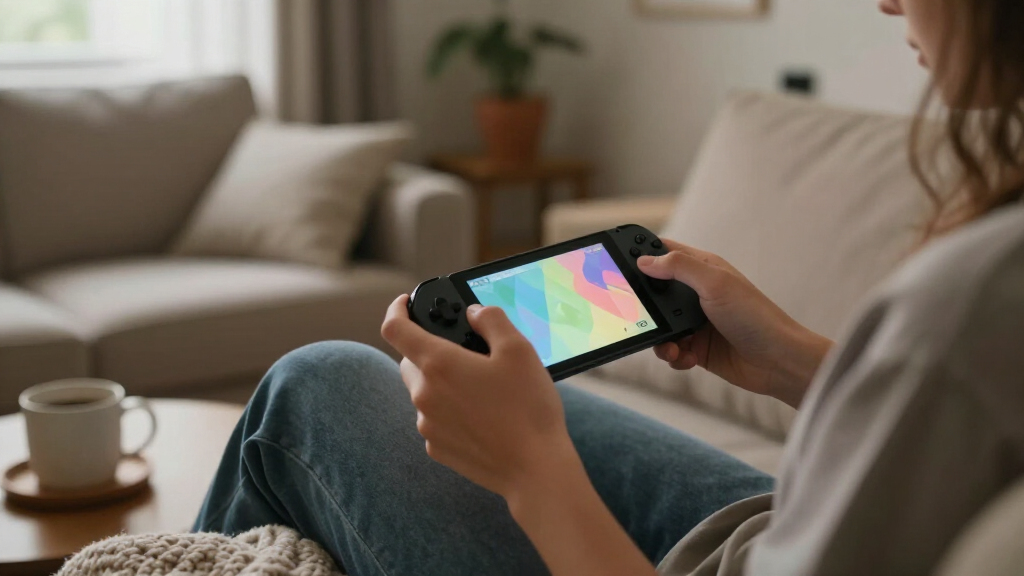
The best handheld gaming consoles balance the games you want to play with the screen, controls, battery, and setup you can live with. I’d put the Nintendo Switch 2 first for an all-around portable gaming experience, while the Lenovo Legion Go S stands out for PC gaming and the Retroid Pocket 5 for Android and retro play. Those choices serve different libraries, so a powerful PC handheld may be the wrong fit for someone who wants quick, simple gaming, and a low-cost retro device won’t run modern PC games. This roundup compares performance, usability, portability, and game access to show where each option makes sense. Read on for the full breakdown and help matching a console to your play style.

Get the latest gadgets delivered free with Prime
- Fast, free delivery on millions of items
- Prime Video, Amazon Music and more included
- Member-only deals all year
Complete the kit



Key Takeaways
The Switch 2 is the broadest fit in this lineup for players who want a dedicated gaming system rather than a Windows PC in handheld form.
The Legion Go S and MSI Claw A8 target PC libraries; the Claw A8 has more listed memory and storage, while the Legion Go S offers a more straightforward spec profile.
Remote-play devices depend on another system or a strong network. The PlayStation Portal and OnePro are not interchangeable with standalone consoles.
Retro handhelds vary more by screen, controls, and software than by game-count claims. The Retroid Pocket 5 has clearly listed Android hardware, while several budget models provide limited technical detail.
Simple kids’ and entry-level devices trade flexibility for ease. The preloaded 220-game handheld suits uncomplicated play better than a more adaptable system such as the Switch 2.


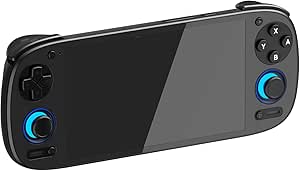


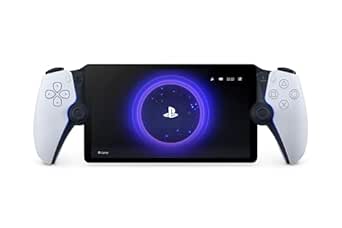


| handheld gaming console | Display | Storage | Processor | Battery |
|---|---|---|---|---|
| Lenovo Legion Go S | 8-inch IPS, 120Hz, 1080p | 512GB | AMD Ryzen Z2 Go | 55.5Wh |
| Handheld Game for Kids | — | 2GB | — | — |
| OnePro Cloud Handheld Portable | 7-inch 1080p touchscreen | 64GB | MediaTek Genio 510 | — |
| RS36 Retro Handheld Game Conso | 4-inch IPS | 64GB | — | — |
| ASUS ROG Xbox Ally Gaming Hand | 7-inch IPS touchscreen, 120Hz | 512GB SSD | AMD Ryzen Z2 A | 60Wh |
| Retroid Pocket 5 Retro Handhel | 5.5-inch touchscreen, 1080p | — | Snapdragon 865 | 5000mAh |
| RG52MINI Retro Handheld Game C | 5.5-inch IPS, 720 x 1280 | 64GB internal; microSD expansion up to 1TB | Rockchip RK3562 quad-core Cortex-A53, up to 2.0GHz | 5000mAh; up to 8 hours stated |
| R36MAX 2 Retro Handheld Game C | 4.5-inch IPS, 1024 x 768 | TF card included; product information lists 128GB; expansion stated up to 256GB | RK3326 quad-core Cortex-A35, up to 1.5GHz | 4000mAh; up to 6 hours stated |
| R36MAX 2 Retro Handheld Consol | 4.5-inch IPS, 1024 x 768 | 128GB listed; TF card and expansion details are unclear | RK3326 quad-core Cortex-A35, up to 1.5GHz | 4000mAh; up to 6 hours stated |
| Retro Handheld Game Console wi | 3.5-inch IPS | 64GB TF card | Quad-core ARM Cortex-A53 | 3200mAh Li-polymer; 6–7 hours stated |
| Nintendo Switch 2 System | 7.9-inch 1080p LCD touchscreen with HDR support | — | — | — |
| PlayStation 5 Portal Remote Pl | 8-inch LCD | — | — | — |
| MSI Claw A8 PC Gaming Handheld | 8-inch FHD+ | 1TB NVMe SSD | AMD Ryzen Z2 Extreme | — |
| DREAMHAX X7 Plus Handheld Game | 4.3-inch TFT LCD | — | — | Included lithium-ion battery |
More Details on Our Top Picks
Lenovo Legion Go S – 2025 – Mobile Gaming Console – AMD Radeon graphics – 8″ PureSight IPS Display – 120Hz – AMD Ryzen™ Z2 Go – 16GB Memory – 512GB Storage – Glacier White – Free PC Game Pass
The Lenovo Legion Go S is my strongest fit for players who want a large-screen Windows handheld with PC storefront flexibility. Its 8-inch 120Hz display, VRR, and 16:10 layout give games more room and smoother motion than the 7-inch screen on the ASUS ROG Xbox Ally, while 500-nit brightness helps in brighter settings. The Ryzen Z2 Go, 16GB of memory, and 512GB storage make it a more capable all-purpose PC handheld than the simple retro devices here. Legion TrueStrike controls and a 55.5Wh battery support longer sessions, and rapid charging helps shorten breaks. The tradeoff is that Windows PC handhelds require more setup than a dedicated console, and its 8-inch size is less pocket-friendly than the OnePro or compact retro picks.
Pros:- Large 8-inch 120Hz display with VRR, 500-nit brightness, and 16:10 aspect ratio
- Windows platform supports PC game libraries and multiple storefronts
- 16GB memory and 512GB storage suit a broader game library than basic retro handhelds
- 55.5Wh battery and rapid charging support extended play and quicker top-ups
Cons:- Larger format is less convenient to carry than smaller retro handhelds
- Windows setup and game configuration can take more effort than on a dedicated console
Best for: PC gamers who want a roomy, high-refresh handheld screen, access to Windows game stores, and enough storage for a rotating game library
Not ideal for: Players who want a lightweight pocket device, offline retro games with no setup, or a straightforward console interface
- Platform:Windows
- Processor:AMD Ryzen Z2 Go
- Graphics:AMD Radeon graphics
- Display:8-inch IPS, 120Hz, 1080p
- Memory:16GB
- Storage:512GB
- Battery:55.5Wh
- Included charger:65W USB-C
Our verdict“Choose the Legion Go S if you want a large, fast-screen Windows handheld, and skip it if portability or plug-and-play simplicity matters more.”
Handheld Game for Kids – Preloaded 220 Retro Video Games, Portable Gaming Player with Rechargeable Battery, 3.0″ LCD Screen, Mini Arcade Electronic Toy Gifts for Boys and Girls (Blue)
This handheld makes the most sense as a child’s first simple gaming device: 220 built-in games, button controls, and a rechargeable battery keep the experience straightforward. At 6.4 ounces, it is easier for small hands to hold than the larger Lenovo Legion Go S or ASUS ROG Xbox Ally, and its 3-inch screen keeps the device compact for travel. The appeal is convenience rather than a broad modern game library; it is a single-player toy, not a substitute for a Windows handheld or a streaming device such as the OnePro Cloud. The small display limits detail, and the product data does not identify the game list, so buyers should not assume specific familiar titles are included. Its stated battery life is up to six hours, though actual play time can vary.
Pros:- 220 preloaded games avoid downloads and account setup
- Light 6.4-ounce body is manageable for younger players
- Rechargeable battery is rated for up to six hours of play
- Simple button controls suit a beginner-friendly gaming experience
Cons:- 3-inch screen is much smaller than the Lenovo Legion Go S or OnePro Cloud display
- Single-player design offers no built-in multiplayer option
- Game titles and the degree of variety are not specified
Best for: Parents seeking a lightweight, self-contained first handheld for a child who mainly wants simple solo games on trips
Not ideal for: Older players who want a large screen, multiplayer, modern games, or control over which titles are installed
- Screen:3-inch LCD
- Preloaded games:220
- Players:1
- Controls:Button control
- Battery life:Up to 6 hours
- Storage:2GB
- Dimensions:5.9 x 2.8 x 0.7 inches
- Weight:6.4 ounces
Our verdict“Pick this for a young beginner who wants a small, simple solo game device, not for anyone seeking a versatile gaming handheld.”
OnePro Cloud Handheld Portable Remote Play Gaming Console, For Xbox Cloud Gaming, NVIDIA GeForce NOW, Playstation, PC, Long-Battery Life, 7″ 1080P Touchscreen, Lightweight Retro Game Handheld – 64G
The OnePro Cloud suits players who want one handheld for streaming, Android games, and retro play rather than native Windows PC gaming. Its 7-inch 1080p touchscreen is larger and sharper than the kids’ 3-inch handheld, while the Android platform supports services and remote-play apps including GeForce NOW, Steam Link, and PlayStation Remote Play. That flexibility depends on a reliable Wi-Fi connection; cloud play also requires the relevant service and, for some platforms, a subscription. Compared with the Lenovo Legion Go S, this is lighter at a stated 430g and better oriented to streaming, but it is not the same proposition as a Windows device for installing a full PC library. The 64GB storage also leaves less room for local games, and the claimed 8-plus-hour battery life is a manufacturer specification rather than a guarantee.
Pros:- 7-inch 1080p touchscreen offers a more spacious view than small retro handhelds
- Supports cloud gaming and remote-play apps for several gaming ecosystems
- Android also allows local Android games and retro emulation
- Listed 430g weight and 8-plus-hour battery claim suit portable streaming
Cons:- Cloud and remote play depend on a stable Wi-Fi connection
- Some services require separate subscriptions or access to another gaming device
- 64GB storage is limited for a growing collection of local games
Best for: Players with dependable Wi-Fi who want to stream from a gaming PC or cloud service and also play Android titles
Not ideal for: Travelers who need reliable offline access to a large local library or buyers who do not want subscriptions and network dependence
- Platform:Android
- Display:7-inch 1080p touchscreen
- Processor:MediaTek Genio 510
- Storage:64GB
- Wireless:Wi-Fi
- Video output:Up to 4K
- Weight:430g
- Claimed battery life:8+ hours
Our verdict“Choose the OnePro if streaming and remote play are your main priorities and dependable Wi-Fi is available wherever you play.”
RS36 Retro Handheld Game Console,20,000+ Classic Games,4.0“IPS, 64GB
The RS36 is the pick for players who want a dedicated retro library without relying on Wi-Fi, subscriptions, or a cloud service. Its 4-inch IPS screen is roomier than the 3-inch display on the kids’ handheld, and Linux with 12 built-in emulators is aimed at older game systems rather than modern PC titles. The listing claims more than 20,000 games, but it does not name them, so I would treat that figure as a broad library claim rather than a guarantee of particular favorites. Compared with the OnePro Cloud, the RS36 is a more self-contained option for offline play; compared with the Lenovo Legion Go S, it is far less suited to current PC games. The listed 64GB storage and 8-ounce weight support portability, though button controls and a single-player design keep it focused on solo retro gaming.
Pros:- Offline-focused design does not require Wi-Fi or subscriptions for included games
- 4-inch IPS screen is larger than the kids’ handheld’s 3-inch display
- Linux system includes 12 emulators for multiple classic systems
- Listed weight of 8 ounces makes it easy to carry
Cons:- The advertised game count is not accompanied by a named title list
- Single-player button controls are less flexible than streaming handheld controls
- Retro-focused hardware is not positioned for modern PC gaming
Best for: Retro fans who want a lightweight, offline handheld for classic games and do not need modern titles or online services
Not ideal for: Players seeking current PC games, cloud access, multiplayer features, or a clearly itemized and verified game collection
- Platform:Linux
- Display:4-inch IPS
- Storage:64GB
- Emulators:12 built-in
- Advertised game count:20,000+
- Players:1
- Weight:8 ounces
- Charging interface:USB Type-C
Our verdict“Choose the RS36 for portable offline retro gaming, but look elsewhere for modern games, online play, or a confirmed list of included titles.”
ASUS ROG Xbox Ally Gaming Handheld 7″ 120Hz, AMD Ryzen Z2 A, 16GB / 512GB
The ROG Xbox Ally is the most natural fit here for players who want an Xbox-style entry point into handheld PC gaming. Its Xbox button and Game Bar integration put familiar controls close at hand, while Windows 11 opens access to Xbox, Steam, Epic, and other PC game stores. The 7-inch 120Hz display with FreeSync Premium targets smooth play, and the contoured grips draw on Xbox controller styling. Compared with the Lenovo Legion Go S, the Ally has a smaller screen but a more explicitly Xbox-focused interface; the Legion’s 8-inch 120Hz panel is the better match for players who prioritize display size. At 1.47 pounds, the Ally is not a pocket-sized retro device, and Windows still brings setup and launcher management. Its 16GB memory and 512GB SSD also require library management for players who keep many large games installed.
Pros:- Xbox button and Game Bar integration provide an Xbox-oriented control experience
- Windows 11 supports Xbox, Steam, Epic, and other PC storefronts
- 7-inch 120Hz display with FreeSync Premium supports smoother motion
- Contoured grips and a 60Wh battery are designed for longer handheld sessions
Cons:- At 1.47 pounds, it is substantially heavier than compact retro handhelds
- 7-inch screen is smaller than the Lenovo Legion Go S display
- Windows game launchers and settings can require more management than a dedicated console
Best for: Xbox players who want a handheld PC for Xbox Game Pass and other Windows game libraries, with familiar controls and a console-oriented interface
Not ideal for: Buyers who want a truly pocketable handheld, a large 8-inch screen, or the simplest possible offline retro experience
- Platform:Windows 11 Home
- Processor:AMD Ryzen Z2 A
- Display:7-inch IPS touchscreen, 120Hz
- Resolution:1080p
- Memory:16GB LPDDR5 6400MHz
- Storage:512GB SSD
- Battery:60Wh
- Weight:1.47 pounds
- Wireless:Wi-Fi 6E and Bluetooth 5.4
Our verdict“Pick the ROG Xbox Ally if Xbox access and familiar controls matter more than the Legion Go S’s larger display or a lighter retro handheld’s portability.”
Retroid Pocket 5 Retro Handheld Game Console
The Retroid Pocket 5 is the most versatile Android-focused pick in this group. Its Snapdragon 865 and 1080p touchscreen give it more headroom for Android games, emulation, and cloud gaming apps than the Linux-based R36MAX 2, while Wi-Fi 6 supports a more capable wireless setup. The 5.5-inch display also gives menus and touch-driven apps more room than the 3.5-inch Retro Handheld Game Console. That flexibility comes with extra setup: no games are preloaded, and buyers need to source games and configure apps themselves. The listed 5,000mAh battery offers portable play, but a device waking from battery protection may need an extended initial charge. I’d choose it for someone who wants an Android handheld, not a ready-to-play classic game library.
Pros:- Snapdragon 865 and Adreno 650 provide stronger Android and emulation capability than the Linux-focused R36MAX 2.
- 5.5-inch 1080p touchscreen suits Android apps and games that benefit from touch input.
- 128GB internal storage plus microSD expansion gives room for apps and a personal game collection.
- Wi-Fi 6 and Bluetooth 5.1 support wireless connectivity and accessories.
Cons:- No games are preloaded, so buyers must provide and configure their own content.
- Android emulation can involve more setup than a dedicated retro handheld interface.
- The instructions describe an extended charge to wake the battery if it enters battery protection mode.
Best for: Android users who want to install their own games and emulators, use cloud gaming services, and value a sharp larger display.
Not ideal for: Beginners seeking a console that is ready to play classic games immediately, since no games are included and setup is required.
- Operating system:Android 13
- Processor:Snapdragon 865
- GPU:Adreno 650
- Display:5.5-inch touchscreen, 1080p
- Memory and storage:8GB RAM, 128GB storage
- Battery:5000mAh
- Wireless:Wi-Fi 6, Bluetooth 5.1
- Expansion:microSD card slot
Our verdict“Choose the Retroid Pocket 5 if you want a powerful, customizable Android handheld and are comfortable supplying and setting up your own games.”
RG52MINI Retro Handheld Game Console
The RG52MINI makes the strongest case for a retro handheld that can also serve as a small living-room console. Its HDMI output lets you move play to a TV, a feature that the R36MAX 2 description does not list, while Wi-Fi multiplayer adds another way to play with others. The 5.5-inch display is more spacious than the 3.5-inch screen on the Retro Handheld Game Console, and the dual-system setup offers flexibility across supported emulators. A claimed library of 22,000 games sounds convenient, but buyers should check what is included and how the menus are organized rather than assuming every title will suit them. The 64GB internal storage is also modest beside the Retroid Pocket 5’s 128GB, and configuration may take patience. I’d favor this for classic gaming split between handheld and TV use.
Pros:- HDMI output supports playing on a television as well as on the built-in display.
- Dual-system support offers flexibility across compatible emulators.
- 5.5-inch IPS display is larger than the screen on the 3.5-inch Retro Handheld Game Console.
- 5000mAh battery is specified for up to eight hours of gameplay.
Cons:- 64GB internal storage may call for a microSD card as the collection grows.
- Setup and configuration may be challenging for first-time emulator users.
- The 720 x 1280 resolution is lower than the Retroid Pocket 5’s listed 1080p display.
Best for: Retro players who want HDMI TV output, multiplayer options, and a larger screen for handheld sessions.
Not ideal for: People who want simple setup or substantial built-in storage, since configuration may be involved and internal storage is 64GB.
- Processor:Rockchip RK3562 quad-core Cortex-A53, up to 2.0GHz
- RAM:Up to 4GB
- Storage:64GB internal; microSD expansion up to 1TB
- Display:5.5-inch IPS, 720 x 1280
- Battery:5000mAh; up to 8 hours stated
- Wireless:2.4GHz Wi-Fi
- Video output:HDMI
- Controls:Dual 3D joysticks, mechanical buttons, Hall linear triggers
Our verdict“Pick the RG52MINI if HDMI TV play and a large retro library matter more than effortless setup or generous internal storage.”
R36MAX 2 Retro Handheld Game Console, 4.5-inch IPS HD Display
This R36MAX 2 is the comfort-focused choice among the compact Linux handhelds here. Its detachable ergonomic grip and Hall-sensor joysticks target longer sessions, while the 4.5-inch, 1024 x 768 IPS screen offers more room than the 3.5-inch display on the Retro Handheld Game Console. The Linux system and preloaded library are aimed at classic gaming, not Android apps or modern PC titles, so it is a narrower-purpose device than the Retroid Pocket 5. The claimed 20,000-plus games and broad emulator support may sound expansive, but the provided description does not identify the titles, and the listing’s storage details are inconsistent: it mentions a TF card and expansion up to 256GB, while product information lists 128GB. Its 4000mAh battery is stated for up to six hours, so I’d treat it as a comfort-led retro pick rather than an all-day machine.
Pros:- Detachable grip is designed to support a more comfortable hold than a bare compact console.
- Hall-sensor joysticks are intended to reduce stick drift concerns.
- 1024 x 768 IPS display gives classic games a sharper image than the 3.5-inch screen on the Retro Handheld Game Console.
- Linux interface and preloaded game card aim for ready-to-play retro use.
Cons:- The 4000mAh battery is specified for up to six hours, less than the RG52MINI’s stated eight hours.
- Storage capacity is unclear across the listing, which cites both a TF card and 128GB product information.
- Linux-focused software is less suited to Android apps and cloud gaming than the Retroid Pocket 5.
Best for: Retro players who prioritize a supported grip and joystick control for longer sessions on a compact Linux handheld.
Not ideal for: Android app and cloud gaming users, or buyers who need unambiguous storage specifications before choosing.
- Operating system:Open-source Linux
- Processor:RK3326 quad-core Cortex-A35, up to 1.5GHz
- GPU:Mali-G31MP2
- Display:4.5-inch IPS, 1024 x 768
- Battery:4000mAh; up to 6 hours stated
- Storage:TF card included; product information lists 128GB; expansion stated up to 256GB
- Wireless:2.4GHz Wi-Fi
- Controls:Hall-sensor 3D joysticks; detachable grip
Our verdict“Choose this R36MAX 2 for a grip-focused retro handheld, but verify the included storage configuration before buying.”
R36MAX 2 Retro Handheld Console, Black-128G
This black 128G R36MAX 2 is a close counterpart to the other R36MAX 2 in this roundup, so the buying distinction is the stated storage configuration rather than a different console design. It retains the 4.5-inch 1024 x 768 IPS screen, detachable grip, Hall-sensor joysticks, and Linux system, making it a more comfort-oriented retro option than the smaller 3.5-inch Retro Handheld Game Console. The listing identifies 128GB of storage, which gives a buyer more room than the RG52MINI’s listed 64GB, though the product description’s TF-card details are not fully clear. Its 4000mAh battery is claimed to last up to six hours, and the device remains focused on classic emulation rather than Android or PC gaming. I’d pick this version over its near-twin only when the black finish and 128GB listing match the buyer’s priorities.
Pros:- Listed 128GB capacity is greater than the RG52MINI’s 64GB internal storage.
- Detachable grip is designed for a more supported hold during longer play.
- Hall-sensor joysticks offer drift-conscious control.
- 4.5-inch IPS screen provides more display area than the 3.5-inch Retro Handheld Game Console.
Cons:- The description does not clearly reconcile the 128GB listing with its TF-card and expansion details.
- The 4000mAh battery is specified for up to six hours of play.
- Linux retro focus offers less software flexibility than the Android-based Retroid Pocket 5.
Best for: Retro handheld buyers who want the R36MAX 2 grip and controls with a listed 128GB storage capacity.
Not ideal for: Shoppers seeking a distinct upgrade over the other R36MAX 2 version, or anyone who needs clear confirmation of the supplied card and storage setup.
- Operating system:Open-source Linux
- Processor:RK3326 quad-core Cortex-A35, up to 1.5GHz
- GPU:Mali-G31MP2
- Display:4.5-inch IPS, 1024 x 768
- Storage:128GB listed; TF card and expansion details are unclear
- Battery:4000mAh; up to 6 hours stated
- Wireless:2.4GHz Wi-Fi
- Controls:Hall-sensor 3D joysticks; detachable grip
Our verdict“Choose this black R36MAX 2 if you want its listed 128GB configuration and ergonomic grip, after confirming the included storage card.”
Retro Handheld Game Console with 3.5-Inch IPS Screen and 64GB TF Card
The 3.5-inch Retro Handheld Game Console is the compact, pick-up-and-play alternative to the larger RG52MINI and R36MAX 2 models. Its 64GB TF card with 4,353 listed games gives it a clear out-of-box convenience advantage over the Retroid Pocket 5, which includes no games, while the smaller screen and 6.4-ounce weight make it easier to carry. Wi-Fi, Bluetooth, HDMI, and TV output add useful connection options, though the description does not explain how those features are implemented or which games support them. Its 1GB RAM and older Cortex-A53 processor position it for retro play rather than demanding modern games, and the 3.5-inch display is less comfortable for extended sessions than the 5.5-inch screens on the RG52MINI and Retroid Pocket 5. I’d choose it for portability and an included library, not for screen size or broad performance headroom.
Pros:- 64GB TF card is described as preloaded with 4,353 games, unlike the game-free Retroid Pocket 5.
- At 6.4 ounces, it is lighter than a larger-screen handheld such as the RG52MINI.
- IPS display and a compact 3.5-inch format suit portable retro play.
- Wi-Fi, Bluetooth, HDMI, and TV output are listed.
Cons:- The 3.5-inch screen is smaller than the 4.5-inch R36MAX 2 and 5.5-inch RG52MINI displays.
- 1GB RAM and the Cortex-A53 processor make it a retro-focused choice rather than a modern gaming handheld.
- The product information does not clarify the game list or the use cases supported by its connectivity features.
Best for: Travelers and casual retro players who want a lightweight console with an included game card and TV connection options.
Not ideal for: Players who prefer a large screen, want modern Android gaming, or expect detailed control over a preloaded game collection.
- Display:3.5-inch IPS
- Processor:Quad-core ARM Cortex-A53
- GPU:PowerVR SGX544MP
- Memory:1GB LPDDR4
- Storage:64GB TF card
- Battery:3200mAh Li-polymer; 6–7 hours stated
- Connectivity:Wi-Fi 5G, Bluetooth, HDMI, TV output
- Dimensions and weight:12.8 x 8.1 x 2.2cm; 6.4 ounces
Our verdict“Pick this console if low carry weight and an included retro library matter more to you than screen size or modern-game capability.”
Nintendo Switch 2 System
I rank the Nintendo Switch 2 first for buyers who want a handheld that can also serve as a living-room and tabletop console. Its 7.9-inch 1080p touchscreen gives games room to breathe on the go, while the dock adds TV play and up to 4K output with compatible games and displays. Unlike the PlayStation Portal, it runs games on the system itself rather than relying on a PS5 and Wi-Fi connection, and it supports compatible games from the earlier Switch library. The detachable Joy-Con 2 controllers add flexible local multiplayer and mouse controls in supported games. The tradeoffs are a larger body than compact retro handhelds and a library limited to Nintendo and compatible titles; 4K output also tops out at 60 fps. It is the most versatile pick here, but not the right fit for PC libraries or PlayStation Remote Play.
Pros:- Three play modes make it useful on the go and at home
- Large 7.9-inch 1080p touchscreen with HDR and support for up to 120 fps
- Compatible with physical and digital games from the original Switch, with some exceptions
- Detachable Joy-Con 2 controllers support local multiplayer and mouse controls in compatible games
Cons:- Larger and less pocketable than compact retro handhelds such as the DREAMHAX X7 Plus
- Some original Switch games may not be supported or fully compatible
- 4K TV output is limited to 60 fps, and the dock’s higher frame-rate support depends on compatible games and displays
Best for: Players who want one system for handheld, tabletop, and TV gaming, especially households with an existing Nintendo Switch game library.
Not ideal for: Buyers seeking Windows PC game access, a compact pocketable retro system, or a handheld that works independently of a console library.
- Platform:Nintendo Switch 2
- Display:7.9-inch 1080p LCD touchscreen with HDR support
- Display frame rate:Up to 120 fps
- Internal storage:256GB
- Expandable storage:microSD Express cards, sold separately
- TV output:Up to 4K with a compatible TV and game; up to 60 fps at 4K
- Connectivity:Wi-Fi
- Controllers:Magnetically attaching Joy-Con 2 controllers with mouse controls in compatible games
Our verdict“Choose the Nintendo Switch 2 if you want a self-contained handheld that can also switch to shared play on a TV.”
PlayStation 5 Portal Remote Player
The PlayStation Portal Remote Player is a companion for PS5 owners, not a standalone console: it streams compatible games installed on a PS5 over Wi-Fi. That distinction makes it a focused way to free up the TV while keeping access to a familiar PS5 collection, with an 8-inch 1080p screen and DualSense-style haptics and adaptive triggers in supported games. Compared with the Nintendo Switch 2, it does not run games locally or offer a TV dock; its value depends on having a PS5 and a reliable network. PlayStation Plus Premium adds cloud streaming for eligible titles, but it does not remove the service and connectivity requirements. I’d pick it over a general-purpose handheld only for someone already invested in PlayStation who wants remote access around the home or on a dependable Wi-Fi connection.
Pros:- Large 8-inch full HD screen for streamed PS5 games
- Supports up to 1080p at 60 fps, depending on the game and network
- DualSense haptic feedback and adaptive triggers work in supported games
- Optional PlayStation Plus Premium cloud streaming supports eligible catalog and library games
Cons:- Requires a PS5 and network connection for Remote Play
- Game performance and image quality depend on Wi-Fi and internet conditions
- Not compatible with games that require a VR headset or certain additional peripherals
Best for: PS5 owners who want to play compatible installed games away from the television and have dependable Wi-Fi.
Not ideal for: Buyers without a PS5, people needing offline gaming, or anyone looking for a self-contained console like the Nintendo Switch 2.
- Compatible console:PlayStation 5
- Display:8-inch LCD
- Resolution:1080p
- Frame rate:Up to 60 fps
- Connectivity:Wi-Fi
- Audio:Tempest 3D AudioTech in supported games with compatible audio devices
- Audio connections:PlayStation Link wireless or 3.5mm audio jack
- Weight:2.6 pounds
Our verdict“Choose the Portal if you already own a PS5 and want its compatible games on a dedicated handheld screen, not a console that works on its own.”
MSI Claw A8 PC Gaming Handheld
The MSI Claw A8 is the lineup’s PC-first option: Windows 11 Home, an AMD Ryzen Z2 Extreme processor, and 24GB of memory give it room to handle demanding PC games and everyday Windows tasks. Its 1TB SSD also offers substantially more built-in space than the Nintendo Switch 2, while the 8-inch 1920 x 1200 display runs at up to 120Hz for smoother motion in games that can make use of it. An SD card reader and Thunderbolt 4 add flexibility for storage and peripherals. That openness comes with more setup and software management than a console-focused system, and the product information does not provide a battery capacity or measured runtime to substantiate its endurance claims. Compared with the PS5-dependent Portal, the Claw runs PC software locally, but buyers should expect a larger, more complex handheld experience.
Pros:- Windows 11 Home supports PC gaming and general Windows use
- AMD Ryzen Z2 Extreme processor paired with 24GB LPDDR5x memory
- 1TB NVMe SSD plus an SD card reader for storage flexibility
- 8-inch 1920 x 1200 display with a 120Hz refresh rate and Thunderbolt 4
Cons:- Windows handhelds can require more setup and troubleshooting than the Nintendo Switch 2
- The 8-inch screen and PC hardware make it less compact than small retro handhelds
- The supplied product data gives no battery capacity or specific runtime
Best for: PC players who want Windows game access, ample built-in storage, and a high-refresh display in a handheld form.
Not ideal for: Buyers who prefer a simple console interface, a lightweight pocketable system, or clearly specified battery runtime before choosing.
- Operating system:Windows 11 Home
- Processor:AMD Ryzen Z2 Extreme
- Display:8-inch FHD+
- Resolution:1920 x 1200
- Refresh rate:120Hz
- Memory:24GB LPDDR5x
- Storage:1TB NVMe SSD
- Connections:Wi-Fi, Bluetooth, Thunderbolt 4, and SD card reader
Our verdict“Pick the MSI Claw A8 if you want a Windows gaming PC in handheld form and are comfortable with its extra setup and size.”
DREAMHAX X7 Plus Handheld Game Console
The DREAMHAX X7 Plus suits buyers who want a small, simple device centered on older games rather than modern console releases. Its 4.3-inch screen, button controls, and listed support for systems including NES, SNES, GBA, and PS1 make it a different proposition from the Windows-powered MSI Claw A8 or the dockable Nintendo Switch 2. HDMI output and two-player support offer a way to move play to a TV or share it, while music, video, and e-book functions broaden its use beyond games. The compact 8.8-ounce body is easier to carry than those larger systems. The compromises are equally clear: its screen is small, storage starts at 8GB and expands only to 32GB, and the product description warns that some games may not display on the main screen. Buyers should also check game compatibility rather than assuming every preloaded title will suit them.
Pros:- Light 8.8-ounce design is more portable than the Switch 2 or MSI Claw A8
- Supports listed classic formats including PS1, MAME, NEOGEO, GBA, and SNES
- HDMI output and two-player support allow shared play on a TV
- Adds music, video, camera, and e-book functions
Cons:- The 4.3-inch TFT LCD is smaller than the screens on the Portal, Switch 2, and Claw A8
- Storage is 8GB built in and supports TF card expansion only up to 32GB
- The supplied description warns that some games may not display on the main screen
Best for: Retro-game fans seeking a lightweight handheld for older systems, with occasional TV output and basic multimedia functions.
Not ideal for: Players who want modern releases, a large high-resolution display, extensive storage, or a well-documented and curated game library.
- Display:4.3-inch TFT LCD
- Built-in storage:8GB
- Expandable storage:TF card up to 32GB
- Supported game formats:PS1, MAME, FBA, NEOGEO, GBA, GBC, GB, NES, SNES, MD
- Battery:Included lithium-ion battery
- TV output:HDMI
- Controls and players:Button controls; supports two players
- Dimensions and weight:7.68 x 2.36 x 1.18 inches; 8.8 ounces
Our verdict“Choose the DREAMHAX X7 Plus for portable older-game play and basic extras, but skip it if modern titles or a larger screen matter most.”

How We Picked
I compared these 14 handheld gaming consoles by the kind of gaming they enable: modern PC play, a dedicated console library, remote play, Android gaming, or retro emulation. I weighed listed processing hardware, display size and refresh rate, memory and storage, controls, portability, battery information, and how clearly the product communicates its capabilities. A high specification matters only when it improves a buyer’s likely experience, so a PC handheld is not automatically a better pick for someone seeking an easy, self-contained device.
The ranking favors versatility and a clear use case, then accounts for usability and meaningful tradeoffs. The Nintendo Switch 2 leads for its straightforward dedicated-console role; PC-focused options follow for players who value access to PC games and accept more setup. Remote-play and retro devices rank according to their narrower purpose, while products with sparse or broad game-count claims receive less weight than models with identifiable hardware and platform details. I treat the listed specifications as product claims, not as a guarantee of performance across every game.
Factors to Consider When Choosing Handheld Gaming Consoles
Before choosing a handheld, decide what you want to play and where those games actually run. The biggest differences in this roundup are not just screen size or processing power: they are whether the device plays games on its own, streams from another system, or relies on a particular software library. These checks can prevent buying a capable device that does not fit your routine.
Start With the Game Library, Not the Hardware
Make a short list of the games you expect to play, then check which platform supports them. A dedicated console such as the Switch 2, a Windows handheld, an Android device, and a retro player offer different libraries, and their names do not mean they share games. A common mistake is buying based on processor specifications before checking whether favorite titles are available or run well on that platform. Also check whether a game requires a separate account, subscription, launcher, or internet connection. If you want a mix of PC games, verify compatibility title by title rather than assuming a handheld PC behaves exactly like a desktop. Choosing the library first usually narrows the field faster than comparing raw performance figures.
Know Whether the Console Runs Games Locally
Some handhelds run games directly, while remote-play devices stream from a console, PC, or cloud service. Streaming can make a light device useful at home, but its play quality depends on the host system, network conditions, and supported services. Before buying, confirm what hardware or subscription you already own and whether the service works in the places you plan to play. A device marketed for cloud gaming is not necessarily a standalone console with a library stored on it. If travel, commuting, or unreliable internet is part of your routine, local game support may matter more than a large screen. This distinction is one of the easiest ways to avoid a frustrating mismatch.
Balance Screen Size Against Comfort and Portability
A larger display can make text, menus, and detailed scenes easier to see, but it adds bulk and can make long sessions harder on the hands. A compact retro device may slip into a bag more easily, though small controls and screens can feel cramped for players with larger hands or games with dense interfaces. Compare dimensions and weight where available, not only the screen diagonal. If you mostly play at home, a larger model may be a fair trade; if it will live in a pocket or small bag, portability should carry more weight. Try to think about how long you hold the device at once, because comfort can matter more than a display’s headline resolution.
Treat Battery Claims as a Use-Case Question
Battery life changes with screen brightness, wireless use, game workload, and settings, so a capacity figure alone cannot tell you how long a session will last. Demanding PC games often ask more from a battery than simpler retro titles, while cloud play keeps networking active throughout a session. Look for a stated runtime under conditions similar to your own rather than assuming a large battery number means long play in every situation. Consider charging access, whether you can play while plugged in, and how often you expect to carry a charger. Buyers who play in short bursts may accept frequent charging more readily than travelers planning long stretches away from an outlet.
Check Storage, Expansion, and Setup Before Choosing
Storage affects how many large games you can keep installed, while a microSD slot or other expansion option can make a smaller built-in drive easier to manage. Do not compare storage numbers without considering the operating system and the size of the games you intend to install. Also account for setup: PC handhelds can offer broad software access, but they may require updates, sign-ins, launcher configuration, or settings changes. A simpler dedicated console or preloaded retro player can be easier to start using, though it may offer less control over what you can add. Check how the product handles game installation and storage expansion before purchase, especially if you want to keep several large titles ready offline.
Pay for Flexibility Only If You Will Use It
Premium hardware makes sense when its extra performance, memory, storage, or connectivity supports games and tasks you actually plan to use. A buyer who mainly wants simple retro play may gain little from a high-end PC handheld, while a PC gamer may find a basic preloaded device too limited. Think about the full setup too: a stand, protective case, charger, headset, or additional storage can affect convenience even when those items are not bundled. Check the return policy and warranty details before committing, since troubleshooting and support vary by product type and seller. The right choice is the least complicated device that reliably covers your games, not automatically the model with the longest specification list.
Frequently Asked Questions
Can the PlayStation Portal or OnePro replace a standalone handheld console?
Not in the same way as a device that runs games locally. The PlayStation Portal is designed for remote play from a PlayStation system, and the OnePro is positioned around cloud and remote gaming services. Their usefulness depends on network quality, service availability, and access to a compatible host or account. If you need to play without an internet connection or a separate system, choose a handheld with local game support instead. Check the exact service requirements for your location before treating a streaming device as your only console.
Should I choose a Windows PC handheld or the Nintendo Switch 2?
Choose based on the games and setup you want, not just the performance ceiling. A Windows handheld such as the Legion Go S or MSI Claw A8 suits players who want access to PC game platforms and are comfortable with a PC-style interface and configuration. The Switch 2 is a better fit for someone who prefers a dedicated console experience and its particular game library. A PC handheld can offer more flexibility, but that flexibility may involve updates, launchers, and settings work. Confirm that your must-play games are available on the platform you choose.
Are preloaded retro handhelds a good choice for a child?
They can suit a child who wants simple, portable play without managing a large game library, but check the device’s controls, screen, charging method, and age suitability first. Preloaded-game counts do not tell you whether the games are appropriate, easy to navigate, or legally licensed. A basic handheld with a small screen may be easier to carry but less comfortable for longer sessions. Parents who want a more supported ecosystem and a wider range of newer games may prefer a dedicated console such as the Switch 2. Review the seller’s game and return details before buying a device whose listing gives little software information.
How much storage should I look for in a handheld gaming console?
The right amount depends on the size and number of games you want installed at once. A collection of small retro titles needs far less room than several modern PC games, which can take up substantial storage individually. Check whether the operating system uses part of the advertised capacity and whether the device supports expandable storage. Expansion can reduce the need to pay for a larger built-in drive, though loading and compatibility details depend on the model. If you regularly switch between large games or play offline, more available storage can save repeated downloads.
Does a higher refresh-rate screen matter for handheld gaming?
A higher refresh rate can make motion look smoother in games that can run at a matching frame rate, but it does not improve every game automatically. It may also draw more power, so buyers should weigh visual smoothness against battery use. For slower-paced titles, strategy games, or retro play, screen comfort, readable text, and controls may matter more. Check whether the device and the games you play can make use of the screen’s refresh rate. A headline display specification is most useful when it fits your actual library and play style.
Conclusion
For most players seeking a straightforward, versatile handheld, I recommend the Nintendo Switch 2 as best overall. For PC libraries, the Lenovo Legion Go S is my balanced PC-handheld pick, while the MSI Claw A8 is the best premium option for buyers drawn to its listed 24GB of memory, 1TB SSD, and larger display. For retro and Android gaming, the Retroid Pocket 5 offers the clearest hardware profile among the specialized retro picks; the simpler preloaded kids’ handheld is the best beginner choice for uncomplicated play. Choose the PlayStation Portal or OnePro only if remote or cloud play fits your setup, and favor the compact retro models when portability matters more than modern-game flexibility.
Fall Picks
fall essentials
As an affiliate, we earn on qualifying purchases.