The best AI PCs pair capable processors with enough memory and cooling to handle demanding local workloads. My best overall pick is the GMKtec EVO-X3, whose Ryzen AI Max+ 395 and 128GB of memory make it a strong fit for heavier AI tasks. The MINISFORUM AI X1 Pro-370 is a more balanced alternative, while the HP OmniDesk suits buyers who prefer a conventional business desktop. The main tradeoffs are compact size versus sustained performance, memory capacity versus flexibility, and specialized AI hardware versus familiar office features. Read on for the full breakdown and guidance on choosing the right kind of AI PC.

Get the latest gadgets delivered free — and shop member deals
- Fast, free delivery on millions of items
- Access to Prime Big Deal Days deals on October 6–7
- Prime Video, Amazon Music and more included
Complete the kit



Key Takeaways
- 128GB configurations define this roundup’s workstation tier: several Ryzen AI Max+ 395 mini PCs offer much more memory headroom than the 16GB GEEKOM GT13 MAX and IT13 MAX.
- The GMKtec EVO-X3 earns the lead through workload headroom: its Ryzen AI Max+ 395, 128GB LPDDR5X, and 2TB SSD make it better suited to substantial local AI work than compact systems with less memory.
- Not every strong AI PC needs the highest-memory chip: the MINISFORUM AI X1 Pro-370’s Ryzen AI 9 HX 370 and 32GB RAM make a more balanced match for mixed productivity and lighter AI tasks.
- Business desktops serve a different priority: HP’s OmniDesk and Dell’s Pro Micro focus on office deployment and conventional desktop use rather than the large memory pools found in AI workstations.
- Near-duplicate configurations make capacity checks essential: the lineup includes EVO-X2 and EVO-X3 variants and repeated M5 and EVO-X3 entries, so buyers should verify the exact RAM, SSD, and model before choosing.
| GEEKOM GT13 MAX Mini PC |  | Best Intel Mini PC for Multi-Display Work | Processor: Intel Core Ultra 9 185H, 16 cores, up to 5.1 GHz | Graphics: Intel Arc Graphics, 8 Xe cores | AI NPU: Up to 11 TOPS | VIEW LATEST PRICE | See Our Full Breakdown |
| GMKtec EVO-X3 Mini PC |  | Best for High-Memory Local AI Work | Processor: AMD Ryzen AI Max+ 395, 16 cores and 32 threads, up to 5.1 GHz | Graphics: AMD Radeon 8060S, 40 compute units, up to 2900 MHz | AI performance: Up to 126 TOPS overall; XDNA 2 NPU up to 50 TOPS | VIEW LATEST PRICE | See Our Full Breakdown |
| GMKtec EVO-X2 AI Mini PC |  | Best for Four-Display Setups | Processor: AMD Ryzen AI Max+ 395, 16 Zen 5 cores, up to 5.1 GHz | Threads: 32 | Graphics: AMD Radeon RX 8060S integrated GPU, 40 RDNA 3.5 CUs | VIEW LATEST PRICE | See Our Full Breakdown |
| BOSGAME M5 AI Mini PC |  | Best for Windows Pro and Linux | Processor: AMD Ryzen AI Max+ 395, 16 cores and 32 threads, up to 5.1 GHz | Graphics: Integrated AMD Radeon 8060S | Memory: 128GB LPDDR5X, 8000 MT/s | VIEW LATEST PRICE | See Our Full Breakdown |
| GEEKOM IT13 MAX Mini PC |  | Best for Linux-Friendly Compact Desks | Processor: Intel Core Ultra 9 185H | Processor TDP: 65W | Graphics: Integrated Intel Arc Graphics | VIEW LATEST PRICE | See Our Full Breakdown |
| MINISFORUM AI X1 Pro-370 Mini PC with AMD Ryzen AI 9 HX 370, 32GB DDR5 RAM, and 1TB SSD | 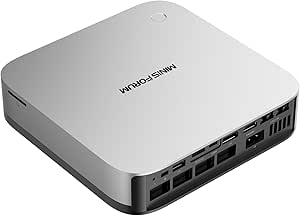 | Best for Expandable Mini PC Workstations | Processor: AMD Ryzen AI 9 HX 370, 12 cores / 24 threads, up to 5.1 GHz | Graphics: AMD Radeon 890M integrated graphics | Memory: 32GB DDR5-5600, removable; expandable up to 128GB | VIEW LATEST PRICE | See Our Full Breakdown |
| HP OmniDesk Business Desktop PC, Intel Core Ultra 7 265, 32GB DDR5 RAM, 1TB SSD |  | Best for Windows Pro Office Work | Processor: Intel Core Ultra 7 265, 20 cores, up to 5.2 GHz | Memory: 32GB DDR5-5600 | Storage: 1TB PCIe Gen 4 NVMe SSD | VIEW LATEST PRICE | See Our Full Breakdown |
| GMKtec EVO-X3 Mini PC with AMD Ryzen AI Max+ 395, 128GB LPDDR5X, and 2TB PCIe 4.0 SSD |  | Best for Local AI Memory Capacity | Processor: AMD Ryzen AI Max+ 395, 16 cores / 32 threads, up to 5.1 GHz | Graphics: Integrated AMD Radeon RX 8060S, 40 RDNA 3.5 compute units | AI performance: Up to 126 TOPS | VIEW LATEST PRICE | See Our Full Breakdown |
| MINISFORUM MS-S1 MAX Mini AI Workstation PC, AMD Ryzen AI Max+ 395, 128GB LPDDR5x RAM, 2TB SSD |  | Best for Rackable AI Workstations | Processor: AMD Ryzen AI Max+ 395, 16 cores / 32 threads, up to 5.1 GHz | Graphics: Integrated AMD RDNA 3.5 graphics | NPU: 50 TOPS | VIEW LATEST PRICE | See Our Full Breakdown |
| Dell Pro Micro QCM1250 Mini Business Desktop, Intel Core Ultra 5 235T, Windows 11 Pro |  | Best Compact Business AI PC | Processor: Intel Core Ultra 5 235T, 14 cores, 2.2 GHz base / up to 5 GHz | Memory: Configurable 8GB to 64GB DDR5 | Storage: Configurable 256GB to 2TB M.2 NVMe PCIe SSD | VIEW LATEST PRICE | See Our Full Breakdown |
| GEEKOM A9 Mega AI Workstation Mini PC, Ryzen AI Max+ 395, 128GB RAM, 2TB SSD |  | Best for Multi-Display AI Work | Processor: AMD Ryzen AI Max+ 395, 16 Zen 5 cores | Graphics: AMD Radeon 8060S | Memory: 128GB LPDDR5X, 8000 MT/s | VIEW LATEST PRICE | See Our Full Breakdown |
| BOSGAME M5 Mini PC, AMD Ryzen AI Max+ 395, 128GB LPDDR5X RAM, 2TB NVMe SSD | | Best for Expandable Storage | Processor: AMD Ryzen AI Max+ 395, 16 cores and 32 threads, up to 5.1GHz | Graphics: Integrated AMD Radeon 8060S, 40 RDNA 3.5 compute units | Memory: 128GB LPDDR5X-8000 unified memory | VIEW LATEST PRICE | See Our Full Breakdown |
| AMD Ryzen AI Halo Personal AI Desktop Computer |  | Best for Linux AI Development | Operating system: Linux | Processor: AMD Ryzen AI Max+ 395, 16 cores and 32 threads, up to 5.1GHz | Graphics: AMD Radeon 8060S integrated graphics, 40 RDNA 3.5 compute units | VIEW LATEST PRICE | See Our Full Breakdown |
| GMKtec EVO-X2 Mini PC with AMD Ryzen AI Max+ 395, 128GB LPDDR5X, and 1TB SSD |  | Best for Adjustable Power Modes | Processor: AMD Ryzen AI Max+ 395, 16 cores and 32 threads, up to 5.1GHz | Graphics: AMD Radeon 8060S, 40 RDNA 3.5 compute units | NPU: Up to 50 TOPS | VIEW LATEST PRICE | See Our Full Breakdown |
| GEEKOM IT15 Mini PC, Intel Core Ultra 9 285H, 32GB DDR5 RAM, 1TB SSD |  | Best for Upgradeable Memory | Processor: Intel Core Ultra 9 285H | AI performance: 99 TOPS total: 13 TOPS NPU, 77 TOPS Arc GPU, 9 TOPS CPU | Graphics: Intel Arc 140T | VIEW LATEST PRICE | See Our Full Breakdown |
| AI PC | Processor | Graphics | Memory | Storage |
|---|---|---|---|---|
| GEEKOM GT13 MAX Mini PC | Intel Core Ultra 9 185H, 16 cores, up to 5.1 GHz | Intel Arc Graphics, 8 Xe cores | 16GB DDR5; expandable to 96GB | 1TB SSD; expandable to 6TB |
| GMKtec EVO-X3 Mini PC | AMD Ryzen AI Max+ 395, 16 cores and 32 threads, up to 5.1 GHz | AMD Radeon 8060S, 40 compute units, up to 2900 MHz | 128GB LPDDR5X, up to 8000 MT/s | 2TB PCIe 4.0 SSD |
| GMKtec EVO-X2 AI Mini PC | AMD Ryzen AI Max+ 395, 16 Zen 5 cores, up to 5.1 GHz | AMD Radeon RX 8060S integrated GPU, 40 RDNA 3.5 CUs | 128GB LPDDR5X, up to 8000 MT/s | 2TB SSD |
| BOSGAME M5 AI Mini PC | AMD Ryzen AI Max+ 395, 16 cores and 32 threads, up to 5.1 GHz | Integrated AMD Radeon 8060S | 128GB LPDDR5X, 8000 MT/s | SSD; capacity not specified |
| GEEKOM IT13 MAX Mini PC | Intel Core Ultra 9 185H | Integrated Intel Arc Graphics | 16GB DDR5 | 1TB SSD |
| MINISFORUM AI X1 Pro-370 Mini | AMD Ryzen AI 9 HX 370, 12 cores / 24 threads, up to 5.1 GHz | AMD Radeon 890M integrated graphics | 32GB DDR5-5600, removable; expandable up to 128GB | 1TB PCIe 4.0 SSD; supports up to three SSDs and 12TB total |
| HP OmniDesk Business Desktop P | Intel Core Ultra 7 265, 20 cores, up to 5.2 GHz | Integrated Intel Graphics | 32GB DDR5-5600 | 1TB PCIe Gen 4 NVMe SSD |
| GMKtec EVO-X3 Mini PC with AMD | AMD Ryzen AI Max+ 395, 16 cores / 32 threads, up to 5.1 GHz | Integrated AMD Radeon RX 8060S, 40 RDNA 3.5 compute units | 128GB LPDDR5X, up to 8000 MT/s | 2TB PCIe 4.0 SSD |
| MINISFORUM MS-S1 MAX Mini AI W | AMD Ryzen AI Max+ 395, 16 cores / 32 threads, up to 5.1 GHz | Integrated AMD RDNA 3.5 graphics | 128GB LPDDR5x-8000 listed; product details also include conflicting 64GB values | 2TB SSD listed; product details also include conflicting capacity information |
| Dell Pro Micro QCM1250 Mini Bu | Intel Core Ultra 5 235T, 14 cores, 2.2 GHz base / up to 5 GHz | Integrated Intel Graphics | Configurable 8GB to 64GB DDR5 | Configurable 256GB to 2TB M.2 NVMe PCIe SSD |
| GEEKOM A9 Mega AI Workstation | AMD Ryzen AI Max+ 395, 16 Zen 5 cores | AMD Radeon 8060S | 128GB LPDDR5X, 8000 MT/s | 2TB PCIe Gen4 NVMe SSD; supports up to 8TB |
| BOSGAME M5 Mini PC | AMD Ryzen AI Max+ 395, 16 cores and 32 threads, up to 5.1GHz | Integrated AMD Radeon 8060S, 40 RDNA 3.5 compute units | 128GB LPDDR5X-8000 unified memory | 2TB PCIe 4.0 NVMe SSD |
| AMD Ryzen AI Halo Personal AI | AMD Ryzen AI Max+ 395, 16 cores and 32 threads, up to 5.1GHz | AMD Radeon 8060S integrated graphics, 40 RDNA 3.5 compute units | 128GB LPDDR5x unified memory, 8000 MT/s; maximum listed capacity 192GB | 2TB M.2 SSD |
| GMKtec EVO-X2 Mini PC with AMD | AMD Ryzen AI Max+ 395, 16 cores and 32 threads, up to 5.1GHz | AMD Radeon 8060S, 40 RDNA 3.5 compute units | 128GB LPDDR5X-8000 unified memory | 1TB M.2 2280 PCIe 4.0 NVMe SSD |
| GEEKOM IT15 Mini PC | Intel Core Ultra 9 285H | Intel Arc 140T | 32GB DDR5, upgradeable to 128GB | 1TB NVMe Gen 4 SSD |
More Details on Our Top Picks
GEEKOM GT13 MAX Mini PC
The Core Ultra 9 185H gives this compact desktop plenty of CPU headroom for office work, development, and lighter creative tasks, while its AI Boost NPU supports compatible local AI features. Its clearest advantage over the GEEKOM IT13 MAX is its specified Wi-Fi 7, Bluetooth 5.4, and dual 2.5G LAN, which suit a desk that needs modern wireless and wired connections. It can also drive four displays and offers memory and storage expansion, giving it a more adaptable setup than the memory-limited starting configuration suggests. The tradeoff is that it ships with only 16GB of RAM, and its NPU’s 11 TOPS is modest beside the 50-TOPS NPU in the GMKtec EVO-X3. I’d choose it for connectivity and flexibility, not for the roundup’s heaviest local AI workloads.
Pros:- Core Ultra 9 185H combines 16 CPU cores with an AI Boost NPU.
- Supports up to four displays across a broad selection of outputs.
- Memory expands to 96GB and storage to 6TB.
- Wi-Fi 7 and dual 2.5G LAN provide flexible networking.
Cons:- The included 16GB of memory can constrain demanding creative and multitasking workloads.
- The NPU’s 11 TOPS is limited for AI workloads compared with the GMKtec EVO-X3.
- Compatible software is needed to use advertised local AI capabilities.
Best for: Office users and developers who want a compact Intel system with four-display support, fast networking, and room to expand memory and storage.
Not ideal for: Local AI users or creators who need a large memory pool out of the box; its 16GB configuration and 11-TOPS NPU trail the GMKtec EVO-X3.
- Processor:Intel Core Ultra 9 185H, 16 cores, up to 5.1 GHz
- Graphics:Intel Arc Graphics, 8 Xe cores
- AI NPU:Up to 11 TOPS
- Memory:16GB DDR5; expandable to 96GB
- Storage:1TB SSD; expandable to 6TB
- Display outputs:Dual USB4, dual HDMI 2.0, Mini DisplayPort 1.4; up to four displays
- Connectivity:Wi-Fi 7, Bluetooth 5.4, dual 2.5G LAN
- Warranty:3-year limited warranty
Our verdict“Pick the GT13 MAX if you want a well-connected Intel mini PC with expansion options and four-display support, and plan to upgrade its memory for heavier work.”
GMKtec EVO-X3 Mini PC
The Ryzen AI Max+ 395 and 128GB of LPDDR5X unified memory make the EVO-X3 the strongest fit here for workloads that need substantial memory alongside integrated graphics. Its XDNA 2 NPU reaches 50 TOPS, well above the 11-TOPS NPU in the GEEKOM GT13 MAX, while Radeon 8060S graphics and a 2TB SSD suit creative projects and gaming too. Compared with the GMKtec EVO-X2, this model adds OCuLink eGPU expansion, giving owners a path to external graphics. That flexibility has a catch: OCuLink devices must be connected or disconnected with the PC powered off. The triple-fan cooling system also matters in a compact chassis, so buyers should expect active cooling under demanding loads. I’d choose it for performance headroom, not a silent or upgradeable-memory setup.
Pros:- 128GB of high-speed unified memory supports large workloads.
- 50-TOPS XDNA 2 NPU and Ryzen AI Max+ 395 suit compatible local AI tasks.
- Radeon 8060S graphics and 2TB SSD support creative work and gaming.
- OCuLink provides an external GPU expansion option.
Cons:- The LPDDR5X memory is a fixed unified pool rather than a stated upgradeable configuration.
- OCuLink devices must be connected or disconnected while the PC is powered off.
- Demanding workloads rely on a triple-fan cooling system.
Best for: AI practitioners and creative users running memory-hungry local models or applications who want integrated graphics and the option to add an external GPU.
Not ideal for: Buyers who need quiet operation, upgradeable system memory, or hot-plug eGPU connections.
- Processor:AMD Ryzen AI Max+ 395, 16 cores and 32 threads, up to 5.1 GHz
- Graphics:AMD Radeon 8060S, 40 compute units, up to 2900 MHz
- AI performance:Up to 126 TOPS overall; XDNA 2 NPU up to 50 TOPS
- Memory:128GB LPDDR5X, up to 8000 MT/s
- Storage:2TB PCIe 4.0 SSD
- Display output:HDMI 2.1 and USB4; dual display, up to 8K
- Connectivity:USB4 up to 40Gbps, Wi-Fi 7, Bluetooth 5.4, 2.5G LAN, OCuLink PCIe Gen4 x4
- Cooling:Triple-fan cooling with three copper pipes
Our verdict“Choose the EVO-X3 for memory-intensive AI and creative work with eGPU expansion, provided its fixed memory and active cooling fit your setup.”
GMKtec EVO-X2 AI Mini PC
The EVO-X2 pairs the Ryzen AI Max+ 395 with 128GB of unified memory, making it a capable compact workstation for AI, multitasking, and graphics-heavy work. Its standout distinction in this group is support for up to four displays; the GMKtec EVO-X3 is specified for dual display, so the EVO-X2 may fit a more expansive desk setup better. Three selectable power modes also let owners choose between a quieter 54W setting and higher-power performance up to 140W. That flexibility comes with more to manage: its 128GB memory is onboard, the system uses three fans, and the warranty is one year. Unlike the EVO-X3, the provided specifications do not list OCuLink expansion. I’d favor this model when screen count and power modes matter more than an external GPU path.
Pros:- 128GB unified memory and Ryzen AI Max+ 395 suit demanding multitasking.
- Up to four displays support broad desktop workflows.
- Three power modes let users tune operation from 54W to 140W.
- Wi-Fi 7, 2.5GbE, dual USB4, and a UHS-II card reader broaden connectivity.
Cons:- Onboard LPDDR5X memory is not described as upgradeable.
- Three cooling fans may be noticeable under heavier loads.
- The listed limited warranty is one year.
Best for: Developers, analysts, and creators who want a compact AI-capable workstation driving up to four displays.
Not ideal for: Buyers who need expandable memory, a longer stated warranty, or the EVO-X3’s OCuLink eGPU connection.
- Processor:AMD Ryzen AI Max+ 395, 16 Zen 5 cores, up to 5.1 GHz
- Threads:32
- Graphics:AMD Radeon RX 8060S integrated GPU, 40 RDNA 3.5 CUs
- Memory:128GB LPDDR5X, up to 8000 MT/s
- Storage:2TB SSD
- Display support:Up to four displays; HDMI 2.1, DisplayPort 1.4, and dual USB4
- Performance modes:Quiet 54W, Balanced 85W, Performance 140W
- Networking:2.5GbE Ethernet, Wi-Fi 7, Bluetooth 5.4
- Warranty:1-year limited warranty
Our verdict“Choose the EVO-X2 if four-display support and selectable power modes matter more to you than OCuLink expansion or upgradeable memory.”
BOSGAME M5 AI Mini PC
The BOSGAME M5 is built around the same Ryzen AI Max+ 395 and 128GB unified-memory approach as the GMKtec EVO-X2, with up to 96GB of that memory assignable as VRAM. That large configurable graphics pool can help compatible AI and graphics workloads that need more memory close to the GPU. The M5’s distinguishing strengths are Windows 11 Pro, Ubuntu support, and up to four 8K displays, making it a flexible fit for mixed operating-system or multi-screen environments. Its two 40Gbps USB4 ports add fast peripheral connections. The buying decision is harder because the provided data does not specify SSD capacity, so storage planning is uncertain; it also relies on integrated graphics rather than a separate professional GPU. I’d choose it for OS flexibility and memory allocation, while the EVO-X2 offers a clearer four-display specification without the 8K-per-display claim.
Pros:- 128GB unified memory allows up to 96GB allocation as VRAM.
- Supports Windows 11 Pro and Ubuntu.
- Dual 40Gbps USB4 ports and 2.5GbE networking provide fast connectivity.
- Supports up to four 8K displays.
Cons:- The provided product data does not specify SSD capacity.
- Integrated Radeon graphics may not meet needs for workloads requiring a separate professional GPU.
- The listed full warranty is one year, with hardware parts protection specified separately.
Best for: Technical users who need Windows 11 Pro or Ubuntu support and want a large unified memory pool for compatible AI or graphics workloads.
Not ideal for: Buyers who need a confirmed SSD capacity or a discrete professional GPU for specialized graphics applications.
- Processor:AMD Ryzen AI Max+ 395, 16 cores and 32 threads, up to 5.1 GHz
- Graphics:Integrated AMD Radeon 8060S
- Memory:128GB LPDDR5X, 8000 MT/s
- Maximum allocatable VRAM:Up to 96GB
- Storage:SSD; capacity not specified
- Display outputs:HDMI 2.1, DisplayPort 1.4, and dual USB4; up to four 8K displays
- Connectivity:Wi-Fi 7, Bluetooth 5.4, 2.5GbE Ethernet
- Operating systems:Windows 11 Pro; Ubuntu support
- Warranty:1-year full warranty; 3-year hardware parts protection
Our verdict“Pick the BOSGAME M5 for Windows Pro or Ubuntu flexibility and configurable unified memory, after confirming the storage configuration meets your needs.”
GEEKOM IT13 MAX Mini PC
The IT13 MAX takes the Core Ultra 9 185H platform into a compact 65W system aimed at office work, development, and lighter creative use. Its stated Linux support gives it a clearer fit for developers than the GT13 MAX, while both offer four-display capability and 16GB of DDR5 memory. The comparison also highlights the main compromise: neither starts with enough memory for every demanding AI or creative workload, and this model’s supplied details do not specify an NPU TOPS figure. Its 1TB SSD gives users a defined starting capacity, and the three-year warranty is useful for a workstation expected to stay in daily service. I’d pick it for a Linux-oriented desk and broad display support, but the GMKtec EVO-X2 is a better match for memory-heavy AI work.
Pros:- Core Ultra 9 185H processor with integrated Intel Arc graphics.
- Supports Linux and Windows distributions.
- Can drive up to four displays at resolutions up to 7680 × 4320.
- Includes a three-year warranty.
Cons:- The included 16GB of DDR5 may constrain demanding multitasking and creative applications.
- The supplied specifications do not state an NPU performance figure.
- The provided details do not specify memory expansion options.
Best for: Linux developers and office users seeking a compact Intel mini PC with four-display support and a stated three-year warranty.
Not ideal for: Users running large local AI models or heavy creative workloads who need more than 16GB of memory without an upgrade path specified here.
- Processor:Intel Core Ultra 9 185H
- Processor TDP:65W
- Graphics:Integrated Intel Arc Graphics
- Memory:16GB DDR5
- Storage:1TB SSD
- Operating systems:Linux; supports Windows and major Linux distributions
- Display support:Up to four displays; maximum resolution 7680 × 4320
- Cooling:IceBlast 3.0
- Warranty:3 years
Our verdict“Choose the IT13 MAX for a compact Linux-friendly Intel workstation and four displays, but look to a 128GB model like the EVO-X2 for memory-intensive AI work.”
MINISFORUM AI X1 Pro-370 Mini PC with AMD Ryzen AI 9 HX 370, 32GB DDR5 RAM, and 1TB SSD
The AI X1 Pro-370 suits buyers who want strong local computing in a compact desktop that can grow over time. Its Ryzen AI 9 HX 370 and Radeon 890M handle multitasking and lighter graphics work, while removable memory and support for three SSDs give it an upgrade path the GMKtec EVO-X3’s soldered 128GB memory does not. Four-display support, USB4, OCuLink, and dual 2.5GbE also make it a flexible desk or small-office hub. The tradeoff is that its integrated graphics are less suited to demanding GPU workloads than a system with a dedicated graphics card, and reaching the stated memory and storage limits requires separate upgrades. I’d choose it for configurable expansion, not for maximum out-of-box AI memory.
Pros:- 12-core Ryzen AI 9 HX 370 with integrated Radeon 890M graphics
- Removable 32GB DDR5 memory, expandable up to 128GB
- Supports up to three SSDs and 12TB total storage
- USB4, OCuLink, Wi-Fi 7, dual 2.5GbE, and up to four displays
Cons:- Integrated graphics limit demanding GPU workloads
- Maximum memory and storage require separate upgrades
Best for: Developers and small-office users who want a compact AI-capable PC with removable memory, multiple SSD bays, and broad display support.
Not ideal for: Buyers running large local models that need 128GB of memory immediately or graphics-heavy work that calls for a dedicated GPU.
- Processor:AMD Ryzen AI 9 HX 370, 12 cores / 24 threads, up to 5.1 GHz
- Graphics:AMD Radeon 890M integrated graphics
- Memory:32GB DDR5-5600, removable; expandable up to 128GB
- Storage:1TB PCIe 4.0 SSD; supports up to three SSDs and 12TB total
- Display support:Up to four displays, maximum 7680 × 4320 resolution
- Ports:2 × USB4, HDMI 2.1, DisplayPort 2.0, OCuLink
- Networking:Dual 2.5GbE, Wi-Fi 7, Bluetooth 5.4
- Operating system:Windows 11
Our verdict“Choose the AI X1 Pro-370 if you want a compact AI PC with room to expand; choose the GMKtec EVO-X3 if you need 128GB of memory from the start.”
HP OmniDesk Business Desktop PC, Intel Core Ultra 7 265, 32GB DDR5 RAM, 1TB SSD
The HP OmniDesk is the straightforward business desktop in this group: it pairs a 20-core Core Ultra 7 265 with 32GB of memory, a 1TB NVMe drive, and Windows 11 Pro. That combination is a practical fit for office multitasking and business applications, and the included wired keyboard and mouse make it ready for a conventional desk setup. Compared with the smaller Dell Pro Micro QCM1250, the OmniDesk offers a higher-tier listed processor and a familiar tower-style form, while the Dell is easier to place in a tight workspace. The HP’s integrated graphics are a limit for GPU-heavy AI tasks, and its Wi-Fi 6 is a step behind the Wi-Fi 7 offered by several mini PCs here. Product details also give conflicting weights, so portability is hard to judge.
Pros:- 20-core Intel Core Ultra 7 265 processor
- 32GB DDR5 memory and 1TB PCIe Gen 4 NVMe storage
- Windows 11 Pro included
- Wired keyboard and mouse included
Cons:- Integrated Intel graphics constrain demanding GPU workloads
- Wi-Fi 6 is older than the Wi-Fi 7 connectivity on several alternatives
- Product details list conflicting weights
Best for: Office teams and business users who want Windows 11 Pro, substantial multitasking capacity, and included desktop input devices.
Not ideal for: Local AI developers who need a discrete GPU or very high memory capacity, and buyers who need a clearly documented weight or compact footprint.
- Processor:Intel Core Ultra 7 265, 20 cores, up to 5.2 GHz
- Memory:32GB DDR5-5600
- Storage:1TB PCIe Gen 4 NVMe SSD
- Graphics:Integrated Intel Graphics
- Operating system:Windows 11 Pro
- Wireless:Wi-Fi 6 and Bluetooth 5.4
- Video outputs:HDMI and DisplayPort 1.4
- Included accessories:Wired keyboard and mouse
Our verdict“Pick the OmniDesk for a Windows Pro office setup with capable multitasking, but choose the Dell Pro Micro QCM1250 if desk space matters more.”
GMKtec EVO-X3 Mini PC with AMD Ryzen AI Max+ 395, 128GB LPDDR5X, and 2TB PCIe 4.0 SSD
For local AI work that needs room for large models or datasets, the GMKtec EVO-X3 leads this group with 128GB of LPDDR5X memory and a 16-core Ryzen AI Max+ 395. Its integrated Radeon RX 8060S also gives it more graphics capability on paper than the Radeon 890M in the MINISFORUM AI X1 Pro-370. Dual M.2 slots and OCuLink add options for more storage or an external GPU, so the compact system can support a broader workstation setup. The main compromise is permanence: the memory is onboard, so buyers need to select their capacity carefully. OCuLink expansion also depends on buying a separate dock and graphics card. I’d favor it for high-memory local workloads, while the MINISFORUM is a better fit for users who value removable memory.
Pros:- 128GB LPDDR5X memory for memory-intensive local workloads
- 16-core Ryzen AI Max+ 395 with integrated Radeon RX 8060S graphics
- 2TB SSD with two M.2 slots and support for up to 16TB total storage
- Wi-Fi 7, 2.5GbE, and OCuLink external GPU expansion
Cons:- Onboard memory cannot be upgraded or replaced
- External GPU expansion requires a separate dock and graphics card
- One-year limited warranty
Best for: AI developers, creators, and technical users who want 128GB of memory for local models, media work, or other memory-intensive tasks.
Not ideal for: Buyers who want user-upgradable RAM or expect OCuLink to provide external graphics without purchasing a dock and GPU.
- Processor:AMD Ryzen AI Max+ 395, 16 cores / 32 threads, up to 5.1 GHz
- Graphics:Integrated AMD Radeon RX 8060S, 40 RDNA 3.5 compute units
- AI performance:Up to 126 TOPS
- Memory:128GB LPDDR5X, up to 8000 MT/s
- Storage:2TB PCIe 4.0 SSD
- Storage expansion:Dual M.2 2280 PCIe 4.0 x4 slots; up to 16TB total
- External GPU expansion:OCuLink PCIe 4.0 x4
- Networking:2.5GbE, Wi-Fi 7, Bluetooth 5.4
Our verdict“Choose the EVO-X3 when high-capacity memory for local AI work is the priority; choose the MINISFORUM AI X1 Pro-370 if you want RAM you can replace.”
MINISFORUM MS-S1 MAX Mini AI Workstation PC, AMD Ryzen AI Max+ 395, 128GB LPDDR5x RAM, 2TB SSD
The MINISFORUM MS-S1 MAX is the most workstation-oriented choice here. Its Ryzen AI Max+ 395, 128GB of unified memory, and 50-TOPS NPU target demanding local AI, video editing, and development, while dual 10GbE and USB4 V2 support fast connected storage and network workflows. Unlike the GMKtec EVO-X3, it adds a PCIe x16 slot and supports 2U rack deployment and multi-unit clustering, making it a more natural fit for a shared lab or compact server setup. That extra capability brings tradeoffs: the high-power cooling system may be audible under load, and the product information conflicts about memory and storage capacities. I’d verify the shipped configuration before buying; the specs and description disagree on those details.
Pros:- Ryzen AI Max+ 395 with a 50-TOPS NPU and 126-TOPS system AI performance listed
- 128GB LPDDR5x-8000 memory listed in the product description
- Dual 10GbE, USB4 V2, and a PCIe x16 expansion slot
- Supports 2U rack deployment and multi-unit clustering
Cons:- Cooling fans may produce noise under heavy workloads
- Product details conflict on memory and storage capacities
- Integrated graphics may not suit workloads that require a dedicated GPU
Best for: AI developers and small technical teams building a rackable workstation or cluster with fast wired networking and expansion options.
Not ideal for: Quiet-home users or buyers who need a clearly confirmed memory and storage configuration before purchase.
- Processor:AMD Ryzen AI Max+ 395, 16 cores / 32 threads, up to 5.1 GHz
- Graphics:Integrated AMD RDNA 3.5 graphics
- NPU:50 TOPS
- System AI performance:126 TOPS
- Memory:128GB LPDDR5x-8000 listed; product details also include conflicting 64GB values
- Storage:2TB SSD listed; product details also include conflicting capacity information
- Expansion:PCIe x16 slot; dual M.2 PCIe 4.0 slots, up to 16TB RAID 0/1
- Networking:Dual 10GbE and Wi-Fi 7
- Form factor:Mini PC supporting 2U rack deployment
Our verdict“Choose the MS-S1 MAX for rack deployment, high-speed networking, and expansion, after confirming its shipped configuration; the GMKtec EVO-X3 is the simpler high-memory mini PC pick.”
Dell Pro Micro QCM1250 Mini Business Desktop, Intel Core Ultra 5 235T, Windows 11 Pro
The Dell Pro Micro QCM1250 is the space-saving business option: at about 2.56 pounds, it can fit where the HP OmniDesk’s tower form is less convenient. Its Core Ultra 5 235T and Windows 11 Pro make it a compact choice for everyday office work, while the listed ports and support for two 4K displays give it useful desk flexibility. Memory and SSD configurations vary, which can let a buyer tailor a deployment, but it also means the exact capacity needs checking. Compared with the MINISFORUM AI X1 Pro-370, this Dell emphasizes small size and business deployment rather than integrated Radeon graphics, broad expansion, or high-capacity local AI workloads. It has integrated graphics and comes resealed for upgrades, so it is a less direct pick for buyers seeking a new, fixed configuration.
Pros:- Compact 2.56-pound chassis fits space-constrained desks
- Configurable DDR5 memory and M.2 NVMe storage
- Supports two external displays up to 4K at 60Hz
- Windows 11 Pro with Wi-Fi 6E and a broad selection of ports
Cons:- Resealed for memory or SSD upgrades
- Memory and storage configuration may vary
- Integrated graphics limit demanding GPU workloads
Best for: Business users outfitting small desks or shared work areas who need Windows 11 Pro, dual-display support, and a lightweight mini desktop.
Not ideal for: AI developers who need large fixed memory capacity, graphics-heavy users, or buyers who require an unopened unit and a uniform configuration.
- Processor:Intel Core Ultra 5 235T, 14 cores, 2.2 GHz base / up to 5 GHz
- Memory:Configurable 8GB to 64GB DDR5
- Storage:Configurable 256GB to 2TB M.2 NVMe PCIe SSD
- Graphics:Integrated Intel Graphics
- Operating system:Windows 11 Pro
- Weight:2.56 lb
- Display support:Two external displays, up to 4K at 60Hz
- Connectivity:Wi-Fi 6E, Bluetooth, Ethernet
- Ports:USB-C, five USB-A, DisplayPort, HDMI, headset jack
Our verdict“Choose the Dell Pro Micro QCM1250 for a small business desktop with flexible configurations, while the HP OmniDesk is better suited to a conventional office tower setup.”
GEEKOM A9 Mega AI Workstation Mini PC, Ryzen AI Max+ 395, 128GB RAM, 2TB SSD
The GEEKOM A9 Mega suits buyers who need a small desktop to connect local AI work with a multi-screen setup. Its 128GB of memory, with up to 96GB allocatable as VRAM, gives large models and graphics workloads more room to run than the 32GB GEEKOM IT15. Four display outputs, including 8K support, also make it easier to build a workspace around several screens. Wi-Fi 7 and dual 2.5GbE add flexible network options for a home lab or office. The tradeoff is that its LPDDR5X memory is not described as upgradeable, so buyers need to choose their capacity upfront. The listing also gives no independent benchmarks to substantiate its performance claims. This is a stronger fit for a screen-heavy AI workstation than a conventional upgradeable mini PC.
Pros:- 128GB of LPDDR5X memory with up to 96GB allocatable as VRAM
- Supports up to four displays, including 8K output
- Wi-Fi 7 and dual 2.5GbE LAN
- Listing states a 3-year limited warranty
Cons:- LPDDR5X memory is not described as user-upgradeable
- No independent benchmarks are provided for the claimed AI performance
Best for: Local AI developers and creative professionals who need a compact workstation connected to several high-resolution displays.
Not ideal for: Buyers who want to add or replace memory later, or who need independent performance results before choosing a workstation.
- Processor:AMD Ryzen AI Max+ 395, 16 Zen 5 cores
- Graphics:AMD Radeon 8060S
- Memory:128GB LPDDR5X, 8000 MT/s
- Allocatable VRAM:Up to 96GB
- Storage:2TB PCIe Gen4 NVMe SSD; supports up to 8TB
- AI compute:126 TOPS total; 50 TOPS NPU
- Networking:Wi-Fi 7 and dual 2.5GbE LAN
- Display support:Up to four displays, including 8K
Our verdict“Choose the GEEKOM A9 Mega if your local AI or creative workstation needs 128GB of memory and up to four displays in a compact system.”
BOSGAME M5 Mini PC, AMD Ryzen AI Max+ 395, 128GB LPDDR5X RAM, 2TB NVMe SSD
The BOSGAME M5 pairs the Ryzen AI Max+ 395 platform with a useful practical advantage: a second M.2 slot for adding storage as local model files, project assets, or media libraries grow. Like the GEEKOM A9 Mega, it has 128GB of unified memory and supports up to four displays, making either a plausible compact workstation for AI and creative tasks. The BOSGAME also comes with Windows 11 Pro and a broad set of ports, including USB4, HDMI, DisplayPort, and 2.5GbE. Its integrated Radeon graphics share system memory, though, rather than using dedicated graphics memory. The listed 240-watt power consumption may also be a drawback for buyers seeking a particularly low-power mini PC. Pick it for storage flexibility; look at the GEEKOM A9 Mega if dual 2.5GbE matters more.
Pros:- 128GB of unified LPDDR5X memory
- Second M.2 slot provides a path to expand storage
- Radeon 8060S graphics and support for up to four displays
- Windows 11 Pro and Wi-Fi 7
Cons:- Integrated graphics share system memory
- Listed power consumption is 240 watts
Best for: AI developers and media creators who want a high-memory compact desktop and room to add a second SSD.
Not ideal for: Buyers who need a dedicated graphics card or want to minimize the power draw of their desktop.
- Processor:AMD Ryzen AI Max+ 395, 16 cores and 32 threads, up to 5.1GHz
- Graphics:Integrated AMD Radeon 8060S, 40 RDNA 3.5 compute units
- Memory:128GB LPDDR5X-8000 unified memory
- Storage:2TB PCIe 4.0 NVMe SSD
- Storage expansion:Second M.2 2280 PCIe 4.0 slot
- Operating system:Windows 11 Pro
- Display support:Up to four displays; up to 8K at 60Hz
- Connectivity:Dual USB4, HDMI 2.1, DisplayPort 1.4, Wi-Fi 7, Bluetooth 5.4, 2.5GbE, SD 4.0
Our verdict“Choose the BOSGAME M5 if you want 128GB of unified memory and a second SSD slot for expanding a local AI or creative workstation.”
AMD Ryzen AI Halo Personal AI Desktop Computer
The AMD Ryzen AI Halo is the clearest fit here for developers building a Linux-based local AI workflow. It pairs the Ryzen AI Max+ 395 with ROCm support and preloaded development tools, so its appeal centers on software setup as well as hardware. The 128GB unified memory pool and stated support for models up to 200 billion parameters target workloads that are more demanding than the 32GB GEEKOM IT15 is designed for. Its 10GbE networking is also faster on paper than the 2.5GbE ports on the BOSGAME M5. The Halo has a one-year limited warranty, shorter than the three-year warranty listed for the GEEKOM A9 Mega, and the provided description does not specify multiple display outputs. Choose it for its Linux and ROCm orientation, while checking software compatibility and warranty needs before buying.
Pros:- 128GB of unified memory for memory-intensive local AI workloads
- ROCm support and preloaded AI development tools
- 10GbE LAN and Wi-Fi 7
- Compact 6 × 6 × 2-inch chassis
Cons:- One-year limited warranty is shorter than the GEEKOM A9 Mega’s listed three years
- Only HDMI 2.1b is specified for video output
- 128GB is installed, while the listed maximum memory is 192GB
Best for: Linux AI developers who want a compact local inference system with ROCm support and development tools already installed.
Not ideal for: Windows-first users, buyers who need several specified video outputs, or those seeking a longer listed warranty.
- Operating system:Linux
- Processor:AMD Ryzen AI Max+ 395, 16 cores and 32 threads, up to 5.1GHz
- Graphics:AMD Radeon 8060S integrated graphics, 40 RDNA 3.5 compute units
- NPU:AMD XDNA 2, up to 50 TOPS
- Memory:128GB LPDDR5x unified memory, 8000 MT/s; maximum listed capacity 192GB
- Memory bandwidth:256 GB/s
- Storage:2TB M.2 SSD
- Networking:10GbE LAN, Wi-Fi 7, Bluetooth 5.4
Our verdict“Choose the Ryzen AI Halo if your priority is a compact Linux system prepared for ROCm-based local AI development.”
GMKtec EVO-X2 Mini PC with AMD Ryzen AI Max+ 395, 128GB LPDDR5X, and 1TB SSD
The GMKtec EVO-X2 gives buyers three listed power modes, making it easier to choose between a quieter, lower-power setup and the system’s higher-performance profile. Its 128GB unified memory and Ryzen AI Max+ 395 place it in the same broad local AI workstation class as the GEEKOM A9 Mega, while the EVO-X2 starts with a smaller 1TB SSD. Its two additional M.2 slots offer a clear upgrade path for storage, with drives sold separately. The vapor chamber and multi-fan cooling support the compact system’s configurable operating modes, but add complexity compared with a simpler desktop. Memory is onboard and not described as upgradeable, so the 128GB capacity is a decision to make up front. This pick fits buyers who value power-mode control and storage expansion over a larger included SSD.
Pros:- Three selectable power modes: Silent 54W, Balanced 85W, and Performance 120W
- 128GB of unified LPDDR5X-8000 memory
- Two additional M.2 PCIe 4.0 x4 slots
- Dual USB4, Wi-Fi 7, and 2.5GbE
Cons:- Onboard memory is not described as user-upgradeable
- The included SSD is 1TB, smaller than the 2TB drive in the GEEKOM A9 Mega
- Additional SSDs must be purchased separately
Best for: Local AI users and creators who want to tune system power behavior and add SSD storage over time.
Not ideal for: Buyers who want upgradeable memory or need more than 1TB of included storage without installing another drive.
- Processor:AMD Ryzen AI Max+ 395, 16 cores and 32 threads, up to 5.1GHz
- Graphics:AMD Radeon 8060S, 40 RDNA 3.5 compute units
- NPU:Up to 50 TOPS
- Memory:128GB LPDDR5X-8000 unified memory
- Storage:1TB M.2 2280 PCIe 4.0 NVMe SSD
- Additional storage:Two M.2 2280 PCIe 4.0 x4 slots; up to 8TB per drive
- Display outputs:HDMI 2.1, DisplayPort 1.4, and two USB4; up to four displays
- Cooling and power modes:Vapor chamber and multi-fan cooling; Silent 54W, Balanced 85W, Performance 120W
Our verdict“Choose the GMKtec EVO-X2 if selectable power modes and multiple SSD slots matter more to you than a larger included drive.”
GEEKOM IT15 Mini PC, Intel Core Ultra 9 285H, 32GB DDR5 RAM, 1TB SSD
The GEEKOM IT15 takes a more conventional route to AI PC ownership than the 128GB Ryzen AI Max+ systems in this group. It starts with 32GB of DDR5, but the memory is listed as upgradeable to 128GB, giving buyers a way to expand as their projects grow. That makes it a more flexible starting point than the GEEKOM A9 Mega, whose LPDDR5X memory is not described as upgradeable. The Intel Core Ultra 9 285H and Arc 140T graphics provide integrated AI acceleration, while four-display support and Wi-Fi 7 suit a busy desk. Its listed total AI performance is lower than the 126 TOPS stated for the A9 Mega, and the provided display resolution details are inconsistent. Choose it for memory flexibility and Linux support; skip it if you need a clearly specified high-memory local AI configuration out of the box.
Pros:- DDR5 memory is listed as upgradeable from 32GB to 128GB
- Intel Core Ultra 9 285H with Arc 140T integrated graphics
- Supports up to four displays and external GPU expansion
- Wi-Fi 7, Bluetooth 5.4, and 2.5Gbps Ethernet
Cons:- Ships with 32GB, far less than the 128GB in the GEEKOM A9 Mega
- Listed display resolution specifications are inconsistent
- No independent performance results are provided
Best for: Developers and power users who prefer starting with a conventional DDR5 configuration and upgrading memory as their AI workloads grow.
Not ideal for: Buyers running large local models immediately who need 128GB installed, or anyone relying on precise display-resolution specifications.
- Processor:Intel Core Ultra 9 285H
- AI performance:99 TOPS total: 13 TOPS NPU, 77 TOPS Arc GPU, 9 TOPS CPU
- Graphics:Intel Arc 140T
- Memory:32GB DDR5, upgradeable to 128GB
- Storage:1TB NVMe Gen 4 SSD
- Display support:Up to four displays; listing describes two 8K and two 4K outputs
- Connectivity:Wi-Fi 7, Bluetooth 5.4, and 2.5Gbps Ethernet
- Noise and warranty:Under 35dB; three-year warranty
Our verdict“Choose the GEEKOM IT15 if you want an AI-capable mini PC with a clear path to expand its memory, and can start with 32GB.”

How We Picked
I ranked these systems by how well their listed hardware matches real buyer needs for AI-capable desktop computing: processor class, memory capacity, storage, form factor, and likely fit for sustained or mixed workloads. For AI PCs, memory deserves special attention because local models and related tools can need more working space than everyday office tasks. I also weighed usability for buyers who want a familiar business machine against the extra headroom of high-memory mini workstations.
The order favors machines with stronger stated headroom and a clear role, not simply the longest specification list. That puts the 128GB Ryzen AI Max+ 395 systems near the top for memory-intensive local workloads, while the Ryzen AI 9 HX 370 and conventional Intel business desktops suit narrower needs. Several entries are repeated or close configuration variants, so I treat them as choices that require careful SKU verification rather than pretending every listing represents a distinct advantage. I did not infer performance figures or features that were not included in the supplied specifications.
Factors to Consider When Choosing Best AI PCs
Choosing an AI PC starts with the work you expect it to do, not the word “AI” in its name. I would match memory and cooling to the largest tasks you plan to run, then check whether the computer’s size and software setup fit your workspace. These broader checks help avoid paying for unused capacity or buying a compact system that feels constrained.
Match Memory to the Workload, Not the Marketing
Local AI tools can use substantial system memory, especially when models, context, and other applications are open together. A large memory configuration can reduce the need to close tasks or move work to another machine, but it does not make every model compatible or fast. Check the memory required by the software and model you intend to use before choosing between 16GB, 32GB, and 128GB systems. Also distinguish soldered LPDDR5X from upgradeable memory: compact PCs may offer ample capacity but little room to change it later. If your AI use is occasional and cloud-based, a high-memory workstation may add little practical value.
Treat the NPU as One Part of the System
An NPU can accelerate supported AI features efficiently, but it is not a universal replacement for CPU, GPU, or system memory. Software support varies, and some local AI applications may depend more on the GPU or available memory than on the NPU. Check which specific applications you plan to run and whether they support the processor’s AI hardware. For office assistants and supported creative features, an NPU-equipped everyday PC may be enough. For local model experimentation, look beyond the NPU label and compare the entire platform, including memory capacity and cooling.
Consider Cooling and Sustained Work
A compact mini PC saves desk space, but its small enclosure can limit cooling compared with a larger desktop. That difference matters during long AI runs, rendering, or repeated heavy workloads, when sustained operation matters more than a short burst. Ask whether the manufacturer provides clear thermal and power information, and look for credible long-duration testing before relying on a system for continuous workloads. A workstation-style mini PC may offer more headroom than a low-power business micro desktop, yet it still has less room for expansion than a tower. Choose the smallest form factor that can handle the duration and intensity of your actual work.
Check Upgrade Paths Before Choosing a Configuration
Memory and storage can affect a PC’s useful life as much as its processor. Some systems let you replace or add an SSD, while high-capacity LPDDR5X is commonly fixed to the board. That means a large preconfigured memory pool may be more valuable than a lower initial configuration with limited upgrade options. Check how many storage slots are available, what memory is replaceable, and whether opening the system affects support. If you expect your projects to grow, prioritize capacity you can use now or a clear path to add more later.
Choose Between a Workstation and a Business Desktop
AI workstations and office desktops solve different problems. High-memory mini PCs are better aligned with local experimentation and demanding multitasking, while business systems such as the HP OmniDesk and Dell Pro Micro are aimed at conventional workplace deployment. Buyers should compare connectivity, management needs, operating system edition, service options, and physical access alongside processor specifications. A business machine can be the smarter choice for standardized office tasks even if its AI hardware is less ambitious. Avoid choosing a workstation solely because it has a stronger-sounding processor when your daily work is browser, documents, and video calls.
Verify the Exact Model and Intended Software
AI PC listings can use similar names for systems with different processors, memory, or storage. This roundup includes repeated and near-matching configurations, including EVO-X2 and EVO-X3 variants, so confirm the full model number and the exact installed components before ordering. Check operating system details and software requirements as well; AI tools may have compatibility limits that hardware specifications alone do not reveal. For business or development use, confirm support for the applications, security features, and peripherals your setup depends on. A careful SKU check can matter more than a small specification difference on a product page.
Frequently Asked Questions
Do I need 128GB of memory to run AI locally?
No. The right amount depends on the models and applications you intend to use, along with what else will run at the same time. A 128GB system is most compelling for buyers who want room for memory-intensive local workloads or several demanding tasks at once. For lighter experimentation, supported AI features, and general productivity, a lower-capacity configuration may be a better fit. Check your software’s memory guidance before paying for capacity you may not use.
Should I choose a Ryzen AI Max+ 395 mini PC or an Intel business desktop?
Choose based on workload, not brand or processor naming alone. The Ryzen AI Max+ 395 configurations in this roundup pair the chip with 128GB of memory, making them more aligned with local workloads that need substantial capacity. The HP OmniDesk and Dell Pro Micro are better matches when conventional business deployment and day-to-day office computing take priority. Compare the required applications, memory, physical footprint, and support expectations before deciding. A business desktop can be the more sensible purchase if local AI is not a central task.
Is a mini PC suitable for long AI workloads?
It can be, but suitability depends on the system’s cooling and how consistently the workload runs. Small cases save space, while limited room for airflow and expansion can be a disadvantage during extended heavy use. Look for sustained-workload testing and manufacturer information about power and thermal behavior rather than relying on short benchmark bursts. If the machine will run AI jobs for long periods every day, a workstation-oriented design may be a safer fit than a basic office micro desktop. Also plan for adequate ventilation around the unit.
What should I check when two listings have almost the same AI PC name?
Compare the complete model number and the installed processor, memory type and capacity, SSD capacity, and operating system. This roundup includes close and repeated configurations, so a familiar series name does not prove that two listings are identical. Check whether memory is soldered or replaceable and whether the storage can be expanded. Confirm the seller’s exact configuration in the specifications, not just the headline. These checks help prevent buying a lower-capacity variant by mistake.
Is an AI PC still a good choice if I mostly use cloud-based AI tools?
Yes, but you may not benefit from paying for a high-memory local-AI workstation. Cloud services handle much of the model processing remotely, so general responsiveness, reliable connectivity, memory for your other applications, and a suitable display setup may matter more. A balanced system such as the MINISFORUM AI X1 Pro-370 or a conventional business desktop may better match mixed everyday use, depending on your needs. Local hardware becomes more valuable when you need offline access, want to run models on your own machine, or work with sensitive files that should stay local. Pick the system around those priorities rather than the AI label alone.
Conclusion
For the broadest local-AI headroom in this lineup, I recommend the GMKtec EVO-X3 as best overall, particularly for buyers who can use its 128GB memory and 2TB SSD. The MINISFORUM AI X1 Pro-370 is my better-value-style choice for mixed productivity and lighter AI use, while the GEEKOM IT15 gives buyers a higher-spec Intel mini PC with 32GB of memory. Beginners who mainly need a familiar computer for office work should look first at the HP OmniDesk rather than paying for workstation capacity they may not use. For a compact business deployment, consider the Dell Pro Micro; for memory-heavy local workloads, focus on the Ryzen AI Max+ 395 systems, and verify the exact configuration before choosing among their similar model names.
Halloween Picks
halloween
As an affiliate, we earn on qualifying purchases.