
The Kindle lineup in 2026 has never been wider, which makes choosing harder, not easier. The Kindle Paperwhite Signature Edition (12th Generation, 2024) stands out as my best overall pick, thanks to its larger 7-inch glare-free display, 32GB of storage, wireless charging, and auto-adjusting front light — features that make long reading sessions genuinely better. For budget-conscious readers, the base Kindle (2024, 11th Generation) remains the best entry point, while the Kindle Colorsoft is the one to get if you read a lot of comics, cookbooks, or anything where color matters. The core tradeoff across this roundup is simple: screen size and lighting quality versus price, plus whether extras like color displays, stylus support, or lockscreen-ad removal are worth paying for. I also factored in refurbished options, which can be a smart route to a better model at a lower cost. Keep reading for the full breakdown of all 15 options and which one fits your reading habits.

Get the latest gadgets delivered free with Prime
- Fast, free delivery on millions of items
- Prime Video, Amazon Music and more included
- Member-only deals all year
Complete the kit



Key Takeaways
- The Paperwhite Signature Edition beat the standard Paperwhite primarily on lighting and charging: the auto-adjusting front light and wireless charging are quality-of-life upgrades you notice daily, not gimmicks.
- Within the Paperwhite family, the 12th Generation (2024) 7-inch model is a clear generational leap over the 11th Generation — the larger display alone justifies choosing it over older stock still being sold.
- Color options (Jade, Matcha, Raspberry, Metallic Black) cost the same and differ only cosmetically, so color choice should never influence which tier of Kindle you buy.
- The Colorsoft and Scribe serve opposite niches: Colorsoft wins for color content like manga and cookbooks, while the Scribe wins for note-takers — neither is the right pick for a plain novel reader.
- Certified refurbished base Kindles held up as the strongest value play in the lineup, but skipping refurbished on the Signature Edition makes sense because the newest Paperwhite models are only marginally more when new.
| Amazon Kindle Paperwhite Signature Edition 32GB (Newest Model), Metallic Jade |  | Best Overall | Storage: 32 GB | Display: 7-inch glare-free, higher contrast | Page Turn Speed: 25% faster than previous generation | VIEW LATEST PRICE | See Our Full Breakdown |
| Amazon Kindle 16 GB (2024, 11th Generation) – Black |  | Best Budget Entry Point | Storage: 16 GB | Display: 6-inch glare-free, 300 ppi, 16-level grayscale | Weight: 5.56 oz (158 g) | VIEW LATEST PRICE | See Our Full Breakdown |
| Amazon Kindle Paperwhite (16 GB) – 11th Generation |  | Best Value Mid-Range | Display: 6.8 inches, 300 ppi | Storage: 16 GB | Battery Life: Up to 10 weeks | VIEW LATEST PRICE | See Our Full Breakdown |
| Amazon Kindle 16 GB (2024, 11th Generation) – Without Lockscreen Ads – Black | | Best Clean-Screen Budget Pick | Display: 6-inch glare-free, 300 ppi, 16-level grayscale | Storage: 16 GB | Battery Life: Up to 6 weeks | VIEW LATEST PRICE | See Our Full Breakdown |
| Amazon Kindle Paperwhite 16GB (12th Generation, 2024) – 7″ Glare-Free Display, Black, Without Lockscreen Ads |  | Best Battery Life | Storage: 16 GB | Display: 7-inch, 300 ppi, built-in light, 16-level grayscale | Battery Life: Up to 12 weeks per charge | VIEW LATEST PRICE | See Our Full Breakdown |
| Amazon Kindle Paperwhite Signature Edition 32GB (Newest Model) – Metallic Raspberry |  | Best Premium in Color | Storage: 32 GB | Display: 7-inch glare-free Paperwhite | Page Turns: 25% faster | VIEW LATEST PRICE | See Our Full Breakdown |
| Amazon Kindle Paperwhite 16GB (Newest Model) – Black | | Best Value | Storage: 16 GB | Display: 7-inch glare-free E Ink | Page Turns: 25% faster than previous generation | VIEW LATEST PRICE | See Our Full Breakdown |
| Amazon Kindle Paperwhite Signature Edition (12th Generation, 2024) – 32GB, Metallic Black |  | Best Overall | Display: 7-inch Paperwhite, 300 ppi, 16-level grayscale | Storage: 32 GB | Battery Life: Up to 12 weeks | VIEW LATEST PRICE | See Our Full Breakdown |
| Amazon Kindle 16 GB (2024, 11th Generation) – Matcha |  | Best Compact and Lightest | Storage: 16 GB | Display: 6-inch glare-free, 300 ppi, 16-level grayscale | Battery Life: Up to 6 weeks per charge | VIEW LATEST PRICE | See Our Full Breakdown |
| Amazon Kindle Scribe Colorsoft 64GB (Newest Model) with Premium Pen – Graphite |  | Best for Reading and Note-Taking | Display: 11-inch Colorsoft, 300 ppi B&W, 150 ppi color | Storage: 64 GB (50 GB available to user) | Battery Life: Weeks of reading and writing per charge | VIEW LATEST PRICE | See Our Full Breakdown |
| Amazon Kindle Colorsoft 16 GB (Newest Model) – Color Display, No Ads, Black |  | Best Premium Color Pick | Model: Kindle Colorsoft | Display: 7-inch Colorsoft color display | Storage: 16 GB | VIEW LATEST PRICE | See Our Full Breakdown |
| Amazon Kindle Paperwhite 16GB (12th Generation, 2024) – 7″ Glare-Free Display, Jade |  | Best Overall | Display: 7-inch, 300 ppi glare-free with adjustable front light | Storage: 16 GB | Battery Life: Up to 12 weeks per charge | VIEW LATEST PRICE | See Our Full Breakdown |
| Amazon Kindle Paperwhite 16GB (12th Generation, 2024) – Raspberry | 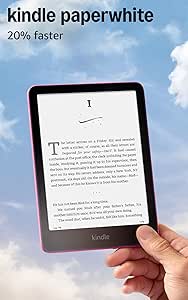 | Best Overall in Color — For Style-Minded Readers | Display: 7-inch, 300 ppi, 16-level grayscale | Storage: 16 GB | Battery Life: Up to 12 weeks per charge | VIEW LATEST PRICE | See Our Full Breakdown |
| Amazon Kindle 16 GB (2024 Release, Matcha) – Like-New Certified Refurbished | | Best Budget Entry Point | Display: 6-inch glare-free | Front Light: Adjustable, 25% brighter at max | Storage: 16 GB | VIEW LATEST PRICE | See Our Full Breakdown |
| Amazon Kindle 16 GB (11th Generation, 2024) – Like-New/Refurbished – Black | | Best Value for Travelers | Display: 6-inch, 300 ppi glare-free with adjustable front light | Storage: 16 GB | Battery Life: Up to 6 weeks | VIEW LATEST PRICE | See Our Full Breakdown |
| Amazon Kindle e-reader | Storage | Display | Battery Life | Weight |
|---|---|---|---|---|
| Amazon Kindle Paperwhite Signa | 32 GB | 7-inch glare-free, higher contrast | Up to 12 weeks | — |
| Amazon Kindle 16 GB | 16 GB | 6-inch glare-free, 300 ppi, 16-level grayscale | Up to 6 weeks per charge | 5.56 oz (158 g) |
| Amazon Kindle Paperwhite | 16 GB | 6.8 inches, 300 ppi | Up to 10 weeks | 7.23 oz (205 g) |
| Amazon Kindle 16 GB | 16 GB | 6-inch glare-free, 300 ppi, 16-level grayscale | Up to 6 weeks | 5.56 oz (158 g) |
| Amazon Kindle Paperwhite 16GB | 16 GB | 7-inch, 300 ppi, built-in light, 16-level grayscale | Up to 12 weeks per charge | 7.4 oz (211 g) |
| Amazon Kindle Paperwhite Signa | 32 GB | 7-inch glare-free Paperwhite | Up to 12 weeks | — |
| Amazon Kindle Paperwhite 16GB | 16 GB | 7-inch glare-free E Ink | Up to 12 weeks | — |
| Amazon Kindle Paperwhite Signa | 32 GB | 7-inch Paperwhite, 300 ppi, 16-level grayscale | Up to 12 weeks | 7.5 oz (214 g) |
| Amazon Kindle 16 GB | 16 GB | 6-inch glare-free, 300 ppi, 16-level grayscale | Up to 6 weeks per charge | 5.56 oz (158 g) |
| Amazon Kindle Scribe Colorsoft | 64 GB (50 GB available to user) | 11-inch Colorsoft, 300 ppi B&W, 150 ppi color | Weeks of reading and writing per charge | 14.1 oz (400 g); Pen: 0.6 oz (17 g) |
| Amazon Kindle Colorsoft 16 GB | 16 GB | 7-inch Colorsoft color display | Up to 8 weeks | — |
| Amazon Kindle Paperwhite 16GB | 16 GB | 7-inch, 300 ppi glare-free with adjustable front light | Up to 12 weeks per charge | 7.4 oz (211 g) |
| Amazon Kindle Paperwhite 16GB | 16 GB | 7-inch, 300 ppi, 16-level grayscale | Up to 12 weeks per charge | — |
| Amazon Kindle 16 GB | 16 GB | 6-inch glare-free | Up to 6 weeks per charge | — |
| Amazon Kindle 16 GB | 16 GB | 6-inch, 300 ppi glare-free with adjustable front light | Up to 6 weeks | 5.56 oz (158 g) |
More Details on Our Top Picks
Amazon Kindle Paperwhite Signature Edition 32GB (Newest Model), Metallic Jade
The Signature Edition earns the top spot because it removes nearly every compromise: a 7-inch higher-contrast display, an auto-adjusting front light that handles the shift from sunlit patio to pitch-black bedroom without a single tap, and 32 GB of storage — double what the standard Kindle Paperwhite 16GB (12th Generation) offers. Wireless charging is the differentiator nobody thinks they need until the Kindle lives on a nightstand. Compared with the Kindle 16 GB (2024), the larger screen and waterproofing justify the jump for serious readers. The tradeoffs are real but modest: the wireless dock costs extra, and the Metallic Jade finish is a taste call. For a reader who wants one device to last years without upgrade envy, this is the pick that ends the search.
Pros:- Auto-adjusting front light adapts to any environment without manual fiddling
- 32 GB storage holds massive libraries, audiobooks included
- Wireless charging plus USB-C gives flexible top-up options
- Waterproof design survives poolside and bathtub reading
- Up to 12 weeks of battery life per charge
Cons:- Wireless charging dock sold separately, adding to real-world cost
- Higher price than the standard Paperwhite with mostly the same core reading experience
- Ad-free configuration depends on variant selection at purchase
Best for: Heavy readers who want maximum storage, a big sharp screen, and zero daily friction like manual light adjustments or frequent charging
Not ideal for: Casual readers who finish a book a month — the base Kindle covers that for less, and 32 GB would sit mostly empty
- Storage:32 GB
- Display:7-inch glare-free, higher contrast
- Page Turn Speed:25% faster than previous generation
- Front Light:Auto-adjusting
- Charging:USB-C and wireless (dock sold separately)
- Battery Life:Up to 12 weeks
- Waterproof:Yes
- Color:Metallic Jade
Our verdict“Buy this if you read daily and want the most frictionless Kindle experience available without stepping up to a Scribe or Colorsoft.”
Amazon Kindle 16 GB (2024, 11th Generation) – Black
This is the Kindle I point people toward when they’re not sure how much they’ll read. At 5.56 oz it’s the lightest Kindle, the 300 ppi screen matches the resolution of the far pricier Paperwhite Signature Edition, and 16 GB holds thousands of titles. What you give up compared with the Paperwhite (16 GB, 11th Generation) is the adjustable warm light — night readers will feel that omission — plus waterproofing and the bigger 6.8-inch panel. The 6-inch display also means more page turns per book. The eco-friendly build (75% recycled plastics, 90% recycled magnesium) is a genuine plus. For a first e-reader, a travel backup, or a gift that doesn’t require a big decision, this is the low-risk entry.
Pros:- Lightest and most compact Kindle in the lineup at 5.56 oz
- 300 ppi display matches Paperwhite sharpness at a lower tier
- Up to 6 weeks of battery life per charge
- Built with 75% recycled plastics and 90% recycled magnesium
Cons:- No adjustable warm light, unlike every Paperwhite model
- 6-inch screen requires more frequent page turns on long sessions
- Full charge takes around 4 hours over USB
Best for: First-time e-reader buyers and commuters who want the lightest possible device for one-handed reading on a train
Not ideal for: Bedtime readers and bathtub readers — no warm light and no waterproofing make it a poor fit there
- Storage:16 GB
- Display:6-inch glare-free, 300 ppi, 16-level grayscale
- Weight:5.56 oz (158 g)
- Dimensions:6.2 x 4.3 x 0.32 inches
- Battery Life:Up to 6 weeks per charge
- Charge Time:~4 hours via USB, ~2 hours with 9W adapter
- Wi-Fi:2.4 GHz and 5.0 GHz
- Generation:Kindle (11th Generation), 2024 release
Our verdict“The smartest low-commitment way into Kindle reading, as long as you don’t read in the dark often or near water.”
Amazon Kindle Paperwhite (16 GB) – 11th Generation
The 2021 Paperwhite remains the value sweet spot because it delivers the three features that matter most — adjustable warm light, IPX8 waterproofing, and a roomy 6.8-inch display — without the premium pricing of the 12th-generation Paperwhite 16GB (2024). Compared with that newer model, you accept a slightly smaller screen, a bit less battery (10 weeks versus 12), and slower page turns, but the core reading experience holds up well. Against the basic Kindle 16 GB, the win is decisive for anyone who reads at night or near water. The absence of physical page-turn buttons is the main ergonomic miss — swiping gets old during marathon sessions. This is the pick for readers who want Paperwhite essentials and don’t need the latest generation badge.
Pros:- Adjustable warm light reduces eye strain for nighttime reading
- IPX8 waterproof rating allows pool and bath reading
- Up to 10 weeks of battery life per charge
- 6.8-inch display offers more text per page than the base Kindle
Cons:- No physical page-turn buttons for tactile readers
- Superseded by the 12th generation, so accessories and resale may age faster
- Text-to-speech accessibility limited to English
Best for: Value-focused readers who want warm light and waterproofing without paying for the newest generation’s upgrades
Not ideal for: Anyone wanting the biggest screen and longest battery — the 12th-generation Paperwhite beats it on both counts
- Display:6.8 inches, 300 ppi
- Storage:16 GB
- Battery Life:Up to 10 weeks
- Weight:7.23 oz (205 g)
- Dimensions:6.9 x 4.9 x 0.32 inches
- Connectivity:Wi-Fi (2.4 GHz and 5.0 GHz)
- Charging Port:USB-C
- Generation:11th Generation (2021)
Our verdict“The best feature-per-dollar choice if warm light and waterproofing are must-haves and generation numbers don’t matter to you.”
Amazon Kindle 16 GB (2024, 11th Generation) – Without Lockscreen Ads – Black
This is the same compact 2024 Kindle as the Kindle 16 GB (2024, 11th Generation) – Black, with one difference that shapes every single interaction: no lockscreen ads. That means every time the device wakes, you see your own cover art or a blank screen instead of a sponsored title — a small daily quality-of-life upgrade that compounds over years of use. Purists who hate the ad-supported variant’s cheaper upfront feel will find this the more restful device. The hardware tradeoffs are identical to its sibling: no warm light (the Paperwhite Signature Edition has that and auto-brightness), a 6-inch panel, and a roughly 4-hour USB charge. You pay a modest premium over the ad-supported version for the cleaner experience, which is a fair exchange for distraction-averse readers.
Pros:- Ad-free lockscreen shows your book cover instead of sponsored content
- Same lightest-in-lineup 5.56 oz body as the standard 2024 Kindle
- 25% brighter front light with dark mode and high-contrast display
- Recycled plastics and magnesium construction
Cons:- Costs more than the ad-supported version with identical hardware
- No adjustable warm light, unlike any Paperwhite model
- Charging via a computer takes around 4 hours
Best for: Minimalists and gift-givers who want a compact Kindle with a clean, ad-free lockscreen out of the box
Not ideal for: Buyers optimizing purely for low cost — the ad-supported variant is cheaper and functionally identical while reading
- Display:6-inch glare-free, 300 ppi, 16-level grayscale
- Storage:16 GB
- Battery Life:Up to 6 weeks
- Weight:5.56 oz (158 g)
- Charge Time:~4 hours via USB, ~2 hours with 9W adapter
- Connectivity:Wi-Fi 2.4 GHz and 5.0 GHz
- Lockscreen:Without ads
- Generation:11th Generation, 2024 release
Our verdict“Choose this over the standard 2024 Kindle if a sponsored lockscreen would bother you every time you pick it up.”
Amazon Kindle Paperwhite 16GB (12th Generation, 2024) – 7″ Glare-Free Display, Black, Without Lockscreen Ads
This 12th-generation Paperwhite stakes its claim on endurance: up to 12 weeks per charge, matching the Paperwhite Signature Edition while skipping that model’s wireless charging and auto-adjusting light. What you keep is the important part — the fast 7-inch display with 25% quicker page turns, a warm light adjustable from white to amber, and IPX8 waterproofing. Against the 11th-generation Paperwhite, the larger screen and extra two weeks of battery make a persuasive upgrade case for frequent flyers and cottage-goers who charge rarely. The ad-free lockscreen is included here, which readers comparing it to ad-supported variants should factor in. Just know that streaming audiobooks over Bluetooth drains the battery far faster than the headline number, and there are still no page-turn buttons.
Pros:- Up to 12 weeks of battery life, tied for best in the Paperwhite line
- 7-inch high-contrast display with adjustable warm light from white to amber
- IPX8 waterproofing rated for 2m of fresh water for 60 minutes
- Ad-free lockscreen included by default
Cons:- Bluetooth audiobook streaming dramatically shortens battery life
- No wireless charging or auto-adjusting light, unlike the Signature Edition
- No physical page-turn buttons
Best for: Travelers and off-grid readers who go weeks between charges and want a big warm-lit screen waiting when they return
Not ideal for: Listeners more than readers — Bluetooth audiobook playback cuts deeply into that 12-week battery claim
- Storage:16 GB
- Display:7-inch, 300 ppi, built-in light, 16-level grayscale
- Battery Life:Up to 12 weeks per charge
- Charge Time:Under 2.5 hours with 9W USB adapter
- Waterproofing:IPX8 (2m fresh water for 60 minutes)
- Wi-Fi:2.4 GHz and 5.0 GHz
- Weight:7.4 oz (211 g)
- Generation:Kindle Paperwhite (12th Generation), 2024 release
Our verdict“The best choice for readers who prioritize maximum screen time between charges and want Signature-tier fundamentals without the premium add-ons.”
Amazon Kindle Paperwhite Signature Edition 32GB (Newest Model) – Metallic Raspberry
If you want the full Paperwhite Signature feature set but prefer a device that doesn’t look like everyone else’s, the Metallic Raspberry finish is the main reason to pick this over the otherwise identical Kindle Paperwhite Signature Edition in Metallic Black. You still get the 7-inch glare-free display, 25% faster page turns, 32GB of storage, an auto-adjusting front light, and wireless charging — the last of which the standard Paperwhite 16GB skips entirely. That front light is a genuine quality-of-life upgrade: it adapts brightness as ambient lighting changes, so late-night reading never feels harsh. The tradeoffs are real, though. The wireless charging dock costs extra, and like every Kindle here, this is a reading-only device — no apps, no notifications, by design.
Pros:- Up to 12 weeks of battery life on a single USB-C charge
- Auto-adjusting front light for comfortable day and night reading
- Fully waterproof for pool, bath, or beach reading
- Wireless charging support and generous 32GB storage
Cons:- Wireless charging dock is sold separately
- Reading-only platform with no apps or notifications
Best for: Heavy readers who want maximum storage, wireless charging, and a finish that stands out from the usual black slab
Not ideal for: Buyers on a tighter budget who don’t need 32GB or wireless charging — the standard Paperwhite covers the essentials for less
- Storage:32 GB
- Display:7-inch glare-free Paperwhite
- Page Turns:25% faster
- Front Light:Auto-adjusting
- Charging:USB-C and wireless charging (dock sold separately)
- Battery Life:Up to 12 weeks
- Waterproof:Yes
- Color:Metallic Raspberry
Our verdict“Choose this if you want the most capable Paperwhite and a distinctive color — skip it if the black Signature Edition’s lower-profile look suits you fine.”
Amazon Kindle Paperwhite 16GB (Newest Model) – Black
This is the Paperwhite at its most sensible. You get the same 7-inch high-contrast glare-free display, the same 25% faster page turns, the same 12-week battery life, and the same IPX8 waterproofing as the Paperwhite Signature Edition — you just give up wireless charging, the auto-adjusting light, and half the storage. For most readers, those are conveniences rather than necessities; the manual warm-light adjustment here works perfectly well. Compared with the compact Kindle 16GB (2024), this model’s larger screen and waterproof build make it the better pick for anyone who reads in the bath, at the pool, or on long trips. The one honest limitation: 16GB fills up faster if you hoard manga, comics, or audiobook-free large libraries — heavy collectors should step up to a 32GB Signature model.
Pros:- Up to 12 weeks of battery life per charge
- Waterproof design safe for pool or bath reading
- Glare-free display with adjustable warm light from white to amber
- Distraction-free reading with no apps or notifications
Cons:- 16GB of storage can feel tight for very large libraries
- No wireless charging or auto-adjusting light unlike the Signature Edition
Best for: Readers who want the core Paperwhite experience — big screen, warm light, waterproofing, long battery — without paying for premium extras
Not ideal for: Large-library hoarders and wireless-charging devotees, who will be better served by a Signature Edition
- Storage:16 GB
- Display:7-inch glare-free E Ink
- Page Turns:25% faster than previous generation
- Battery Life:Up to 12 weeks
- Charging:USB-C
- Waterproof:Yes (IPX8)
- Color:Black
Our verdict“The smartest price-to-feature balance in the lineup — nearly all of the Signature Edition’s performance with fewer luxury add-ons.”
Amazon Kindle Paperwhite Signature Edition (12th Generation, 2024) – 32GB, Metallic Black
If I had to point one buyer at a single Kindle, it would be this one. The 12th-generation Signature Edition in Metallic Black hits the sweet spot: a 7-inch, 300 ppi display with the fastest page turns and best contrast in the Paperwhite line, 32GB of storage for a serious library, wireless charging, and the auto-adjusting front light — all in an understated finish that appeals to more buyers than the flashier Metallic Raspberry Signature Edition, which is otherwise identical. Compared with the Paperwhite 16GB, the doubling of storage and the self-adjusting light are the two upgrades that actually change daily reading. It’s not flawless: the wireless dock is a separate purchase, and the text-to-speech accessibility feature works in English only, which matters to multilingual households.
Pros:- Fastest page turns and higher contrast than previous Paperwhite generations
- Wireless charging and auto-adjusting front light
- 32GB of storage for large libraries
- Up to 12 weeks of battery life and IPX8 waterproofing
Cons:- Wireless charging dock sold separately
- Text-to-speech accessibility available in English only
Best for: Dedicated readers who want the most complete Paperwhite package and plan to keep one device for years
Not ideal for: Casual or occasional readers — the standard Paperwhite 16GB delivers most of this experience for less money
- Display:7-inch Paperwhite, 300 ppi, 16-level grayscale
- Storage:32 GB
- Battery Life:Up to 12 weeks
- Charging:USB-C and wireless charging
- Weight:7.5 oz (214 g)
- Connectivity:Wi-Fi 2.4 GHz and 5.0 GHz
- Waterproof:Yes (IPX8)
- Color:Metallic Black
Our verdict“The most complete Kindle for the money if you read constantly — storage, speed, and lighting conveniences all in one device.”
Amazon Kindle 16 GB (2024, 11th Generation) – Matcha
Sometimes small is the whole point. At 5.56 oz and 6.2 inches tall, this is the lightest and most pocketable Kindle in the lineup, and the Matcha colorway gives it a personality the black models lack. The 300 ppi display matches the Paperwhite Signature Edition for sharpness, and the 25% brighter front light keeps text readable indoors. But the gaps versus the Paperwhite line are structural, not cosmetic: no adjustable warm light, no waterproofing, and battery life of about 6 weeks rather than 12. Compared with the Paperwhite 16GB, you’re trading screen size, water resistance, and warm lighting for portability and a lower price. For commuters, travelers, and one-handed readers, that trade makes sense; for bathtub readers it doesn’t. Bonus points for the recycled plastics and magnesium construction.
Pros:- Lightest and most compact Kindle design at 5.56 oz
- Up to 6 weeks of battery life per charge
- Brighter glare-free 300 ppi display with dark mode
- Built with 75% recycled plastics and 90% recycled magnesium
Cons:- No adjustable warm light and not waterproof
- No speakers or Audible playback — VoiceView text-to-speech only
Best for: Commuters, travelers, and anyone who wants a Kindle that slips into a jacket pocket or small bag
Not ideal for: Bath, pool, or beach readers — the lack of waterproofing rules it out where the Paperwhite line thrives
- Storage:16 GB
- Display:6-inch glare-free, 300 ppi, 16-level grayscale
- Battery Life:Up to 6 weeks per charge
- Charge Time:~2 hours with 9W adapter; ~4 hours via USB
- Weight:5.56 oz (158 g)
- Connectivity:Wi-Fi 2.4 GHz and 5.0 GHz
- Generation:Kindle (11th Generation) — 2024 release
Our verdict“The right pick when portability matters more than waterproofing and warm light — a genuine pocket reader, not a shrunken Paperwhite.”
Amazon Kindle Scribe Colorsoft 64GB (Newest Model) with Premium Pen – Graphite
This is the only device in the roundup that’s as much a work tool as a reader. The 11-inch Colorsoft display renders books and documents in color, and the included Premium Pen — no charging required, with a built-in eraser and shortcut button — turns margin notes and journaling into the core experience. Built-in AI tools summarize, search, and convert handwriting to text, while integration with Google Drive, OneDrive, and OneNote makes it a genuine document-review machine, something no Paperwhite can attempt. The tradeoffs are worth knowing before buying: the color layer changes the screen’s texture and brightness compared with the standard Scribe, color content runs at 150 ppi versus 300 ppi for black-and-white, and at 14.1 oz it’s roughly double the weight of the Paperwhite Signature Edition. It’s also firmly not a tablet — no apps, no video.
Pros:- Large 11-inch paper-like color display that’s easy on the eyes
- Premium Pen included with no charging, built-in eraser, and shortcut button
- AI tools to summarize, search, and convert handwriting to text
- Cloud integration with Google Drive, OneDrive, and OneNote
Cons:- Color layer alters texture and brightness versus the standard Scribe display
- Color resolution limited to 150 ppi versus 300 ppi for black-and-white
- Reading and writing only — not a general-purpose tablet
Best for: Students, researchers, and professionals who annotate documents and journals as much as they read books
Not ideal for: Novel-first readers — the Paperwhite Signature Edition is lighter, cheaper to own, and its screen is just as sharp for plain text
- Display:11-inch Colorsoft, 300 ppi B&W, 150 ppi color
- Storage:64 GB (50 GB available to user)
- Battery Life:Weeks of reading and writing per charge
- Weight:14.1 oz (400 g); Pen: 0.6 oz (17 g)
- Connectivity:Wi-Fi 2.4 GHz and 5.0 GHz, WEP/WPA/WPA2/WPA3
- Included:Kindle Scribe Colorsoft, Premium Pen, USB-C cable, replacement tips
- Color:Graphite
Our verdict“Buy it for the pen and document workflows, not for fiction — it’s a note-taking Kindle that happens to read books beautifully.”
Amazon Kindle Colorsoft 16 GB (Newest Model) – Color Display, No Ads, Black
The Kindle Colorsoft is the only model in this lineup built around a 7-inch color display, and that single difference reshapes the entire reading experience. Book covers, comics, manga, and illustrated guides gain a visual richness the Kindle Paperwhite (12th Generation) simply cannot deliver, and color highlighting makes annotation feel closer to working with a physical textbook. Compared with the Paperwhite, though, the Colorsoft trades away some of the razor-sharp crispness black-and-white e-ink is known for — color screens render text with a slightly softer, warmer character that devoted novel-readers may notice. Battery life is also shorter at 8 weeks versus the Paperwhite’s 12, a fair trade for the color panel. Waterproofing carries over, and the ads-free lockscreen is standard here.
Pros:- 7-inch high-contrast color display transforms covers, comics, and illustrated content
- Color highlighting adds real value for study and annotation
- Waterproof build matches the Paperwhite for bath and pool reading
- Ships without lockscreen ads and includes Dark Mode
Cons:- Text sharpness is softer than dedicated black-and-white e-readers like the Paperwhite
- Shorter battery life than the Paperwhite’s 12 weeks
- Fullest content access leans on a Kindle Unlimited subscription
Best for: Readers of comics, manga, cookbooks, and illustrated nonfiction who want color without giving up e-ink comfort
Not ideal for: Pure novel-readers prioritizing maximum text sharpness and battery life — the standard Paperwhite does both better for less
- Model:Kindle Colorsoft
- Display:7-inch Colorsoft color display
- Storage:16 GB
- Battery Life:Up to 8 weeks
- Charging:USB-C
- Waterproof:Yes
- Ads:None
Our verdict“This is the pick for readers whose libraries are visual — if color matters to what you read, nothing else here comes close.”
Amazon Kindle Paperwhite 16GB (12th Generation, 2024) – 7″ Glare-Free Display, Jade
The 12th Generation Paperwhite in Jade hits the sweet spot the entire Kindle lineup orbits around: a 7-inch 300 ppi glare-free display, 12 weeks of battery life, IPX8 waterproofing, and a thin, light body — all in one package. Page turns are 25% faster than the previous generation, which sounds minor until you’re powering through a dense novel. Compared with the Kindle Colorsoft, this model delivers noticeably crisper text and longer runtime, but in monochrome only. And against the compact Kindle (11th Generation), it wins on screen size, waterproofing, and double the battery endurance. The Jade colorway is a genuine differentiator if black plastic feels dull. The tradeoff is that audiobook streaming over Bluetooth drains the battery far faster than the rated 12 weeks, and there’s no cellular option.
Pros:- 7-inch 300 ppi glare-free display with 25% faster page turns
- Up to 12 weeks of battery life per charge
- IPX8 waterproofing survives baths, pools, and beach spills
- Fully distraction-free — no apps, social media, or notifications
Cons:- Audible streaming over Bluetooth drastically reduces battery life
- No cellular connectivity; downloads require Wi-Fi
- VoiceView text-to-speech works in English only
Best for: Serious readers who want the best balance of screen size, battery life, and durability without paying premium-tier prices
Not ideal for: Listeners who mostly stream Audible audiobooks — Bluetooth streaming slashes the battery life dramatically
- Display:7-inch, 300 ppi glare-free with adjustable front light
- Storage:16 GB
- Battery Life:Up to 12 weeks per charge
- Charge Time:Under 2.5 hours with 9W adapter
- Waterproofing:IPX8 (2m fresh water, 60 minutes)
- Weight:7.4 oz (211 g)
- Color:Jade
Our verdict“If you want one Kindle that does almost everything well for years, this Jade Paperwhite is the safest and smartest choice in the roundup.”
Amazon Kindle Paperwhite 16GB (12th Generation, 2024) – Raspberry
Hardware-wise, the Raspberry Paperwhite (12th Generation) is identical to the Jade model I ranked just above it: the same 7-inch 300 ppi display, the same 12-week battery, the same IPX8 waterproofing. What separates it is the Raspberry colorway, a warm pink that makes this the most distinctive e-reader in the batch — useful if you share a household with multiple Kindles and want yours instantly identifiable, or you simply want a device that doesn’t look like every other slab of black glass. It’s also a natural gift pick for exactly that reason. The tradeoffs mirror the Jade model: streaming Audible over Bluetooth eats the battery quickly, and there’s no cellular fallback, so everything downloads over Wi-Fi. Choose between the two colors on preference alone, because performance is indistinguishable.
Pros:- Distinctive Raspberry finish sets it apart from standard black e-readers
- Identical flagship hardware: 7-inch 300 ppi display and 12-week battery
- IPX8 waterproofing with adjustable warm front light
- 25% faster page turns and higher contrast than the prior generation
Cons:- Bluetooth audiobook streaming significantly cuts battery life
- Wi-Fi only — no cellular option for downloading on the go
- Pays a style premium over functionally identical color variants
Best for: Readers who want flagship Paperwhite performance in a colorway that stands out, or gift-givers who want a memorable presentation
Not ideal for: Anyone indifferent to color — the Jade or Black versions deliver identical hardware if Raspberry doesn’t appeal
- Display:7-inch, 300 ppi, 16-level grayscale
- Storage:16 GB
- Battery Life:Up to 12 weeks per charge
- Charge Time:Under 2.5 hours with 9W adapter
- Waterproofing:IPX8 (2m fresh water, 60 minutes)
- Dimensions:5″ x 7″ x 0.3″
- Color:Raspberry
Our verdict“The same exceptional Paperwhite experience with a personality — buy it if the color makes you smile, skip it if it doesn’t.”
Amazon Kindle 16 GB (2024 Release, Matcha) – Like-New Certified Refurbished
This certified refurbished Matcha Kindle is the cheapest legitimate path into the current generation, and it arrives with the same limited warranty as a new device — which is what separates it from risky secondhand buys. You still get the 2024 refresh’s real improvements: a 6-inch glare-free display that’s 25% brighter at maximum, faster page turns, Dark Mode, and a light, compact body. Compared with the Paperwhite (12th Generation), you give up waterproofing, a third of the battery life (6 weeks versus 12), and an inch of screen — meaningful concessions for bathtub readers and marathon sessions. But for commute-and-couch reading, the gap matters less than the savings. The Matcha green finish is genuinely charming and rare among refurb listings. Expect generic packaging rather than retail presentation.
Pros:- Certified refurbished with the same limited warranty as a new device
- 25% brighter glare-free display with Dark Mode
- Lightest and most compact Kindle body — ideal for one-handed reading and bags
- Distinctive Matcha colorway rarely available refurbished
Cons:- No waterproofing — keep it away from water entirely
- 6-week battery is half the Paperwhite’s endurance
- May arrive in generic packaging without retail presentation
Best for: Budget-conscious first-time e-reader buyers and students who want a current-generation Kindle at the lowest entry cost
Not ideal for: Pool, bath, and beach readers — this model has no waterproof rating at all
- Display:6-inch glare-free
- Front Light:Adjustable, 25% brighter at max
- Storage:16 GB
- Battery Life:Up to 6 weeks per charge
- Dark Mode:Yes
- Condition:Like-New Certified Refurbished
- Color:Matcha
Our verdict“The smartest low-risk budget buy in the roundup — current-generation hardware, full warranty, and a fun color, if you can live without waterproofing.”
Amazon Kindle 16 GB (11th Generation, 2024) – Like-New/Refurbished – Black
At 5.56 oz, this refurbished 11th Generation Kindle is the lightest device in the entire roundup — light enough to disappear in a jacket pocket, which is exactly why travelers and commuters should shortlist it. It carries the same 6-inch 300 ppi glare-free display as the standard 2024 Kindle, with the brighter front light, faster page turns, and Dark Mode. The 16 GB of storage comfortably holds thousands of books, and the 1-year warranty on this certified refurb matches new-device coverage. Compared with the refurbished Matcha Kindle, this black version is functionally the same reader — the real difference is availability and finish preference. Against the Paperwhite, you’re again trading waterproofing and battery endurance for portability and price. Charging takes roughly 4 hours over USB, or 2 with a 9W adapter — slow by current standards.
Pros:- Lightest Kindle in the lineup at 5.56 oz (158 g)
- Sharp 6-inch 300 ppi display with dark mode and brighter front light
- 16 GB storage holds thousands of books
- Certified refurbished with the full 1-year limited warranty
Cons:- Slow charging — about 4 hours over standard USB
- No waterproofing and no cellular option, Wi-Fi only
- Refurbished stock may come in plain packaging
Best for: Commuters, travelers, and anyone who prioritizes pocketability and weight above all else
Not ideal for: Power readers wanting long trips between charges — 6 weeks of battery and no waterproofing limit its endurance credentials
- Display:6-inch, 300 ppi glare-free with adjustable front light
- Storage:16 GB
- Battery Life:Up to 6 weeks
- Weight:5.56 oz (158 g)
- Charging:USB-C, ~2 hours with 9W adapter
- Connectivity:Wi-Fi 2.4/5.0 GHz only
- Condition:Like-New Certified Refurbished
Our verdict“If your Kindle lives in a bag or pocket rather than on a nightstand, this featherweight refurb delivers the core experience for the least outlay.”

How We Picked
I ranked these 15 Kindle configurations around one question: which model delivers the best reading experience for the money at each level? That meant evaluating screen size and quality first (6-inch versus 7-inch, front light adjustability, glare resistance), then storage capacity, battery life, and the extras that separate tiers — wireless charging, auto-brightness, color displays, and stylus support. Because this lineup includes multiple colors, generations, and refurbished units of the same underlying devices, I also judged value per configuration: whether a variant justifies its existence or is simply a cosmetic duplicate of a better-ranked pick.
The ranking logic follows the natural tiers Amazon has built. Premium do-everything models (Signature Edition, Scribe, Colorsoft) sit near the top for readers whose habits justify them. The mid-tier Paperwhite 12th Generation ranks as the smart middle ground. Base Kindle models fill the beginner and value slots, with ad-free and refurbished variants ranked on their specific tradeoffs. Older-generation Paperwhites rank below their successors for the same reason: buying last generation only makes sense at a meaningful discount, and I flag where that logic holds or breaks.
Factors to Consider When Choosing Amazon Kindle E-readers
Before picking a specific configuration, it helps to understand how Amazon has structured the Kindle line and where the real decision points are. These are the factors that actually change your day-to-day reading experience — and the ones that quietly don’t.Screen Size and Display Generation Matter Most
The single biggest differentiator across Kindle e-readers is the display, and it’s where I’d spend the most attention. The base Kindle’s 6-inch screen is fine for casual reading, but the 7-inch Paperwhite display fits noticeably more text per page, which means fewer page turns and less fatigue during long sessions. Generation matters too: a 12th Generation Paperwhite is a meaningfully different device from an 11th Generation model, with faster page turns and better contrast. A common mistake is comparing prices between generations without realizing you’re looking at different screens. My advice: once you’ve decided on a tier, always buy the newest generation available — the older model only wins if the discount is substantial. Display quality is the one spec you can’t upgrade later, so treat it as the anchor of your decision.
Lockscreen Ads: The Hidden Cost Decision
Several Kindles in this lineup appear as both standard and without lockscreen ads versions, and buyers often don’t realize what this means until the device arrives. The ad-supported version shows Amazon-sponsored screensavers when the Kindle is asleep — harmless while reading, but a daily small annoyance and a privacy consideration for some. The ad-free version carries a modest premium, and in my judgment it’s one of the more worthwhile upgrades because it’s a one-time payment for a permanent improvement. What trips people up is that ad removal can also be purchased after the fact through your Amazon account, so the pre-configured ad-free variant is a convenience, not a necessity. If you’re giving the Kindle as a gift, the ad-free version is the safer choice — nobody wants to unwrap a device that shows them advertisements.
Storage: 16GB Is Almost Always Enough
Storage is the spec Amazon uses most aggressively to upsell, and it’s where buyers most often overpay. A 16GB Kindle holds thousands of standard ebooks, which covers even heavy readers for years. The 32GB on the Signature Edition is genuinely useful only if you load audiobooks, large PDFs, or graphic-heavy content — the kinds of files that are ten to fifty times larger than a typical novel. The 64GB on the Scribe exists because that device is designed for documents and notes, not because anyone needs that much novel storage. A useful rule: storage anxiety is a phone habit, not an e-reader habit. If you’re torn between a 16GB Paperwhite and a 32GB Signature Edition, decide based on the lighting and charging features instead — the storage difference is almost irrelevant for text-based reading.
Color Versus Monochrome: Match the Screen to Your Content
The Color display on the Colorsoft is the biggest fork in this lineup, and it’s worth being honest with yourself about your library before paying for it. If you read novels, essays, and text-heavy nonfiction, color adds nothing — the standard E Ink display actually renders text with slightly sharper contrast. Color earns its keep for manga, comics, cookbooks, children’s books, and illustrated guides, where a monochrome screen genuinely degrades the material. A common mistake is buying color as a future-proofing hedge, which rarely pays off because reading habits change slowly. The other honest note: color E Ink is dimmer and slightly slower than monochrome, so it’s a trade, not a pure upgrade. Buy it for what you read today, not what you imagine reading someday.
Refurbished Versus New: When Savings Make Sense
This roundup includes certified refurbished units, and my take is that they’re category-dependent. For the base Kindle, a Like-New refurbished unit is an excellent play: the device is simple, the failure points are few, and the savings are proportionally meaningful. For a flagship like the Signature Edition or Colorsoft, I’d be more cautious — battery health degrades over time, and the front light and charging system are exactly the components you want in pristine condition. Amazon’s certified refurbished program does replace the battery and外壳 components, so the risk is low either way, but the newest models carry longer useful lifespans that a refurb partially eats into. Also check the return window on refurbished units specifically; it sometimes differs from new-device policies. If the savings on a refurb exceed what you’d pay for peace of mind on a premium model, that’s your answer.
Lighting and Charging: The Daily-Use Upgrades
The features that separate the Signature Edition from the standard Paperwhite sound minor on a spec sheet but define the daily experience. An auto-adjusting front light means the Kindle adapts as you move from a bright room to bed, instead of you manually tweaking brightness twice a day. Wireless charging sounds like a luxury, but Kindles already charge infrequently — weeks of battery — so this one is genuinely optional unless you’ve standardized your nightstand on Qi pads. Warm light adjustment (shifting the display tone toward amber in the evening) is available on both Paperwhite tiers and is worth having if you read at night. My honest ranking of these extras: warm light matters most, auto-brightness second, wireless charging a distant third. Don’t let the charging feature alone push you up a tier.
Frequently Asked Questions
Is the Paperwhite Signature Edition worth it over the regular Paperwhite?
It depends on how you read, but for most people the gap is narrower than the marketing suggests. The Signature Edition adds 32GB of storage, wireless charging, an auto-adjusting front light, and no lockscreen ads out of the box. Of those, only the auto-adjusting light changes the reading experience day to day — the rest are conveniences. If you read nightly and move between rooms with different lighting, the Signature Edition justifies itself. If you read in one or two consistent spots and mostly read novels, the standard 12th Generation Paperwhite delivers the same screen and battery for less, and you won’t miss much.
What’s the difference between the 11th and 12th Generation Paperwhite?
The 12th Generation (2024) Paperwhite is the current design, featuring the larger 7-inch glare-free display, faster page turns, and updated internals. The 11th Generation Paperwhite has a smaller screen and slower hardware, and it’s mostly sold through remaining stock and third-party listings. The performance gap isn’t dramatic for plain reading, but the screen size difference is immediately noticeable — more words per page means fewer turns and better immersion. I’d only recommend the 11th Generation if you find it at a genuinely deep discount from a reputable seller. Otherwise, the 12th Generation is the model to buy, and it’s why the older units rank lower in this lineup.
Should I buy the base Kindle or spend more on a Paperwhite?
The base Kindle is the right call if you read occasionally, travel light, or want a low-risk first e-reader. Its 6-inch screen is sharp and perfectly readable, and the device is smaller and lighter than any Paperwhite — which some readers actually prefer for one-handed use. The Paperwhite pulls ahead with a bigger, brighter display, better water resistance, and longer battery life, all of which matter more the more you read. A good heuristic: if you finish a book or more per week, or you read in the bath or by the pool, get the Paperwhite. If you read a few books a month indoors, the base Kindle — especially the refurbished or Matcha variants — is the smarter spend.
Do the different color options (Jade, Matcha, Raspberry) affect anything besides looks?
No — across the entire Kindle line, color variants are purely cosmetic. A Metallic Jade Signature Edition is identical in hardware to the Metallic Black one, and the Matcha base Kindle matches the Black one component for component. Pricing can drift slightly between colors based on stock levels, so if you’re flexible, checking all variants of the same model can occasionally save you a little. The one real consideration is resale and wear: darker finishes tend to hide scuffs better over years of use. Pick whichever color you’ll enjoy holding, but never let a color availability push you into a different tier of device — that’s the mistake to avoid.
Is the Kindle Colorsoft worth it if I mostly read regular books?
Honestly, no. The Colorsoft’s value is entirely tied to color content: manga, comics, cookbooks, illustrated nonfiction, and children’s books. For text-only novels, the color display offers no benefit and comes with real tradeoffs — color E ink layers are slightly dimmer, page turns can feel marginally slower, and you’re paying a premium for a capability you won’t use. The Paperwhite delivers sharper text contrast for monochrome reading. The only scenario where a novel-reader should buy the Colorsoft is if they expect their library to shift toward graphic content soon. Otherwise, treat the Colorsoft as a specialized tool and put the difference toward the Signature Edition or more books.
Conclusion
After comparing all 15 configurations, the right Kindle comes down to what kind of reader you are. For best overall, the Kindle Paperwhite Signature Edition (12th Generation, 2024) in any finish wins — the 7-inch display, auto-adjusting warm light, and 32GB of storage make it the most complete package for serious readers. For best value, the Kindle 16 GB (2024, 11th Generation) refurbished or in Matcha delivers the core reading experience at the lowest sensible cost, and the ad-free variant is worth the small step up if lockscreen offers would bother you. For best premium, it’s a split: the Scribe with Premium Pen for readers who annotate and take notes, and the Colorsoft for anyone whose library leans graphic. For beginners, the standard Kindle 16 GB (2024) is the low-risk starting point that proves whether e-reading fits your habits before you invest more. And for specific needs — travel-proof reading, audiobook storage, or gift-giving — the Paperwhite 16GB (12th Generation, 2024) hits the sweet spot between price and capability. Whichever you choose, buy the newest generation you can afford; the screen is the part you live with every day.