
The best digital voice recorder for most people is the Plaud Note Pro, which pairs recording with AI transcription and summaries. For a more traditional recorder with a named audio brand, the Philips VoiceTracer DVT4115 is a standout, while the EVISTR L359 combines substantial storage with transcription features. The main choice is between AI-assisted note workflows and straightforward recording with playback; storage capacity, voice activation, and device size also separate these options. A larger memory figure does not automatically mean easier file handling or better transcription. Read on for the full breakdown of all 15 digital voice recorders and which type of buyer each one suits.

Get the latest gadgets delivered free with Prime
- Fast, free delivery on millions of items
- Prime Video, Amazon Music and more included
- Member-only deals all year
Complete the kit



Key Takeaways
- AI workflow is the clearest distinction: Plaud Note Pro, Philips VoiceTracer, EVISTR L359, NotePin S, and the Pocket AI recorder add transcription or note-taking features, while many other picks focus on recording and playback.
- Two Plaud Note Pro listings serve a similar buyer: both target people who want recorded speech converted into organized notes, so compare the precise listing and included capabilities rather than treating the names as distinct recorder types.
- Storage claims vary widely: the EVIDA 128GB and magnetic 136GB models emphasize capacity, but buyers still need to check file transfer, playback, and recording controls for their intended routine.
- Voice activation appears across several budget-style options: HoTiyan, Cappsu, EVIDA, the magnetic recorder, and QNGEE offer this feature, which can reduce silent sections but may miss quiet speech or clipped first words.
- Simple playback remains a valid priority: Sunlan, the 80GB MP3-player model, Cappsu, and EVISTR L357 favor direct recording and listening over an AI-centered workflow.
| Plaud Note Pro AI Voice Recorder with Transcription and Summaries |  | Best for Cross-Format AI Recording | Microphones: 4 MEMS microphones and 1 VPU microphone | Storage: 64 GB | Display: 0.95-inch AMOLED | VIEW LATEST PRICE | See Our Full Breakdown |
| Philips VoiceTracer DVT4115 Digital Voice Recorder with Sembly AI Trial |  | Best Traditional Recorder for Meetings | Microphones: Three built-in stereo microphones | Recording formats: MP3 and PCM | Storage: 8 GB | VIEW LATEST PRICE | See Our Full Breakdown |
| Plaud Note Pro AI Voice Recorder |  | Best Compact AI Recorder | Microphones: 4 MEMS and 1 VPU | Storage: 64 GB | Display: 0.95-inch AMOLED | VIEW LATEST PRICE | See Our Full Breakdown |
| Sunlan 16GB Digital Voice Recorder with Playback |  | Best for Simple One-Button Recording | Storage: 16 GB | Recording format: WAV | Recording time: Up to 30 hours | VIEW LATEST PRICE | See Our Full Breakdown |
| HoTiyan 8GB Digital Voice Recorder with Voice Activation |  | Best for Playback and File Controls | Storage: 8 GB | Recording formats: MP3 and WAV | Microphone: Built-in stereo | VIEW LATEST PRICE | See Our Full Breakdown |
| Cappsu 32GB Digital Voice Recorder with Playback and Voice-Activated Recording | 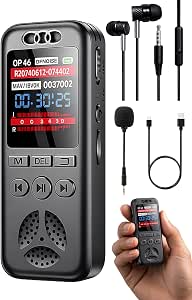 | Best for Simple Voice-Activated Recording | Storage: 32GB TF card; expandable up to 128GB | Maximum recording bitrate: 1536 Kbps | Continuous recording time: Up to 20 hours | VIEW LATEST PRICE | See Our Full Breakdown |
| EVIDA 128GB Digital Voice Recorder with Voice Activation and Playback |  | Best for Long Recording Sessions | Storage capacity: 128GB | Recording formats: WAV, MP3 | Maximum recording quality: 1536 Kbps | VIEW LATEST PRICE | See Our Full Breakdown |
| 136GB Magnetic Voice-Activated Digital Recorder with USB-C |  | Best for Hands-Free Magnetic Placement | Internal storage: 136GB | Claimed recording storage: Up to 18,800 hours | Continuous recording time: Up to 100 hours | VIEW LATEST PRICE | See Our Full Breakdown |
| 80GB Digital Voice Recorder with Playback and MP3 Player |  | Best for Stereo Recording and On-Device Review | Storage: 80GB total: 16GB onboard plus preinstalled 64GB microSD card | Recording formats: MP3, WAV | Maximum PCM recording bitrate: 1536 Kbps | VIEW LATEST PRICE | See Our Full Breakdown |
| EVISTR L359 Digital Voice Recorder with 128GB Storage and AI Transcription |  | Best for AI Transcription and Summaries | Storage: 128GB | Maximum recording bitrate: 3072 Kbps | Continuous recording time: Up to 33 hours | VIEW LATEST PRICE | See Our Full Breakdown |
| Plaud NotePin S Wearable AI Voice Recorder, Black |  | Best Wearable AI Recorder | Storage: 64 GB | Continuous recording time: Up to 20 hours | Standby time: Up to 40 days | VIEW LATEST PRICE | See Our Full Breakdown |
| Cappsu Digital Voice Recorder with Playback, 32GB Built-in Memory |  | Best Simple Recorder for Everyday Notes | Memory: 32 GB built-in | Maximum recording bitrate: 1536 Kbps | Battery life: 20 hours | VIEW LATEST PRICE | See Our Full Breakdown |
| QNGEE 64GB Digital Voice Recorder with Playback and Voice Activation |  | Best for Long Recording Sessions | Model: F5 | Storage: 64 GB TF card | Recording: 1536 kbps PCM | VIEW LATEST PRICE | See Our Full Breakdown |
| Pocket AI Voice Recorder with Transcription and Note-Taking, Space Grey |  | Best for AI Meeting Follow-Up | Model: PKT 01 | Storage: 64 GB | Battery life: Up to 4 days | VIEW LATEST PRICE | See Our Full Breakdown |
| EVISTR L357 64GB Digital Voice Recorder with Playback |  | Best for Manual Recording Control | Storage: 64 GB | Recording formats: MP3, WAV | Microphone: Built-in stereo | VIEW LATEST PRICE | See Our Full Breakdown |
| digital voice recorder | Storage | Weight | Microphone | Connectivity |
|---|---|---|---|---|
| Plaud Note Pro AI Voice Record | 64 GB | 30 g (1.06 oz) | — | — |
| Philips VoiceTracer DVT4115 Di | 8 GB | 93 g | — | — |
| Plaud Note Pro AI Voice Record | 64 GB | 30 g (1.06 oz) | — | — |
| Sunlan 16GB Digital Voice Reco | 16 GB | 35 g | Built-in mono with noise cancellation | USB |
| HoTiyan 8GB Digital Voice Reco | 8 GB | — | Built-in stereo | — |
| Cappsu 32GB Digital Voice Reco | 32GB TF card; expandable up to 128GB | 1.28 ounces | — | USB Type-C |
| EVIDA 128GB Digital Voice Reco | — | 3.35 ounces | — | USB 2.0 |
| 136GB Magnetic Voice-Activated | — | — | — | USB-C, OTG |
| 80GB Digital Voice Recorder wi | 80GB total: 16GB onboard plus preinstalled 64GB microSD card | 3.67 ounces | — | USB Type-C |
| EVISTR L359 Digital Voice Reco | 128GB | 2.24 ounces | Built-in, mono | USB Type-C; wired OTG |
| Plaud NotePin S Wearable AI Vo | 64 GB | 17.28 g (0.61 oz) | Built-in; mono and stereo modes | Bluetooth 5 |
| Cappsu Digital Voice Recorder | — | 1.6 ounces | Built-in | — |
| QNGEE 64GB Digital Voice Recor | 64 GB TF card | — | Built-in dual noise-reduction microphones | — |
| Pocket AI Voice Recorder with | 64 GB | — | Built-in | Bluetooth |
| EVISTR L357 64GB Digital Voice | 64 GB | 2.24 ounces | Built-in stereo | — |
More Details on Our Top Picks
Plaud Note Pro AI Voice Recorder with Transcription and Summaries
The Plaud Note Pro suits buyers who want one recorder for in-person conversations, phone calls, and online meetings, rather than a device limited to in-room audio. Its 112-language transcription, speaker labels, summaries, and action items make recorded material easier to turn into usable notes. Compared with the Philips VoiceTracer DVT4115, it offers broader capture options and a more developed AI workflow, while the Philips supplies a conventional 3.5 mm jack and MP3/PCM recording. The Plaud’s 64 GB storage and 30-hour battery support frequent use in a slim 30 g body, and its small display provides a quick on-device status check. The main tradeoff is ongoing reliance on the AI service: the included plan covers 300 transcription minutes monthly, so heavier users may need a paid plan. It also lacks a headphone jack.
Pros:- Captures in-person conversations and phone calls, with desktop software for online meetings
- Transcribes in 112 languages and can label speakers and generate summaries and action items
- 64 GB of storage and up to 30 hours of recording
- Compact 30 g body with a 0.95-inch AMOLED display
Cons:- The free AI transcription plan is limited to 300 minutes per month
- No headphone jack for direct wired listening
Best for: Professionals who record a mix of phone calls, face-to-face conversations, and online meetings and want AI-generated summaries and action items.
Not ideal for: Buyers who mainly need local audio playback through wired headphones or want unlimited transcription without a subscription.
- Microphones:4 MEMS microphones and 1 VPU microphone
- Storage:64 GB
- Display:0.95-inch AMOLED
- Battery life:Up to 30 hours
- Weight:30 g (1.06 oz)
- Audio format:WAV
- Microphone modes:Mono and stereo
- Free transcription plan:300 minutes per month
Our verdict“Choose the Plaud Note Pro if you need AI-assisted notes from several kinds of conversations and accept the monthly transcription limit.”
Philips VoiceTracer DVT4115 Digital Voice Recorder with Sembly AI Trial
The Philips VoiceTracer DVT4115 is the more conventional choice for lectures, meetings, and interviews: three built-in stereo microphones, MP3 and PCM recording, and a 3.5 mm audio jack make it useful even without an AI workflow. Its 36-hour battery life exceeds the 30-hour figure listed for the Plaud Note Pro, while the Plaud is much lighter and adds phone-call and online-meeting capture. The Philips also has smartphone app control, handy when the recorder is placed near a speaker or at the center of a table. Its 8 GB storage is far below the Plaud’s 64 GB, though the listed digital recording time is extensive. The Sembly AI trial can produce transcriptions and meeting minutes, but it is a trial rather than a lasting included allowance. This pick makes more sense for straightforward audio capture than for buyers seeking an all-in-one AI note system.
Pros:- Three built-in stereo microphones for recording speakers around a room
- Records in MP3 and PCM formats
- Up to 36 hours of battery life
- Smartphone app control and a 3.5 mm audio jack
Cons:- Only 8 GB of internal storage, compared with the 64 GB in the Plaud Note Pro
- Sembly AI transcription and meeting minutes are offered as a trial
- At 93 g, it is less pocket-light than the Plaud Note Pro
Best for: Students, interviewers, and meeting attendees who want stereo recording, long battery life, app control, and familiar audio formats.
Not ideal for: People who need substantial onboard storage, compact pocket carry, or a continuing AI transcription plan included with the recorder.
- Microphones:Three built-in stereo microphones
- Recording formats:MP3 and PCM
- Storage:8 GB
- Battery life:Up to 36 hours
- Digital recording time:Up to 89 days
- Audio jack:3.5 mm
- Weight:93 g
- Interface:USB 2.0
Our verdict“Pick the Philips VoiceTracer if dependable meeting capture and conventional audio controls matter more than large storage or ongoing AI features.”
Plaud Note Pro AI Voice Recorder
This Plaud Note Pro is a strong fit for buyers who want AI transcription in a card-sized recorder without carrying a larger handheld unit. It captures in-person conversations, phone calls, and online meetings, then supports transcription in 112 languages with summaries, action items, and follow-ups. Against the Philips VoiceTracer DVT4115, its 30 g weight and 64 GB storage favor travel and frequent capture, while the Philips has a 3.5 mm jack and more familiar MP3/PCM recording options. The Plaud records WAV and includes a 0.95-inch AMOLED display, offering a compact way to check the device without adding much bulk. Its 300 monthly free transcription minutes may be enough for occasional use, but regular long recordings can exceed that allowance. Buyers who want to listen through wired headphones should also note the missing headphone jack.
Pros:- Records conversations, phone calls, and online meetings
- AI transcription supports 112 languages and produces structured notes
- 64 GB storage in a 30 g credit-card-sized device
- Includes a 0.95-inch AMOLED display and magnetic accessories
Cons:- Free transcription is capped at 300 minutes per month
- No headphone jack for wired playback
Best for: Mobile professionals and students who want a lightweight recorder for conversations and calls, plus AI summaries in multiple languages.
Not ideal for: Frequent long-session transcribers who do not want a monthly allowance, or listeners who need a built-in headphone connection.
- Microphones:4 MEMS and 1 VPU
- Storage:64 GB
- Display:0.95-inch AMOLED
- Recording time:Up to 30 hours
- Weight:30 g (1.06 oz)
- Audio format:WAV
- Bluetooth:Bluetooth 5
- AI transcription languages:112
Our verdict“Choose this Plaud if compact carry and multilingual AI notes outweigh the monthly transcription cap and lack of wired audio output.”
Sunlan 16GB Digital Voice Recorder with Playback
The Sunlan is aimed at buyers who want a straightforward recorder for speech, not AI-generated transcripts or meeting workflows. One-button recording and playback keep the basic task simple, while voice activation can reduce stretches of silence in a lecture or interview. Its 16 GB of storage is double the Philips VoiceTracer DVT4115’s 8 GB, but the Philips is the stronger option for room coverage with its three stereo microphones. The Sunlan instead uses a mono microphone with noise cancellation, which suits simpler personal recording but offers less flexibility for capturing a group. It also has a built-in speaker, a 3.5 mm headphone jack, and A-B repeat for reviewing a section. Playback lasts up to seven hours, a notable limitation beside its 30-hour recording figure, and its WAV-only recording gives fewer format choices than the Philips.
Pros:- One-button recording and playback keep basic operation simple
- Voice activation can limit silent recording
- 16 GB storage and WAV recording at up to 1536 kbps
- Includes a built-in speaker, 3.5 mm headphone jack, and A-B repeat
Cons:- Mono microphone is less suited to capturing multiple speakers across a room than the Philips VoiceTracer DVT4115
- Playback time is limited to up to seven hours
- Records in WAV only, rather than offering MP3 as the Philips does
Best for: People who want an uncomplicated recorder for personal notes, classes, or interviews with voice activation and easy playback.
Not ideal for: Meeting recorders who need stereo capture across a room, MP3 recording, or long playback away from a charger.
- Storage:16 GB
- Recording format:WAV
- Recording time:Up to 30 hours
- Playback time:Up to 7 hours
- Recording bitrate:1536 kbps
- Microphone:Built-in mono with noise cancellation
- Connectivity:USB
- Weight:35 g
Our verdict“Choose the Sunlan for simple speech recording and playback, but pick the Philips VoiceTracer for stereo room capture and more format options.”
HoTiyan 8GB Digital Voice Recorder with Voice Activation
The HoTiyan favors hands-on playback and file management over the AI transcription offered by the Plaud Note Pro. Voice activation can reduce empty recording, while A-B repeat and variable playback speed help when reviewing a passage or working through a language lesson. It records MP3 and WAV, transfers files over USB, and adds password protection and time-stamped filenames. That feature set makes it more versatile for local audio handling than the Sunlan, which records WAV only, though the Sunlan has twice the HoTiyan’s storage at 16 GB. The HoTiyan provides 8 GB of storage and up to 20 hours of continuous recording, with playback listed at up to eight hours using earphones. Its claimed maximum capacity depends on bitrate, so buyers should not treat the 128-hour figure as a fixed amount across recording settings. It also lacks the Plaud’s transcription and summary tools.
Pros:- Voice activation can reduce silent sections and conserve storage
- Supports both MP3 and WAV recording
- Variable playback speed and A-B repeat help with focused review
- Includes password protection, time-stamped filenames, and USB file transfer
Cons:- 8 GB storage is less than the Sunlan’s 16 GB and the Plaud Note Pro’s 64 GB
- Maximum recording capacity varies with bitrate
- Playback is listed at up to eight hours with earphones, and there are no AI transcription tools
Best for: Students and language learners who want voice-activated recording plus variable-speed playback, A-B repeat, and USB file transfer.
Not ideal for: People who need large onboard storage, AI transcripts and summaries, or dependable long playback without earphones.
- Storage:8 GB
- Recording formats:MP3 and WAV
- Microphone:Built-in stereo
- Continuous recording time:Up to 20 hours
- Playback time:Up to 8 hours with earphones
- Recording capacity:Up to 128 hours at 192 kbps
- Headphone jack:3.5 mm
- Screen size:1.1 inches
Our verdict“Choose the HoTiyan if playback controls and local file handling matter more to you than high capacity or AI-generated notes.”
Cappsu 32GB Digital Voice Recorder with Playback and Voice-Activated Recording
I’d choose the Cappsu V05 for straightforward, portable recording where voice activation matters more than extensive controls. Its included 32GB card can expand to 128GB, while voice-activated mode is listed for up to 50 hours of recording—useful for meetings or interviews with pauses, since quiet stretches need not be recorded. One-click controls also make it less involved to start than the feature-heavy EVISTR L359, which adds app-based transcription and summaries.
The tradeoff is endurance: continuous recording is listed at up to 20 hours, shorter than the EVIDA’s 54-hour claim. The product description also recommends placing the recorder near the sound source, so this is better for close-up conversations than capturing distant voices. Its supplied microphone and earphones add flexibility, but the 1536 Kbps maximum alone does not establish how clear recordings will be in every setting.
Pros:- Voice activation can reduce recording during quiet periods
- Includes a 32GB TF card, expandable up to 128GB
- Compact 1.28-ounce body with one-click recording controls
- Includes an external microphone, earphones, and USB-C cable
Cons:- Up to 20 hours of continuous recording is less than the EVIDA’s listed 54 hours
- Recommended placement near the sound source limits convenience for distant recording
Best for: Students or interviewers who want pocketable, one-click recording with voice activation and included accessories.
Not ideal for: People recording long events continuously or capturing speakers from across a room; its listed continuous runtime is 20 hours and the maker recommends close placement.
- Storage:32GB TF card; expandable up to 128GB
- Maximum recording bitrate:1536 Kbps
- Continuous recording time:Up to 20 hours
- Voice-activated recording time:Up to 50 hours
- Connectivity:USB Type-C
- Headphone jack:3.5 mm
- Dimensions:3.46 × 1.42 × 0.63 inches
- Weight:1.28 ounces
Our verdict“Choose the Cappsu V05 for simple, close-range recording with voice activation, but pick a longer-running model for uninterrupted sessions.”
EVIDA 128GB Digital Voice Recorder with Voice Activation and Playback
The EVIDA 128GB recorder is the endurance-focused choice here: its listed continuous recording time reaches 54 hours, and six voice-activation sensitivity levels let you tune when recording starts. That combination suits people who need to capture extended sessions without frequently managing files or charging. Its WAV and MP3 options also give users a choice between formats, while bookmarks and A-B repeat help when reviewing specific sections. Compared with the Cappsu V05, it offers more listed continuous runtime and far more storage, but it is heavier and lacks a headphone jack.
Its 128GB capacity and password protection make it a practical all-in-one recorder and file carrier, though the USB 2.0 connection is less current than the USB-C transfer options on the Cappsu and EVISTR L359. The single C battery is another ownership detail to weigh, especially for frequent recording. I’d favor it for lengthy capture and playback controls, not for users who prioritize modern connections or a headphone-monitoring port.
Pros:- 128GB of storage for extended recording archives
- Up to 54 hours of listed continuous recording
- Six voice-activation sensitivity levels
- WAV and MP3 recording with bookmarks and A-B repeat
Cons:- No headphone jack for direct listening or monitoring
- USB 2.0 transfers are less current than the USB-C connection on the Cappsu V05
- Uses one C battery
Best for: Researchers, students, and meeting attendees who need high storage, adjustable voice activation, and long continuous sessions.
Not ideal for: USB-C-focused users or anyone who needs to monitor recordings through a headphone jack; this model uses USB 2.0 and has no headphone jack.
- Storage capacity:128GB
- Recording formats:WAV, MP3
- Maximum recording quality:1536 Kbps
- Continuous recording time:Up to 54 hours
- Voice activation:6 sensitivity levels
- Display:1.5 inches
- Connectivity:USB 2.0
- Weight:3.35 ounces
Our verdict“Pick the EVIDA when storage and long continuous recording matter more than USB-C convenience or headphone monitoring.”
136GB Magnetic Voice-Activated Digital Recorder with USB-C
This recorder’s standout distinction is its double-sided magnetic attachment, which offers a placement option the handheld Cappsu V05 does not. That can help when a metal surface is available and keeping the recorder in hand or on a desk is inconvenient. Its 136GB of internal storage and listed 100-hour continuous recording time also make it suited to long sessions without frequent file offloads. Voice activation and one-touch operation keep the basic workflow simple, while USB-C and OTG support provide wired transfer options.
I’d treat the AI noise filtering claim cautiously: the supplied product details do not substantiate its performance, and no dimensions or weight are listed to judge portability precisely. The claimed storage duration of up to 18,800 hours is tied to unspecified recording conditions, so it is not a direct measure of high-quality recording capacity. Compared with the 80GB recorder, this model offers more internal storage and magnetic mounting, but the latter provides more clearly specified hardware details, including dual microphones and a headphone jack.
Pros:- 136GB of internal storage
- Listed continuous recording time of up to 100 hours
- Double-sided magnets support hands-free placement on metal
- USB-C and OTG file transfer support
Cons:- No dimensions or weight are provided, making portability hard to judge
- AI noise-filtering performance is not substantiated in the product details
- No headphone jack is listed
Best for: People recording near metal surfaces who want hands-free placement, large internal storage, and USB-C or OTG transfers.
Not ideal for: Buyers who need verified noise-filtering performance, known dimensions, or a headphone jack; those details are not provided here.
- Internal storage:136GB
- Claimed recording storage:Up to 18,800 hours
- Continuous recording time:Up to 100 hours
- Connectivity:USB-C, OTG
- Voice activation:Supported
- Noise filtering:AI noise filtering
- Attachment:Double-sided magnetic attachment
- Playback:MP3 playback
Our verdict“Choose this model for magnetic placement and high stated capacity, but favor a better-documented recorder if noise performance or monitoring ports matter.”
80GB Digital Voice Recorder with Playback and MP3 Player
The 80GB recorder makes the most sense for buyers who value a more fully specified listening and recording setup: it lists dual stereo microphones, a 1.44-inch color display, and a 3.5mm headphone jack. Those details make it easier to review files on the device than with the EVIDA, which has no headphone jack, and its USB-C connection is more current than EVIDA’s USB 2.0. Storage combines 16GB onboard with a preinstalled 64GB card, and the recorder supports both MP3 and WAV.
The headline runtime needs context: up to 100 hours applies to 32kbps MP3 recording, not the maximum 1536Kbps PCM setting. That lower-bitrate mode can stretch battery life, but it is not equivalent to recording at the highest listed quality. DSP noise reduction and voice activation add practical tools, yet the product details do not specify an external microphone. Compared with the magnetic 136GB recorder, this model gives clearer hardware and format information but has less storage and no magnetic mounting.
Pros:- 80GB total storage from onboard memory and a preinstalled microSD card
- Dual stereo microphones with MP3 and WAV recording
- 1.44-inch color display and 3.5mm headphone jack
- USB-C transfers, voice activation, and password protection
Cons:- The 100-hour battery claim applies to 32kbps MP3 recording
- No external microphone is listed in the supplied product details
- At 3.67 ounces, it weighs more than the Cappsu V05
Best for: Interviewers and students who want stereo microphones, an onboard display, headphone playback, and flexible MP3 or WAV recording.
Not ideal for: People who need 100 hours at the highest recording quality or require an included external microphone; the runtime claim applies to 32kbps MP3.
- Storage:80GB total: 16GB onboard plus preinstalled 64GB microSD card
- Recording formats:MP3, WAV
- Maximum PCM recording bitrate:1536 Kbps
- Battery life:Up to 100 hours at 32kbps MP3
- Microphones:Built-in dual stereo microphones
- Display:1.44-inch color screen
- Connectivity:USB Type-C
- Weight:3.67 ounces
Our verdict“Choose this recorder for stereo capture and convenient on-device playback, while treating its longest runtime as a low-bitrate figure.”
EVISTR L359 Digital Voice Recorder with 128GB Storage and AI Transcription
The EVISTR L359 is the clearest choice for buyers who want a recorder tied to a transcription workflow rather than just a folder of audio files. Its AI DVR Link app supports transcription in 113 languages, summaries, mind maps, speaker identification, and AI insights—tools the EVIDA 128GB recorder does not list. The L359 also provides 128GB storage, voice activation, noise reduction, password encryption, and a maximum listed bitrate of 3072 Kbps, twice the 1536 Kbps listed for the Cappsu V05.
Those added capabilities come with dependencies: AI functions require the app, and phone transfers use a wired OTG connection rather than a wireless workflow. Its up-to-33-hour continuous runtime is shorter than the EVIDA’s listed 54 hours, so I’d rank it for post-recording productivity rather than endurance. The built-in mono microphone and included nonstandard battery are further limitations for buyers who want stereo capture or a familiar replacement battery. Its compact 2.24-ounce body helps keep the recorder portable.
Pros:- AI app supports transcription in 113 languages, summaries, and speaker identification
- 128GB storage with a maximum listed recording bitrate of 3072 Kbps
- Voice activation, noise reduction, and password protection
- Compact 2.24-ounce body with USB-C, wired OTG, and a 3.5mm headphone jack
Cons:- Transcription and other AI features require the AI DVR Link app
- Phone transfers use a wired OTG connection
- Up to 33 hours of continuous recording is shorter than the EVIDA’s listed 54 hours
- Uses an included nonstandard battery
Best for: Multilingual professionals, students, and journalists who want recordings turned into searchable transcripts and summaries through an app.
Not ideal for: People who want app-independent transcription, wireless phone transfers, stereo recording, or the longest continuous runtime.
- Storage:128GB
- Maximum recording bitrate:3072 Kbps
- Continuous recording time:Up to 33 hours
- Maximum storage duration:Up to 9,216 hours at 32 kbps
- Supported transcription languages:113
- Audio formats:MP3, WAV
- Connectivity:USB Type-C; wired OTG
- Microphone:Built-in, mono
- Weight:2.24 ounces
Our verdict“Pick the L359 if app-based transcription and summaries are central to your workflow, but choose another model for longer sessions or app-free use.”
Plaud NotePin S Wearable AI Voice Recorder, Black
The Plaud NotePin S suits people who want to capture conversations without holding a recorder or leaving a phone on the table. Its four wearing options—pin, clip, necklace, or wristband—make it more discreet and adaptable than the handheld EVISTR L357, while 64 GB storage and up to 20 hours of continuous recording support regular use. Its strongest distinction is the connected workflow: the Plaud app or web platform can transcribe and summarize recordings in 112 languages, with images and real-time highlights added to notes. That convenience depends on software, though; the included Starter Plan allows 300 transcription minutes per month, and summaries require the Plaud platform. Choose it for wearable capture and organized notes, not for a standalone recorder with unrestricted transcription.
Pros:- Four included wearing options support different clothing and recording situations.
- Transcription and summaries are available in 112 languages through the Plaud platform.
- 64 GB of local storage holds recordings on the device.
- Up to 20 hours of continuous recording suits long sessions.
Cons:- Transcription and summaries depend on the Plaud app or web platform.
- The Starter Plan includes only 300 transcription minutes per month.
Best for: People who attend frequent meetings or interviews and want a wearable recorder with multilingual transcription and summaries.
Not ideal for: Buyers who want to transcribe large amounts without an app or monthly transcription allowance, or who prefer a conventional handheld recorder with direct playback controls.
- Storage:64 GB
- Continuous recording time:Up to 20 hours
- Standby time:Up to 40 days
- Audio format:MP3
- Microphone:Built-in; mono and stereo modes
- Transcription languages:112
- Connectivity:Bluetooth 5
- Weight:17.28 g (0.61 oz)
- Included accessories:Magnetic pin, clip, lanyard, wristband, charging dock, and USB-C cable
Our verdict“Pick the NotePin S if discreet wearable recording and multilingual AI notes matter more than platform-independent use.”
Cappsu Digital Voice Recorder with Playback, 32GB Built-in Memory
The Cappsu Digital Voice Recorder keeps the basic recording routine straightforward: one-click capture, built-in memory, and voice activation that can skip quieter stretches. Its 32 GB storage avoids the need to buy or manage a separate card, and the 1.6-ounce body is easy to carry to lectures or appointments. The listed recording quality reaches 1536 Kbps, giving it a higher stated bitrate than the supplied specs for the EVISTR L357, which instead offers stereo recording, adjustable gain, and more storage. Cappsu is a simpler fit for buyers who want a compact recorder rather than a long list of controls. The tradeoff is that its memory cannot be expanded, and the small screen may make settings less convenient to change.
Pros:- One-click recording makes it quick to start capturing a note or lecture.
- Built-in 32 GB memory works without an external card.
- Voice-activated mode can reduce silence in recordings and conserve battery.
- Lightweight 1.6-ounce design is easy to carry.
Cons:- Storage is fixed at 32 GB and cannot be expanded.
- The small screen can make navigation and settings adjustments less convenient.
Best for: Students and everyday note-takers who want a lightweight recorder with one-button operation and no memory-card setup.
Not ideal for: Interviewers or frequent recorders who need expandable storage, detailed recording controls, or a larger display for managing files.
- Memory:32 GB built-in
- Maximum recording bitrate:1536 Kbps
- Battery life:20 hours
- Digital recording time:20 hours
- Microphone:Built-in
- Headphone jack:3.5 mm
- Interface:USB Type-C
- Weight:1.6 ounces
Our verdict“Choose Cappsu for simple, portable recording; choose the EVISTR L357 instead if you need stereo capture and more control over recording levels.”
QNGEE 64GB Digital Voice Recorder with Playback and Voice Activation
For a recorder that can stay on through a long day of lectures or interviews, the QNGEE F5 pairs a supplied 64 GB TF card with up to 30 hours of continuous use. One-touch recording keeps operation quick, while voice activation and dual noise-reduction microphones give it more capture-focused tools than the minimalist Cappsu 32GB Digital Voice Recorder. It also plays MP3 files, so it can serve as a basic audio player between recording sessions. Its stated 1536 kbps PCM recording rate is aimed at detailed audio capture, though that alone cannot guarantee clear results in every setting. The tradeoff is a modest 260 mAh battery capacity, and the product information provides limited detail about performance beyond its feature list. Pick it for capacity and runtime, not for a well-documented software workflow like the Plaud NotePin S.
Pros:- Included 64 GB TF card provides substantial recording capacity.
- Up to 30 hours of continuous use supports extended sessions.
- One-touch and voice-activated recording make capture straightforward.
- Dual noise-reduction microphones and MP3 playback add useful recording and listening functions.
Cons:- The listed battery capacity is 260 mAh, with limited information on battery performance beyond the runtime claim.
- The supplied product details offer little evidence about real-world recording quality.
Best for: Students, reporters, and interviewers who need long recording stretches, voice activation, and substantial included storage.
Not ideal for: Buyers who need extensive documentation about audio performance or a connected transcription and summarization platform.
- Model:F5
- Storage:64 GB TF card
- Recording:1536 kbps PCM
- Continuous use:Up to 30 hours
- Battery capacity:260 mAh
- Microphone:Built-in dual noise-reduction microphones
- Supported audio formats:MP3, WAV
- Charging and data interface:USB Type-C
- Headphone jack:3.5 mm
Our verdict“Choose the QNGEE F5 for long sessions and included storage, but favor the Plaud NotePin S if transcription and searchable meeting notes are the priority.”
Pocket AI Voice Recorder with Transcription and Note-Taking, Space Grey
The Pocket AI Voice Recorder is built around what happens after a meeting: it can create summaries, action items, and conversation maps, then answer questions about saved recordings. That puts it closer to the Plaud NotePin S than to a traditional recorder such as the EVISTR L357, but Pocket emphasizes follow-up tools and MagSafe-compatible attachment rather than multiple wearable formats. Its 64 GB capacity and stated battery life of up to four days make it suited to people who want a compact companion for recurring conversations. The main tradeoff is access: some advanced functions require an optional subscription, so the full workflow may involve an ongoing service commitment. The supplied specs also list a nonstandard battery and RealAudio format, details buyers should weigh if charging flexibility or file compatibility matters.
Pros:- Creates summaries, action items, and conversation maps from recordings.
- Question-and-answer features can help retrieve details from saved conversations.
- MagSafe compatibility supports attachment to compatible devices.
- Listed battery life is up to four days.
Cons:- Some advanced tools require an optional subscription.
- Uses a nonstandard battery, which may limit replacement options.
- RealAudio is less familiar than the MP3 and WAV formats supported by the EVISTR L357.
Best for: Meeting-heavy professionals who want AI-generated action items and the ability to query recorded conversations from a compatible smartphone.
Not ideal for: Buyers who want a subscription-free workflow, a standard replaceable battery, or familiar MP3/WAV recording formats.
- Model:PKT 01
- Storage:64 GB
- Battery life:Up to 4 days
- Audio format:RealAudio
- Connectivity:Bluetooth
- Compatibility:iOS and Android; MagSafe-compatible devices
- Microphone:Built-in
- Color:Space Grey
- Battery:One included nonstandard battery
Our verdict“Pick Pocket for AI-driven meeting follow-up and recording queries, but choose the EVISTR L357 for a more conventional file-and-playback workflow.”
EVISTR L357 64GB Digital Voice Recorder with Playback
The EVISTR L357 is the most control-oriented conventional recorder in this group. Its built-in stereo microphone, seven gain levels, and seven voice-activation sensitivity settings let users adjust capture for different rooms and speaking distances—more hands-on flexibility than the Cappsu 32GB Digital Voice Recorder. It records in MP3 or WAV, and playback tools such as A-B repeat and variable speed are useful for reviewing interviews, lectures, or language practice. With 64 GB of storage and USB-C file transfer to Windows or Mac, it also avoids dependence on a transcription platform like the Plaud NotePin S. The compromise is a small 1-inch screen, and the supplied battery-life figures vary across the product information. Choose it for direct recording and playback controls, not AI-generated summaries.
Pros:- Built-in stereo microphone and adjustable gain offer hands-on control over capture.
- MP3 and WAV recording formats suit different file and audio-quality needs.
- Voice activation offers seven sensitivity levels to help reduce silent segments.
- USB-C transfer supports Windows and Mac computers.
Cons:- The 1-inch screen can make file and setting navigation cramped.
- Listed battery-life figures vary across the product information.
- It does not provide the AI transcription and summaries available with the Plaud NotePin S.
Best for: Interviewers, students, and language learners who want stereo recording, adjustable capture settings, and playback controls on a standalone device.
Not ideal for: Buyers who want automatic transcripts and summaries, a large interface for file management, or clearly consistent battery-life information.
- Storage:64 GB
- Recording formats:MP3, WAV
- Microphone:Built-in stereo
- Noise reduction:PCM intelligent noise reduction
- Recording gain:7 adjustable levels
- Voice activation:7 sensitivity levels
- Battery life:Up to 32 hours recording; up to 35 hours playback
- Charging interface:USB Type-C
- Weight:2.24 ounces
Our verdict“Choose the EVISTR L357 for adjustable, standalone recording and playback; choose the Plaud NotePin S if automated transcription matters more than manual control.”
How We Picked
I compared these digital voice recorders by the job they are built to do: capture speech for later listening, support transcription and note-taking, or provide a straightforward portable recorder. I weighed the features named in each product listing—such as storage, voice activation, playback, USB-C, and AI tools—against how clearly they serve a buyer need. I also looked at practical usability: whether the feature set sounds approachable for a new user, whether the recorder emphasizes simple operation or a more involved software workflow, and how clearly its role differs from other picks.
The ranking favors useful capability over headline numbers. AI-equipped options rise when transcription or organized notes can save work, while traditional recorders remain competitive for buyers who want recordings they can replay without relying on an AI workflow. Large storage claims alone do not determine placement, and similar listings are judged by their stated differentiators rather than assumed performance. Since product descriptions do not establish real-world audio quality, battery life, transcription accuracy, or service terms, I avoid treating those as proven advantages; buyers should verify them before purchase.
| digital voice recorder | Microphone |
|---|---|
| Plaud Note Pro AI Voice Record | — |
| Philips VoiceTracer DVT4115 Di | — |
| Plaud Note Pro AI Voice Record | — |
| Sunlan 16GB Digital Voice Reco | Built-in mono with noise cancellation |
| HoTiyan 8GB Digital Voice Reco | Built-in stereo |
| Cappsu 32GB Digital Voice Reco | — |
| EVIDA 128GB Digital Voice Reco | — |
| 136GB Magnetic Voice-Activated | — |
| 80GB Digital Voice Recorder wi | — |
| EVISTR L359 Digital Voice Reco | Built-in, mono |
| Plaud NotePin S Wearable AI Vo | Built-in; mono and stereo modes |
| Cappsu Digital Voice Recorder | Built-in |
| QNGEE 64GB Digital Voice Recor | Built-in dual noise-reduction microphones |
| Pocket AI Voice Recorder with | Built-in |
| EVISTR L357 64GB Digital Voice | Built-in stereo |
Factors to Consider When Choosing Digital Voice Recorders
Choose a recorder around what happens after you press record. A device for a meeting that needs searchable notes has different priorities from one used to capture a lecture for later listening. These broader tradeoffs can help narrow the field before you compare individual models.
Decide Whether You Need Transcription or Just a Recording
Start with the output you need: an audio file, a written transcript, or a structured summary. Transcription can save review time, but it adds a software layer that may require an account, connectivity, or a paid service after any trial ends. Check what is included, whether usage is limited, and how recordings are stored before making AI a deciding factor. A plain recorder may be the better fit if you mainly replay interviews or classes and want to avoid a separate workflow. Do not assume that an AI label guarantees accurate text, especially with multiple speakers, technical terms, or background noise. If the transcript matters for work or study, plan to review and correct it rather than treating it as a verbatim record.
Match Recording Controls to the Sound Environment
Voice activation can save space by limiting silent stretches, which is useful for long sessions with intermittent speech. It can also miss a quiet speaker, a soft opening phrase, or words spoken far from the device. For a lecture or interview where every word matters, continuous recording may be safer if the recorder supports it. Room acoustics and placement matter as much as the feature list: a recorder buried in a bag or placed far from a speaker can produce difficult audio even when it has ample storage. Consider whether you can keep the device near the source and whether its controls let you confirm recording has started. Test voice activation in a low-stakes setting before depending on it for an important session.
Treat Storage Capacity as a Workflow Question
High-capacity listings, including the 128GB and 136GB options here, may reduce how often you need to clear files, but capacity alone does not tell you how many hours fit. Recording format, quality settings, and file organization all affect usable space. Ask how easily files can be copied to a computer or phone, and whether the recorder presents recordings in a way you can find later. Regular transfer and backup habits matter more than a large number printed in a product name if recordings are important. If you record occasionally, simpler storage may be enough; frequent users should verify transfer options and file management before choosing a capacity-first model. Keep a second copy of important audio rather than relying on the recorder as permanent storage.
Check Playback and Transfer Before Buying
Some buyers want to listen directly on the recorder, while others plan to move every file to another device. Playback controls, headphone support, file navigation, and connection type can shape daily convenience more than a long feature list. A built-in MP3-player style feature may suit someone who wants one device for recording and listening, but it is less valuable if all playback happens on a computer. USB-C is a connection detail, not a guarantee of fast or simple transfers; check compatibility with your devices and whether a cable is included. Look for a clear way to rename, sort, and delete files so a full memory does not become a jumble. Buyers who need quick access during a busy day should prioritize controls they can operate without a lengthy setup.
Choose a Form Factor You Will Actually Carry
A recorder only helps when it is with you and positioned well for the speaker. Compact magnetic and wearable designs can suit mobile note-taking, while a conventional handheld recorder may be easier to manage during planned interviews or desk work. Smaller is not automatically more convenient: tiny controls can be harder to check, and a wearable device may be less comfortable or discreet than expected. Think about where it will sit during use, how you will start and stop recording, and whether you can confirm its status at a glance. If you need a recorder for classes, meetings, and spontaneous ideas, choose the form you are most likely to keep accessible. For occasional stationary use, prioritize straightforward buttons over portability features you will rarely use.
Check the Full Cost and Privacy of AI Features
An included AI trial can make a recorder appear more capable at first, but buyers should find out what happens when that trial ends. Check any subscription, transcription allowance, export limits, and whether recorded audio is uploaded to an online service. Privacy and ongoing access are part of the buying decision, particularly for workplace meetings, interviews, or sensitive notes. Confirm whether local recording and playback remain available if you stop using the service. If cloud processing is not suitable for your recordings, a traditional playback-focused model may fit better even if it lacks automatic summaries. Choose AI for a clear time-saving need, not simply because it appears on the feature list.
Frequently Asked Questions
Is an AI voice recorder worth choosing over a standard digital recorder?
It is worthwhile when you regularly turn speech into written notes and the service fits your budget and privacy needs. A standard recorder can be the better choice when you only need audio for later listening or want to keep software out of the process. Before buying an AI model, check the trial length, ongoing limits, export options, and how recordings are handled. Also consider how often you will correct transcripts, since automated text may need editing. If you rarely review recordings, transcription features may add complexity without saving much time.
Will voice activation capture every word in a lecture or interview?
Voice activation can reduce long silent sections, but it is not a guarantee that every word will be captured. Quiet voices, distant speakers, and short phrases can fall below the trigger level, particularly at the start of a recording. For high-stakes sessions, continuous recording is generally the safer setting if available. Place the device near the main speaker and test it with the same room and speaking distance beforehand. Review a sample file before relying on the feature for an important event.
Do I need 128GB or more for everyday recording?
Many occasional users will not need the largest capacity, especially if they transfer files regularly and remove recordings they no longer need. The space required depends on recording format, sound quality settings, and how many hours you capture. Frequent users who keep an archive may value more capacity, but should also confirm that files are easy to copy and organize. A large memory figure is less useful if the device makes transfer awkward or the recordings are difficult to locate. Check the product details for recording duration estimates rather than relying on capacity alone.
Can I use a digital voice recorder for confidential meetings?
That depends on the recorder’s storage and any connected transcription service, as well as your workplace rules and local consent requirements. A traditional model focused on recording and playback may avoid automatic cloud processing, but you should still check where files are saved and how they can be transferred. AI models can send audio or transcripts to an online service, so read the privacy terms before recording sensitive discussions. Ask for permission where required and follow organizational policies. If confidentiality is a priority, choose a workflow that lets you control access, storage, and deletion.
What should I check before using a recorder for a class or interview?
Check that recording is permitted, then test the recorder in a similar room and from the intended position. Confirm that the microphone can pick up the speaker clearly, that the chosen recording mode does not cut off quiet speech, and that you have enough available storage. Make a short test file and play it back through headphones before the session. If you plan to use transcription, verify the export process and whether the feature works without a stable connection. Keep a backup plan, such as taking brief written notes, for situations where recording is not allowed or the device fails.
Conclusion
For the broadest mix of recording and note-making features, I would start with the Plaud Note Pro as the best overall pick; its AI-centered workflow sets it apart from the playback-first models. The Sunlan 16GB is a sensible best-value direction for buyers who want basic recording and playback without making transcription the main event, while the Philips VoiceTracer DVT4115 is my best premium-style choice for someone who prefers a traditional recorder with an AI trial option. Beginners who want a simple feature set can look at the Sunlan or EVISTR L357 rather than starting with a wearable or AI-heavy workflow. For capacity-focused use, compare the EVIDA 128GB and magnetic 136GB recorder, checking transfer and controls before choosing; for wearable note capture, the Plaud NotePin S is the more specialized fit. If transcription is your priority, compare the Plaud, Philips, and EVISTR L359 details for service terms and export options; if simple replay is all you need, a conventional recorder is likely the cleaner choice.
Halloween Picks
halloween
As an affiliate, we earn on qualifying purchases.