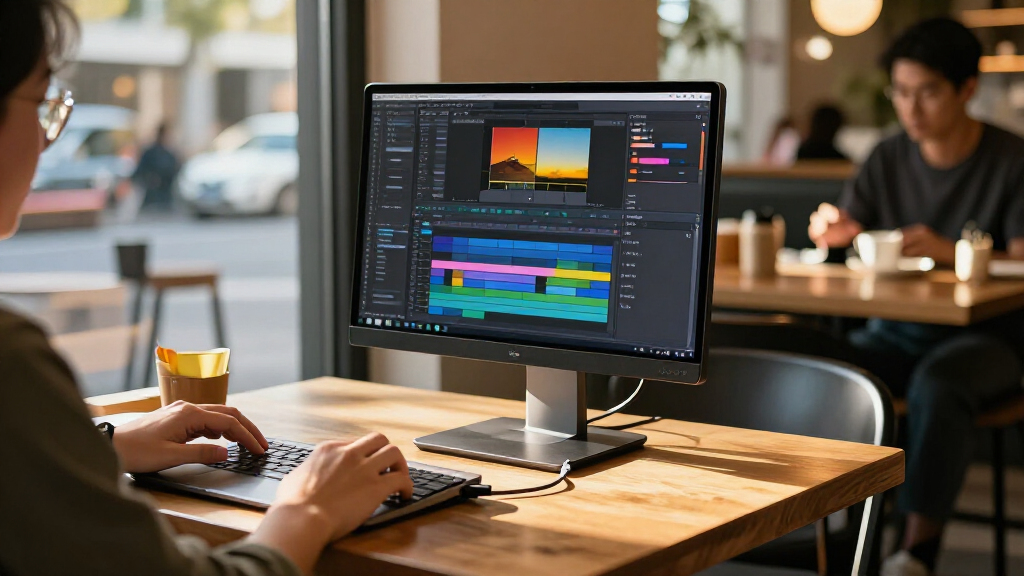
The best portable USB-C monitor for most buyers in this roundup is the ASUS ZenScreen MB169CK, a straightforward 15.6-inch Full HD option from an established monitor brand. For sharper detail, the ARZOPA 16-Inch 2.5K stands out, while the KYY X90D is aimed at people who want an attached dual-screen laptop setup. Across these portable USB-C monitors, the main tradeoffs are resolution, screen size, stand and cover design, and how much flexibility you need from the connections. A USB-C port alone does not guarantee that every laptop or phone can send video over a single cable. Read on for the full comparison, buying advice, and picks for different travel and work needs.

Get the latest gadgets delivered free — and shop member deals
- Fast, free delivery on millions of items
- Access to Prime Big Deal Days deals on October 6–7
- Prime Video, Amazon Music and more included
Complete the kit



Key Takeaways
- The lineup divides into two clear resolution tiers: most models are 15.6-inch 1080p screens, while the ARZOPA 16-inch 2.5K offers more workspace detail at the cost of asking buyers to prioritize sharper output over the simpler Full HD baseline.
- USB-C and HDMI flexibility matters as much as screen specs: several listed models pair USB-C with HDMI or mini HDMI, which can help with devices that lack USB-C video output, though cable and adapter needs vary.
- The KYY X90D serves a different job from a standalone monitor: its dual-screen laptop-extender format suits buyers seeking a laptop-attached workspace, not people who want the simplest independent portable display.
- Protection and placement vary across the group: some options are described with a smart cover or protective case, while the cocopar also lists VESA mounting; buyers should match the support style to their desk and travel routine.
- Many models share a 15.6-inch Full HD IPS format: the choice between them is less about headline resolution and more about connectivity, support design, portability, and whether a brand-specific option fits the buyer’s setup.
| KYY 15.6-Inch Portable Monitor, 1080p with Smart Cover |  | Best for Flexible Everyday Use | Screen size: 15.6 inches | Resolution: 1920 × 1080 | Panel and viewing angle: IPS; 178° | VIEW LATEST PRICE | See Our Full Breakdown |
| Portable Monitor 15.6″ FHD USB-C HDMI Ultra-Slim Travel Monitor with Kickstand |  | Best for Lightweight Carry | Screen size and resolution: 15.6 inches; 1920 × 1080 | Panel and aspect ratio: IPS; 16:9 | Refresh rate and response time: 60 Hz; 1.98 ms | VIEW LATEST PRICE | See Our Full Breakdown |
| ASUS ZenScreen MB169CK 15.6-Inch 1080p Portable Monitor | 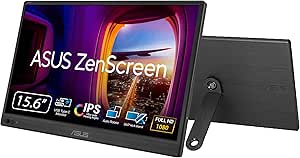 | Best for Adjustable Positioning | Screen size and resolution: 15.6 inches; 1920 × 1080 | Panel and finish: IPS LCD/LED; matte | Brightness and contrast: 300 nits; 2000:1 | VIEW LATEST PRICE | See Our Full Breakdown |
| cocopar 15.6-Inch Portable Monitor, 1080p FHD, 60Hz, USB-C and HDMI, VESA Mountable |  | Best for VESA Mounting | Screen size and resolution: 15.6 inches; 1920 × 1080 | Panel and refresh rate: IPS LCD; 60 Hz | Brightness and color gamut: 280 cd/m²; 85% | VIEW LATEST PRICE | See Our Full Breakdown |
| KYY X90D 15.6-Inch Dual-Screen Laptop Extender, FHD 1080p IPS |  | Best for Triple-Screen Laptop Setups | Display configuration: Two 15.6-inch screens | Resolution: 1920 × 1080 per screen | Panel and refresh rate: IPS LCD; 60 Hz | VIEW LATEST PRICE | See Our Full Breakdown |
| VILVA 15.6-Inch FHD IPS Portable Monitor with USB-C and HDMI |  | Best for a Matte Screen | Screen size: 15.6 inches | Resolution: 1920 × 1080 (FHD) | Panel: LCD with LED backlight; IPS | VIEW LATEST PRICE | See Our Full Breakdown |
| AOC 16T20 15.6-Inch Portable FHD Monitor |  | Best for Lightweight Carry | Screen size: 15.6 inches | Resolution: 1920 × 1080 (FHD) | Panel: IPS | VIEW LATEST PRICE | See Our Full Breakdown |
| Lenovo L15 15.6-Inch Portable FHD Monitor |  | Best for an Adjustable Work Setup | Screen size: 15.6 inches | Resolution: 1920 × 1080 (Full HD) | Panel: IPS | VIEW LATEST PRICE | See Our Full Breakdown |
| ARZOPA 16-Inch 2.5K Portable Monitor |  | Best for a Higher-Resolution Workspace | Screen size: 16 inches | Resolution: 2560 × 1600 | Display type: IPS | VIEW LATEST PRICE | See Our Full Breakdown |
| Anyuse 15.6-Inch FHD IPS Portable Monitor |  | Best for Mixed Work and Gaming Connections | Screen size: 15.6 inches | Resolution: 1920 × 1080 (FHD) | Display type: IPS LCD | VIEW LATEST PRICE | See Our Full Breakdown |
| ForHelp 15.6-Inch Portable FHD Monitor with USB-C and Mini HDMI |  | Best for a Brighter Matte Screen | Screen: 15.6-inch IPS LCD | Resolution: 1920 × 1080 (FHD) | Refresh rate: 60 Hz | VIEW LATEST PRICE | See Our Full Breakdown |
| MNN 15.6-inch FHD Portable Monitor |  | Best for Multiple Display Modes | Screen: 15.6-inch IPS | Resolution: 1920 × 1080 (Full HD) | Refresh rate: 60 Hz | VIEW LATEST PRICE | See Our Full Breakdown |
| InnoView 15.6-Inch FHD Portable Monitor with Protective Case |  | Best for an Adjustable Cover Stand | Screen: 15.6-inch IPS LCD | Resolution: 1920 × 1080 | Refresh rate: 60 Hz | VIEW LATEST PRICE | See Our Full Breakdown |
| ViewSonic VA1653 15.6-Inch 1080p Portable Monitor |  | Best for Frequent Travel | Screen: 15.6-inch IPS LCD | Resolution: 1920 × 1080 | Screen finish: Matte | VIEW LATEST PRICE | See Our Full Breakdown |
| Yodoit 15.6-Inch Portable FHD IPS Monitor |  | Best for a Simple Matte, Speaker-Ready Setup | Screen: 15.6-inch LCD IPS | Resolution: 1920 × 1080 (FHD) | Refresh rate: 60 Hz | VIEW LATEST PRICE | See Our Full Breakdown |
| portable USB-C monitor | Resolution | Connectivity | Refresh rate |
|---|---|---|---|
| KYY 15.6-Inch Portable Monitor | 1920 × 1080 | — | — |
| Portable Monitor 15.6" FHD USB | — | — | — |
| ASUS ZenScreen MB169CK 15.6-In | — | Dual USB-C; Mini HDMI | — |
| cocopar 15.6-Inch Portable Mon | — | 2 USB-C ports, HDMI, 3.5 mm audio | — |
| KYY X90D 15.6-Inch Dual-Screen | 1920 × 1080 per screen | USB-C 3.1 video output; USB-C power delivery | — |
| VILVA 15.6-Inch FHD IPS Portab | 1920 × 1080 (FHD) | USB-C, mini HDMI | 60 Hz |
| AOC 16T20 15.6-Inch Portable F | 1920 × 1080 (FHD) | — | 60 Hz |
| Lenovo L15 15.6-Inch Portable | 1920 × 1080 (Full HD) | Two USB-C ports | 60 Hz |
| ARZOPA 16-Inch 2.5K Portable M | 2560 × 1600 | — | — |
| Anyuse 15.6-Inch FHD IPS Porta | 1920 × 1080 (FHD) | — | 60 Hz |
| ForHelp 15.6-Inch Portable FHD | 1920 × 1080 (FHD) | 2 USB-C ports, 1 Mini HDMI port | 60 Hz |
| MNN 15.6-inch FHD Portable Mon | 1920 × 1080 (Full HD) | 2 full-featured USB-C ports, HDMI | 60 Hz |
| InnoView 15.6-Inch FHD Portabl | 1920 × 1080 | 2 full-function USB-C ports, 1 HDMI port | 60 Hz |
| ViewSonic VA1653 15.6-Inch 108 | 1920 × 1080 | USB-C, Mini HDMI | 60 Hz |
| Yodoit 15.6-Inch Portable FHD | 1920 × 1080 (FHD) | USB-C, Mini HDMI | 60 Hz |
More Details on Our Top Picks
KYY 15.6-Inch Portable Monitor, 1080p with Smart Cover
The KYY is a versatile pick for buyers who want a standard-size USB-C travel screen that can also connect over Mini HDMI. Its 15.6-inch Full HD IPS panel and 178-degree viewing angle suit shared viewing or a second laptop screen, while the magnetic cover protects the display and props it up. Compared with the ASUS ZenScreen MB169CK, the KYY weighs less and includes stereo speakers, but it lacks the ASUS’s 360-degree kickstand, tripod socket, and auto-rotation. Portrait orientation is supported, though the cover’s two stand grooves limit how precisely you can set the viewing angle. USB-C video in one cable also depends on a compatible device, so buyers should check for video output over USB-C before relying on that setup.
Pros:- Slim 1.7-pound design is practical for carrying alongside a laptop.
- Two full-function USB-C ports and Mini HDMI broaden device compatibility.
- Magnetic cover protects the screen and serves as a stand.
- Built-in stereo speakers and HDR support add useful everyday features.
Cons:- The cover stand has only two viewing-angle grooves.
- Single-cable USB-C video requires a compatible device.
- At 15.6 inches and 1080p, it is less compact and less sharp than smaller or higher-resolution alternatives.
Best for: Laptop owners who want a lightweight 15.6-inch second screen with both USB-C and Mini HDMI, plus an included protective stand cover.
Not ideal for: People who need finely adjustable positioning, a tripod mount, or guaranteed one-cable USB-C operation with devices that lack USB-C video output.
- Screen size:15.6 inches
- Resolution:1920 × 1080
- Panel and viewing angle:IPS; 178°
- Ports:2 full-function USB-C, Mini HDMI, 3.5 mm audio input
- Weight and profile:1.7 lb; 0.3 inches
- Audio:2 built-in stereo speakers
- Orientation:Landscape and portrait
- Included cover:Magnetic PU leather cover that doubles as a stand
Our verdict“Choose the KYY if you want a portable Full HD screen with broad connections and a protective cover, and can live with limited stand adjustment.”
Portable Monitor 15.6″ FHD USB-C HDMI Ultra-Slim Travel Monitor with Kickstand
At a listed 1.37 pounds, this model is the lightest straightforward 15.6-inch option in this group, making it a sensible choice for commuters who carry a second screen regularly. Its Full HD IPS panel, dual USB-C ports, Mini HDMI, and built-in speakers cover common laptop and console setups; the adjustable kickstand is more direct to use than the KYY’s grooved cover stand. HDR and low-blue-light features are included, but the listed contrast ratio is the main display figure provided, and the product data gives no brightness measurement. That makes its outdoor suitability harder to judge, especially since brightness may fall short in strong sunlight. Compared with the ASUS ZenScreen MB169CK, it is lighter, while the ASUS adds a tripod socket, auto-rotation, and a stated 300-nit brightness.
Pros:- Listed weight of 1.37 pounds suits regular travel.
- Dual USB-C ports and Mini HDMI support a range of devices.
- Adjustable kickstand avoids relying on a separate cover as the stand.
- HDR, low-blue-light technology, and built-in speakers add convenience.
Cons:- Brightness may be inadequate in very bright outdoor settings.
- USB-C video requires a compatible device with DP Alt Mode.
- No audio jack or additional HDMI input is listed.
Best for: Frequent travelers who want a light, full-size 1080p second screen with an adjustable kickstand and both USB-C and Mini HDMI inputs.
Not ideal for: Outdoor workers who need a clearly specified high-brightness display or buyers looking for a tripod mount and automatic screen rotation.
- Screen size and resolution:15.6 inches; 1920 × 1080
- Panel and aspect ratio:IPS; 16:9
- Refresh rate and response time:60 Hz; 1.98 ms
- Contrast ratio:1200:1
- Ports:2 USB-C (DP Alt Mode), Mini HDMI
- Weight and thickness:1.37 lb; 0.04 in
- Display features:HDR and low-blue-light technology
- Audio and stand:2 built-in speakers; adjustable kickstand
Our verdict“Pick this monitor if minimizing carry weight matters more than having a tripod mount or a published brightness figure.”
ASUS ZenScreen MB169CK 15.6-Inch 1080p Portable Monitor
The ASUS ZenScreen MB169CK is the strongest fit here for buyers who need more ways to position a portable screen. Its 360-degree kickstand, tripod socket, and auto-rotation offer more flexibility than the KYY’s two-position cover or the cocopar’s included cover stand, particularly for switching between desk setups and portrait documents. The matte 300-nit display, flicker-free operation, and low-blue-light features also make it a considered choice for extended work sessions. The tradeoff is weight: its listed 960 g makes it heavier than the 1.37-pound monitor in this lineup, and it is not the best pick for minimizing every ounce. USB-C video still depends on DP Alt Mode support, though Mini HDMI provides another connection route.
Pros:- 360-degree kickstand, tripod socket, and auto-rotation support flexible positioning.
- Matte 300-nit screen helps manage glare in varied indoor work settings.
- Dual USB-C and Mini HDMI provide more than one connection option.
- Flicker-free and low-blue-light features support longer viewing sessions.
Cons:- Listed weight of 960 g is higher than the lightest monitor in this group.
- One-cable USB-C video requires DP Alt Mode support.
- Its 5 ms response time is slower than the 1.98 ms figure listed for the lightweight travel monitor.
Best for: Mobile professionals who frequently change screen orientation or want to mount a portable monitor on a tripod.
Not ideal for: Travelers focused on the lightest possible 15.6-inch screen, or laptop owners whose USB-C ports do not support DP Alt Mode and who cannot use Mini HDMI.
- Screen size and resolution:15.6 inches; 1920 × 1080
- Panel and finish:IPS LCD/LED; matte
- Brightness and contrast:300 nits; 2000:1
- Refresh rate and response time:60 Hz; 5 ms
- Connectivity:Dual USB-C; Mini HDMI
- Weight and thickness:960 g; 11.8 mm
- Positioning features:360-degree kickstand, tripod socket, auto-rotation
- Viewing comfort:Flicker-free and low-blue-light features
Our verdict“Choose the ASUS if positioning options, anti-glare viewing, and portrait use matter more than carrying the lightest screen.”
cocopar 15.6-Inch Portable Monitor, 1080p FHD, 60Hz, USB-C and HDMI, VESA Mountable
The cocopar stands apart from the cover-stand models with VESA mounting, giving desk users a way to attach it to a compatible arm or mount rather than relying on its included cover. Its 15.6-inch Full HD IPS display, 60Hz refresh rate, and 85% color gamut make it a practical general-purpose companion screen, while USB-C and HDMI cover common laptop and console connections. At 1.5 pounds without the cover, the monitor itself is fairly portable; the complete carry setup rises to 2.4 pounds, which weakens its case against the lighter 1.37-pound travel model. Compared with the KYY, it adds VESA support but has a heavier covered carry weight. One-cable USB-C video also depends on the connected device supporting video output.
Pros:- VESA compatibility allows mounting beyond the included cover stand.
- Full HD IPS panel offers a 178-degree viewing angle.
- USB-C and HDMI support different host-device connection needs.
- Monitor weighs 1.5 pounds without its cover.
Cons:- The cover increases listed weight to 2.4 pounds.
- Single-cable USB-C display requires video output support from the connected device.
- Its 280 cd/m² brightness may be limiting in bright surroundings.
Best for: Laptop or console users who want a portable screen that can also attach to a VESA-compatible mount at a home or shared desk.
Not ideal for: People who carry their monitor with its cover every day and want the lowest possible bag weight, or those whose USB-C device lacks video output.
- Screen size and resolution:15.6 inches; 1920 × 1080
- Panel and refresh rate:IPS LCD; 60 Hz
- Brightness and color gamut:280 cd/m²; 85%
- Viewing angle:178°
- Connectivity:2 USB-C ports, HDMI, 3.5 mm audio
- Weight:1.5 lb without cover; 2.4 lb with cover
- Mounting and accessory:VESA mountable; includes cover stand
- Warranty:2 years
Our verdict“Choose the cocopar if VESA mounting is a priority and you can accept extra carry weight when the cover is attached.”
KYY X90D 15.6-Inch Dual-Screen Laptop Extender, FHD 1080p IPS
The KYY X90D is a different kind of portable USB-C monitor: rather than adding one independent screen like the KYY 15.6-inch model, it attaches two 15.6-inch displays to a compatible laptop for a triple-screen workspace. That can help users keep reference material, calls, and active work visible at once, and the rotating panels support landscape or portrait layouts. Its adjustable stand, included cables, and power adapter make it a more involved setup than a standard single-screen travel monitor; driver installation may also be required. The added workspace comes with a bulkier footprint and narrower device use: the product is intended for compatible computers and is not compatible with PS5, Xbox Series X, or other gaming consoles. Buyers should confirm host compatibility before choosing this over a conventional portable display.
Pros:- Adds two 15.6-inch Full HD screens for an expanded laptop workspace.
- Screens rotate through 360 degrees for landscape and portrait layouts.
- Adjustable stand supports screen positioning up to 90 degrees.
- Cables and a power adapter are included.
Cons:- Driver installation may be required.
- Not compatible with PS5, Xbox Series X, or other gaming consoles.
- The dual-screen assembly is larger and more involved to carry than a single portable monitor such as the ASUS ZenScreen MB169CK.
Best for: Laptop-based multitaskers who need two extra Full HD screens for work and are comfortable checking operating-system and driver compatibility.
Not ideal for: Console gamers, buyers seeking a simple standalone portable monitor, or travelers prioritizing a small and light bag setup.
- Display configuration:Two 15.6-inch screens
- Resolution:1920 × 1080 per screen
- Panel and refresh rate:IPS LCD; 60 Hz
- Brightness and contrast:300 cd; 1200:1
- Connectivity:USB-C 3.1 video output; USB-C power delivery
- Compatibility:Windows, macOS, Chrome OS, Android, and Linux
- Adjustment and rotation:Stand adjusts up to 90°; screens rotate 0° to 360°
- Dimensions and included accessories:9 × 15.35 × 1.18 inches; cables and power adapter
Our verdict“Choose the X90D if two extra laptop screens matter more than a compact, simple monitor that also works with consoles.”
VILVA 15.6-Inch FHD IPS Portable Monitor with USB-C and HDMI
The VILVA suits travelers who would rather avoid the reflections common on glossy portable displays. Its matte 15.6-inch Full HD panel gives you a familiar-sized second screen, while USB-C and mini HDMI let you connect to a range of compatible laptops and other devices. The magnetic cover protects the screen and props it up, and built-in stereo speakers mean fewer accessories for basic audio. Compared with the AOC 16T20, VILVA has the more glare-conscious finish, but the AOC is lighter and lists two USB-C ports. VILVA’s listed weight of 1.74 kg is a meaningful carry burden, and its brightness figure has no stated unit, making it harder to judge for bright workspaces. Its 60 Hz refresh rate is also a standard, not gaming-focused, specification.
Pros:- Matte Full HD IPS display can reduce distracting reflections.
- USB-C and mini HDMI support connections to a range of compatible devices.
- Magnetic cover protects the screen and doubles as a stand.
- Built-in stereo speakers provide basic audio without a separate speaker.
Cons:- Listed weight of 1.74 kg is heavier than the AOC 16T20 and ARZOPA 16-inch.
- Brightness is listed without a unit, limiting useful comparison.
- 60 Hz refresh rate is suited to standard work and viewing rather than high-refresh gaming.
Best for: Laptop users who work in mixed lighting and want a matte screen, a protective stand cover, and both USB-C and mini HDMI options.
Not ideal for: Frequent travelers prioritizing low carry weight, or buyers who need a clearly specified brightness level for outdoor or very bright environments.
- Screen size:15.6 inches
- Resolution:1920 × 1080 (FHD)
- Panel:LCD with LED backlight; IPS
- Screen finish:Matte
- Refresh rate:60 Hz
- Connectivity:USB-C, mini HDMI
- Weight:1.74 kg
- Included accessories:Magnetic cover, USB-C to USB-C cable, mini HDMI to HDMI cable
- Warranty:2 years
Our verdict“Choose VILVA if a matte screen and protective cover matter more to you than keeping your travel setup as light as possible.”
AOC 16T20 15.6-Inch Portable FHD Monitor
At 1.5 pounds, the AOC 16T20 is the easiest pick here for people who carry a second screen between offices, classes, or client sites. Its 15.6-inch Full HD IPS panel keeps the workspace familiar, and two USB-C ports plus Mini HDMI give it flexible connection options. A smart cover is included, while the three-year warranty is longer than the one-year coverage listed for the Lenovo L15. The tradeoff is the glossy screen, which can reflect windows and overhead lights more than the matte VILVA or Anyuse. A listed 20 ms response time also makes the AOC less appealing for fast-paced gaming than those models, whose listed response times are shorter. I’d favor it for portable office work, not for glare-prone spaces or responsiveness-sensitive play.
Pros:- At 1.5 pounds, it is lighter than the VILVA and Lenovo L15.
- Two USB-C ports and one Mini HDMI port offer multiple connection choices.
- Smart cover is included for screen protection and positioning.
- Three-year warranty is longer than the one listed for the Lenovo L15.
Cons:- Glossy finish can reflect nearby lights and windows.
- Listed 20 ms response time is slower than the 2 ms figures provided for VILVA and Anyuse.
- 60 Hz refresh rate does not target high-refresh gaming.
Best for: Commuters, students, and mobile professionals who want a light 15.6-inch second screen with USB-C and Mini HDMI connections.
Not ideal for: People working under bright overhead lighting or gamers who want a monitor with a shorter listed response time.
- Screen size:15.6 inches
- Resolution:1920 × 1080 (FHD)
- Panel:IPS
- Refresh rate:60 Hz
- Ports:2 USB-C, 1 Mini HDMI
- Viewing angle:170 degrees
- Weight:1.5 pounds
- Included components:Monitor, smart cover
- Warranty:3 years
Our verdict“Pick the AOC 16T20 if low carry weight and a longer listed warranty matter more than a glare-reducing finish or faster listed response time.”
Lenovo L15 15.6-Inch Portable FHD Monitor
The Lenovo L15 is the work-focused choice for buyers who want a more adaptable screen position than a cover-stand typically provides. Its height-adjustable stand can help align the display with a laptop or seated posture, and flicker-free technology is a useful feature for long work sessions. Two USB-C ports keep the setup simple with compatible devices. Against the AOC 16T20, the Lenovo offers stand adjustment and a wider listed viewing angle, but it weighs 4.7 pounds compared with the AOC’s 1.5, so it is a less convenient travel companion. The 250-nit brightness and glossy finish also make it a weaker fit for sunlit rooms than the brighter, matte ARZOPA and VILVA options. Its one-year warranty is shorter than the coverage listed for several alternatives.
Pros:- Height-adjustable stand offers more positioning flexibility than a basic cover stand.
- Two USB-C ports support a straightforward compatible-device setup.
- IPS panel has a listed 178-degree viewing angle.
- Flicker-free technology is intended to support comfortable extended viewing.
Cons:- At 4.7 pounds, it is substantially heavier than the AOC 16T20 and ARZOPA 16-inch.
- 250-nit brightness may be limiting in very bright environments.
- Glossy screen can reflect ambient light, and the listed warranty is one year.
Best for: Remote workers who travel occasionally and want an adjustable stand and two USB-C ports for a more ergonomic laptop workstation.
Not ideal for: Daily commuters who prioritize a light bag, or people who work in bright spaces where glossy screens and 250-nit brightness may be limiting.
- Screen size:15.6 inches
- Resolution:1920 × 1080 (Full HD)
- Panel:IPS
- Brightness:250 nits
- Refresh rate:60 Hz
- Connectivity:Two USB-C ports
- Stand:Height-adjustable
- Weight:4.7 pounds
- Warranty:1 year manufacturer warranty
Our verdict“Choose the Lenovo L15 for adjustable positioning at a work stop, but skip it if your portable monitor needs to stay genuinely light.”
ARZOPA 16-Inch 2.5K Portable Monitor
The ARZOPA earns its place by giving portable work more room and detail than the 15.6-inch Full HD models in this group. Its 16-inch, 2560 × 1600 display uses a 16:10 ratio, adding vertical space for documents, code, and web pages without requiring a taller desktop monitor. The listed 350-nit brightness and 123% sRGB gamut also set it apart from options such as the Lenovo L15, which is listed at 250 nits. At 1.46 pounds, it remains easy to carry and is slightly lighter than the AOC 16T20. The tradeoff is that this higher-resolution panel still depends on an external device; it is a display, not a standalone computer. Its inputs are listed as USB-C and HDMI, but the supplied data does not specify included cables or a protective cover.
Pros:- 2560 × 1600 resolution provides more detail than the Full HD options in this batch.
- 16:10 aspect ratio adds vertical workspace for documents and browsing.
- At 1.46 pounds, it is lighter than the AOC 16T20 and far lighter than the Lenovo L15.
- 350-nit brightness and 123% sRGB gamut are useful listed display specifications.
Cons:- Requires an external device to display content.
- Product data does not specify included accessories or a stand.
- HDMI is listed, but the data does not identify the connector type.
Best for: Mobile professionals, writers, and spreadsheet users who want extra vertical workspace and sharper detail while keeping their monitor bag-friendly.
Not ideal for: Buyers seeking a self-contained device, or those who need confirmed information about included cables, a protective cover, or a built-in stand.
- Screen size:16 inches
- Resolution:2560 × 1600
- Display type:IPS
- Aspect ratio:16:10
- Brightness:350 nits
- Color gamut:123% sRGB
- Inputs:USB-C, HDMI
- Weight:1.46 pounds
- Dimensions:14 × 9.3 × 0.36 inches
Our verdict“Choose the ARZOPA if extra resolution and vertical workspace are worth more to you than the familiar Full HD format of the other options.”
Anyuse 15.6-Inch FHD IPS Portable Monitor
Anyuse is the flexible Full HD pick for people who expect to switch between a laptop, phone, and game console. It has two USB-C ports and Mini HDMI, plus a matte IPS display with a 178-degree viewing angle. The listed 2 ms response time gives it a more responsiveness-focused spec than the AOC 16T20’s 20 ms figure, though both are 60 Hz displays and neither is a high-refresh option. Built-in speakers and multiple display modes add convenience for varied uses, while the matte finish contrasts with the glossy Lenovo L15 and AOC panels. At 1.4 pounds, it is also the lightest listed model here. The main caveat is USB-C video compatibility: the connected device needs DP Alt Mode or Thunderbolt. The stated HDR support does not change its 1920 × 1080 resolution or 60 Hz ceiling.
Pros:- At 1.4 pounds, it is lighter than the other models in this batch with listed weights.
- Two USB-C ports and Mini HDMI support several connection types.
- Matte IPS display has a listed 178-degree viewing angle.
- Built-in speakers and multiple display modes suit mixed work and entertainment.
Cons:- USB-C video requires a compatible device with DP Alt Mode or Thunderbolt.
- 60 Hz refresh rate is a limit for buyers seeking smoother high-refresh gaming.
- Listed dimensions of 16.9 × 1.96 × 11.4 inches may be awkward to compare with the slimmer measurements given for some alternatives.
Best for: Travelers who alternate between a compatible laptop, phone, and console and want a light monitor with multiple connection options and built-in speakers.
Not ideal for: Buyers whose USB-C device lacks DP Alt Mode or Thunderbolt, or gamers seeking a refresh rate above 60 Hz.
- Screen size:15.6 inches
- Resolution:1920 × 1080 (FHD)
- Display type:IPS LCD
- Screen finish:Matte
- Brightness:300 cd/m²
- Refresh rate:60 Hz
- Ports:2 USB-C, 1 Mini HDMI
- Weight:1.4 pounds
- Warranty:2 years
Our verdict“Pick Anyuse for a lightweight, matte-screen monitor that can serve several compatible devices, but check USB-C video support before buying.”
ForHelp 15.6-Inch Portable FHD Monitor with USB-C and Mini HDMI
I’d pick the ForHelp when glare control and a thin, light setup matter more than stand flexibility. Its matte 300 cd/m² IPS display is listed brighter than the MNN and ViewSonic panels, which can help in well-lit rooms, while the 1.52-pound aluminum body stays easy to pack. USB-C and Mini HDMI give it a useful fallback for devices that cannot send video over USB-C, though USB-C still requires compatible video output. The PU leather cover doubles as a stand, but it offers only two viewing angles; the ViewSonic VA1653’s foldable stand is a better fit for frequent repositioning. Built-in speakers add convenience, but I would not choose this as a substitute for dedicated audio. It’s a straightforward travel display, with a relatively simple stand as its main compromise.
Pros:- Matte Full HD IPS panel with a listed 300 cd/m² brightness
- USB-C and Mini HDMI support a range of compatible devices
- Slim 1.52-pound aluminum body is easy to carry
- Included cover protects the screen and works as a stand
Cons:- USB-C video requires a compatible device and video-output mode
- Cover stand has only two viewing-angle positions
- Built-in speakers offer an all-in-one convenience, not a dedicated audio setup
Best for: Laptop and console users who want a light, matte 15.6-inch screen for work or travel and can live with two stand angles.
Not ideal for: People who often change their screen position or need USB-C video from a device without DP Alt Mode or compatible video output.
- Screen:15.6-inch IPS LCD
- Resolution:1920 × 1080 (FHD)
- Refresh rate:60 Hz
- Brightness:300 cd/m²
- Screen finish:Matte
- Connectivity:2 USB-C ports, 1 Mini HDMI port
- Weight and thickness:1.52 lb; 0.3 inches
- Stand and audio:PU leather cover stand; 2 built-in speakers
Our verdict“Choose the ForHelp for a brighter matte screen and lightweight build, but pick the ViewSonic VA1653 if adjustable stand positioning matters more.”
MNN 15.6-inch FHD Portable Monitor
The MNN earns its place for buyers who want more ways to arrange a portable second screen, including portrait, extended, and copy modes. That flexibility suits document work and compatible phone setups better than the ForHelp’s more basic presentation. It also has two full-featured USB-C ports plus HDMI, so the connection choices are broad, although USB-C video still depends on Thunderbolt 3 or USB-C DP Alt Mode support. HDR and eye-care features add useful options, but the glossy panel can reflect windows or overhead lighting—a meaningful drawback beside the matte ForHelp and ViewSonic VA1653. Its cover doubles as a stand, which keeps the kit compact, but the supplied information does not give weight or brightness figures for an easy travel or daylight comparison. I’d favor it for flexible screen orientation, not glare-prone workspaces.
Pros:- Supports copy, extended, second-screen, and portrait display modes
- Two full-featured USB-C ports and HDMI provide flexible connections
- HDR, blue-light reduction, and flicker-free features are specified
- PU leather cover protects the panel and serves as a stand
Cons:- Glossy screen can reflect ambient light
- USB-C video requires Thunderbolt 3 or USB-C DP Alt Mode support
- Supplied product data does not state brightness or weight
Best for: Remote workers and students who want portrait mode for documents and multiple connection choices for compatible laptops, phones, or consoles.
Not ideal for: People working near bright windows or overhead lights, or buyers who need confirmed brightness and weight figures before choosing a travel display.
- Screen:15.6-inch IPS
- Resolution:1920 × 1080 (Full HD)
- Refresh rate:60 Hz
- Viewing angle:178°
- Connectivity:2 full-featured USB-C ports, HDMI
- Display features:HDR, blue-light reduction, flicker-free
- Display modes:Copy, extended, second screen, portrait
- Cover:PU leather smart cover that doubles as a stand
Our verdict“Choose the MNN if portrait mode and display flexibility outrank glare control, where the matte ForHelp or ViewSonic is the safer fit.”
InnoView 15.6-Inch FHD Portable Monitor with Protective Case
I’d shortlist the InnoView for buyers who want a protective case that can also serve as an adjustable stand. That gives it a practical setup advantage over the ForHelp, whose cover has only two viewing positions. The 15.6-inch IPS panel offers Full HD resolution, HDR support, and a listed 1200:1 contrast ratio, but its 250 cd/m² brightness is lower than the ForHelp’s stated 300 cd/m². Its 2.7-pound listed weight is also noticeably less travel-friendly than the roughly 1.5-pound ViewSonic VA1653 and ForHelp. USB-C and HDMI broaden device compatibility, but USB-C video needs a suitable output mode, and HDMI may call for separate power. I see this as a case-and-positioning pick rather than a lightest-load option; buyers should weigh the stand convenience against the heavier carry.
Pros:- Protective cover doubles as an adjustable stand
- Full HD IPS panel supports HDR and 178-degree viewing angles
- USB-C and HDMI offer more than one connection route
- Listed 1200:1 contrast ratio
Cons:- Listed 2.7-pound weight is heavier than the ForHelp and ViewSonic options
- USB-C video requires Thunderbolt 3/4 or USB-C DP Alt Mode support
- HDMI use may require a separate power cable
Best for: Desk-to-desk workers who value a protective cover with adjustable positioning and use compatible USB-C or HDMI devices.
Not ideal for: Frequent flyers prioritizing low carry weight, or users who need HDMI video and power from a single cable.
- Screen:15.6-inch IPS LCD
- Resolution:1920 × 1080
- Refresh rate:60 Hz
- Brightness:250 cd/m²
- Contrast ratio:1200:1
- Connectivity:2 full-function USB-C ports, 1 HDMI port
- Weight and dimensions:2.7 lb; 0.26 × 13.99 × 8.7 inches
- Power consumption:18 W
- Warranty:18 months
Our verdict“Pick the InnoView if its adjustable case stand matters more than low carry weight; choose the ViewSonic VA1653 for a lighter travel setup.”
ViewSonic VA1653 15.6-Inch 1080p Portable Monitor
The VA1653 is my travel-oriented pick because it combines a 1.5-pound body with a matte IPS display, a foldable stand, and a protective sleeve. Unlike the ForHelp and MNN, it does not rely on a cover that also props up the screen, so the included stand can support portrait and landscape use without folding a cover into position. USB-C and Mini HDMI give mobile workers a useful connection fallback, and the listed 7.6-watt power consumption suits a compact setup. The tradeoff is a 250 brightness figure with no unit supplied in the product data, so direct brightness comparison is uncertain; the ForHelp lists 300 cd/m². It also runs at 60 Hz, as do the other monitors here. I’d choose it for straightforward travel handling, not for the most confidently specified bright-screen option.
Pros:- Listed weight of 1.5 pounds suits regular travel
- Matte Full HD IPS panel helps limit reflections
- Foldable stand supports portrait and landscape orientations
- USB-C and Mini HDMI connections plus a protective sleeve
Cons:- Brightness is listed as 250 without a unit, making comparisons uncertain
- 60 Hz refresh rate is not aimed at high-refresh gaming
- Supplied information does not specify the stand’s adjustment range
Best for: Consultants, students, and hybrid workers who carry a monitor regularly and want a light panel with a separate foldable stand and sleeve.
Not ideal for: Buyers who need clearly documented brightness units or a higher refresh rate for fast-moving content.
- Screen:15.6-inch IPS LCD
- Resolution:1920 × 1080
- Screen finish:Matte
- Refresh rate:60 Hz
- Brightness:250 (unit not specified)
- Connectivity:USB-C, Mini HDMI
- Weight and dimensions:1.5 lb; 0.7 × 14.1 × 8.9 inches
- Power consumption:7.6 W
- Warranty:3-year limited warranty
Our verdict“Choose the ViewSonic for a light, travel-ready kit with portrait support, but favor the ForHelp if a stated 300 cd/m² brightness figure matters more.”
Yodoit 15.6-Inch Portable FHD IPS Monitor
The Yodoit pairs a matte Full HD IPS screen with USB-C, Mini HDMI, built-in speakers, HDR, and a low-blue-light mode. That makes it a simple all-in-one option for compatible laptops or consoles when an extra speaker or separate display cable is inconvenient. Its listed 300 brightness figure appears as both nits and, elsewhere in the product information, lux, so I would not use it for a precise brightness comparison with the ForHelp, which specifies 300 cd/m². The listed weight also varies between 690 g and 1.5 pounds. Those inconsistencies make travel planning less certain than with the ViewSonic VA1653, whose weight is stated consistently. The Yodoit is also thicker than the ForHelp at 0.43 inches. I’d consider it for its feature mix, while treating its weight and brightness claims cautiously.
Pros:- Matte Full HD IPS panel with 178-degree viewing angles
- USB-C and Mini HDMI provide two connection options
- Built-in dual speakers reduce the need for separate audio gear
- HDR and low-blue-light mode are included
Cons:- Product information gives conflicting weight figures
- Brightness is reported inconsistently as 300 nits and 300 lux
- USB-C single-cable operation requires a compatible video-output device
Best for: Laptop or console users who want a matte portable screen with built-in speakers and low-blue-light mode for casual work or entertainment.
Not ideal for: Travelers who need dependable weight and brightness specifications, or anyone whose device cannot output video over USB-C.
- Screen:15.6-inch LCD IPS
- Resolution:1920 × 1080 (FHD)
- Refresh rate:60 Hz
- Screen finish:Matte anti-glare
- Brightness:Reported as 300 nits and 300 lux
- Connectivity:USB-C, Mini HDMI
- Weight and thickness:Reported as 690 g and 1.5 lb; 0.43 inches thick
- Speakers and modes:Built-in dual speakers; HDR and low-blue-light mode
- Power consumption:5 W
Our verdict“Choose the Yodoit for a matte screen and built-in speakers in one compact kit, but prefer the ViewSonic if reliable travel specifications matter most.”
How We Picked
I ranked these portable USB-C monitors by how well their listed features answer common travel and work needs: readable screen area, resolution, connection options, setup support, and ease of carrying or protecting the display. I also separated products with a distinct use, such as the KYY X90D laptop extender and the ARZOPA 2.5K model, from the many 15.6-inch Full HD monitors rather than treating every screen as interchangeable.
The ranking favors models with a clear buyer advantage, then places more specialized or less differentiated options lower. Because product names and supplied details do not establish every point—such as brightness, weight, power draw, or included cable capabilities—I avoid treating those as confirmed advantages. Buyers should check the exact listing and their device’s video-output support before choosing; USB-C charging or data support alone does not prove USB-C video compatibility.
Factors to Consider When Choosing Portable USB-C Monitors
Portable monitors can look similar on a spec sheet, so I would start with the way the screen needs to connect and sit—not with the product name alone. These checks help avoid buying a display that is awkward with your laptop, too demanding to power, or poorly suited to your work surface.
Check USB-C Video Support Before Choosing a One-Cable Setup
A USB-C-shaped port does not always carry video. Your laptop or phone needs to support display output over USB-C, often through DisplayPort Alt Mode, for a direct video connection to work. Check the source device’s specifications and the monitor’s connection requirements before assuming one cable handles everything. If your device lacks USB-C video output, an HDMI connection may be useful, but it can add a second cable and may require a compatible adapter. A monitor with both USB-C and HDMI can offer more connection paths, but buyers should confirm which cables are included and whether the source also needs to power the display.
Choose Resolution for Your Screen Size and Work
Full HD is the common format among the 15.6-inch models here, and it can keep text and everyday applications practical without adding the demands of a higher-resolution panel. The ARZOPA’s 16-inch 2.5K resolution is the standout for buyers who want more detail or more room for dense layouts, but higher resolution can make power, scaling, and device performance more relevant. Think about what will be open on the screen: spreadsheets and fine text benefit more from extra pixels than a basic reference window. Also check how your operating system handles scaling, since a sharper display can still feel cramped if interface elements are too small. Match resolution to your workload rather than assuming the highest number is always the best travel choice.
Treat the Stand or Cover as Part of the Monitor
A portable screen needs stable placement, and the support method can shape daily comfort as much as the panel does. A cover that folds into a stand may protect the screen in transit, while a separate kickstand can make quick desk setups simpler. VESA mounting, listed for the cocopar, may suit a fixed workstation better than a traveler who wants the fewest separate parts. Check whether the screen can be angled to your preferred viewing position and whether the support remains steady on a small table. A case that protects the panel is not automatically a good stand, so look for clear details on both roles.
Plan for Power, Cables, and the Real Travel Load
Portable displays add more than their own weight to a bag: power adapters, video cables, and protective covers can all add bulk. Some USB-C setups may use the source device for power, but that can drain a laptop battery faster and depends on the devices and cable. HDMI often handles video without powering the monitor, so a separate power connection may be needed. Before buying, check the monitor’s power requirements, the supplied accessories, and whether your travel setup has spare ports. A slightly less feature-rich screen can be easier to use on the road if it needs fewer accessories.
Decide Whether You Need a Standalone Screen or a Laptop Extender
A conventional portable monitor can sit beside a laptop, connect to a console, or serve as a second screen wherever you have a surface. A laptop extender such as the KYY X90D instead targets a screen attached to or arranged around the laptop, which can save desk width but makes the setup more specific. Consider whether you need the display to work with several devices or mostly with one laptop. Check supported laptop sizes, mounting method, and how the added screen affects portability before choosing an extender. Buyers who switch between a laptop, console, and phone are usually better served by a conventional monitor with suitable inputs.
Pay for Features You Will Use, Not Just a Premium Label
Spending more makes sense when a feature changes how you work: higher resolution for detailed content, a particular connection for device compatibility, or mounting support for a permanent desk arrangement. It is harder to justify an upgrade when two candidates share the same 15.6-inch Full HD format and the listing does not show a concrete benefit for your setup. Brand familiarity can help some buyers narrow the field, but it does not replace checking the exact panel, accessories, and support design. Compare the full kit and your expected use rather than focusing on the screen specification alone. For occasional reference work, a basic Full HD model may be a better fit than paying for resolution or a layout you will rarely use.
Frequently Asked Questions
Will any USB-C portable monitor work with my laptop through one cable?
No. The laptop’s USB-C port must support video output, and the monitor and cable must support a compatible video connection. Some USB-C ports handle charging and data but not display output. If your laptop cannot send video over USB-C, check whether the monitor accepts HDMI and what extra power connection or adapter that setup needs. Confirm the exact port capabilities in the device specifications before buying.
Is a 2.5K portable monitor worth choosing over a 1080p model?
It can be worthwhile if you regularly work with detailed text, large spreadsheets, or layouts that benefit from additional screen detail. The ARZOPA 16-inch 2.5K is the clear higher-resolution option in this lineup, while most alternatives use Full HD. Higher resolution does not automatically mean a better fit: consider operating-system scaling, your device’s video output, and power needs. For a second screen used mainly for email or reference material, Full HD may be the simpler match.
Can I use a portable USB-C monitor with a phone or game console?
Possibly, but compatibility depends on the device’s video output and the monitor’s inputs. A phone needs to support external display output, and a console may connect through HDMI or another supported video path. A product listing that names phones or consoles does not confirm compatibility with every model or cable arrangement. Check the source device’s output requirements and the monitor’s input ports, then account for how the screen will receive power during use.
Should I choose a laptop screen extender or a regular portable monitor?
Choose an extender if you mainly want an expanded laptop workspace and are comfortable with a setup designed around that computer. The KYY X90D fills that more specialized role in this roundup. A standalone display is usually more flexible if you plan to connect different laptops, consoles, or other devices, or want to place the screen independently. Before choosing an extender, verify laptop fit and mounting details; before choosing a regular monitor, check how its stand or cover works on your typical surface.
What should I verify before taking a portable monitor on a trip?
Check the display’s dimensions and weight, whether its cover protects the panel in your bag, and how many cables or adapters its connection setup requires. Confirm whether your laptop can power it over USB-C or whether you need a separate power source. Test that the screen can be positioned securely on the surfaces you expect to use, since a travel cover and a stable stand are not always the same thing. Keeping those checks tied to your actual laptop and travel routine helps prevent a compact monitor from becoming a cumbersome extra kit.
Conclusion
For a balanced conventional display, I would start with the ASUS ZenScreen MB169CK as the best overall pick in this group. The best value direction is a straightforward 15.6-inch Full HD model that has the inputs and support style your devices need; compare the KYY, VILVA, ForHelp, MNN, Anyuse, and Yodoit listings closely rather than assuming their similar formats mean identical accessories. For a premium feature priority, the ARZOPA 16-inch 2.5K is the choice for buyers who want higher resolution. Beginners should favor a conventional 15.6-inch Full HD screen with clearly documented connections and a usable cover or stand, while buyers who want a laptop-attached second display should look at the KYY X90D. Choose the cocopar if VESA mounting is a specific need, and verify port support, power, and included cables before placing any model in your travel setup.
Halloween Picks
halloween
As an affiliate, we earn on qualifying purchases.