
For coding, a monitor light bar should brighten your desk without adding glare to the screen, and the BenQ ScreenBar Halo 2 is my best overall pick for its front lighting, rear bias light, and range of controls. The Quntis Monitor Light Bar with Auto-Dimming suits programmers who want automatic brightness adjustment, while the Yeelight keeps things simpler with touch control and stepless dimming. The main tradeoffs are monitor fit, whether you want backlighting, and how much control you need over brightness and color. Curved screens and compact setups can rule out otherwise appealing models. Read on for how all eight options compare and which one fits your desk.

Get the latest gadgets delivered free with Prime
- Fast, free delivery on millions of items
- Prime Video, Amazon Music and more included
- Member-only deals all year
Complete the kit



Key Takeaways
- BenQ ScreenBar Halo 2 leads for a feature-rich desk setup because it combines screen-directed lighting with rear bias lighting and multiple controls.
- Quntis with Auto-Dimming is the clearest fit for programmers who want brightness to respond to the room without frequent manual changes.
- Backlighting separates several Quntis models from simpler bars: it can make a dim coding setup feel more balanced, but adds another lighting choice to manage.
- The 26-inch curved Quntis targets wide curved displays, while compact bars such as the Samphon 11.8-inch favor smaller screens and desks.
- USB power and remote controls appear across lower-complexity options, but buyers still need to check monitor shape, top bezel space, and cable reach before choosing.
| Yeelight Monitor Light Bar with Touch Control and Stepless Dimming |  | Best for Simple, Glare-Controlled Desk Lighting | Brightness: 250 lm | Color temperature: 2700K–6500K | Color rendering index: Ra95 | VIEW ON AMAZON | See Our Full Breakdown |
| OOWOLF Monitor Light Bar with Remote |  | Best for Remote Adjustments | Brand: OOWOLF | Product type: Monitor light bar | Power: USB | VIEW ON AMAZON | See Our Full Breakdown |
| BenQ ScreenBar Halo 2 LED Monitor Light Bar |  | Best Premium Lighting System | Light source: LED | Power source: USB electrical cable | Wattage: 5 W | VIEW ON AMAZON | See Our Full Breakdown |
| Quntis 16.1-Inch Monitor Light Bar with Backlight and Remote | 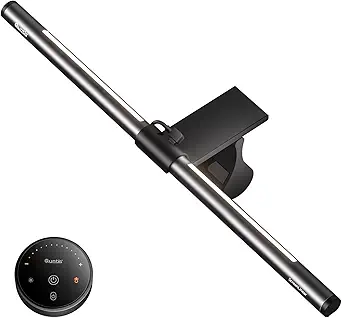 | Best for Front-and-Back Lighting Modes | Length: 16.1 inches (41 cm) | Color: Grey | Lighting modes: Work, Immersive, Design | VIEW ON AMAZON | See Our Full Breakdown |
| Quntis 26-Inch Curved Monitor Light Bar with RGB Backlight |  | Best for Large Curved Displays | Extended length: Up to 26 in (66 cm) | Monitor compatibility: Curved monitors over 34 in with 800R–3000R curvature, or large flat screens | Maximum screen thickness: 3.35 in | VIEW ON AMAZON | See Our Full Breakdown |
| Quntis Monitor Light Bar with Auto-Dimming and Touch Controls |  | Best for Automatic Desk Lighting | LEDs: 78 LED beads | Color temperature: 3000K–6500K | Color rendering index: Ra98 | VIEW ON AMAZON | See Our Full Breakdown |
| Colorpanda 16.14-Inch USB Monitor Light Bar, 250 Lumens |  | Best for Straightforward Monitor Fit | Length: 16.14 inches | Brightness: 250 lumens | Power: USB | VIEW ON AMAZON | See Our Full Breakdown |
| Samphon 11.8-Inch USB LED Monitor Light Bar |  | Best Compact Pick | Dimensions: 11.8 × 0.78 × 3.3 in | Light source: LED | Power source: Corded electric, USB | VIEW ON AMAZON | See Our Full Breakdown |
| monitor light bar for coding | Color rendering index | Color temperature | Power |
|---|---|---|---|
| Yeelight Monitor Light Bar wit | Ra95 | 2700K–6500K | USB |
| OOWOLF Monitor Light Bar with | CRI ≥95 | 3100K–6500K | USB |
| BenQ ScreenBar Halo 2 LED Moni | CRI > 95 | 2700K–6500K | — |
| Quntis 16.1-Inch Monitor Light | Ra95 | — | — |
| Quntis 26-Inch Curved Monitor | RA98 | 3000K–6500K | — |
| Quntis Monitor Light Bar with | Ra98 | 3000K–6500K | USB |
| Colorpanda 16.14-Inch USB Moni | — | — | USB |
| Samphon 11.8-Inch USB LED Moni | — | — | — |
More Details on Our Top Picks
Yeelight Monitor Light Bar with Touch Control and Stepless Dimming
The Yeelight makes sense for coders who want to add focused desk light without a separate remote or a complicated setup. Its stepless brightness and 2700K–6500K color adjustment let you tune the light for daytime work or a warmer evening session, while the glare-minimizing design aims light away from the screen. Compared with the OOWOLF Monitor Light Bar, Yeelight offers touch controls on the bar instead of remote adjustments, which suits a minimal desk but means reaching up to change settings. Its clip fits flat and curved monitors 0.3–1.1 inches thick, and the low-profile build leaves desk space and webcam visibility intact. The tradeoff is a USB power connection and no stated ambient backlight, so it is less suited to buyers seeking broader room lighting.
Pros:- Adjustable brightness and 2700K–6500K color temperature
- Designed to minimize glare and flicker
- Fits compatible flat and curved monitors
- Low-profile design preserves desk space and webcam visibility
Cons:- Requires a USB power connection
- Touch controls require reaching the light bar
- No ambient backlight is listed
Best for: Coders who want adjustable, screen-friendly front light on a thin flat or curved monitor and prefer onboard touch controls.
Not ideal for: People who want ambient backlighting, remote controls, or a monitor thicker than 1.1 inches.
- Brightness:250 lm
- Color temperature:2700K–6500K
- Color rendering index:Ra95
- LEDs:78
- Monitor thickness compatibility:0.3–1.1 in
- Power:USB
- Cable length:1.5 m
- Controls:Touch control with stepless dimming
Our verdict“Choose Yeelight for straightforward touch-controlled task lighting when glare control and a compact fit matter more than backlighting or remote operation.”
OOWOLF Monitor Light Bar with Remote
The OOWOLF is a practical pick for someone who wants to change lighting without reaching over the keyboard. Its remote adjusts brightness and color temperature, and the memory function restores the last brightness setting, reducing repeated setup at the start of a coding session. The listed 3100K–6500K range covers neutral through cool light, but it does not extend as warm as the Yeelight’s 2700K setting. OOWOLF emphasizes flicker-free lighting and reduced blue light exposure; the supplied data does not give a lumen output or monitor-fit range, so buyers have less information for judging desk coverage and compatibility. Compared with the BenQ ScreenBar Halo 2, it offers a simpler remote-focused setup without listed ambient backlighting or automatic monitor-linked operation.
Pros:- Remote control adjusts brightness and color temperature
- Memory recalls the last brightness setting
- Flicker-free lighting is specified
- CRI of at least 95
Cons:- No lumen output is provided in the supplied specifications
- Monitor thickness compatibility is not stated
- Color temperature starts at 3100K, warmer than Yeelight’s listed minimum
Best for: Coders who want to adjust desk light from a seated position and have the lamp recall their preferred brightness.
Not ideal for: Buyers who need confirmed monitor thickness compatibility, a particularly warm setting, or ambient backlighting.
- Brand:OOWOLF
- Product type:Monitor light bar
- Power:USB
- Color rendering index:CRI ≥95
- Color temperature:3100K–6500K
- Brightness:Stepless dimming
- Controls:Remote control
- Screen size:16.14 inches
- Pack quantity:1
Our verdict“Pick OOWOLF if remote control and brightness memory are priorities and its unspecified monitor fit works for your setup.”
BenQ ScreenBar Halo 2 LED Monitor Light Bar
The ScreenBar Halo 2 earns its place for coders who want both glare-free front lighting and ambient backlighting in one monitor-mounted setup. Its wireless controller adjusts brightness, color temperature, and modes, while ambient light adjustment and automatic monitor-linked operation reduce the need to reset the lamp manually. That wider control set separates it from the Yeelight Monitor Light Bar, which offers adjustable front light but no listed backlight or automatic operation. The BenQ also has broader stated fit: it supports monitors 0.17–2.36 inches thick and curved screens from 1000R to 1800R. The tradeoff is a more involved feature set and a USB power cable; coders seeking only a simple light may find the Quntis 16.1-inch bar’s front-and-back modes adequate without needing these automatic features.
Pros:- Combines adjustable front lighting and ambient backlighting
- Wireless controller adjusts brightness, color temperature, and modes
- Ambient light adjustment and automatic monitor-linked operation
- Wide stated monitor thickness compatibility
Cons:- Requires a USB electrical cable for power
- Curved monitor compatibility is specified only for 1000R–1800R
- More features than buyers seeking simple front lighting may need
Best for: Developers with compatible flat or curved monitors who want front and back lighting, automatic adjustment, and wireless controls.
Not ideal for: Minimalist setups that need only basic task lighting or users whose curved monitor falls outside the stated 1000R–1800R range.
- Light source:LED
- Power source:USB electrical cable
- Wattage:5 W
- Voltage:5 V DC
- Color temperature:2700K–6500K
- Color rendering index:CRI > 95
- LED lifespan:Over 50,000 hours
- Monitor thickness compatibility:0.17–2.36 in (0.43–6 cm)
- Curved monitor compatibility:1000R–1800R
Our verdict“Choose the ScreenBar Halo 2 if you want a more automated front-and-back lighting setup and your monitor fits its stated compatibility range.”
Quntis 16.1-Inch Monitor Light Bar with Backlight and Remote
This Quntis is a middle ground for coders who want more than a front-facing lamp but do not need the automatic monitor-linked features listed for the BenQ ScreenBar Halo 2. Its three modes—Work, Immersive, and Design—pair front and back lighting with stepless brightness and color temperature adjustment, giving users ways to shape the desk atmosphere around focused coding or other screen work. A weighted sliding clip is designed for flat and curved monitors, and the memory function restores brightness and color temperature. Compared with the Yeelight Monitor Light Bar, Quntis adds backlighting and a touch remote; compared with the BenQ, its backlight adjustment is limited to brightness. That limitation matters if you want independent color control behind the display, and the supplied data does not specify a monitor thickness range.
Pros:- Front and back lighting with three listed modes
- Stepless brightness and color temperature adjustment
- Weighted sliding clip is designed for flat and curved monitors
- Memory restores brightness and color temperature
Cons:- Backlight adjustment is limited to brightness
- Monitor thickness compatibility range is not stated
- The supplied specifications do not list a power connection
Best for: Coders who want multiple front-and-back lighting modes, a touch remote, and saved settings for a compatible flat or curved monitor.
Not ideal for: People who want independent color adjustment for backlighting or need a confirmed monitor thickness range before buying.
- Length:16.1 inches (41 cm)
- Color:Grey
- Lighting modes:Work, Immersive, Design
- Light sources:Front and back
- LED count:84
- Color rendering index:Ra95
- Controls:Touch remote and onboard buttons
- Mounting:Adjustable sliding weighted clip
- Memory function:Restores last brightness and color temperature
Our verdict“Choose this Quntis for flexible front-and-back modes and saved settings if brightness-only backlight control meets your needs.”
Quntis 26-Inch Curved Monitor Light Bar with RGB Backlight
For a large coding display, this Quntis addresses a coverage problem the shorter bars in this lineup may leave unresolved. Its dual bars extend up to 26 inches, and the product is designed for curved monitors over 34 inches as well as large flat screens. The listed illuminance—up to 1400 lux at the center and 500 lux across a wider area—signals a focus on broad desk lighting, while the 15 RGB backlight modes add ambient color behind the screen. Compared with the 16.1-inch Quntis, this model is built for larger displays and has a stated clamp capacity up to 3.35 inches thick. That reach comes with narrower monitor-size suitability: smaller-screen users may find it a poor fit, and its USB-C power connection needs a compatible port or adapter.
Pros:- Dual bars extend up to 26 inches for large-screen coverage
- Up to 1400 lux at center and 500 lux across a wider area
- Offers 15 RGB backlight modes
- Ambient light sensing and power-off memory are specified
Cons:- Designed primarily for curved monitors over 34 inches and large flat screens
- Requires USB-C power
- Maximum screen thickness is limited to 3.35 inches
Best for: Coders using a curved monitor over 34 inches or a large flat display who want broad desk illumination and RGB backlighting.
Not ideal for: People with smaller monitors or setups without a suitable USB-C power connection.
- Extended length:Up to 26 in (66 cm)
- Monitor compatibility:Curved monitors over 34 in with 800R–3000R curvature, or large flat screens
- Maximum screen thickness:3.35 in
- Color temperature:3000K–6500K
- RGB backlight modes:15
- Color rendering index:RA98
- Illuminance:Up to 1400 lux at center; 500 lux across a wider area
- Blue light certification:IEC/TR 62778, RG0
- Power connection:USB-C
Our verdict“Pick this Quntis when a large display needs wider desk coverage and RGB backlighting, provided the screen and USB-C connection are compatible.”
Quntis Monitor Light Bar with Auto-Dimming and Touch Controls
The ambient light sensor makes this Quntis a useful fit for coders whose room lighting shifts through the day: it adjusts illumination automatically, while manual controls let you set brightness and color temperature from 3000K to 6500K. Its asymmetrical beam is designed to light the desk while limiting reflected screen glare, and the weighted clip keeps the lamp off your work surface. Compared with the Colorpanda 16.14-Inch USB Monitor Light Bar, this model adds automatic adjustment and a higher stated color rendering index, while Colorpanda supplies a specified length and monitor thickness range. The tradeoff is that Quntis lists neither dimensions nor monitor compatibility details, so checking the clip fit may take extra care. Choose it for adaptive lighting; skip it if you need a standalone lamp.
Pros:- Ambient light sensor adjusts illumination automatically
- Asymmetrical beam is designed to reduce reflected screen glare
- Manual brightness and 3000K–6500K color temperature adjustments
- Ra98 color rendering and 78 LEDs for desk tasks
Cons:- Monitor-mounted design does not serve as a standalone desk lamp
- No dimensions or monitor compatibility range is provided
Best for: Coders who work through changing daylight or room conditions and want a monitor-mounted light that adjusts automatically.
Not ideal for: Buyers who need a standalone desk lamp or clear dimensions and monitor compatibility details before choosing a mount.
- LEDs:78 LED beads
- Color temperature:3000K–6500K
- Color rendering index:Ra98
- Auto-dimming:Ambient light sensor adjusts illumination to 900 lux
- Power:USB
- Mounting:Weighted monitor clip
- Lighting design:Asymmetrical beam designed to reduce screen glare
- Safety and flicker claims:IEC/TR 62778 and IEC/EN 62471 standards; flicker-free
Our verdict“Choose this Quntis if automatic brightness adjustment matters more than having published fit dimensions or a standalone lamp.”
Colorpanda 16.14-Inch USB Monitor Light Bar, 250 Lumens
The 0.12–2.2-inch monitor thickness range gives this Colorpanda a clear fit target, which is useful if you want to check compatibility before setting up a coding desk. Its 16.14-inch bar clips on without tools, freeing desk space, and touch controls offer adjustable brightness across three color temperatures. The memory function keeps the last setting for the next session. Compared with the Quntis Monitor Light Bar with Auto-Dimming and Touch Controls, Colorpanda spells out its length and supported monitor thickness, while Quntis adds an ambient light sensor and a broader stated color temperature range. Colorpanda’s tradeoff is a more bounded setup: monitors outside its listed thickness range are a poor fit, and it has no described automatic adjustment. It suits buyers who prefer simple controls and known fit limits.
Pros:- Specified compatibility with monitors 0.12 to 2.2 inches thick
- Three color temperatures and adjustable brightness
- Memory function saves the last setting
- Clip-on, tool-free installation saves desk space
Cons:- Monitor thickness outside the stated range may prevent a suitable fit
- No automatic ambient light adjustment is described
Best for: Coders with a monitor between 0.12 and 2.2 inches thick who want a tool-free, space-saving light with simple settings.
Not ideal for: Users with monitors outside the stated thickness range or those who want a sensor to adjust lighting automatically.
- Length:16.14 inches
- Brightness:250 lumens
- Power:USB
- Color temperatures:2700K, 4000K, 6500K
- Brightness control:Adjustable via touch buttons
- Memory function:Saves the last setting
- Monitor thickness compatibility:0.12 to 2.2 inches
- Installation:Clip-on, tool-free
Our verdict“Pick Colorpanda if your monitor fits its stated range and you value simple controls over automatic dimming.”
Samphon 11.8-Inch USB LED Monitor Light Bar
At 11.8 inches long, the Samphon is the compact choice in this batch, suited to a smaller coding setup where a longer bar may feel out of place. It claims up to 800 lux across a 30 × 20-inch area, with a 45-degree beam designed to light the desk while reducing screen glare. Stepless dimming and three color temperatures allow more adjustment than the Colorpanda’s listed three fixed color settings. Its tool-free counterweight clip is described as compatible with most flat and curved monitors. The tradeoff is its shorter span, which may be less suited to a wide desk or monitor than Colorpanda’s 16.14-inch bar. A right-side mechanical switch may also be awkward depending on your setup.
Pros:- Compact 11.8-inch length suits smaller monitor setups
- Stepless dimming and three color temperatures
- USB-powered at 5 V
- Tool-free counterweight clip is described as compatible with most flat and curved monitors
Cons:- Shorter bar may provide less across-monitor coverage than Colorpanda’s 16.14-inch model
- Mechanical switch is located on the right side
Best for: Coders with a compact desk or monitor who want USB power, adjustable brightness, and a small footprint.
Not ideal for: Users who need a longer light bar for a wide display or whose setup makes a right-side switch inconvenient.
- Dimensions:11.8 × 0.78 × 3.3 in
- Light source:LED
- Power source:Corded electric, USB
- Voltage:5 V
- Illumination:Up to 800 lux
- Coverage area:30 × 20 in
- Beam angle:45 degrees
- Color temperatures:3000 K, 4000 K, 6500 K
- Dimming and mounting:Stepless dimming; tool-free counterweight clip
Our verdict“Choose Samphon for a compact monitor setup where adjustable lighting matters more than a longer bar.”

How We Picked
I ranked these bars around the needs of long coding sessions: lighting that can be aimed at the desk, controls that are practical during work, a mount suited to the intended monitor, and useful options for balancing light around the screen. I gave extra weight to features that address a real desk problem, such as auto-dimming for changing room light or rear illumination for a dark setup, rather than treating more features as automatically better.
The BenQ ScreenBar Halo 2 takes the lead as the most fully equipped option, with the Quntis auto-dimming model close behind for hands-off adjustment. Other Quntis bars earn places for backlighting, curved-display coverage, or a shorter 16.1-inch format. I placed Yeelight and OOWOLF as simpler control-focused alternatives, while Colorpanda and Samphon serve buyers prioritizing compact USB-powered lighting. Before buying, confirm that the mount suits your monitor; the product names and feature sets alone do not establish fit for every screen.
| monitor light bar for coding | Color rendering index |
|---|---|
| Yeelight Monitor Light Bar wit | Ra95 |
| OOWOLF Monitor Light Bar with | CRI ≥95 |
| BenQ ScreenBar Halo 2 LED Moni | CRI > 95 |
| Quntis 16.1-Inch Monitor Light | Ra95 |
| Quntis 26-Inch Curved Monitor | RA98 |
| Quntis Monitor Light Bar with | Ra98 |
| Colorpanda 16.14-Inch USB Moni | — |
| Samphon 11.8-Inch USB LED Moni | — |
Factors to Consider When Choosing Monitor Light Bar For Coding
Choosing a coding light bar is mostly a question of how your monitor, room, and work habits interact. These factors can help narrow the field before you compare individual controls and lighting modes.
Match the bar to your monitor shape
Start with the monitor’s top edge, not just its screen size. Curved panels, very thin bezels, webcams, and unusual rear housings can affect how a clip sits and whether the bar points down at the desk. A wide curved monitor may call for a longer bar, while a compact display can feel crowded under one. Check the maker’s fit guidance and measure any raised bezel or webcam before ordering. A light bar that rests securely matters more than extra modes if you have to reposition it each day. If your setup has multiple monitors, decide whether you want one bar per screen or a single light aimed across the desk.
Choose front light and backlight for your room
Front lighting and rear bias lighting solve different problems. The front beam lights your keyboard and notes; rear light adds a glow behind the display that can make a dark workspace feel less stark. A backlight does not replace a desk lamp when you need broad room illumination, and it may be unnecessary in a bright office. Think about whether you work late with the main lights off, or mostly during daylight. In a shared space, the ability to control rear and front lighting separately can help keep light from spilling where it is unwanted. Avoid buying a backlight solely because it is included if you expect to leave it off.
Decide how much automation you want
Auto-dimming can reduce small manual adjustments when daylight changes, but it cannot know your preferred brightness or compensate for every reflective desk surface. Manual dimming gives you direct control and can be more predictable if your room lighting stays steady. Stepless adjustment offers finer tuning than a few fixed levels, while touch controls and remotes place those adjustments in different places. Consider whether you change brightness often enough for automation to matter. A simple control scheme may be easier to use during focused work than a set of modes you rarely touch. Whichever approach you choose, check that brightness can be adjusted without awkwardly reaching over the monitor.
Check power and cable routing
USB power can keep a light bar convenient, but the available port and cable path shape the setup. A monitor port may turn off with the display or supply less power than the bar expects, so confirm the device’s requirements and your preferred power source. A desk hub can simplify routing, though it adds another cable and connection point. Look at where the cable exits the bar and whether it can run behind your monitor without pressing against a wall. On adjustable arms, leave enough slack for the screen to move. A tidy connection is useful for coding setups where the desk already carries power, data, and peripheral cables.
Prioritize useful light over extra modes
More color options and effects do not necessarily make a better work light. For reading code and paper notes, consistent white illumination and easy brightness adjustment may matter more than decorative RGB. If you switch between focused work and ambient lighting, extra modes can be worthwhile, but consider whether they are simple to control and can be turned off quickly. A narrow bar may leave the desk edges dim, while a longer model takes more space above the screen. Match coverage to the area you use rather than choosing by feature count. The practical test is whether the light reaches your keyboard and nearby notes without reflecting into the display.
Frequently Asked Questions
Will a monitor light bar fit a curved monitor?
Some bars are designed with curved screens in mind, but “curved” covers a wide range of panel shapes and rear housings. Check the mounting method and the supported monitor thickness or curvature guidance from the manufacturer. A longer bar can spread light across a wide display, but length alone does not guarantee that its clip will sit securely. Also check whether your webcam or monitor light sensor occupies the same top edge. If fit is uncertain, prioritize a clear return policy and verify compatibility before mounting.
Is rear backlighting useful for coding in a dark room?
Rear light can soften the visual contrast between a bright screen and a dark wall, which some people prefer during evening work. It does not light your keyboard or replace the bar’s downward-facing beam, so the two functions should be judged separately. Backlighting is less useful if your room is already evenly lit or if light behind the monitor would distract others. Check whether the front and rear lights can be controlled independently. That flexibility lets you keep desk lighting while leaving the ambient glow off.
Should I pick auto-dimming or manual brightness controls?
Auto-dimming makes the most sense if daylight or room lighting changes often and you want fewer adjustments during the day. It may still need occasional correction because sensor placement and desk conditions affect the result. Manual controls suit a stable room or anyone who wants the same brightness each session. Stepless dimming can help find a comfortable level between preset steps, while a remote or touch control changes how easily you reach it. Choose based on your routine rather than assuming automation will always match your preference.
Can I power a USB monitor light bar from my monitor?
Often that is possible, but USB ports differ in available power and behavior when the monitor sleeps or turns off. Check the light bar’s power requirements and the monitor’s USB specifications before relying on that port. If the bar flickers, turns off with the screen, or behaves inconsistently, a powered USB hub or wall adapter may be a better source if supported. Consider cable length and routing as well as the port itself. A stable connection is especially useful if you adjust your monitor throughout the day.
Is a shorter light bar enough for a small coding monitor?
A shorter bar can be a sensible match for a compact display and a desk with limited overhead space. Its beam may cover less of the work area, so check whether you also need light for a keyboard, notebook, or a second screen. A long bar on a small monitor can extend beyond the panel and feel awkward, though the exact fit depends on its mounting design. Compare the bar’s length with the screen’s usable width and your desk layout. If the display is part of a multi-monitor setup, think about coverage across both screens before choosing a compact model.
Conclusion
For the broadest feature set in this lineup, I’d choose the BenQ ScreenBar Halo 2 as best overall, provided its mount suits your monitor. The Quntis 16.1-inch bar with backlight and remote is my value-minded pick for buyers who want a shorter format with ambient lighting and remote control, while the Quntis auto-dimming model is better for beginners who prefer less manual adjustment. For a premium setup centered on a wide curved display, consider the Quntis 26-inch curved bar. Choose Yeelight for direct touch control and stepless dimming, OOWOLF if a remote is your main preference, and Colorpanda or Samphon when compact USB lighting is the priority. Compare your monitor’s shape and the light coverage you need before settling on a model.
Halloween Picks
halloween
As an affiliate, we earn on qualifying purchases.