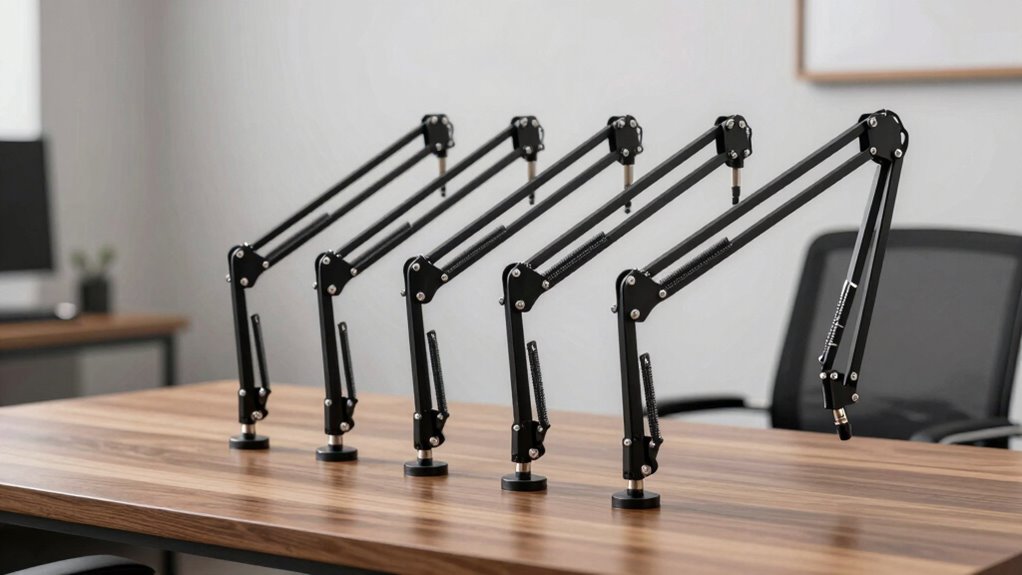

A desk boom arm for microphone setups is one of the cheapest upgrades that instantly cleans up your recording space, but the category splits into two very different camps: full-size scissor arms with big reach, and low-profile arms that stay out of your camera frame. The InnoGear Microphone Boom Arm with Cable Management stands out as the best overall pick because it balances a high weight rating, hidden cable routing, and broad Blue Yeti compatibility at a mid-tier price point. If desk real estate is tight, the FIFINE BM88 Low Profile and the InnoGear MU-LP26 keep your mic below monitor height while still holding heavier microphones. The main tradeoffs you will face are reach versus visibility, spring noise versus internal-spring quietness, and bare arms versus bundled kits that include shock mounts and pop filters. Read on for the full breakdown of all ten options.

Get the latest gadgets delivered free with Prime
- Fast, free delivery on millions of items
- Prime Video, Amazon Music and more included
- Member-only deals all year
Complete the kit


Key Takeaways
- Low-profile arms dominated this comparison for streamers — the InnoGear MU-LP26 and FIFINE BM88 keep mics below the camera line, something full-size scissor arms like the InnoGear Adjustable Boom Arm simply cannot do.
- Bundled kits (shock mount, pop filter, cable ties) from InnoGear offer better entry-level value than buying accessories separately, but the included shock mounts fit a narrower range of mic diameters than standalone mounts.
- Weight capacity separated the lineup more than any other spec — arms rated under 3 pounds sag with a Blue Yeti plus shock mount attached, while heavier-duty options held position without drooping.
- Internal cable management, featured on the InnoGear arm with hidden routing, was the single biggest quality-of-life difference versus arms like the SUNMON where cables hang exposed and can transmit desk vibration.
- The overhead riser model with a 31.5-inch post fills a niche none of the other nine cover: broadcasting from a seated position across a wide desk, at the cost of a much larger desk footprint.
| InnoGear Low Profile Mic Arm Boom Microphone Stand Desk Mount, Black |  | Best Overall | Brand: InnoGear | Model: LP98 | Material: Alloy steel | VIEW ON AMAZON | See Our Full Breakdown |
| SUNMON Microphone Boom Arm with 3/8″ to 5/8″ Adapter |  | Best Value Pick | Compatibility: HyperX QuadCast, Blue Yeti, Blue Snowball, HyperX SoloCast, Shure MV7, Shure SM7B, Fifine K688, Fifine AM8, Rode, Razer Mini, and others | Adapter: 3/8″ to 5/8″ | Clamp Capacity: Desktops up to 1.89 inches (4.8 cm) thick | VIEW ON AMAZON | See Our Full Breakdown |
| InnoGear Microphone Boom Arm with Cable Management, Fits Blue Yeti, Black |  | Best for Heavy Mics | Brand: InnoGear | Model: MU-PSA28 | Weight Capacity: 3.5 lbs | VIEW ON AMAZON | See Our Full Breakdown |
| InnoGear Microphone Boom Arm Stand with Shock Mount, Pop Filter, Mic Clip, and Cable Ties |  | Best Complete Kit for Beginners | Brand: InnoGear | Model: MU059 | Screw Adapter: 3/8″ to 5/8″ | VIEW ON AMAZON | See Our Full Breakdown |
| InnoGear MU-LP26 Low-Profile Microphone Boom Arm, Black |  | Best for Thick Desks | Brand: InnoGear | Model: MU-LP26 | Material: Alloy steel | VIEW ON AMAZON | See Our Full Breakdown |
| InnoGear Adjustable Boom Arm Microphone Stand, Black |  | Best Budget Starter Arm | Material: Steel | Maximum load capacity: 3.3 lb (1.5 kg) | Base rotation: 360° | VIEW ON AMAZON | See Our Full Breakdown |
| FIFINE BM88 Low Profile Microphone Boom Arm Stand |  | Best Low-Profile Design | Material: Metal | Max extension: 29 inches | Vertical adjustment: 220 degrees | VIEW ON AMAZON | See Our Full Breakdown |
| Adjustable Overhead Microphone Boom Arm with 31.5-Inch Riser |  | Best for Over-Monitor Overhead Positioning | Riser height: 31.5 in (80 cm) | Maximum desktop thickness: 4.2 in (106 mm) | Material: Steel | VIEW ON AMAZON | See Our Full Breakdown |
| AA Audio Accessory Low-Profile Microphone Boom Arm |  | Best for Heavy Broadcast Mics | Materials: Aluminum alloy and glass-fiber nylon composite | Maximum load: 6.6 lbs (3 kg) | Reach: 780 mm | VIEW ON AMAZON | See Our Full Breakdown |
| FIFINE CS1 Scissor Microphone Boom Arm Stand for Gaming and Recording |  | Best Portable Scissor Arm | Material: Metal | Desk clamp mouth width: Up to 2 inches | Rotation: 180° up and down | VIEW ON AMAZON | See Our Full Breakdown |
| desk boom arm for microphone | Material |
|---|---|
| InnoGear Low Profile Mic Arm B | Alloy steel |
| SUNMON Microphone Boom Arm wit | — |
| InnoGear Microphone Boom Arm w | High-grade thickened steel with built-in springs |
| InnoGear Microphone Boom Arm S | — |
| InnoGear MU-LP26 Low-Profile M | Alloy steel |
| InnoGear Adjustable Boom Arm M | Steel |
| FIFINE BM88 Low Profile Microp | Metal |
| Adjustable Overhead Microphone | Steel |
| AA Audio Accessory Low-Profile | — |
| FIFINE CS1 Scissor Microphone | Metal |
More Details on Our Top Picks
InnoGear Low Profile Mic Arm Boom Microphone Stand Desk Mount, Black
This is the arm that balances desk-space efficiency against studio-grade flexibility better than anything else in this lineup. The lower arm sits just 3.35 inches above the desk, which means it tucks under a monitor where a taller arm like the InnoGear MU-PSA28 would crowd your screen. Unlike the MU-LP26, which also keeps a low stance, the LP98 adds snap-on magnetic cable management — a small detail that removes the dangling-wire mess that plagues cheaper arms such as the SUNMON. The adjustment range is genuinely full-coverage: 360° base rotation paired with 170° tilt lets you swing the mic out of frame without standing up. The tradeoff is payload — at 3.3 lbs, a Shure SM7B with a heavy shock mount pushes the limit, and there is no shock mount in the box.
Pros:- Ultra-low 3.35-inch lower arm clears space under monitors
- Magnetic snap-on cable channel keeps wiring hidden
- Full-range adjustability with 360° base rotation and 170° tilt
- Includes both 3/8″-to-5/8″ and 3/8″-to-1/4″ adapters for mics and webcams
Cons:- Shock mount not included
- Clamp only fits desks up to 2.36 inches thick with flat edges
- 3.3 lb payload limits heavier mic-and-mount combinations
Best for: Streamers and home-office callers who want full positioning flexibility without surrendering desk real estate under a monitor
Not ideal for: Owners of heavy broadcast mics like the Shure SM7B, since the 3.3 lb payload leaves little headroom once a shock mount is added
- Brand:InnoGear
- Model:LP98
- Material:Alloy steel
- Max Payload:3.3 lbs (1.5 kg)
- Lower Arm Height Above Desk:3.35 inches
- Adjustability:360° base rotation, 180° swivel, 170° tilt, 360° shaft rotation
- Max Desk Thickness:2.36 inches (flat edges only)
- Included Components:Mic arm, magnetic cable channel, Allen wrench, 3/8″-5/8″ adapter, 3/8″-1/4″ adapter
Our verdict“The best all-around choice for anyone who wants a clean, monitor-friendly setup with studio-level movement at a mid-weight payload.”
SUNMON Microphone Boom Arm with 3/8″ to 5/8″ Adapter
When the goal is simply getting a mic off the desk for as little money as possible, this arm does the job without pretending to be more than it is. Dual springs and reinforced knobs keep popular USB mics like the Blue Yeti and HyperX QuadCast steady — the essentials work. Compared with the InnoGear MU059 kit, though, the gaps become obvious: no shock mount, no pop filter, no cable management, just the arm, clamp, and adapter. That bare-bones approach is exactly why it earns the value slot; you are not paying for accessories you may already own. The padded desk clamp protects your desktop from scratches, but its 1.89-inch capacity is the tightest in this roundup, so chunkier desks are out. It is a capable starter arm, provided your expectations match its simplicity.
Pros:- Broad compatibility with popular USB and XLR microphones
- Dual springs and reinforced knobs stabilize the arm under load
- Padded clamp protects the desk surface from scratches
- Low-cost entry point for a first boom arm
Cons:- No included accessories beyond the screw adapter
- Clamp capacity limited to desks up to 1.89 inches thick
Best for: Budget-conscious first-time streamers or podcasters who already own a mic and just need a basic, stable arm
Not ideal for: Buyers wanting a complete recording kit — there is no shock mount, pop filter, or cable management included
- Compatibility:HyperX QuadCast, Blue Yeti, Blue Snowball, HyperX SoloCast, Shure MV7, Shure SM7B, Fifine K688, Fifine AM8, Rode, Razer Mini, and others
- Adapter:3/8″ to 5/8″
- Clamp Capacity:Desktops up to 1.89 inches (4.8 cm) thick
- Stabilization:Dual springs with reinforced knobs
- Included:Boom arm, desk clamp, screw adapter
- Microphone Included:No
Our verdict“A sensible budget pick if you need a functional arm now and already have the accessories covered.”
InnoGear Microphone Boom Arm with Cable Management, Fits Blue Yeti, Black
Where most arms in this roundup top out around 3.3 lbs, this model’s 3.5 lb steel-frame build is aimed squarely at heavier microphones — it handles a Shure SM7B where the LP98 or MU-LP26 would strain. The real differentiator is reach: 32.3 inches horizontally and 37.4 inches vertically with the extension riser, letting you record from a standing position or position the mic far from your seating spot. The built-in cable channels with rubber covers deliver a cleaner result than the SUNMON’s bare routing. Two caveats temper the pitch: you must install the 6.3-inch extension riser to unlock full vertical reach, which adds assembly steps, and like several InnoGear arms here, there is no shock mount in the box. For broadcast-style setups, it is still the strongest anchor in this batch.
Pros:- 3.5 lb capacity supports heavy dynamic microphones
- 32.3-inch horizontal and 37.4-inch vertical reach with riser
- Built-in cable channels with rubber covers for a tidy setup
- Smooth, silent adjustment across 135° and 180° ranges
Cons:- Shock mount not included
- Full vertical reach requires installing the extension riser
Best for: Podcasters and voiceover artists running heavy dynamic mics like the Shure SM7B who need long reach and stability
Not ideal for: Compact desk setups under a monitor — the tall profile and extension riser consume vertical space the LP98 preserves
- Brand:InnoGear
- Model:MU-PSA28
- Weight Capacity:3.5 lbs
- Horizontal Reach:32.3 inches
- Vertical Reach:37.4 inches (with 6.3-inch extension riser)
- Adjustment Range:135° back and forth, 180° up and down, 360° base rotation
- Connector:5/8″ metal connector
- Max Desk Thickness:2 inches
- Material:High-grade thickened steel with built-in springs
Our verdict“The pick for heavy-mic owners who prioritize reach and load capacity over a low desk footprint.”
InnoGear Microphone Boom Arm Stand with Shock Mount, Pop Filter, Mic Clip, and Cable Ties
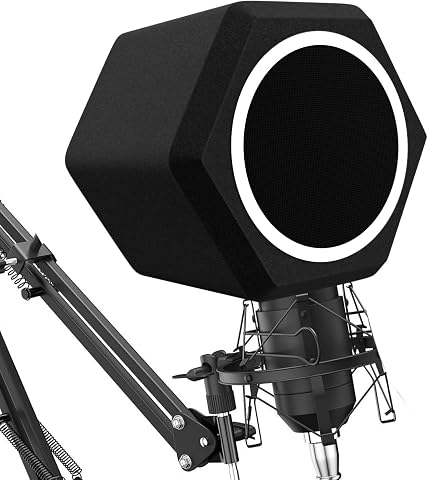
This is the only option in the batch that arrives as a true all-in-one kit: arm, zinc alloy clamp, shock mount, double-screen pop filter, and five cable ties. For someone building a first streaming or podcasting setup, that matters more than raw specs — the SUNMON covers only the arm, and the LP98 leaves you shopping for a shock mount separately. The double-screen pop filter genuinely tames plosives on a first recording attempt, and the 52mm shock mount isolates desk thumps from your audio. The catch, and it is a real one: that shock mount does not fit the Blue Yeti, despite the Yeti being one of the most common starter mics. Yeti owners should look at the MU-PSA28 instead and buy a threaded mount separately. Desk clamp capacity also stops at 2 inches, matching the MU-PSA28 but trailing the MU-LP26’s 2.75 inches.
Pros:- Complete kit with shock mount, pop filter, clip, and cable ties included
- Double-screen pop filter effectively reduces plosives
- Heavy-duty spring arm and zinc alloy clamp hold steady
- Universal 3/8″-to-5/8″ adapter fits most popular microphones
Cons:- Shock mount does not fit the Blue Yeti
- Clamp only fits desks up to 2 inches thick
Best for: Beginners building a recording setup from scratch who want every accessory in one purchase
Not ideal for: Blue Yeti owners — the included shock mount does not fit the Yeti’s wide body, undercutting the kit’s value
- Brand:InnoGear
- Model:MU059
- Screw Adapter:3/8″ to 5/8″
- Shock Mount Hole Diameter:52mm
- Max Desk Thickness:2 inches
- Clamp Material:Zinc alloy
- Included Components:Stand, clamp, screw adapter, pop filter, shock mount, 5 cable ties
Our verdict“The fastest path from empty desk to recording-ready setup, provided your mic is not a Blue Yeti.”
InnoGear MU-LP26 Low-Profile Microphone Boom Arm, Black
The MU-LP26’s defining trait is its 2.75-inch clamp capacity — the widest in this lineup, beating the LP98’s 2.36 inches and comfortably clearing the SUNMON’s 1.89 inches. If your desk is a thick butcher-block or a countertop-style surface, this is the arm that will actually attach. Its low-profile frame slides beneath a monitor much like the LP98, and its 25.6-inch extension with 250° vertical adjustment covers typical seated recording positions well. Where it concedes ground is adjustability: the LP98 offers a fuller range including 360° shaft rotation, and the MU-PSA28 reaches considerably farther — this arm is built for compact workspaces, not sprawling podcast desks. The included 3/8″-to-1/4″ adapter also makes it unusually friendly for mounting webcams or lights alongside a mic. Payload again stops at 3.3 lbs, so heavy broadcast setups should step up to the MU-PSA28.
Pros:- Clamp fits desks up to 2.75 inches thick — widest in the lineup
- Low-profile design fits beneath a monitor
- 250° vertical adjustment and 360° horizontal rotation
- Includes adapters for microphones, webcams, and other gear
Cons:- Shorter 25.6-inch reach limits positioning on deep desks
- 3.3 lb weight cap restricts heavier microphone builds
Best for: Owners of thick desks (over 2.4 inches) who want a low-profile arm that fits under a monitor
Not ideal for: Heavy-mic setups needing long reach or payloads beyond 3.3 lbs — the MU-PSA28 serves that job better
- Brand:InnoGear
- Model:MU-LP26
- Material:Alloy steel
- Maximum Extension:25.6 inches
- Adjustment Range:250° vertical, 360° horizontal rotation
- Weight Capacity:3.3 lbs (1.5 kg)
- Max Desk Thickness:2.75 inches
- Included Adapters:3/8″ to 5/8″ and 3/8″ to 1/4″
Our verdict“The practical choice when your desk is too thick for every other clamp in this roundup.”
InnoGear Adjustable Boom Arm Microphone Stand, Black
For a first step up from a cheap desktop tripod, this InnoGear arm covers the basics: multi-directional adjustment, a folding design, and enough steel-and-spring strength for most USB and midsize dynamic mics. Compared with the FIFINE CS1, it lacks an anti-scratch clamp pad and folded portability is less refined, but the 3.3 lb load capacity comfortably handles a Blue Yeti-class microphone. The tradeoff is fit: the clamp demands a flat, squared desk edge up to 2 inches thick, so rounded or lip-heavy desktops may not grip securely. There’s no shock mount in the box either, which matters if you type or bump the desk while recording. This pick makes the most sense for someone who wants functional positioning at minimal cost before committing to a premium arm.
Pros:- Multi-directional adjustment (360° base, 180° shaft, 270° adapter) for flexible positioning
- Folds away compactly for storage or transport
- Steel construction supports microphones up to 3.3 lb
- Includes 5/8-inch to 3/8-inch adapter for broad mic compatibility
Cons:- Clamp requires a flat, squared desk edge up to 2 inches thick
- No shock mount included, so desk vibrations transmit to the mic
Best for: First-time streamers and podcasters with a standard flat-edged desk who want a cheap, capable upgrade from a tripod stand
Not ideal for: Owners of heavy broadcast mics like the Shure SM7B or anyone with a rounded desk edge — the 3.3 lb limit and square-edge clamp will both cause trouble
- Material:Steel
- Maximum load capacity:3.3 lb (1.5 kg)
- Base rotation:360°
- Arm shaft movement:180°
- Desk clamp capacity:Up to 2 inches thick
- Included adapters:5/8-inch to 3/8-inch
- Shock mount:Not included
Our verdict“A sensible low-cost entry arm for standard setups, as long as your desk edge is flat and your mic isn’t a heavyweight.”
FIFINE BM88 Low Profile Microphone Boom Arm Stand
The BM88 solves a problem the classic scissor arms like the InnoGear Adjustable Boom Arm create: it stays below the monitor line, so your screen and desk footprint stay clear while the mic sits exactly where your voice is. The all-metal build holds steady even at the full 29-inch extension, and hidden cable management keeps the setup looking clean on camera. Three thread sizes (1/4”, 3/8”, 5/8”) mean it fits nearly any mic without hunting for adapters, something the InnoGear budget arm can’t match with its single included adapter. The main limitation is geometry — the section near the C-clamp can’t be adjusted up or down, which restricts fine-tuning on unusually tall or short desks, and the 0.8 to 2.4 inch clamp range excludes some thick butcher-block tops.
Pros:- Low-profile design keeps monitor view and desk space unobstructed
- Sturdy all-metal construction stays stable even fully extended to 29 inches
- Hidden cable management keeps the setup tidy on camera
- Three thread sizes included for compatibility with most microphones
Cons:- Section near the C-clamp cannot be adjusted up or down
- Desk clamp only fits desktops 0.8 to 2.4 inches thick
Best for: Gamers and streamers with single or dual monitors who need the mic close without blocking the screen or eating desk space
Not ideal for: Podcasters with thick desktops over 2.4 inches or those who need vertical adjustment at the base joint for standing setups
- Material:Metal
- Max extension:29 inches
- Vertical adjustment:220 degrees
- Horizontal adjustment:360 degrees
- Thread sizes:1/4”, 3/8”, 5/8”
- Desk thickness compatibility:0.8 to 2.4 inches
- Warranty:One year
Our verdict“The pick for monitor-centric setups where staying out of sight and out of the way matters more than maximum articulation.”
Adjustable Overhead Microphone Boom Arm with 31.5-Inch Riser
Where the FIFINE BM88 stays low and out of the way, this arm takes the opposite approach: a 31.5-inch riser that reaches over your monitor to position the mic from above, which many voice actors and streamers prefer for a more natural speaking angle. The adjustable height and swivel make it work for sitting or standing setups — a flexibility no other arm in this lineup offers — and the clamp handles desktops up to 4.2 inches thick, far beyond the 2 to 2.4 inch limits of the InnoGear and FIFINE CS1 clamps. Adapters for SM7B, MV7+, QuadCast S, and Yeti are all covered. The compromises are practical: you need a genuine desk edge to clamp to (no freestanding option), and a riser this tall demands more clearance and introduces more leverage than a compact arm.
Pros:- 31.5-inch riser extends over monitors for overhead mic positioning
- Adjustable height and swivel supports both sitting and standing setups
- Clamp fits desktops up to 4.2 inches thick
- Tool-less joint adjustments and adapters for popular mics like the SM7B and QuadCast S
Cons:- Requires an accessible desktop edge for clamp mounting
- Tall riser needs significant overhead clearance and adds leverage that demands a sturdy desk
Best for: Streamers and recorders with thick desks or standing desks who want the mic suspended overhead, out of the camera frame
Not ideal for: Compact desks in corners or against walls — the tall riser needs overhead clearance and a reachable desk edge for clamping
- Riser height:31.5 in (80 cm)
- Maximum desktop thickness:4.2 in (106 mm)
- Material:Steel
- Included adapters:3/8 in–5/8 in and 1/4 in–3/8 in
- Compatible microphones:HyperX QuadCast S, Shure SM7B, Shure MV7+, Blue Yeti, AT2020
Our verdict“The go-to choice if you want true overhead positioning or have a thick desktop other clamps can’t grip.”
AA Audio Accessory Low-Profile Microphone Boom Arm
This arm targets the one weakness most entries here share: sag under heavy microphones. Its 6.6 lb load rating — double the InnoGear budget arm’s 3.3 lb — combined with a gear-lock mechanism means an SM7B or PodMic with accessories stays put instead of slowly drooping mid-stream, a common failure of spring-only designs like the FIFINE CS1. The reinforced aluminum and glass-fiber nylon build keeps weight down while the 780 mm reach and 360° horizontal rotation give plenty of positioning freedom, plus cable channels and tool-free adjustments. The 120° vertical range is narrower than the BM88’s 220 degrees, though, so it trades articulation for holding power. Compatibility also depends heavily on your specific mic and clamp setup, so verify your mount and thread sizes before ordering.
Pros:- Supports microphones up to 6.6 lbs — double many competitor arms
- Gear-lock mechanism resists sagging with heavy broadcast mics
- Long 780 mm reach with 360° horizontal rotation
- Built-in cable channels and tool-free adjustments
Cons:- 120° vertical rotation is more limited than low-profile rivals like the BM88
- Desk clamp and microphone fit depend on the user’s specific setup
Best for: Owners of heavy dynamic mics like the Shure SM7B, SM7dB, or RODE PodMic who are tired of spring arms sagging over long sessions
Not ideal for: Buyers who need wide vertical articulation for unusual mounting angles, or those unwilling to verify clamp and thread compatibility themselves
- Materials:Aluminum alloy and glass-fiber nylon composite
- Maximum load:6.6 lbs (3 kg)
- Reach:780 mm
- Adjustment:360° horizontal, 120° vertical rotation
- Locking mechanism:Gear-lock
- Included accessories:Desk clamp, two boom arm sections, 3/8″ to 5/8″ adapter, 3/8″ to 1/4″ adapter, extension rod
Our verdict“The strongest holding arm in this lineup, built specifically for heavyweight microphones that defeat spring-based competitors.”
FIFINE CS1 Scissor Microphone Boom Arm Stand for Gaming and Recording
A classic scissor design done properly: the CS1 pairs strong elastic springs with an upgraded clamp that includes an anti-scratch pad — a small detail the basic InnoGear Adjustable Boom Arm omits, and one that matters if you care about your desk’s finish. The 180° up-and-down range handles most gaming and podcasting positions, and the whole arm folds flat for transport, making it the obvious choice among these picks for anyone who records in multiple locations or travels to LAN events. Where it falls short of the AA Audio Accessory arm is heavy lifting — spring-based designs can drift with very weighty mics — and the clamp maxes out at 2 inches of desk thickness. For FIFINE AmpliGame and K-series microphones, the fit is essentially guaranteed.
Pros:- Sturdy metal construction with strong elastic springs for stability
- Upgraded desk clamp with anti-scratch pad protects desk finish
- Folds flat for portability and space saving
- Includes 5/8” to 3/8” adapter with guaranteed fit for FIFINE microphones
Cons:- Spring-based design may drift or sag with heavy broadcast mics
- Only fits desks with thickness of 2 inches or less
Best for: Mobile streamers and gamers — especially FIFINE mic owners — who need a stable arm that folds flat and travels well
Not ideal for: Owners of very heavy broadcast microphones or desks thicker than 2 inches, where the springs and clamp will struggle
- Material:Metal
- Desk clamp mouth width:Up to 2 inches
- Rotation:180° up and down
- Adapter included:5/8” to 3/8” metal adapter
- Foldable:Yes
- Compatible microphones:FIFINE K669B, K670, K683A, K658, K688, AmpliGame (A6V, A8), AM8 USB microphones
Our verdict“A dependable, desk-friendly scissor arm that earns its place through portability and clamp quality rather than raw strength.”

How We Picked
I ranked these ten boom arms around five factors that actually change day-to-day use: load capacity and drift resistance (does the arm hold a heavy mic in position for hours), reach and positioning flexibility, noise behavior (spring creaks and desk vibration transmission), desk footprint and visibility, and what you get for the money — including whether adapters, shock mounts, and cable routing are bundled. Because three InnoGear models and two FIFINE models appear here, I also compared within brands to surface which specific version earns its spot rather than treating similar products as interchangeable.
The ranking logic favors versatility first: arms that handle heavy mics like the Blue Yeti while staying quiet and tidy rank higher than cheaper arms with narrower compatibility. Low-profile models are ranked on a parallel track, judged by how well they disappear on camera while still supporting full-sized microphones. Niche options, like the overhead riser stand, rank lower overall but are flagged as the right answer for specific desk layouts rather than docked for being specialized.
| desk boom arm for microphone | Material |
|---|---|
| InnoGear Low Profile Mic Arm B | Alloy steel |
| SUNMON Microphone Boom Arm wit | — |
| InnoGear Microphone Boom Arm w | High-grade thickened steel with built-in springs |
| InnoGear Microphone Boom Arm S | — |
| InnoGear MU-LP26 Low-Profile M | Alloy steel |
| InnoGear Adjustable Boom Arm M | Steel |
| FIFINE BM88 Low Profile Microp | Metal |
| Adjustable Overhead Microphone | Steel |
| AA Audio Accessory Low-Profile | — |
| FIFINE CS1 Scissor Microphone | Metal |
Factors to Consider When Choosing Desk Boom Arm For Microphone
Before picking a specific arm, it helps to understand the structural and ergonomic factors that separate a satisfying purchase from one you replace within months. These are the considerations that shaped the rankings above.Weight Capacity and Drift
The most common mistake buyers make is matching a heavy microphone to an under-rated arm. A Blue Yeti weighs roughly 2.5 pounds on its own, and adding a shock mount and adapter can push the total past 3 pounds — beyond what entry-level scissor arms are tuned for. An overloaded arm does not fail dramatically; it slowly droops mid-recording, forcing you to reposition constantly and introducing handling noise into your takes. Pay attention to whether the stated capacity includes the clamp hardware or only the load at the threading. If you plan to upgrade microphones later, buy an arm rated for at least a pound more than your current setup, because spring tension loosens with age regardless of brand.
Low-Profile Versus Full-Size Scissor Design
These two form factors solve different problems, and choosing wrong is the second most common regret. A full-size scissor arm positions the mic anywhere in a wide arc above your desk, which suits podcasters and musicians who move around. A low-profile arm sits below monitor height, which matters enormously for streamers and video creators whose camera would otherwise capture a metal arm crossing their face. Low-profile arms trade away vertical reach and some positioning freedom for that clean frame. Ask yourself what the camera sees before deciding — if nobody films your desk, the extra reach of a scissor arm is worth more than a tidy silhouette.
Cable Management Strategy
Cable routing affects both aesthetics and audio quality, and it is the spec most buyers overlook until the cable brushes against the arm during a recording. Arms with internal channels, like the InnoGear model with hidden routing, isolate the cable from the metal structure so desk bumps do not travel down the wire into your signal. External-clip systems are functional but leave slack that can swing and tap the arm. If you choose an arm without any cable provision, budget for velcro ties and plan a routing path that avoids joints. XLR users should also check whether the internal channel fits their connector, since some channels accommodate USB-C but not a full-size XLR plug.
Clamp Quality and Desk Compatibility
The clamp is the component under constant stress, and it determines whether the whole system stays stable. Check your desk thickness before ordering: most standard clamps fit desks between roughly 0.6 and 2.4 inches, and thicker countertops or metal-frame desks can defeat them entirely. A wider clamp pad spreads the grip force and prevents the marring that cheaper single-point contacts leave on wood veneer. If your desk lacks a suitable edge — glass tops and skirting boards are frequent culprits — a grommet-mount arm is the safer route. Also note that heavier mics amplify any clamp weakness, so a marginal clamp that holds a light mic fine may pivot and twist under a full streaming setup.
Bundles Versus Bare Arms
Several arms in this lineup ship with shock mounts, pop filters, and clips, and the value math depends on what you already own. Bundles make sense if this is your first mic setup, since the included accessories would cost more bought separately — even if they are mid-grade quality. The catch is compatibility: bundled shock mounts typically fit a specific mic diameter range, and a Blue Yeti’s wide body may not fit a mount designed for slim dynamic mics. If you already own quality accessories, a bare arm with a higher weight rating usually delivers better core performance for the same spend. Match the bundle to your actual microphone, not to the accessory count on the box.
Noise Transmission and Spring Behavior
Every articulated joint and spring is a potential noise source, and this separates arms more than build weight does. External springs can creak when you reposition mid-stream, while internal spring designs dampen that sound substantially. Desk-transmitted vibration is the other path: typing, foot bumps, and wobbly desks all travel up the clamp into the mic capsule. A shock mount addresses this at the mic end, but a stiffer arm with tighter tolerances reduces it at the source. If you record while gaming or typing, prioritize quiet articulation and pair the arm with a shock mount; if you record in dedicated quiet sessions, spring noise matters far less and you can save money here.
Frequently Asked Questions
Will a low-profile boom arm hold a Blue Yeti without drooping?
It depends on the specific model, not the form factor itself. The FIFINE BM88 and InnoGear MU-LP26 are both engineered with heavier dynamic and condenser mics in mind and hold a Yeti-class microphone steadily, while cheaper low-profile arms from generic brands often sag under that load. Check the stated capacity and look for a 5/8-inch threading with an included 3/8-inch adapter, since the Yeti’s foot mount replaces the standard threading anyway. Also confirm the arm articulates far enough forward to position the mic close to your mouth — some low-profile arms optimize for camera clearance at the expense of reach. Used within its weight rating, a good low-profile arm is just as stable as a full scissor design.
Do I need a shock mount if my boom arm already has one bundled?
If your arm ships with a shock mount, that bundled unit is usually sufficient for hobby recording, but verify the diameter fit before relying on it. Bundled mounts typically accommodate slim microphone bodies between roughly 22 and 38 millimeters, and wider mics like the Blue Yeti or MV7 may not seat properly. The practical difference between a bundled mount and a premium standalone one is elastic quality and isolation at low frequencies — desk thumps and keyboard rumble are attenuated better by higher-grade suspension. If you record vocals seriously or stream daily, upgrading the mount later while keeping the arm is a sensible path. The arm itself does most of the positioning work; the mount handles vibration, so treat them as separate quality decisions.
Why do some boom arms creak, and can I prevent it?
Creaking comes from metal-on-metal friction at the springs and joints, and it is far more common on externally sprung budget arms than on internal-spring designs like the cable-managed InnoGear or the FIFINE models. You cannot fully eliminate it on an arm built with external springs, but you can reduce it by repositioning slowly, tightening the tension screws at each joint, and applying a small amount of lithium grease or PTFE lubricant to the spring contact points. Wobbling is a different issue and usually traces back to a loose desk clamp rather than the arm itself. If quiet repositioning matters — say you adjust your mic live on stream — an internal-spring arm is worth the premium. For recorded content where you set position once, spring noise is a non-issue you can safely ignore.
What if my desk is too thick or has no edge for the clamp?
Standard C-clamps fit desks between roughly 0.6 and 2.4 inches thick, and thicker countertops, aproned desks, and glass tops all cause problems. If your desk has a pre-drilled cable hole, a grommet-mount arm solves this elegantly by bolting through the hole — though only some arms in this category include a grommet kit, so check the listing before buying. For desks with a lip or skirting board, a riser-style stand like the 31.5-inch overhead model can sit on the desktop itself rather than clamping to its edge. Glass desks introduce a separate concern: even a compatible clamp risks cracking tempered glass under torque, so a freestanding or grommet solution is strongly preferable there.
Is a 3/8-inch to 5/8-inch adapter really necessary?
Almost every consumer microphone and accessory in this category uses 5/8-inch threading, while many European-made stands and studio accessories use 3/8-inch, so the adapter determines what you can attach. Most arms here include one, as the SUNMON does, but losing it is common and renders premium shock mounts or boom extensions unusable until replaced — replacements cost little but take days to arrive. Check the threading on any accessory you already own before choosing an arm, since a mismatch discovered on setup day is frustrating. If you plan to mix pro audio accessories with consumer gear, having two spare adapters in a drawer is cheap insurance. The threading itself has no effect on audio quality; it is purely a mechanical compatibility question.
Conclusion
For best overall, the InnoGear Microphone Boom Arm with Cable Management earns the top spot: it handles heavy mics, hides the cable, and suits podcasting, streaming, and music work without specialization penalties. The best value pick is the SUNMON Boom Arm with Adapter, which covers the fundamentals for less and suits buyers who already own accessories. For beginners, the InnoGear kit with shock mount, pop filter, and cable ties removes every first-setup decision in one purchase. The Fifine BM88 and InnoGear MU-LP26 are the choices for streamers who need the mic below camera height, with the BM88 taking the premium low-profile slot for heavier setups. Finally, the overhead riser model is the niche answer for wide desks and seated broadcasting where no clamp arm reaches. Match the arm to your microphone weight and what your camera sees, and any of these will serve you well.
Halloween Picks
halloween
As an affiliate, we earn on qualifying purchases.