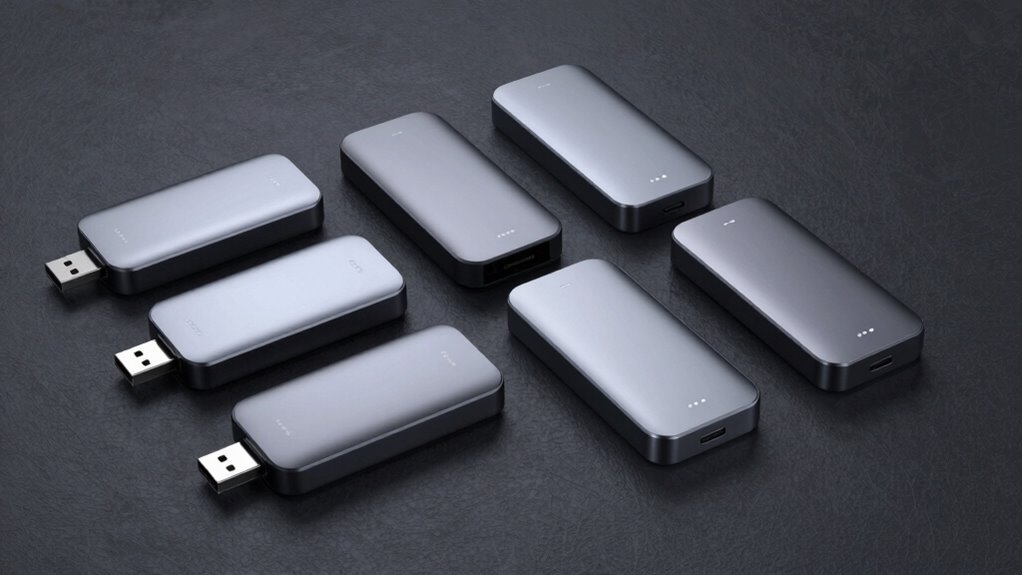

For a fast USB4 external drive, I’d start with the addlink P30 2TB as the best overall fit in this lineup: it offers USB4 speed in a practical capacity for active projects. The OWC Express 1M2 stands out when you need up to 8TB, while the Corsair EX400U Survivor suits buyers who want a more rugged 2TB drive. The main tradeoffs are capacity, connection compatibility, portability, and whether a faster interface is useful with your computer. Two SanDisk options use a slower interface class, so they make more sense when broad compatibility matters more than USB4 performance. Read on for how each choice fits different workflows and what to check before buying.

Get the latest gadgets delivered free with Prime
- Fast, free delivery on millions of items
- Prime Video, Amazon Music and more included
- Member-only deals all year
Complete the kit



Key Takeaways
The addlink P30 2TB is the clearest all-around USB4 pick here: it pairs the requested interface with a capacity that suits active editing and project transfers.
The OWC Express 1M2 is the capacity specialist, offering up to 8TB; buyers should weigh that headroom against the larger investment and their actual storage needs.
The Corsair EX400U Survivor prioritizes protection within the USB4 group, making its 2TB capacity a better fit for mobile work than for a large archive.
The Sabrent Rocket XTRM 5 moves beyond USB4 to Thunderbolt 5; its appeal depends on having compatible host hardware and a workflow that can use that interface.
The SanDisk Extreme and Extreme PRO are compatibility-minded alternatives, but their listed performance and interfaces place them behind the USB4 and Thunderbolt choices for this roundup’s speed focus.
| addlink P30 2TB USB4 External SSD |  | Best for iPhone Creators | Storage capacity: 2 TB | Interface: USB-C USB4.0, 40 Gbps | Read speed: Up to 4000 MB/s | VIEW ON AMAZON | See Our Full Breakdown |
| OWC Express 1M2 8TB USB4 Portable NVMe SSD |  | Best High-Capacity Workhorse | Storage capacity: 8 TB | Interface: USB4, USB Type-C | Maximum stated read speed: 6,000 MB/s | VIEW ON AMAZON | See Our Full Breakdown |
| SanDisk 4TB Extreme Portable SSD, up to 2000MB/s |  | Best Rugged Value | Capacity: 4 TB | Maximum transfer speed: Up to 2000 MB/s | Ingress protection: IP65 | VIEW ON AMAZON | See Our Full Breakdown |
| SanDisk 2TB Extreme PRO Portable SSD |  | Best Overall | Capacity: 2 TB | Maximum transfer speed: Up to 4000 MB/s | Average sustained write speed: 3100 MB/s (2TB–4TB models) | VIEW ON AMAZON | See Our Full Breakdown |
| Corsair EX400U Survivor 2TB USB4 External SSD |  | Best for Gamers and On-the-Go Workloads | Capacity: 2 TB | Interface: USB4, USB Type-C | Maximum read speed: 4,000 MB/s | VIEW ON AMAZON | See Our Full Breakdown |
| Sabrent Rocket XTRM 5 4TB Thunderbolt 5 Portable SSD (SB-XTM5-4TB) |  | Best Premium Speed Pick | Capacity: 4TB | Connection: Thunderbolt 5 (80Gbps) | Max Transfer Speed: 64Gbps | VIEW ON AMAZON | See Our Full Breakdown |
| fast usb4 external drive | Capacity | Interface | Compatibility | Ingress protection |
|---|---|---|---|---|
| addlink P30 2TB USB4 External | — | USB-C USB4.0, 40 Gbps | — | — |
| OWC Express 1M2 8TB USB4 Porta | — | USB4, USB Type-C | Mac, PC, iPad Pro, Chromebook, Surface, PlayStation 5 | — |
| SanDisk 4TB Extreme Portable S | 4 TB | — | — | IP65 |
| SanDisk 2TB Extreme PRO Portab | 2 TB | — | — | IP65 |
| Corsair EX400U Survivor 2TB US | 2 TB | USB4, USB Type-C | USB4/Thunderbolt 4 hosts; USB-C 3.2; iOS/iPadOS 13 and later | IP55 |
| Sabrent Rocket XTRM 5 4TB Thun | 4TB | — | Thunderbolt 5/4/3, USB4, USB 3.2 Gen 2×2 (20Gbps), 10Gbps, 5Gbps | — |
More Details on Our Top Picks
addlink P30 2TB USB4 External SSD
The addlink P30 stands out for one reason the rest of this lineup can’t match: MagSafe-ready mounting for iPhone ProRes recording. That turns an iPhone Pro into a serious video rig without cables dangling mid-shoot. On paper, its 4000 MB/s read and 3600 MB/s write speeds put it in the same performance class as the SanDisk Extreme PRO, but at 45 g and roughly the size of a stick of gum, it’s far easier to keep stuck to the back of a phone. The tradeoff is capacity and durability — it maxes out at 2TB here, and there’s no IP rating like the SanDisk or the Corsair Survivor, so it’s clearly built for controlled environments rather than outdoor shoots. The 3-year warranty softens that concern somewhat.
Pros:- MagSafe-ready design purpose-built for iPhone ProRes workflows
- Read speeds up to 4000 MB/s rival pricier picks in this roundup
- Featherlight 45 g aluminum body disappears in a pocket or camera bag
- 3-year warranty adds peace of mind
Cons:- No water or dust resistance rating, unlike the SanDisk and Corsair options
- Real-world speeds fall short of stated figures depending on host device
- Capping out at 2TB limits it for large video libraries
Best for: iPhone Pro videographers recording ProRes directly to a MagSafe-mounted drive
Not ideal for: Outdoor or rough-environment shooters — it lacks any ingress or drop protection rating
- Storage capacity:2 TB
- Interface:USB-C USB4.0, 40 Gbps
- Read speed:Up to 4000 MB/s
- Write speed:Up to 3600 MB/s
- Weight:45 g
- Enclosure material:Aluminum
- Additional features:MagSafe-ready for iPhone ProRes recording
- Warranty:3 years
Our verdict“This is the pick for mobile-first creators who want phone-native speed and mounting; anyone needing ruggedness or big capacity should look elsewhere.”
OWC Express 1M2 8TB USB4 Portable NVMe SSD
When raw capacity is the deciding factor, the OWC Express 1M2 plays in a different league: 8TB of bus-powered NVMe storage with reported real-world speeds above 6,000 MB/s — faster on paper than anything else here, including the Sabrent Rocket XTRM 5‘s Thunderbolt 5 claims in everyday use. The aluminum chassis doubles as a heatsink, so it runs silently where fan-cooled desktop drives would not. The catch is portability: at nearly 281 g and a 2.5-inch form factor, it’s a bag drive, not a pocket drive — the addlink P30 weighs a fraction as much. Buyers should also verify whether they’re getting a ready-to-run configuration or a DIY enclosure, since the listing covers both, and Gen 5 SSD support depends on what the host can power.
Pros:- 8TB capacity dwarfs every other pick in this roundup
- Real-world speeds reported above 6,000 MB/s
- Aluminum heat-dissipating design runs completely silently
- Bus-powered operation with an included USB4 cable
Cons:- At 280.8 g it’s far heavier and larger than pocket-sized rivals
- Ambiguity between DIY enclosure and pre-configured versions requires careful checking before buying
- Gen 5 SSD compatibility is limited by power draw and host constraints
Best for: Video editors and photographers who need a full project archive on one drive without sacrificing speed
Not ideal for: Commuters and travelers who want true pocket portability — it’s heavy and comparatively bulky
- Storage capacity:8 TB
- Interface:USB4, USB Type-C
- Maximum stated read speed:6,000 MB/s
- Supported SSDs:PCIe Gen 3, Gen 4, and selected Gen 5 M.2 NVMe
- Power:Bus-powered
- Weight:280.8 g
- Form factor:2.5-inch
- Compatibility:Mac, PC, iPad Pro, Chromebook, Surface, PlayStation 5
Our verdict“This is the capacity-first choice for professionals who value speed and silence over portability.”
SanDisk 4TB Extreme Portable SSD, up to 2000MB/s
Half the speed of the flagship drives here, but the SanDisk Extreme Portable SSD earns its slot by nailing the fundamentals: 4TB of storage in a pocket-sized body, an IP65 rating, 3-meter drop protection, and 256-bit AES encryption. Compared with the SanDisk Extreme PRO, the difference is straightforward — 2000 MB/s versus 4000 MB/s — and for backing up photos, shuttling media, or expanding a PS5, that halved speed rarely feels like a bottleneck. Where the addlink P30 offers no environmental protection at all, this drive shrugs off rain and dust on a job site. Its rugged, carabiner-friendly design makes it the natural pick for people whose drives live in backpacks, not on desks. If you regularly move multi-hundred-gigabyte video projects, though, the speed gap adds up.
Pros:- IP65 water and dust resistance plus 3-meter drop protection
- 4TB capacity in a genuinely pocketable format
- Password-protected 256-bit AES hardware encryption
- Carabiner-friendly rugged design built for bags and job sites
Cons:- Half the transfer speed of the Extreme PRO and other USB4 picks
- No sustained write specification for heavy workloads
- Lacks the Thunderbolt-level headroom of faster rivals
Best for: Travelers, hikers, and field photographers who need durable, high-capacity storage at a reasonable speed
Not ideal for: Professionals moving massive video projects daily — 2000 MB/s is half the speed of the USB4 picks here
- Capacity:4 TB
- Maximum transfer speed:Up to 2000 MB/s
- Ingress protection:IP65
- Drop protection:Up to 3 m
- Encryption:256-bit AES
- Form factor:Pocket-sized portable SSD
Our verdict“This is the smart choice when durability and capacity matter more than benchmark speed — skip it if you edit directly off the drive.”
SanDisk 2TB Extreme PRO Portable SSD
The SanDisk Extreme PRO is the most complete package in this roundup: 4000 MB/s peak transfers, a stated 3100 MB/s average sustained write speed, and the same IP65 and 3-meter drop protection as its cheaper sibling. That sustained figure is what separates it from the addlink P30 and Corsair Survivor — both quote similar peak numbers, but the Extreme PRO commits to holding speed during long, heavy writes, which is exactly what matters when offloading a full day of 4K footage. It matches the rugged credentials of the Corsair while adding 256-bit AES encryption the Corsair doesn’t advertise. The honest caveat: sustained numbers apply only to the 2TB–4TB models, and buyers who want 8TB have to step up to the OWC Express 1M2 at a weight and price premium.
Pros:- 4000 MB/s peak speeds put it at the top of the USB4 class here
- Published 3100 MB/s average sustained write speed for heavy workloads
- IP65 rating and 3-meter drop protection
- Password-protected 256-bit AES encryption included
Cons:- Sustained write spec only applies to 2TB–4TB models
- More expensive per terabyte than the standard Extreme Portable SSD
- No MagSafe mounting for iPhone workflows like the addlink P30
Best for: Working creatives who need flagship speed that holds up under sustained writes, with rugged protection
Not ideal for: Buyers wanting maximum capacity per drive — 4TB is the ceiling here, unlike OWC’s 8TB option
- Capacity:2 TB
- Maximum transfer speed:Up to 4000 MB/s
- Average sustained write speed:3100 MB/s (2TB–4TB models)
- Ingress protection:IP65
- Drop protection:Up to 3 meters
- Encryption:256-bit AES
Our verdict“If you want one drive that does speed, durability, and sustained performance without compromise, this is the one to buy.”
Corsair EX400U Survivor 2TB USB4 External SSD
The Corsair EX400U Survivor splits the difference between the rugged and speed-focused picks: 4000 MB/s reads and 3600 MB/s writes over USB4, wrapped in an IP55-rated housing that’s tougher than the unprotected addlink P30 but a step below the IP65 SanDisk Extreme PRO. Where it pulls ahead for a specific crowd is gaming — plug-and-play over a single USB-C cable makes it a natural PS5 or gaming-laptop expansion drive, and Corsair’s compatibility list covers USB4/Thunderbolt 4 hosts plus iOS and iPadOS devices. The tradeoffs are real: maximum performance demands a USB4 or better host, so on an older USB 3.2 port it falls back to ordinary speeds, and performance varies by capacity — buyers choosing smaller variants shouldn’t expect flagship numbers.
Pros:- 4000 MB/s read and 3600 MB/s write speeds for game and file transfers
- IP55-rated rugged housing handles rough transport
- True plug-and-play with a single USB-C cable
- Broad compatibility including PS5-adjacent setups and iOS/iPadOS devices
Cons:- IP55 rating trails the IP65 protection on both SanDisk picks
- Performance varies by capacity, so smaller variants are slower
- No advertised hardware encryption option
Best for: Gamers and mobile professionals who want USB4 speed for PS5 or laptop expansion with a rugged shell
Not ideal for: Owners of older USB 3.2-only machines — top speeds require a USB4 or Thunderbolt 4 host
- Capacity:2 TB
- Interface:USB4, USB Type-C
- Maximum read speed:4,000 MB/s
- Maximum write speed:3,600 MB/s
- Ingress protection:IP55
- Compatibility:USB4/Thunderbolt 4 hosts; USB-C 3.2; iOS/iPadOS 13 and later
Our verdict“This is the gamer’s USB4 drive — fast, tough enough, and effortless to connect — as long as your host actually supports USB4.”
Sabrent Rocket XTRM 5 4TB Thunderbolt 5 Portable SSD (SB-XTM5-4TB)
Thunderbolt 5 headroom is what separates the Rocket XTRM 5 from every other drive in this roundup. With transfer speeds reaching 64Gbps on an 80Gbps connection, it comfortably outruns USB4 picks like the addlink P30 or the Corsair EX400U Survivor — provided your machine actually has a Thunderbolt 5 port. That’s the catch: this model is built for people already on the newest Macs or high-end Windows machines, and on a standard USB4 or USB 3.2 port it falls back to those slower speeds and loses its main justification for existing.
The build quality backs up the premium positioning. A rugged aluminum enclosure with a silicone sleeve gives it more drop confidence than the bare-plastic feel of the SanDisk Extreme line, and the bundled Thunderbolt cable plus bus-powered plug-and-play design means no extra accessories. Buyers comparing it to the OWC Express 1M2 should note Sabrent offers less capacity per dollar here, but far more ceiling speed for future-proofed workflows.
Pros:- Thunderbolt 5 speeds up to 64Gbps — the fastest transfer ceiling in this lineup
- Broad backward compatibility with Thunderbolt 3/4, USB4, and USB 3.2
- Rugged aluminum body with silicone sleeve for real-world drop protection
- Bus-powered plug-and-play setup with a premium Thunderbolt cable included
Cons:- Full speed requires Thunderbolt 5 hardware that most current laptops lack
- Premium pricing per terabyte compared to standard USB4 portable SSDs
- Capacity ceiling of 4TB trails the 8TB OWC Express 1M2 for archival-heavy users
Best for: Video editors and creative professionals with Thunderbolt 5 machines who move massive 4K/8K footage and want maximum transfer headroom today
Not ideal for: Laptop owners with only USB4 or USB 3.2 ports — you’ll pay a premium for speeds you can’t access and get similar results from cheaper USB4 drives
- Capacity:4TB
- Connection:Thunderbolt 5 (80Gbps)
- Max Transfer Speed:64Gbps
- Compatibility:Thunderbolt 5/4/3, USB4, USB 3.2 Gen 2×2 (20Gbps), 10Gbps, 5Gbps
- Enclosure:Aluminum with silicone drop-protection sleeve
- Power:Bus-powered plug-and-play
- Model:SB-XTM5-4TB
Our verdict“Buy this only if you own Thunderbolt 5 hardware and need its unmatched speed today; everyone else gets better value from a USB4 alternative.”

How We Picked
I ranked these drives by how well they match the promise of a fast USB4 external drive, giving weight to interface capability, stated capacity, and the type of buyer each design serves. USB4 models rank ahead of the SanDisk USB-C options for buyers seeking the newer high-bandwidth connection; the Thunderbolt 5 Sabrent is a specialist choice because its faster interface only helps with compatible systems. Capacity also matters: a drive intended for current projects has different value from one meant to hold a substantial working library.
I also considered portability, protection, and practical fit rather than treating transfer speed as the only decision. A drive with more storage or a tougher design can be the better pick for a particular workflow, even if it is not the simplest recommendation for everyone. The product details provided do not establish comparable real-world benchmark results, so I avoid claiming measured speeds or ranking on unverified performance figures. Buyers should check their computer’s port support and the manufacturer’s full specifications before purchase.
| fast usb4 external drive | Interface | Compatibility | Ingress protection |
|---|---|---|---|
| addlink P30 2TB USB4 External | USB-C USB4.0, 40 Gbps | — | — |
| OWC Express 1M2 8TB USB4 Porta | USB4, USB Type-C | Mac, PC, iPad Pro, Chromebook, Surface, PlayStation 5 | — |
| SanDisk 4TB Extreme Portable S | — | — | IP65 |
| SanDisk 2TB Extreme PRO Portab | — | — | IP65 |
| Corsair EX400U Survivor 2TB US | USB4, USB Type-C | USB4/Thunderbolt 4 hosts; USB-C 3.2; iOS/iPadOS 13 and later | IP55 |
| Sabrent Rocket XTRM 5 4TB Thun | — | Thunderbolt 5/4/3, USB4, USB 3.2 Gen 2×2 (20Gbps), 10Gbps, 5Gbps | — |
Factors to Consider When Choosing Fast Usb4 External Drive
Choosing a fast external drive starts with the whole path from computer to files: the port, the drive, the cable, and the job you need it to do. These checks can prevent paying for speed your setup cannot use or choosing a capacity that fills too quickly.
Check Your Computer’s Port Before Chasing USB4
USB-C describes a connector shape, not a guaranteed transfer standard. Check your computer’s technical specifications for USB4 or Thunderbolt support, since a USB-C port may provide a different level of performance. A high-end drive can still connect to a slower port, but transfers will be limited by that connection. Also check whether the drive includes a suitable cable and whether your operating system supports the intended format. For shared drives, consider whether you need to reformat between Mac and Windows. Match the drive to the computer you actually use most, rather than a future machine you may buy.
Choose Capacity Around Your Working Set
Think about the files that need to stay available at once, not just the total size of your archive. Video source files, virtual machines, and large creative projects can consume space quickly, while completed work may be better stored elsewhere. Keeping free space also gives you room for temporary exports and updates. A larger drive can reduce file shuffling, but it may be unnecessary if you regularly move finished projects to long-term storage. Capacity needs often grow faster than expected when project files include caches, proxies, and multiple versions. Estimate a typical project folder and multiply by how many you keep active.
Understand What Speed Claims Do and Don’t Tell You
Advertised transfer figures usually describe favorable conditions and may not reflect long, sustained writes. Large file copies, small-file folders, and repeated transfers can behave differently. The host computer, cable, file system, and the drive’s thermal behavior all affect results. If your work involves long recordings or frequent backups, sustained performance matters more than a brief peak figure. For ordinary document storage, paying extra for the highest interface speed may not change your day-to-day experience. Look for independent testing of the exact capacity and model when performance under load is central to your decision.
Decide How Much Protection Your Travel Calls For
A portable drive faces more than data-transfer demands: it may be jostled in a bag, exposed to dust, or used in changing conditions. A rugged housing can add peace of mind, though it does not replace a backup or guarantee that data survives every accident. Check the manufacturer’s specific protection claims and the conditions attached to them. A compact drive may be easier to carry, while a more protective design may take more room or add weight. If the drive stays on a desk, portability and ruggedness may matter less than capacity and cable convenience. For travel, consider protecting both the drive and its cable.
Pay for Interface Headroom Only When Your Workflow Can Use It
USB4 and Thunderbolt 5 can make sense for large media workflows, frequent transfers, or working directly from external storage. The benefit shrinks if your computer lacks the matching connection or your tasks mostly involve small everyday files. A faster interface may also require checking cable compatibility and host support, so count the whole setup rather than the drive alone. Thunderbolt 5 is a specialized step beyond USB4, not an automatic upgrade for every buyer. If you are unsure, prioritize a suitable capacity and reliable compatibility first. You can then compare interface tiers against the time your workload spends waiting on transfers.
Frequently Asked Questions
Will a USB4 drive work with a regular USB-C port?
Usually, a USB-C connector lets the drive plug in, but it does not guarantee USB4 transfer speeds. The port, cable, and drive must all support compatible standards for the fastest connection. On a slower port, the drive may operate at a lower speed. Check the computer maker’s specifications and the drive maker’s compatibility notes before buying. This matters especially if you are choosing USB4 to shorten large project transfers.
Should I choose the 8TB OWC drive or a smaller USB4 model?
Choose 8TB if you need a large active library on one portable drive or want fewer transfers between storage devices. A smaller capacity may be easier to justify when you keep only current projects on the drive and archive completed work elsewhere. Consider how much space your largest projects use, including source media and temporary files. Leave room for new work rather than planning to fill the drive completely. The OWC’s capacity advantage is most useful when it solves a real storage bottleneck.
Is the Thunderbolt 5 Sabrent a better buy than a USB4 drive?
It may be a better fit if your computer supports Thunderbolt 5 and your workflow regularly moves large files or runs directly from external storage. Without compatible host hardware, the extra interface capability may not translate into a practical benefit. USB4 is the more direct match for someone specifically seeking a USB4 drive. Check the Sabrent’s system requirements and included cable details before choosing it. Base the decision on your current computer and workload, not interface numbers alone.
Are the SanDisk Extreme models fast enough for video work?
They may suit some video workflows, but the answer depends on file sizes, editing format, and whether you work from the drive or only transfer finished files. Their listed speeds are lower than the USB4-focused choices in this roundup, so demanding large-file work may benefit from a higher-bandwidth model. For lighter projects, backups, or computers without USB4, a SanDisk model may still be a sensible fit. Check independent sustained-transfer results for the exact capacity before using any portable SSD as a primary editing drive. Keep a separate backup of footage regardless of drive speed.
Does a rugged external SSD remove the need for backups?
No. Rugged construction can help protect the device from some physical hazards, but it cannot prevent accidental deletion, theft, electronic failure, or every kind of damage. Keep another copy of important files on a separate drive or in a trusted backup system. For work that cannot be recreated, use a backup routine that preserves earlier versions as well as current files. The Corsair’s protective positioning may suit travel, but redundancy still protects the data itself. Test that you can restore files from your backup before relying on it.
Conclusion
For most buyers seeking USB4 speed, I recommend the addlink P30 2TB as the best overall choice in this group. The best value in practical terms is the SanDisk Extreme 4TB for buyers who prefer broad USB-C compatibility and more capacity over USB4-class speed; it is not the pick for maximizing interface performance. Beginners who want a straightforward portable SSD can start with that SanDisk option and verify its compatibility with their computer. For premium capacity, choose the OWC Express 1M2 8TB; for a tougher travel-oriented USB4 drive, consider the Corsair EX400U Survivor. The Sabrent Rocket XTRM 5 is the specialist option for compatible Thunderbolt 5 systems, while the SanDisk Extreme PRO suits buyers who value its portable SSD format over the faster interfaces in this roundup.