Setting up a reliable home lab requires a network switch that balances performance, affordability, and ease of use. The TP-Link TL-SG116 stands out as the best overall for its robust 16-port gigabit capacity and unmanaged setup, ideal for expanding your network seamlessly. For those seeking compact and quiet options, the TP-Link TL-SG105 offers a simple 5-port solution perfect for smaller setups, while the NETGEAR GS324 provides a larger 24-port capacity suited for more complex home labs. The main tradeoffs involve balancing port count, manageability, and budget—more ports often mean higher costs, and unmanaged switches lack advanced control features. Keep reading for a detailed breakdown of each option to find the best fit for your home lab.

Get the latest gadgets delivered free — and shop member deals
- Fast, free delivery on millions of items
- Access to Prime Big Deal Days deals on October 6–7
- Prime Video, Amazon Music and more included
Complete the kit



Key Takeaways
- The number of ports significantly impacts scalability; larger switches like the GS324 are better for growth but come at a higher price.
- Unmanaged switches offer plug-and-play simplicity, ideal for most home labs, while managed options are better for advanced network control, though at increased complexity.
- Compact, fanless designs such as the TP-Link TL-SG105 excel in noise-sensitive environments, but typically have fewer ports.
- Build quality and power efficiency vary; metal housings tend to last longer and dissipate heat better, which matters for continuous operation.
- Budget constraints influence the choice; smaller switches like the TP-Link TL-SG105 can save money but may limit future expansion.
| TP-Link TL-SG116 16-Port Gigabit Unmanaged Ethernet Switch |  | Best Overall for Home Lab Expansion | Number of Ports: 16 | Port Speed: Gigabit (10/100/1000Mbps) | Energy Efficiency: Yes | VIEW ON AMAZON | See Our Full Breakdown |
| NETGEAR 8-Port Gigabit Ethernet Unmanaged Network Switch (GS308) | 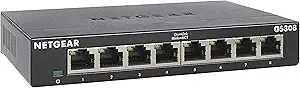 | Best Compact Unmanaged Switch for Small Labs | Number of Ports: 8 | Port Speed: 1 Gbps | Case Material: Metal | VIEW ON AMAZON | See Our Full Breakdown |
| TP-Link TL-SG105 5-Port Gigabit Unmanaged Ethernet Switch |  | Best Budget-Friendly Compact Switch | Ports: 5 | Flow Control: IEEE 802.3X | QoS: Port-based 802.1p/DSCP | VIEW ON AMAZON | See Our Full Breakdown |
| NETGEAR 5-Port Gigabit Ethernet Unmanaged Network Switch (GS305) |  | Best Small, Silent Switch with Mounting Flexibility | Number of Ports: 5 | Port Speed: 1.0 Gbps | Design: Metal, compact | VIEW ON AMAZON | See Our Full Breakdown |
| TP-Link 8 Port Gigabit Ethernet Network Switch – Unmanaged, Fanless, Metal Housing |  | Best All-Round for Balanced Home Lab Growth | Number of Ports: 8 | Supported Devices: Desktop | Voltage: 5 volts | VIEW ON AMAZON | See Our Full Breakdown |
| NETGEAR 24-Port Gigabit Ethernet Unmanaged Switch (GS324) |  | Best for Large Home Labs Needing Extensive Connectivity | Number of Ports: 24 | Compatible Devices: Television, Monitor, Projector, Gaming Console, DVD Player, Laptop, Personal Computer | Voltage: 230 volts | VIEW ON AMAZON | See Our Full Breakdown |
| network switch for home lab | Number of Ports | Port Speed |
|---|---|---|
| TP-Link TL-SG116 16-Port Gigab | 16 | Gigabit (10/100/1000Mbps) |
| NETGEAR 8-Port Gigabit Etherne | 8 | 1 Gbps |
| TP-Link TL-SG105 5-Port Gigabi | — | — |
| NETGEAR 5-Port Gigabit Etherne | 5 | 1.0 Gbps |
| TP-Link 8 Port Gigabit Etherne | 8 | — |
| NETGEAR 24-Port Gigabit Ethern | 24 | — |
More Details on Our Top Picks
TP-Link TL-SG116 16-Port Gigabit Unmanaged Ethernet Switch
The TP-Link TL-SG116 stands out as the best choice for those needing extensive network ports without complexity. Its 16 Gigabit ports provide ample room for multiple devices, making it ideal for a home lab that demands scalability. Compared with the NETGEAR GS308, which offers fewer ports, the TL-SG116 supports larger setups but lacks advanced management features. Its plug-and-play design simplifies deployment, and energy-efficient technology keeps power use low, while fanless operation ensures silent performance. The main tradeoff is its unmanaged nature, meaning no VLAN or traffic prioritization options for fine-tuning. It’s perfect for users who prioritize expansion and simplicity over advanced control.
Pros:- Expansive 16-port gigabit capacity for large home lab setups
- Plug-and-play setup simplifies deployment
- Energy-efficient with silent fanless operation
- Supports traffic prioritization for QoS
Cons:- No advanced management or VLAN features
- Lacks included mounting hardware for rack or wall mounting
Best for: Home lab enthusiasts who require a large, reliable switch with straightforward setup and high port count.
Not ideal for: Advanced users needing managed switches with VLANs or network segmentation capabilities, as this model offers only unmanaged features.
- Number of Ports:16
- Port Speed:Gigabit (10/100/1000Mbps)
- Energy Efficiency:Yes
- Fanless Design:Yes
- Operating Temperature:0°C – 40°C
Our verdict“This switch is best suited for home lab builders who prioritize extensive port availability and ease of use over management features.”
NETGEAR 8-Port Gigabit Ethernet Unmanaged Network Switch (GS308)
The NETGEAR GS308 offers a compact, durable solution for small home labs needing reliable gigabit connectivity. Its 8 ports strike a balance for those who don’t require extensive expansion but want straightforward plug-and-play performance. Unlike the TP-Link TL-SG116, which offers twice as many ports, the GS308 focuses on simplicity and space-saving design. Its metal case ensures durability, and the fanless operation keeps noise levels minimal—an advantage over switches with active cooling. The main tradeoff is its unmanaged nature, limiting control over traffic or VLANs. It’s ideal for users with modest expansion needs who value quiet operation and durability.
Pros:- Compact, space-saving 8-port design
- Durable metal case suitable for desktop or wall mounting
- Silent, fanless operation for quiet environments
- Plug-and-play setup with no configuration needed
Cons:- Limited to unmanaged switch capabilities
- Regional compatibility restricted to U.S. & Canada
Best for: Small home labs or offices where space is limited but reliable, high-speed wired connections are needed without advanced network management.
Not ideal for: Users seeking managed features or larger port counts to support growing or complex networks.
- Number of Ports:8
- Port Speed:1 Gbps
- Case Material:Metal
- Operation:Fanless
- Compatibility:U.S. & CA
Our verdict“This switch is best for small-scale home labs or offices that need reliable gigabit connectivity in a compact, silent form factor.”
TP-Link TL-SG105 5-Port Gigabit Unmanaged Ethernet Switch
The TP-Link TL-SG105 provides a simple, reliable solution for small home labs with limited device counts. Its 5 ports are enough for basic network expansion, and its plug-and-play setup makes it accessible for less technical users. Compared with larger switches like the TP-Link TL-SG116, it sacrifices port count for a more compact and affordable package. Its energy-efficient design and durable metal case ensure quiet operation and longevity. However, the limited number of ports makes it unsuitable for larger or more complex networks, and it lacks management features needed for traffic control or VLAN segmentation. It’s an excellent choice for simple setups or testing environments.
Pros:- Easy to set up with plug-and-play operation
- Compact, durable metal design
- Energy-efficient and quiet
- Reliable gigabit speed for small setups
Cons:- Limited to 5 ports, not suited for expanding networks
- No advanced management features
Best for: Home lab users with minimal device counts needing a straightforward, low-cost gigabit switch.
Not ideal for: Growing labs or users requiring management features or more than five connections.
- Ports:5
- Flow Control:IEEE 802.3X
- QoS:Port-based 802.1p/DSCP
- Design:Fanless metal casing
- Warranty:3 years
Our verdict“This switch is ideal for small, simple home labs or testing environments where cost and space are primary concerns.”
NETGEAR 5-Port Gigabit Ethernet Unmanaged Network Switch (GS305)
The NETGEAR GS305 offers a compact, silent alternative for home labs that need a reliable gigabit switch with flexible mounting options. Its 5 ports are easy to deploy in tight spaces, and its metal case ensures durability. Unlike the TP-Link TL-SG105, which focuses on affordability, the GS305 emphasizes silent operation and a sturdy build, making it well-suited for noise-sensitive environments. However, its limited port count and unmanaged design mean it’s not suitable for expanding networks or those requiring VLAN configuration. It’s best suited for users who want a small, silent switch with straightforward, high-speed connectivity.
Pros:- Silent, fanless operation for noise-sensitive environments
- Flexible mounting options for desktop or wall use
- Durable metal case for long-term use
- Plug-and-play setup
Cons:- Limited to unmanaged switch functionality
- Only regionally compatible with U.S. & CA
Best for: Home lab builders needing a compact, silent switch that can be mounted anywhere for reliable gigabit connections.
Not ideal for: Users requiring managed features or larger port counts for more complex or growing networks.
- Number of Ports:5
- Port Speed:1.0 Gbps
- Design:Metal, compact
- Operation:Fanless, energy-efficient
- Compatibility:U.S. & CA
Our verdict“This switch is a good fit for small home labs needing a silent, space-efficient gigabit solution without management complexity.”
TP-Link 8 Port Gigabit Ethernet Network Switch – Unmanaged, Fanless, Metal Housing
The TP-Link TL-SG108 offers a well-rounded option for home labs wanting moderate expansion with reliable, high-speed wired connectivity. Its 8 ports balance size and capacity, making it suitable for users who need a bit more than a small switch but don’t require the extensive port count of larger models. Compared with the NETGEAR GS305, which also offers 5 ports, the TL-SG108 provides more connections. Its fanless, metal design ensures silent operation, and traffic optimization features improve data flow. The main tradeoff is its unmanaged nature, which limits network control, and the maximum data rate of 142.8 Mbps is notably lower than true gigabit speeds, making it less ideal for high-bandwidth applications.
Pros:- Reliable 8-port gigabit connectivity
- Silent operation with fanless metal casing
- Supports traffic optimization for better data flow
- Durable build
Cons:- Limited maximum speed at 142.8 Mbps, not full gigabit
- Unmanaged, with no advanced control features
Best for: Home lab users seeking a reliable, moderate-capacity switch that balances size, speed, and quiet operation.
Not ideal for: Environments needing managed features or maximum gigabit throughput for demanding data transfers.
- Number of Ports:8
- Supported Devices:Desktop
- Voltage:5 volts
- Maximum Power:2.77 watts
- Operating System:Switch
Our verdict“This switch is suitable for home labs that need a balanced mix of capacity, quiet operation, and straightforward use without management complexity.”
NETGEAR 24-Port Gigabit Ethernet Unmanaged Switch (GS324)
The NETGEAR GS324 stands out for its high port count, making it ideal for expanding a home lab with numerous devices without complex management. Compared with smaller switches like the NETGEAR GS308, it offers more room for future growth, but this comes with increased size and power consumption. Its metal enclosure and silent fanless operation ensure reliable, noise-free deployment, even in quiet environments. The plug-and-play setup with auto-negotiation simplifies initial installation, but the lack of advanced management features means it’s best suited for straightforward networking needs rather than complex configurations. The absence of included power supply or mounting hardware adds some initial setup work for users. Overall, this pick excels for those needing high-density connectivity with minimal fuss, but less so for users looking for advanced control or smaller spaces.
Pros:- High-speed 24 gigabit Ethernet ports for extensive device connectivity
- Fanless, silent operation suitable for quiet environments
- Durable metal enclosure with flexible mounting options
- Plug-and-play setup with auto-negotiation and auto-MDI/MDIX
Cons:- Designed primarily for small networks, limiting scalability for larger setups
- Lacks advanced management features for customizing traffic or VLANs
- No included power supply or mounting hardware increases initial setup effort
Best for: Home lab enthusiasts who require extensive, reliable gigabit connectivity for multiple devices and are comfortable with unmanaged switches.
Not ideal for: Users seeking managed features or those with limited space, since its size and simplicity may not meet more advanced or compact deployment needs.
- Number of Ports:24
- Compatible Devices:Television, Monitor, Projector, Gaming Console, DVD Player, Laptop, Personal Computer
- Voltage:230 volts
- Interface:RJ45
- Data Transfer Rate:24 gigabits_per_second
- Number of Layers:1
- Switch Type:Metal
- Color:Black
- Mounting Options:Desktop, Wall, Rack
Our verdict“This switch is perfect for home labs that need many reliable, high-speed connections without complex management, but it’s less suited for those requiring detailed network control.”

How We Picked
These switches were selected based on their relevance to home lab setups, focusing on performance, build quality, ease of installation, and value. Priority was given to unmanaged switches for their simplicity, as most home lab users prefer straightforward, plug-and-play devices. Port count was a key factor, with a range from 5 to 24 ports to suit different sizes of setups. We also considered physical design—fanless models for quiet operation—and overall durability. The ranking reflects a balance between affordability and features, ensuring each option offers a clear advantage for a specific user profile. Tradeoffs such as port limitations versus price or manageability versus simplicity were factored into the order of the list.Factors to Consider When Choosing Network Switch For Home Lab
Choosing the right network switch for a home lab involves more than just counting ports. Understanding your current and future network needs helps avoid overpaying for features you don’t require or running out of ports as your setup grows. Consider how manageable the switch needs to be—unmanaged switches are easier but less flexible, while managed switches offer detailed control at the cost of complexity. Physical factors like size, noise level, and build quality also matter, especially if your lab operates in a shared space. Additional features such as Power over Ethernet (PoE) or VLAN support can be beneficial if you plan to expand or add specific devices, but they often come at a higher price. Carefully weighing these factors ensures your investment supports your home lab’s growth without unnecessary expense.Port Count and Scalability
The number of ports on a switch directly influences how many devices you can connect simultaneously. For small setups, 5-8 ports may suffice, but as your home lab expands, a 16- or 24-port switch provides room for future growth. Keep in mind that larger switches tend to be more expensive and may include additional features you don’t need immediately. Planning for scalability involves assessing your current device count and anticipating future additions, which helps justify a slightly higher initial investment for a larger switch that won’t need replacing soon.
Unmanaged vs. Managed Switches
Unmanaged switches are designed for simplicity; they require no configuration and work immediately out of the box—ideal for most home lab users. Managed switches, on the other hand, provide advanced features like VLAN setup, traffic prioritization, and network monitoring, which are beneficial for complex or professional environments. However, managed devices typically involve a steeper learning curve and higher cost. For most hobbyist setups, unmanaged switches strike a good balance, but those needing granular control should consider managed options despite the added complexity.
Physical Design and Noise Considerations
The physical design impacts where you can place your switch and how it fits into your environment. Fanless models like the TP-Link TL-SG105 operate silently, making them suited for quiet home offices or shared spaces. Metal housings tend to be more durable and better at heat dissipation, which is important if the switch will run continuously. Size matters too—a compact switch can fit into tight spaces or rack setups, whereas larger models might be more suitable for dedicated server rooms. Choosing a design that matches your space and noise preferences enhances your overall experience.
Power and Additional Features
Power efficiency and extra features like Power over Ethernet (PoE) support can influence your decision. PoE allows you to power devices like IP cameras or access points directly through the switch, reducing cable clutter. However, PoE switches tend to be more expensive and might offer fewer ports at the same price point. Power efficiency also helps lower electricity bills and extends hardware lifespan. Think about what additional functionalities your home lab might need now and in the future before opting for advanced features.
Budget and Long-term Value
While budget constraints are a reality, investing in a slightly more capable switch can save money over time by avoiding frequent upgrades. Cheaper, smaller switches are suitable for very basic setups but can limit expansion. Conversely, investing in a larger, more feature-rich switch—like a 24-port model—may seem costly upfront but provides flexibility and reduces the need for replacements as your network grows. Balancing immediate costs with future needs ensures a setup that remains functional and efficient without unnecessary spending.
Frequently Asked Questions
Do I need a managed switch for my home lab?
Most home lab users find unmanaged switches sufficient because they are simple to set up and require no configuration. Managed switches are better suited if you need advanced control over your network, such as segmenting traffic with VLANs or prioritizing certain data types. If your setup is straightforward or just starting out, an unmanaged switch provides excellent value and ease of use. Upgrade to a managed switch only if your network complexity or management needs increase significantly in the future.
Is a larger switch always better for a home lab?
Not necessarily. While more ports provide room to grow, they also come at a higher cost and complexity. If your current setup is small, a 5- or 8-port switch may be enough, and you can add more as needed. Larger switches like 16 or 24 ports are ideal if you plan to expand significantly or already have many devices, but they might be overkill for simple setups. Consider your present needs and future plans carefully before investing in a larger switch to avoid unnecessary expense.
Should I prioritize fanless switches for my home lab?
Fanless switches are an excellent choice if your home lab operates in a shared space or a noise-sensitive environment. They run silently and often have lower power consumption, making them suitable for continuous operation. However, fanless models sometimes have fewer ports or lack advanced features found in active-cooled switches. If noise is a priority for you, choosing a fanless model like the TP-Link TL-SG105 can enhance your setup without sacrificing performance for small to medium-sized networks.
Are PoE switches necessary for a home lab?
Power over Ethernet (PoE) is useful if you plan to connect powered devices like cameras or wireless access points directly through your switch. For most home labs, PoE isn’t essential unless you have specific devices that require it. PoE switches tend to be more expensive and may have fewer ports, so weigh whether the convenience outweighs the additional cost. If you don’t need to power devices directly, a regular unmanaged gigabit switch will typically suffice and save money.
How do I choose between different port speeds?
Most home lab switches operate at gigabit speeds, which are suitable for most applications. If you work with large data transfers or plan to run multiple high-bandwidth devices, ensure the switch supports true gigabit throughput on all ports. Some cheaper switches may advertise gigabit ports but only support full speed at a subset of ports, so check specifications carefully. For future-proofing, sticking with gigabit ports across the board is a safe bet, as 10GbE switches are generally unnecessary for typical home labs at this stage.
Conclusion
For most users starting or maintaining a small to medium-sized home lab, the TP-Link TL-SG116 offers a solid balance of performance, reliability, and ease of use, making it the best overall choice. If you’re looking for the best value, the TP-Link TL-SG105 provides essential features without breaking the bank. For those who want a more comprehensive setup with room to grow, the NETGEAR GS324 stands out as the top premium pick, especially for larger or more complex networks. Beginners should opt for simple, unmanaged models, while advanced users can consider managed switches for finer control. Ultimately, your decision should align with your current needs and future plans, ensuring your home lab stays flexible and efficient.
As an affiliate, we earn on qualifying purchases.Fall Picks
fall essentials