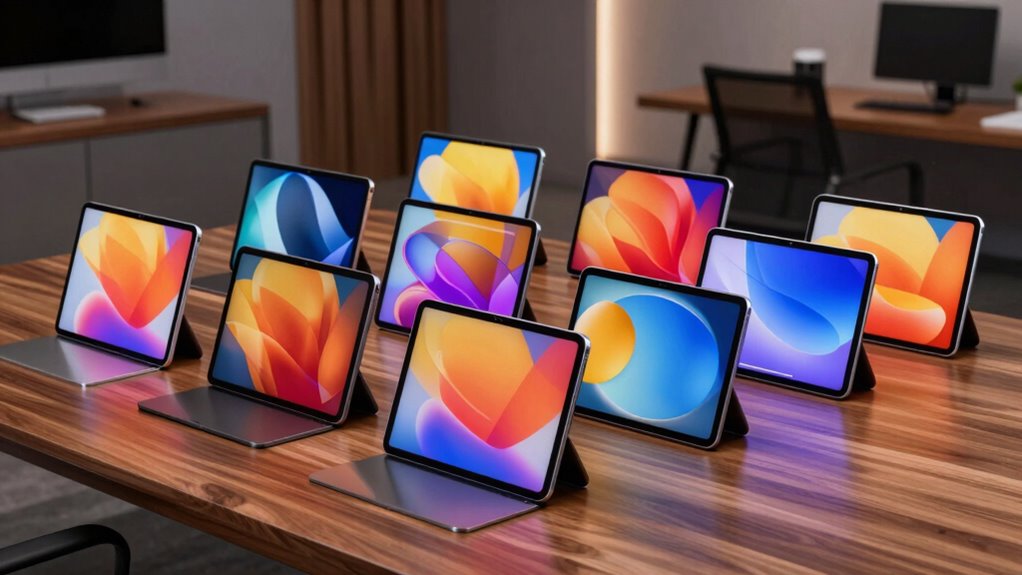

For a premium tablet for productivity, my best overall pick is the Samsung Galaxy Tab S11 512GB, which pairs a high-end Android tablet experience with room for demanding work. The Apple iPad Air 11-inch (M4) is a strong alternative for buyers who value Apple’s app ecosystem and a powerful compact device, while the Microsoft Surface Pro (2026) suits workflows that need Windows software. The main tradeoff is between a portable tablet-first setup and a larger, laptop-style workspace, with accessories and operating system fit shaping the real work experience. Screen size, storage, included keyboard or pen, and the apps you rely on can matter more than raw specifications. Read on for my ranked picks, buying advice, and answers to common questions.

Get the latest gadgets delivered free with Prime
- Fast, free delivery on millions of items
- Prime Video, Amazon Music and more included
- Member-only deals all year
Complete the kit



Key Takeaways
- The Tab S11 512GB ranks first as the most balanced tablet-first choice in this lineup; the larger Tab S11 Ultra favors people who need a broad canvas and can handle its size.
- The Surface Pro models are the clearest laptop replacements because they run Windows, while the Android and iPad options make more sense for touch-first workflows and mobile apps.
- The iPad Air M4 stands out for Apple users who want a compact, high-performance tablet, but buyers should account for the keyboard and stylus accessories their work may require.
- The Lenovo Yoga Tab AI includes a pen and keyboard, making its out-of-box productivity setup more complete than tablet listings where accessories are separate or unspecified.
- Two Tab S10+ configurations serve different priorities: one lists 512GB internal storage, while the other pairs 256GB internal storage with a 256GB SD card, which is not the same as built-in capacity.
| Samsung Galaxy Tab S11 512GB Wi-Fi Android Tablet, Silver |  | Best Overall | Display: 11-inch Dynamic AMOLED 2X with Vision Booster | Memory: 12GB RAM | Storage: 512GB, expandable via microSD | VIEW ON AMAZON | See Our Full Breakdown |
| Samsung Galaxy Tab S10+ 12.4″ 512GB Android Tablet, Platinum Silver |  | Best for Large-Screen Multitasking | Display size: 12.4 inches | Storage: 512GB | Operating system: Android | VIEW ON AMAZON | See Our Full Breakdown |
| Apple iPad 11-inch with A16 chip, 512GB, Wi-Fi 6, and Liquid Retina Display (Blue) |  | Best for Apple Ecosystem Basics | Display: 11-inch Liquid Retina with True Tone | Chip: Apple A16 | Storage: 512GB | VIEW ON AMAZON | See Our Full Breakdown |
| Lenovo Idea Tab 11-Inch Tablet with Tab Pen and Folio Case | 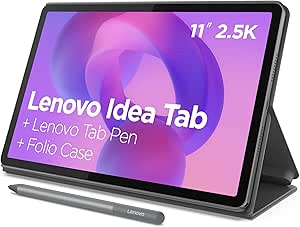 | Best Ready-to-Work Bundle | Display: 11-inch 2.5K IPS touchscreen, 90Hz | Processor: MediaTek Dimensity 6300 | Memory: 8GB | VIEW ON AMAZON | See Our Full Breakdown |
| Apple iPad Air 11-inch (M4), 1TB, Wi-Fi 7, Space Gray |  | Best Premium Performance | Display: 11-inch Liquid Retina with P3 wide color and True Tone | Chip: Apple M4 | Storage: 1TB | VIEW ON AMAZON | See Our Full Breakdown |
| Samsung Galaxy Tab S10+ 12.4-Inch Tablet, 12GB RAM, 256GB Storage with 256GB SD Card |  | Best for S Pen Productivity | Display: 12.4-inch WUXGA+ AMOLED 2X touchscreen | Resolution: 2800 x 1752 | Refresh rate: 120Hz | VIEW ON AMAZON | See Our Full Breakdown |
| Samsung Galaxy Tab S11 Ultra AI Wi-Fi Tablet, 14.6″ 256GB/12GB, Gray (SM-X930) with S Pen |  | Best for a Large Android Workspace | Display: 14.6-inch Dynamic AMOLED 2X, anti-reflective | Resolution: 2960 x 1848 | Refresh rate: 120Hz | VIEW ON AMAZON | See Our Full Breakdown |
| Lenovo Yoga Tab AI Tablet, 11.1-Inch 3.2K 144Hz, 12GB RAM, 512GB Storage, Pen and Keyboard |  | Best Productivity Bundle | Display: 11.1-inch 3.2K LTPS IPS touchscreen | Resolution: 3200 x 2000 | Refresh rate: 144Hz | VIEW ON AMAZON | See Our Full Breakdown |
| Microsoft Surface Pro (2026) 13-inch 2-in-1 Laptop, Snapdragon X2 Elite, OLED Touchscreen, 16GB RAM, 1TB SSD, Windows 11 Copilot+ PC, Black |  | Best for Windows Power Users | Display: 13-inch PixelSense OLED touchscreen with HDR | Processor: Qualcomm Snapdragon X2 Elite, 12-core | Memory: 16GB RAM | VIEW ON AMAZON | See Our Full Breakdown |
| Microsoft Surface Pro for Business 2-in-1 Laptop/Tablet (2025), 13-inch Touchscreen, Intel Core Ultra 7, 16GB RAM, 1TB SSD, Platinum |  | Best for Windows Business Workflows | Model year: 2025 | Operating system: Windows 11 Pro | Processor: Intel Core Ultra 7 Series 2 | VIEW ON AMAZON | See Our Full Breakdown |
| premium tablet for productivity | Storage | Display | Memory | Processor |
|---|---|---|---|---|
| Samsung Galaxy Tab S11 512GB W | 512GB, expandable via microSD | 11-inch Dynamic AMOLED 2X with Vision Booster | 12GB RAM | — |
| Samsung Galaxy Tab S10+ 12.4" | 512GB | — | — | Powerful tablet processor (model not specified) |
| Apple iPad 11-inch with A16 ch | 512GB | 11-inch Liquid Retina with True Tone | — | — |
| Lenovo Idea Tab 11-Inch Tablet | 256GB | 11-inch 2.5K IPS touchscreen, 90Hz | 8GB | MediaTek Dimensity 6300 |
| Apple iPad Air 11-inch | 1TB | 11-inch Liquid Retina with P3 wide color and True Tone | — | — |
| Samsung Galaxy Tab S10+ 12.4-I | 256GB built-in + 256GB SD card | 12.4-inch WUXGA+ AMOLED 2X touchscreen | 12GB RAM | MT6989 |
| Samsung Galaxy Tab S11 Ultra A | 256GB | 14.6-inch Dynamic AMOLED 2X, anti-reflective | 12GB RAM | — |
| Lenovo Yoga Tab AI Tablet | 256GB built-in + 256GB microSD card | 11.1-inch 3.2K LTPS IPS touchscreen | 12GB LPDDR5X | Qualcomm Snapdragon 8 Gen 3 |
| Microsoft Surface Pro | 1TB SSD | 13-inch PixelSense OLED touchscreen with HDR | 16GB RAM | Qualcomm Snapdragon X2 Elite, 12-core |
| Microsoft Surface Pro for Busi | 1TB SSD | 13-inch touchscreen | 16GB RAM | Intel Core Ultra 7 Series 2 |
More Details on Our Top Picks
Samsung Galaxy Tab S11 512GB Wi-Fi Android Tablet, Silver
The Galaxy Tab S11 is my strongest all-around pick for productivity because it pairs a vivid, compact 11-inch Dynamic AMOLED 2X display with 12GB of RAM, 512GB of storage, and an included S Pen. That combination suits switching between documents, research, and handwritten notes without making the tablet oversized. Compared with the Galaxy Tab S10+, its smaller screen gives up workspace but is easier to carry; the Tab S10+ is the better fit for people who want more room for split-screen work. The S11 also offers microSD expansion and IP68 resistance, useful for keeping files on hand and working in more settings. Its tradeoffs are the 11-inch canvas for dense layouts and reliance on Android apps for desktop-style workflows.
Pros:- 11-inch Dynamic AMOLED 2X display with Vision Booster
- 12GB RAM and 512GB storage for multitasking and local files
- Included S Pen with Galaxy AI note and drawing features
- microSD expansion and IP68 water and dust resistance
Cons:- Smaller workspace than the 12.4-inch Galaxy Tab S10+
- Android apps may not match desktop software workflows
Best for: Mobile professionals and students who want a premium Android tablet with an included pen, ample storage, and a portable footprint.
Not ideal for: People who regularly edit side-by-side documents or want a laptop-style desktop workflow; the 11-inch screen and Android app environment may feel limiting.
- Display:11-inch Dynamic AMOLED 2X with Vision Booster
- Memory:12GB RAM
- Storage:512GB, expandable via microSD
- Connectivity:Wi-Fi
- Operating system:Android
- Included accessory:Galaxy Tab S Pen
- Water and dust resistance:IP68
- Color:Silver
Our verdict“Choose the Galaxy Tab S11 for a portable premium Android work tablet with a capable included pen and room to grow its storage.”
Samsung Galaxy Tab S10+ 12.4″ 512GB Android Tablet, Platinum Silver
The Galaxy Tab S10+ makes the most sense when screen space is the priority: its 12.4-inch display gives split-screen documents, lecture notes, and reference material more room than the Galaxy Tab S11. With 512GB onboard and Samsung tools such as Note Assist and Circle to Search, it is geared toward people who handle substantial notes and research on the tablet. Its larger canvas is the main productivity advantage, though the listed description does not specify memory or display technology, so buyers have less detail for judging those areas. The S Pen is also likely sold separately, unlike the S11’s included pen. Some AI features may depend on region or subscription, which makes the core screen-and-storage benefits a safer reason to choose it.
Pros:- 12.4-inch display offers more room for split-screen tasks
- 512GB storage accommodates substantial work files
- Note Assist can help organize and summarize notes
- Circle to Search supports quick on-screen research
Cons:- S Pen is likely sold separately
- Some AI features may have regional or subscription limits
- Memory and display technology are not specified in the supplied product data
Best for: Researchers, students, and office users who prefer a larger Android screen for reading, split-screen work, and organizing notes.
Not ideal for: Frequent travelers or buyers who expect a pen in the box; its larger footprint is less compact and the S Pen may be separate.
- Display size:12.4 inches
- Storage:512GB
- Operating system:Android
- Productivity tools:Galaxy AI, including Sketch to Image, Circle to Search, and Note Assist
- Processor:Powerful tablet processor (model not specified)
- Color:Platinum Silver
Our verdict“Pick the Tab S10+ if a roomy Android workspace matters more to you than the S11’s smaller, pen-included setup.”
Apple iPad 11-inch with A16 chip, 512GB, Wi-Fi 6, and Liquid Retina Display (Blue)
The 11-inch iPad with A16 is a practical productivity choice for people already working across Apple devices who want fast everyday performance and 512GB for documents, downloads, and creative projects. Touch ID, Wi-Fi 6, and the 12MP Center Stage camera support common work routines, from signing in to video calls. Compared with the iPad Air 11-inch (M4), this model offers plenty of storage but a less powerful chip and does not list Wi-Fi 7; the Air is better suited to heavier creative and multitasking demands. The iPad’s main cost in setup is that Apple Pencil and Magic Keyboard Folio are separate accessories, so a serious note-taking or typing workflow requires added gear. Buyers should also weigh iPadOS app capabilities against desktop-class needs.
Pros:- A16 chip supports responsive everyday work
- 512GB storage for apps and offline files
- 12MP Center Stage front camera for video calls
- Touch ID and Wi-Fi 6
Cons:- Apple Pencil and Magic Keyboard Folio are sold separately
- Less capable chip than the M4 iPad Air for demanding tasks
- Wi-Fi 6 is an older connectivity generation than the Air’s Wi-Fi 7
Best for: Apple users who need a responsive tablet for documents, video calls, browsing, and occasional pen or keyboard work.
Not ideal for: Professionals running demanding creative workloads or expecting a complete pen-and-keyboard setup included; the accessories are separate and the A16 sits below the M4 Air.
- Display:11-inch Liquid Retina with True Tone
- Chip:Apple A16
- Storage:512GB
- Connectivity:Wi-Fi 6
- Front camera:12MP Center Stage
- Security:Touch ID
- Connector:USB-C
- Compatible accessories:Apple Pencil (USB-C or 1st generation); Magic Keyboard Folio
Our verdict“Choose this iPad for familiar Apple workflows and generous storage when you do not need the Air’s M4 performance.”
Lenovo Idea Tab 11-Inch Tablet with Tab Pen and Folio Case
The Lenovo Idea Tab is the straightforward pick for buyers who want to start handwriting notes and typing with a case without sourcing accessories separately: it includes both a Tab Pen and folio case. Its 11-inch 2.5K IPS screen runs at 90Hz, giving everyday scrolling and reading a smooth feel, while the quad speakers suit lessons and calls. Compared with the Galaxy Tab S11, Lenovo bundles the basic work accessories, but lists 8GB of memory and 256GB of storage rather than the S11’s 12GB and 512GB. That makes the S11 a stronger fit for heavier multitasking and large local libraries. The Idea Tab’s stated battery figure is based on YouTube playback, so it does not establish work-session endurance; its midrange processor is also a less compelling match for demanding workloads.
Pros:- Tab Pen and folio case are included
- 11-inch 2.5K IPS display with 90Hz refresh rate
- Quad Dolby Atmos-tuned speakers
- 256GB storage for everyday documents and apps
Cons:- 8GB memory and Dimensity 6300 are less suited to demanding multitasking
- Battery claim specifies YouTube playback rather than work use
- 256GB storage is less than the 512GB options in this lineup
Best for: Students and note-takers seeking an Android tablet with a pen and folio included for class notes, reading, and light office tasks.
Not ideal for: Power users with demanding applications or large offline libraries; its 8GB memory and 256GB storage trail the Galaxy Tab S11.
- Display:11-inch 2.5K IPS touchscreen, 90Hz
- Processor:MediaTek Dimensity 6300
- Memory:8GB
- Storage:256GB
- Audio:Quad Dolby Atmos-tuned speakers
- Battery life:Up to 12 hours of YouTube playback
- Included accessories:Tab Pen and folio case
- Charger:20W
Our verdict“Choose the Idea Tab for a ready-to-use note-taking setup, and choose the Tab S11 if you need more memory and storage.”
Apple iPad Air 11-inch (M4), 1TB, Wi-Fi 7, Space Gray
The iPad Air 11-inch with M4 is the premium performance pick for buyers who need a compact tablet to handle demanding creative apps and sustained multitasking. Its M4 chip and 1TB of storage give intensive projects and large offline libraries more headroom than the A16 iPad, while Wi-Fi 7 brings newer wireless capability. The tradeoff is that both Apple Pencil and Magic Keyboard accessories are separate, so the work setup costs extra effort and hardware. Its 11-inch screen also provides less working area than the Galaxy Tab S10+ at 12.4 inches, which may matter for people who routinely keep two documents visible. The Air suits performance-focused Apple users, though buyers whose work is mainly notes and documents may find the less powerful iPad already sufficient.
Pros:- M4 chip supports demanding tasks and multitasking
- 1TB storage for large projects and offline files
- Wi-Fi 7 connectivity
- 11-inch Liquid Retina display with P3 wide color and True Tone
Cons:- Apple Pencil and Magic Keyboard are separate accessories
- Smaller screen than the 12.4-inch Galaxy Tab S10+
- Its performance headroom may exceed the needs of basic document and note workflows
Best for: Apple users running demanding creative apps or large projects who want strong performance, 1TB storage, and a compact 11-inch form.
Not ideal for: Buyers focused on split-screen workspace or a complete accessory bundle; the Tab S10+ has a larger screen, and the Pencil and Magic Keyboard are separate.
- Display:11-inch Liquid Retina with P3 wide color and True Tone
- Chip:Apple M4
- Storage:1TB
- Connectivity:Wi-Fi 7 with Apple N1
- Front camera:12MP Center Stage
- Rear camera:12MP Wide
- Security:Touch ID
- Weight:1.02 pounds
Our verdict“Choose the M4 iPad Air for high performance and extensive storage in a compact Apple tablet, provided you are comfortable adding accessories.”
Samsung Galaxy Tab S10+ 12.4-Inch Tablet, 12GB RAM, 256GB Storage with 256GB SD Card
The Galaxy Tab S10+ balances a roomy 12.4-inch workspace with a bundled magnetic S Pen, Samsung DeX, and Galaxy AI note tools. That combination suits people who move between handwritten notes, split-screen tasks, and media without needing a laptop-style Windows setup. Compared with the larger Galaxy Tab S11 Ultra, it is easier to manage as a tablet, while still offering an AMOLED screen and 120Hz refresh rate for smooth scrolling and detailed work. Its IP68 protection also adds reassurance for study or work on the move. The storage listing needs a close read: 256GB is built in, and the additional 256GB comes from a separate SD card. Buyers who need a single large internal drive or a specified Wi-Fi standard may prefer another option.
Pros:- 12.4-inch AMOLED 2X display with a 120Hz refresh rate
- Magnetic S Pen and Galaxy AI note-taking features included
- Samsung DeX supports desktop-style multitasking
- IP68-rated water and dust resistance
Cons:- The advertised 512GB total includes a separate 256GB SD card; built-in storage is 256GB
- The Wi-Fi standard is not specified in the product data
Best for: Students and mobile professionals who want an included stylus, DeX multitasking, and water-resistant hardware in a large but manageable Android tablet.
Not ideal for: Buyers who require 512GB of built-in storage or need the Wi-Fi standard clearly specified before purchase.
- Display:12.4-inch WUXGA+ AMOLED 2X touchscreen
- Resolution:2800 x 1752
- Refresh rate:120Hz
- Processor:MT6989
- Memory:12GB RAM
- Storage:256GB built-in + 256GB SD card
- Protection:IP68 water and dust resistance
- Included accessory:Magnetic S Pen
Our verdict“Choose the Tab S10+ for a capable Android work and study tablet with an included S Pen, DeX, and stronger water resistance than the larger Tab S11 Ultra.”
Samsung Galaxy Tab S11 Ultra AI Wi-Fi Tablet, 14.6″ 256GB/12GB, Gray (SM-X930) with S Pen
The Galaxy Tab S11 Ultra is the Android pick for buyers who want a tablet-sized canvas that can hold several work panes comfortably. Its 14.6-inch anti-reflective AMOLED display gives documents, drawing tools, and side-by-side apps more room than the 12.4-inch Galaxy Tab S10+, while the included S Pen handles annotation and handwriting. Wi-Fi 7 is a useful advantage on compatible networks, though it cannot provide a mobile connection: this is a Wi-Fi-only model. The tradeoff is also regional. The listing identifies it as an international model with no USA warranty, a meaningful concern for buyers who depend on local manufacturer support. At 256GB, its internal storage is less generous than the Lenovo Yoga Tab’s stated 512GB total, which includes a microSD card.
Pros:- 14.6-inch 120Hz Dynamic AMOLED 2X display with anti-reflective coating
- S Pen included for handwriting, markup, and drawing
- Wi-Fi 7 support across 2.4, 5, and 6GHz bands
- Dual rear cameras and 4K video recording
Cons:- International model with no USA warranty
- Wi-Fi only, with no cellular calls or data
- 256GB internal storage is less than the Lenovo Yoga Tab’s stated 512GB total
Best for: Android users who prioritize a very large, anti-reflective screen for split-screen research, digital art, and S Pen work at home or on campus.
Not ideal for: US buyers who require a USA warranty or people who need cellular data while away from Wi-Fi.
- Display:14.6-inch Dynamic AMOLED 2X, anti-reflective
- Resolution:2960 x 1848
- Refresh rate:120Hz
- Memory:12GB RAM
- Storage:256GB
- Battery:11600 mAh
- Wireless:Wi-Fi 7; Bluetooth 5.3
- Included accessory:S Pen
- Connectivity:Wi-Fi only; no cellular calls or data
Our verdict“Pick the Tab S11 Ultra if a huge Android canvas matters more than portability, cellular access, or a US warranty.”
Lenovo Yoga Tab AI Tablet, 11.1-Inch 3.2K 144Hz, 12GB RAM, 512GB Storage, Pen and Keyboard
The Lenovo Yoga Tab AI makes a strong case for buyers who want a ready-to-work kit: the listing includes a keyboard, Tab Pen Pro, and USB-C hub. Its 11.1-inch 3.2K display is smaller than the Galaxy Tab S11 Ultra’s, but the 144Hz refresh rate and wide color gamut suit both detailed creative work and responsive navigation. A Snapdragon 8 Gen 3 and 12GB of RAM provide a capable base for demanding apps, while the hub adds ports without requiring a separate purchase. The storage headline needs context: only 256GB is built in; the stated 512GB total includes a microSD card. At 1.01 pounds, it is also heavier for long handheld sessions than its compact screen might suggest, and IP53 protection is less robust than the Tab S10+’s IP68 rating.
Pros:- 11.1-inch 3.2K display with 144Hz refresh rate and 98% DCI-P3 gamut
- Keyboard, Tab Pen Pro, and 7-in-1 USB-C hub included
- Snapdragon 8 Gen 3 processor with 12GB LPDDR5X memory
- Wi-Fi 7 and DisplayPort output over USB-C
Cons:- The stated 512GB total includes a microSD card; built-in storage is 256GB
- At 1.01 pounds, it may feel heavy during extended handheld use
- IP53 splash and dust protection is below the Tab S10+’s IP68 rating
Best for: Creative students and mobile workers who want a high-refresh display, stylus, keyboard, and USB-C hub together in one Android setup.
Not ideal for: People who prioritize a lightweight handheld tablet, need 512GB internal storage, or expect stronger water protection.
- Display:11.1-inch 3.2K LTPS IPS touchscreen
- Resolution:3200 x 2000
- Refresh rate:144Hz
- Processor:Qualcomm Snapdragon 8 Gen 3
- Memory:12GB LPDDR5X
- Storage:256GB built-in + 256GB microSD card
- Weight:1.01 lbs
- Included accessories:Tab Pen Pro, keyboard, 7-in-1 USB-C hub
- Protection:IP53 dust and splash resistance
Our verdict“Choose the Yoga Tab AI if you want the most complete included work kit and can accept its weight and microSD-dependent storage total.”
Microsoft Surface Pro (2026) 13-inch 2-in-1 Laptop, Snapdragon X2 Elite, OLED Touchscreen, 16GB RAM, 1TB SSD, Windows 11 Copilot+ PC, Black
For productivity that depends on desktop Windows software, the Surface Pro (2026) is the clearest fit in this group. Its 13-inch OLED touchscreen, 16GB RAM, and 1TB SSD put it closer to a laptop replacement than the Android Galaxy Tab S10+, which is better suited to mobile-first apps, pen notes, and DeX workflows. The 165-degree kickstand lets the screen sit at a range of working angles, and two USB-C/USB4 ports support modern peripherals. The laptop-like experience has an extra cost in accessories and setup: the Flex Keyboard is optional, so the tablet alone does not provide a built-in typing surface. It also offers only two ports, with no USB-A listed, making a hub useful for older accessories.
Pros:- Windows 11 Copilot+ PC with Snapdragon X2 Elite 12-core processor
- 13-inch PixelSense OLED touchscreen with HDR
- 16GB RAM and 1TB SSD
- 165-degree kickstand and up to 15.5 hours of stated battery life
Cons:- Flex Keyboard is optional, adding a separate accessory requirement
- Only two USB-C/USB4 ports are listed, with no USB-A or other legacy ports
Best for: Professionals who need Windows 11 software, substantial local storage, and a tablet that can become a keyboard-equipped laptop.
Not ideal for: Buyers seeking a complete out-of-box typing setup or frequent users of USB-A and other legacy accessories without a hub.
- Display:13-inch PixelSense OLED touchscreen with HDR
- Processor:Qualcomm Snapdragon X2 Elite, 12-core
- Memory:16GB RAM
- Storage:1TB SSD
- Operating system:Windows 11 Copilot+ PC
- Battery life:Up to 15.5 hours
- Ports:2x USB-C / USB4
- Kickstand:Adjusts up to 165 degrees
Our verdict“Choose this Surface Pro if Windows apps and 1TB of SSD storage matter more than having a keyboard included in the box.”
Microsoft Surface Pro for Business 2-in-1 Laptop/Tablet (2025), 13-inch Touchscreen, Intel Core Ultra 7, 16GB RAM, 1TB SSD, Platinum
The Surface Pro for Business (2025) pairs Windows 11 Pro with an Intel Core Ultra 7 processor, making it a natural fit for organizations and professionals whose work already depends on Windows tools and business settings. Like the 2026 Surface Pro, it offers 16GB RAM, 1TB SSD, and a 165-degree kickstand; the newer Snapdragon model distinguishes itself with an OLED HDR screen and longer stated battery life. This business edition instead lists an Intel AI Boost NPU rated up to 48 TOPS and fast charging through Surface Connect or USB-C. The display is specified only as a 13-inch touchscreen, with no panel type or resolution given here, so buyers comparing screen quality have less to go on. Pen inclusion is also unclear, and the stated battery life is up to 14 hours.
Pros:- Windows 11 Pro for business-oriented workflows
- Intel Core Ultra 7 Series 2 processor with AI Boost NPU up to 48 TOPS
- 16GB RAM and 1TB SSD
- 165-degree kickstand and fast charging via Surface Connect or USB-C
Cons:- Battery life is stated as up to 14 hours and may vary with use
- Display panel type and resolution are not specified in the product data
- Pen inclusion is unclear
Best for: Business users who need Windows 11 Pro, Intel-based hardware, and a large SSD for office files and established desktop workflows.
Not ideal for: Buyers who prioritize a clearly specified premium display, longer stated battery life, or confirmation that a pen comes in the box.
- Model year:2025
- Operating system:Windows 11 Pro
- Processor:Intel Core Ultra 7 Series 2
- Display:13-inch touchscreen
- Memory:16GB RAM
- Storage:1TB SSD
- Battery life:Up to 14 hours
- AI processor:Intel AI Boost NPU, up to 48 TOPS
- Kickstand:Adjusts up to 165 degrees
Our verdict“Pick the business Surface Pro for Windows 11 Pro and Intel-based work needs, while the 2026 Surface Pro is a better fit if OLED HDR and longer stated battery life lead your priorities.”

How We Picked
I ranked these tablets for sustained productivity rather than entertainment alone. I weighed processor and memory details where provided, display size and resolution, storage, operating system, and whether a pen or keyboard is included. I also considered how each setup fits common work patterns: writing and markup, multitasking across apps, laptop-style office work, and carrying a device between meetings or classes. Where a listing leaves a specification or accessory unclear, I treat that as a buying uncertainty rather than assuming a benefit.
The order reflects how broadly each model can serve work and study while balancing portability, capability, and setup effort. The Galaxy Tab S11 takes the top spot for a strong tablet-first balance; the iPad Air and Surface Pro follow for distinct ecosystem and desktop-software needs. Larger or more specialized options rank lower for general use because their size, platform, or configuration makes them a better match for a narrower workflow. The Lenovo Idea Tab is included as an accessible starting point, but its listed details indicate less headroom than the flagship choices.
| premium tablet for productivity | Processor |
|---|---|
| Samsung Galaxy Tab S11 512GB W | — |
| Samsung Galaxy Tab S10+ 12.4" | Powerful tablet processor (model not specified) |
| Apple iPad 11-inch with A16 ch | — |
| Lenovo Idea Tab 11-Inch Tablet | MediaTek Dimensity 6300 |
| Apple iPad Air 11-inch | — |
| Samsung Galaxy Tab S10+ 12.4-I | MT6989 |
| Samsung Galaxy Tab S11 Ultra A | — |
| Lenovo Yoga Tab AI Tablet | Qualcomm Snapdragon 8 Gen 3 |
| Microsoft Surface Pro | Qualcomm Snapdragon X2 Elite, 12-core |
| Microsoft Surface Pro for Busi | Intel Core Ultra 7 Series 2 |
Factors to Consider When Choosing Premium Tablet For Productivity
My picks differ most in how they fit into a working day. Before choosing a model, decide what kind of work the tablet must handle, what else you need to buy, and how you will move files between your devices.
Choose the Operating System Around Your Work
Start with the apps and file formats your work already depends on. Windows tablets can run familiar desktop software and fit into PC-centered workplaces, though a touch interface may feel less direct for some tasks. iPadOS and Android offer strong mobile app libraries and touch-first workflows, but a desktop application may have no equivalent or may behave differently. Check whether your employer or school requires specific software, device management, or file-handling features before buying. A common mistake is choosing by processor name and discovering that a required app cannot run the way you need. The best platform is the one that removes friction from your actual workday.
Match Screen Size to Your Work Surface
A larger display gives documents, timelines, and split-screen apps more room, but it takes more space in a bag and can be tiring to hold for long periods. Compact tablets travel easily and work well for reading, annotation, and quick edits, but extended spreadsheet or document work may feel cramped. Think about where you will use the tablet most: at a desk with an external display, on a train, or in hand during a class. Do not assume the biggest screen is automatically the most productive choice. If you often work with two apps side by side, compare the usable screen area and aspect ratio, not only the diagonal measurement. Portability and workspace compete directly here.
Budget for the Complete Setup
A tablet alone may not cover typing, handwriting, and stable desk use. Check whether a keyboard, pen, case, and charger are included, and confirm compatibility before planning around an accessory. A keyboard case can turn a tablet into a compact writing station, while a stylus matters more for handwritten notes, diagrams, and document markup. Buyers often compare the device specifications but overlook the weight and bulk of the attached keyboard. Consider whether you will leave the tablet assembled or carry accessories separately. A complete setup that is ready when you open the box can be more useful than a faster tablet that needs several additions.
Buy Storage for the Files You Keep Locally
Cloud storage can reduce how much space you need, but it depends on reliable access and may not cover large offline projects. Video files, design assets, downloaded course materials, and virtual machines can consume storage quickly. Compare built-in capacity with expandable storage carefully: a memory card can hold files, but it does not turn into internal storage for every app or workflow. Also check whether the model supports the card type and capacity you plan to use. Keep some room free for system updates and working files instead of filling the device from day one. Choose capacity based on your offline habits, not just your current file count.
Separate Peak Performance From Useful Performance
More powerful chips and larger memory allowances matter when you edit media, manage many demanding apps, or run desktop workloads. For notes, email, browsing, and office documents, the surrounding workflow can matter more: app switching, keyboard comfort, battery endurance, and file access. Look for clear memory and processor details when buying a high-end device, and avoid treating an AI label as a guarantee that a particular work feature is available. Check which on-device or cloud features are supported in your region and in the apps you use. Paying for the highest configuration makes sense when your workload can use it; otherwise, a more modest device may leave more budget for accessories.
Check Compatibility Before Replacing a Laptop
A tablet can handle a surprising amount of work, but some jobs still rely on desktop peripherals, specialist apps, or a particular connection standard. List the devices you connect now, such as monitors, storage drives, printers, and wired networks, then check port support and adapter needs. Review whether your files sync cleanly across your phone and computer, especially if you switch between operating systems. Remote access to a work PC can fill some gaps, but it depends on a dependable connection and may not suit travel. Try to map one typical work task from start to finish before treating a tablet as a full replacement. That check can reveal whether you need a tablet, a 2-in-1, or both.
Frequently Asked Questions
Can a premium tablet replace my laptop for work?
It can if your daily work centers on documents, communication, web apps, note-taking, and other software available on the tablet’s operating system. A Surface Pro is the more natural fit when you need Windows desktop applications, while the iPad and Android models are better suited to mobile-first workflows. Check specialist software, external display support, and peripheral connections before replacing a laptop. If your work depends on several desktop programs running together, keep a laptop or choose a Windows 2-in-1. The right answer depends on your apps, not the tablet’s premium positioning.
Should I choose the Galaxy Tab S11 Ultra or the regular Tab S11?
Choose the Ultra if a large canvas will improve your work, such as viewing documents side by side, drawing, or presenting information. Its 14.6-inch display will be less convenient to carry and hold than the regular Tab S11. The standard S11 is the more balanced choice for people who move between locations and still want a capable tablet-first device. Consider the weight of your full setup once you add a case or keyboard. If you rarely use split-screen work, the extra screen area may not repay the portability cost.
Is 256GB with a memory card as good as 512GB built in?
No, the two configurations offer different kinds of storage. A memory card can provide space for files such as media and documents, but apps and some work data may still need internal storage. Built-in capacity is generally simpler when you install large apps or work offline. Check the tablet’s card support and the way your key apps handle external files before relying on expansion. The 512GB configuration is the more straightforward option for people who want substantial local space without managing a separate card.
Do I need to buy a keyboard and pen separately?
That depends on the specific listing and the way you work. The Lenovo Yoga Tab AI listing includes both a pen and keyboard, while other product names here do not make the same bundle promise. A keyboard is useful for long writing sessions and shortcuts; a pen helps with handwriting, sketches, and markup. Verify the exact box contents and accessory compatibility before purchase, since bundles can vary by retailer or configuration. If you need both tools, include their cost, weight, and charging needs in your comparison.
Which tablet makes the most sense for a student or first-time tablet buyer?
The Lenovo Idea Tab is the approachable pick in this lineup, particularly for someone who wants a tablet with a pen and folio case listed in the package. The Yoga Tab AI offers a more equipped bundle with a keyboard and pen, but its higher-resolution, high-refresh display may be more than a beginner needs. Students should first confirm that their required learning apps work on the chosen operating system. They should also check keyboard comfort, offline file access, and whether the device fits their backpack and desk. A beginner benefits more from a setup that is easy to carry and ready for class than from unused high-end specifications.
Conclusion
For most productivity-focused buyers, I recommend the Samsung Galaxy Tab S11 512GB as the best overall tablet-first choice. The Samsung Galaxy Tab S10+ 256GB with SD card is my value-oriented option for someone comfortable managing expandable storage, while the Apple iPad Air 11-inch (M4) is the best premium compact choice for Apple users. New tablet buyers can start with the Lenovo Idea Tab, especially if its included pen and folio match their needs. For Windows software, choose a Surface Pro; for a broad Android workspace, choose the Tab S11 Ultra; and for an included keyboard-and-pen bundle, consider the Lenovo Yoga Tab AI. Let your apps, work surface, and accessory needs decide between them.