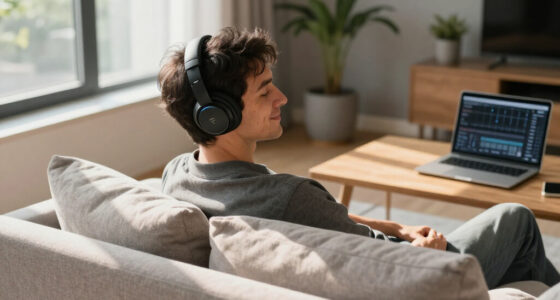

Set up and use wireless earbuds with noise cancellation by charging them, pairing them with a device, fitting the ear tips, and checking the available listening modes. This guide is for first-time users and anyone replacing earbuds who wants a reliable connection, comfortable fit, and a clear way to confirm noise cancellation is active. Allow about 15-25 minutes for setup and testing.

Get the latest gadgets delivered free — and shop member deals
- Fast, free delivery on millions of items
- Access to Prime Big Deal Days deals on October 6–7
- Prime Video, Amazon Music and more included
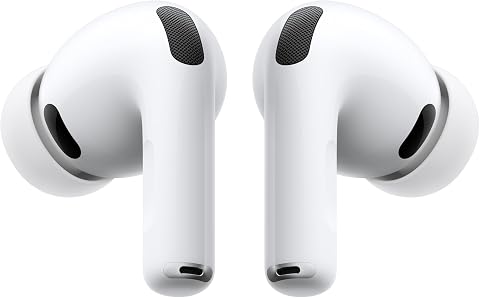
Apple AirPods Pro 3 Wireless Earbuds with Active Noise Cancellation
- ✔ Connectivity: Wireless
- ✔ Noise cancellation: Active noise cancellation
- ✔ Listening time with ANC: Up to 8 hours

Soundcore P30i Noise-Cancelling Wireless Earbuds with Charging Case Phone Stand
- ✔ Model: P30i (A3959)
- ✔ Connectivity: Bluetooth 5.4, wireless
- ✔ Noise cancellation: Adaptive ANC, stated to reduce noise by up to 42 dB

JBL Vibe Beam 2 Noise-Cancelling Earbuds, Black
- ✔ Model: JBL Vibe Beam 2 (JBLVBEAM2BLKAM)
- ✔ Noise control: Active Noise Cancelling and Smart Ambient
- ✔ Driver size: 8 mm
Difficulty: Beginner | Time: 15-25 minutes
What You’ll Need
Tools & Materials:
- Wireless noise-cancelling earbuds and their charging case
- A compatible phone, tablet, or computer with Bluetooth
- The earbuds’ charging cable or a compatible wireless charger, if needed
- The manufacturer’s companion app, if available
Knowledge:
- Basic ability to open Bluetooth settings and select a device
- Ability to charge a device and follow on-screen prompts
Check the earbuds’ quick-start instructions for model-specific pairing and control details. Charge the case and earbuds before setup; some models need a minimum battery level to enter pairing mode. Keep the earbuds and device close together during pairing.
Apple AirPods Pro 3 Wireless Earbuds with Active Noise Cancellation
AirPods Pro 3 take the top spot because they pair active noise cancellation with more ways to tailor the listening experience than the other two picks. Five ear-tip sizes give us more opportunity to find a secure seal, which matters because a comfortable fit can support both isolation and long listening sessions. Hearing-health tools, Adaptive EQ, and workout heart-rate sensing also make these more than a commute-only option. Compared with the Soundcore P30i, the Apple pick has a broader stated feature set, while Soundcore offers a phone-stand case and a larger total battery figure.The key limitation is ecosystem dependence. The supplied details note that several features require an iPhone or Apple Intelligence, so buyers using other phones should not assume they will get the complete experience. Up to eight hours of listening with ANC enabled is clearly useful, but actual time varies by mode and feature use. We put these first for people who can use their integrated tools; buyers seeking the most platform-neutral value or the most case-inclusive runtime may prefer Soundcore or JBL instead.
Pros:
- Active noise cancellation with up to eight hours of stated listening time while enabled
- Five ear-tip sizes support a more personalized fit
- Hearing-health tools include a hearing test and hearing protection
- Workout features include heart-rate and calorie sensing
Cons:
- Several features require an iPhone or Apple Intelligence
- Battery life varies with listening mode and feature use
Best for: Apple-device owners who want ANC, multiple fit choices, and hearing or workout features in one pair.
Not ideal for: Listeners who use non-Apple devices and want every listed feature available, or buyers prioritizing the longest stated total battery life.
Bottom line: We recommend AirPods Pro 3 as the most complete ANC-focused pick for buyers who will use them within Apple’s ecosystem.
“We recommend AirPods Pro 3 as the most complete ANC-focused pick for buyers who will use them within Apple’s ecosystem.”
Soundcore P30i Noise-Cancelling Wireless Earbuds with Charging Case Phone Stand
The Soundcore P30i stands out for combining adaptive ANC with a case that doubles as a phone stand. That is a genuinely different everyday benefit from the AirPods Pro 3’s hearing and workout tools: the case can prop up a phone, while the earbuds offer transparency mode when we need to stay more aware of our surroundings. Soundcore also gives a useful distinction between battery modes: up to 45 hours with the case in the stated standard estimate, but up to 25 hours with ANC enabled. That ANC-on figure is more relevant to this roundup than the headline maximum.Its 10 mm drivers with BassUp point toward a bass-forward presentation, and four microphones with AI-enhanced call processing address calls as well as listening. A 10-minute charge is stated to provide up to two hours of use. Compared with JBL Vibe Beam 2, P30i includes the distinctive stand-case design and an explicit ANC-on case total; JBL’s maximum runtime is listed with ANC off. The tradeoff is that P30i’s battery falls considerably when cancellation is active, and the provided specifications do not list a headphone jack. We see it as the practical middle choice, not the most specialized one.
Pros:
- Adaptive ANC and transparency mode cover quieter and more aware listening
- Charging case doubles as a phone stand
- Up to 25 hours with ANC enabled or up to 45 hours under the standard stated estimate
- Four microphones support AI-enhanced call processing
Cons:
- Battery life drops when ANC is enabled
- No headphone jack is listed
- BassUp may be less suitable for listeners seeking a neutral sound profile
Best for: Commuters and everyday listeners who want adaptive ANC, transparency, long case-inclusive runtime, and a phone-stand case.
Not ideal for: Buyers who keep ANC on for most listening and need the longest ANC-enabled runtime, or anyone seeking a wired headphone connection.
Bottom line: We rate Soundcore P30i as the most practical all-round alternative when useful case design and flexible battery modes matter as much as ANC.
“We rate Soundcore P30i as the most practical all-round alternative when useful case design and flexible battery modes matter as much as ANC.”
JBL Vibe Beam 2 Noise-Cancelling Earbuds, Black
JBL Vibe Beam 2 is our pick for listeners who want ANC alongside adjustable Smart Ambient controls and app-based sound customization. That combination makes it easier to switch priorities: use cancellation when we want fewer distractions, then adjust ambient listening when awareness matters. JBL’s four microphones also support clearer calls, and the Headphones app adds EQ customization. Compared with Soundcore P30i, JBL offers three additional charges in its case for a stated 30 hours of case playback, but its up-to-40-hour total is specifically for ANC off. Soundcore, by contrast, supplies a separate total for ANC-enabled use.The 8 mm drivers and Pure Bass tuning suit listeners who like weightier low frequencies, though buyers who prefer a less emphasized bass presentation may want to explore EQ settings. JBL lists up to 10 hours per earbud and a quick-charge claim of up to three hours of playback from 10 minutes, but those figures should not be mistaken for a guaranteed ANC-on session length. We place it third not because ANC is absent, but because the supplied battery details are less helpful for people who leave noise cancellation on throughout the day. For app controls and flexible ambient listening, however, it is a clear alternative to the more ecosystem-focused AirPods.
Pros:
- Active noise cancelling with adjustable Smart Ambient mode
- JBL Headphones app offers EQ customization
- Four microphones support clearer calls
- Quick charge provides up to three hours of playback from 10 minutes
Cons:
- Up-to-40-hour playback figure requires ANC to be off
- The provided battery details do not specify total playback with ANC enabled
- Pure Bass tuning may not suit listeners who prefer a restrained low end
Best for: Listeners who want ANC with adjustable Smart Ambient controls, app EQ, and a bass-forward sound option.
Not ideal for: People who rely on ANC continuously and want a clearly stated ANC-on total battery figure before choosing.
Bottom line: We recommend JBL Vibe Beam 2 for ambient-mode flexibility and app sound controls, provided its ANC-off battery headline matches your expectations.
“We recommend JBL Vibe Beam 2 for ambient-mode flexibility and app sound controls, provided its ANC-off battery headline matches your expectations.”
As an Amazon Associate we earn from qualifying purchases.
Before You Start
Use noise cancellation only when it is safe to reduce awareness of your surroundings. Turn it off or use transparency or ambient mode near traffic, while cycling, or when you need to hear announcements. Noise cancellation reduces some background sounds but does not make earbuds hearing protection. Start at a low listening volume, and do not test the feature in a setting where missing an alert could put you at risk.
Bluetooth menus and app features vary by model. The mode names may include Noise Cancellation, ANC, Transparency, Ambient Sound, and Off. If you cannot find an option, check the model’s instructions rather than assuming every pair has the same controls.
Step-by-Step Instructions
Step 1: Charge the earbuds and case
Place both earbuds in their charging slots and connect the case to its cable or charger. Check the case indicator or companion app for battery status, then charge until the earbuds have enough power for setup and testing. If the case has a protective film over its charging contacts, remove it according to the product instructions.
Tip: Do not force an earbud into the wrong slot. Each earbud should sit securely and make contact with its charging pins.
Check: The case or app shows that both earbuds are charging or have a usable battery level.
Step 2: Install the companion app if your model uses one
Find the app named in the earbuds’ instructions in your device’s official app store. Install it, open it, and allow only the permissions needed for setup and device features. Follow any prompts to register or add the earbuds. If the model works without an app, continue to Bluetooth pairing.
Tip: Use the official app publisher listed by the manufacturer. Avoid third-party apps that request unrelated access.
Check: The app recognizes the earbuds or displays the model’s setup screen. If no app is needed, you can continue without one.
Step 3: Put the earbuds in Bluetooth pairing mode
Open the case with the earbuds inside, or remove them if the instructions say to do so. Start pairing using the model’s stated method, such as holding the case button or touching both earbuds. Watch for a flashing indicator or listen for a pairing prompt. If the earbuds connect to another device automatically, disconnect them there or temporarily turn off that device’s Bluetooth.
Tip: Pairing controls differ between models. Use the included instructions instead of holding buttons at random, which can trigger a reset or another function.
Check: The indicator flashes in the pairing pattern or the earbuds announce that they are ready to pair.
Step 4: Connect the earbuds to your phone or computer
Open Bluetooth settings on the device you want to use, turn Bluetooth on, and select the earbuds’ name from the available-device list. Approve the pairing prompt if it appears. Wait for the status to change to Connected. If a separate prompt asks to pair a second item, follow the instructions for your model; do not select an unfamiliar device name.
Tip: Keep the earbuds close to the device and avoid pairing through multiple devices at once during initial setup.
Check: The device lists the earbuds as connected, and any connection tone or voice prompt confirms the link.
Step 5: Choose and fit the ear tips
Try the supplied ear-tip sizes, starting with the size already attached. Insert each earbud gently and twist or angle it as directed by the manufacturer. Choose tips that seal the ear canal without pain or pressure. If the app includes a fit test, run it and change sizes or adjust the position until the test reports a suitable seal.
Tip: A poor seal can weaken bass and noise cancellation. Do not push an earbud deeply or keep a tip that causes soreness; try another size or shape.
Check: Both earbuds feel secure during a gentle head movement, remain comfortable, and produce balanced sound without a hollow or leaking sensation.
Step 6: Set up noise cancellation and other listening modes
Open the companion app or use the earbuds’ touch, button, or stem controls to find the listening-mode options. Select Noise Cancellation or ANC. Locate Transparency or Ambient mode and Off as well, then check how the controls switch between them. Adjust the mode level only if your model provides that option.
Tip: Some earbuds require a long press or a setting enabled in the app before the controls can change modes. Check the control diagram for the correct gesture.
Check: The app, device, voice prompt, or indicator identifies the selected mode, and you can switch to another mode and back.
Step 7: Test audio and noise cancellation safely
Play familiar audio at a low volume in a safe, quiet place. Confirm that sound comes from both earbuds, then pause playback and switch between ANC, transparency, and Off. Listen for a change in how steady background sounds are perceived. Noise cancellation often works best on consistent low-frequency sounds; it may not remove speech, sudden noises, or every sound completely.
Tip: Do not turn the volume up to compensate for a weak seal or to overpower noise. Reseat the earbuds and check the fit first.
Check: Audio plays in both earbuds, the mode changes register, and steady background noise is reduced in ANC compared with Off. Transparency should make nearby sounds easier to hear.
Step 8: Set useful controls and device preferences
In the app or device settings, set the available controls for playback, calls, and mode switching. Choose a mode cycle that includes the options you will use, if the feature is supported. Check that the earbuds are selected as the audio output for calls and media, and review automatic pause, microphone, and multipoint settings if present.
Tip: Make one change at a time and test it. A control assigned to a mode switch may no longer perform its default playback action.
Check: A test tap or button press performs the assigned action, and media or a test call uses the earbuds rather than the device speaker.
Step 9: Store the earbuds and confirm reconnection
Return the earbuds to their case and close the lid. After a few seconds, open the case near the paired device or remove the earbuds as directed. Check that they reconnect automatically. Put them back in the case after use so they are protected and can recharge.
Tip: If they do not reconnect, confirm Bluetooth is on and that the device has not connected to another audio accessory.
Check: The device shows the earbuds as connected after they are removed from the case, without repeating the full pairing process.
Common Mistakes to Avoid
- Using ear tips that are too small or too large, leaving an incomplete seal. — Try the supplied sizes in each ear, adjust the angle, and use the app’s fit test if available. Comfort and a stable seal matter more than choosing the same size for both ears.
- Assuming ANC removes every sound or treating it as hearing protection. — Expect reduced steady background noise, not silence. Keep volume moderate and use transparency or remove the earbuds when you need to hear people or safety alerts.
- Pairing while the earbuds are still connected to another nearby device. — Disconnect the earlier device or temporarily switch off its Bluetooth before pairing to the intended device.
- Using the wrong touch gesture and resetting or changing a setting by accident. — Check the model’s control guide and test gestures one at a time while audio is paused.
Troubleshooting
Problem: The earbuds do not appear in the Bluetooth device list.
Solution: Confirm they have charge, put them into the model’s pairing mode, and move them close to the phone or computer. Disconnect them from any device they already use. If they still do not appear, turn Bluetooth off and on, then follow the manufacturer’s reset instructions and try pairing again.
Problem: Only one earbud produces sound.
Solution: Check that both earbuds are charged and seated correctly in the case. Remove and reinsert them, confirm the device’s audio balance is centered, and reconnect Bluetooth. Clean the speaker openings gently as instructed by the manufacturer; do not insert sharp tools.
Problem: Noise cancellation seems weak or uneven.
Solution: Reseat both earbuds and test another tip size. Check that the ANC mode is selected rather than Off or Transparency, and inspect the microphones for dirt or blockage. Retest with steady background noise; changing voices and sudden sounds may remain audible.
Problem: Audio cuts out or the earbuds connect to the wrong device.
Solution: Keep the source device nearby, reduce obstructions, and disconnect unused paired devices. Check multipoint settings if the earbuds connect to two devices. If dropouts continue, remove the earbuds from the device’s Bluetooth list, restart both devices, then pair again.
What Success Looks Like
The setup is complete when both earbuds connect to the intended device, fit comfortably, and play sound in both ears. You can select ANC, Transparency or Ambient, and Off using the app or earbuds’ controls. In a safe test, ANC reduces steady background sound compared with Off, while transparency makes nearby sounds easier to hear. The earbuds also reconnect after you return them to the case and take them out again.
Next Steps
Keep the earbuds and case clean using the manufacturer’s care instructions, and clear debris from the charging contacts with a safe, dry method. Store the earbuds in the case when not in use and charge them before a long listening session. Check the app or product support page for firmware updates if you notice connection or mode problems. Repeat the fit check if the earbuds loosen, cause discomfort, or sound unbalanced. Seek help from the manufacturer if a battery, charging, or hardware fault persists after the listed troubleshooting steps.
Frequently Asked Questions
Will noise cancellation make my earbuds completely silent?
No. ANC commonly reduces steady, low-frequency sounds, such as a fan or engine hum, but voices, sudden noises, and other sounds may remain audible. Use a suitable safe environment and do not rely on ANC to block hazards.
Can I use noise cancellation without playing music?
Many models allow ANC to run without media playback, though behavior differs by model. Select ANC using the app or onboard controls, then check whether the earbuds stay in that mode while idle.
Why does ANC sound different in each ear?
Different ear-tip seals, fit, or blocked microphones can make cancellation seem uneven. Reseat the earbuds, try other tip sizes, and clean the microphone openings as directed. If the difference continues, check the manufacturer’s support guidance.
Can I connect the earbuds to a laptop after pairing them with my phone?
Yes, if the earbuds support switching or multipoint. Put them in pairing mode and select them in the laptop’s Bluetooth settings. Some models connect to only one source at a time; disconnect the phone first if the laptop cannot connect.
Should I use ANC or transparency while walking outside?
Use transparency or remove the earbuds when you need to hear traffic, people, or alerts. ANC and audio can reduce awareness, and earbuds do not replace attention to your surroundings.
Fall Picks
fall essentials
As an affiliate, we earn on qualifying purchases.