
TL;DR

Get the latest gadgets delivered free — and shop member deals
- Fast, free delivery on millions of items
- Access to Prime Big Deal Days deals on October 6–7
- Prime Video, Amazon Music and more included
Smart home Halloween decorations pair familiar props—lights, speakers, inflatables, and animatronics—with connected controls such as schedules, motion sensors, and smart plugs. Start with one effect, check device compatibility and outdoor ratings, and test the full setup before Halloween night so your spooky scene stays safe, reliable, and welcoming.
A skeleton that glows purple as trick-or-treaters reach the gate feels like a little piece of movie magic. You can create that moment without building a Hollywood control room: smart bulbs, plugs, speakers, and sensors can turn familiar decorations into a scene that reacts to people or follows a schedule.
This guide explains what smart Halloween decorations can actually do, how to start with a manageable setup, and what to check before leaving electronics outside on a chilly October evening. You’ll also find practical notes on power, privacy, sound, and accessibility—because the best display is spooky for visitors, not stressful for you or your neighbors.
Start with one effect, such as a scheduled smart bulb, before adding sensors or synchronized props.
A smart plug can schedule power to a simple decoration but cannot add features or guarantee that a prop restarts after power returns.
Check outdoor ratings, electrical load, connection instructions, and cable placement before putting devices outside.
Aim motion sensors at the visitor path, not the street, and keep sound and flashing effects comfortable for guests and neighbors.
Test compatibility, internet dependence, and app support before Halloween night; product capabilities vary by device and can change.
What smart Halloween decorations can do beyond glowing orange
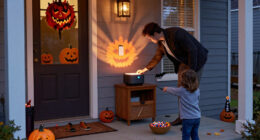
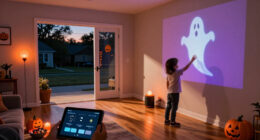
Smart home Halloween decorations combine familiar props with connected controls, allowing lights, speakers, and some moving props to respond to a schedule, a sensor, or a button press. A smart setup could change porch lights at dusk, play a short sound when someone approaches, or turn a simple plug-powered decoration on at a chosen time. The effect is less like switching on a porch bulb and more like a stagehand quietly cuing a scene.
The range runs from general-purpose smart bulbs and plugs to purpose-built effects with their own controllers. Devices may connect through Wi-Fi, Bluetooth, Zigbee, Z-Wave, or a proprietary radio system, and those choices affect which app, hub, or home platform you need. This matters beyond convenience: every additional connection or app can add setup and troubleshooting, while a more self-contained prop may be easier to operate but less flexible. Two products that both say “smart” may not work together, so check compatibility before buying rather than assuming one app controls everything.
For example, you might set a color-changing porch bulb to glow deep violet from 5:30 to 9 p.m., then use a motion sensor to trigger a brief sound near a covered entry. A smart plug can add a schedule to a basic decoration with a standard on/off switch, but it usually cannot change that decoration’s speed, sound, or lighting mode. Some devices also fail to restart as expected after power returns. That distinction helps set realistic expectations: a smart plug automates when power flows, not what a prop does with that power.
Why smart decorations can be appealing is simple: you can coordinate familiar props without manually switching each one on. Many general-purpose lights and plugs can also return for winter holidays or a backyard party. The tradeoff is that connected controls can introduce network, app, and compatibility dependencies that ordinary decorations do not have. Start with one effect you can test; a small, reliable scene often feels more polished than a yard full of gadgets competing for attention.
As an affiliate, we earn on qualifying purchases.
Build a convincing spooky scene with three simple effects
Smart home Halloween decorations work best when each device has one clear job: set the mood, react to visitors, or add a timed accent. You do not need a complicated show-control setup to make the front path feel different after dark. A few well-placed effects can guide a visitor’s eye like a red thread through a shadowy garden.
- Set the base light. Use an outdoor-rated smart bulb or light string to give the entry a steady color. For instance, leave the steps softly lit in warm white while a nearby spotlight paints a shrub purple. Keeping a dependable light on the walking route is important because dramatic colors or shadows can make steps harder to judge. Put the atmosphere around the path, not in place of visibility.
- Add one visitor trigger. Place a compatible motion sensor where it sees the path rather than the street. Set it to trigger a short sound or a brighter light so passing cars do not set off a chorus every few seconds. Sensor placement is a tradeoff between responsiveness and false alarms: a wide detection area catches visitors early, but may also react to traffic or passersby. Start with a narrower, deliberate coverage area and adjust after testing.
- Schedule the scene. Choose a start and stop time that matches your neighborhood’s trick-or-treat hours. Test the routine from the sidewalk and from the door before relying on it. Schedules can reduce the need to remember each device, but they can also leave a display running after visitors have gone or switch it off while late arrivals are still walking up, so choose times with a little judgment and check the routine on the night.
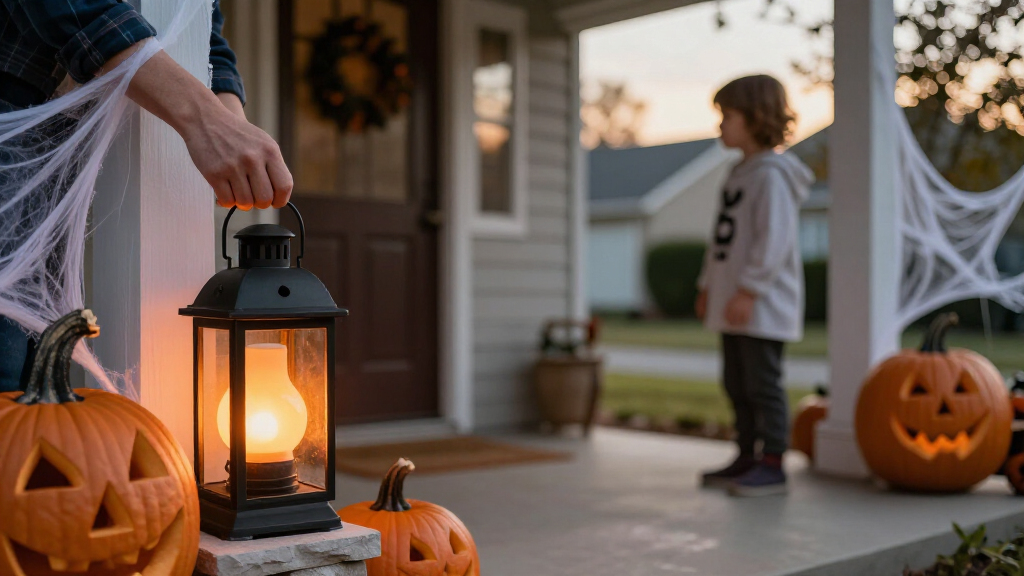
Imagine a small front porch with one smart bulb, a motion-triggered speaker, and a plastic raven beside the mat. At dusk, the bulb turns amber; when a visitor steps into the entry, it shifts to violet and the speaker gives one quiet caw. That combination feels intentional, but each piece remains easy to troubleshoot. The steady base light also means the visitor can still see the entry if the sensor misses them or the sound cue fails.
Keep the first setup modest until you know how your devices behave. Apps differ in how they handle delays, repeated triggers, and schedules, and some automations depend on internet access. More devices create more opportunities for timing conflicts or connection problems, so add a second sensor or a synchronized prop only after the first scene runs reliably for several evenings.
Wi-Fi enabled Halloween smart plugs
As an affiliate, we earn on qualifying purchases.
As an affiliate, we earn on qualifying purchases.
Choose smart lights, plugs, sensors, or show controls that fit your yard
Smart bulbs and plugs suit simple scenes, while sensors and show-control systems add more interaction and timing. Your best choice depends on what the decoration already does, where you can place it, and how much setup you want to manage. For a single porch, a bulb and a schedule may be plenty; a coordinated yard display needs more compatible parts and testing. The practical tradeoff is control versus complexity: choose the least elaborate option that delivers the effect you actually want.
| Device | What it adds | Best fit | Check before buying |
|---|---|---|---|
| Smart bulb or light string | Color changes, scenes, and schedules | Porches, windows, and garden accents | Outdoor rating, app or hub needs, and signal strength |
| Smart plug | Scheduled power on or off | Simple props with a standard on/off switch | Whether the prop restarts when power returns; outdoor suitability |
| Motion sensor | Triggers a compatible light or effect | Entryways and defined paths | Detection range, trigger settings, and what the sensor can control |
| Show-control system | More precise coordination across devices | Elaborate, synchronized displays | Hardware compatibility, setup time, and testing demands |
A useful example: a plug can turn a simple illuminated tombstone on at 6 p.m., but it cannot tell a separate motor to move or make an onboard sound play unless the tombstone supports that behavior. If it stays dark after a power cycle, the plug may be working perfectly while the prop itself is not designed to restart automatically. Understanding this boundary can prevent a frustrating mismatch between what the automation controls and what the decoration can do.
Check platform support by product rather than relying on a logo or a broad promise. Apple Home, Google Home, Amazon Alexa, and Matter support varies by device and feature. Some products need a hub; others connect directly over Wi-Fi or use Bluetooth. A hub can add coordination or local control, but it also means another device to configure and maintain. Product capabilities change, so confirm current specifications and app support at purchase time instead of depending on an old compatibility list.
motion sensor Halloween decorations
As an affiliate, we earn on qualifying purchases.
As an affiliate, we earn on qualifying purchases.
Keep outdoor decorations working through rain, wind, and cold
Outdoor reliability starts with using each device only in conditions its manufacturer allows. A porch roof does not automatically make an indoor-rated plug safe outside, and an outdoor-rated light does not make every extension-cord connection weatherproof. Rain, damp grass, cold temperatures, and gusty wind can all turn a cheerful display into a frustrating problem. Ratings apply to particular devices and conditions; they are not a general guarantee for every connection in the setup.
Before installation, check the exact outdoor rating for lights, plugs, sensors, and cables. Follow the manufacturer’s directions for connection protection and placement; do not improvise a cover that traps heat or blocks ventilation. Secure inflatables and lightweight props for the wind conditions in your area, and keep cords out of walkways where a child in a long costume might catch a toe. These precautions have practical consequences: a wet connection or shifted prop can interrupt the display, while a loose cable or obscured step can create a hazard for visitors.
Use this quick preflight before the busy night:
- Inspect every cord and connection for damage, loose plugs, and exposure to water.
- Check the total electrical load and avoid overloading outlets or power strips.
- Keep cables and props clear of paths, door swings, and places where visitors queue.
- Test moving parts, fog machines, and heaters according to their instructions, with visitors kept at a safe distance.
- Skip open flames near decorations unless the display and location are specifically suitable and all instructions allow it.
For example, if a fog machine sits beside a walkway, the effect may hide a low cable or make a step hard to see. Move the machine away from foot traffic, keep the path visibly lit, and follow the device instructions. A clear route and a stable prop matter more than one extra burst of fog.
As an affiliate, we earn on qualifying purchases.
Make the display fun for visitors, neighbors, and your privacy
A good smart display is predictable enough to feel welcoming. Motion effects should react where you expect, sound should stay at a considerate level, and flashing lights should not overwhelm the path. What feels like a thrilling jump scare to one visitor may be uncomfortable for a toddler, an older neighbor, or someone sensitive to sudden sound and flashing light. Designing for comfort does not remove the spooky mood; it helps ensure visitors can enjoy it without being startled into an unsafe reaction.
Try the display as a visitor would experience it: approach from the sidewalk, walk through the entry, and listen from inside a nearby home. Aim sensors away from the road if headlights or passing pedestrians trigger them constantly. Set audio to a short, moderate burst rather than a loop that rattles windows all evening. A steady low light on steps can make a scene both more atmospheric and easier to navigate. This kind of test reveals not just whether the devices work, but whether the combined effect feels appropriate from the places people will actually encounter it.
Connected decorations can also raise privacy and account questions. Some devices need an app account, permissions, or cloud access; others offer local controls. Check what information an app collects, whether a schedule still runs if the internet drops, and whether the manufacturer continues to support the app and security updates. Test offline behavior before you depend on it. A cloud-connected feature may offer convenient remote control, but it creates a dependency on the network and service; a local routine may be less flexible while continuing to work during an outage.
Let the spooky effect live beside a clear, comfortable path. A decoration should surprise visitors, not make them guess where to step.
Picture a motion sensor that catches everyone walking past your front fence. It may trigger dozens of times before the first trick-or-treater reaches your door. Turning the sensor toward the gate and shortening its range can reduce false triggers, lower noise for neighbors, and make each cue feel deliberate. Fewer, better-timed activations also make the effect feel more surprising because it is connected to a visitor’s approach rather than happening at random.
Spend less by testing one effect before expanding
You can make a memorable display without buying a dedicated Halloween system. Many households start with a smart bulb or plug they already own, then add a sensor only if the first scene works well. A basic setup can be inexpensive; a synchronized yard production can demand extra lights, controllers, cables, weather protection, and several evenings of troubleshooting. The real cost is not only the purchase price: more equipment also means more setup time and more possible points of failure on the night.
Consider Maya, who wants her small front porch to feel haunted without spending the month configuring equipment. She starts with one compatible smart bulb, schedules it to turn from warm white to purple at dusk, and uses an existing speaker for a short sound cue. On the first test, the bulb works but the speaker routine depends on the home internet connection, so she checks whether the sound can be started locally before Halloween night. That test helps her decide whether the added effect is worth relying on or whether the dependable light alone makes a better foundation.
That kind of small trial reveals the details a shopping page cannot: whether Wi-Fi reaches the porch, whether the app routine has a delay, and whether the effect feels too loud from the sidewalk. It also shows how devices behave together, which can differ from how each one works in isolation. If the scene holds up, Maya can add a motion sensor next year. If it does not, she has still learned how to improve the setup without buying a pile of parts she may never use.
Reuse is part of the value. General-purpose lights, plugs, speakers, and sensors can serve other holidays or everyday routines, while a dedicated monster prop may spend most of the year in storage. The tradeoff is that general-purpose devices may need extra configuration to create a Halloween effect, while a dedicated prop can be simpler but less useful later. Start early enough to test schedules, triggers, sound, network coverage, and weather protection. Make one change at a time, and keep notes on what worked so next October feels easier.
Frequently Asked Questions
What do I need to get started with smart Halloween decorations?
Start with a compatible smart bulb or outdoor-rated smart plug, the required app, and a reliable connection if the device depends on Wi-Fi or cloud services. One scheduled porch light is enough to test the idea before you add more equipment.
Can I make decorations turn on when trick-or-treaters approach?
Yes, if you use a compatible motion sensor or a decoration with a built-in sensor. Check what devices the sensor can trigger and aim it at the path rather than the street to reduce false activations.
Can a smart plug make any decoration smart?
A smart plug can schedule power for many simple devices with a standard on/off switch. It cannot add features the decoration does not have, and some props will not restart in their previous mode when power returns.
Will smart Halloween decorations work outdoors in rain or cold?
Only when the specific device and its connections are rated for those conditions. Check manufacturer instructions for weather exposure and temperature, and protect connections as directed rather than assuming a covered porch is enough.
Do smart decorations need Wi-Fi or a hub?
It depends on the product: some connect directly to Wi-Fi, while others use Bluetooth, a hub, or a proprietary controller. Check whether schedules and triggers work locally, since some features may stop if the internet or cloud service is unavailable.
How can I keep the display safe and comfortable for visitors?
Use devices according to their instructions, check electrical loads, secure props, and keep cables out of walkways. Keep steps visible, use moderate sound, and avoid effects that may distress visitors with sensory sensitivities.
Conclusion
Choose one effect, test it outdoors, and build from what works. A steady violet porch light and one well-timed sound can make an ordinary entry feel like a scene from a ghost story. Check the ratings, keep the path clear, and make sure your devices behave even when the network does not.
On Halloween night, the best automation is the one you barely notice—until a small, glowing raven turns its head at just the right moment.
Fall Picks
fall essentials
As an affiliate, we earn on qualifying purchases.