
The best gaming controllers balance reliable controls, comfortable ergonomics, and compatibility with the system you actually play on. My best overall pick is the GameSir G7 Pro, a versatile wired option for Xbox and PC, while the Razer Wolverine V3 Pro 8K suits PC players who prioritize fast, responsive input. For a straightforward entry point, the GameSir G7 SE offers wired Xbox and Windows play with Hall Effect sticks. The biggest tradeoffs are wired reliability versus wireless freedom, standard controls versus extra customization, and broad compatibility versus platform-specific features. Read on for the full breakdown and a guide to choosing the right fit.

Get the latest gadgets delivered free — and shop member deals
- Fast, free delivery on millions of items
- Access to Prime Big Deal Days deals on October 6–7
- Prime Video, Amazon Music and more included
Complete the kit



Key Takeaways
- Wired Xbox and PC picks lead on simplicity: The GameSir G7 Pro and G7 SE avoid charging and wireless setup, but their cables limit where you can play.
- PC-focused premium models emphasize responsiveness and customization: The Razer Wolverine V3 Pro 8K and Flydigi Vader 5 Pro stand apart from simpler, general-use controllers.
- Hall Effect sticks appear across several distinct tiers: They are featured on options such as the G7 SE, EasySMX X15, and GameSir Nova Lite 2, so the technology alone does not determine compatibility or overall fit.
- Multi-device flexibility varies widely: The ManbaOne, AceGamer Aurora II, and EasySMX X05Pro target several device types, while PlayStation DualSense Edge and Xbox Elite Series 2 are more closely tied to their platform ecosystems.
- Extra screens, docks, paddles, and remapping suit different players: These features can help with setup or complex controls, but they add complexity that beginners may not need.
| GameSir G7 Pro Wired Controller for Xbox Series X|S, Xbox One, PC & Android | 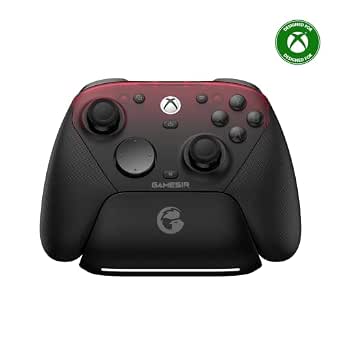 | Best for Multi-Platform Xbox Players | Compatible devices: Android, PC, Xbox One, Xbox Series S, Xbox Series X | Connectivity: Wired for Xbox, 2.4GHz wireless, Bluetooth for Android | Stick type: TMR | VIEW LATEST PRICE | See Our Full Breakdown |
| Flydigi Vader 5 Pro PC Controller with Low Latency and FORCEFLEX Joysticks |  | Best for PC and Switch Customization | Compatible devices: PC, Nintendo Switch, Android, TV, laptops | Connectivity: Wired, wireless, Bluetooth | Listed latency: 3ms wired, 4ms wireless | VIEW LATEST PRICE | See Our Full Breakdown |
| ManbaOne Interactive Screen Wireless Gaming Controller for PC, Switch, iOS, Android, Hall Effect Stick & Trigger, RGB Lighting, Remappable Buttons, 1800mAh Battery with Charging Dock |  | Best for On-Controller Customization | Supported platforms: Switch, Switch 2, iOS, Android, Windows PC | Connection modes: Wired, Bluetooth, wireless dongle | Display: 2-inch interactive screen | VIEW LATEST PRICE | See Our Full Breakdown |
| Razer Wolverine V3 Pro 8K PC Wireless Gaming Controller |  | Best for High-Response PC Play | Compatible devices: PC | Connectivity: 2.4GHz wireless; wired mode also supported | Polling rate: 8000Hz | VIEW LATEST PRICE | See Our Full Breakdown |
| FLYDIGI VADER 5S Wired Controller for Xbox Series X|S, Xbox One, Windows |  | Best Wired Xbox Value | Compatible devices: Windows, Xbox One, Xbox Series S, Xbox Series X | Controller type: Wired | Button quantity: 17 | VIEW LATEST PRICE | See Our Full Breakdown |
| GameSir G7 Pro 8K PC Wireless Gaming Controller with Hall Effect Triggers and Programmable Buttons |  | Best for High-Response PC Play | Compatibility: Android, Nintendo Switch, Nintendo Switch 2, Windows | Connectivity: Wired and 2.4GHz wireless | Controller type: Gamepad | VIEW LATEST PRICE | See Our Full Breakdown |
| EasySMX X15 Wireless PC & Steam Gaming Controller, Hall Effect, Black | 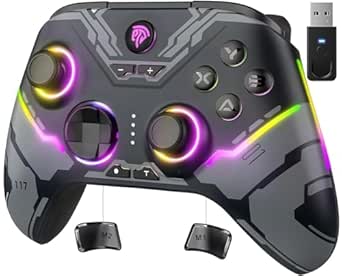 | Best Value for Multi-Device Play | Compatible devices: Android, iOS, PC, Windows, Nintendo Switch | Connectivity: 2.4G wireless, Bluetooth, USB | Controller type: Gamepad | VIEW LATEST PRICE | See Our Full Breakdown |
| Xbox Wireless Gaming Controller Elite Series 2 Black | 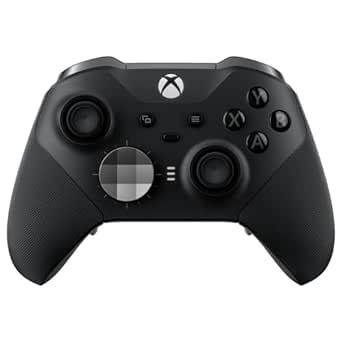 | Best for Customizable Xbox Play | Compatibility: Xbox Series X|S, Xbox One, Windows PC, mobile devices | Connectivity: Xbox Wireless, Bluetooth, USB-C cable | Battery life: Up to 40 hours | VIEW LATEST PRICE | See Our Full Breakdown |
| ASUS ROG Raikiri II Xbox Wireless Gaming Controller for PC and Xbox Series X|S |  | Best for Flexible Xbox and PC Setups | Compatible devices: Xbox, PC, ROG Xbox Ally | Connectivity: USB-C, Bluetooth, 2.4GHz RF | Polling rate: 1000Hz | VIEW LATEST PRICE | See Our Full Breakdown |
| Razer Wolverine V3 Pro Wireless Gaming Controller |  | Best for Competitive Xbox and PC Play | Compatibility: Xbox Series X|S, Xbox One, Windows PC | Connectivity: HyperSpeed 2.4GHz wireless, USB Type-C wired | Thumbsticks: Hall Effect precision thumbsticks | VIEW LATEST PRICE | See Our Full Breakdown |
| GameSir G7 SE Wired Controller for Xbox Series X|S, Xbox One & Windows 10/11, Plug and Play Gaming Gamepad with Hall Effect Joysticks and 3.5mm Audio Jack (White) |  | Best Wired Xbox Value | Compatibility: Xbox Series X|S, Xbox One, Windows 10/11 PC | Connection: Wired | Controls: Hall effect joysticks and triggers | VIEW LATEST PRICE | See Our Full Breakdown |
| GameSir Nova Lite 2 Wireless PC Controller with Hall Effect Sticks |  | Best for Multi-Platform Beginners | Compatibility: PC, Nintendo Switch, Nintendo Switch 2, Android, iOS | Connections: Wired, Bluetooth, wireless dongle | Controls: Hall effect sticks, trigger locks, remappable buttons | VIEW LATEST PRICE | See Our Full Breakdown |
| AceGamer Aurora II Wireless Bluetooth Controller for PC, Android, Switch, iOS, Steam Deck | 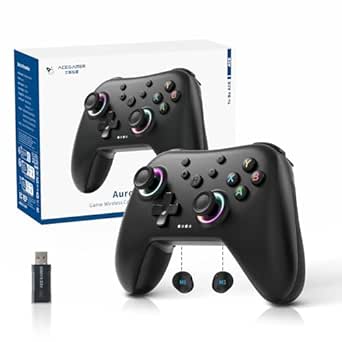 | Best for Wireless Handheld Play | Compatibility: PC, Android, Nintendo Switch, iOS, Steam Deck | Connections: Bluetooth, 2.4G wireless | Controls: Hall effect joysticks, customizable back keys | VIEW LATEST PRICE | See Our Full Breakdown |
| EasySMX X05Pro Wireless Gaming Controller for PC, Switch, Android, iOS | 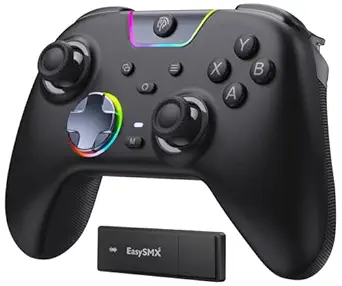 | Best for Low-Latency Multiplatform Play | Compatibility: Windows PC, Switch, Android, iOS | Connections: USB-C, 2.4G wireless, Bluetooth | Polling rate: 1000Hz wired/2.4G; 125Hz Bluetooth | VIEW LATEST PRICE | See Our Full Breakdown |
| PlayStation DualSense Edge Wireless Controller | 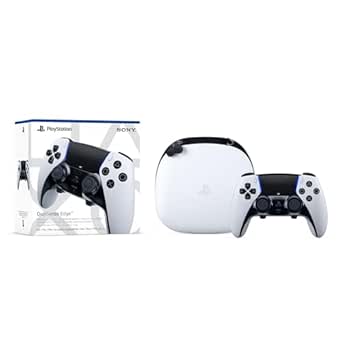 | Best Premium PS5 Customization | Compatibility: PlayStation 5 | Connection: Wireless | Power: Battery powered | VIEW LATEST PRICE | See Our Full Breakdown |
| gaming controller | Connectivity | Weight | Dimensions | Compatibility |
|---|---|---|---|---|
| GameSir G7 Pro Wired Controlle | Wired for Xbox, 2.4GHz wireless, Bluetooth for Android | 272 g | 3.9 x 7.01 x 7.13 inches | — |
| Flydigi Vader 5 Pro PC Control | Wired, wireless, Bluetooth | — | 6.06 x 4 x 2.56 inches | — |
| ManbaOne Interactive Screen Wi | — | 630 g | — | — |
| Razer Wolverine V3 Pro 8K PC W | 2.4GHz wireless; wired mode also supported | 0.58 kg | 8.7 x 3.23 x 7.99 inches | — |
| FLYDIGI VADER 5S Wired Control | — | 450 g | — | — |
| GameSir G7 Pro 8K PC Wireless | Wired and 2.4GHz wireless | — | — | Android, Nintendo Switch, Nintendo Switch 2, Windows |
| EasySMX X15 Wireless PC & Stea | 2.4G wireless, Bluetooth, USB | — | 2.95 x 4.69 x 6.5 inches | — |
| Xbox Wireless Gaming Controlle | Xbox Wireless, Bluetooth, USB-C cable | — | — | Xbox Series X|S, Xbox One, Windows PC, mobile devices |
| ASUS ROG Raikiri II Xbox Wirel | USB-C, Bluetooth, 2.4GHz RF | 9.6 ounces | 6.1 x 4.1 x 2.6 inches | — |
| Razer Wolverine V3 Pro Wireles | HyperSpeed 2.4GHz wireless, USB Type-C wired | — | — | Xbox Series X|S, Xbox One, Windows PC |
| GameSir G7 SE Wired Controller | — | 420 g | 8.27 x 4.53 x 2.56 inches | Xbox Series X|S, Xbox One, Windows 10/11 PC |
| GameSir Nova Lite 2 Wireless P | — | 0.24 kg | 6.1 x 4.09 x 2.24 inches | PC, Nintendo Switch, Nintendo Switch 2, Android, iOS |
| AceGamer Aurora II Wireless Bl | — | — | — | PC, Android, Nintendo Switch, iOS, Steam Deck |
| EasySMX X05Pro Wireless Gaming | — | — | — | Windows PC, Switch, Android, iOS |
| PlayStation DualSense Edge Wir | — | 2.6 pounds | 8 x 8 x 4.5 inches | PlayStation 5 |
More Details on Our Top Picks
GameSir G7 Pro Wired Controller for Xbox Series X|S, Xbox One, PC & Android
Xbox, PC, and Android flexibility gives the GameSir G7 Pro a broader role than the wired-only FLYDIGI VADER 5S, while its Xbox connection remains wired. TMR sticks and Hall Effect triggers are built for precise input and resistance to stick drift, and the 1000Hz polling rate targets responsive play. The GameSir Nexus app adds button customization, making it easier to tailor controls across supported setups. Wireless modes add options for PC and Android, though they require setup; the included data describes Xbox play as wired. The gyroscope is PC-only, so it is not a universal feature. Compared with the PC-focused Razer Wolverine V3 Pro 8K, this is the more flexible pick across platforms, but it does not match that controller’s stated polling rate.
Pros:- Supports Xbox, PC, and Android, with wired, 2.4GHz wireless, and Bluetooth modes.
- TMR sticks and Hall Effect triggers support precise control.
- 1000Hz polling rate and app-based customization offer responsive, tailored input.
- Built-in 1200mAh battery supports wireless modes.
Cons:- Xbox connectivity is wired, so wireless play on Xbox is not provided.
- Wireless modes require setup, and gyroscope functionality is PC-only.
- The charging station is described as an extra accessory rather than a confirmed included item.
Best for: Xbox owners who also play on PC or Android and want one controller with customizable controls and multiple connection modes.
Not ideal for: Players who want wireless Xbox play, a simple plug-and-play setup across every mode, or a gyro feature available on all platforms.
- Compatible devices:Android, PC, Xbox One, Xbox Series S, Xbox Series X
- Connectivity:Wired for Xbox, 2.4GHz wireless, Bluetooth for Android
- Stick type:TMR
- Triggers:Hall Effect analog
- Polling rate:1000Hz
- Battery:1200mAh built-in
- Weight:272 g
- Dimensions:3.9 x 7.01 x 7.13 inches
Our verdict“Choose the G7 Pro if you want a customizable controller spanning wired Xbox play and wireless PC or Android use.”
Flydigi Vader 5 Pro PC Controller with Low Latency and FORCEFLEX Joysticks
The Vader 5 Pro is a strong fit for players who want adjustable joystick feel and configurable controls across PC, Switch, Android, TV, and laptops. Its stated latency is 3ms wired and 4ms wireless, giving competitive-minded PC players a specific responsiveness claim to weigh against the Razer Wolverine V3 Pro 8K’s much higher stated polling rate. The Flydigi’s advantage is broader platform support, including Switch; it does not support Xbox or PlayStation. Wired, Bluetooth, and 2.4G dongle connections let you adapt to different setups, while motion sensing and rumble suit more than just fast-action games. Full customization requires software, which may take patience, and the charging dock is sold separately. Compared with the ManbaOne’s built-in screen-based controls, this model depends more on software for setup.
Pros:- Supports PC, Nintendo Switch, Android, TVs, and laptops.
- Offers wired, Bluetooth, and 2.4G dongle connectivity.
- Adjustable joysticks and customizable buttons support different play styles.
- Listed latency is 3ms wired and 4ms wireless.
Cons:- Does not support Xbox or PlayStation consoles.
- Full customization depends on software that may feel complex to configure.
- Charging dock is sold separately.
Best for: PC and Switch players who want adjustable joysticks, multiple connection choices, and profiles they can tailor for different game genres.
Not ideal for: Xbox or PlayStation owners, or players who want extensive customization without configuring software.
- Compatible devices:PC, Nintendo Switch, Android, TV, laptops
- Connectivity:Wired, wireless, Bluetooth
- Listed latency:3ms wired, 4ms wireless
- Button quantity:20
- Additional features:Adjustable joysticks, motion sensing, rumble
- Battery:1000mAh
- Dimensions:6.06 x 4 x 2.56 inches
Our verdict“Pick the Vader 5 Pro if adjustable controls and PC-or-Switch versatility matter more than Xbox compatibility or effortless setup.”
ManbaOne Interactive Screen Wireless Gaming Controller for PC, Switch, iOS, Android, Hall Effect Stick & Trigger, RGB Lighting, Remappable Buttons, 1800mAh Battery with Charging Dock
The ManbaOne’s 2-inch interactive screen sets it apart: players can adjust controls on the controller instead of relying on the software-based setup used by the Flydigi Vader 5 Pro. It also covers Switch, Switch 2, iOS, Android, and Windows PC, making it a practical multi-device choice outside the Xbox and PlayStation ecosystem. Hall Effect sticks and linear Hall Effect triggers support precise input, while remappable buttons and macro support offer room to tailor play. The included charging station and 1800mAh battery are useful for players who move between devices. There are tradeoffs: Bluetooth is not recommended for stable gameplay, and the listed 630g weight is notably substantial. Setup can also be complex, so this is less suited to players who want a lightweight, uncomplicated controller.
Pros:- Interactive screen allows customization without additional software.
- Supports Switch, Switch 2, iOS, Android, and Windows PC.
- Hall Effect sticks and linear Hall Effect triggers provide precise input.
- Includes a charging station and a 1800mAh battery.
Cons:- Not compatible with Xbox or PlayStation consoles.
- Bluetooth is not recommended for stable gameplay.
- Listed weight of 630g and potentially complex setup may deter some players.
Best for: Multi-device players on Switch, PC, iOS, or Android who want to change controller settings directly on the device.
Not ideal for: Xbox or PlayStation users, players who rely on stable Bluetooth play, or anyone seeking a lightweight controller with simple setup.
- Supported platforms:Switch, Switch 2, iOS, Android, Windows PC
- Connection modes:Wired, Bluetooth, wireless dongle
- Display:2-inch interactive screen
- Joystick type:Hall Effect
- Trigger type:Linear Hall Effect
- Battery:1800mAh
- Charging station:Included
- Weight:630 g
Our verdict“Choose the ManbaOne if on-controller customization and broad mobile-and-Switch support outweigh its weight and Bluetooth caveats.”
Razer Wolverine V3 Pro 8K PC Wireless Gaming Controller
For a Windows player focused on fast input, the Razer Wolverine V3 Pro 8K leads this group with a true 8000Hz polling rate in wired and wireless modes. That makes it a more specialized responsiveness pick than the GameSir G7 Pro, whose listed rate is 1000Hz and whose compatibility extends to Xbox and Android. Swappable TMR thumbsticks, tactile PBT buttons, and six remappable controls give players meaningful options for tuning aim and layout; the four mouse-click back buttons add quick-access inputs. Synapse 4 handles customization, so setup is less direct than the ManbaOne’s screen-based approach. The main limit is platform reach: this model is designed exclusively for Windows PCs, and wireless use requires a USB dongle. It makes the most sense when PC performance takes priority over console flexibility.
Pros:- True 8000Hz polling rate in wired and wireless modes.
- Swappable TMR thumbsticks allow changes to stick setup.
- Four mouse-click back buttons and six remappable buttons support tailored controls.
- Includes a carrying case and 2m braided cable.
Cons:- Compatible with Windows PC only, not consoles or mobile devices.
- Wireless play requires a USB dongle.
- Customization relies on Synapse 4 software.
Best for: Windows PC players who prioritize high polling, configurable back controls, and interchangeable thumbstick caps for precise play.
Not ideal for: Console or mobile players, or buyers who want wireless connectivity without a USB dongle.
- Compatible devices:PC
- Connectivity:2.4GHz wireless; wired mode also supported
- Polling rate:8000Hz
- Thumbsticks:Swappable TMR thumbsticks with caps
- Remappable controls:Six remappable buttons, including four mouse-click back buttons
- Customization software:Synapse 4
- Weight:0.58 kg
- Dimensions:8.7 x 3.23 x 7.99 inches
Our verdict“Choose the Wolverine V3 Pro 8K for highly responsive, customizable Windows PC play if its narrow platform support suits your setup.”
FLYDIGI VADER 5S Wired Controller for Xbox Series X|S, Xbox One, Windows
The VADER 5S keeps its focus on wired Xbox and Windows play, making it a simpler alternative to the multi-platform GameSir G7 Pro for players who do not need Android or wireless modes. Its Hall Effect sticks, adjustable tension, and adjustable triggers give players tools to tune control for different genres, while vibration and quick profile switching add flexibility during play. Compared with the wireless Flydigi Vader 5 Pro, this model trades connection freedom and Switch support for compatibility with Xbox consoles. That wired connection can be a plus for a fixed gaming station, but it restricts movement and cable placement. Customization options may also take time to learn, so this is not the easiest choice for someone who wants a basic controller without profile adjustments.
Pros:- Compatible with Xbox Series X|S, Xbox One, and Windows.
- Hall Effect sticks and adjustable tension support tuned control.
- Adjustable triggers and remappable buttons accommodate different game styles.
- Includes vibration, a headphone jack, and quick profile switching.
Cons:- Wired connection limits movement and requires cable management.
- Customization options may feel complex for casual players.
- Does not offer the multi-platform wireless options of the Flydigi Vader 5 Pro.
Best for: Xbox Series X|S, Xbox One, and Windows players who use a fixed setup and want adjustable stick tension, triggers, and button profiles.
Not ideal for: Players who want wireless freedom, Switch or mobile compatibility, or a straightforward controller with minimal customization.
- Compatible devices:Windows, Xbox One, Xbox Series S, Xbox Series X
- Controller type:Wired
- Button quantity:17
- Additional features:Adjustable stick tension, adjustable triggers, remappable buttons
- Audio:Headphone jack
- Feedback:Vibration
- Weight:450 g
Our verdict“Choose the VADER 5S if you play on Xbox or Windows from a fixed setup and prefer adjustable controls over wireless convenience.”
GameSir G7 Pro 8K PC Wireless Gaming Controller with Hall Effect Triggers and Programmable Buttons
The GameSir G7 Pro is the pick here for PC players who want an unusually fast input rate alongside extensive control tuning. Its stated 8000Hz polling rate, Hall Effect TMR sticks, dual-mode triggers, and four programmable macro buttons target players who want to tailor controls for competitive games. Compared with the EasySMX X15, it offers a more performance-focused feature set and a charging dock, while the X15 is the simpler multi-device choice. The G7 Pro also spans Android, Switch, and Switch 2, but its software customization can take time to configure, and the description flags limited compatibility outside Windows. Buyers should verify support for their particular device and game before choosing it. Its many features make more sense for hands-on tinkerers than for players seeking a plug-and-play pad.
Pros:- Stated 8000Hz polling rate is aimed at very responsive PC control.
- Hall Effect TMR sticks and triggers offer drift-resistant control.
- Four programmable macro buttons and software customization allow tailored layouts.
- Charging dock gives the rechargeable controller a convenient home between sessions.
Cons:- Software customization can make setup more involved than with the EasySMX X15.
- Compatibility and customization support may be more limited outside Windows.
- Its advanced feature set may be unnecessary for casual or plug-and-play use.
Best for: PC players who tune button layouts and want a high-polling-rate controller with a dock and programmable macros.
Not ideal for: Players who want straightforward setup or primarily use platforms beyond the listed compatible devices, since software customization is complex and support may be limited.
- Compatibility:Android, Nintendo Switch, Nintendo Switch 2, Windows
- Connectivity:Wired and 2.4GHz wireless
- Controller type:Gamepad
- Button quantity:16
- Sticks and triggers:Hall Effect TMR sticks; Hall Effect triggers
- Programmable controls:4 macro buttons
- Power:Rechargeable battery; charging dock included
- Additional features:Gyroscope, vibration motors, 3.5mm headset jack
- Color:Royal2
Our verdict“Choose the G7 Pro if you want extensive PC-focused tuning and a high stated polling rate, and skip it if simple setup matters more.”
EasySMX X15 Wireless PC & Steam Gaming Controller, Hall Effect, Black
The EasySMX X15 earns its place as a practical wireless option for players who switch among PC, Switch, and mobile devices. Its 2.4G wireless, Bluetooth, and USB connections give it more ways to pair than a single-platform controller, and Hall Effect joysticks address stick-drift concerns without the extensive tuning focus of the GameSir G7 Pro. The X15 also offers programmable rear buttons and up to 20 hours of playtime, making it a useful everyday pad rather than a specialist tournament controller. Its tradeoffs are clear: there is no gyro sensor or built-in microphone, and the G7 Pro provides more advanced controls and a charging dock. Check device compatibility before buying, particularly if your setup falls outside the listed platforms.
Pros:- 2.4G wireless, Bluetooth, and USB connections support varied setups.
- Hall Effect joysticks are designed to resist stick drift.
- Programmable back buttons add control options without a more complex pro layout.
- Up to 20 hours of playtime suits regular wireless sessions.
Cons:- No gyro sensor for games that rely on motion aiming.
- No built-in microphone.
- Compatibility should be checked for each intended device.
Best for: Players who want one wireless controller for a compatible PC, Switch, phone, or tablet, with back buttons and multiple connection methods.
Not ideal for: Motion-control players or buyers who need a built-in microphone, and anyone whose device is not on the supported compatibility list.
- Compatible devices:Android, iOS, PC, Windows, Nintendo Switch
- Connectivity:2.4G wireless, Bluetooth, USB
- Controller type:Gamepad
- Button quantity:14
- Joysticks:Hall Effect
- Battery life:Up to 20 hours
- Additional features:Programmable back buttons, rumble, RGB lighting
- Dimensions:2.95 x 4.69 x 6.5 inches
- Warranty:12 months
Our verdict“Pick the X15 for flexible everyday play across supported devices; choose the GameSir G7 Pro instead if you want a more performance-focused feature set.”
Xbox Wireless Gaming Controller Elite Series 2 Black
The Xbox Elite Series 2 suits players who want to shape the controller around different games rather than settle for one fixed layout. Its interchangeable thumbsticks, D-pads, and paddles pair with profile switching, while up to 40 hours of battery life cuts down on charging interruptions. Compared with the ASUS ROG Raikiri II, the Elite Series 2 emphasizes a broad set of interchangeable components and profiles; the Raikiri II offers tri-mode connectivity and a charging stand. The Elite’s customization is its main advantage, but it also brings a learning curve, and full feature access depends on compatible devices and software. Its premium positioning may be hard to justify for players who do not plan to adjust components or use multiple control profiles.
Pros:- Interchangeable thumbsticks, paddles, and D-pads let players tailor the physical controls.
- Profile switching supports distinct layouts for different games.
- Up to 40 hours of battery life suits extended play between charges.
- Xbox Wireless, Bluetooth, and USB-C offer wired and wireless connection options.
Cons:- The many customization choices can take time to configure.
- Full feature access depends on compatible devices and software.
- Its premium feature set is excessive for players who will use a standard layout.
Best for: Xbox and Windows players who want interchangeable controls and saved layouts for different games or play styles.
Not ideal for: Casual players who prefer a simple standard layout, or buyers who do not want to configure software and profiles.
- Compatibility:Xbox Series X|S, Xbox One, Windows PC, mobile devices
- Connectivity:Xbox Wireless, Bluetooth, USB-C cable
- Battery life:Up to 40 hours
- Included thumbsticks:6
- Included paddles:4
- Included D-pads:2
- Included accessories:Carrying case, charging dock, USB-C cable
Our verdict“Choose the Elite Series 2 if interchangeable parts and multiple control profiles matter to your Xbox or PC setup.”
ASUS ROG Raikiri II Xbox Wireless Gaming Controller for PC and Xbox Series X|S
The ASUS ROG Raikiri II is a strong fit for players who move between Xbox, PC, and ROG Xbox Ally and want three connection choices in one controller. Its USB-C, Bluetooth, and 2.4GHz RF modes are a practical distinction from the Xbox Elite Series 2, whose included component set centers more on physical customization. The Raikiri II adds anti-drift joysticks, programmable rear buttons, dual-mode triggers, and a stated 1000Hz polling rate, while its case and charging stand make it easier to store and recharge. The tradeoff is a potentially bulky feel, and the product data lists an AC power source despite also describing extended battery life. I would check the power details and fit before buying; players who want lots of interchangeable parts may prefer the Elite Series 2.
Pros:- USB-C, Bluetooth, and 2.4GHz RF support wired and wireless setups.
- Anti-drift joysticks and programmable rear buttons target precise, customizable play.
- Stated 1000Hz polling rate suits players who prioritize responsive input.
- Includes a protective case, charging stand, and detachable joystick caps.
Cons:- Some players may find its form factor bulky.
- The product data lists AC power while also describing up to 30 hours of battery life.
- Offers fewer listed interchangeable components than the Xbox Elite Series 2.
Best for: Xbox, PC, and ROG Xbox Ally players who want tri-mode connectivity, rear buttons, and included storage and charging accessories.
Not ideal for: Players seeking a compact controller or extensive interchangeable parts; the listed AC power detail may also need clarification for buyers focused on battery use.
- Compatible devices:Xbox, PC, ROG Xbox Ally
- Connectivity:USB-C, Bluetooth, 2.4GHz RF
- Polling rate:1000Hz
- Joysticks:Anti-drift
- Controls:Programmable rear buttons, dual-mode triggers
- Battery life:Up to 30 hours
- Included accessories:Protective case, charging stand, detachable joystick caps
- Weight:9.6 ounces
- Dimensions:6.1 x 4.1 x 2.6 inches
Our verdict“Pick the Raikiri II if you need flexible Xbox and PC connections with included accessories, but check its size and power details first.”
Razer Wolverine V3 Pro Wireless Gaming Controller
The Razer Wolverine V3 Pro is built around quick, deliberate inputs: Hall Effect thumbsticks, adjustable-travel Pro HyperTriggers, and mouse-click back buttons give competitive players more ways to act without moving their thumbs from the sticks. Its HyperSpeed 2.4GHz wireless connection supports untethered play, while the 1000Hz polling rate is specified for wired Tournament Mode on PC. That PC-only qualification matters: compared with the ASUS ROG Raikiri II, the Razer emphasizes its clicky controls and competitive button layout, while the ASUS lists tri-mode connectivity and a charging stand. The Razer’s many remappable controls can be more than casual players need, and its fastest stated polling mode requires a wired PC connection. Buyers should also note that compatibility is limited to Xbox consoles and Windows PC.
Pros:- Hall Effect precision thumbsticks are designed to resist stick drift.
- Four mouse-click back buttons and two claw-grip bumpers expand available inputs.
- Adjustable-travel Pro HyperTriggers support different trigger preferences.
- Includes a carrying case, long USB-C cable, and replaceable thumbstick caps.
Cons:- 1000Hz Tournament Mode is specified for wired PC use, not as a universal wireless mode.
- The extensive remapping and control options may be excessive for casual play.
- Compatibility is limited to Xbox consoles and Windows PC.
Best for: Competitive Xbox or Windows PC players who want clicky rear controls, adjustable triggers, and remappable inputs.
Not ideal for: Casual players who want a simple controller, or buyers on platforms outside Xbox Series X|S, Xbox One, and Windows PC.
- Compatibility:Xbox Series X|S, Xbox One, Windows PC
- Connectivity:HyperSpeed 2.4GHz wireless, USB Type-C wired
- Thumbsticks:Hall Effect precision thumbsticks
- Remappable controls:6 remappable buttons, 4 mouse-click back buttons, 2 claw-grip bumpers
- Triggers:Pro HyperTriggers with adjustable travel
- Action buttons:Razer Mecha-Tactile
- D-pad:8-way floating D-pad
- Polling rate:1000Hz wired Tournament Mode on PC
- Included accessories:Carrying case, 10 ft USB Type-C cable, 2 replaceable thumbstick caps
Our verdict“Choose the Wolverine V3 Pro for competitive Xbox or PC play if its clicky extra controls and wired PC Tournament Mode match your needs.”
GameSir G7 SE Wired Controller for Xbox Series X|S, Xbox One & Windows 10/11, Plug and Play Gaming Gamepad with Hall Effect Joysticks and 3.5mm Audio Jack (White)
The GameSir G7 SE makes the most sense for Xbox and Windows players who want Hall effect controls and customizable backbuttons without relying on a wireless connection. Its wired setup means play is ready without battery management, while the 3.5mm audio jack lets you connect a headset directly. Compared with the GameSir Nova Lite 2, this is the more focused pick: it supports Xbox consoles, while the Nova Lite 2 is aimed at PC, Switch, and mobile. The tradeoff is flexibility; the cable restricts where you can sit, and this model does not cover the Nova Lite 2’s broader wireless device mix. I’d choose it for a fixed Xbox or PC setup, but skip it if couch-distance play or switching among several device types matters more.
Pros:- Hall effect joysticks and triggers support precise input.
- Customizable backbuttons add convenient control options.
- 3.5mm audio jack allows direct headset connection.
- Compatible with Xbox consoles and Windows PCs.
Cons:- The cable limits movement and seating distance.
- Its listed compatibility is narrower than the Nova Lite 2’s cross-platform range.
Best for: Xbox Series X|S, Xbox One, and Windows players who prefer a ready-to-play wired setup with remappable backbuttons and headset support.
Not ideal for: Players who want wireless couch gaming or one controller for Xbox, Switch, and mobile devices.
- Compatibility:Xbox Series X|S, Xbox One, Windows 10/11 PC
- Connection:Wired
- Controls:Hall effect joysticks and triggers
- Extra controls:Customizable backbuttons
- Audio:3.5mm audio jack
- Power:Corded electric
- Weight:420 g
- Dimensions:8.27 x 4.53 x 2.56 inches
Our verdict“Choose the GameSir G7 SE for wired Xbox or Windows play with Hall effect controls; skip it if wireless freedom is a priority.”
GameSir Nova Lite 2 Wireless PC Controller with Hall Effect Sticks
If I wanted one controller to move between a PC, Switch, and mobile devices, the GameSir Nova Lite 2 would be the straightforward pick in this group. It supports Bluetooth, wired, and wireless-dongle connections, and its Hall effect sticks are intended to provide consistent input over time. Remappable buttons and trigger locks give players room to adjust controls, though full customization requires an app on a phone or PC. That extra setup is a contrast with the plug-and-play emphasis of the GameSir G7 SE, which is a more natural fit for a fixed Xbox or Windows station but is wired. The Nova Lite 2’s main uncertainty is battery life: the supplied details do not specify runtime. It suits adaptable setups better than players who want a clearly documented endurance figure or Xbox compatibility.
Pros:- Works with PC, Switch, Android, and iOS devices.
- Offers Bluetooth, wired, and wireless-dongle connections.
- Hall effect sticks and trigger locks support tailored control.
- Remappable buttons and firmware customization add flexibility.
Cons:- Full customization requires setup through a mobile or PC app.
- Battery life is not specified in the supplied product details.
Best for: PC, Switch, and mobile players who want one controller with several connection options and are comfortable configuring controls in an app.
Not ideal for: Xbox owners or players who want a stated battery runtime and minimal setup for customization.
- Compatibility:PC, Nintendo Switch, Nintendo Switch 2, Android, iOS
- Connections:Wired, Bluetooth, wireless dongle
- Controls:Hall effect sticks, trigger locks, remappable buttons
- Customization:Firmware customization
- Vibration:Responsive vibration
- Power:Battery powered
- Weight:0.24 kg
- Dimensions:6.1 x 4.09 x 2.24 inches
Our verdict“Pick the Nova Lite 2 for flexible PC, Switch, and mobile play, but choose the G7 SE instead for wired Xbox compatibility.”
AceGamer Aurora II Wireless Bluetooth Controller for PC, Android, Switch, iOS, Steam Deck
The AceGamer Aurora II is aimed at players who move between a PC, phone, Switch, or Steam Deck and want wireless control without being tied to one console family. Its Bluetooth and 2.4G connections give it more than one wireless route, while Hall effect sticks and customizable back keys add useful control options across different games. The listed 1000mAh battery capacity is a concrete detail, though it does not establish how long a charge lasts. Compared with the EasySMX X05Pro, the Aurora II also lists Steam Deck compatibility, while the X05Pro provides USB-C, a stated polling rate, and adjustable triggers. The Aurora’s drawback is pairing: selecting 2.4G mode involves specific button presses, and it does not support Xbox systems. I’d favor it for multi-device wireless play, not an Xbox-centered setup.
Pros:- Supports PC, Android, Switch, iOS, and Steam Deck.
- Bluetooth and 2.4G provide two wireless connection options.
- Hall effect sticks and customizable back keys offer control flexibility.
- Lists a 1000mAh battery capacity and power-saving mode.
Cons:- Not compatible with Xbox systems.
- 2.4G setup requires specific button presses, which can complicate pairing.
- The listed battery capacity does not specify playtime.
Best for: Players who split gaming between a PC, Steam Deck, Switch, and mobile devices and want Bluetooth or 2.4G wireless options.
Not ideal for: Xbox players or anyone who wants simple, clearly documented pairing and wired connectivity.
- Compatibility:PC, Android, Nintendo Switch, iOS, Steam Deck
- Connections:Bluetooth, 2.4G wireless
- Controls:Hall effect joysticks, customizable back keys
- Battery capacity:1000mAh
- Additional feature:Power-saving mode
- Buttons:12
- Color:Midnight Black
- Hardware platform:Nintendo Switch, Nintendo Switch 2, PC
Our verdict“Choose the Aurora II for wireless play across handheld and mobile devices, but look to the EasySMX X05Pro if adjustable triggers and wired play matter more.”
EasySMX X05Pro Wireless Gaming Controller for PC, Switch, Android, iOS
The EasySMX X05Pro stands apart from the Aurora II by giving players a wired option and a specified 1000Hz polling rate over USB-C or 2.4G; Bluetooth is listed at 125Hz. That distinction helps buyers choose a connection based on the game, rather than treating every wireless mode as equivalent. Hall effect joysticks, adjustable triggers, and programmable buttons also make it more configurable than the simpler cross-device approach of the GameSir Nova Lite 2. Silent buttons are a practical bonus for shared rooms, but they will not make the controller compatible with Xbox or PlayStation, and programmable controls may take time to set up. The 1000mAh rechargeable battery is listed without a runtime estimate. I’d pick this model for PC or Switch players who value connection choices and trigger adjustments, not for console owners outside its supported platforms.
Pros:- Supports Windows PC, Switch, Android, and iOS.
- Offers USB-C, 2.4G wireless, and Bluetooth connections.
- Hall effect joysticks, adjustable triggers, and programmable buttons provide control options.
- Silent buttons and a rechargeable 1000mAh battery suit quiet, untethered play.
Cons:- Not compatible with Xbox or PlayStation.
- Programmable buttons may take time to configure.
- Battery runtime is not stated in the supplied details.
Best for: PC and Switch players who want wired or wireless connection choices, adjustable triggers, and quiet buttons for shared spaces.
Not ideal for: Xbox or PlayStation owners, and players who want programmable controls without configuration.
- Compatibility:Windows PC, Switch, Android, iOS
- Connections:USB-C, 2.4G wireless, Bluetooth
- Polling rate:1000Hz wired/2.4G; 125Hz Bluetooth
- Battery:1000mAh rechargeable
- Sticks:Hall effect
- Triggers:Adjustable
- Buttons:Programmable; silent operation
Our verdict“Choose the X05Pro for adjustable, quiet play with a high-polling wired or 2.4G option, but skip it if you need Xbox or PlayStation support.”
PlayStation DualSense Edge Wireless Controller
For a PS5 player who wants to reshape the controller around different games, the DualSense Edge offers the most dedicated customization in this batch. Swappable stick modules, mappable back buttons, and adjustable trigger lengths let players tailor both reach and response, while haptic feedback and adaptive triggers preserve the PS5-specific effects of the standard DualSense experience. Compared with the multi-platform AceGamer Aurora II, this is a focused PS5 choice rather than a controller to carry across PC, Switch, and mobile. That focus comes with meaningful limits: replacement stick modules are sold separately, and the range of options may be more than casual players need. The listed weight is 2.6 pounds, another detail buyers should weigh when choosing for extended sessions. I’d reserve it for PS5 players who will actively use its profile and hardware adjustments.
Pros:- Swappable stick modules allow replacement and configuration changes.
- Mappable back buttons add controls without moving thumbs from the sticks.
- Adjustable trigger lengths suit different gameplay styles.
- Haptic feedback and adaptive triggers support PS5-specific features.
Cons:- Replacement stick modules must be purchased separately.
- The customization options may feel excessive for casual play.
- Listed compatibility is limited to PlayStation 5.
Best for: PS5 players who want customizable control profiles, adjustable trigger travel, and replaceable stick modules for different game styles.
Not ideal for: Casual players seeking a simple controller, or anyone who wants one gamepad for PS5 and multiple other platforms.
- Compatibility:PlayStation 5
- Connection:Wireless
- Power:Battery powered
- Controls:Mappable back buttons, adjustable trigger lengths
- Stick modules:Swappable
- Feedback:Haptic feedback and adaptive triggers
- Weight:2.6 pounds
- Dimensions:8 x 8 x 4.5 inches
- Color:White
Our verdict“Choose the DualSense Edge if you play on PS5 and will use its hardware and control customization; otherwise, a simpler multi-platform controller is a better fit.”

How We Picked
I compared these 15 controllers by platform compatibility, connection type, control options, comfort, and practical setup. I also looked at the buyer consequences of features such as Hall Effect sticks, remappable rear buttons, adjustable triggers, charging docks, and built-in screens: each can be useful, but only when it fits a player’s games and routine. A controller’s headline feature was not enough to place it near the top; the overall fit for common gaming needs mattered more.
The ranking prioritizes versatility and ease of choosing for the leading all-around picks, then gives dedicated PC, console, wireless, budget-minded, and specialist options their own roles. Platform-specific premium models rank well for the players who can use their strengths, but not automatically above simpler choices that suit more setups. I also treated similarly named variants as separate products: wired and wireless versions can differ in setup, compatibility, and intended use, so buyers should check the exact model before ordering.
Factors to Consider When Choosing Best Gaming Controllers
Before choosing, I would start with the games and devices the controller needs to serve, then narrow the field by connection, layout, and extras. A long feature list can look appealing, but a feature that does not work with your platform or play style adds little.
Match Compatibility to Your Actual Setup
Write down every device you plan to use before comparing controllers, including console generation, PC, phone, and handheld. A product described as wireless may support different connection methods on different devices, and platform-specific buttons or headset functions may not carry over. Check the exact model name and supported systems rather than assuming two versions in the same product family behave alike. If you mainly play on one console, a controller designed for that system may be simpler than a multi-platform model. If you regularly switch devices, flexibility can matter more than a specialized feature. Compatibility should be a pass-or-fail filter, not a detail to sort out after purchase.
Choose Wired or Wireless Around Your Play Space
A wired controller removes charging from the routine and can be easy to connect at a desk, but the cable affects seating distance and can catch on furniture. Wireless models make couch and handheld play more convenient, though they introduce battery upkeep and pairing steps. Think about whether you can charge between sessions and whether you play near the device or across a room. Some controllers offer more than one connection mode, but the available modes can depend on the platform. Do not choose wireless just because it sounds more advanced if your setup is stationary. Likewise, do not accept a cable if it will make your usual position uncomfortable.
Decide Whether Extra Controls Fit Your Games
Rear buttons, remapping, adjustable triggers, and sensitivity options can help when a game benefits from fast access to several actions. They are less useful if you play casually or prefer a familiar, uncluttered layout. Before paying for extra controls, identify which actions you would map and whether the controller supports that setup on your platform. A feature that requires software configuration may also be less convenient if you switch between devices. Try to separate genuinely useful customization from a long spec list. For a first controller, a clear standard layout can be easier to learn and maintain.
Treat Stick Technology as One Part of the Decision
Hall Effect sticks are a recurring feature in this lineup, but they do not make every controller interchangeable or guarantee the same feel. Stick shape, resistance, dead-zone settings, and overall ergonomics still affect control. Consider the kinds of games you play: precise aiming, racing, and platforming can place different demands on stick movement and trigger response. Check whether sensitivity can be adjusted if you like to tune controls. Also look at the controller’s other tradeoffs, such as wired-only use or limited platform support. Choose based on the complete control experience rather than one component name.
Pay More Only for Features You Will Use
Premium controllers make the most sense when their additional controls, customization, or platform integration solve a recurring problem. If you mainly need dependable movement and button input, a simpler model may be a better match. Ask whether you will use features such as a screen, dock, replaceable parts, or multiple profiles often enough to justify added setup and upkeep. More controls can also mean more decisions to configure. Beginners may prefer a controller that works with minimal adjustment, while competitive or highly particular players may value the extra tuning. Let your habits—not the feature count—set the level of complexity.
Check Comfort, Layout, and Maintenance
Grip shape, button reach, weight, and stick placement can matter more over a long session than a headline specification. If possible, compare the controller’s layout with a familiar pad, especially when moving between Xbox-style and PlayStation-style arrangements. Wireless models also call for a charging routine, while wired options require cable management and a suitable playing distance. Think about whether you need a headset connection, a charging dock, or easy access to remapping tools. Small conveniences can have a daily effect, but they should support the way you play. The best fit is the one you can hold and operate comfortably without constant adjustment.
Frequently Asked Questions
Which controller should I choose if I play on both PC and Xbox?
Start with a model explicitly listed for both Xbox and PC, such as the GameSir G7 Pro or G7 SE, and decide whether a cable works for your setup. The wired connection avoids battery management, but it may be awkward if you play from a couch. A wireless PC-focused model is not automatically an Xbox-compatible controller, so check the exact platform list before buying. Also confirm which features remain available on each device, since remapping and other tools can vary by platform. If you only need one system supported, favor fit and connection over broad compatibility.
Are Hall Effect sticks a reason to choose one controller over another?
They can be a useful feature, but they should not decide the purchase by themselves. Several models in this roundup use Hall Effect sticks, yet they differ in platform support, connection, layout, and customization. Your preferred stick feel and the controller’s ergonomics still shape how comfortable precise movement feels. Check whether the product offers the adjustment options you want and whether those tools work on your device. Treat Hall Effect as one point in the comparison, not a substitute for checking the whole controller.
Should I buy a wireless controller if I mostly play at a desk?
Not necessarily. A wired controller can be a practical desk choice if the cable reaches comfortably and you want to avoid charging or pairing. Wireless is more appealing if you move between devices, play away from your desk, or dislike having a cable across your workspace. Consider how often you would charge it and where you would store it between sessions. Some models support different connection methods, but their compatibility can change by device. Choose the connection that fits your routine rather than treating wireless as a default upgrade.
Do premium controllers make sense for casual players?
They can, but only when their specific features solve a problem you notice. Extra paddles, adjustable triggers, and remapping can help with games that use many actions or benefit from tailored controls, yet they may add setup work for someone who wants a simple pad. The Xbox Elite Series 2, DualSense Edge, and premium Razer options are more compelling when you value their particular control features and ecosystem fit. For occasional play, a straightforward controller may be easier to pick up and maintain. Consider how often you would use the extras before choosing a more elaborate model.
How can I avoid buying the wrong version of a controller?
Compare the full product name and platform list, not just the brand or family name. This roundup includes wired and wireless GameSir models as well as two distinct Razer Wolverine V3 Pro listings, so similar names do not mean identical setups. Confirm the supported console or operating system, connection method, and any features you specifically need. Check whether software tools, audio connections, or remapping functions apply to your intended device. If the listing leaves a compatibility question unanswered, resolve it before purchase rather than assuming the feature carries over.
Conclusion
For the broadest mix of Xbox and PC use, I would start with the GameSir G7 Pro as my best overall pick; choose the G7 SE as the best straightforward value-oriented option if wired play suits you. The Razer Wolverine V3 Pro 8K is my premium choice for PC players who want a performance-focused controller, while beginners may prefer a simpler wired model such as the GameSir G7 SE over a pad with many settings. For multi-device play, compare the ManbaOne, AceGamer Aurora II, and EasySMX X05Pro against your exact compatibility needs. Players committed to PlayStation or Xbox ecosystems should weigh the DualSense Edge or Xbox Elite Series 2 for their platform-focused approach. Match the controller to your system, preferred connection, and actual need for customization; that will narrow this large lineup faster than chasing the longest feature list.
Halloween Picks
halloween
As an affiliate, we earn on qualifying purchases.