
The best gaming handheld consoles depend on what you want to play: I’d start with the Steam Deck OLED for a broad PC gaming library, consider the MSI Claw A8 for high-end Windows hardware, and choose the Retroid Pocket 5 for Android and emulation-focused play. The lineup also includes simpler retro systems and devices that stream games rather than run a full PC library. Screen quality, game compatibility, battery demands, and setup complexity create the main tradeoffs. A more powerful handheld can run more demanding games, but may be heavier and require more tweaking. Read on for the full breakdown and a guide to matching a console to your games.

Get the latest gadgets delivered free with Prime
- Fast, free delivery on millions of items
- Prime Video, Amazon Music and more included
- Member-only deals all year
Complete the kit



Key Takeaways
- The Steam Deck OLED stands apart as the broadest PC handheld choice: its 1TB configuration suits players who want installed games and an OLED screen, while the Windows models offer different hardware and software tradeoffs.
- The MSI Claw A8 prioritizes hardware headroom: its Ryzen Z2 Extreme, 24GB of memory, and 1TB SSD distinguish it from the Ryzen Z2 A and Z2 Go handhelds, though stronger specifications do not remove Windows setup or battery tradeoffs.
- The Retroid Pocket 5 fills the middle ground between PC and retro devices: Android, a 1080p touchscreen, and Snapdragon 865 suit mobile games and emulation better than the small-screen Linux models.
- Retro handhelds make more sense as focused, compact devices than universal consoles: models with 4- to 4.5-inch screens and card-based storage emphasize simple play, but buyers should check game support and controls rather than assume every title is included.
- The PlayStation Portal and Abxylute OnePro serve streaming-first play: they can suit a household with a reliable network and compatible game access, but they are not direct substitutes for handhelds that run games locally.
| R46H Retro Handheld Game Console with 4.2-Inch IPS Screen and 128GB Storage |  | Best Compact Retro Pick | Platform: Linux | Processor: RK3326 quad-core | Display: 4.2-inch IPS, 1024 × 768 | VIEW LATEST PRICE | See Our Full Breakdown |
| R36MAX 2 Retro Handheld Game Console with 4.5-Inch IPS Display |  | Best Retro Handheld for a Bigger Screen | Operating system: Linux | Processor: RK3326 64-bit quad-core Cortex-A35, up to 1.5GHz | Graphics: Mali-G31MP2 | VIEW LATEST PRICE | See Our Full Breakdown |
| Lenovo Legion Go S Handheld Gaming Console, 8-inch 120Hz Display, Ryzen Z2 Go, 16GB RAM, 512GB Storage, Glacier White |  | Best Windows Handheld for a Large, Smooth Screen | Operating system: Windows | Processor: AMD Ryzen Z2 Go | Graphics: AMD Radeon | VIEW LATEST PRICE | See Our Full Breakdown |
| MSI Claw A8 Gaming Handheld, AMD Ryzen Z2 Extreme, 8-inch FHD+ 120Hz Display, 24GB LPDDR5x, 1TB NVMe SSD, White |  | Best Premium Windows Handheld | Operating system: Windows 11 Home | Processor: AMD Ryzen Z2 Extreme | Display: 8-inch FHD+, 1920 × 1200, 120Hz | VIEW LATEST PRICE | See Our Full Breakdown |
| RF40H Handheld Retro Game Console, 4-Inch IPS Display, Wi-Fi, Linux, Black |  | Best Retro Starter Kit | Operating system: Linux | Display: 4-inch IPS, 720 × 720 | Storage: 64GB | VIEW LATEST PRICE | See Our Full Breakdown |
| RG56PRO Retro Handheld Game Console with EVA Hard Case, 128GB, Black |  | Best for a Large Retro Library | Processor: Rockchip RK3562 quad-core, up to 2.0GHz | Operating system: Linux | Display: 5.5-inch IPS LCD, 1280 × 720 | VIEW LATEST PRICE | See Our Full Breakdown |
| My Arcade Atari Pocket Player Pro Handheld Console with 100 Games |  | Best for Official Atari Classics | Game library: 100 games: 80 Atari 2600 games and 20 bonus games | Display: 2.75-inch color LCD | Players: 1 | VIEW LATEST PRICE | See Our Full Breakdown |
| KFUPCQ Handheld Linux Gaming Console with 4-Inch IPS Display and 64GB Card |  | Best Simple Linux Handheld | Platform: Linux | Display: 4-inch IPS | Storage: 64GB TF card, expandable up to 128GB | VIEW LATEST PRICE | See Our Full Breakdown |
| PlayStation Portal Remote Player for PS5 | 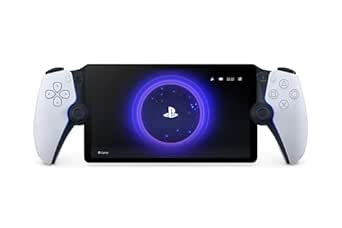 | Best for PS5 Remote Play | Compatible device: PlayStation 5 | Display: 8-inch LCD, 1080p | Maximum frame rate: 60 fps | VIEW LATEST PRICE | See Our Full Breakdown |
| ASUS ROG Xbox Ally Gaming Handheld, 7-Inch 120Hz Display, AMD Ryzen Z2 A, 16GB RAM, 512GB SSD |  | Best for Windows Game Libraries | Operating system: Windows 11 Home | Processor: AMD Ryzen Z2 A | Graphics: AMD RDNA 2 | VIEW LATEST PRICE | See Our Full Breakdown |
| Retroid Pocket 5 Android Handheld Game Console, 8GB RAM, 128GB Storage, 5.5-Inch 1080p Touchscreen, Snapdragon 865, Black | 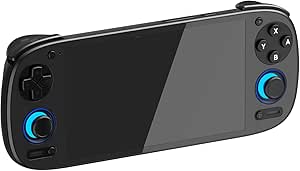 | Best Compact Android Handheld | Operating system: Android 13 | Processor: Snapdragon 865 | GPU: Adreno 650 | VIEW LATEST PRICE | See Our Full Breakdown |
| ASUS ROG Xbox Ally Gaming Handheld, 7-inch 1080p 120Hz Touchscreen, AMD Ryzen Z2 A, 16GB RAM, 512GB SSD, White |  | Best for Xbox and PC Storefront Access | Operating system: Windows 11 | Processor: AMD Ryzen Z2 A | Memory: 16GB LPDDR5 6400MHz | VIEW LATEST PRICE | See Our Full Breakdown |
| GB45V Retro Handheld Game Console, 4.5-Inch IPS Display, 128GB, Black |  | Best for Ready-to-Play Retro Gaming | Operating system: Linux | Processor: RK3326 quad-core, 1.5GHz | Display: 4.5-inch IPS LCD, 1024 × 768, 4:3 | VIEW LATEST PRICE | See Our Full Breakdown |
| Abxylute OnePro Cloud Gaming Handheld, 7-Inch 1080p Touchscreen, 64GB, Black Transparent |  | Best for Cloud and Remote Play | Platform: Android | Storage: 64GB | Display: 7-inch 1080p touchscreen | VIEW LATEST PRICE | See Our Full Breakdown |
| Valve Steam Deck OLED 1TB Handheld Gaming Console |  | Best Premium Steam Library Handheld | Platform: Steam Deck | Storage: 1TB NVMe SSD; microSD expansion supported | Display: 7.4-inch HDR OLED touchscreen, 1280 × 800 | VIEW LATEST PRICE | See Our Full Breakdown |
| gaming handheld console | Display | Storage | Connectivity | Battery |
|---|---|---|---|---|
| R46H Retro Handheld Game Conso | 4.2-inch IPS, 1024 × 768 | 128GB | Wi-Fi | — |
| R36MAX 2 Retro Handheld Game C | 4.5-inch IPS, 1024 × 768 | 128GB; TF cards supported up to 256GB | Wi-Fi multiplayer | 4,000mAh; advertised for up to 6 hours per charge |
| Lenovo Legion Go S Handheld Ga | 8-inch IPS touchscreen, 1080p, 120Hz | 512GB | HDMI, USB, Bluetooth, and Wi-Fi | 55.5Wh |
| MSI Claw A8 Gaming Handheld | 8-inch FHD+, 1920 × 1200, 120Hz | 1TB NVMe SSD | Bluetooth, Wi-Fi, Thunderbolt 4 | — |
| RF40H Handheld Retro Game Cons | 4-inch IPS, 720 × 720 | 64GB | Wi-Fi | 4,000mAh lithium-ion; stated 6–8 hours |
| RG56PRO Retro Handheld Game Co | 5.5-inch IPS LCD, 1280 × 720 | 128GB TF card | Wi-Fi, HDMI output, USB Type-C | 5000mAh; advertised up to 8 hours, with 6 hours listed as average |
| My Arcade Atari Pocket Player | 2.75-inch color LCD | — | — | — |
| KFUPCQ Handheld Linux Gaming C | 4-inch IPS | 64GB TF card, expandable up to 128GB | — | 4000mAh rechargeable |
| PlayStation Portal Remote Play | 8-inch LCD, 1080p | — | Wi-Fi | — |
| ASUS ROG Xbox Ally Gaming Hand | 7-inch IPS touchscreen, 1080p, 120Hz | 512GB SSD; microSD support | — | 60Wh; fast charging from 0% to 50% in 30 minutes |
| Retroid Pocket 5 Android Handh | 5.5-inch 1080p touchscreen | 128GB; expandable via microSD | Wi-Fi 6, Bluetooth 5.1 | 5000mAh |
| ASUS ROG Xbox Ally Gaming Hand | 7-inch 1080p touchscreen | 512GB SSD | — | 60Wh |
| GB45V Retro Handheld Game Cons | 4.5-inch IPS LCD, 1024 × 768, 4:3 | 128GB card, preloaded with games | Wi-Fi | 4000mAh; up to 6 hours |
| Abxylute OnePro Cloud Gaming H | 7-inch 1080p touchscreen | 64GB | Wi-Fi, USB, HDMI | — |
| Valve Steam Deck OLED 1TB Hand | 7.4-inch HDR OLED touchscreen, 1280 × 800 | 1TB NVMe SSD; microSD expansion supported | Wi-Fi 6E | 50Wh; estimated 3–12 hours of gameplay |
More Details on Our Top Picks
R46H Retro Handheld Game Console with 4.2-Inch IPS Screen and 128GB Storage
The R46H suits players who want classic console emulation in a small, straightforward handheld rather than a Windows gaming PC. Its 4.2-inch, 1024 × 768 IPS display gives retro games a compact but detailed screen, while the included 128GB card provides room for the supported emulator library. Dual joysticks add flexibility for games that benefit from analog control, and Wi-Fi multiplayer is a useful extra for compatible play. Compared with the larger R36MAX 2, this model gives up screen size and Hall-effect sticks in favor of a slimmer 5 × 3.5 × 0.4-inch body. Its plastic construction and unspecified battery runtime make it less reassuring for rough handling or long trips, but it makes sense for portable classic gaming.
Pros:- Supports emulators for several classic gaming systems
- 1024 × 768 IPS display with OCA full lamination
- Compact design includes dual joysticks
- Wi-Fi multiplayer support
Cons:- Plastic construction may feel less durable than larger premium handhelds
- No specific battery runtime is provided
- Smaller screen than the R36MAX 2
Best for: Retro-game fans who want a slim Linux handheld for PS1, PSP, N64, MAME, and GBA emulation.
Not ideal for: Players who want a large screen, documented battery runtime, or a more substantial build for frequent travel.
- Platform:Linux
- Processor:RK3326 quad-core
- Display:4.2-inch IPS, 1024 × 768
- Storage:128GB
- Controls:Dual joysticks
- Connectivity:Wi-Fi
- Dimensions:5 × 3.5 × 0.4 inches
- Material:Plastic
Our verdict“Choose the R46H for a slim, classic-game-focused handheld, but pick the R36MAX 2 if a larger screen and more detailed battery information matter more.”
R36MAX 2 Retro Handheld Game Console with 4.5-Inch IPS Display
The R36MAX 2 is the stronger fit among these Linux retro picks for players who want a roomier display without moving to a bulky Windows handheld. Its 4.5-inch IPS screen keeps the same 1024 × 768 resolution as the R46H, so the larger panel favors viewing comfort rather than a higher pixel count. Hall-effect joysticks are designed for precise control, and support for more than 30 emulator formats plus expandable TF storage gives it flexibility as a collection grows. The listed 4,000mAh battery and USB-C charging add useful travel details, though the product information conflicts between six- and seven-hour runtime claims. Compared with the RF40H, it offers a larger display and more expandable storage, but its stated battery life is less clear.
Pros:- 4.5-inch IPS display with 1024 × 768 resolution
- Hall-effect joysticks are designed for smooth, precise input
- Supports more than 30 emulator formats and TF expansion up to 256GB
- USB-C charging and Wi-Fi multiplayer
Cons:- Battery-life information conflicts between six- and seven-hour claims
- RK3326 hardware is aimed at retro emulation, not modern PC games
- Larger body is less slim than the R46H
Best for: Retro players who prefer a larger handheld screen, analog controls, and room to expand a Linux-based game collection.
Not ideal for: Buyers who need consistent battery-life information or want a newer PC-game library rather than classic emulation.
- Operating system:Linux
- Processor:RK3326 64-bit quad-core Cortex-A35, up to 1.5GHz
- Graphics:Mali-G31MP2
- Display:4.5-inch IPS, 1024 × 768
- Storage:128GB; TF cards supported up to 256GB
- Controls:Hall sensor 3D joysticks
- Battery:4,000mAh; advertised for up to 6 hours per charge
- Charging:USB-C; approximately 2 hours
- Connectivity:Wi-Fi multiplayer
Our verdict“Pick the R36MAX 2 if screen space and expandable retro storage outweigh the uncertainty around its advertised battery runtime.”
Lenovo Legion Go S Handheld Gaming Console, 8-inch 120Hz Display, Ryzen Z2 Go, 16GB RAM, 512GB Storage, Glacier White
The Lenovo Legion Go S marks a clear step away from the small-screen retro consoles in this roundup: Windows and an 8-inch 120Hz touchscreen make it a better match for PC games and a broad software library. The large 1080p panel, 500-nit brightness, and 100% sRGB coverage are useful when games rely on fine interface details or vivid scenery. Ergonomic, anti-slip controllers and front-firing speakers also suit longer sessions better than the compact R46H. Compared with the MSI Claw A8, the Legion Go S has less memory and half the listed SSD capacity, but its 55.5Wh battery and rapid charging are defined clearly. Runtime itself is not specified, so I would not treat the battery capacity as a guarantee of all-day play.
Pros:- 8-inch 1080p touchscreen with 120Hz refresh rate
- 500-nit brightness and 100% sRGB color accuracy
- Ergonomic controllers with anti-slip texture
- 55.5Wh battery with rapid charging
Cons:- Battery runtime is not specified
- 512GB storage may constrain a large PC game library
- Larger Windows design is less compact than the Linux retro handhelds
Best for: PC gamers who want a large, color-rich Windows handheld for playing away from a desk and value rapid charging.
Not ideal for: Retro-only players seeking a lighter, simpler device, or large-library PC gamers who need more than 512GB of built-in storage.
- Operating system:Windows
- Processor:AMD Ryzen Z2 Go
- Graphics:AMD Radeon
- Display:8-inch IPS touchscreen, 1080p, 120Hz
- Brightness:500 nits
- Memory:16GB
- Storage:512GB
- Battery:55.5Wh
- Connectivity:HDMI, USB, Bluetooth, and Wi-Fi
Our verdict“Choose the Legion Go S for a large, fast Windows display and rapid charging, but favor the MSI Claw A8 if memory and built-in storage take priority.”
MSI Claw A8 Gaming Handheld, AMD Ryzen Z2 Extreme, 8-inch FHD+ 120Hz Display, 24GB LPDDR5x, 1TB NVMe SSD, White
The MSI Claw A8 is the premium-leaning Windows option here, built for players who want more memory and local game storage than the Lenovo Legion Go S provides. Its 24GB LPDDR5x memory and 1TB NVMe SSD offer more headroom for a broad PC library, while the Ryzen Z2 Extreme and 120Hz, 1920 × 1200 display target demanding games and fluid motion. Contoured grips help make the 1.7-pound device more manageable, and Thunderbolt 4, Wi-Fi, Bluetooth, and an SD card reader add flexibility for peripherals and storage. The tradeoff is the weight: compared with the Legion Go S, the Claw A8 carries more memory and storage but is a substantial device to hold. Battery capacity and runtime are not specified.
Pros:- Ryzen Z2 Extreme processor and 24GB LPDDR5x memory
- 1TB NVMe SSD provides more built-in space than the Legion Go S
- 8-inch 1920 × 1200 display with a 120Hz refresh rate
- Thunderbolt 4, Wi-Fi, Bluetooth, and SD card reader
Cons:- At 1.7 pounds, it is a heavy handheld for extended unsupported play
- Battery capacity and runtime are not specified
- Windows 11 Home may require setup and maintenance familiar to PC users
Best for: PC handheld buyers who want a high-resolution 120Hz screen, generous memory, and 1TB of built-in storage.
Not ideal for: Players prioritizing a lighter handheld, a stated battery runtime, or a compact retro-focused console.
- Operating system:Windows 11 Home
- Processor:AMD Ryzen Z2 Extreme
- Display:8-inch FHD+, 1920 × 1200, 120Hz
- Memory:24GB LPDDR5x
- Storage:1TB NVMe SSD
- Connectivity:Bluetooth, Wi-Fi, Thunderbolt 4
- Additional storage:SD card reader
- Weight:1.7 pounds
- Warranty:1-year limited manufacturer warranty
Our verdict“Choose the Claw A8 if storage, memory, and a high-resolution screen outweigh its substantial weight and unspecified battery runtime.”
RF40H Handheld Retro Game Console, 4-Inch IPS Display, Wi-Fi, Linux, Black
The RF40H makes a practical entry point for players who want a Linux retro handheld with useful accessories included. Its 4-inch, 720 × 720 IPS screen is smaller and lower-resolution than the R46H’s 4.2-inch, 1024 × 768 panel, but the RF40H pairs its display with a stated 6–8 hours of battery life, stereo speakers, a headphone jack, and a protective screen layer. The kit also includes a TF card, USB-C cable, organizer bag, and screen film, reducing the need to gather basic extras separately. More than 20 emulators and a claimed library of over 20,000 games broaden its appeal, though those claims do not specify how every title performs. Compared with the R36MAX 2, it offers less storage and a smaller screen, but clearer battery information and a ready-to-carry bundle.
Pros:- Supports more than 20 emulators and includes a 64GB TF card
- Stated 6–8-hour battery life
- Wi-Fi, stereo speakers, and a 3.5mm headphone jack
- Includes an organizer bag, USB-C cable, and screen film
Cons:- 4-inch, 720 × 720 screen is smaller and lower-resolution than the R46H display
- 64GB storage is less than the 128GB options in this roundup
- Not recommended for children under 12
Best for: Retro newcomers who want an accessory bundle, headphone support, and a stated battery range for portable play.
Not ideal for: Children under 12, players wanting the sharpest screen in this group, or buyers seeking large built-in storage.
- Operating system:Linux
- Display:4-inch IPS, 720 × 720
- Storage:64GB
- Emulators:More than 20 supported
- Connectivity:Wi-Fi
- Audio:Stereo speakers and 3.5mm headphone jack
- Battery:4,000mAh lithium-ion; stated 6–8 hours
- Included accessories:TF card, USB-C cable, organizer bag, screen film, and manual
- Recommended minimum age:12 years
Our verdict“Pick the RF40H for a bundled retro starter kit with a stated battery range, but choose the R46H for a larger, sharper display and more storage.”
RG56PRO Retro Handheld Game Console with EVA Hard Case, 128GB, Black
The RG56PRO is the retro pick here for buyers who want a broad collection in one handheld rather than a small, fixed set of games. Its 5.5-inch 720p display is larger than the KFUPCQ’s 4-inch screen, while dual joysticks and Hall-effect shoulder controls offer more input options than the button-only KFUPCQ. Active cooling and HDMI output add flexibility for longer sessions and play on a TV. The included EVA hard case is a useful extra for carrying it, too. The tradeoff is that its Linux system and preloaded library may suit tinkering more than a plug-and-play licensed collection like the My Arcade Atari Pocket Player Pro. Battery runtime varies, and Wi-Fi two-player play depends on compatible games and devices.
Pros:- 128GB card comes preloaded with more than 31,000 games
- 5.5-inch 1280 × 720 IPS display with anti-glare finish
- Dual joysticks, Hall-effect shoulder controls, and active cooling
- HDMI output and included EVA hard case
Cons:- Battery life varies with settings and usage
- Two-player play requires compatible games and devices
- Linux-based setup may be less straightforward than a fixed-library handheld
Best for: Retro-game fans who want a large preloaded library, joystick controls, and a case for portable play.
Not ideal for: Buyers who want a clearly defined licensed game collection, simple one-player setup, or dependable battery runtime for long trips.
- Processor:Rockchip RK3562 quad-core, up to 2.0GHz
- Operating system:Linux
- Display:5.5-inch IPS LCD, 1280 × 720
- Storage:128GB TF card
- Preloaded games:More than 31,000
- Controls:Hall-effect L1/L2/R1/R2 controls; dual 3D joysticks
- Battery:5000mAh; advertised up to 8 hours, with 6 hours listed as average
- Connectivity:Wi-Fi, HDMI output, USB Type-C
- Weight:7.2 ounces
Our verdict“Choose the RG56PRO if you want a large retro library and versatile controls more than a simple, tightly curated game collection.”
My Arcade Atari Pocket Player Pro Handheld Console with 100 Games
The Atari Pocket Player Pro is the most focused option in this group: it offers a fixed set of 100 games, including 80 Atari 2600 titles, instead of a large expandable retro library like the RG56PRO. That makes it a better fit for buyers who want familiar classics without choosing from thousands of entries. Its 2.75-inch screen is much smaller than the KFUPCQ’s 4-inch display, so this is a compact, straightforward pick rather than a screen-first handheld. A headphone jack and adjustable brightness and volume give it useful basics, while power comes from four AA batteries or USB-C. The catch is that batteries and the USB-C cable are not included, and the console is single-player only. I’d skip it for modern games, broader controls, or multiplayer sessions.
Pros:- Includes 80 Atari 2600 games and 20 bonus retro games
- Compact, 4-ounce design
- Offers both four-AA and USB-C power options
- Built-in speaker, adjustable volume and brightness, and 3.5 mm headphone jack
Cons:- Small 2.75-inch screen is less suited to extended play than the KFUPCQ’s 4-inch display
- AA batteries and USB-C cable are not included
- Designed for one player and offers a fixed 100-game library
Best for: Atari fans and casual players who want a compact handheld with a known collection of licensed retro games.
Not ideal for: Players who want a larger display, expandable game selection, rechargeable battery included, or two-player play.
- Game library:100 games: 80 Atari 2600 games and 20 bonus games
- Display:2.75-inch color LCD
- Players:1
- Power:Four AA batteries or USB-C
- Headphone jack:3.5 mm
- Dimensions:5.8 × 1.5 × 2.8 inches
- Weight:4 ounces
- Controls:Button control
Our verdict“Pick this Atari handheld for a compact, fixed collection of classics, but choose the RG56PRO or KFUPCQ if you want a broader retro setup or a larger screen.”
KFUPCQ Handheld Linux Gaming Console with 4-Inch IPS Display and 64GB Card
The KFUPCQ takes a middle path between the small, fixed Atari Pocket Player Pro and the larger, more control-rich RG56PRO. Its 4-inch IPS display gives retro games more room than the Atari’s 2.75-inch screen, while the included 64GB card and expansion up to 128GB offer room to build beyond the included setup. It runs Linux and lists 12 emulators, making it a straightforward choice for buyers interested in multiple retro systems without the RG56PRO’s much larger advertised game count. The 4000mAh battery is stated to provide over five hours of play, though charging takes about three hours. It is a one-player button-control handheld, so it lacks the RG56PRO’s joysticks and broader control options. Choose it for a simple, portable retro setup, not demanding modern games or multiplayer.
Pros:- 4-inch IPS display is larger than the Atari Pocket Player Pro’s screen
- 64GB card with expansion support up to 128GB
- 4000mAh rechargeable battery with over five hours of stated playtime
- USB charging cable, manual, and gift box are included
Cons:- Single-player button controls offer less input flexibility than the RG56PRO
- Stated charging time is about three hours
- No battery runtime guarantee beyond the stated estimate
Best for: Retro players who want a modest Linux handheld with a larger screen than pocket-sized fixed-library consoles and expandable storage.
Not ideal for: Buyers who want dual joysticks, multiplayer, a large preloaded collection, or short charging breaks between sessions.
- Platform:Linux
- Display:4-inch IPS
- Storage:64GB TF card, expandable up to 128GB
- Emulators:12
- Battery:4000mAh rechargeable
- Stated playtime:Over 5 hours
- Stated charging time:About 3 hours
- Players:1
- Weight:8 ounces
Our verdict“Choose the KFUPCQ for a simple, expandable Linux retro handheld with a 4-inch screen, rather than the larger library and joystick controls of the RG56PRO.”
PlayStation Portal Remote Player for PS5
The PlayStation Portal is not a standalone gaming handheld: it streams compatible games from a PS5 over Wi-Fi, with select cloud-streamed games also supported through PlayStation Plus Premium. That makes it a focused companion for existing PS5 owners, not an alternative to a self-contained Windows device like the ASUS ROG Xbox Ally. Its 8-inch 1080p screen is larger than the Ally’s 7-inch display, and DualSense haptic feedback and adaptive triggers bring supported PS5 games’ controller features to handheld play. The tradeoff is reliance on a stable network and a compatible game; VR titles and games needing certain extra peripherals are out. At 2.6 pounds, it is also much heavier than the retro handhelds in this roundup. Choose it to extend PS5 play around the home, not for offline portability.
Pros:- Large 8-inch 1080p screen supports up to 60 fps
- DualSense haptic feedback and adaptive triggers work in supported games
- Streams compatible installed PS5 games over Wi-Fi
- Supports select cloud-streamed games with PlayStation Plus Premium
Cons:- Remote play requires a PS5 and broadband Wi-Fi
- Performance depends on network quality
- VR games and games requiring certain additional peripherals are incompatible
Best for: PS5 owners with reliable Wi-Fi who want to play compatible console games on a large handheld screen.
Not ideal for: Travelers who need offline games, buyers without a PS5 or PlayStation Plus Premium, and players whose Wi-Fi is unreliable.
- Compatible device:PlayStation 5
- Display:8-inch LCD, 1080p
- Maximum frame rate:60 fps
- Connectivity:Wi-Fi
- Audio:PlayStation Link wireless or 3.5 mm audio jack
- Weight:2.6 pounds
- Dimensions:14 × 3.88 × 6 inches
- Power:Battery powered
Our verdict“Choose the Portal if you already own a PS5 and want a large-screen way to stream compatible games, not a standalone console for offline play.”
ASUS ROG Xbox Ally Gaming Handheld, 7-Inch 120Hz Display, AMD Ryzen Z2 A, 16GB RAM, 512GB SSD
For buyers who want PC games on a handheld, the ROG Xbox Ally is the most flexible choice in this batch. Its Windows 11 system supports libraries including Xbox, Steam, and Epic Games, unlike the PlayStation Portal, which depends on a PS5 and Wi-Fi. The 7-inch 1080p touchscreen refreshes at 120Hz with FreeSync Premium, offering smoother motion than the Portal’s 60Hz screen when games and performance allow. Contoured grips and a 60Wh battery with fast charging suit longer play sessions, but the stated specs give no specific runtime, so I would not choose it on battery endurance alone. Its 512GB SSD may fill quickly with large PC games, and at two pounds it is considerably heavier than the RG56PRO. This is a capable library-first handheld, not the lightest travel pick.
Pros:- Windows 11 supports Xbox, Steam, Epic Games, and other PC game libraries
- 7-inch 1080p touchscreen with 120Hz refresh rate and FreeSync Premium
- Contoured grips are designed for handheld gaming
- 60Wh battery supports fast charging from 0% to 50% in 30 minutes
Cons:- 512GB SSD may constrain a large installed game library
- No specific battery runtime is provided
- Two-pound weight is substantially higher than the retro handhelds in this batch
Best for: PC and Xbox players who want access to multiple Windows game libraries on a handheld with a high-refresh-rate screen.
Not ideal for: Buyers who prioritize light weight, a specified all-day battery runtime, or ample built-in storage for a large installed library.
- Operating system:Windows 11 Home
- Processor:AMD Ryzen Z2 A
- Graphics:AMD RDNA 2
- Display:7-inch IPS touchscreen, 1080p, 120Hz
- Memory:16GB LPDDR5 6400MHz
- Storage:512GB SSD; microSD support
- Battery:60Wh; fast charging from 0% to 50% in 30 minutes
- Wireless:Wi-Fi 6E and Bluetooth 5.4
- Weight:2 pounds
Our verdict“Choose the ROG Xbox Ally for broad Windows game-library access and a 120Hz screen, but skip it if low weight or known battery runtime matters most.”
Retroid Pocket 5 Android Handheld Game Console, 8GB RAM, 128GB Storage, 5.5-Inch 1080p Touchscreen, Snapdragon 865, Black
The Retroid Pocket 5 is the most portable choice here for buyers who want more than a fixed retro library. Its Android 13 platform supports Android games, emulators, app stores, and cloud gaming, while the 5.5-inch 1080p touchscreen keeps the body pocket-friendly compared with the larger ASUS ROG Xbox Ally. The Snapdragon 865 and 8GB of RAM provide a flexible Android setup, but this is not a ready-to-play retro box: no games are preloaded, so you need to install and configure your own content. Its 128GB storage can also fill quickly, though microSD expansion helps. The 5000mAh battery adds useful capacity, but buyers should note the possible initial eight-hour charge if the battery enters protection mode. Choose it for portability and platform flexibility, not PC storefront access.
Pros:- Runs Android games, emulators, app stores, and cloud gaming services.
- Compact 5.5-inch 1080p touchscreen is more portable than the 7-inch ROG Xbox Ally.
- 128GB storage can be expanded with a microSD card.
- 5000mAh battery and Wi-Fi 6 support mobile play and online use.
Cons:- Games are not included, so setup and content selection are the buyer’s responsibility.
- Battery protection mode may require an initial charge of at least eight hours.
- Android gaming does not provide the same PC storefront access as the Windows-based ROG Xbox Ally.
Best for: Players who want a pocketable Android device for apps, emulation, and cloud gaming, and are comfortable setting up their own games.
Not ideal for: Buyers who want a preloaded retro library or direct access to Windows PC game stores; this runs Android and requires game setup.
- Operating system:Android 13
- Processor:Snapdragon 865
- GPU:Adreno 650
- Memory:8GB RAM
- Storage:128GB; expandable via microSD
- Display:5.5-inch 1080p touchscreen
- Battery:5000mAh
- Connectivity:Wi-Fi 6, Bluetooth 5.1
Our verdict“Choose the Retroid Pocket 5 if a compact Android handheld for games you select and configure matters more than a preloaded library or Windows compatibility.”
ASUS ROG Xbox Ally Gaming Handheld, 7-inch 1080p 120Hz Touchscreen, AMD Ryzen Z2 A, 16GB RAM, 512GB SSD, White
The ROG Xbox Ally suits players who want a Windows handheld that can reach beyond one game library. Windows 11 support brings Xbox, Steam, Epic Games, and other PC stores into one portable device, unlike the Android-focused Retroid Pocket 5. Its 7-inch 1080p, 120Hz display with FreeSync Premium favors smoother motion, while the 16GB of memory and 512GB SSD provide a PC-style foundation. That flexibility comes with practical compromises: the SSD may hold only a limited selection of large games at once, and the 1.47-pound body is less pocketable than a small retro or Android handheld. Dual USB-C ports make TV play and extra controllers easier, and fast charging can reduce downtime. Game Pass access is included for three months, though availability and features vary by plan, region, device, and game.
Pros:- Windows 11 supports games from Xbox, Steam, Epic Games, and other PC stores.
- 7-inch 1080p touchscreen runs at 120Hz and includes FreeSync Premium.
- Dual USB-C ports support TV connections and multiple-controller play.
- Fast charging can bring the battery to 50% in 30 minutes.
Cons:- The 512GB SSD may require frequent game management for large PC titles.
- At 1.47 pounds, it is less convenient to carry than the Retroid Pocket 5.
- Some Game Pass and cloud gaming features have plan, regional, device, or game restrictions.
Best for: Players who want one handheld for Xbox, Steam, Epic, and other Windows game libraries, with the option to connect a TV and controllers.
Not ideal for: Travelers prioritizing a light, pocketable device or players who need a very large built-in game library; its 1.47-pound build and 512GB SSD may be limiting.
- Operating system:Windows 11
- Processor:AMD Ryzen Z2 A
- Memory:16GB LPDDR5 6400MHz
- Storage:512GB SSD
- Display:7-inch 1080p touchscreen
- Refresh rate:120Hz with FreeSync Premium
- Battery:60Wh
- Ports:Dual USB-C
- Weight:1.47 lbs
Our verdict“Pick the ROG Xbox Ally if access to several PC game storefronts and a high-refresh display outweigh compact size and storage capacity.”
GB45V Retro Handheld Game Console, 4.5-Inch IPS Display, 128GB, Black
The GB45V makes the most sense for buyers who want a retro-focused handheld with games already on its included card. Its 128GB preloaded card and support for more than 30 emulators reduce the setup work required by the Retroid Pocket 5, which arrives without games. A 4.5-inch, 4:3 IPS screen matches the shape of many older games, while dual analog sticks, a D-pad, ABXY buttons, and removable arcade-style joystick attachments offer varied control options. The tradeoff is that this is a Linux-based retro console, not a general-purpose Android or Windows gaming device. Performance, compatibility, and save behavior can vary by game and emulator, so the listed emulator count does not guarantee every title will run alike. Battery life is rated up to six hours, with actual play time depending on settings and content.
Pros:- Includes a 128GB card preloaded with games and supports more than 30 emulators.
- 4.5-inch 4:3 IPS display suits many classic game formats.
- Dual analog sticks, D-pad, ABXY buttons, and removable joystick attachments offer control flexibility.
- USB-C charging and an included carrying case support portable use.
Cons:- Game performance, compatibility, and save features vary by title and emulator.
- Battery life is rated for up to six hours and depends on games, brightness, and settings.
- Linux retro focus is less flexible for apps and modern game stores than the Retroid Pocket 5’s Android platform.
Best for: Retro players who want a handheld with a preloaded game card, classic 4:3 display, and physical controls without building an emulator library from scratch.
Not ideal for: Buyers seeking modern Android apps, PC storefronts, or predictable compatibility across every game; this Linux retro device has variable emulator behavior.
- Operating system:Linux
- Processor:RK3326 quad-core, 1.5GHz
- Display:4.5-inch IPS LCD, 1024 × 768, 4:3
- Storage:128GB card, preloaded with games
- Controls:Dual analog sticks, D-pad, ABXY buttons, removable joystick attachments
- Battery:4000mAh; up to 6 hours
- Charging:USB-C
- Connectivity:Wi-Fi
- Dimensions:5.6 × 3.9 × 1.5 inches
Our verdict“Choose the GB45V if you want a retro-oriented handheld with a preloaded card and classic controls rather than a device for modern app or PC gaming.”
Abxylute OnePro Cloud Gaming Handheld, 7-Inch 1080p Touchscreen, 64GB, Black Transparent
The Abxylute OnePro is built around streamed games rather than a large local library. It supports cloud gaming and remote play from services and devices including Xbox, GeForce NOW, PlayStation, PC, and Android, making it a more focused companion device than the Windows-based ROG Xbox Ally. Its 7-inch 1080p display gives remote sessions room to breathe, while Hall-effect joysticks and an ergonomic grip suit longer play. The main limitation is the connection: gaming depends on Wi-Fi, so unstable networks can undermine responsiveness or access. The listed 64GB storage is modest, and the product data does not specify a software update support date. Compared with the Retroid Pocket 5, this pick puts remote play first rather than broad local Android gaming; its claimed battery life of over eight hours is attractive but remains a manufacturer claim.
Pros:- Supports cloud gaming and remote play from Xbox, GeForce NOW, PlayStation, PC, and Android.
- 7-inch 1080p touchscreen provides a large viewing area for streamed play.
- Hall-effect joysticks and an ergonomic anti-slip grip are suited to extended sessions.
- Manufacturer claims over eight hours of battery life; a carrying case is included.
Cons:- Cloud gaming and remote play depend on a reliable Wi-Fi connection.
- 64GB storage is limited for buyers who also want a substantial local game library.
- The listing does not specify a software update support date.
Best for: Players with reliable Wi-Fi who want a dedicated device for streaming games from cloud services or remotely accessing consoles and PCs.
Not ideal for: Commuters, travelers, or players in areas with unreliable internet who need games to run locally without a network connection.
- Platform:Android
- Storage:64GB
- Display:7-inch 1080p touchscreen
- Refresh rate:60Hz
- Controls:Hall-effect joysticks, ABXY buttons
- Connectivity:Wi-Fi, USB, HDMI
- Battery life:Over 8 hours claimed
- Weight:430g
- Included accessories:Carrying case, cable
Our verdict“Choose the OnePro if streaming and remote access are your main uses and your Wi-Fi can support them; skip it for offline-first gaming.”
Valve Steam Deck OLED 1TB Handheld Gaming Console
The Steam Deck OLED is the strongest fit here for players whose library is centered on Steam and who value a large, high-quality screen and generous onboard storage. Its 7.4-inch HDR OLED display reaches up to 90Hz, while the 1TB NVMe SSD leaves more room for installed games than the ROG Xbox Ally’s 512GB drive. The 1TB model also includes anti-glare etched glass, useful when reflections would interrupt handheld play, and storage can expand with microSD. Wi-Fi 6E supports current wireless connections, but the estimated battery range spans 3–12 hours, so demanding games can shorten sessions. Compared with the Windows-based ROG Xbox Ally, this is the more Steam-centered choice rather than the broader storefront option. The 1280 × 800 resolution is also lower than the Ally’s 1080p screen, despite the Deck’s larger OLED panel.
Pros:- 7.4-inch HDR OLED touchscreen supports refresh rates up to 90Hz.
- 1TB NVMe SSD offers more built-in space than the ROG Xbox Ally’s 512GB SSD.
- Anti-glare etched glass is included on the 1TB model, and microSD expansion is supported.
- Wi-Fi 6E and a carrying case with removable liner are included.
Cons:- Estimated battery life ranges from 3 to 12 hours depending on the content.
- 1280 × 800 resolution is lower than the ROG Xbox Ally’s 1080p display.
- The anti-glare etched glass is specified for the 1TB model rather than every Steam Deck OLED configuration.
Best for: Steam players who want a premium handheld display, 1TB of built-in game storage, and the option to expand with microSD.
Not ideal for: Buyers who need a 1080p screen or want the broad Windows storefront approach of the ROG Xbox Ally; battery life can also vary widely by game.
- Platform:Steam Deck
- Storage:1TB NVMe SSD; microSD expansion supported
- Display:7.4-inch HDR OLED touchscreen, 1280 × 800
- Refresh rate:Up to 90Hz
- Touchscreen polling rate:180Hz
- Battery:50Wh; estimated 3–12 hours of gameplay
- Connectivity:Wi-Fi 6E
- Included accessories:Carrying case with removable liner
Our verdict“Choose the Steam Deck OLED if your library is Steam-focused and you want a large OLED screen with ample built-in storage, accepting variable battery life and lower resolution than the ROG Xbox Ally.”
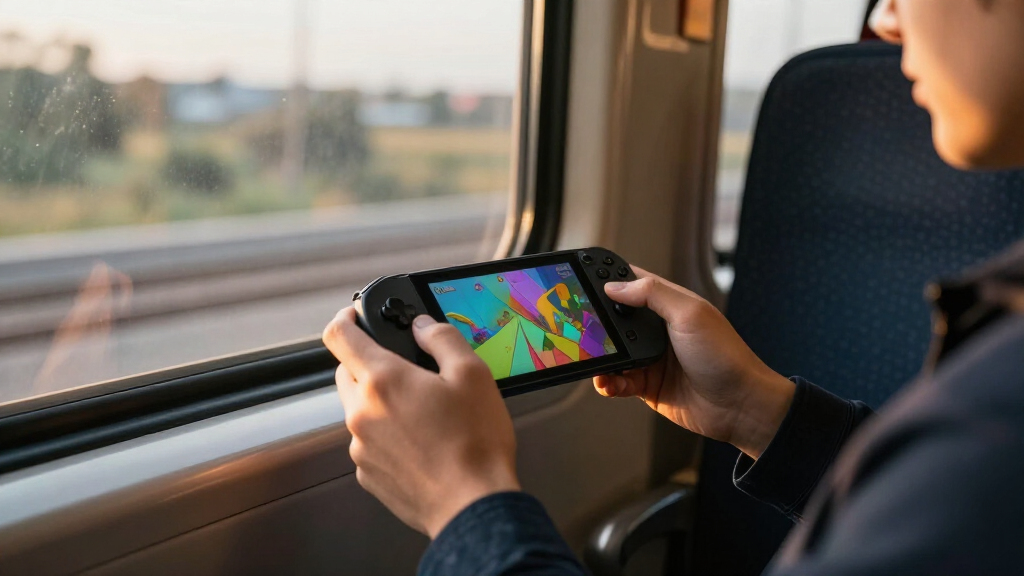
How We Picked
I ranked these gaming handheld consoles by how well their design fits the games and play habits they support, not by raw specifications alone. I weighed platform and library access, display usability, controls, storage, setup demands, and the difference between local play, cloud play, and remote streaming. I also treated product category as a meaningful distinction: a dedicated Atari device, a Linux retro handheld, and a Windows PC handheld solve different problems and should not be compared as if they offer the same game access.
The order favors versatility and clarity of purpose. The Steam Deck OLED leads for its combination of a large PC game ecosystem, portable controls, and OLED display; the more powerful Windows systems follow for buyers who value hardware flexibility and demanding games. The Retroid Pocket 5 ranks ahead of basic retro options for its broader Android use, while streaming devices and simpler retro systems rank lower for buyers seeking a standalone console. I also account for configuration differences, including the two ASUS ROG Xbox Ally listings, which share core specifications but differ in listed display details and color.
| gaming handheld console | Operating system |
|---|---|
| R46H Retro Handheld Game Conso | — |
| R36MAX 2 Retro Handheld Game C | Linux |
| Lenovo Legion Go S Handheld Ga | Windows |
| MSI Claw A8 Gaming Handheld | Windows 11 Home |
| RF40H Handheld Retro Game Cons | Linux |
| RG56PRO Retro Handheld Game Co | Linux |
| My Arcade Atari Pocket Player | — |
| KFUPCQ Handheld Linux Gaming C | — |
| PlayStation Portal Remote Play | — |
| ASUS ROG Xbox Ally Gaming Hand | Windows 11 Home |
| Retroid Pocket 5 Android Handh | Android 13 |
| ASUS ROG Xbox Ally Gaming Hand | Windows 11 |
| GB45V Retro Handheld Game Cons | Linux |
| Abxylute OnePro Cloud Gaming H | — |
| Valve Steam Deck OLED 1TB Hand | — |
Factors to Consider When Choosing Gaming Handheld Consoles
Choosing among handhelds starts with the games and connection conditions you already have, not the screen size or processor name. I’d use these factors to rule out mismatches before comparing individual models.
Match the device to where the games run
Handhelds may run games locally, stream them from a console or PC, or rely on cloud services, and those paths are not interchangeable. Local play is the safer fit for travel and unreliable internet, while streaming can make a lighter device useful if your home network and game access are dependable. Before buying, check whether your must-play titles are supported by the device’s operating system and store. A game that runs on Windows may need extra setup on Linux, while an Android device has a different app and emulation ecosystem. Avoid choosing by the word “gaming” alone; confirm the actual route from device to game.
Treat screen size, resolution, and refresh rate as a balance
A larger display can make PC games and menus easier to read, but it also adds bulk and can make long sessions harder to hold. Resolution matters most when the hardware can render games smoothly at that level; a sharp screen does not guarantee a sharp, fast-playing experience in demanding titles. High refresh rates can make motion feel smoother, yet many games and battery-conscious settings will not sustain the maximum rate. Small retro screens suit older games designed around compact displays, but can be less comfortable for modern interfaces. Choose for the games you actually play, not the most impressive number on a spec sheet.
Account for setup and maintenance
A Windows handheld can offer broad PC compatibility, but users may need to manage updates, launcher logins, controller settings, and game-specific fixes. Console-like interfaces can reduce friction, though they may provide less freedom to change software or stores. Android and Linux handhelds also vary in how much configuration is needed for emulators, files, and controls. If you want to start a game quickly, favor a platform with a familiar interface and a clear library path. If you enjoy tuning settings, a more flexible device may reward that effort.
Check storage against your game habits
Installed PC games can take far more space than a collection of older titles, so storage capacity affects how often you need to uninstall and reinstall. A larger drive is useful for keeping several demanding games ready, but it does not improve compatibility or performance by itself. Retro handhelds often use memory cards, which can make collections easier to organize, though card capacity and software support should be verified. Streaming devices may need less room for game installations but still store apps, updates, and local data. Think about your connection and whether you prefer a ready-to-play library offline.
Weigh portability against sustained play
Handheld size and weight affect whether a device is comfortable for commuting, bed play, or long sessions on the couch. More powerful hardware can support demanding games, but performance may come with greater heat, fan activity, or battery use depending on the game and settings. A compact retro unit can be easier to carry, yet its smaller controls and screen may not suit every player. Consider how long you play away from a charger and whether you are willing to lower brightness or performance to extend a session. A device that stays at home can justify a different size and capability than one carried daily.
Separate standalone play from remote and cloud access
Remote-play and cloud handhelds can be appealing when you already own a console or subscribe to a compatible service, but they depend on access beyond the device itself. Network congestion, latency, account requirements, and service availability can affect whether a session feels responsive. Local-play handhelds avoid those network limits but must have enough performance and storage for the games you want. Some buyers benefit from having both paths, while others can save complexity by picking one clear use case. Check how the device behaves away from home before treating it as a travel console.
Frequently Asked Questions
Should I choose a Steam Deck OLED or a Windows handheld for PC games?
I’d favor the Steam Deck OLED if you want a more console-like route into a large PC library and value its OLED display. A Windows handheld such as the MSI Claw A8 or ASUS ROG Xbox Ally can suit buyers who need Windows software access or prefer that operating system. The tradeoff is that Windows flexibility can bring more setup and interface management. Check compatibility for the specific games you care about, since anti-cheat systems, launchers, and control support can affect the experience on either platform. Pick the system that supports your library with the least friction you are willing to accept.
Can the PlayStation Portal replace a standalone gaming handheld?
Not for most people who need games to run directly on the device. The PlayStation Portal is designed for remote play from a PS5, so it depends on a compatible console and a suitable network connection. That can be a good fit for playing around the home when the main TV is occupied. For travel or offline sessions, a local-play handheld is a safer choice. I’d decide based on where you play and whether your PS5 will be available, rather than comparing the Portal only by screen size.
Are retro handhelds a good first gaming handheld?
They can be a good first choice if you mainly want compact play with older games and prefer a simpler device over a full PC interface. The R46H, R36MAX 2, and other Linux retro models differ in screen size, included storage, and listed features, so check each model’s game support and controls. Do not assume that a storage card means every game you want is supported or included. Players seeking current PC releases, a large app ecosystem, or modern 3D performance should look at the Steam Deck, Windows handhelds, or Android options instead. For a beginner, the best choice is the device whose library and setup expectations are clear.
When does a streaming handheld make more sense than a local-play model?
A streaming device can make sense when you already have compatible games or services and expect to play where the network is stable. The PlayStation Portal is tied to PS5 remote play, while the Abxylute OnePro is positioned for cloud gaming; their usefulness depends on access and connection quality. Streaming avoids installing a large local library, but latency and interruptions can spoil fast-paced games. A local-play handheld costs you more storage and onboard performance needs, yet it is less dependent on Wi-Fi. If you often play outside reliable coverage, choose local play.
Is it worth choosing a more powerful handheld if I mostly play indie games?
Usually, not unless you also want demanding PC games, Windows software, or more room to grow into heavier titles. Indie games often run well on less demanding hardware, so comfort, battery use, controls, and a convenient library may matter more than the highest processor specification. The Steam Deck OLED offers a broad PC option, while the Retroid Pocket 5 targets Android and emulation use; compact retro models focus on a narrower set of older games. Check the requirements for your regular games and leave some headroom for occasional favorites. Paying for power you rarely use can mean carrying a larger device without gaining much in daily play.
Conclusion
For the best overall balance of PC library access and a strong built-in display, I’d choose the Valve Steam Deck OLED 1TB. The best premium hardware pick is the MSI Claw A8 for buyers who want its Ryzen Z2 Extreme, 24GB memory, and large SSD and are comfortable with Windows handheld setup. For best value by use case, the Retroid Pocket 5 is the more capable fit for Android and emulation-focused play, while a simpler R-series or similar retro handheld makes more sense if older games are the whole point. I’d point beginners who want straightforward PC play toward the Steam Deck OLED, and PS5 owners seeking play around the home toward the PlayStation Portal. Choose the Abxylute OnePro only if cloud access fits your routine; for offline travel, prioritize a handheld that runs games locally.