TL;DR

Get the latest gadgets delivered free with Prime
- Fast, free delivery on millions of items
- Prime Video, Amazon Music and more included
- Member-only deals all year
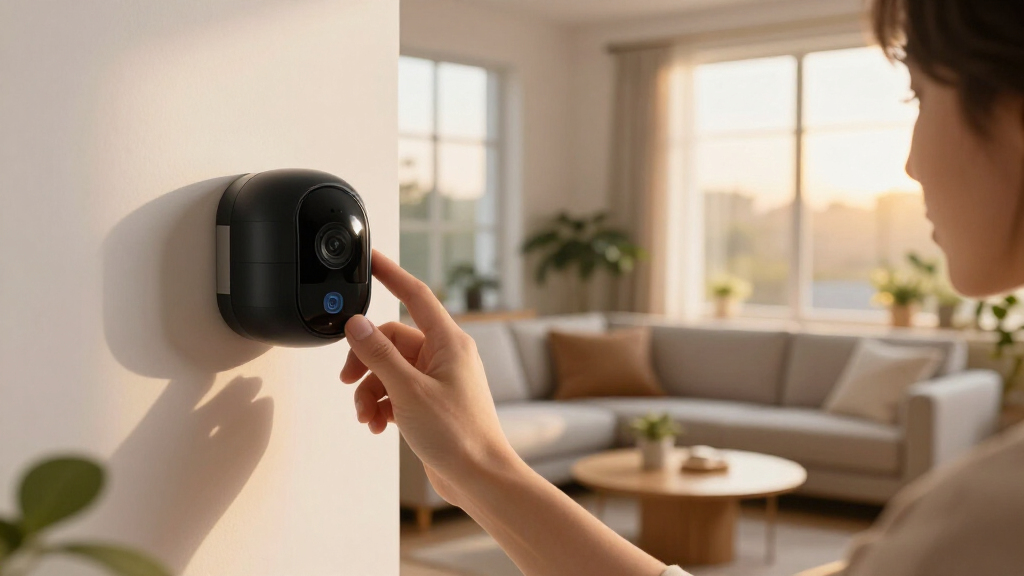
Smart home security cameras combine high-quality video, AI-driven detection, and seamless connectivity to boost home safety. Choosing the right camera depends on your needs and security priorities, with recent tech advances making them more reliable and private.
Choose cameras with high resolution (4K or HD) for clearer identification of faces and license plates.
AI features like facial recognition and activity zones dramatically reduce false alarms.
Weatherproof ratings and night vision are essential for outdoor cameras to function reliably in all conditions.
Wired cameras offer stability, but wireless models provide flexibility and easier installation.
Secure your devices with strong passwords, firmware updates, and network segmentation to prevent hacking.
What Makes a Home Security Camera Truly Smart?
Smart home security cameras are more than just video recorders. They combine high-resolution footage, smart detection, and seamless connectivity. For example, a 4K Arlo camera can deliver razor-sharp images, helping you identify a face or license plate from across the yard. Field of view is crucial—wider lenses (up to 180°) mean fewer cameras needed to cover your entire porch or backyard. Connectivity ensures your camera stays linked to your phone and smart home system, whether via Wi-Fi or mesh networks.
Features like motion alerts turn your camera into a vigilant eye. When a visitor steps onto your driveway, you get a notification—sometimes with a quick snapshot. Two-way audio lets you chat with delivery people or scare off intruders. Storage options include local SD cards or encrypted cloud servers, with privacy controls becoming more common. Power sources vary—battery-powered models offer easy placement, while wired ones ensure constant power. All these elements combine to make your camera an active, intelligent part of your home security setup.
Understanding these core features helps you appreciate why a smart camera is more than just a recording device. The combination of high-quality visuals, instant detection, and connectivity creates a proactive security system. This means you don’t just see what’s happening—you can respond in real-time, which is crucial for preventing theft or intrusion and providing peace of mind.
As an affiliate, we earn on qualifying purchases.
How AI Turns Basic Cameras Into Smart Detectives
AI and machine learning are revolutionizing security cameras by enabling them to interpret the visual data they capture. Instead of triggering false alarms from benign events like passing cars or shadows, AI-powered cameras analyze patterns to identify genuine threats—such as a person loitering or an unfamiliar face approaching your property. For instance, the Ring Always Wi-Fi Camera uses AI to differentiate between a falling leaf and an intruder, significantly reducing false alerts that can desensitize homeowners.
Facial recognition adds a layer of intelligence—helping you quickly identify family members or alert you to unknown visitors. Activity zones allow you to designate specific areas, like your front door or driveway, so you’re only notified about relevant events. This targeted approach reduces alert fatigue and ensures you respond only to meaningful activity.
Edge computing—processing data directly on the device—further enhances privacy and speed. Since footage doesn’t need to be sent to the cloud for analysis, alerts are faster, and sensitive data stays within your local network. This shift towards smarter, on-device processing reduces reliance on constant internet connectivity and minimizes data breaches. As a result, AI-driven cameras not only improve detection accuracy but also strengthen your privacy safeguards, making your security system more trustworthy and effective.
wireless smart home security camera
As an affiliate, we earn on qualifying purchases.
As an affiliate, we earn on qualifying purchases.
Latest Tech That Makes Cameras Clearer in Darkness and Rain
Recent advancements in night vision and weatherproofing are critical for ensuring your security system remains effective around the clock and in all weather conditions. Infrared LEDs and low-light sensors enable cameras to produce clear images in complete darkness, which is essential for nighttime security. For example, Eufy’s Floodlight Cam can capture detailed footage in total darkness, and some models now include color night vision, which uses ambient light to provide more detailed, natural-looking images—crucial for identifying intruders or suspicious activity.
Weatherproof ratings like IP66 or IP67 indicate a camera’s ability to withstand harsh environmental conditions such as rain, snow, dust, and extreme temperatures. This durability means fewer maintenance issues and consistent operation, even during storms or winter freezes. Longer-lasting batteries and more reliable wireless connections also contribute to continuous coverage, reducing the chances of blind spots or camera failures during critical moments.
These technological improvements are not just about better images—they’re about reliability. A camera that can operate effectively in challenging weather ensures your security isn’t compromised by environmental factors, providing peace of mind and consistent surveillance regardless of weather conditions.
security camera with night vision and AI detection
As an affiliate, we earn on qualifying purchases.
As an affiliate, we earn on qualifying purchases.
Comparison Table: Wired vs. Wireless Cameras — Which Fits Your Home?
| Feature | Wired Cameras | Wireless Cameras |
|---|---|---|
| Installation | Requires drilling and wiring. Better for permanent setups. | Plug-and-play. Easy to move around. |
| Power | Constant, reliable power from outlets. | Battery-powered or rechargeable—more flexible. |
| Connectivity | Less prone to interference, stable connection. | Depends on Wi-Fi strength; can face interference. |
| Maintenance | Requires wiring checks and possibly rewiring. | Battery changes and firmware updates. |
| Flexibility | Limited to wired locations. | Great for tricky spots or temporary setups. |
weatherproof Wi-Fi security camera
As an affiliate, we earn on qualifying purchases.
As an affiliate, we earn on qualifying purchases.
Choosing a Camera That Won’t Leave You Hanging
Picking the right smart security camera starts with your home’s needs. Do you want something easy to install, or are you okay with a wired setup? Think about coverage—do you need a wide-angle lens or multiple cameras? Budget also plays a role; options range from budget-friendly models around $20 to high-end systems exceeding $300.
Look for cameras with strong privacy features—end-to-end encryption, local storage, and transparent data policies. Compatibility matters, too. If you use Alexa, Google, or Apple HomeKit, pick a camera that works seamlessly with your system.
For example, if you want a quick upgrade without rewiring, a battery-powered camera with AI detection in your front yard might be perfect. If you’re building a more comprehensive setup, wired cameras linked to a security hub could give you peace of mind.
Knowing these factors helps you make an informed choice, balancing ease of installation, security features, and your specific needs to ensure your home’s safety is maximized.
How to Keep Your Cameras and Home Secure from Hackers
Smart cameras can be attractive targets for hackers, and a breach can compromise your entire home network. To protect your devices, start by changing default passwords immediately—many hackers exploit these common, easily guessed credentials. Enabling two-factor authentication adds an extra layer of security, making unauthorized access significantly more difficult. Regular firmware updates are essential because manufacturers release patches that fix known vulnerabilities, closing potential entry points for intruders.
Using a strong, unique Wi-Fi password and creating a separate network (or VLAN) for your security devices isolates them from your main network, reducing the risk of a breach spreading. This segmentation ensures that even if a device is compromised, your primary devices—like banking or work computers—remain protected.
Cybersecurity experts emphasize that most breaches happen because users neglect basic security practices. For example, an incident involving a popular camera brand was traced back to default passwords and outdated firmware, illustrating how neglecting simple security steps can have serious consequences. Implementing these best practices transforms your home into a resilient fortress against hacking threats.
What Storage Options Do You Have? Cloud vs. Local
Smart cameras offer two main storage options: cloud storage and local storage. Cloud storage enables remote access to footage from anywhere, simplifies sharing with family or authorities, and often includes encryption to protect your data. However, it usually involves a subscription fee, which can add up over time. Local storage, on the other hand, stores footage directly on an SD card inside the camera or on a connected device like a NAS. This method offers greater privacy and eliminates ongoing costs but limits remote access unless you set up specific network configurations.
Choosing between them depends on your privacy preferences and convenience needs. Cloud storage allows you to access footage from anywhere without physical access to the device, making it ideal for people who want quick, remote monitoring. Local storage appeals to those who prioritize privacy and want to avoid recurring fees, but it requires more technical setup for remote viewing. Consider your budget, privacy concerns, and how you plan to use footage when making your choice.
For example, budget-conscious users might prefer SD cards for basic monitoring, while those needing continuous, remote access might opt for cloud plans. Balancing privacy, cost, and convenience will help you select the best storage solution for your home security system.
Outdoor Cameras: Weatherproof and Ready for Anything
Outdoor security cameras are designed to withstand the elements, making them reliable year-round. Features like IP66 or IP67 ratings indicate high resistance to dust, rain, snow, and extreme temperatures. For instance, Eufy’s outdoor cams are built to operate in freezing winter temperatures and during heavy storms, ensuring your surveillance remains uninterrupted. This durability means you won’t have to worry about weather-related failures or frequent replacements, saving you money and hassle.
Advanced weatherproofing is complemented by features like infrared night vision and low-light sensors, which ensure clear visibility in darkness, fog, or poor weather conditions. Some models even include color night vision, providing more detailed images for better identification. Longer-lasting batteries or wired power options further reduce maintenance needs, ensuring continuous coverage without frequent interruptions.
Durability and environmental resilience are critical because they directly impact the effectiveness of your security system. A camera that can operate reliably in rain, snow, or extreme cold ensures comprehensive surveillance, regardless of seasonal challenges. Investing in weatherproof outdoor cameras means your security setup remains robust, dependable, and ready to capture every moment, whatever Mother Nature throws at it.
Frequently Asked Questions
How do I choose the best smart security camera for my home?
Start by assessing your coverage needs, budget, and preferred features like AI detection or two-way audio. Consider whether wired or wireless suits your setup better, and prioritize privacy and security features to protect your footage.Are smart security cameras safe from hacking?
Reputable brands use encryption and security protocols, but you must also take steps like changing default passwords, enabling two-factor authentication, and updating firmware regularly to keep your devices safe.What’s the difference between cloud and local storage?
Cloud storage offers remote access and automatic backups but often involves a subscription fee. Local storage keeps footage on an SD card inside the camera, offering more privacy but less flexibility for remote viewing.Can outdoor security cameras handle harsh weather?
Yes, most outdoor cameras are designed with weatherproof ratings (IP66/IP67) to withstand rain, snow, and dust. Always check the IP rating before choosing one for outdoor use.What privacy practices should I follow with smart cameras?
Use strong, unique passwords; enable two-factor authentication; keep firmware updated; and disable features you don’t need. Also, consider where and when cameras record to avoid privacy breaches.Conclusion
Smart home security cameras are transforming how we protect our spaces—combining crisp visuals, smart detection, and seamless control. When you pick the right system, you’re not just watching your home—you’re actively safeguarding it. Think of your camera as a vigilant, invisible guardian—always on, always alert, always there for you.Fall Picks
fall essentials
As an affiliate, we earn on qualifying purchases.