
🔍 Read the full analysis: 10 Laptops To Consider For Professional AI Work On The Go In 2027 on ThorstenMeyerAI.com

Get the latest gadgets delivered free — and shop member deals
- Fast, free delivery on millions of items
- Access to Prime Big Deal Days deals on October 6–7
- Prime Video, Amazon Music and more included
TL;DR
ThorstenMeyerAI.com lists 10 mobile workstation configurations for professional work on the go, including models from HP, Lenovo and Dell. The specifications support comparing memory, storage, graphics and screen size, but do not establish AI performance, battery life, certification or 2027 availability.
As detailed in ThorstenMeyerAI.com’s original analysis, the site compared 10 mobile workstation configurations for professionals who need computing power away from a desk, naming the HP ZBook X G1i its balanced pick and the ThinkPad P1 Gen 7 its strongest specified graphics option. The list is useful as a hardware shortlist, but its cited specifications do not establish how these laptops perform on AI workloads or whether the configurations will be available in 2027.
The guide’s HP recommendation pairs 64GB of RAM, a 1TB SSD and RTX PRO 1000 graphics. The Lenovo ThinkPad P1 Gen 7 is listed with an RTX 3000 Ada GPU and 32GB of RAM; the source describes it as having the clearest graphics advantage on paper, not as a tested performance winner. The difference matters for buyers comparing graphics capacity with memory headroom, as in this guide to laptops for remote tech work.
Dell’s Precision 3490 appears in two configurations, both with an Ultra 5 processor and 14-inch FHD display. One listing specifies 32GB of RAM and 1TB of storage, while the other doubles both to 64GB and 2TB. The Precision 7680 also appears twice: both versions list RTX 2000 Ada graphics and a 1TB SSD, with either 32GB or 64GB of RAM.
The remaining entries widen the choice beyond those models: the guide includes ThinkPad P14s Gen 6 variants with Ryzen AI 7 350 processors, a ThinkPad P16s listing emphasizing a 16-inch OLED touchscreen, and a renewed HP ZBook Power with an older RTX A1000 configuration. These are listed specifications and editorial recommendations from the source, not independently verified benchmarks or guarantees of suitability for a particular AI application; buyers can also compare options in this roundup of AI mobile laptops for professional workflows.
The 10 picks
- 1
 Dell Precision 7680 16-Inch Workstation Laptop, Intel Core i7-13850HX, NVIDIA…View on Amazon →
 - 2
 Lenovo ThinkPad P1 Gen 7 Mobile Workstation, Intel Core Ultra 7 165H, NVIDIA…View on Amazon →
 - 3
 HP ZBook X G1i 16-Inch Laptop with Intel Core Ultra 7, 64GB RAM, 1TB SSD, and…View on Amazon →
 - 4
 Dell Precision 7680 Laptop, NVIDIA RTX 2000 Ada 8GB, i7-13850HX, 32GB DDR5, 1…View on Amazon →
 - 5
 Lenovo ThinkPad P16s Gen 4 with OLED 4K Dolby Vision TouchscreenView on Amazon →
 - 6
 Lenovo ThinkPad P14s Gen 6 14-Inch Mobile Workstation with AMD Ryzen AI 7 PRO…View on Amazon →
 - 7
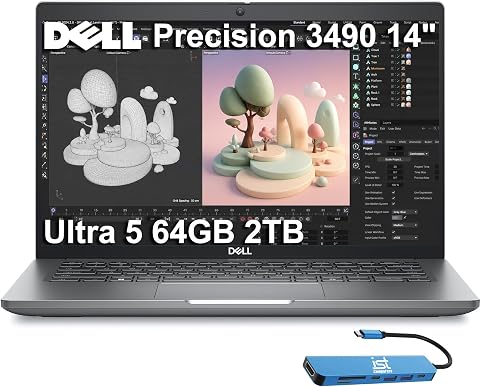 Dell Precision 3490 Laptop, 14" FHD, Intel Core Ultra 5 135H, 64GB DDR5, 2TB…View on Amazon →
 - 8
 HP ZBook Power Mobile Workstation Laptop (15.6" FHD, Intel Core i7-11850H, 32…View on Amazon →
 - 9
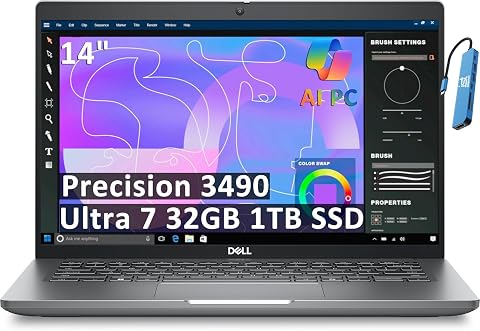 Dell Precision 3490 Mobile Workstation Laptop (14" FHD, Intel i9-12900H, 32GB…View on Amazon →
 - 10
 Lenovo ThinkPad P14s Gen 6 Copilot+ Mobile Workstation 14.0" IPS WUXGA, AMD R…View on Amazon →
Matching Hardware to Mobile Work
The list illustrates why a professional laptop decision cannot be reduced to a single GPU label. Memory capacity, graphics hardware, storage and chassis size affect different work patterns, from carrying a system between sites to keeping large projects and several applications open. For local AI work, those specifications may help narrow options, but the source does not report model throughput, memory bandwidth, power limits or compatibility with specific AI software.
That distinction matters for teams buying equipment against a defined workflow. A compact 14-inch model may be easier to travel with, while a larger system may suit technical drawings or long sessions at a desk. The guide’s own criteria also acknowledge tradeoffs between portability and sustained performance, and between a ready-to-work configuration and possible upgrade needs. Buyers should evaluate the exact workload rather than treating a workstation name as proof of performance.
What the Listed Configurations Show
The source says it ranked models according to their listed GPU, processor class, RAM, storage, display and chassis size, while treating renewed status as a purchasing consideration. It also counted repeated models as separate options when their memory and storage differed. That approach is useful for highlighting configuration differences: a product family can include materially different versions, and the model name alone does not tell a buyer what is inside.
The guide cautions that product names do not confirm GPU certification, upgradeability, sustained performance, battery life or software compatibility. Those checks are particularly relevant for professional applications that rely on certified drivers or for buyers planning long compute sessions away from power. The supplied material does not include test results, measured battery figures, prices or a documented methodology beyond its stated selection factors.
“I ranked these mobile workstation laptops by how well their listed configurations balance professional performance, portability, and readiness for demanding work.”
— ThorstenMeyerAI.com, in its selection methodology
Performance and Availability Still Need Checking
The supplied source does not give a publication date, prices, retailer links, hands-on test results or confirmation that all listed configurations remain available. It also does not show whether the configurations will be sold in 2027. In particular, the title’s reference to professional AI work is not backed by AI benchmarks or a comparison of supported models and workloads.
Buyers should confirm the exact processor and GPU, memory type and upgrade options, display measurements, warranty and renewed condition with the seller or manufacturer. The source also does not identify which applications, drivers or professional certifications were checked. Without those details, its rankings are best read as a starting shortlist, not a verified purchase verdict.
Verify Before Choosing a Configuration
The next step for readers is to match a specific laptop configuration against the software and workload they actually use. Check manufacturer documentation for AI framework support, GPU drivers, memory upgradeability and power limits, then compare independent sustained-load and battery testing if the system will handle long jobs away from an outlet. Availability and prices should be checked close to purchase, since the source does not establish current or 2027 sales status.
Until those checks are made, the guide’s clearest takeaway is that buyers should compare configurations, not just model names. The listed distinctions—such as 32GB versus 64GB memory or 1TB versus 2TB storage—are concrete; claims about performance in a particular professional AI workflow remain untested in the supplied material.
Key Questions
Which laptop does the guide name as its balanced pick?
It names the HP ZBook X G1i, listing 64GB of RAM, a 1TB SSD and RTX PRO 1000 graphics. That is the source’s recommendation, not an independently tested ranking.
Which listed model has the strongest specified graphics?
The guide points to the Lenovo ThinkPad P1 Gen 7 with an RTX 3000 Ada GPU. Its listed memory is 32GB, below the HP configuration’s 64GB.
Does the comparison prove these laptops are suitable for AI work?
No. The source lists hardware but does not provide AI benchmarks, framework compatibility tests or workload-specific results. Buyers should verify support for their software and intended models.
Why are some laptop models listed twice?
The repeated entries have different configurations. For example, the Precision 3490 listings specify either 32GB of RAM and 1TB or 64GB and 2TB, so the guide treats them as separate options.
Source: ThorstenMeyerAI.com
Fall Picks
fall essentials
As an affiliate, we earn on qualifying purchases.