
Get the latest gadgets delivered free — and shop member deals
- Fast, free delivery on millions of items
- Access to Prime Big Deal Days deals on October 6–7
- Prime Video, Amazon Music and more included
Complete the kit



Key Takeaways
- The Roku Ultra line dominates the premium segment due to its consistent software updates and lack of intrusive ads compared to some competitors.
- Budget 1080p players are increasingly obsolete unless you have older displays, as 4K sticks have dropped in price to near-parity with HD models.
- Devices with built-in storage, like the NEUMI Atom or Micca Speck, serve a niche audience wanting to play local files without complex server setups.
- The Amazon Fire TV ecosystem offers the best integration for smart home controls but often comes with a more commercialized user interface.
- Support for Dolby Vision and Atmos is no longer a premium-only feature, with mid-range sticks like the Roku Streaming Stick 4K now supporting high-end audio/video formats.
| Roku Streaming Stick 4K with Voice Remote |  | Best Compact Streaming Stick for 4K UHD | Brand: Roku | Model: 3820R2 | Connectivity: Wi-Fi | VIEW LATEST PRICE | See Our Full Breakdown |
| Roku Streaming Stick Plus 4K HDR Streaming Device with Voice Remote |  | Best Value 4K Streaming Stick with Extensive Smart Features | Brand: Roku | Model: 3830R | Connectivity: Bluetooth, Wi-Fi | VIEW LATEST PRICE | See Our Full Breakdown |
| Roku Streambar SE 4K Soundbar with Built-In Streaming |  | Best All-in-One Compact Streaming and Audio Solution | Connectivity: Bluetooth, HDMI, optical, Wi-Fi | Resolution: 4K | HDR formats: HDR10, HDR10+ | VIEW LATEST PRICE | See Our Full Breakdown |
| Roku Streaming Stick HD with Voice Remote |  | Best Budget HD Streaming Stick | Brand: Roku | Model: 3840R | Resolution: 1080p | VIEW LATEST PRICE | See Our Full Breakdown |
| Roku Ultra LT (2023) 4K HDR Dolby Vision Streaming Player with Voice Remote |  | Best High-End 4K HDR Streaming Player | Brand: Roku | Model: 4801RW | Connectivity: Bluetooth, Ethernet, HDMI, Wi-Fi | VIEW LATEST PRICE | See Our Full Breakdown |
| Roku Ultra LT 4K Streaming Device with Voice Remote and HDMI Cable |  | Best for Simple 4K Streaming | Resolution: 4K UHD (3840 × 2160) | HDR: Dolby Vision | Wireless: 802.11ac dual-band Wi-Fi | VIEW LATEST PRICE | See Our Full Breakdown |
| Roku Ultra LT 2021 4K Streaming Device with Voice Remote and HDMI Cable |  | Best for Private Listening | Resolution: 4K | HDR formats: Dolby Vision, HDR10+ | Connectivity: HDMI, Wi-Fi, Ethernet | VIEW LATEST PRICE | See Our Full Breakdown |
| Mini 1080p HDMI/AV Media Player with Remote Control | 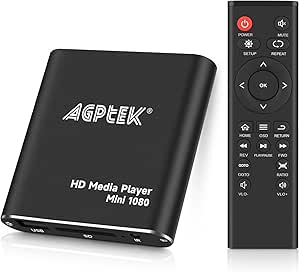 | Best for Older TVs and Local Files | Resolution: 1080p at 60 Hz | Outputs: HDMI and composite AV | USB support: USB 2.0/3.0 | VIEW LATEST PRICE | See Our Full Breakdown |
| NEUMI Atom 4K Lite Digital Media Player | 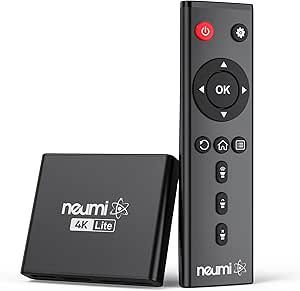 | Best for 4K Local Media and Signage | Video output: Up to 2160p/60Hz (4K/UHD) | Maximum listed resolution: 4096 × 2304p at 30fps | Video codecs: H.264/AVC, H.265/HEVC, VC1, MPEG2/4 | VIEW LATEST PRICE | See Our Full Breakdown |
| Infomir MAG555 4K Streaming Media Player with Google TV |  | Best Google TV Alternative | Resolution: 3840 × 2160 pixels, up to 60 fps | Operating system: Google TV 12 | Processor: Amlogic S905Y4-B | VIEW LATEST PRICE | See Our Full Breakdown |
| Micca Speck 4K USB and microSD Media Player |  | Best for Versatile Local Media Playback | Brand: Micca | Model: Speck 4K | Connectivity: USB, HDMI, composite AV, microSD | VIEW LATEST PRICE | See Our Full Breakdown |
| Amazon Fire TV Stick 4K Select with Alexa+ |  | Best for Easy 4K Streaming with Voice Control | Dimensions: 3.9 × 1.2 × 0.6 in | Weight: 1.5 oz | Processor: Quad-core 1.7 GHz | VIEW LATEST PRICE | See Our Full Breakdown |
| JLZNLC A5 4K Media Player with HDD Enclosure |  | Best for High-Resolution Local Media on Older Displays | Brand: JLZNLC | Model: A5 | Resolution: Up to 4096×2304 at 30 fps | VIEW LATEST PRICE | See Our Full Breakdown |
| Roku Ultra 4K Streaming Player with Voice Remote Pro |  | Best for Advanced Streaming and Smart Home Integration | Connectivity: Bluetooth, Ethernet, HDMI, USB, Wi-Fi 6 | Resolution: 4K (3840 x 2160) | HDR and audio formats: HDR10, HDR10+, Dolby Vision, Dolby Atmos | VIEW LATEST PRICE | See Our Full Breakdown |
| Mini 1080p HDMI Media Player with AV Output, Blue |  | Best for Travel and Basic Media Playback | Color: Blue | Video output resolution: 1920 × 1080 pixels | Supported resolution: 1080p | VIEW LATEST PRICE | See Our Full Breakdown |
| streaming media player | Connectivity | Resolution |
|---|---|---|
| Roku Streaming Stick 4K with V | Wi-Fi | 4K UHD, up to 2160p at 60 fps |
| Roku Streaming Stick Plus 4K H | Bluetooth, Wi-Fi | 4K |
| Roku Streambar SE 4K Soundbar | Bluetooth, HDMI, optical, Wi-Fi | 4K |
| Roku Streaming Stick HD with V | Wi-Fi, Bluetooth | 1080p |
| Roku Ultra LT | Bluetooth, Ethernet, HDMI, Wi-Fi | — |
| Roku Ultra LT 4K Streaming Dev | — | 4K UHD (3840 × 2160) |
| Roku Ultra LT 2021 4K Streamin | HDMI, Wi-Fi, Ethernet | 4K |
| Mini 1080p HDMI/AV Media Playe | — | 1080p at 60 Hz |
| NEUMI Atom 4K Lite Digital Med | — | — |
| Infomir MAG555 4K Streaming Me | Dual-band Wi-Fi (2.4 GHz/5 GHz), Ethernet, Bluetooth | 3840 × 2160 pixels, up to 60 fps |
| Micca Speck 4K USB and microSD | USB, HDMI, composite AV, microSD | — |
| Amazon Fire TV Stick 4K Select | — | — |
| JLZNLC A5 4K Media Player with | HDMI, composite AV, USB, Micro SD | Up to 4096×2304 at 30 fps |
| Roku Ultra 4K Streaming Player | Bluetooth, Ethernet, HDMI, USB, Wi-Fi 6 | 4K (3840 x 2160) |
| Mini 1080p HDMI Media Player w | HDMI, USB | — |
More Details on Our Top Picks
Roku Streaming Stick 4K with Voice Remote
This model stands out for its ultra-compact design that stays hidden behind your TV while supporting full 4K UHD resolution with Dolby Vision and HDR10+. Compared to the Roku Streaming Stick Plus, it offers similar streaming quality but lacks additional features like Bluetooth support and a more advanced remote. Its small size makes it ideal for travelers or those with limited space, but it requires a 4K-compatible TV to realize its full potential. The absence of a dedicated Ethernet port and reliance on Wi-Fi can be a drawback in less stable networks. Overall, this pick makes the most sense for users seeking a simple, portable 4K streaming device that doesn’t block HDMI ports.
Pros:- Supports 4K UHD, Dolby Vision, and HDR10+ for vibrant picture quality
- Long-range Wi-Fi enhances streaming stability
- Compact, portable design easily hidden behind the TV
Cons:- Requires a 4K-compatible TV to enjoy 4K resolution
- Limited to basic remote control features, no dedicated voice assistant
Best for: Casual viewers who want a portable, straightforward 4K streaming experience without extra bells and whistles
Not ideal for: Power users needing Ethernet connectivity or advanced audio options, or those with non-4K TVs
- Brand:Roku
- Model:3820R2
- Connectivity:Wi-Fi
- Connector:HDMI
- Resolution:4K UHD, up to 2160p at 60 fps
- HDR formats:Dolby Vision, HDR10, HDR10+
Our verdict“This is ideal for viewers seeking a simple, portable 4K streamer that fits behind the TV without cluttering the space.”
Roku Streaming Stick Plus 4K HDR Streaming Device with Voice Remote
This pick makes the most sense for those who want a full-featured 4K HDR device without the bulk of larger boxes like the Roku Ultra LT. It supports HDR10 and HDR10+ and includes a voice remote that controls streaming, TV power, and volume—similar to the Roku Streaming Stick 4K but with a slightly more advanced remote. Unlike the Roku Ultra models, it draws power from the TV’s USB port, avoiding the need for a separate power outlet, which can be convenient but may lead to connectivity issues if the TV’s USB port isn’t always reliable. Its support for Bluetooth Headphone Mode adds private listening, making it ideal for shared spaces. Compared with the HD-only Roku Streaming Stick, this provides a significant upgrade in resolution and features for a modest price difference.
Pros:- Supports 4K resolution and HDR10/10+ for vibrant images
- Compact design leaves HDMI ports free for other devices
- Power from TV’s USB port simplifies setup
Cons:- Dependent on TV’s USB port for power, which may cause instability
- No wall power adapter included, limiting options for non-USB power sources
Best for: Home entertainment enthusiasts who want 4K HDR support with convenient remote controls and private listening features
Not ideal for: Users with non-4K TVs or those who prefer wired power connections for maximum reliability
- Brand:Roku
- Model:3830R
- Connectivity:Bluetooth, Wi-Fi
- Connector:HDMI
- Resolution:4K
- HDR:HDR10/10+
Our verdict“Best suited for viewers wanting a feature-rich, compact 4K HDR device that balances performance and convenience.”
Roku Streambar SE 4K Soundbar with Built-In Streaming
This device is perfect for small spaces where upgrading both sound and streaming is desired. It combines a 4K HDR streaming device with a soundbar aimed at enhancing speech clarity and overall audio quality. Unlike the standalone Roku Streaming Stick, it offers built-in speakers with dedicated audio features such as enhanced speech and auto volume leveling. Its Bluetooth support allows wireless headphones and music playback, making it versatile for different listening needs. However, it’s limited to smaller TVs and spaces, and its performance might fall short for those seeking high-end, surround-sound setups. Compared with the separate soundbars and streaming sticks, this offers a convenient, space-saving combo, though at the cost of some flexibility and expansion options.
Pros:- Combines streaming and soundbar functions in one compact device
- Supports 4K HDR streaming with clear speech enhancement
- Bluetooth enables wireless headphones and music streaming
Cons:- Designed primarily for smaller TVs and spaces, not high-end home theaters
- Limited audio output power compared to dedicated sound systems
Best for: Small-space dwellers or bedroom setups needing a simple, combined streaming and audio solution
Not ideal for: Audiophiles or those with larger TVs who want a more immersive audio experience with separate components
- Connectivity:Bluetooth, HDMI, optical, Wi-Fi
- Resolution:4K
- HDR formats:HDR10, HDR10+
- Speakers:Two premium speakers with bass port
- Supported services:Hulu, Netflix, Prime Video, YouTube
- Controls:App, buttons, remote
Our verdict“This makes sense for users seeking a space-efficient device that handles both streaming and modest audio upgrades.”
Roku Streaming Stick HD with Voice Remote
Compared with 4K options, this model is a solid choice for those who primarily watch HD content. It streams at 1080p resolution, which is sufficient for many users and compatible with a broad range of TVs. Its compact size makes it easy to hide behind the TV, and it supports Bluetooth Headphone Mode for private listening. Unlike 4K models like the Roku Streaming Stick Plus, it doesn’t support HDR or 4K resolution, but it offers reliable performance for HD streams at a lower price point. Its dependency on Wi-Fi for streaming means it’s less suitable for unstable networks. This pick suits budget-conscious buyers who want basic streaming without the bells and whistles of higher-end devices.
Pros:- Compact design leaves HDMI ports accessible
- Supports private listening via Bluetooth Headphone Mode
- Draws power directly from the TV
Cons:- Limited to 1080p resolution, no 4K or HDR support
- Dependent on Wi-Fi, which can affect streaming stability
Best for: Budget-minded viewers who watch mostly HD content on standard TVs
Not ideal for: Those with 4K TVs or seeking future-proofing with HDR and 4K support
- Brand:Roku
- Model:3840R
- Resolution:1080p
- Connectivity:Wi-Fi, Bluetooth
- Supported services:Apple TV+, Disney+, Hulu, Netflix, Prime Video
- Voice assistant compatibility:Alexa, Google Home
Our verdict“Ideal for users who want reliable HD streaming on a budget without the need for 4K or HDR features.”
Roku Ultra LT (2023) 4K HDR Dolby Vision Streaming Player with Voice Remote
This model makes the most sense for serious streamers who want premium 4K HDR with Dolby Vision and flexible connectivity options. Supporting Wi-Fi, Ethernet, and HDMI, it offers maximum flexibility for stable, high-quality streaming. Its voice remote controls both the player and your TV, with support for private listening via wired or wireless headphones. While the water damage to its box is a concern, the device itself provides robust performance comparable to the flagship Roku Ultra, with the added benefit of Ethernet for wired stability. Compared to the Roku Streaming Stick models, the Ultra LT provides higher resolution, more connectivity options, and a more advanced remote, making it suitable for demanding home theater setups.
Pros:- Supports 4K UHD, HDR, and Dolby Vision for premium quality
- Flexible connectivity: Wi-Fi, Ethernet, HDMI
- Voice remote with private listening and TV controls
Cons:- Box has water damage, which might concern some buyers despite the device’s functionality
- Larger size may be less discreet behind the TV
Best for: Home theater enthusiasts and power users seeking premium 4K HDR content with reliable connections
Not ideal for: Casual viewers on a tight budget or those who prefer simple setups without Ethernet or wired options
- Brand:Roku
- Model:4801RW
- Connectivity:Bluetooth, Ethernet, HDMI, Wi-Fi
- Video resolution:Up to 4K UHD
- HDR formats:HDR, Dolby Vision
- Included accessories:HDMI cable, headphones, voice remote
Our verdict“This is best suited for serious users demanding high-quality 4K HDR streaming with reliable, versatile connections.”
Roku Ultra LT 4K Streaming Device with Voice Remote and HDMI Cable
The Roku Ultra LT is a straightforward pick for viewers who want 4K with Dolby Vision and familiar streaming apps without adding a more involved platform. Its dual-band Wi-Fi and included HDMI cable simplify setup, while the voice remote can also control compatible TV functions. Compared with the Infomir MAG555, it offers less connection flexibility: the MAG555 lists Ethernet and Google TV with Chromecast built in. The Roku’s strength is a simpler Roku OS experience, but the supplied details do not list Ethernet or private listening. It also depends on an internet connection for streaming, so it is a poor fit for offline playback. I’d choose it for an uncomplicated streaming setup, not for local media libraries or advanced connectivity.
Pros:- Supports 4K UHD with Dolby Vision
- Dual-band Wi-Fi
- Voice remote controls streaming and compatible TV functions
- Includes an HDMI cable and USB extension cord
Cons:- Streaming requires an internet connection
- Ethernet and private listening are not listed in the supplied specifications
- Warranty duration is not specified
Best for: Viewers with a 4K Dolby Vision television who want popular streaming apps and a simple voice remote
Not ideal for: People who need Ethernet, offline USB playback, or the broader Google TV and Chromecast features listed for the Infomir MAG555
- Resolution:4K UHD (3840 × 2160)
- HDR:Dolby Vision
- Wireless:802.11ac dual-band Wi-Fi
- Operating system:Roku OS
- RAM:2 GB
- Video codec:HEVC (H.265)
- Included accessories:Voice remote, HDMI cable, USB extension cord
- Dimensions:5.00 × 4.90 × 1.00 in
Our verdict“Choose the Roku Ultra LT for uncomplicated 4K Dolby Vision streaming over Wi-Fi with a voice remote.”
Roku Ultra LT 2021 4K Streaming Device with Voice Remote and HDMI Cable
This Roku Ultra LT stands out for viewers who want private listening alongside 4K streaming. Headphones can connect through the remote or Roku mobile app, letting one person watch without playing audio through the room. It also lists Ethernet, a useful alternative when Wi-Fi is unreliable; that makes it more flexible for wired setups than the Roku Ultra LT whose supplied specs list Wi-Fi only. Dolby Vision and HDR10+ support broaden its HDR format coverage, though the product data does not specify a frame rate. The tradeoff is that remote-based listening requires headphones, and streaming services may require separate subscriptions. I’d pick this model when listening options and wired networking matter more than a compact stick-style setup.
Pros:- Supports Dolby Vision and HDR10+
- Ethernet and Wi-Fi connectivity
- Private listening through the remote or Roku mobile app
- Voice remote supports search and compatible TV power and volume controls
Cons:- Remote-based private listening requires headphones
- Streaming subscriptions may be required for services
- The supplied specifications do not state a 4K frame rate
Best for: Households with different sleep schedules or viewers who want headphone listening and an Ethernet option
Not ideal for: Buyers who want a tiny HDMI stick or need confirmed 4K playback at 60 fps
- Resolution:4K
- HDR formats:Dolby Vision, HDR10+
- Connectivity:HDMI, Wi-Fi, Ethernet
- Voice control:Roku Voice Remote; compatible with Google Assistant and Siri
- Private listening:Headphones via remote or Roku mobile app
- Included accessories:Voice remote, Premium High Speed HDMI cable
- Dimensions:6 × 2 × 2 in
- Color:Purple
Our verdict“Choose this Roku Ultra LT when private listening and Ethernet are useful parts of your 4K streaming setup.”
Mini 1080p HDMI/AV Media Player with Remote Control
This compact player is a different kind of choice from the Roku Ultra LT: it plays local files from USB drives, SD cards, or hard drives instead of focusing on internet streaming apps. Its HDMI and composite AV outputs can connect to a newer television or an older set, while playback options such as looping and resume suit simple displays. That makes it more useful for stored videos than the Roku Ultra LT, but it tops out at 1080p and does not offer the listed 4K streaming or Dolby Vision support of the Roku. File-system support is limited to FAT or FAT32, which can restrict drive compatibility. I’d choose it for a basic offline media setup, not as a replacement for an app-based streaming player.
Pros:- Plays files from USB drives, SD cards, and hard drives
- Offers both HDMI and composite AV output
- Supports autoplay, looping, shuffle, and resume
- Compact aluminum alloy construction with a remote included
Cons:- Maximum output is 1080p
- Supports FAT or FAT32 file systems only
- HDMI and AV cannot output video simultaneously
Best for: Owners of older TVs or simple displays who want to play stored videos and photos from removable media
Not ideal for: Viewers who want streaming apps, 4K output, or support for drives formatted with exFAT or NTFS
- Resolution:1080p at 60 Hz
- Outputs:HDMI and composite AV
- USB support:USB 2.0/3.0
- Storage support:USB flash drives up to 512 GB; SD cards up to 128 GB; hard drives up to 8 TB
- File systems:FAT or FAT32
- Remote control:Included
- Material:Aluminum alloy
- Weight:249 g
Our verdict“Choose this mini player for straightforward local media playback, especially when composite AV is needed.”
NEUMI Atom 4K Lite Digital Media Player
The NEUMI Atom 4K Lite suits buyers whose videos already live on drives or cards, including people setting up signage. It handles 4K playback from local storage, supports USB drives up to 8TB and SD cards up to 1TB, and reads FAT32, exFAT, and NTFS. Compared with the Mini 1080p HDMI/AV Media Player, it offers higher resolution and broader file-system support, plus trigger-based playback for sensor-driven displays. Its HDMI and analog AV outputs also give it a path to older equipment. The tradeoff is that it is a media-file player, not an app-based streaming device like the Infomir MAG555, and optional sensors are sold separately. I’d choose it for a self-contained playback loop, not for browsing mainstream streaming services.
Pros:- Outputs up to 4K at 60 Hz over HDMI
- Supports USB drives up to 8TB and SD cards up to 1TB
- Reads FAT32, exFAT, and NTFS
- Provides automatic playback, resume, looping, and optional trigger input
Cons:- Push-button and motion sensors are sold separately
- The maximum listed resolution of 4096 × 2304 is specified at 30 fps
- Designed for local media playback rather than streaming apps
Best for: Small businesses and home users who need 4K playback from local drives, including looping or sensor-triggered displays
Not ideal for: Viewers who want built-in streaming apps, Chromecast, or voice-controlled discovery
- Video output:Up to 2160p/60Hz (4K/UHD)
- Maximum listed resolution:4096 × 2304p at 30fps
- Video codecs:H.264/AVC, H.265/HEVC, VC1, MPEG2/4
- File systems:FAT32, exFAT, NTFS
- Maximum USB drive capacity:8TB
- Maximum SD card capacity:1TB
- Outputs:HDMI and analog AV
- Dimensions:3 × 2.6 × 0.6 in
Our verdict“Choose the NEUMI Atom 4K Lite for flexible 4K playback from local storage or a looping display.”
Infomir MAG555 4K Streaming Media Player with Google TV
The Infomir MAG555 is the most platform-flexible streaming pick in this group for buyers who prefer Google TV. It combines 4K at up to 60 fps with Chromecast built in and Google Assistant, so it can handle both app-based viewing and casting from a phone. Its Ethernet, dual-band Wi-Fi, HDMI 2.1, and two USB ports give it more connection options than the Roku Ultra LT whose listed specs focus on Wi-Fi and HDMI. The Roku may suit viewers who prefer Roku OS, while the MAG555 is a better fit for people already using Google services. Its 2GB RAM and 16GB storage leave limited room for apps, and its codec list does not name Dolby Vision. I’d favor it for Google TV features over extensive onboard storage.
Pros:- Streams 4K UHD at up to 60 fps
- Google TV includes Chromecast built in and Google Assistant
- Provides dual-band Wi-Fi and Ethernet
- Includes HDMI 2.1, AV, and two USB ports
Cons:- Limited to 2 GB RAM and 16 GB storage
- Dolby Vision is not listed in the supplied specifications
- Requires an internet connection for streaming services
Best for: Google TV users who want 4K streaming, Chromecast, voice control, and both wired and wireless networking
Not ideal for: Buyers seeking a large app-storage capacity or a specified Dolby Vision feature set
- Resolution:3840 × 2160 pixels, up to 60 fps
- Operating system:Google TV 12
- Processor:Amlogic S905Y4-B
- RAM:2 GB
- Storage:16 GB
- Connectivity:Dual-band Wi-Fi (2.4 GHz/5 GHz), Ethernet, Bluetooth
- Ports:HDMI 2.1, 2 × USB 2.0, AV, DC
- Audio:Dolby Audio
Our verdict“Choose the MAG555 if Google TV, Chromecast, and Ethernet matter more to you than extra onboard storage.”
Micca Speck 4K USB and microSD Media Player
The Micca Speck 4K stands out for its ability to play videos, music, and photos directly from USB drives up to 8TB or microSD cards up to 1TB, making it ideal for users who prefer local media without relying on internet streaming. Compared with the Roku Ultra, it offers more flexibility with media sources but lacks wireless connectivity, limiting its convenience. Its support for 4K output and multiple media formats ensures sharp visuals and broad compatibility. The inclusion of both HDMI and composite AV outputs makes it suitable for modern and older TVs alike. However, it’s limited to 30 fps at the highest resolution, which might affect smoothness for fast-paced videos, and no wireless features mean it’s less suited for streaming over Wi-Fi. This device makes the most sense for those with large local media collections needing reliable playback on a variety of displays.
Pros:- Supports 4K video output with HDR compatibility
- Reads USB drives up to 8TB and microSD cards up to 1TB
- Includes autoplay, looping, resume, and rotation features
- Offers HDMI and composite AV outputs for versatile connectivity
Cons:- Maximum frame rate is limited to 30 fps at high resolution
- No wireless connectivity options listed
Best for: Users who prioritize local media playback from USB and microSD with flexible connectivity options.
Not ideal for: Those seeking a wireless streaming device or a smart platform with built-in apps.
- Brand:Micca
- Model:Speck 4K
- Connectivity:USB, HDMI, composite AV, microSD
- Maximum video resolution:4096 × 2304 at 30 fps
- USB drive support:Up to 8TB
- microSD card support:Up to 1TB
Our verdict“This media player is best suited for users who want reliable local playback from large external storage devices, especially on older or non-smart TVs.”
Amazon Fire TV Stick 4K Select with Alexa+
The Fire TV Stick 4K Select makes streaming straightforward with support for 4K Ultra HD, HDR10+, and HDR10+ content, making it ideal for those who want a plug-and-play device for popular streaming apps. Its inclusion of Alexa Voice Remote with voice controls simplifies navigation and smart home integration, unlike the more basic remotes on some competitors. While it offers access to a wide range of streaming services, some require separate subscriptions, and 4K playback hinges on having a compatible TV and the right app settings. Compared to the Roku Ultra, it may lack some advanced features like Dolby Vision or Dolby Atmos support, but its integration with Amazon’s ecosystem and simplicity appeal to casual users. Its limited 90-day warranty and potential need for additional subscriptions are notable tradeoffs.
Pros:- Supports 4K Ultra HD, HDR10+, and HDR10+
- Includes an Alexa Voice Remote with hands-free controls
- Compatible with popular streaming apps and free ad-supported content
- Supports cloud gaming through Xbox Game Pass and Luna
Cons:- Requires a compatible TV and internet connection for full features
- Some streaming services and gaming apps may need separate subscriptions
- Limited warranty period of 90 days
Best for: Prime members or casual streamers who want easy access to 4K content with voice commands.
Not ideal for: Power users seeking advanced features like Dolby Vision or extensive gaming options.
- Dimensions:3.9 × 1.2 × 0.6 in
- Weight:1.5 oz
- Processor:Quad-core 1.7 GHz
- Internal storage:8 GB
- Wi-Fi:Dual-band MIMO; supports 802.11a/b/g/n/ac
- Supported resolutions:2160p, 1080p, 720p up to 60 fps
Our verdict“This device is well-suited for casual viewers who want a simple, voice-controlled 4K streaming experience on their TV.”
JLZNLC A5 4K Media Player with HDD Enclosure
The JLZNLC A5 offers robust 4K playback capabilities, supporting resolutions up to 4096×2304 at 30 fps, with HDMI and composite AV outputs. Its compatibility with a wide array of media formats from USB drives, microSD cards, or external hard drives makes it ideal for users with extensive local media collections, especially if they have older TVs needing composite connections. Compared to the Micca Speck, it provides a more traditional media player experience with a dedicated hard drive enclosure option, although the hard drive isn’t included. Its support for multiple formats, automatic playback functions, and rotation support make it versatile, but its maximum frame rate may not satisfy those seeking ultra-smooth playback at high resolutions, and no included hard drive means additional setup is required.
Pros:- Supports 4K video playback up to 30 fps
- Works with HDMI and older composite AV outputs
- Supports a broad range of media formats and storage devices
- Includes features like auto start, looping, resume, and rotation
Cons:- Hard drive is not included, adding extra setup
- Maximum playback frame rate of 30 fps at 4K may be limiting for fast motion
Best for: Media enthusiasts with large local collections who prefer a dedicated device with flexible connectivity options.
Not ideal for: Users seeking a wireless or internet-connected streaming platform, or who want a built-in smart interface.
- Brand:JLZNLC
- Model:A5
- Resolution:Up to 4096×2304 at 30 fps
- Video codecs:H.265/HEVC, H.264/AVC, MPEG1/2/4, VC1
- Connectivity:HDMI, composite AV, USB, Micro SD
- Storage support:USB drives up to 8 TB, Micro SD up to 1TB
Our verdict“This media player suits users with large local media libraries who want high-res playback adaptable to older displays.”
Roku Ultra 4K Streaming Player with Voice Remote Pro
The Roku Ultra 4K excels in delivering high-quality streaming with support for 4K, HDR10+, Dolby Vision, and Dolby Atmos, making it a strong choice for home theater enthusiasts. Its Wi-Fi 6, Ethernet, and Bluetooth headphone mode cover a wide range of connectivity needs, while the rechargeable voice remote with backlit buttons and hands-free controls adds convenience. Compared to the Amazon Fire TV Stick 4K, it offers more advanced connectivity options and a dedicated remote that’s easier to use in low light. However, it requires a robust internet connection and a compatible TV to fully leverage its features. The lack of detailed review data suggests it’s more suitable for users who want a premium, versatile streaming device with excellent picture quality, rather than casual viewers or those seeking built-in smart home features.
Pros:- Supports 4K, HDR10+, Dolby Vision, and Dolby Atmos
- Includes a rechargeable remote with backlit buttons and voice controls
- Supports Wi-Fi 6, Ethernet, and Bluetooth headphone mode
- Access to a wide range of streaming services and free live TV
Cons:- Requires a fast and stable internet connection for best experience
- No detailed review info makes it harder to gauge user experience
Best for: Home theater enthusiasts seeking a versatile, high-performance streaming device with advanced remote controls.
Not ideal for: Casual users or those with limited internet bandwidth who don’t need the latest connectivity tech.
- Connectivity:Bluetooth, Ethernet, HDMI, USB, Wi-Fi 6
- Resolution:4K (3840 x 2160)
- HDR and audio formats:HDR10, HDR10+, Dolby Vision, Dolby Atmos
- Remote features:Rechargeable USB-C, backlit, voice control
- Item weight:18 g
- Dimensions:5 x 4.9 x 1 in
Our verdict“This streaming player is ideal for users who want a high-end, feature-rich device for a premium home theater setup.”
Mini 1080p HDMI Media Player with AV Output, Blue
The Mini 1080p HDMI Media Player offers a compact, straightforward solution for playing videos and images from USB or SD cards on any TV. Its small form factor makes it perfect for travel or limited space setups, and it supports a variety of media formats up to 1080p resolution. Compared to the more advanced JLZNLC A5, it lacks 4K support but compensates with portability and ease of use. It features both HDMI and composite AV outputs, but these cannot be used simultaneously, which may limit flexibility. It does not support internet services, so it’s not suitable for streaming or smart features, but it excels at offline media playback for simple needs.
Pros:- Compact size ideal for travel and limited space
- Supports both HDMI and composite AV outputs
- Plays a wide range of media formats
- Includes remote control and AV cable
Cons:- HDMI and AV outputs cannot be used simultaneously
- No internet or streaming capabilities
Best for: Travelers or users who need a basic, reliable media player for local playback without internet dependence.
Not ideal for: Those wanting 4K resolution or integrated smart features for streaming or app use.
- Color:Blue
- Video output resolution:1920 × 1080 pixels
- Supported resolution:1080p
- Connectivity:HDMI, USB
- Storage support:SD card up to 128 GB, USB drives up to 512 GB, hard drives up to 8 TB
- Video codec:H.264
Our verdict“This device suits users seeking a simple, portable media player for local content on a basic TV setup.”

How We Picked
My selection process for the best streaming media players focused on three core pillars: performance reliability, ecosystem compatibility, and long-term software support. I prioritized devices that maintain consistent frame rates and quick app loading times, as sluggish interfaces are the most common complaint among users. I also evaluated the breadth of available streaming apps, ensuring each pick supports the major services people actually use, such as Netflix, Disney+, and YouTube, without requiring workarounds.
Ranking logic was determined by the balance of features against price. Devices that offer 4K, HDR10+, and Dolby Vision at a mid-range price point were ranked higher than those charging a premium for the same specifications. I also considered the physical form factor, giving credit to designs that minimize cable clutter or integrate well with existing home theater setups, such as soundbars with built-in players.
Factors to Consider When Choosing Best Streaming Media Players
Selecting a streaming player requires more than just looking at the spec sheet. You need to consider how the device fits into your daily habits and technical environment.Resolution and HDR Support
Your TV’s capabilities dictate the minimum resolution you should buy. If you have a 4K HDR television, buying a 1080p player wastes its potential. However, if your display is only 1080p, a 4K player will still work by downscaling the image, often with better color processing than native HD sticks. Check for HDR10+ or Dolby Vision support if your TV supports these formats, as they provide dynamic tone mapping for better contrast. Ignoring this mismatch can result in a flat, washed-out picture that negates the investment in a quality display.
Ecosystem and Voice Control
The software interface is just as important as the hardware. Roku is known for its simplicity and app variety, while Amazon Fire TV integrates deeply with Alexa for voice commands and smart home control. Google TV offers a unified search across apps, which is helpful if you subscribe to many services. Choose the ecosystem that matches your phone or smart speaker. Switching ecosystems later is cumbersome, as it often requires re-linking accounts and reconfiguring preferences, so align your choice with your existing digital habits.
Connectivity and Ports
Most modern streaming sticks rely on Wi-Fi, but Ethernet ports are a significant advantage for stability. If your router is far from your TV, or if you experience buffering during peak hours, a device with a wired connection, like the Roku Ultra, provides a consistent bandwidth stream. Additionally, look for USB ports if you plan to play media from external drives. Without these ports, you are limited to streaming services and cannot access local media files easily, restricting your flexibility.
Remote Control and Accessibility
The remote is your primary interface, so its design matters. Voice remotes speed up content discovery, but physical button layouts vary widely. Some remotes lack directional pads, relying entirely on voice or smartphone apps, which can be frustrating if the internet drops. Features like backlit buttons or a headphone jack on the remote are excellent for night-time viewing without disturbing others. Prioritize comfort and intuitive layout over gimmicky features you may never use.
Frequently Asked Questions
Do I really need a 4K streaming player if my TV is only 1080p?
Yes, in many cases. Even if your display is 1080p, a 4K streaming player often includes a more powerful processor and better upscaling algorithms than dedicated HD models. This results in sharper images, better color accuracy, and smoother playback. Additionally, if you upgrade your TV in the next few years, the player will already be ready for higher resolutions, saving you from having to buy a new device immediately.Is it worth paying extra for Dolby Vision and Atmos support?
If you own a high-end TV and sound system, the answer is yes. Dolby Vision adjusts brightness and contrast scene-by-scene, offering a more cinematic experience than static HDR10. Dolby Atmos adds height channels to audio, creating a more immersive soundscape. However, if your setup is basic, these features may not provide a noticeable improvement, and you might be better off spending that money on a better soundbar or a larger screen.Can I use a streaming player without a subscription?
Yes, but with limitations. Most players provide access to free, ad-supported streaming services like Tubi, Pluto TV, or The Roku Channel. You can also use the device for screen mirroring from your phone or playing media from a USB drive, if the player supports it. However, the core value proposition of these devices is access to paid premium content, so a subscription is usually necessary to get the full utility out of the hardware.How long do streaming media players typically last?
Hardware itself rarely fails, but software support is the limiting factor. Manufacturers typically update their operating systems for 4 to 6 years. Once support ends, you may stop receiving app updates, leading to compatibility issues with newer apps or security vulnerabilities. Buying a newer model with a strong track record of long-term support, such as those from Roku or Amazon, ensures your device remains functional and secure for a longer period.What is the difference between a streaming stick and a set-top box?
A streaming stick is a compact device that plugs directly into the HDMI port, hiding behind the TV for a clean look. A set-top box is a larger unit that sits next to the TV, often including extra ports like Ethernet, USB, and sometimes even a DVD/Blu-ray drive. Sticks are ideal for simplicity and aesthetics, while boxes offer better connectivity, easier access to ports, and sometimes more powerful hardware for gaming or heavy app usage.Conclusion
Choosing the right streaming player comes down to matching the device’s strengths to your specific household needs. For most users, the Roku Ultra 4K Streaming Player remains the Best Overall choice due to its reliable performance, extensive app library, and future-proof features like Dolby Vision. If you are on a tight budget or simply need to bring an older TV into the modern era, the Roku Streaming Stick HD or the Mini 1080p HDMI Media Player serve as excellent Best Value options, though they lack advanced HDR capabilities.
For those deeply invested in the Amazon ecosystem, the Amazon Fire TV Stick 4K Select is the clear winner, offering seamless Alexa integration and a user-friendly interface, making it the Best for Beginners who prefer voice control. If you prioritize high-end audio-visual fidelity and have a complex home theater setup, the Roku Streambar SE or the Infomir MAG555 offer specialized features that justify their place in a Premium or niche Best for Specific Needs category. Ultimately, the best player is the one that disappears into your routine, offering instant access to your favorite content without technical friction.
As an affiliate, we earn on qualifying purchases.Halloween Picks
halloween