

🔍 Read the full analysis: How These 6 Thunderbolt Docks Can Make A Desk More Capable on ThorstenMeyerAI.com

Get the latest gadgets delivered free with Prime
- Fast, free delivery on millions of items
- Prime Video, Amazon Music and more included
- Member-only deals all year
TL;DR
A buyer’s guide from ThorstenMeyerAI.com ranks six Thunderbolt docks, led by Anker’s Prime 14-in-1 Thunderbolt 5 Dock, and compares five Thunderbolt 4 models. The guide says buyers should check their computer’s Thunderbolt support, display limits and power needs rather than choosing by port count alone.
ThorstenMeyerAI.com has ranked six Thunderbolt docking stations for people building or expanding a desk setup, placing Anker’s Prime 14-in-1 Thunderbolt 5 Dock first and comparing it with five Thunderbolt 4 options, as detailed in the original analysis. The guide’s main qualification is that a dock’s ports and advertised capabilities do not guarantee the same results on every computer: host support, operating system, monitor connections and charging requirements all matter.
The guide names the Anker Prime 14-in-1 Thunderbolt 5 Dock its best overall pick for buyers seeking newer-generation bandwidth and a broad set of connections, a key consideration when choosing among desk docks with power delivery. It describes the Plugable TBT-UDM as a strong choice for Thunderbolt 4 setups, and the Dell Pro SD25TB4 as an option for buyers looking for a current Dell dock. These are editorial rankings and recommendations, not results from a disclosed standardized performance test.
The other three picks are the Plugable 100W Thunderbolt 4 dock, plus Dell’s WD19TB and WD19TBS. The source distinguishes the Dell models by power configuration, citing a listed 180W adapter for the WD19TB and 130W Power Delivery for the WD19TBS. It presents the Plugable 100W model as focused on charging and dual-monitor use. The source does not provide full product specifications, prices or model-by-model test results for all six docks.
The ranking weighs Thunderbolt generation, host compatibility, charging, display support and port variety, considerations also covered in this guide to Thunderbolt docks for professional setups. Its practical advice is to check the exact laptop and monitor requirements before buying: the computer may limit the number or settings of external displays, while a dock’s charging figure may not be the same as its power-adapter rating.
The 6 picks
- 1
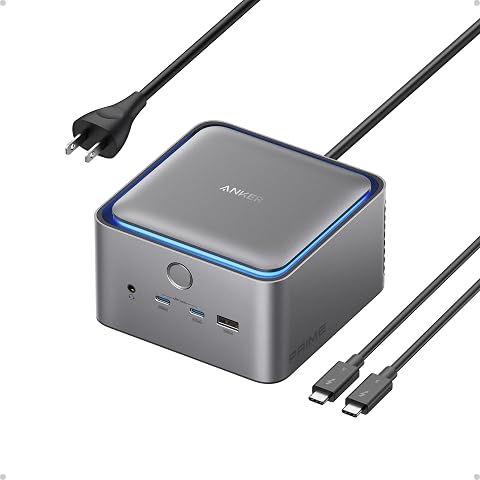 Anker Prime 14-in-1 Thunderbolt 5 Docking StationView on Amazon →
- 2
 Dell Pro Thunderbolt 4 Smart Dock SD25TB4 – USB-C Station 130W, 4 Displays 4K…View on Amazon →
- 3
 Plugable Thunderbolt 4 Dock with 100W Charging, Dual MonitorView on Amazon →
- 4
 Plugable Thunderbolt 4 Dock (TBT-UDM) for Mac and WindowsView on Amazon →
- 5
 Dell WD19TB Thunderbolt Docking Station with 180W AC AdapterView on Amazon →
- 6
 Dell Thunderbolt Dock WD19TBS with 130W Power DeliveryView on Amazon →
Match the Dock to the Desk
Choosing a dock affects more than how many cables reach a laptop. A suitable model can connect displays and peripherals through one desk setup, but a mismatch may mean a monitor runs at different settings than expected, a computer cannot use the dock’s newer bandwidth, or the dock does not supply enough power for a laptop’s needs.
The guide’s comparison highlights two decisions with direct cost and usability consequences: whether paying for Thunderbolt 5 headroom makes sense for a buyer’s computer, and whether an established Thunderbolt 4 dock better fits existing equipment. It also cautions against treating port count as a proxy for compatibility. Buyers who verify their computer’s capabilities and list the devices they use together are less likely to pay for features they cannot use or discover a limitation after setup.
Products Worth Considering

Anker SOLIX C300 DC Portable Power Station, 288Wh, 300W

DJI Osmo Action 4 Essential Combo Waterproof 4K Action Camera

Jackery Solar Generator 1000 V2 with 200W Solar Panel, 1,070Wh, 1,500W, Dune White
As an affiliate, we earn on qualifying purchases.
Six Models, Two Thunderbolt Generations
The list contains one Thunderbolt 5 model and five Thunderbolt 4 models. The guide positions Anker’s dock around newer-generation bandwidth, while the Thunderbolt 4 selections serve different priorities: cross-platform use for the Plugable TBT-UDM, charging and dual-monitor use for the Plugable 100W model, and Dell-oriented options from the SD25TB4 and WD19 family.
Its selection criteria include charging capability, display support, port variety and the configuration supplied with each dock. The source advises readers to check the computer’s exact port specification rather than assume that every USB-C-shaped port supports Thunderbolt. It also recommends checking the monitor’s resolution, refresh rate and inputs alongside the computer’s operating-system and display limits.
Compatibility Depends on the Computer
The source does not provide the guide’s publication date, prices, links to product listings or independent test data. It also does not state exact display-resolution and refresh-rate combinations, detailed port inventories, or charging performance under specific workloads for every model. Those omissions mean the ranking cannot establish which dock will perform best in a particular reader’s setup.
Compatibility remains computer- and configuration-specific. The source says display support can differ by host and operating system, and that a dock’s power figures should be checked against the laptop maker’s requirements. It does not confirm that every model will drive two displays, charge every laptop at its maximum rate, or support every listed peripheral in all configurations.
Check Requirements Before Buying
The source describes no upcoming product test, launch or follow-up milestone. For readers considering one of the six docks, the next step is to confirm the laptop’s Thunderbolt generation and power needs, then check the dock’s supported display arrangements against each monitor’s connections and settings.
Buyers should also compare the exact model and supplied adapter, particularly when considering the Dell WD19TB and WD19TBS, which the guide says have different power configurations. Until complete specifications and setup-specific compatibility are checked, the rankings are best treated as a shortlist rather than a guarantee that a dock will meet every desk’s needs.
Key Questions
Which dock does the guide rank first?
It ranks the Anker Prime 14-in-1 Thunderbolt 5 Dock first, citing its newer-generation bandwidth positioning and broad connection focus.
Are all six docks Thunderbolt 5?
No. The guide includes one Thunderbolt 5 dock from Anker and five Thunderbolt 4 models from Plugable and Dell.
Will any of these docks work with every laptop and monitor?
The source does not claim universal compatibility. Results can depend on the computer’s port capabilities, operating system, display limits, monitor connections and charging requirements.
What should buyers check before replacing a laptop charger?
Compare the laptop maker’s recommended power supply with the dock’s stated charging output. The source cautions that a dock’s adapter rating and the power delivered to the laptop are not necessarily the same figure.
Source: ThorstenMeyerAI.com