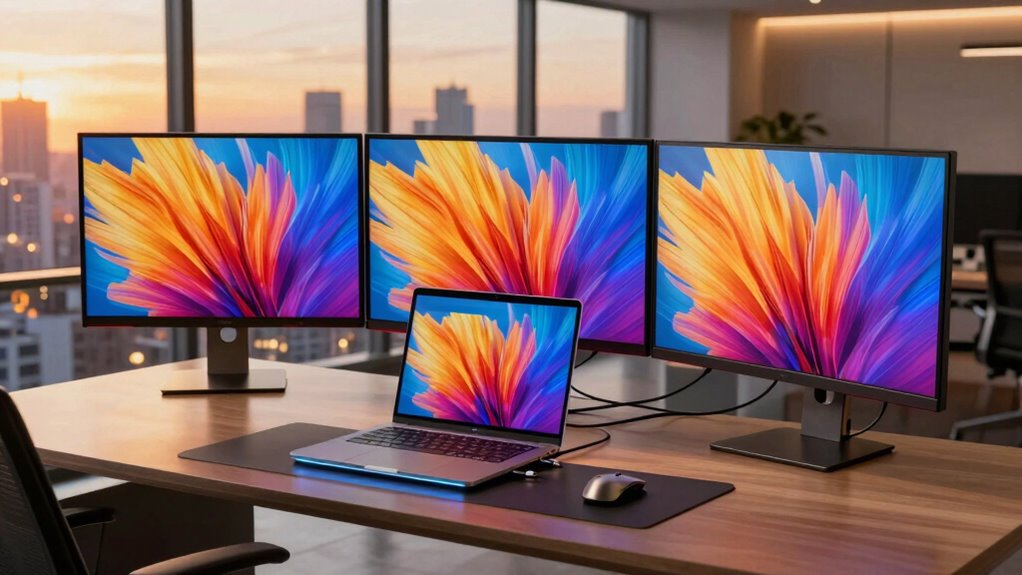
Finding the right laptop dock for triple monitors can transform your workspace, boosting productivity and multitasking capacity. The Plugable USB-C Triple Monitor Docking Station stands out as the best overall pick thanks to its reliable performance and 13-in-1 ports, including 100W charging. The TobenONE 18-in-1 Docking Station impresses with its extensive connectivity, supporting three 4K displays and multiple USB devices, making it ideal for power users. However, buyers often face tradeoffs between high port count, compatibility, and price. Keep reading to explore these options in detail and find the best fit for your needs.

Get the latest gadgets delivered free — and shop member deals
- Fast, free delivery on millions of items
- Access to Prime Big Deal Days deals on October 6–7
- Prime Video, Amazon Music and more included
Complete the kit



Key Takeaways
- Top picks balance port variety, display support, and charging power to suit different professional and creative workflows.
- Price varies significantly; high port count doesn’t always mean better performance or compatibility, so consider your specific device needs.
- Many docks support 4K resolution but may differ in refresh rates and color accuracy, which matter for design and video editing.
- Build quality and ease of setup vary—some docks are plug-and-play, while others require driver installations or firmware updates.
- Compatibility with different laptop brands and operating systems influences overall usability and future-proofing.
| Plugable USB-C Triple Monitor Docking Station, 13-in-1, 100W Charging |  | Best Overall for Versatility and Compatibility | Hardware Interface: USB Type C | Compatible Devices: Windows 10/11, macOS 10.15+, ChromeOS 100+ | Total USB Ports: 5 | VIEW ON AMAZON | See Our Full Breakdown |
| TobenONE 18-in-1 Laptop Docking Station with Triple 4K HDMI and 9 USB Ports |  | Best for Power and Extensive Connectivity | Ports: 18 (9 USB/PD/HOST/3 HDMI/RJ45/SD/microSD/3.55mm audio) | Display Support: Triple 4K@60Hz | Power Delivery: 100W | VIEW ON AMAZON | See Our Full Breakdown |
| Selore Laptop Docking Station with Triple 4K Monitors and 17-in-1 Expansion |  | Best for Creative Professionals and Data Transfer Speed | Hardware Interface: DisplayPort, Ethernet, HDMI, USB 3.2 | Supported Devices: Dell XPS, Lenovo Yoga, MacBook, Surface, ASUS Zenbook | Total USB Ports: 5 | VIEW ON AMAZON | See Our Full Breakdown |
| Plugable USB C Triple Display Docking Station | 100W PD, 3 HDMI |  | Best for Compatibility and Simplicity | Hardware Interface: USB Type C | Supports: USB-C, USB4, Thunderbolt | Total HDMI Ports: 3 | VIEW ON AMAZON | See Our Full Breakdown |
| Selore 3 HDMI Docking Station Triple Monitor Docking Station 3 Monitors | 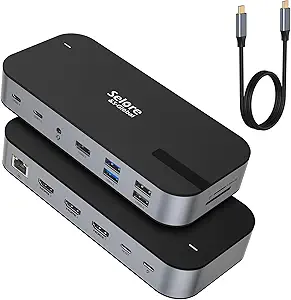 | Best for High-Resolution, Multiple Ports, and Data Transfer | HDMI ports: 3x 4K@60Hz | USB Ports: 1x USB A 3.1, 2x USB-C 3.1, 2x USB A 3.0, 2x USB A 2.0 | Charging: 100W PD | VIEW ON AMAZON | See Our Full Breakdown |
| Acer 11-in-1 USB-C Docking Station for Laptops with 3 Monitors |  | Best Overall for High-Resolution Multi-Display Setups | Monitor Support: 3 monitors (up to 8K@30Hz or 4K@60Hz) | HDMI Ports: 2 HDMI (4K@60Hz) | DisplayPort: 1 DP (8K@30Hz) | VIEW ON AMAZON | See Our Full Breakdown |
| Anker 13-in-1 USB-C Docking Station with Triple Display |  | Best for Versatile Connectivity and Compact Design | Ports: 2× HDMI, DisplayPort, 3× USB-C, 3× USB-A, Gigabit Ethernet, SD/microSD, 3.5mm audio, DC-IN | Power Delivery: 85W | Display Support: Up to 3 monitors at 1080p@60Hz or 1 at 4K@60Hz | VIEW ON AMAZON | See Our Full Breakdown |
| Acer 13-in-1 USB-C Laptop Docking Station with 2 HDMI, DisplayPort, and Gigabit Ethernet |  | Best for Power and Simplicity in Multi-Monitor Setups | Display Outputs: 2 HDMI, 1 DisplayPort | Power Adapter: 110W | Supported Displays: Triple 4K @ 30Hz on Windows, Mirroring on Mac | VIEW ON AMAZON | See Our Full Breakdown |
| MOKiN Laptop Docking Station Dual Monitor 4K HDMI USB C Hub for Dell/HP/Mac |  | Best for Compact, Multi-Platform Multi-Monitor Support | Hardware Interface: HDMI, USB Type C | Additional Features: Plug and Play, Fast Charging | Compatible Devices: Laptops | VIEW ON AMAZON | See Our Full Breakdown |
More Details on Our Top Picks
Plugable USB-C Triple Monitor Docking Station, 13-in-1, 100W Charging
This dock stands out for offering a comprehensive set of features, including support for three 4K monitors and 13 ports that cover almost every connectivity need, making it highly suitable for office environments and enterprise setups. Compared with the TobenONE 18-in-1, it provides broader system compatibility and a more straightforward, driver-based setup, but it requires driver installation and doesn’t support protected content playback, which could be a limitation for media consumption. Its 100W charging capacity simplifies cable management by powering your laptop alongside peripherals, reducing clutter. However, some features may need firmware updates, and certain macOS configurations might require additional setup. This makes it ideal for professionals who prioritize a reliable, universal dock with extensive port options.
Pros:- Supports triple 4K monitor setup for increased productivity
- Provides 100W charging for laptops, reducing cable clutter
- Universal compatibility with Windows, macOS, and ChromeOS
- Includes a broad array of ports: HDMI, USB-A, Ethernet, SD card reader
Cons:- Requires driver installation for certain display configurations on macOS
- Does not support HDCP protected content like Netflix playback
- Some features may need firmware updates for full functionality
Best for: IT professionals or enterprise users needing a versatile, highly compatible dock with multiple ports and high power delivery
Not ideal for: Creative professionals working heavily with protected media content or Mac users seeking seamless plug-and-play without driver setup
- Hardware Interface:USB Type C
- Compatible Devices:Windows 10/11, macOS 10.15+, ChromeOS 100+
- Total USB Ports:5
- Number of HDMI Ports:3
- Wattage:100W
- Input Voltage:20 volts
Our verdict“This dock is best suited for professionals who need a highly adaptable, multi-device setup with extensive port support and system compatibility.”
TobenONE 18-in-1 Laptop Docking Station with Triple 4K HDMI and 9 USB Ports
The TobenONE docking station excels in providing triple 4K@60Hz display support alongside a massive 18-in-1 port array, making it perfect for demanding multitaskers, video editors, and users who need a variety of peripheral connections. It surpasses the Plugable model in port count and display support, but the need to purchase an external power adapter separately can complicate setup and increase overall cost. Its 100W PD charging keeps laptops running without interruption, but since it’s primarily designed for Windows and Chrome OS, Mac users might face limitations in extended display modes. The complex setup might be daunting for less tech-savvy users, yet it offers unparalleled versatility for those who require multiple high-resolution displays and peripherals. This pick suits professionals who want maximum connectivity and high-performance display support.
Pros:- Supports triple 4K@60Hz displays for crisp visuals
- Includes 9 USB ports for peripherals and external drives
- Offers 100W PD charging for continuous laptop operation
- Transforms workspace into a professional-grade setup
Cons:- Power adapter sold separately, adding to cost and complexity
- Designed mainly for Windows and Chrome OS, with limited Mac support
- Setup may be complex for non-technical users
Best for: Power users who need a large number of USB ports and triple 4K display support for demanding workflows
Not ideal for: Casual users or Mac owners seeking simple, out-of-the-box plug-and-play solutions without complex setups
- Ports:18 (9 USB/PD/HOST/3 HDMI/RJ45/SD/microSD/3.55mm audio)
- Display Support:Triple 4K@60Hz
- Power Delivery:100W
- Compatibility:Windows and Chrome OS
- Power Adapter Included:No
- Dimensions:Varies
Our verdict“This dock is ideal for power users demanding maximum connectivity, high-resolution display support, and professional-grade performance.”
Selore Laptop Docking Station with Triple 4K Monitors and 17-in-1 Expansion
The Selore docking station offers a compelling mix of triple 4K monitor support, fast data transfer, and additional features like a smart LCD display, making it suitable for creative professionals, multitaskers, and those who value data management. Its support for high refresh rates on 4K displays and USB 3.2 transfer speeds surpass basic docks like the Plugable, but Mac systems only support mirror mode, limiting extended display options. The need for a separate charger of at least 87W and firmware updates for certain features adds complexity. Nonetheless, the built-in display with weather and time information adds a unique touch for productivity-focused users. This dock is well-suited for creators and professionals who need high-speed data transfer and multi-monitor support.
Pros:- Supports triple 4K monitors with high refresh rates
- Fast data transfer via USB 3.2 and SD card reader
- Powerful 100W charging for laptops and devices
- Includes a smart LCD display for weather and time
Cons:- Mac only supports mirror mode, not extended displays
- Requires a separate charger, possibly 87W or higher
- Firmware updates needed for some security features
Best for: Creative professionals and multitaskers needing high refresh rate support and fast data transfer capabilities
Not ideal for: Mac users or those seeking a plug-and-play solution with minimal setup and no firmware updates
- Hardware Interface:DisplayPort, Ethernet, HDMI, USB 3.2
- Supported Devices:Dell XPS, Lenovo Yoga, MacBook, Surface, ASUS Zenbook
- Total USB Ports:5
- Number of HDMI Ports:3
- Wattage:100W
- Built-in Display:Weather and time
Our verdict“This station is ideal for professionals who need high-speed data, triple 4K support, and additional productivity features, especially on Windows or compatible systems.”
Plugable USB C Triple Display Docking Station | 100W PD, 3 HDMI
This dock is a straightforward choice for users needing three HDMI outputs, including 4K support, along with reliable 100W Power Delivery. It’s compatible across Windows, macOS, and ChromeOS, making it versatile for mixed-device environments. Compared with the Selore 3 HDMI Dock, it offers a more compact form factor and easier setup, but it doesn’t support Linux or HDCP content, which could limit usage in certain scenarios. The six USB ports and Ethernet provide ample peripheral connectivity, yet driver installation on macOS (11+) might be required for full functionality, and it lacks the extra features like a smart display or high refresh rate support. This pick makes the most sense for users seeking a balanced, plug-and-play dock for multiple HDMI monitors with universal compatibility.
Pros:- Supports up to three HDMI monitors, including 4K resolution
- Provides 100W Power Delivery for continuous device charging
- Compatible with a wide range of laptops and operating systems
- Includes multiple USB ports and Ethernet for versatile connectivity
Cons:- Not compatible with Linux operating systems
- Requires driver installation for macOS (11+)
- No HDCP support for protected content
Best for: Users seeking a simple, reliable solution for triple HDMI display support with broad OS compatibility
Not ideal for: Power users requiring advanced features like high refresh rate support or additional display modes
- Hardware Interface:USB Type C
- Supports:USB-C, USB4, Thunderbolt
- Total HDMI Ports:3
- Wattage:100W
- Input Voltage:20 volts
- Dimensions:3.3″L x 7.9″W x 1.2″H
Our verdict“This dock is well-suited for users who need a simple, effective triple HDMI solution across various systems without extra bells and whistles.”
Selore 3 HDMI Docking Station Triple Monitor Docking Station 3 Monitors
The Selore 3 HDMI Docking Station offers a solid balance of triple 4K monitor support, a variety of USB ports, and additional features like SD card slots and Ethernet. Its support for up to three 4K@60Hz displays makes it ideal for multitasking and content creation, surpassing some simpler docks like the Plugable USB-C model in display support. However, MacBook users will find limited extended display options, as only mirror mode is supported, and it requires an 87W+ power adapter for full operation, which isn’t included. The wide port selection, including SD and Micro SD, makes it versatile for data-heavy workflows, but the absence of a dedicated power supply can complicate setup. This device suits users who prioritize multi-monitor productivity and high data transfer speeds.
Pros:- Supports three 4K@60Hz monitors for sharp visuals
- Wide range of ports including Ethernet, SD, and multiple USB types
- High-speed data transfer capabilities
- Supports multitasking with multiple peripherals
Cons:- Requires an 87W+ charger not included in the package
- Limited extended display support on Mac devices
- No included power adapter, adding extra cost and setup step
Best for: Content creators and professionals needing high-resolution multitasking with extensive port options
Not ideal for: Mac users or those seeking a plug-and-play solution with minimal setup and no need for an external power supply
- HDMI ports:3x 4K@60Hz
- USB Ports:1x USB A 3.1, 2x USB-C 3.1, 2x USB A 3.0, 2x USB A 2.0
- Charging:100W PD
- SD Slots:SD and Micro SD
- Ethernet:1x Ethernet
- Power:Requires 87W+ charger
Our verdict“This station is ideal for users needing high-resolution multitasking and multiple port connectivity, especially on Windows or compatible systems.”
Acer 11-in-1 USB-C Docking Station for Laptops with 3 Monitors
This Acer dock stands out for supporting triple monitor configurations with resolutions up to 8K, making it ideal for professionals needing maximum display clarity. Its extensive connectivity options, including HDMI, DisplayPort, USB-C, and Ethernet, make it versatile for complex workflows. Compared to the Anker 13-in-1, it offers higher resolution support but requires a Thunderbolt 3/4 or full-featured USB-C port, which could limit compatibility for some users. The power delivery of 85W is reliable but not as high as some competitors, so heavy-duty laptops might need additional charging solutions. While Mac users can mirror screens rather than extend, this is a fair tradeoff for the impressive multi-monitor support. This model is best suited to power users working with high-resolution content or extensive multitasking, who have compatible ports and need a stable, high-performance dock.
Pros:- Supports triple monitor up to 8K @ 30Hz or 4K @ 60Hz, ideal for high-res workflows
- Fast data transfer with multiple USB-C and USB-A ports
- Reliable 85W charging for most professional laptops
- Stable 1 Gbps Ethernet connection ensures network reliability
Cons:- Requires Thunderbolt 3/4 or full USB-C port; not compatible with all laptops
- Power adapter and cables are sold separately, adding to setup costs
- Mac users can only mirror displays, not extend
Best for: Creative professionals or engineers working with large, high-res files who need maximum display fidelity and reliable connectivity.
Not ideal for: Mac users seeking extended desktop mode or users with laptops lacking Thunderbolt 3/4 support, due to limited Mac compatibility and port requirements.
- Monitor Support:3 monitors (up to 8K@30Hz or 4K@60Hz)
- HDMI Ports:2 HDMI (4K@60Hz)
- DisplayPort:1 DP (8K@30Hz)
- USB-C Ports:2 USB-C (10Gbps)
- USB-A Ports:2 USB-A (5Gbps)
- Ethernet:1 Gbps
- SD/MicroSD Slots:Yes (104Mbps)
- Power Delivery:100W input, 85W to laptop
Our verdict“Best suited for users with compatible ports and high-resolution needs who prioritize display quality and stable connectivity.”
Anker 13-in-1 USB-C Docking Station with Triple Display
This Anker dock offers a comprehensive set of ports, including HDMI, DisplayPort, USB-C, USB-A, and Ethernet, making it ideal for users who need a highly versatile connection hub. Its support for up to three monitors at 1080p@60Hz, or a single 4K@60Hz display, provides flexibility for various workflows, especially compared to the Acer 11-in-1, which supports higher resolutions but at the cost of complexity. The 135W power adapter ensures rapid charging for most laptops and devices, making it a strong choice for those who value desktop-grade power delivery. However, Mac users are limited to mirrored displays unless they check compatibility thoroughly, and the need to verify USB-C DP Alt Mode support can be a hassle. This dock targets users who desire a compact, all-in-one solution for multitasking and multiple device connectivity, especially on Windows systems.
Pros:- Supports up to 3 monitors at 1080p@60Hz or one 4K@60Hz for flexibility
- Includes a wide variety of ports, including SD card reader and audio output
- Powerful 135W charger supports fast laptop charging
- Compact vertical design saves desk space
Cons:- Limited to mirrored display mode on Mac without additional setup
- Requires checking USB-C port capabilities for full functionality
- Supports only 1080p for triple displays unless specific GPU support exists
Best for: IT professionals or power users who require a wide array of ports and reliable multi-monitor support in a space-saving design.
Not ideal for: Mac users wanting extended desktop mode or users with laptops that lack full USB-C DisplayPort Alt Mode support, due to potential compatibility issues.
- Ports:2× HDMI, DisplayPort, 3× USB-C, 3× USB-A, Gigabit Ethernet, SD/microSD, 3.5mm audio, DC-IN
- Power Delivery:85W
- Display Support:Up to 3 monitors at 1080p@60Hz or 1 at 4K@60Hz
- Compatibility:Windows 10/11, ChromeOS, USB-C, USB4, Thunderbolt 3/4/5, Mac (mirrored)
- Size:Compact vertical form factor
Our verdict“Ideal for users needing a broad port selection and versatile multi-monitor setups on Windows, with some limitations on Mac compatibility.”
Acer 13-in-1 USB-C Laptop Docking Station with 2 HDMI, DisplayPort, and Gigabit Ethernet
This Acer dock provides a straightforward solution for connecting three monitors with support for triple 4K output at 30Hz on Windows, making it a good choice for those prioritizing reliable performance over ultra-high resolutions. Its included 110W power adapter ensures your laptop stays charged during demanding tasks, outperforming some competitors like the MOKiN in power delivery. Compared to the Anker or MOKiN docks, it offers a simpler setup with fewer port options but emphasizes stability and ease of use for Windows users. However, it doesn’t support monitor power delivery or extend screens on Mac, limiting its flexibility. Designed for users who want a reliable, easy-to-configure dock for multi-monitor workstations without the extra bells and whistles, it is best for Windows environments where straightforward performance matters most.
Pros:- Supports triple 4K @ 30Hz on Windows, suitable for most productivity tasks
- Includes a robust 110W power adapter for consistent laptop charging
- Multiple ports for versatile device connection, including HDMI, DisplayPort, and Ethernet
- Simple plug-and-play setup for Windows users
Cons:- Does not support monitor power delivery or extend displays on Mac
- Limited to 4K@30Hz for triple monitors, which may not satisfy high-frame-rate needs
- Lacks additional features like SD card or audio ports for expanded connectivity
Best for: Business professionals or developers who need dependable triple 4K display support on Windows laptops with minimal fuss.
Not ideal for: Mac users seeking extended desktop support or those requiring monitor power delivery, as the dock only mirrors on Mac and lacks monitor charging capabilities.
- Display Outputs:2 HDMI, 1 DisplayPort
- Power Adapter:110W
- Supported Displays:Triple 4K @ 30Hz on Windows, Mirroring on Mac
- Connectivity:USB-C, USB-A, Ethernet, SD card reader
- Additional Features:Security slot, heat dissipation design
Our verdict“Best for Windows users who need a straightforward, reliable multi-monitor dock with high power delivery and minimal complexity.”
MOKiN Laptop Docking Station Dual Monitor 4K HDMI USB C Hub for Dell/HP/Mac
The MOKiN dock offers a compact, lightweight option for users needing up to three monitors, supporting dual 4K HDMI displays and additional ports for data and charging. Its plug-and-play design is convenient for mobile professionals or those with limited desk space. Compared with the more feature-rich Acer or Anker docks, it emphasizes portability over extensive port variety or ultra-high resolutions. While it supports 100W power delivery, the need for specific OS support—particularly on macOS where only SSD mode is supported—can limit its usability for some. This dock suits users who prioritize portability and basic triple monitor support without requiring extensive customization or high-resolution gaming performance.
Pros:- Supports dual 4K HDMI monitors for enhanced productivity
- Includes multiple USB ports and 100W charging capability
- Plug-and-play, lightweight, and easy to carry
- Compatible with Windows and macOS
Cons:- Limited support for macOS beyond SSD mode, restricting extended desktop use
- Charger not included, requiring a separate 110W power supply for full charging
- Data transfer rate of 5 Gbps may be slower for large file transfers
Best for: Mobile professionals or users with limited desk space who need a lightweight dock supporting dual or triple 4K monitors on Windows or Mac.
Not ideal for: Power users or gamers seeking high refresh rates or extensive port options, and Mac users needing extended display modes, due to OS limitations and fewer features.
- Hardware Interface:HDMI, USB Type C
- Additional Features:Plug and Play, Fast Charging
- Compatible Devices:Laptops
- Total USB Ports:5
- Data Transfer Rate:5 Gbps
- Number of Ports:14
- Minimum OS Support:Windows 10
- Color:Silver
Our verdict“Ideal for users needing portable, multi-platform support for dual or triple 4K monitors without extensive setup or high-end features.”

How We Picked
The products were selected based on their ability to support three external monitors effectively, with an emphasis on display quality, port versatility, and charging capability. We prioritized docks that are compatible with a broad range of laptops and operating systems, ensuring they can handle common professional setups. Performance stability and build quality were key factors, alongside user-friendly features like easy setup and minimal driver issues. Our ranking reflects a balance of value, durability, and real-world usability, helping buyers identify options that deliver reliable multi-monitor support for different budgets and needs.Factors to Consider When Choosing Laptop Dock For Triple Monitors
Choosing the right laptop dock for triple monitors involves evaluating several factors that influence your workspace efficiency and compatibility. It’s essential to consider not just the number of ports, but also the quality of display support, power delivery, and ease of use. Understanding these broader considerations can prevent common pitfalls like limited compatibility or poor display performance, ensuring your investment aligns with your workflow and future plans.Display Support and Resolution
When selecting a dock, verify that it can handle three monitors at your preferred resolution, whether 1080p, 4K, or higher. Some docks support only 1080p or have limited refresh rates, which can impact visual clarity and responsiveness, especially for creative work. Docks supporting triple 4K at 60Hz are ideal for high-definition tasks, but may require specific ports like DisplayPort or HDMI 2.0. Keep in mind that the total bandwidth of your laptop’s port also affects performance, so check compatibility before purchase.
Power Delivery and Charging
For a seamless setup, prioritize docks offering sufficient power delivery—usually 60W to 100W—so your laptop charges while connected. Low-power docks might require a separate charger, cluttering your workspace and reducing convenience. When working with high-performance laptops, higher wattage support is essential to prevent slow charging or power limitations during intensive tasks. Balance your power needs against the dock’s other features to avoid sacrificing charging speed for port quantity.
Port Selection and Versatility
Beyond HDMI and DisplayPort, consider docks with multiple USB-A and USB-C ports, Ethernet, audio jacks, and SD card readers. A versatile port selection allows connecting peripherals without additional hubs, simplifying your setup. However, more ports can increase complexity and cost, so evaluate which connections are essential for your workflow. Some docks also include dedicated charging ports for mobile devices, adding further convenience.
Compatibility and Ease of Setup
Ensure the dock supports your specific laptop model and operating system to avoid driver or compatibility issues. Some docks are optimized for USB-C laptops, while others work with Thunderbolt 3 or 4 ports. User-friendly docks with plug-and-play setup reduce frustration, especially for non-technical users. Reading user reviews about setup experience can provide insight into potential hurdles and firmware updates needed for smooth operation.
Build Quality and Future-Proofing
Invest in a dock with a solid build that can endure daily use, particularly if you move your setup frequently. Look for docks made from high-quality materials and with good heat dissipation. Future-proofing involves choosing docks that support the latest standards like HDMI 2.1, DisplayPort 1.4, and USB-C Power Delivery 3.1. This ensures compatibility with upcoming devices and reduces the need for replacement or upgrades in the near future.
Frequently Asked Questions
Can I use a laptop dock for triple monitors with a MacBook?
Many docks in this roundup support MacBook models, especially those with USB-C or Thunderbolt 3/4 ports. However, compatibility depends on the specific macOS version and hardware, so checking the manufacturer’s specifications is essential. Some docks may require additional drivers or firmware updates for optimal performance. Confirming support for macOS and your MacBook’s port type ensures your setup will run smoothly without unexpected issues.
Is it better to get a dock with HDMI or DisplayPort for three monitors?
Both HDMI and DisplayPort can support triple monitor setups effectively, but DisplayPort 1.4 generally offers higher bandwidth, allowing for higher resolutions and refresh rates, which is advantageous for creative professionals. HDMI ports are more common and versatile, especially with support for HDMI 2.0 and 2.1 standards. Your choice depends on your monitor inputs and desired resolution, but for high-performance setups, DisplayPort often provides a more future-proof option.
Will using a dock slow down my laptop or affect performance?
Using a dock itself typically does not reduce your laptop’s performance; however, the bandwidth limitations of the connection—USB-C or Thunderbolt—can impact display quality or peripheral responsiveness if your setup exceeds the dock’s capacity. For example, supporting three 4K displays at 60Hz requires a dock with high bandwidth. Ensuring your laptop’s port and the dock support the needed data transfer rates prevents bottlenecks and maintains smooth operation.
How do I know if a dock supports my specific monitor configurations?
Check the dock’s specifications for supported resolutions, refresh rates, and port types. Confirm the monitor inputs (HDMI, DisplayPort) match those on the dock, and verify that the total bandwidth supports your desired combined resolution and refresh rate. Reading user reviews and manufacturer documentation can reveal real-world compatibility issues or limitations, helping you avoid setups that won’t deliver the visual quality you need.
Should I prioritize a dock with more ports or better display support?
The decision depends on your workflow. If you need to connect multiple peripherals like external drives, Ethernet, and audio devices, a dock with more ports is advantageous. However, if your primary goal is a high-quality triple monitor setup, prioritize display support features such as 4K resolution, refresh rate, and bandwidth. Balancing both aspects based on your specific needs ensures a setup that is both versatile and capable of delivering excellent visual quality.
Conclusion
For most users, the Plugable USB-C Triple Monitor Docking Station offers the best overall experience with reliable performance and broad compatibility. If you’re looking for the most value, the TobenONE 18-in-1 Docking Station provides extensive ports at a competitive price. Professionals who demand premium build quality and high resolutions should consider the Selore 17-in-1 Docking Station. Beginners or less technical users will benefit from plug-and-play options with straightforward setup, like the Acer 11-in-1 USB-C Docking Station. Ultimately, your choice should reflect your specific monitor needs, device compatibility, and intended usage, ensuring your workspace is both productive and future-ready.
Fall Picks
fall essentials
As an affiliate, we earn on qualifying purchases.