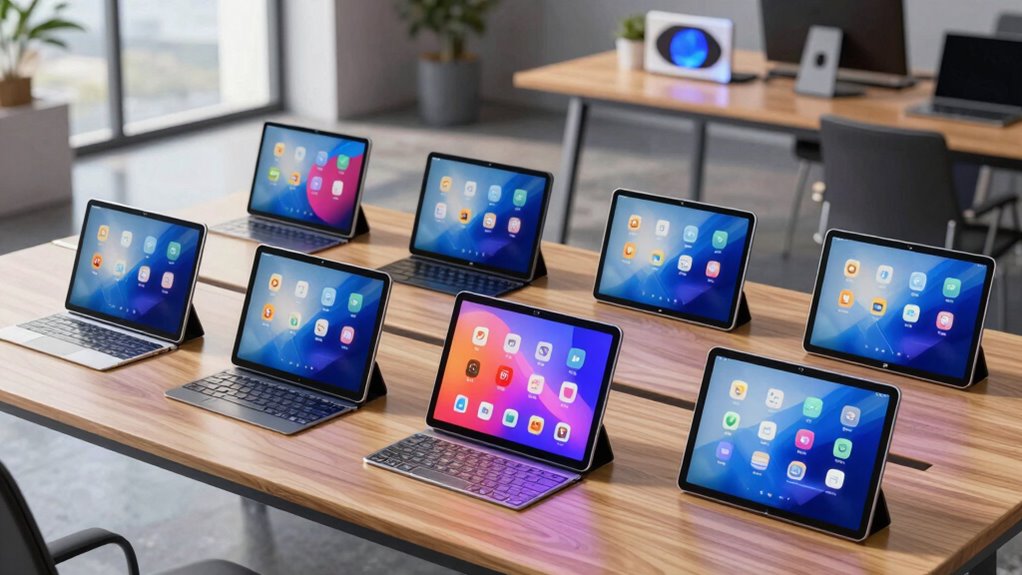

If you’re searching for an Android tablet with a keyboard, my best overall pick is the TABWEE T90, which pairs an 11-inch display with a keyboard in a more manageable size than the largest options. The CUPEISI 10-inch stands out for its listed Wi-Fi 6 support and broad accessory bundle, while the JJGJ P90 suits buyers who want a much larger 13.4-inch screen. The main tradeoff is between portability and screen space; bundle contents, storage claims, and display details also vary across this group. A keyboard can help with typing, but it does not automatically make a tablet a laptop replacement. Read on for my full breakdown of who each model suits and what to check before choosing.

Get the latest gadgets delivered free with Prime
- Fast, free delivery on millions of items
- Prime Video, Amazon Music and more included
- Member-only deals all year
Complete the kit



Key Takeaways
- The TABWEE T90 takes the overall lead for pairing an 11-inch screen with a keyboard, a more balanced fit for everyday use than a 12- or 13.4-inch model.
- Screen size defines the biggest tradeoff: the JJGJ P90 and 13-inch tablet give more room for documents, while 10-inch bundles are easier to carry.
- Accessories are not consistent across the lineup: several bundles list a mouse, stylus, and case, but buyers should check exactly what is included for the chosen configuration.
- Large RAM and expandable-storage figures need careful interpretation: advertised capacity alone does not establish speed, usable built-in storage, or how well apps perform.
- The CUPEISI package is the clearest all-round accessory pick among the 10-inch options, while the simpler Jeazans bundle may suit buyers who want a straightforward starter setup.




| android tablet with keyboard | Connectivity | Display | Operating system | Included accessories |
|---|---|---|---|---|
| 13 Inch Android Tablet with Ke | 5G Wi-Fi, Bluetooth 5.0 | 13.4-inch 2K, 1920 x 1200 | — | — |
| Android 16 Tablet 10.1 Inch | 5G Wi-Fi, Bluetooth 5.0, USB-C | 10.1-inch HD touchscreen | Android 16.0 | Keyboard, mouse, stylus, protective case |
| CUPEISI Android 16 Tablet 10-i | Dual-band Wi-Fi 6, Bluetooth 5.0 | 10.1-inch IPS, 1280 x 800 | Android 16 | Keyboard, wireless mouse, protective case, stylus |
| TABWEE T90 11-inch Android 16 | Dual-band 5G Wi-Fi, Bluetooth 5.0, GPS | 11-inch FHD IPS, 1920 x 1200, 380 nits | Android 16 | Keyboard, mouse, stylus |
| HNVHNV T30MAX 12-inch Android | Wi-Fi 6, Bluetooth 5.4 | 12-inch IPS, 2000 x 1200, 120Hz | Android 16 | Keyboard, mouse, stylus, case, screen protector |
| JJGJ P90 13.4-inch Android 16 | 5G Wi-Fi, Bluetooth 5.0; no cellular data | 13.4 inches, 1920 x 1200 | Android 16 | Keyboard, mouse, stylus, silver case, screen protector, charger, USB-C cable |
| Jeazans Android 16 Tablet 10.1 | Wi-Fi 6, Bluetooth | — | Android 16 | Bluetooth keyboard, wireless mouse, stylus, leather case, charger |
More Details on Our Top Picks
13 Inch Android Tablet with Keyboard, 32GB + 256GB + 2TB Expandable Storage
I’d choose this model when screen space and storage matter more than carrying a compact tablet. Its 13.4-inch 2K display gives documents, split-screen apps, and video more room than the smaller CUPEISI Android 16 Tablet, while the included accessories support a laptop-like setup. The 256GB storage with microSD expansion up to 2TB suits people who keep large media libraries or work files on-device. The Unisoc T615 octa-core processor is positioned for everyday multitasking, not demanding desktop software or high-end gaming. The tradeoff is portability: its large screen and 10,000mAh battery make this a bulkier carry than the 10.1-inch options, and heavy use can shorten runtime. I’d also budget for a microSD card if the listed expansion is part of the plan.
Pros:- 13.4-inch 2K display gives documents and split-screen tasks more room than the 10.1-inch CUPEISI.
- 256GB internal storage plus microSD expansion up to 2TB accommodates large local libraries.
- 10,000mAh battery supports extended sessions, though runtime depends on use.
- Accessory kit supports a keyboard-based 2-in-1 setup.
Cons:- The 13.4-inch format is bulkier to carry than the smaller tablets in this roundup.
- MicroSD card for expanded storage is not included.
- Battery life can fall with heavy workloads, and the T615 is not a high-end gaming processor.
Best for: People who want a large-screen Android tablet for typing, streaming, and storing substantial files, and who mostly use it at a desk or around the home.
Not ideal for: Commuters or students who need a lightweight tablet for daily travel, or buyers expecting desktop-class performance from demanding apps.
- Display:13.4-inch 2K, 1920 x 1200
- Processor:Unisoc T615 octa-core
- RAM:8GB
- Internal storage:256GB
- Expandable storage:Up to 2TB via microSD card
- Battery:10,000mAh
- Cameras:16MP rear, 8MP front
- Connectivity:5G Wi-Fi, Bluetooth 5.0
Our verdict“Choose this if a roomy 2K screen and expandable storage matter more than a compact everyday carry.”
Android 16 Tablet 10.1 Inch, 12GB RAM, 64GB ROM, 1TB Expandable, Touch Screen, 5G WiFi, Bluetooth 5.0, with Keyboard, Mouse, Stylus, Case
This bundle is an accessible starting point for buyers who want a keyboard, mouse, stylus, and case together rather than piecing together a setup. Compared with the larger TABWEE T90, its 10.1-inch size is easier to carry and its included case offers a straightforward way to protect it. The HD touchscreen is suited to notes, browsing, and basic school or home tasks, while storage can grow to 1TB with a separate microSD card. Its 64GB built-in storage is the main constraint: apps and offline files may fill it sooner than on the 128GB CUPEISI or TABWEE models. The listed 12GB RAM figure does not explain how much is physical, so I would not choose it based on that number alone. Software-update details are limited, too.
Pros:- Keyboard, mouse, stylus, and protective case are included in the bundle.
- 10.1-inch form is more portable than the 11- and 13.4-inch models.
- Expandable storage supports up to 1TB via microSD.
- USB-C and Bluetooth 5.0 provide familiar connection options.
Cons:- 64GB of internal storage is less than the 128GB CUPEISI and TABWEE options.
- HD display is less detailed than the FHD and 2K screens elsewhere in the roundup.
- Software-update information and the split between physical and virtual RAM are not specified.
Best for: First-time tablet buyers, younger students, or household users who want a ready-to-use keyboard bundle for notes, browsing, and light productivity.
Not ideal for: People who keep many large apps or offline files, need a sharper screen for detailed work, or want clearly specified software-update support.
- Display:10.1-inch HD touchscreen
- Operating system:Android 16.0
- RAM:12GB listed
- Internal storage:64GB
- Expandable storage:Up to 1TB via microSD card
- Battery:6,000mAh; listed for up to 10 hours
- Connectivity:5G Wi-Fi, Bluetooth 5.0, USB-C
- Included accessories:Keyboard, mouse, stylus, protective case
Our verdict“Pick this bundle for a portable, accessory-rich starter setup, but skip it if storage space or screen detail is a priority.”
CUPEISI Android 16 Tablet 10-inch, 20GB RAM + 128GB ROM, 2TB Expandable, 2.0GHz Octa-core Processor, 1280×800 HD Screen, WiFi6, Bluetooth 5.0, 2-in-1 with Keyboard, Mouse, Stylus, Widevine L1
The CUPEISI makes its strongest case as a compact keyboard bundle for everyday use, with a useful mix of 128GB storage, microSD expansion, and included input accessories. Its Widevine L1 support is a specific advantage for compatible streaming services; the more expensive-feeling feature list is not the same as a higher-resolution screen, however. At 1280 x 800, its 10.1-inch display is less crisp than the FHD TABWEE T90 and the 2K HNVHNV T30MAX. The advertised 20GB RAM includes 16GB of virtual memory, with 4GB fixed, so I would treat it as an entry-level multitasking tablet rather than assume it matches a device with more physical memory. Compared with the Android 16 10.1-inch bundle, it offers more built-in storage and microSD capacity, but the card is sold separately.
Pros:- Widevine L1 support suits compatible high-definition streaming services.
- 128GB internal storage exceeds the 64GB in the Android 16 10.1-inch bundle.
- Keyboard, wireless mouse, case, and stylus are included.
- MicroSD expansion supports up to 2TB.
Cons:- 1280 x 800 resolution is less detailed than the FHD TABWEE and 2K HNVHNV displays.
- The 20GB RAM figure includes virtual memory; fixed RAM is 4GB.
- MicroSD card is not included.
Best for: Streaming-focused users and students who want a compact keyboard-and-mouse kit, 128GB of built-in storage, and room to expand a media library.
Not ideal for: Readers who prioritize sharp text or detailed video, or buyers choosing primarily by the advertised 20GB RAM figure.
- Display:10.1-inch IPS, 1280 x 800
- Operating system:Android 16
- Processor:2.0GHz octa-core
- RAM:20GB listed: 4GB fixed + 16GB virtual
- Internal storage:128GB
- Expandable storage:Up to 2TB via microSD card
- Connectivity:Dual-band Wi-Fi 6, Bluetooth 5.0
- Included accessories:Keyboard, wireless mouse, protective case, stylus
- Streaming feature:Widevine L1 support
Our verdict“Choose the CUPEISI for streaming and routine tablet tasks with a full accessory kit, not for a high-resolution screen or demanding multitasking.”
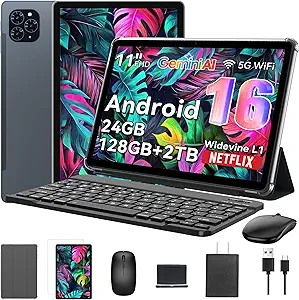
TABWEE T90 11-inch Android 16 Tablet with Keyboard, Gemini AI 3.5, 24 GB RAM + 128 GB Storage
I’d rank the TABWEE T90 as the most balanced choice for people who plan to type regularly but still want a tablet that fits into a bag. Its 11-inch FHD display is a noticeable step up in detail from the CUPEISI’s 1280 x 800 panel, without the larger footprint of the 13.4-inch Android tablet. The keyboard, mouse, and stylus make it ready for notes and light office tasks, while the stated two-year warranty adds a practical support advantage not listed for the HNVHNV T30MAX. The 24GB RAM figure includes 16GB virtual memory, so the 8GB built-in figure is the more useful guide to multitasking expectations. The T615 is aimed at everyday apps, and Android still lacks some desktop software; buyers needing a laptop replacement for specialized programs should look elsewhere.
Pros:- 11-inch FHD display is sharper than the CUPEISI’s 1280 x 800 screen.
- Keyboard, mouse, and stylus support varied typing and note-taking tasks.
- 8,000mAh battery is listed for up to 11 hours of video playback.
- Two-year warranty is specified.
Cons:- The tablet and accessory setup is bulkier than a compact 10.1-inch option.
- 24GB RAM includes 16GB virtual memory, with 8GB built in.
- Android apps may not support specialized desktop workflows.
Best for: Students and mobile workers who want a mid-size FHD tablet with keyboard accessories for documents, notes, video calls, and everyday apps.
Not ideal for: People who need desktop-only software, a very light travel device, or a tablet chosen on the assumption that all 24GB of listed RAM is physical.
- Display:11-inch FHD IPS, 1920 x 1200, 380 nits
- Processor:Unisoc T615 octa-core
- RAM:24GB listed: 8GB built-in + 16GB virtual
- Storage:128GB internal; up to 2TB via TF card
- Battery:8,000mAh; listed for up to 11 hours of video playback
- Operating system:Android 16
- Connectivity:Dual-band 5G Wi-Fi, Bluetooth 5.0, GPS
- Included accessories:Keyboard, mouse, stylus
- Warranty:2 years
Our verdict“Choose the TABWEE T90 for a more portable FHD work-and-study bundle with a specified two-year warranty, while keeping expectations to Android-friendly tasks.”
HNVHNV T30MAX 12-inch Android 16 Tablet with Keyboard, Mouse, and Stylus (48GB RAM, 256GB Storage, Black)
The HNVHNV T30MAX is the display-led option in this group: its 12-inch 2K panel with a 120Hz refresh rate offers more viewing room and smoother scrolling than the FHD TABWEE T90. That can make long documents and animation-heavy interfaces feel more fluid, while the included keyboard, mouse, stylus, case, and screen protector form a broad out-of-box kit. It also starts with 256GB storage, twice the internal capacity of the TABWEE and CUPEISI models. The headline 48GB RAM needs context: 8GB is physical and 40GB is virtual, so it should not be read as workstation-class memory. Its Unisoc T7250 is described as mid-range and may struggle with heavy games. The large 10,000mAh battery and 12-inch body also make this less convenient to carry than the compact bundles.
Pros:- 12-inch 2K display with 120Hz refresh rate offers more space and smoother scrolling than the TABWEE T90.
- 256GB built-in storage is greater than the 128GB CUPEISI and TABWEE models.
- Keyboard, mouse, stylus, case, and screen protector are included.
- 10,000mAh battery provides substantial capacity for extended use.
Cons:- The advertised 48GB RAM consists of 8GB physical RAM and 40GB virtual memory.
- Mid-range Unisoc T7250 may struggle with demanding games.
- The 12-inch tablet and accessory kit are less convenient for lightweight travel.
Best for: People who prioritize a roomy, smooth screen and generous built-in storage for reading, streaming, note-taking, and everyday productivity.
Not ideal for: Heavy mobile gamers, buyers who need a lightweight daily carry, or anyone expecting 48GB of physical RAM or laptop-level performance.
- Display:12-inch IPS, 2000 x 1200, 120Hz
- Operating system:Android 16
- Processor:Unisoc T7250 octa-core
- RAM:48GB listed: 8GB physical + 40GB virtual
- Storage:256GB; expandable up to 2TB
- Battery:10,000mAh
- Connectivity:Wi-Fi 6, Bluetooth 5.4
- Cameras:13MP rear, 8MP front
- Included accessories:Keyboard, mouse, stylus, case, screen protector
Our verdict“Pick the T30MAX for its large, smooth 2K screen and 256GB storage, but not for demanding gaming or the headline virtual-memory figure.”
JJGJ P90 13.4-inch Android 16 Tablet with Keyboard, Mouse, Stylus, and Silver Case
The 13.4-inch display gives the JJGJ P90 more room for split-screen work and document editing than the compact Jeazans 10.1-inch bundle. Its keyboard, mouse, stylus, and case are included, so it arrives better equipped for desk-style use than a tablet-only setup. The 10,000 mAh battery and Widevine L1 support also make it a plausible choice for long viewing sessions between charges. The spec sheet lists 8GB physical RAM alongside 24GB of virtual memory; that headline total should not be read as equivalent to 32GB of physical RAM. Unlike the Jeazans, it offers 256GB internal storage, but its larger size is less convenient to carry, and it has no cellular data connection. I’d choose it for screen space and bundle completeness, not for portability or a familiar major-brand ecosystem.
Pros:- 13.4-inch, 1920 x 1200 display offers more workspace than the 10.1-inch Jeazans tablet.
- Keyboard, mouse, stylus, case, and screen protector come in the bundle.
- 256GB internal storage is substantially more than the Jeazans tablet’s 64GB.
- 10,000 mAh battery and Widevine L1 support suit extended use and HD streaming.
Cons:- No cellular data connectivity; internet access depends on Wi-Fi.
- Only 8GB of the listed 32GB RAM is physical memory; virtual RAM is not equivalent.
- The large screen makes it less portable, and JJGJ is less established than major tablet brands.
Best for: Home users and students who want a large screen, included keyboard and mouse, and generous built-in storage for everyday documents and streaming.
Not ideal for: Commuters who prioritize a compact carry, buyers who need cellular internet, or multitaskers expecting 32GB of physical RAM.
- Operating system:Android 16
- Display:13.4 inches, 1920 x 1200
- Processor:Unisoc T615 octa-core
- Memory:32GB listed: 8GB physical + 24GB virtual
- Storage:256GB internal; expandable up to 2TB via TF card
- Battery:10,000 mAh
- Connectivity:5G Wi-Fi, Bluetooth 5.0; no cellular data
- Included accessories:Keyboard, mouse, stylus, silver case, screen protector, charger, USB-C cable
Our verdict“Choose the JJGJ P90 if you want a roomy tablet-and-keyboard setup with plenty of built-in storage and can accept its size and Wi-Fi-only connectivity.”
Jeazans Android 16 Tablet 10.1 Inch 2-in-1 Bundle with Keyboard, Mouse, Stylus, and Case
The Jeazans is the more portable keyboard bundle in this pair: its 10.1-inch screen and leather case are easier to carry than the JJGJ P90’s 13.4-inch setup. A Bluetooth keyboard, wireless mouse, and stylus give students a ready-made kit for notes, email, and basic document work, while the case offers multiple viewing angles. Wi-Fi 6 and PD fast charging add useful convenience, though neither turns this into a high-capacity work machine. The main compromise is 64GB of internal storage, with expansion dependent on external media; the JJGJ provides 256GB onboard. Its advertised 24GB RAM includes 21GB of virtual memory, leaving 3GB physical, so I wouldn’t choose it for demanding multitasking based on the headline figure. This makes more sense as a portable study companion than as a replacement for a laptop.
Pros:- Compact 10.1-inch format is easier to carry than the JJGJ P90’s 13.4-inch tablet.
- Includes Bluetooth keyboard, wireless mouse, stylus, and leather case.
- Wi-Fi 6 support and PD fast charging add practical connectivity and charging options.
- Case supports multiple viewing angles for typing or watching video.
Cons:- 64GB internal storage is limited; adding capacity relies on external media up to 1TB.
- Only 3GB of the listed 24GB RAM is physical memory.
- Smaller screen offers less room for split-screen work and extended document editing than the JJGJ P90.
Best for: Students and frequent travelers who want a compact tablet bundle for notes, browsing, email, and light keyboard work.
Not ideal for: People who keep many large files or apps on-device, need a roomy screen for side-by-side work, or expect the advertised 24GB to be physical RAM.
- Operating system:Android 16
- Screen size:10.1 inches
- Memory:24GB listed: 3GB physical + 21GB virtual
- Storage:64GB internal; expandable up to 1TB
- Connectivity:Wi-Fi 6, Bluetooth
- Cameras:Dual HD cameras
- Charging:PD fast charging
- Included accessories:Bluetooth keyboard, wireless mouse, stylus, leather case, charger
Our verdict“Pick the Jeazans for a carry-friendly study and browsing bundle, but choose the JJGJ P90 if you need a larger workspace or more built-in storage.”

How We Picked
I ranked these tablets around the practical question behind the search: how well does each package work as a portable typing setup? I compared listed screen size, included keyboard and other accessories, stated storage and connectivity, and the likely balance between working space and ease of carrying. I gave more weight to useful, clearly described details than to headline memory figures alone, since those numbers do not by themselves show real-world speed or overall usability.
The TABWEE T90 ranks first because its 11-inch format offers a more balanced middle ground than the smallest and largest tablets in this lineup. The CUPEISI follows for its specified Wi-Fi 6 support and keyboard, mouse, and stylus bundle; the larger JJGJ and HNVHNV models serve buyers who value screen area over portability. Other 10-inch bundles remain relevant as compact alternatives, but less complete or less distinctive listings rank lower. Product names and specifications can vary by seller or configuration, so I recommend confirming the exact bundle and software details before buying.
| android tablet with keyboard | Operating system | Included accessories |
|---|---|---|
| 13 Inch Android Tablet with Ke | — | — |
| Android 16 Tablet 10.1 Inch | Android 16.0 | Keyboard, mouse, stylus, protective case |
| CUPEISI Android 16 Tablet 10-i | Android 16 | Keyboard, wireless mouse, protective case, stylus |
| TABWEE T90 11-inch Android 16 | Android 16 | Keyboard, mouse, stylus |
| HNVHNV T30MAX 12-inch Android | Android 16 | Keyboard, mouse, stylus, case, screen protector |
| JJGJ P90 13.4-inch Android 16 | Android 16 | Keyboard, mouse, stylus, silver case, screen protector, charger, USB-C cable |
| Jeazans Android 16 Tablet 10.1 | Android 16 | Bluetooth keyboard, wireless mouse, stylus, leather case, charger |
Factors to Consider When Choosing Android Tablet With Keyboard
Choosing a tablet-and-keyboard bundle is not just a matter of comparing listed memory or screen size. I’d start with what you plan to type, where you’ll use it, and whether the tablet needs to replace another device. These checks can help you avoid paying for accessories or specifications that don’t improve your day-to-day setup.
Choose Screen Size Around Your Work
A larger display gives documents, spreadsheets, and split-screen apps more room, but it also makes the tablet less convenient to carry and hold. Ten-inch models suit short writing sessions, reading, and travel, while 11- to 13.4-inch screens are more comfortable for longer periods of desk-based work. Consider the keyboard’s layout as well as the tablet’s diagonal measurement: a compact keyboard can still feel cramped even when the display is large. If you expect to type for hours, check whether the keyboard has a trackpad, how it connects, and whether the listing shows the actual key layout. Don’t assume every bundle’s keyboard attaches in the same way or protects the screen when closed. Pick the smallest size that still gives your main apps enough room.
Treat the Keyboard as an Accessory, Not a Guarantee
A bundled keyboard saves the trouble of finding a compatible one, but it may not offer the feel or layout you prefer. Check whether it connects by Bluetooth or through a dedicated connector, and whether it requires separate charging or batteries. Look for details about language layout, key spacing, function keys, and tablet stand angles; listing photos can reveal more than a short feature list. A mouse and stylus add flexibility, but they matter only if your workflow uses pointer control or handwriting. If typing is central to your work, a tablet paired with a separately chosen keyboard may suit you better than an all-in-one bundle. The tradeoff is extra compatibility research in exchange for more control over the typing experience.
Read Memory and Storage Claims Carefully
Large RAM and storage numbers can sound decisive, but listings may combine physical memory with software-based expansion or advertise a maximum supported microSD capacity. Check how much built-in storage the tablet has and whether expansion requires a separate card. A memory figure alone cannot tell you how smoothly demanding apps will run; processor details, software support, and the apps you use all matter. For typing, browsing, video calls, and streaming, a balanced device may be a better fit than one chosen mainly for its largest advertised number. If you plan to keep files locally, confirm the card type and expansion limit with the seller. Treat unclear or unusually broad capacity claims as a reason to verify the configuration before ordering.
Check Connectivity Against Your Routine
Wi-Fi specifications matter most when a tablet regularly connects to a busy home, school, or office network, but router support also affects the benefit. A product description that says 5G WiFi does not necessarily mean cellular 5G service, so check whether a SIM slot and mobile-data support are explicitly listed. Bluetooth is useful for wireless keyboards, earbuds, and mice, but confirm that the accessories you want can connect at the same time. Think about your usual locations: a tablet used mostly at home may not need mobile data, while frequent travel can make offline access more important. Check charging and port details too, since they affect whether you can connect storage or other peripherals. Match the connection features to your routine instead of treating a longer spec list as automatically better.
Decide Whether a Tablet Can Replace Your Laptop
A keyboard improves text entry, but Android apps may not offer the same desktop features, file handling, or window management as laptop software. Before buying, list the tasks you need to complete, such as editing shared documents, joining video meetings, or using a work-specific application, and check how those apps behave on Android. If your work depends on specialist desktop programs, a tablet may be a companion rather than a replacement. For email, notes, web browsing, and light document work, a keyboard bundle can reduce the need to carry a laptop. Consider screen multitasking, external display support, and file compatibility where those features affect your routine. Paying for a larger display makes more sense when your apps can use the added workspace.
Check Software, Updates, and Seller Details
An Android version printed in a product title does not tell you how long the tablet will receive security or operating-system updates. Look for a clear update policy and support contact, particularly if you plan to use the device for work accounts or online banking. Confirm the exact model, included charger, warranty terms, and return conditions before purchasing. Streaming certification claims such as Widevine L1 can matter for high-definition playback, but they do not guarantee that every service will stream at its highest resolution. If a listing mentions AI tools or unusual software features, check whether access is included and which apps support them. Clear product and support information can be more useful than an ambitious feature list.
Frequently Asked Questions
Can an Android tablet with a bundled keyboard replace my laptop?
It can cover everyday tasks such as email, web browsing, note-taking, and light document editing, but it may not handle every laptop workflow. Check the Android apps you rely on for full file access, desktop-style editing, and compatibility with workplace tools. A keyboard helps with typing, while a mouse can make navigation feel more familiar, but neither adds desktop software support. If your work depends on specialist programs or complex multitasking, keep a laptop or confirm those tasks work on the tablet before replacing one. For travel and basic productivity, a tablet bundle can be a practical lighter setup.
Should I choose a 10-inch tablet or a 12- to 13.4-inch model?
Choose a 10-inch model if carrying comfort, reading, and casual typing matter more than having a broad workspace. A 12- to 13.4-inch tablet gives documents and split-screen apps more room, but the larger device is less convenient to hold and pack. Keyboard dimensions matter too: a larger screen does not guarantee a full-size or comfortable keyboard. Think about where you will type most often and whether the tablet will spend more time in a bag or on a desk. If you’re unsure, an 11-inch option can offer a useful middle ground.
Do advertised RAM and expandable-storage numbers tell me how fast a tablet will be?
No. A large memory figure does not explain the processor’s performance, and some listings may include memory expansion rather than only physical RAM. Likewise, an expandable-storage maximum often refers to a separately purchased memory card, not built-in space. Check the base storage, processor details, and the apps you plan to run before comparing headline numbers. For everyday typing and browsing, a balanced specification may matter more than the largest advertised capacity. Ask the seller to clarify any listing that does not distinguish built-in storage from expansion.
Does “5G WiFi” mean the tablet connects to cellular 5G?
Not necessarily. Product listings may use “5G WiFi” to describe a Wi-Fi band rather than a cellular mobile-data connection. Look for explicit mention of a SIM slot, supported cellular networks, and mobile-data service if you need internet away from Wi-Fi. A Wi-Fi-only tablet can still work well for home, school, or office use and may connect to a phone hotspot when needed. Confirm the exact model specification rather than relying on a short title. This distinction can prevent buying a device that lacks the connectivity you expected.
What should I verify about the keyboard bundle before ordering?
Check whether the keyboard is included with the exact configuration you intend to buy, since bundles can vary by seller or option. Confirm its connection type, key layout, charging needs, and whether it doubles as a stand or case. If a mouse and stylus are listed, verify that both are included rather than shown only in promotional images. Look for a clear return policy in case the keyboard feels too small or does not suit your typing habits. For a work setup, also check whether the bundle leaves access to charging and any ports you need.
Conclusion
For most buyers, I’d start with the TABWEE T90 as the best overall: its 11-inch size balances working space and portability. The CUPEISI 10-inch is my best value-style pick for buyers who want a clearly listed keyboard, mouse, and stylus bundle alongside Wi-Fi 6 support, while the JJGJ P90 is the best fit for a larger-screen setup. Beginners who want a compact, ready-to-use package can compare the Jeazans with the other 10-inch bundles and confirm exactly what accessories are included. For a more expansive display and a substantial listed memory configuration, consider the HNVHNV T30MAX, but check its size and specification details before choosing it over a smaller model. My final advice: choose by screen size and verified bundle contents first, then use storage and connectivity details to narrow the shortlist.
Halloween Picks
halloween
As an affiliate, we earn on qualifying purchases.