The best ESP32 development boards for most projects are the ESP32-S3 Development Board Kit, with its 16 MB flash, 8 MB PSRAM, and expansion board. For a lower-complexity starting point, the ELEGOO ESP32 three-pack offers familiar ESP-WROOM-32 boards with USB-C, while the AITRIP touchscreen boards put a display and touch input on the same board. The main tradeoffs are chip generation, available GPIO and memory, built-in peripherals, and whether you want one board or a multi-board kit. Starter kits add learning materials, but can be less focused than buying only the hardware your project needs. Read on for the full comparison and help matching a board to your build.

Get the latest gadgets delivered free with Prime
- Fast, free delivery on millions of items
- Prime Video, Amazon Music and more included
- Member-only deals all year
Complete the kit



Key Takeaways
- The ESP32-S3 kit stands out for memory and expansion: its 16 MB flash, 8 MB PSRAM, and 44-pin breakout make it the most capable starting point here for projects that need extra room or flexible wiring.
- Board count is not the whole value story: the ELEGOO, AITRIP, and hiBCTR multi-packs suit projects that need spares or several nodes, while starter kits add tutorials and components for learning.
- USB-C is common, but board layouts still differ: pin count and USB-to-serial chip affect wiring and setup, so check the exact board format before planning a breadboard or enclosure.
- Touchscreen models trade general-purpose flexibility for a ready-made interface: the AITRIP 2.8-inch options suit display-led builds, but are less suited to projects where every GPIO pin needs to remain accessible.
- The ESP32-C3 Supermini serves a different purpose from the larger boards: its compact footprint favors space-limited builds, while conventional ESP32 and ESP32-S3 boards offer a more familiar route for broad prototyping and expansion.
| ESP32-S3 Development Board Kit with Power Supply Expansion Board, 240 MHz Dual-Core, 16 MB Flash, 8 MB PSRAM, 44-Pin GPIO Breakout, 3-Pack |  | Best for Peripheral-Heavy Builds | Processor: Dual-core, up to 240 MHz | Flash: 16 MB | PSRAM: 8 MB | VIEW LATEST PRICE | See Our Full Breakdown |
| ELEGOO ESP32 Development Boards, 3-Pack, ESP-WROOM-32, USB-C, Wi-Fi and Bluetooth 4.2 |  | Best Value for General-Purpose Prototyping | Model: EL-SM-012 | Processor: Dual-core, up to 240 MHz | RAM: 520 KB | VIEW LATEST PRICE | See Our Full Breakdown |
| ELEGOO ESP-32 Super Starter Kit with Tutorial |  | Best for Learning Electronics | Processor: Espressif ESP-32, dual-core | RAM: 520 KB SRAM | Connectivity: Wi-Fi and Bluetooth 4.2 | VIEW LATEST PRICE | See Our Full Breakdown |
| AITRIP 2-Pack ESP32 Development Boards with 2.8-Inch Touchscreen |  | Best for Touchscreen Prototypes | Model: ESP32-2432S028R | Quantity: 2 boards | Display: 2.8-inch TFT touchscreen | VIEW LATEST PRICE | See Our Full Breakdown |
| Hosyond 3-Pack ESP32-S3 N16R8 Development Boards |  | Best for ESP32-S3 Wireless Projects | Model: N16R8 | Processor: Dual-core Xtensa 32-bit LX7, up to 240 MHz | Flash: 16 MB | VIEW LATEST PRICE | See Our Full Breakdown |
| AITRIP ESP32 Development Boards, 3-Pack, 30-Pin USB-C with CP2102 |  | Best Value Multi-Board Pack | Module: ESP32-WROOM-32 | Quantity: 3 boards | Pin count: 30 | VIEW LATEST PRICE | See Our Full Breakdown |
| AITRIP ESP32-2432S028R Development Board with 2.8-Inch Touchscreen |  | Best for Touchscreen Prototypes | Display: 2.8-inch LCD TFT touchscreen | Display resolution: 240 × 320 | Processor: Espressif ESP32-D0WDQ6, dual-core, up to 240 MHz | VIEW LATEST PRICE | See Our Full Breakdown |
| AITRIP ESP32 ESP-WROOM-32 Development Board with USB-C | 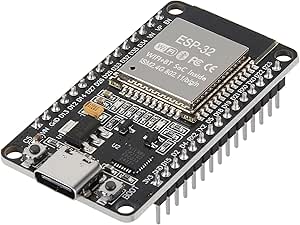 | Best Single-Board General-Purpose Pick | Module: ESP-WROOM-32 | USB interface: USB-C | USB-to-serial chip: CP2102 | VIEW LATEST PRICE | See Our Full Breakdown |
| Teyleten Robot ESP32-C3 Supermini Development Board, Wi-Fi and Bluetooth, 3-Pack | 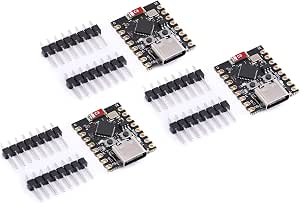 | Best Compact Multi-Board Pack | Model: ESP32-C3 | Quantity: 3 boards | Connectivity: Wi-Fi and Bluetooth | VIEW LATEST PRICE | See Our Full Breakdown |
| ESP32 ESP-WROOM-32 Development Board, Wi-Fi and Bluetooth, 3-Pack |  | Best for Arduino Network Experiments | Processor: Dual-core Tensilica LX6 | Processor speed: Up to 240 MHz | Memory: 512 KB SRAM listed; product information also reports conflicting memory details | VIEW LATEST PRICE | See Our Full Breakdown |
| LAFVIN ESP32 Basic Starter Kit with Tutorial |  | Best for Learning Projects | Model: ESP32 Basic Starter Kit (LA043) | Wireless: Wi-Fi and Bluetooth | Compatible software: Arduino IDE | VIEW LATEST PRICE | See Our Full Breakdown |
| hiBCTR 6-Pack ESP32-DevKitC-32 Development Boards, USB-C, 38-Pin |  | Best for Multi-Board Prototyping | Model: ESP32-DevKitC-32 | Chip: ESP-32D | Pack size: 6 boards | VIEW LATEST PRICE | See Our Full Breakdown |
| AITRIP ESP32 30-Pin Development Board with Wi-Fi and Bluetooth |  | Best for Compact, Single-Board Builds | Model: ESP-WROOM-32 ESP-32S | Board pins: 30 | Wireless: 2.4 GHz Wi-Fi and Bluetooth | VIEW LATEST PRICE | See Our Full Breakdown |
| 3-Pack ESP32 USB-C Development Boards with 38-Pin Breakout Boards |  | Best for GPIO Expansion | Package contents: 3 ESP32 USB-C development boards and 3 breakout boards | Pin count: 38 | Processor: Dual-core Tensilica LX6, up to 240 MHz | VIEW LATEST PRICE | See Our Full Breakdown |
| ESP32 development board | Processor | Model |
|---|---|---|
| ESP32-S3 Development Board Kit | Dual-core, up to 240 MHz | — |
| ELEGOO ESP32 Development Board | Dual-core, up to 240 MHz | EL-SM-012 |
| ELEGOO ESP-32 Super Starter Ki | Espressif ESP-32, dual-core | — |
| AITRIP 2-Pack ESP32 Developmen | Dual-core ESP32-D0WDQ6, up to 240 MHz | ESP32-2432S028R |
| Hosyond 3-Pack ESP32-S3 N16R8 | Dual-core Xtensa 32-bit LX7, up to 240 MHz | N16R8 |
| AITRIP ESP32 Development Board | Dual-core | — |
| AITRIP ESP32-2432S028R Develop | Espressif ESP32-D0WDQ6, dual-core, up to 240 MHz | — |
| AITRIP ESP32 ESP-WROOM-32 Deve | Dual-core 32-bit, up to 240 MHz | — |
| Teyleten Robot ESP32-C3 Superm | — | ESP32-C3 |
| ESP32 ESP-WROOM-32 Development | Dual-core Tensilica LX6 | — |
| LAFVIN ESP32 Basic Starter Kit | — | ESP32 Basic Starter Kit (LA043) |
| hiBCTR 6-Pack ESP32-DevKitC-32 | — | ESP32-DevKitC-32 |
| AITRIP ESP32 30-Pin Developmen | Dual-core, 240 MHz | ESP-WROOM-32 ESP-32S |
| 3-Pack ESP32 USB-C Development | Dual-core Tensilica LX6, up to 240 MHz | — |
More Details on Our Top Picks
ESP32-S3 Development Board Kit with Power Supply Expansion Board, 240 MHz Dual-Core, 16 MB Flash, 8 MB PSRAM, 44-Pin GPIO Breakout, 3-Pack
This kit is the strongest fit here for projects that need room for many connections: its 44-pin GPIO breakout and 1-to-2 GPIO expansion make it easier to attach multiple peripherals than with the ELEGOO ESP32 three-pack, which offers standard interfaces but no comparable expansion board. The 16 MB flash and 8 MB PSRAM also give the ESP32-S3 more headroom for larger firmware and memory-hungry tasks than that board’s 4 MB storage. Dual USB-C ports support separate programming and debugging connections, while Arduino IDE compatibility keeps the setup familiar for many makers. The tradeoff is that the expansion board’s power input needs an external 6.5–9 V DC supply; buyers wanting a straightforward board powered over USB may prefer ELEGOO’s simpler kit. You also need to plan around the added expansion hardware rather than a bare development board.
Pros:- 44-pin GPIO breakout with 1-to-2 connections helps attach multiple peripherals
- 16 MB flash and 8 MB PSRAM provide more capacity than the 4 MB ELEGOO ESP32 boards
- Two USB-C ports support programming and debugging connections
- Arduino IDE compatibility lowers the setup barrier for common projects
Cons:- Expansion-board power input requires a separate 6.5–9 V DC supply
- The expansion hardware adds setup and wiring complexity compared with a bare board
Best for: Makers building ESP32-S3 prototypes with several sensors or modules who want extra GPIO access and memory headroom across three boards.
Not ideal for: Beginners seeking a simple USB-powered board or anyone without access to a 6.5–9 V DC supply for the expansion board.
- Processor:Dual-core, up to 240 MHz
- Flash:16 MB
- PSRAM:8 MB
- SRAM:520 KB
- GPIO:44 pins, with 1-to-2 expansion
- USB:2 USB Type-C ports
- Expansion power input:6.5–9 V DC
- Quantity:3 pieces
Our verdict“Choose this three-pack for ESP32-S3 projects with many peripherals and a need for extra memory, but skip it if you want a simple USB-powered setup.”
ELEGOO ESP32 Development Boards, 3-Pack, ESP-WROOM-32, USB-C, Wi-Fi and Bluetooth 4.2
For routine wireless prototypes, this three-pack covers the basics without adding a touchscreen, expansion carrier, or starter-kit components. Its ESP-WROOM-32 dual-core processor, Wi-Fi, Bluetooth 4.2, and GPIO, UART, SPI, and I2C interfaces suit common sensor and automation builds. Compared with the Hosyond ESP32-S3 pack, it has less flash—4 MB rather than 16 MB—and older Bluetooth, so it is a less appealing base for projects needing extra storage or newer wireless support. In return, the board layout and interface set make a practical general-purpose starting point, and the pack supplies three boards for parallel experiments or spares. The USB-C cable is not included, and OTA updates depend on suitable software configuration; buyers who want guided lessons and bundled components should look at ELEGOO’s Super Starter Kit instead.
Pros:- Three ESP-WROOM-32 boards support parallel builds or provide spares
- Built-in 2.4 GHz Wi-Fi and Bluetooth 4.2 cover common wireless projects
- GPIO, UART, SPI, and I2C support a broad range of peripherals
- Low-power modes and configurable OTA updates support wireless device projects
Cons:- USB-C cable is not included
- 4 MB storage is less than the 16 MB offered by the Hosyond ESP32-S3 boards
- OTA firmware updates require compatible software configuration
Best for: Makers who already have a USB-C cable and want three conventional ESP32 boards for Wi-Fi, Bluetooth, and standard sensor projects.
Not ideal for: Developers needing ESP32-S3 memory capacity, Bluetooth 5.0 LE, a bundled learning kit, or a cable in the box.
- Model:EL-SM-012
- Processor:Dual-core, up to 240 MHz
- RAM:520 KB
- Storage:4 MB
- Connectivity:2.4 GHz Wi-Fi and Bluetooth 4.2
- Interfaces:GPIO, UART, SPI, I2C, USB-C
- USB-to-serial chip:CP2102
- Quantity:3 boards
Our verdict“Pick this pack for straightforward wireless prototypes on three familiar ESP32 boards, unless your project needs more memory or a newer ESP32-S3 platform.”
ELEGOO ESP-32 Super Starter Kit with Tutorial
This is the most learning-focused pick in the group: instead of supplying several bare boards, ELEGOO pairs an ESP-32 with more than 35 modules and components and tutorials for over 30 guided projects. That gives a beginner a clearer path from basic circuits to Wi-Fi and Bluetooth projects than the Hosyond three-pack, which concentrates on board specifications rather than lessons or parts. The Arduino IDE compatibility and tutorials with code and circuit diagrams can help newcomers connect programming concepts to actual hardware. The tradeoff is less freedom to choose the exact components in advance: the product details do not list the complete bundle contents. It also calls for self-guided work, so it is not a ready-made appliance or a no-programming kit. Experienced users who already own sensors and displays may get more from the ESP32-S3 boards’ larger memory instead.
Pros:- Includes more than 35 modules and components for varied hands-on projects
- Over 30 tutorials provide code and circuit diagrams for guided learning
- Wi-Fi and Bluetooth support projects beyond basic wired electronics
- Arduino IDE compatibility suits common beginner workflows
Cons:- The full list of included components is not specified
- Projects still require self-guided programming and circuit work
- The product details do not provide flash capacity
Best for: First-time electronics learners who want an ESP32 board, a varied set of components, and guided Arduino projects in one kit.
Not ideal for: Experienced developers who already have a parts collection or need a clearly itemized bill of materials and more memory than the listed 520 KB SRAM.
- Processor:Espressif ESP-32, dual-core
- RAM:520 KB SRAM
- Connectivity:Wi-Fi and Bluetooth 4.2
- Wireless standard:802.11b/g/n
- USB ports:1
- Included components:More than 35 modules and components
- Tutorial projects:30+
- Compatible software:Arduino IDE
Our verdict“Choose this kit to learn electronics through guided ESP-32 projects, but prefer a board-only pack if you already own the components.”
AITRIP 2-Pack ESP32 Development Boards with 2.8-Inch Touchscreen
These boards make the most sense when the interface itself is part of the prototype. Each combines an ESP32 with a 2.8-inch, 240 × 320 touchscreen, so a maker can explore menus, controls, or compact status displays without adding a separate screen module. Compared with ELEGOO’s Super Starter Kit, this pair puts a display directly on the development board rather than emphasizing a broad assortment of learning components. Wi-Fi, Bluetooth, and interfaces such as UART, SPI, I2C, PWM, ADC, and DAC leave room for connected-control projects. There is a meaningful sourcing caveat: the listing has inconsistent model and specification details, so buyers should verify the exact board revision and storage claims before planning around them. It is less suitable than a conventional bare ESP32 board for projects where a touchscreen is unnecessary and GPIO simplicity matters more.
Pros:- Built-in 2.8-inch touchscreen supports interface prototypes without a separate display module
- 240 × 320 resolution suits compact menus and status screens
- Wi-Fi and Bluetooth enable connected display applications
- UART, SPI, I2C, PWM, ADC, and DAC cover varied peripheral needs
Cons:- Product information has inconsistent model and specification details
- The integrated touchscreen may add unnecessary complexity for projects that need only GPIO and sensors
Best for: Makers prototyping a compact Wi-Fi or Bluetooth interface, such as a touchscreen controller or local status panel.
Not ideal for: Buyers who need dependable, clearly documented model specifications or want a low-cost, bare board for sensor-only projects.
- Model:ESP32-2432S028R
- Quantity:2 boards
- Display:2.8-inch TFT touchscreen
- Display resolution:240 × 320
- Processor:Dual-core ESP32-D0WDQ6, up to 240 MHz
- Installed RAM:520 KB
- Connectivity:Wi-Fi and Bluetooth
- Supported interfaces:UART, SPI, I2C, PWM, ADC, DAC
Our verdict“Choose this pair when a touchscreen is central to your ESP32 prototype, but verify the board details before committing to a specific design.”
Hosyond 3-Pack ESP32-S3 N16R8 Development Boards
Hosyond’s three-pack is a straightforward way to get the ESP32-S3’s 16 MB flash and 8 MB PSRAM across several builds, without the GPIO expansion hardware included in the first product. Those memory capacities match the expansion-board kit, while Bluetooth 5.0 LE is a step beyond the ELEGOO ESP-WROOM-32 pack’s Bluetooth 4.2. Dual USB-C ports support programming and debugging, with both USB and USB-to-serial download options listed. That combination suits makers who want to develop more than one S3-based wireless device or keep a spare board ready. The tradeoff is sparse purchasing detail: dimensions and included accessories are not specified, and the listing says there is no product warranty. Compared with the first ESP32-S3 kit, this is simpler hardware, but it does not list the kit’s GPIO expansion board or power outputs.
Pros:- Three ESP32-S3 boards support multiple builds or spares
- 16 MB flash and 8 MB PSRAM match the capacities of the GPIO expansion kit
- Bluetooth 5.0 LE is newer than the Bluetooth 4.2 on the ELEGOO ESP-WROOM-32 boards
- Dual USB-C ports and USB or USB-to-serial download options support programming workflows
Cons:- Product listing specifies no warranty
- Board dimensions and included accessories are not stated
- No GPIO expansion board or power outputs are listed
Best for: Makers developing multiple ESP32-S3 wireless devices who want substantial flash and PSRAM, Bluetooth 5.0 LE, and dual USB-C.
Not ideal for: Buyers who need a warranty, exact board dimensions, documented included accessories, or an expansion board for connecting many peripherals.
- Model:N16R8
- Processor:Dual-core Xtensa 32-bit LX7, up to 240 MHz
- Flash:16 MB
- PSRAM:8 MB
- Wireless connectivity:2.4 GHz Wi-Fi and Bluetooth 5.0 LE
- USB ports:2 USB-C ports
- Programming:USB and USB-to-serial download options
- Quantity:3 boards
Our verdict“Pick Hosyond for a multi-board ESP32-S3 setup with generous memory and Bluetooth 5.0 LE, but choose the expansion kit if added GPIO access is your priority.”
AITRIP ESP32 Development Boards, 3-Pack, 30-Pin USB-C with CP2102
I’d choose this three-board set for projects where having spare hardware matters as much as getting a straightforward ESP32 working. Each 30-pin ESP32-WROOM-32 board combines USB-C with a CP2102 USB-to-TTL chip, so programming and serial communication are built into the board rather than requiring a separate adapter. Wi-Fi and Bluetooth, plus support for MicroPython and FreeRTOS, make the set flexible for prototypes and learning projects. Compared with the single-board AITRIP ESP-WROOM-32 USB-C model, this pack is better suited to parallel builds or keeping a backup on hand. The tradeoff is that it offers basic development boards, not built-in displays or a tutorial kit; buyers who want a guided starter package should look at the ELEGOO ESP-32 Super Starter Kit instead.
Pros:- Three boards support parallel prototypes or provide spares
- USB-C connection and onboard CP2102 simplify programming and serial access
- Wi-Fi and Bluetooth support common connected-device projects
- Supports MicroPython, FreeRTOS, and NodeLua
Cons:- No display, sensors, or project components are included
- 30-pin layout offers fewer exposed pins than some larger-breakout boards
Best for: Makers building several Wi-Fi or Bluetooth prototypes who want three programmable ESP32 boards with USB-C and onboard USB-to-serial.
Not ideal for: Beginners who want a tutorial, bundled project components, or a built-in screen rather than bare development boards.
- Module:ESP32-WROOM-32
- Quantity:3 boards
- Pin count:30
- USB interface:USB-C
- USB-to-TTL chip:CP2102
- Processor:Dual-core
- Connectivity:2.4 GHz Wi-Fi and Bluetooth
- Supported firmware:MicroPython, FreeRTOS, NodeLua
Our verdict“Choose this pack for several straightforward ESP32 builds; choose a starter kit or touchscreen board if you want more project hardware included.”
AITRIP ESP32-2432S028R Development Board with 2.8-Inch Touchscreen
This board makes the most sense when a project needs its own screen and touch input, not just wireless connectivity. Its 2.8-inch, 240 × 320 TFT touchscreen puts a usable interface on the board, while Wi-Fi, Bluetooth, and UART, SPI, I2C, PWM, ADC, and DAC leave room for sensors and peripherals. Compared with the bare AITRIP 30-pin USB-C three-pack, it can support a more self-contained interface prototype without adding a separate display. That convenience comes with a narrower role: it’s a single board, and its product details give inconsistent model numbers, so I’d verify board identity and library compatibility before planning around it. Buyers who only need a general-purpose controller may prefer a simpler ESP-WROOM-32 board.
Pros:- Integrated 2.8-inch touchscreen supports a local user interface
- 240 × 320 resolution provides space for menus and status information
- Wi-Fi and Bluetooth are available alongside common peripheral interfaces
- Compatible OV2640 and OV7670 camera options broaden prototype possibilities
Cons:- Only one board is included
- Product details list inconsistent board model numbers, complicating compatibility checks
- Display-focused hardware is unnecessary overhead for projects needing only a basic controller
Best for: Developers prototyping a Wi-Fi or Bluetooth device with a local touchscreen interface, such as a controller or status panel.
Not ideal for: Makers focused on low-cost, multi-board experiments or projects that do not need an onboard display; the model-number inconsistency also makes it a less certain choice for tightly specified builds.
- Display:2.8-inch LCD TFT touchscreen
- Display resolution:240 × 320
- Processor:Espressif ESP32-D0WDQ6, dual-core, up to 240 MHz
- Installed RAM:520 KB
- Storage:4 MB
- Connectivity:Wi-Fi and Bluetooth
- Supported interfaces:UART, SPI, I2C, PWM, ADC, DAC
- Compatible cameras:OV2640 and OV7670
- Pack count:1
Our verdict“Pick it for a touchscreen-driven ESP32 prototype, but verify the board revision and software compatibility before building around it.”
AITRIP ESP32 ESP-WROOM-32 Development Board with USB-C
For a project that needs one conventional ESP32 board rather than a multi-pack, this AITRIP model offers a useful balance of connectivity and exposed peripherals. Its 30 pins and 22 I/O ports cover common sensor and control tasks, while the dual-core processor, Wi-Fi, Bluetooth, and UART, SPI, I2C, PWM, ADC, and DAC support a wide range of Arduino-style builds. The reset and programming buttons are handy when flashing firmware or recovering a board during development. Compared with the AITRIP three-pack, this is a single-board choice; compared with the touchscreen model, it leaves the display to the project designer. The listing also describes flash as both 32 Mbit and 4 MB—equivalent figures, but a detail worth checking against the board you receive.
Pros:- USB-C and CP2102 support direct programming and serial communication
- Reset and programming buttons simplify firmware workflows
- 22 I/O ports and a broad set of common interfaces suit varied prototypes
- Supports 2.4 GHz Wi-Fi and Bluetooth
Cons:- One board is included, unlike the AITRIP three-board pack
- No display or external project components are included
- The listing uses two descriptions for flash capacity, even though 32 Mbit equals 4 MB
Best for: Arduino developers who need one USB-C ESP32 board with common interfaces, onboard programming controls, and no built-in display.
Not ideal for: Builders who need several boards in one package, a high-pin-count breakout, or an integrated touchscreen for the finished prototype.
- Module:ESP-WROOM-32
- USB interface:USB-C
- USB-to-serial chip:CP2102
- Processor:Dual-core 32-bit, up to 240 MHz
- Flash storage:32 Mbit (4 MB)
- Pins and I/O:30 pins; 22 I/O ports
- Wireless:2.4 GHz Wi-Fi and Bluetooth
- Interfaces:UART, SPI, SDIO, I2C, PWM, I2S, IR, ADC, DAC
- Power input:USB 5 V or pin input 5.0–12 V
Our verdict“Choose this as a single, versatile ESP32 base when you want USB-C and common interfaces without paying the space and complexity cost of a display.”
Teyleten Robot ESP32-C3 Supermini Development Board, Wi-Fi and Bluetooth, 3-Pack
This pack is the compact alternative for builders who want three wireless boards without defaulting to the familiar dual-core ESP-WROOM-32 format. The ESP32-C3-based Supermini boards support Wi-Fi and Bluetooth, and the stated 3.3–6 V external input gives battery or regulated-supply projects another power option. That makes the set a fit for small connected devices and distributed prototypes. Compared with the AITRIP ESP-WROOM-32 three-pack, the C3 model is a different processor platform, so existing code and pin assumptions should be checked before switching. There are practical setup limits too: download mode requires a manual button sequence, and USB and external power must not be connected at the same time. The product details provide limited board-level specifications, so this is less suited to buyers who need a fully documented pinout.
Pros:- Three ESP32-C3 boards support multiple small-device prototypes
- Wi-Fi and Bluetooth enable wireless projects
- External input accepts a stated 3.3–6 V range
- USB connectivity provides a direct development connection
Cons:- Download mode requires a manual button sequence
- USB and external power cannot be used simultaneously
- Product details give limited information about pin count and board interfaces
Best for: Makers prototyping several compact Wi-Fi and Bluetooth devices who are comfortable checking ESP32-C3 compatibility and managing power inputs.
Not ideal for: Beginners seeking a frictionless flashing process, detailed board specifications, or the familiar ESP-WROOM-32 platform.
- Model:ESP32-C3
- Quantity:3 boards
- Connectivity:Wi-Fi and Bluetooth
- USB:1 USB port
- External power input:3.3–6 V
- Operating system:FreeRTOS
- Processor brand:Espressif
- Power-use limitation:Do not use USB and external power simultaneously
Our verdict“Choose this three-pack for compact ESP32-C3 projects if you can work around manual download-mode entry and carefully manage power.”
ESP32 ESP-WROOM-32 Development Board, Wi-Fi and Bluetooth, 3-Pack
This three-pack is a strong fit for Arduino projects that need several conventional ESP32 boards and varied wireless network modes. The dual-core Tensilica LX6 processor, 2.4 GHz Wi-Fi, Bluetooth Classic and LE, and AP, STA, and AP+STA modes support experiments ranging from a standalone device network to a client-connected prototype. Capacitive touch, ADC, DAC, UART, SPI, and I2C add options for controls and sensors. Compared with the AITRIP USB-C three-pack, this listing emphasizes Arduino IDE compatibility and network modes, but its board pin count is inconsistent and its memory details conflict. That makes it harder to plan a pin-specific build from the listing alone. I’d favor a clearly documented board when a project depends on exact pin availability.
Pros:- Three boards support parallel Arduino and wireless-network projects
- Dual-core processing runs at up to 240 MHz
- Supports Wi-Fi AP, STA, and AP+STA modes
- Bluetooth Classic and LE plus common sensor and communication peripherals
Cons:- Listing gives conflicting pin counts of 30 and 36
- Product information contains conflicting memory specifications
- No USB interface details are provided in the supplied specifications
Best for: Arduino IDE users who want three Wi-Fi and Bluetooth boards for network experiments and general peripheral projects.
Not ideal for: Builders whose design depends on a confirmed pin count or unambiguous memory specification before ordering.
- Processor:Dual-core Tensilica LX6
- Processor speed:Up to 240 MHz
- Memory:512 KB SRAM listed; product information also reports conflicting memory details
- Wireless:2.4 GHz Wi-Fi 802.11b/g/n and Bluetooth Classic/LE
- Network modes:AP, STA, AP+STA
- Compatibility:Arduino IDE
- Peripherals:Capacitive touch, ADC, DAC, UART, SPI, I2C
- Package quantity:3 boards
- Dimensions:2.05 × 1.18 × 0.59 in
Our verdict“Pick this set for Arduino network experiments if exact pin and memory details are not a blocker; otherwise choose a better-documented board.”
LAFVIN ESP32 Basic Starter Kit with Tutorial
The LAFVIN ESP32 Basic Starter Kit is the strongest fit here for someone who wants to learn by building, rather than starting with a bare board. Its tutorial and included OLED, DHT11 sensor, PIR motion sensor, breadboard, and wiring give beginners parts for projects that connect code to visible results. It supports Wi-Fi and Bluetooth and works with the Arduino IDE, so the core board can also serve later experiments. Compared with the hiBCTR six-pack, LAFVIN trades multiple spare boards for guided lessons and a broader set of starter components. That makes it less suited to outfitting several prototypes at once. The tutorial must be downloaded, and assembling circuits still takes patience; this is a hands-on learning kit, not a ready-made project appliance.
Pros:- Tutorial includes code and lessons for assembling projects
- OLED, sensors, breadboard, LEDs, and wiring support varied experiments
- ESP32 provides Wi-Fi and Bluetooth connectivity
- Compatible with the Arduino IDE
Cons:- Tutorial must be downloaded rather than used as a ready-to-open physical guide
- Projects require hands-on wiring and programming practice
- Includes one development board, unlike the hiBCTR six-pack
Best for: First-time ESP32 learners who want guided Arduino IDE projects and sensors, displays, and wiring in one kit.
Not ideal for: Buyers who need several boards for parallel prototypes or want a bare board without tutorial-led assembly.
- Model:ESP32 Basic Starter Kit (LA043)
- Wireless:Wi-Fi and Bluetooth
- Compatible software:Arduino IDE
- Display:0.96-inch OLED
- Sensors:DHT11 temperature and humidity sensor; HC-SR501 PIR motion sensor; obstacle avoidance module; photosensitive resistor
- Breadboard:830-point
- Other included parts:5V 2-channel relay, buzzer, potentiometer, resistors, switches, Dupont wires, LEDs
- USB cable:Micro USB
Our verdict“Choose LAFVIN if guided, component-rich learning matters more than having multiple ESP32 boards.”
hiBCTR 6-Pack ESP32-DevKitC-32 Development Boards, USB-C, 38-Pin
For developers who need several boards for parallel builds, the hiBCTR six-pack offers the largest board count in this group. Each ESP32-DevKitC-32 has a USB-C connector and 38 pins, giving projects access to a range of UART, SPI, I2C, PWM, DAC, and ADC interfaces. That pin count suits more involved sensor or peripheral setups than the AITRIP 30-pin board, though it can also mean checking pin assignments carefully before wiring. Wi-Fi and Bluetooth cover common connected-device projects. Unlike the LAFVIN starter kit, this package focuses on boards, not guided lessons or a collection of project components. Buyers should expect to install any needed drivers and configure the Arduino IDE themselves.
Pros:- Six boards support parallel prototypes and provide spares
- 38 pins expose a broad set of connections
- USB-C connector for board connection
- UART, SPI, I2C, PWM, DAC, and ADC interfaces support varied peripherals
Cons:- Requires setup, including possible driver installation and Arduino IDE configuration
- Does not include a tutorial or project components like the LAFVIN kit
- Pin-rich layout can require more careful wiring and pinout checks
Best for: Makers, educators, and developers building several ESP32 prototypes or keeping matching spare boards on hand.
Not ideal for: Beginners who want guided lessons and bundled sensors, or anyone who needs a kit ready for projects without sourcing components.
- Model:ESP32-DevKitC-32
- Chip:ESP-32D
- Pack size:6 boards
- Pin count:38
- Connector:USB Type-C
- Wireless:2.4 GHz Wi-Fi and Bluetooth
- Interfaces:UART, SPI, I2C, PWM, DAC, ADC
- Operating system:Linux
Our verdict“Pick the hiBCTR pack if you need multiple 38-pin ESP32 boards and are comfortable setting up your own development environment.”
AITRIP ESP32 30-Pin Development Board with Wi-Fi and Bluetooth
The AITRIP 30-pin ESP32 board is a straightforward single-board option for compact projects that need wireless connectivity without a larger 38-pin layout. Its AP, STA, and AP+STA Wi-Fi modes give developers flexibility to connect to an existing network, host one, or use both modes together. It also supports Bluetooth and the Arduino IDE, making it a practical base for common connected-device experiments. Compared with the hiBCTR 38-pin boards, its 30-pin layout offers fewer connection points, but may suit builds where a more expansive pin set would go unused. The listed memory and storage figures are unusual for ESP32 board specifications, so I would verify the exact module details before choosing it for a project with firm memory requirements.
Pros:- Supports both 2.4 GHz Wi-Fi and Bluetooth
- AP, STA, and AP+STA modes cover several network arrangements
- Arduino IDE compatibility suits common ESP32 workflows
- 30-pin format may fit builds that do not need a larger pin layout
Cons:- Listed memory and storage specifications may be inconsistent with typical ESP32 board specifications
- Fewer pins than the hiBCTR 38-pin development boards
- Single-board quantity limits parallel prototyping
Best for: Arduino IDE users making a compact, single-board Wi-Fi or Bluetooth project who do not need a 38-pin breakout.
Not ideal for: Developers who need a clearly documented memory configuration, many GPIO connections, or several boards for simultaneous builds.
- Model:ESP-WROOM-32 ESP-32S
- Board pins:30
- Wireless:2.4 GHz Wi-Fi and Bluetooth
- Wi-Fi modes:AP, STA, AP+STA
- Processor:Dual-core, 240 MHz
- Listed memory:512 MB RAM
- Listed storage:512 KB
- Arduino IDE compatible:Yes
Our verdict“Choose this AITRIP board for a compact Arduino-based wireless build, but verify its memory details before memory-sensitive work.”
3-Pack ESP32 USB-C Development Boards with 38-Pin Breakout Boards
This three-board set is the pick for projects where sharing GPIO connections is part of the wiring challenge. Each board comes with a 38-pin breakout board that splits one GPIO connection into two, while reset and boot buttons simplify firmware installation. The boards support Wi-Fi, Bluetooth Classic and LE, and AP, STA, and AP+STA modes. Compared with the hiBCTR six-pack, this set includes fewer development boards but adds dedicated breakout hardware; compared with the AITRIP 30-pin board, it offers a 38-pin layout and three boards for multiple builds. Compatibility is the main catch: the breakouts fit narrow 38-pin ESP32 boards and do not fit the ESP32 DevKit V1. Check your board format before relying on the expansion pieces.
Pros:- Includes three ESP32 development boards and three GPIO breakout boards
- Breakouts split one GPIO connection into two
- Wi-Fi and Bluetooth Classic and LE support connected projects
- Reset and boot buttons simplify firmware installation
Cons:- Breakout boards fit only narrow 38-pin ESP32 boards
- Not compatible with ESP32 DevKit V1
- Three boards, fewer than the hiBCTR six-pack
Best for: Makers using narrow 38-pin ESP32 boards who want GPIO expansion pieces and multiple boards for connected projects.
Not ideal for: Owners of ESP32 DevKit V1 boards or buyers who need breakouts guaranteed to fit a different board layout.
- Package contents:3 ESP32 USB-C development boards and 3 breakout boards
- Pin count:38
- Processor:Dual-core Tensilica LX6, up to 240 MHz
- RAM:512 KB
- Wireless:Wi-Fi 802.11b/g/n; Bluetooth Classic and LE
- Supported modes:AP, STA, AP+STA
- Programming support:Lua
- Breakout function:Expands one GPIO pin to two
- Compatibility:Narrow 38-pin ESP32 boards; not compatible with ESP32 DevKit V1
Our verdict“Choose this set if GPIO breakout hardware suits your narrow 38-pin boards; skip it if you use the ESP32 DevKit V1.”

How We Picked
I compared the 14 options by how well their hardware matches common ESP32 development needs: chip family, stated memory, exposed GPIO, USB connection, onboard display features, and included expansion or learning materials. I also considered whether a board is sold alone or in a multi-pack, since that changes its usefulness for one-off prototypes, classroom work, and multi-node projects.
The ranking favors versatility and clear project fit over board count alone. The ESP32-S3 kit leads for its memory and expansion options; standard USB-C ESP-WROOM-32 boards rank well as accessible general-purpose choices; touchscreen and starter kits earn their place when their added features support a specific use. Compact C3 hardware ranks for space-sensitive builds rather than as a universal replacement, and kits with fewer details about expansion are better matched to straightforward projects. I did not treat a larger pack as automatically better: layout, documentation, and the needs of the intended project matter just as much.
Factors to Consider When Choosing Best ESP32 Development Boards
Before choosing a board, map the project’s physical and software needs rather than shopping by the ESP32 name alone. The chip generation, pin layout, USB interface, and included extras can change how easily a prototype becomes a finished build.
Match the chip family to the project
ESP32, ESP32-S3, and ESP32-C3 boards are not interchangeable just because they share the ESP32 label. The S3 can be a better fit when a project benefits from more memory or a modern development target, while the C3 Supermini makes sense when board size matters more than having a larger, familiar layout. Check the exact chip and the libraries or features your project requires before ordering. Tutorial examples may target a different ESP32 variant, so confirm that the code and pin assignments carry over. Choosing a newer or smaller chip without checking toolchain support can add setup work. For a first prototype with no special constraints, a conventional ESP-WROOM-32 board often keeps the decision simpler.
Plan GPIO around every connected part
Count the pins your sensors, motors, display, and control signals need, then compare that total with the pins actually exposed on the board. A headline pin count does not mean every pin is equally available: some may have boot, flash, or other board-level functions that affect how they can be used. Leave spare GPIO for debugging and later additions rather than designing right up to the limit. Also check the board dimensions and pin spacing if it needs to fit a breadboard or enclosure. Expansion boards can simplify wiring, but they add physical bulk and may not solve every pin conflict. This check is especially useful before choosing a touchscreen board, where the display already occupies board resources.
Choose memory for the workload, not the biggest number
Flash stores program code and data, while PSRAM can provide extra working memory for applications that need larger buffers or more demanding graphics. Many basic sensor and Wi-Fi projects do not need unusually large memory, so a board with expanded capacity may not improve the build. A display, audio task, or image-heavy interface can make added memory more useful. Verify that your firmware framework supports the board’s memory configuration and that the module specification matches the listing. Extra memory can broaden the projects you can attempt, but it does not replace careful power, wiring, or software choices. Pay for capacity when the workload calls for it, not simply because it is available.
Treat USB and pin layout as workflow choices
USB-C describes the connector, not every part of the programming experience. The USB-to-serial interface and board design can affect driver setup, upload behavior, and how easily the board fits existing cables or fixtures. Check whether your computer and development environment support the interface used by the specific model. Compare 30-pin and 38-pin layouts against your wiring plan instead of assuming a higher count makes a board easier to use. Consistent pin layouts across a multi-pack can save time when building several units, but mixed models may complicate shared code and mounting. A short compatibility check can prevent a project from stalling over a cable, driver, or pin-map mismatch.
Decide whether a screen or starter kit earns its space
A board with an integrated touchscreen can shorten the path to a self-contained control panel or handheld interface. It also makes the board less flexible for projects that need a different screen size, a separate display, or unrestricted GPIO access. Starter kits serve a different purpose: tutorials and bundled parts can help new learners move from setup to small experiments. Check the tutorial’s language, software environment, and included components before relying on it as a complete course. If you already own sensors and understand the toolchain, a board-only pack may be a cleaner fit. Choose the added hardware when it supports the intended build, not just because the bundle contains more pieces.
Balance pack size against project consistency
Multi-packs are useful for parallel prototypes, classroom exercises, replacements, or several connected devices, but they only help if the boards suit the same task. A six-pack can leave unused hardware if a project needs just one specialized board, while a small pack may be inconvenient when every node must be identical. Confirm that all boards in the bundle share the same chip family, pin layout, and USB interface. For a group build, matching boards simplify instructions and reduce wiring variations. For a one-off device, prioritize fit and features over quantity. Keep one spare in mind for development, especially if the final installation will be difficult to access.
Frequently Asked Questions
Which board is the safest choice if I have not settled on a project yet?
I would start with a conventional ESP-WROOM-32 board if you want a familiar general-purpose platform for common sensor and Wi-Fi experiments. The ESP32-S3 kit is a stronger pick if you expect to need its extra memory or expansion board, but that capability may be unnecessary for simple projects. Avoid choosing a touchscreen board until you know a display is part of the plan, since its integrated interface shapes the build. Also check that your preferred tutorials and libraries support the specific chip variant. A flexible board with a pin map that matches your learning materials usually makes early experimentation easier.
Should I buy an ESP32-S3 board or a standard ESP-WROOM-32 board?
Choose the ESP32-S3 when its stated memory and expansion options match a more demanding project, such as one with a larger interface or heavier data handling. A standard ESP-WROOM-32 board is a practical choice for many everyday prototypes and may align more closely with existing guides. The chip family can affect software compatibility, so verify support in the libraries and framework you plan to use. Do not assume the S3 will make every program faster or easier; the result depends on the workload. If you have no specific reason to need the S3 features, the standard board may be the more straightforward fit.
Are touchscreen ESP32 boards a good choice for a first project?
They can work well for a first project if the goal is a small display-based controller and the supplied examples support the screen. A touchscreen can spare you from wiring a separate display, but it also brings more setup and occupies resources that a plain board leaves open. If your first goal is learning GPIO, sensors, and basic Wi-Fi, a standard development board is usually easier to adapt across exercises. Check the display library, pin mapping, and software examples before choosing a screen-equipped model. A display is a useful head start only when it matches the project you intend to build.
What should I check before using a USB-C ESP32 board with my computer?
Check the board’s USB-to-serial interface, driver requirements, and programming instructions rather than relying on the connector shape alone. USB-C does not guarantee that every cable supports data, so use a known data-capable cable if the board is not detected. Confirm that your development environment supports the exact ESP32 chip and board definition. If you plan to use several boards, matching interfaces and layouts can make setup more repeatable. These checks are particularly helpful when mixing boards from different packs or chip families.
Is a multi-pack or a starter kit the better buy for learning?
A starter kit is usually a better learning fit when it includes tutorials and components that help you practice without sourcing each part separately. A multi-pack makes more sense if you already have components, want spare boards, or plan to build several similar devices. Compare the tutorial’s software and chip target with the board in the kit; mismatched instructions can slow a beginner down. For a classroom or group project, identical boards can simplify support and wiring. For one learner with a defined project, choose the bundle whose contents you will actually use.
Conclusion
For the strongest all-around feature set in this lineup, I recommend the ESP32-S3 Development Board Kit, especially when extra memory and expansion matter. The best value by use is a multi-pack of conventional boards if you need several matching prototypes; the ELEGOO three-pack is a straightforward option with USB-C. For beginners who want guided exercises, choose the ELEGOO Super Starter Kit or LAFVIN Basic Starter Kit based on which tutorial and parts better match your learning plan. If you need a compact build, look at the Teyleten Robot ESP32-C3 Supermini; for a ready-made touch interface, choose an AITRIP touchscreen board. I would pay extra for a premium-style feature set only when the S3’s memory or expansion solves a real project requirement; otherwise, a standard board is the simpler choice.
Fall Picks
fall essentials
As an affiliate, we earn on qualifying purchases.