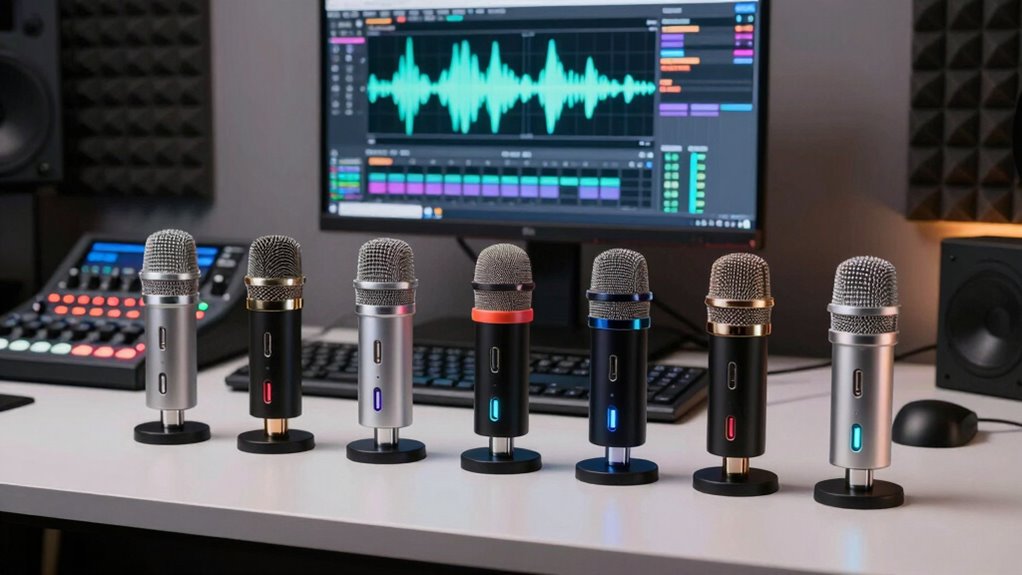

For a simple solo podcast setup, I’d start with the FIFINE K669B for its direct USB connection and onboard gain control; the ZealSound K66 adds mute and headphone monitoring, while the dual wireless K66 kit suits two speakers who need room to move. These microphones differ most in how they handle multiple voices, background noise, and recording control. A compact USB mic can simplify setup, but pickup pattern and mic placement still shape how much room sound reaches your recording. Continue reading for my comparison of all six picks and guidance on matching one to your format.

Get the latest gadgets delivered free with Prime
- Fast, free delivery on millions of items
- Prime Video, Amazon Music and more included
- Member-only deals all year
Complete the kit



Key Takeaways
- Solo recording favors a straightforward wired setup: the FIFINE K669B pairs USB convenience with gain control, while the ZealSound K66 adds mute and headphone monitoring.
- Two-person mobility points to the dual wireless K66 kit: it serves a different purpose from the single-mic models, though wireless operation adds another part of the setup to manage.
- Pickup pattern matters as much as the microphone label: the NEEWER UM04 is omnidirectional, which can suit shared sound around a mic but may also capture more room noise.
- Podcast controls change the recording workflow: the K66’s mute, gain, volume, and monitoring controls offer more direct adjustment than a basic USB connection.
- The COCONISE is oriented toward gaming presentation: RGB lighting may suit a camera-facing desk, but appearance alone does not make it the strongest choice for spoken-word recording.
| NEEWER UM04 USB Omnidirectional Condenser Microphone |  | Best for Group Podcast Discussions | Microphone type: USB omnidirectional condenser | Pickup pattern: 360° omnidirectional | Optimal pickup distance: 4.9 ft (1.5 m) | VIEW ON AMAZON | See Our Full Breakdown |
| XTUGA X-4 USB Condenser Microphone |  | Best for Flexible Recording Setups | Connectivity: USB | Pickup patterns: Cardioid, omnidirectional, bidirectional, and stereo | Recording quality: 48 kHz/16-bit | VIEW ON AMAZON | See Our Full Breakdown |
| FIFINE K669B USB Condenser Microphone |  | Best Simple Starter Mic | Microphone type: Cardioid condenser | Connection: USB | Cable length: 5.9 feet | VIEW ON AMAZON | See Our Full Breakdown |
| ZealSound K66 USB Podcast Microphone with Noise Reduction, Gain and Volume Controls, Mute, and Headphone Monitoring |  | Best for Controlled Solo Recording | Microphone type: Condenser | Pickup pattern: Cardioid | Frequency response: 40 Hz–18 kHz | VIEW ON AMAZON | See Our Full Breakdown |
| ZealSound K66 Dual Wireless Podcast Microphone Kit |  | Best for Two-Person Wireless Podcasts | Microphones: 2 | Wireless connection: 2.4 GHz receiver | Audio resolution: 48 kHz/24-bit | VIEW ON AMAZON | See Our Full Breakdown |
| COCONISE USB Gaming Microphone with RGB Lighting |  | Best for Gaming and Podcasting | Connectivity: USB | Connectors: USB, 3.5 mm jack | Polar pattern: Cardioid (unidirectional) | VIEW ON AMAZON | See Our Full Breakdown |
| usb microphone for podcasting | Compatibility | Controls | Microphone type | Pickup pattern |
|---|---|---|---|---|
| NEEWER UM04 USB Omnidirectiona | Windows, macOS, iPhone, and Android; some phones may require OTG activation | Mute, AI noise cancellation, RGB lighting, 10 volume levels, and mic gain | USB omnidirectional condenser | 360° omnidirectional |
| XTUGA X-4 USB Condenser Microp | Windows, Mac, PS4, and PS5 | Gain, headphone volume, and mute | — | — |
| FIFINE K669B USB Condenser Mic | Desktop computers, laptops, PS4, and PS5 | Built-in volume knob | Cardioid condenser | — |
| ZealSound K66 USB Podcast Micr | Windows PC, Mac, PS4, PS5, iPhone, iPad, and compatible USB-C devices | Microphone volume, monitoring volume, echo, mute, and noise reduction | Condenser | Cardioid |
| ZealSound K66 Dual Wireless Po | — | — | — | Cardioid |
| COCONISE USB Gaming Microphone | PC, laptop, PS4, PS4 Pro, PS5 | — | — | — |
More Details on Our Top Picks
NEEWER UM04 USB Omnidirectional Condenser Microphone
The NEEWER UM04 suits roundtable recording better than a typical single-speaker USB mic because its 360° pickup is designed to capture voices around the microphone. Its one-tap mute, headphone monitoring, and adjustable levels make it practical for calls and casual group sessions where participants share a table. Compared with the cardioid FIFINE K669B, it is less focused on rejecting sound from behind the mic, so room noise and overlapping voices may be more noticeable. The built-in noise cancellation offers some help, but it does not turn an untreated room into a quiet studio. Choose it when easy setup and shared pickup matter more than isolating one host; skip it for a solo show in a noisy space.
Pros:- Omnidirectional pickup can capture participants seated around the mic
- Plug-and-play setup works with computers and compatible phones
- One-tap mute and adjustable volume provide quick session controls
- Real-time headphone monitoring helps catch audio problems while recording
Cons:- 360° pickup also captures more room sound than the cardioid FIFINE K669B
- A 3.5 mm TRS headphone output may not suit every monitoring setup
- Some phones may require OTG activation, and the mic is not a speakerphone
Best for: Podcasters recording casual group conversations around one shared microphone in a reasonably quiet room
Not ideal for: Solo hosts who need strong rejection of room noise or separate microphone tracks for each speaker
- Microphone type:USB omnidirectional condenser
- Pickup pattern:360° omnidirectional
- Optimal pickup distance:4.9 ft (1.5 m)
- Audio format:48 kHz/24-bit
- Headphone output:3.5 mm TRS
- Controls:Mute, AI noise cancellation, RGB lighting, 10 volume levels, and mic gain
- Compatibility:Windows, macOS, iPhone, and Android; some phones may require OTG activation
- Setup:Plug and play; no drivers required
Our verdict“Choose the UM04 for shared-table conversations in a quiet room; pick the FIFINE K669B for a more focused solo voice.”
XTUGA X-4 USB Condenser Microphone
The XTUGA X-4 earns its place through four selectable pickup patterns: cardioid for a host, bidirectional for an interview, omnidirectional for a group, and stereo for a wider recording. That range makes it more adaptable than the fixed-pattern FIFINE K669B, particularly if one mic needs to cover changing podcast formats. Physical gain, headphone volume, and mute controls also make adjustments accessible mid-session, while zero-latency monitoring helps with live recording. The tradeoff is complexity: choosing a pattern that does not match the room can pick up unwanted voices and reflections. Its listed connectors and cables deserve a compatibility check, and the product data’s 12V battery requirement is unclear for a USB mic. It fits hosts who will use its flexibility, rather than buyers seeking the simplest setup.
Pros:- Four pickup patterns adapt to solo shows, interviews, and group sessions
- Physical gain, headphone volume, and mute controls are easy to reach
- Zero-latency monitoring is available through headphone and speaker outputs
- Metal body and computer and PlayStation compatibility support varied setups
Cons:- Pattern selection adds setup decisions that a fixed cardioid mic such as the FIFINE K669B avoids
- Listed connector and cable details may require checking against the recording setup
- Product information lists a 12V battery requirement, which may cause power compatibility uncertainty
Best for: Podcast hosts who alternate between solo narration, two-person interviews, and group recordings
Not ideal for: First-time podcasters who want a simple, fixed setup or buyers who cannot verify the listed power and connector requirements
- Connectivity:USB
- Pickup patterns:Cardioid, omnidirectional, bidirectional, and stereo
- Recording quality:48 kHz/16-bit
- Maximum SPL:125 dB
- Signal-to-noise ratio:85 dB
- Outputs:Headphone and speaker
- Controls:Gain, headphone volume, and mute
- Compatibility:Windows, Mac, PS4, and PS5
- Included cables:USB-A to USB-C and USB-C to USB-C
Our verdict“Pick the X-4 if you will switch between podcast formats and can confirm its power and cable needs.”
FIFINE K669B USB Condenser Microphone
The FIFINE K669B keeps a solo podcast setup straightforward: connect it by USB, place it on the included tripod, and adjust the built-in volume knob. Its cardioid pickup is a better fit for one person speaking toward the mic than the room-facing NEEWER UM04, which is intended to capture sound from all directions. That focus can help keep a voice prominent, though it is not a substitute for a quiet recording space. The compact bundle has fewer monitoring and processing controls than the ZealSound K66, so hosts who want headphone monitoring or noise reduction controls should look there instead. Phone and Xbox users need another option, and some recording apps may change the mic level unless automatic adjustment is disabled. This is a sensible first USB mic for a computer-based solo show.
Pros:- USB connection and included tripod make a basic computer setup quick
- Cardioid pickup favors a single host over a room-filling pattern like the NEEWER UM04
- Built-in volume knob provides direct level adjustment and can mute at zero
- USB power means no 48V phantom power is required
Cons:- Not compatible with phones or Xbox
- No headphone monitoring is listed, unlike the ZealSound K66
- Some recording apps may need automatic volume adjustment disabled
Best for: New solo podcasters recording on a desktop or laptop who want a basic USB mic with a stand and onboard level control
Not ideal for: Hosts who record on phones or Xbox, or who need headphone monitoring and more recording controls
- Microphone type:Cardioid condenser
- Connection:USB
- Cable length:5.9 feet
- Included accessories:Tripod stand
- Controls:Built-in volume knob
- Power:USB-powered; no 48V phantom power required
- Compatibility:Desktop computers, laptops, PS4, and PS5
- Incompatible devices:Xbox and phones
Our verdict“Choose the K669B for a straightforward solo podcast recorded on a compatible computer.”
ZealSound K66 USB Podcast Microphone with Noise Reduction, Gain and Volume Controls, Mute, and Headphone Monitoring
The ZealSound K66 gives a solo host more in-session control than the pared-back FIFINE K669B. Its cardioid pickup favors the speaker in front of the mic, while gain, monitoring volume, echo, noise reduction, and a mute button let a podcaster make quick adjustments without relying entirely on software. The headphone jack offers zero-latency monitoring, which helps catch issues while recording. Noise reduction is described as reducing background sounds, not removing them, so room choice and mic placement still matter. The XTUGA X-4 offers more pattern choices for interviews and group formats; the K66 stays simpler for one main speaker. Its adapters broaden device options, but compatibility depends on the device and the included connections. Choose it for a controlled solo workflow, not as a cure for a noisy room.
Pros:- Cardioid pickup is suited to a single host speaking toward the mic
- Zero-latency headphone monitoring supports live checks while recording
- Gain, echo, noise reduction, and mute controls provide hands-on adjustments
- USB-C and Lightning adapters extend compatibility to supported mobile devices
Cons:- Noise reduction may lessen background sounds but does not eliminate them
- Device compatibility depends on the included adapters and connection support
- Unlike the XTUGA X-4, it does not list selectable pickup patterns
Best for: Solo podcasters who want onboard mute, noise reduction, and headphone monitoring with computer or compatible mobile recording
Not ideal for: Hosts recording multiple speakers who need selectable pickup patterns or separate mic channels
- Microphone type:Condenser
- Pickup pattern:Cardioid
- Frequency response:40 Hz–18 kHz
- Sampling rate:46 kHz
- Sensitivity:–45 dB ±3 dB
- Monitoring:3.5 mm headphone jack with zero-latency monitoring
- Controls:Microphone volume, monitoring volume, echo, mute, and noise reduction
- Compatibility:Windows PC, Mac, PS4, PS5, iPhone, iPad, and compatible USB-C devices
- Included adapters:USB-C and Lightning
Our verdict“Choose the K66 for a solo show where direct controls and headphone monitoring matter more than multiple pickup patterns.”
ZealSound K66 Dual Wireless Podcast Microphone Kit
For a host and co-host who need to move around or sit apart, the ZealSound K66 Dual Wireless Kit solves a different problem from the wired ZealSound K66: it includes two microphones and a shared 2.4 GHz receiver for compatible devices. Each mic has its own gain, mute, noise reduction, echo, and headphone monitoring controls, making the kit more suited to a two-person conversation than trying to share one NEEWER UM04. Wireless operation can simplify seating and cable placement, though recording both mics to one device requires wireless mode. Bluetooth is only for background music input, not for sending microphone audio. With up to 16 hours of use per charge, it can support extended sessions, but two mics mean more charging and setup than a single USB unit.
Pros:- Two microphones let co-hosts speak into separate mics rather than share the NEEWER UM04
- 2.4 GHz receiver supports wireless recording with compatible devices
- Each mic provides gain, mute, echo, noise reduction, and headphone monitoring controls
- Up to 16 hours of wireless use supports long recording sessions
Cons:- Using both microphones with one device requires wireless mode
- Bluetooth input handles background music, not microphone audio
- Two rechargeable microphones add charging and setup needs compared with a single wired mic
Best for: Two-person podcast teams who want separate wireless microphones connected to one compatible computer or mobile device
Not ideal for: Solo hosts seeking a compact wired mic or buyers expecting Bluetooth to carry microphone audio
- Microphones:2
- Wireless connection:2.4 GHz receiver
- Audio resolution:48 kHz/24-bit
- Pickup pattern:Cardioid
- Battery life:Up to 16 hours
- Recharge time:Approximately 3 hours
- Monitoring:3.5 mm headphone jack with zero-latency monitoring
- Connectivity:USB with USB-C and Lightning adapters; Bluetooth input for background music
- Included accessories:Two metal desktop stands, one USB receiver, and foam windscreens
Our verdict“Choose this kit for a two-host show that benefits from separate wireless mics and has compatible recording devices.”
COCONISE USB Gaming Microphone with RGB Lighting
The COCONISE suits a podcaster who also streams or games and wants controls close at hand. Its touch mute with a visible light cue makes it easy to tell when the mic is off, while the headphone jack supports real-time monitoring during a recording. A pop filter, shock mount, and weighted base are included, so the setup addresses plosives and desk vibration without requiring those accessories separately. Compared with the FIFINE K669B, this model offers headphone monitoring and touch mute, which are useful for managing a live session; its RGB styling is more gaming-oriented than a typical podcast setup. The listed 20–2000 Hz frequency range is an unusual limitation for a voice microphone, and single-channel audio gives little room for more complex recording setups. I would choose it for a simple solo rig, not a multi-mic production.
Pros:- Touch mute has a light cue, making mute status easy to see
- Headphone jack enables real-time voice monitoring
- Included pop filter and shock mount help reduce plosives and vibration
- USB plug-and-play compatibility includes PC, laptop, PS4, and PS5
Cons:- Listed 20–2000 Hz frequency range is unusually narrow for podcast voice capture
- Single-channel audio limits recording flexibility
- RGB lighting may not suit a restrained recording setup
Best for: Solo podcasters who also game or stream on PC or PlayStation and want onboard mute and headphone monitoring
Not ideal for: Podcasters seeking a conventional studio look, stereo recording, or a microphone with a clearly broader listed frequency range
- Connectivity:USB
- Connectors:USB, 3.5 mm jack
- Polar pattern:Cardioid (unidirectional)
- Sampling rate:Up to 192 kHz
- Frequency range:20–2000 Hz
- Channels:1
- Cable length:180 cm
- Compatibility:PC, laptop, PS4, PS4 Pro, PS5
- Included features:RGB lighting, touch mute, volume control, headphone monitoring, pop filter, shock mount, weighted base
Our verdict“Choose the COCONISE for a solo gaming podcaster who values visible mute status and monitoring more than a traditional studio design or flexible channel recording.”

How We Picked
I compared these six microphones through the needs of a podcast setup: how easily each connects, what control it offers during recording, how its pickup approach fits solo or shared voices, and whether its form and extras serve spoken-word work. I gave more weight to practical recording decisions—such as monitoring your voice and muting quickly—than to cosmetic features. I also considered the difference between a single wired mic and a kit intended for two speakers.
The ranking reflects how directly each product supports common podcast formats. The FIFINE K669B and ZealSound K66 lead for straightforward solo recording, with the K66 gaining an edge for hands-on controls. The dual wireless kit has a distinct place for two-person conversations, while the NEEWER UM04, XTUGA X-4, and COCONISE fit narrower needs based on pickup, setup, or presentation. Product names and listed features inform these comparisons; I do not treat them as proof of sound quality in every room.
| usb microphone for podcasting | Microphone type | Controls | Compatibility | Connectivity |
|---|---|---|---|---|
| NEEWER UM04 USB Omnidirectiona | USB omnidirectional condenser | Mute, AI noise cancellation, RGB lighting, 10 volume levels, and mic gain | Windows, macOS, iPhone, and Android; some phones may require OTG activation | — |
| XTUGA X-4 USB Condenser Microp | — | Gain, headphone volume, and mute | Windows, Mac, PS4, and PS5 | USB |
| FIFINE K669B USB Condenser Mic | Cardioid condenser | Built-in volume knob | Desktop computers, laptops, PS4, and PS5 | — |
| ZealSound K66 USB Podcast Micr | Condenser | Microphone volume, monitoring volume, echo, mute, and noise reduction | Windows PC, Mac, PS4, PS5, iPhone, iPad, and compatible USB-C devices | — |
| ZealSound K66 Dual Wireless Po | — | — | — | USB with USB-C and Lightning adapters; Bluetooth input for background music |
| COCONISE USB Gaming Microphone | — | — | PC, laptop, PS4, PS4 Pro, PS5 | USB |
Factors to Consider When Choosing Usb Microphone For Podcasting
Before choosing a USB microphone for podcasting, I’d match the mic to the way the show is recorded. A feature that helps a two-person interview can add needless complexity to a solo desk setup, and a convenient pickup pattern may capture more of the room than you want.
Match the pickup pattern to your recording space
Pickup pattern affects which sounds reach the recording, so think about the room as well as the speaker count. An omnidirectional mic can pick up voices around it, which may help when people share a table, but it can also capture room reflections and nearby noise. A single host in an untreated room often benefits from placing a directional mic close and speaking toward its pickup side. Don’t assume that a microphone described for podcasting will automatically reject keyboard clicks or household sounds. Check the pattern and any selectable modes before buying. If you record several people, separate microphones can offer more control than asking everyone to crowd around one capsule.
Decide whether onboard controls matter during recording
Gain, mute, volume, and headphone monitoring address different tasks, even when they sit on the same microphone. Gain changes the level sent into the recording; headphone volume changes what you hear. A physical mute button helps during live calls or streamed interviews, while monitoring can reveal a loose cable, clipping, or room noise before you finish a long session. These controls are useful when you record without a producer, but they cannot correct poor mic placement or a noisy room. If your recording software already gives you reliable control, simpler hardware may be easier to manage. Check that the controls are accessible from your normal seated position.
Plan for one speaker or a conversation
A single USB microphone is usually the simpler route for a solo show: fewer connections and less equipment to position. Two people sharing one mic may end up at uneven distances, which can make their voices differ in level and tone. A dual wireless kit can help speakers move independently, but it introduces transmitters and batteries or charging into the routine. Before choosing a wireless setup, check how the microphones connect to your computer and whether the included receiver suits your device. For a fixed two-person desk podcast, two separate mics and inputs may give each voice more control in editing. Choose around your actual recording format rather than the largest bundle of included gear.
Treat the room before chasing microphone features
Hard walls, bare desks, and windows can send reflections back into a recording, and a USB mic does not remove those reflections by itself. A close speaking distance, a quieter room, and soft furnishings can improve clarity without adding another device. Some microphones advertise noise reduction, but that label alone does not tell you how voices will sound or which noises will be reduced. Avoid placing the mic beside a laptop fan or directly on a desk that transmits typing and bumps. A stand or suitable mount can help isolate the mic and keep its position steady. If your space is noisy, prioritize placement and room control before paying for lighting or decorative extras.
Check the whole connection and monitoring setup
USB connection can make a microphone easier to connect, but compatibility still depends on your computer, operating system, and recording app. Confirm the connector type and whether the package includes the cable and stand you need. Headphone monitoring is most useful when you can hear the mic signal with little delay; software monitoring can introduce latency depending on the device and settings. A headphone jack on the mic may make that check more direct, but it does not guarantee that every app routes audio the same way. Consider where the cable will run and whether the mic’s controls remain reachable on your desk. A quick setup check before recording prevents a simple connection issue from disrupting an interview.
Frequently Asked Questions
Is an omnidirectional USB microphone a good choice for a solo podcast?
It can work if your room is quiet and you want sound picked up from more than one direction. For a solo host in a reflective or noisy room, that broad pickup can include more unwanted room sound. Place the mic close to your mouth and keep the room as quiet as practical. If you need stronger focus on one speaker, compare the pattern options before choosing. The NEEWER UM04’s omnidirectional design makes room coverage part of the decision.
Should I choose a mic with headphone monitoring?
Monitoring is useful when you want to hear the microphone signal as you record, especially for checking speaking level and catching noise early. It can save time by revealing a problem before you record a full episode. A headphone jack does not replace checking your recording app’s input settings, though. If you always record through software that provides dependable monitoring, a mic jack may be less important. For a self-run setup, direct monitoring can make troubleshooting simpler.
Can one USB microphone record two podcast hosts clearly?
It depends on the pickup pattern, room, and how consistently both hosts can sit near the mic. With one shared microphone, the farther speaker may sound quieter, and both voices share the same recorded track. That can limit individual level adjustments during editing. For a mobile conversation, a dual wireless kit gives each speaker a separate mic position, while a fixed desk show may benefit from two microphones and suitable inputs. Choose one shared mic only if its placement and pickup suit the way you plan to talk.
Does a microphone with noise reduction eliminate background noise?
No microphone feature can be assumed to remove every sound without affecting the voice. Noise reduction may help in some situations, but results depend on the sound source, settings, and room. Fans, traffic, keyboard taps, and echo behave differently, so check how the feature is implemented rather than relying on its name. Moving closer to the mic and reducing noise at the source often helps more predictably. Record a short sample in your own space before committing to a workflow.
When does a wireless podcast microphone make more sense than a wired USB mic?
Wireless is useful when speakers need to move around or record away from a shared desk. For a seated solo podcast, a wired USB microphone usually means fewer devices to charge and manage. A wireless kit also requires checking its receiver, connection path, and battery routine before a session. If you record interviews in different locations, that extra setup may be worthwhile. For a stationary show, prioritize simple connections and consistent mic placement.
Conclusion
For most solo hosts who want a direct USB setup, I’d choose the FIFINE K669B as my best overall pick, with the ZealSound K66 as my best choice for hands-on controls and monitoring. The K669B is also my best value for a basic wired setup, while the K66 is the stronger beginner pick for someone who wants mute and level controls close at hand. For a two-speaker show with room to move, the ZealSound dual wireless kit is the specific-use choice; its extra setup makes less sense for a fixed solo desk. The NEEWER UM04 suits buyers who need omnidirectional pickup, and the COCONISE may appeal to camera-facing gaming desks where RGB presentation matters. I would treat the XTUGA X-4 as a straightforward alternative, then compare its connection and controls against the K669B before deciding.
Halloween Picks
halloween
As an affiliate, we earn on qualifying purchases.