
🔍 Read the full analysis: 8 High Refresh Gaming Monitors Worth Considering In 2027 on ThorstenMeyerAI.com

Get the latest gadgets delivered free with Prime
- Fast, free delivery on millions of items
- Prime Video, Amazon Music and more included
- Member-only deals all year
TL;DR
A ThorstenMeyerAI.com roundup compares eight high-refresh gaming monitors across resolution, refresh rate, panel type and screen format. The MSI MAG 272URDFA E16 pairs 4K with 320Hz, while lower-resolution options may be a better fit for PCs that cannot sustain high frame rates at 4K. The source does not provide prices, full specifications or independent test results for every model.
ThorstenMeyerAI.com has compared eight high-refresh gaming monitors for buyers weighing speed against resolution, panel type and screen size. Its leading pick, the MSI MAG 272URDFA E16, combines 4K resolution with a 320Hz refresh rate, but that specification does not mean a PC will produce 320 frames per second in demanding games; the guide says graphics-card capability is a key consideration.
The comparison spans three broad approaches. The MSI MAG 272URDFA E16 targets buyers seeking both high resolution and a very high refresh ceiling. The AOC Q27G41ZE is presented as a more conventional 27-inch QHD option, with a 240Hz native refresh rate and a listed 260Hz overclocked mode. The Samsung Odyssey OLED G6 is the panel-focused alternative, using QD-OLED rather than being positioned solely around refresh speed.
Other picks emphasize more manageable rendering demands or larger formats. The guide names the ASUS VG259QM5A and Dell SE2426HG as 24-inch-class, 1080p models at 240Hz. It also includes the Sceptre 34-inch ultrawide, the 32-inch SANSUI and the curved, 27-inch 1080p AOC C27G4ZH. The supplied material does not give complete specifications for every model, so features not listed should not be assumed.
The ranking is based on how resolution, refresh rate and format work together, according to the guide. It also says it considered panel type, adaptive-sync support where specified, connectivity and adjustment features. The source does not include test methodology, measured response times, prices or a full specification table in the provided text.
The 8 picks
- 1
 Samsung 27" Odyssey OLED G6 (G61SH) QD-OLED Gaming MonitorView on Amazon →
- 2
 msi MAG 272URDFA E16 27-inch 3840 x 2160 (UHD) Gaming Office Monitor, 320Hz,…View on Amazon →
- 3
 Sceptre C345B-QU240T 34-inch Curved Ultrawide Gaming MonitorView on Amazon →
- 4
 SANSUI 32 Inch Curved 240Hz Gaming Monitor High Refresh Rate, FHD 1080PView on Amazon →
- 5
 AOC 27" Gaming Monitor QHD 240Hz Overclocked IPS NVIDIA G‑Sync Q27G41ZEView on Amazon →
- 6
 AOC C27G4ZH 27-Inch Curved FHD Gaming MonitorView on Amazon →
- 7
 ASUS TUF Gaming VG259QM5A 24.5-Inch 1080p 240Hz Gaming MonitorView on Amazon →
- 8
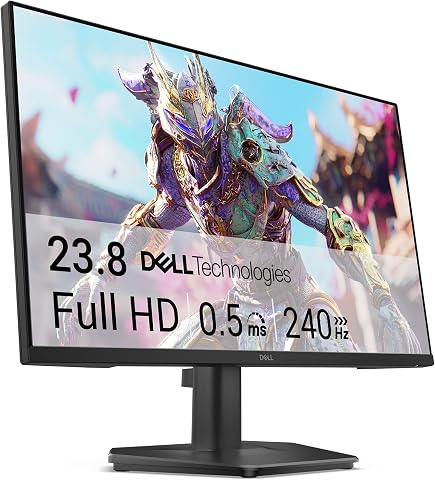 Dell 24 240Hz Gaming Monitor – SE2426HG – 23.8-inch FHD (1920×1080) 240Hz Dis…View on Amazon →
Matching Refresh Rates to Real PCs
The practical issue is whether a gaming PC can make use of the refresh rate. A monitor can update at a high rate, but the computer still has to render frames quickly enough to approach it. The guide notes that 4K places more demand on a graphics card than 1080p, making the MSI’s 4K-and-320Hz combination a demanding target in many games. A buyer choosing on the number alone could pay for headroom their current system rarely uses.
Resolution and screen size also affect how sharp a game looks at a typical desk distance. The guide describes QHD as a middle ground between 1080p and 4K, while compact 1080p screens can suit competitive players prioritizing frame rates over fine detail. On a larger 27- or 32-inch 1080p display, visible pixels may be more apparent when sitting close. Those tradeoffs make the comparison useful as a way to match a monitor to a PC and play style, rather than treating the highest refresh figure as an automatic winner.
Format is another buying consideration: ultrawide screens can offer more horizontal space, but support varies between games. Curvature may make a wide display feel more immersive, yet it is a matter of preference, not a performance gain.
Products Worth Considering

LG UltraGear 32-inch QHD Curved Gaming Monitor, 180Hz, 1ms, FreeSync

Sony WH-1000XM4C (M4 2nd Gen) Wireless Noise-Cancelling Headphones, Black

Sony WH-1000XM6 Wireless Noise-Canceling Headphones, Black
As an affiliate, we earn on qualifying purchases.
Eight Picks, Different Tradeoffs
The source’s selection is organized around use cases rather than a single specification. The MSI is its overall choice for the unusual pairing of 4K and 320Hz; the AOC Q27G41ZE is the QHD speed pick; and the Samsung Odyssey OLED G6 is distinguished by its QD-OLED panel. The remaining named models give readers options at 1080p or in larger, curved and ultrawide formats.
The guide advises shoppers to consider the games they play, the frame rates their PC can sustain, and how far they sit from the screen. It also cautions that ultrawide support differs by game and that a curved screen is not suited to every desk or shared-viewing setup. These are the guide’s recommendations, not independently verified findings supplied with benchmark data.
“The MSI combines 4K resolution and 320Hz refresh.”
— ThorstenMeyerAI.com buyer’s guide
Specs and Pricing Still Missing
The supplied source does not state when the roundup was published, provide current prices, or establish whether all eight models are available in every market in 2027. It also does not include independent lab measurements, product links, detailed model specifications for several picks, or a direct explanation of how the Samsung Odyssey OLED G6 performs against the other displays.
Adaptive-sync support, connectivity and adjustment features are described as selection factors, but the source does not identify every feature for every monitor. It is also unclear which games or graphics cards were used to assess the recommendations. Buyers should verify the exact regional model, specifications, price and compatibility before making a purchase.
Verify Models Before Buying
The next step for shoppers is to compare current listings and manufacturer specifications for the exact model names, including the native refresh rate, any overclocked mode, panel type, adaptive-sync support and available inputs. They should also check performance in the games they actually play and confirm whether those games support ultrawide resolutions if considering the Sceptre.
Because prices and availability are not supplied, the comparison alone cannot establish which monitor offers the best value in 2027. Updated retail listings and independent testing would help clarify those questions; no such follow-up is specified in the source.
Key Questions
Which monitor does the guide rank as its overall pick?
The guide names the MSI MAG 272URDFA E16, citing its combination of 4K resolution and 320Hz refresh. It also warns that reaching high frame rates at 4K depends on the PC and game.
What is the AOC Q27G41ZE’s listed refresh rate?
The source lists 240Hz native refresh and an overclocked mode of up to 260Hz. It does not provide additional testing details for those figures.
Which models in the roundup are 1080p options?
The source identifies the ASUS VG259QM5A and Dell SE2426HG as 24-inch-class 1080p models at 240Hz. It also describes the curved AOC C27G4ZH as a 27-inch 1080p monitor.
Does the source provide prices or independent test results?
No. The supplied material gives buyer-oriented comparisons but does not include current prices, availability, benchmark results or complete specifications for all eight picks.
Source: ThorstenMeyerAI.com