
Among these 14 options, I’d make the Lenovo IdeaPad Slim 3 with Ryzen 7 5825U my best overall pick for its capable processor, 16GB of memory, and 512GB SSD. The Dell 16-inch with Core 7 and 32GB RAM is a stronger fit for heavier multitasking, while the Lenovo IdeaPad Slim 3 Chromebook suits buyers who mainly work in browser-based apps. The main tradeoffs are Windows flexibility versus ChromeOS simplicity, laptop power versus portability, and a sharper display versus a lower-resolution screen. A touchscreen can make navigation and casual note-taking easier, but it does not automatically make a laptop a good tablet or stylus device. Read on for how I compare each option and which compromises make sense for different buyers.

Get the latest gadgets delivered free — and shop member deals
- Fast, free delivery on millions of items
- Access to Prime Big Deal Days deals on October 6–7
- Prime Video, Amazon Music and more included
Complete the kit



Key Takeaways
- The Ryzen 7 IdeaPad Slim 3 is the most balanced Windows choice: its 16GB RAM and 512GB SSD make a stronger everyday combination than the entry-level configurations in this lineup.
- The 16-inch Dell is the multitasking standout: 32GB of DDR5 memory and a 1TB SSD give it more headroom than the other listed Dell laptops, though its larger size is less travel-friendly.
- ChromeOS models are best for browser-first work: both Lenovo Chromebooks have 4GB RAM, so buyers who keep many tabs or desktop apps open should look at a Windows option instead.
- Screen resolution varies more than the touchscreen label suggests: the HP OmniBook 3 offers a 2K panel, while several 15.6-inch options are listed with HD displays.
- Convertible design is not a guarantee of tablet-ready use: the two 2-in-1 listings offer flexible positioning, but buyers should check for stylus support, hinge modes, and included pen details before choosing one for handwriting.
| Tylvx 15.6-Inch 2-in-1 Touchscreen Laptop, Intel Core m3-8100Y, 16GB RAM, 512GB SSD, Windows 11, Deep Purple |  | Best for Convertible Modes | Display: 15.6-inch Full HD touchscreen | Processor: Intel Core m3-8100Y, up to 3.4GHz | Memory: 16GB RAM | VIEW LATEST PRICE | See Our Full Breakdown |
| Lenovo Flagship Chromebook, 14” FHD Touchscreen Slim Thin Light Laptop Computer, 8-Core MediaTek Kompanio 520 Processor, 4GB RAM, 64GB eMMC, WiFi 6, Chrome OS, Abyss Blue |  | Best for ChromeOS Beginners | Display: 14-inch Full HD IPS touchscreen, 1920 × 1080 | Processor: MediaTek Kompanio 520, octa-core | Memory: 4GB RAM | VIEW LATEST PRICE | See Our Full Breakdown |
| Dell 15.6-Inch FHD Touchscreen Laptop, Intel Core i5-1334U, 8GB RAM, 512GB SSD, Windows 11 |  | Best for a Smoother Touch Display | Display: 15.6-inch Full HD IPS touchscreen, 1920 × 1080, 120Hz | Processor: 13th Gen Intel Core i5-1334U, 10 cores, up to 4.60GHz | Graphics: Integrated Intel Iris Xe | VIEW LATEST PRICE | See Our Full Breakdown |
| 16-Inch Touchscreen Laptop, Intel Celeron N95, 16GB DDR4 RAM, 1TB SSD, Windows 11 |  | Best for Built-In Storage | Display: 16-inch touchscreen LCD; product information lists 1920 × 1200 | Processor: Intel Celeron N95, quad-core, up to 3.4GHz | Memory: 16GB DDR4 | VIEW LATEST PRICE | See Our Full Breakdown |
| Lenovo IdeaPad Slim 3 15.6-inch FHD Touchscreen Laptop, Ryzen 7 5825U, 16GB RAM, 512GB SSD |  | Best for Multitasking | Display: 15.6-inch Full HD IPS touchscreen, 1920 × 1080, 300 nits, 60Hz | Processor: AMD Ryzen 7 5825U, 8 cores, 16 threads | Graphics: Integrated AMD Radeon | VIEW LATEST PRICE | See Our Full Breakdown |
| HP OmniBook 3 16-inch Laptop, 2K Touchscreen, AMD Ryzen 3 7320U, 8 GB RAM, 256 GB SSD, Radeon 610M, Windows 11 Home, Mica Silver |  | Best Large-Screen Everyday Pick | Display: 16-inch IPS touchscreen, 1920 × 1200, 300 nits | Processor: AMD Ryzen 3 7320U, 4 cores, 8 threads, up to 4.1 GHz | Memory: 8 GB LPDDR5-5500, onboard | VIEW LATEST PRICE | See Our Full Breakdown |
| HP 15.6-inch HD Touchscreen Laptop, AMD Ryzen 3 7320U, 8 GB RAM, 128 GB SSD, Radeon Graphics, Windows 11 Home in S Mode, Natural Silver (15-fc0099nr) |  | Best for Basic Touchscreen Tasks | Display: 15.6-inch anti-glare touchscreen, 1366 × 768, 250 nits | Processor: AMD Ryzen 3 7320U, 4 cores, 8 threads, up to 4.1 GHz | Memory: 8 GB LPDDR5-5500, onboard | VIEW LATEST PRICE | See Our Full Breakdown |
| Dell 16-Inch Touchscreen Laptop, Intel Core 7 150U, 32GB DDR5 RAM, 1TB SSD |  | Best for Multitasking and Storage | Display: 16-inch FHD+ touchscreen, 1920 × 1200, 16:10, 300 nits | Processor: Intel Core 7 150U, 10 cores, up to 5.4 GHz | Memory: 32 GB DDR5, 5200 MT/s | VIEW LATEST PRICE | See Our Full Breakdown |
| HP Pavilion 15.6-Inch HD Touchscreen Laptop, Core i3-1115G4, 16GB RAM, 1TB SSD, Windows 11 Home, Silver | 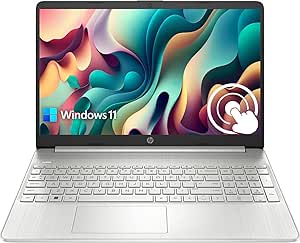 | Best for Built-In Storage on a Basic Display | Display: 15.6-inch anti-glare touchscreen, 1366 × 768, 220 nits | Processor: Intel Core i3-1115G4, 2 cores, 4 threads, up to 4.1 GHz | Memory: 16 GB RAM | VIEW LATEST PRICE | See Our Full Breakdown |
| Microsoft Surface Laptop 5 13.5-Inch Touchscreen Laptop, Intel Core i7-1265U, 16GB RAM, 512GB SSD, Platinum (Renewed) |  | Best Compact Premium Touchscreen | Display: 13.5-inch touchscreen LCD, 2256 × 1504 | Processor: 12th Gen Intel Core i7-1265U, 2.9 GHz, up to 4.8 GHz | Memory: 16 GB LPDDR5, 4800 MHz | VIEW LATEST PRICE | See Our Full Breakdown |
| 15.6-Inch 2-in-1 Touchscreen Laptop, Intel Core i3-10100Y, 16GB RAM, 256GB SSD |  | Best for Flexible Laptop-to-Tablet Use | Processor: Intel Core i3-10100Y | Memory: 16GB RAM | Storage: 256GB SSD; additional M.2 2280 SSD supported up to 2TB | VIEW LATEST PRICE | See Our Full Breakdown |
| HP 15.6-Inch FHD Touchscreen Laptop, AMD Ryzen 7 7730U, 32GB RAM, 1TB SSD |  | Best for Touchscreen Multitasking | Processor: AMD Ryzen 7 7730U, 8 cores, 16 threads, up to 4.5 GHz | Memory: 32GB DDR4 3200MHz | Storage: 1TB PCIe NVMe SSD | VIEW LATEST PRICE | See Our Full Breakdown |
| Dell 15.6-Inch Touchscreen Laptop with Intel Core i7-1355U, 16GB DDR5 RAM, 512GB SSD, and Windows 11 Pro |  | Best for Processor-Heavy Office Work | Processor: Intel Core i7-1355U, 10 cores, 12 threads, up to 5.0 GHz | Memory: 16GB DDR5 | Storage: 512GB SSD | VIEW LATEST PRICE | See Our Full Breakdown |
| Lenovo IdeaPad Slim 3 Chromebook, 14-Inch Touchscreen, 4GB RAM, 576GB Storage, MediaTek Kompanio 540, Chrome OS, Blue |  | Best for Basic ChromeOS Touchscreen Use | Processor: MediaTek Kompanio 540, 8 cores, up to 2.6 GHz | Memory: 4GB LPDDR5X | Storage: 576GB listed total: 64GB SSD plus 512GB docking set | VIEW LATEST PRICE | See Our Full Breakdown |
| touchscreen laptop | Display | Processor | Memory | Storage |
|---|---|---|---|---|
| Tylvx 15.6-Inch 2-in-1 Touchsc | 15.6-inch Full HD touchscreen | Intel Core m3-8100Y, up to 3.4GHz | 16GB RAM | 512GB SSD |
| Lenovo Flagship Chromebook | 14-inch Full HD IPS touchscreen, 1920 × 1080 | MediaTek Kompanio 520, octa-core | 4GB RAM | 64GB eMMC |
| Dell 15.6-Inch FHD Touchscreen | 15.6-inch Full HD IPS touchscreen, 1920 × 1080, 120Hz | 13th Gen Intel Core i5-1334U, 10 cores, up to 4.60GHz | 8GB DDR4 | 512GB SSD |
| 16-Inch Touchscreen Laptop | 16-inch touchscreen LCD; product information lists 1920 × 1200 | Intel Celeron N95, quad-core, up to 3.4GHz | 16GB DDR4 | 1TB SSD |
| Lenovo IdeaPad Slim 3 15.6-inc | 15.6-inch Full HD IPS touchscreen, 1920 × 1080, 300 nits, 60Hz | AMD Ryzen 7 5825U, 8 cores, 16 threads | 16GB DDR4, 3200MHz | 512GB SSD |
| HP OmniBook 3 16-inch Laptop | 16-inch IPS touchscreen, 1920 × 1200, 300 nits | AMD Ryzen 3 7320U, 4 cores, 8 threads, up to 4.1 GHz | 8 GB LPDDR5-5500, onboard | 256 GB PCIe NVMe M.2 SSD |
| HP 15.6-inch HD Touchscreen La | 15.6-inch anti-glare touchscreen, 1366 × 768, 250 nits | AMD Ryzen 3 7320U, 4 cores, 8 threads, up to 4.1 GHz | 8 GB LPDDR5-5500, onboard | 128 GB PCIe NVMe M.2 SSD |
| Dell 16-Inch Touchscreen Lapto | 16-inch FHD+ touchscreen, 1920 × 1200, 16:10, 300 nits | Intel Core 7 150U, 10 cores, up to 5.4 GHz | 32 GB DDR5, 5200 MT/s | 1 TB PCIe NVMe M.2 SSD |
| HP Pavilion 15.6-Inch HD Touch | 15.6-inch anti-glare touchscreen, 1366 × 768, 220 nits | Intel Core i3-1115G4, 2 cores, 4 threads, up to 4.1 GHz | 16 GB RAM | 1 TB PCIe NVMe SSD |
| Microsoft Surface Laptop 5 13. | 13.5-inch touchscreen LCD, 2256 × 1504 | 12th Gen Intel Core i7-1265U, 2.9 GHz, up to 4.8 GHz | 16 GB LPDDR5, 4800 MHz | 512 GB SSD |
| 15.6-Inch 2-in-1 Touchscreen L | 15.6-inch Full HD IPS touchscreen, 1920 x 1080 | Intel Core i3-10100Y | 16GB RAM | 256GB SSD; additional M.2 2280 SSD supported up to 2TB |
| HP 15.6-Inch FHD Touchscreen L | 15.6-inch Full HD IPS touchscreen, 1920 x 1080, 300 nits, anti-glare | AMD Ryzen 7 7730U, 8 cores, 16 threads, up to 4.5 GHz | 32GB DDR4 3200MHz | 1TB PCIe NVMe SSD |
| Dell 15.6-Inch Touchscreen Lap | 15.6-inch Full HD touchscreen, 1920 x 1080, anti-glare, 60Hz, 220 nits | Intel Core i7-1355U, 10 cores, 12 threads, up to 5.0 GHz | 16GB DDR5 | 512GB SSD |
| Lenovo IdeaPad Slim 3 Chromebo | 14-inch IPS LED touchscreen, 1920 x 1200, 60Hz | MediaTek Kompanio 540, 8 cores, up to 2.6 GHz | 4GB LPDDR5X | 576GB listed total: 64GB SSD plus 512GB docking set |
More Details on Our Top Picks
Tylvx 15.6-Inch 2-in-1 Touchscreen Laptop, Intel Core m3-8100Y, 16GB RAM, 512GB SSD, Windows 11, Deep Purple
The Tylvx 2-in-1 is the clearest pick here for buyers who want a large touchscreen that can also fold into tablet, tent, and stand positions. Its 360-degree hinge gives it more flexibility for touch-led browsing or watching video than the conventional Dell 15.6-Inch FHD Touchscreen Laptop, which stays in laptop form. The 16GB RAM and 512GB SSD are generous for everyday Windows use, but they do not make its older Core m3-8100Y suited to demanding creative work or heavy multitasking. The 38Wh battery is another compromise: the listed capacity is modest, and runtime is not specified. I’d choose it for the convertible design and plentiful memory, not for speed or all-day unplugged use.
Pros:- 360-degree hinge supports laptop, tablet, tent, and stand modes
- 15.6-inch Full HD touchscreen
- 16GB RAM and 512GB SSD suit everyday apps and files
- USB, USB-C data, and HDMI connections
Cons:- Older Core m3-8100Y is intended for everyday tasks, not demanding workloads
- 38Wh battery capacity is modest and runtime is not provided
Best for: Windows users who want a large display for touch navigation, video, and occasional tablet-style use.
Not ideal for: People running demanding workloads or spending long days away from an outlet, given the entry-level processor and unspecified battery runtime.
- Display:15.6-inch Full HD touchscreen
- Processor:Intel Core m3-8100Y, up to 3.4GHz
- Memory:16GB RAM
- Storage:512GB SSD
- Operating system:Windows 11
- Battery:38Wh
- Ports:3 × USB 3.0, HDMI, USB-C data
- Wireless:Wi-Fi 5, Bluetooth 5.0
Our verdict“Choose the Tylvx if flexible 2-in-1 touchscreen use matters more than processing headroom or documented battery endurance.”
Lenovo Flagship Chromebook, 14” FHD Touchscreen Slim Thin Light Laptop Computer, 8-Core MediaTek Kompanio 520 Processor, 4GB RAM, 64GB eMMC, WiFi 6, Chrome OS, Abyss Blue
The Lenovo 14-inch Chromebook makes touchscreen computing approachable for students and households that mostly use browser-based apps, video calls, and Google services. Its Full HD IPS screen has a sharper, wider-viewing-angle display than the HD panel on the HP 15.6-inch HD Touchscreen Laptop, while the 2.86-pound listed weight is convenient for carrying between classes. ChromeOS keeps the experience focused on web apps, but the 4GB RAM and 64GB eMMC leave less room for heavy tab use or local files than the Windows Lenovo IdeaPad Slim 3. Wi-Fi 6, a privacy-shutter webcam, and a microSD reader add practical touches. I’d pass if you need Windows software, substantial built-in storage, or demanding multitasking.
Pros:- 14-inch 1920 × 1080 IPS touchscreen
- ChromeOS suits browser-first work and Google services
- Wi-Fi 6 and Bluetooth 5.1
- Webcam privacy shutter and microSD card reader
Cons:- 4GB RAM can constrain heavier multitasking
- 64GB eMMC provides limited local storage
- ChromeOS does not run all Windows desktop software
Best for: Students and first-time laptop buyers who mainly use web apps, Google Classroom, video calls, and cloud storage.
Not ideal for: Windows-software users, people who keep large files locally, or anyone who regularly multitasks across many demanding apps.
- Display:14-inch Full HD IPS touchscreen, 1920 × 1080
- Processor:MediaTek Kompanio 520, octa-core
- Memory:4GB RAM
- Storage:64GB eMMC
- Operating system:ChromeOS
- Wireless:Wi-Fi 6, Bluetooth 5.1
- Ports:USB-A, USB-C, microSD card reader, headphone/microphone combo jack
- Weight:2.86 lb
Our verdict“Pick this Lenovo for portable, browser-centered touchscreen use, but choose a Windows laptop such as the IdeaPad Slim 3 for broader software support and more memory.”
Dell 15.6-Inch FHD Touchscreen Laptop, Intel Core i5-1334U, 8GB RAM, 512GB SSD, Windows 11
The Dell 15.6-inch FHD stands out for its 120Hz touchscreen, which can make scrolling and on-screen motion feel smoother than the 60Hz display on the Lenovo IdeaPad Slim 3. Its 13th Gen Core i5 and 512GB SSD also make it a balanced Windows choice for general work, streaming, and everyday browsing. The tradeoff is memory: 8GB RAM gives less room for demanding multitasking than the IdeaPad’s 16GB, so the faster-refresh screen should not be mistaken for a stronger all-around configuration. A 1080p webcam, HDMI, USB-C, and SD card reader make it useful for calls and peripherals, though the keyboard is not backlit. I’d rank it for display fluidity and a useful mix of ports, not maximum multitasking capacity.
Pros:- 15.6-inch Full HD IPS touchscreen with a 120Hz refresh rate
- 13th Gen Intel Core i5 processor
- 512GB SSD for apps and files
- 1080p webcam and HDMI, USB-C, and SD card connections
Cons:- 8GB RAM is less suited to demanding multitasking than the IdeaPad Slim 3’s 16GB
- Keyboard is not backlit
Best for: Windows users who value a high-refresh touchscreen for frequent scrolling, video, and everyday productivity.
Not ideal for: Buyers who keep many demanding apps open at once or need a backlit keyboard.
- Display:15.6-inch Full HD IPS touchscreen, 1920 × 1080, 120Hz
- Processor:13th Gen Intel Core i5-1334U, 10 cores, up to 4.60GHz
- Graphics:Integrated Intel Iris Xe
- Memory:8GB DDR4
- Storage:512GB SSD
- Operating system:Windows 11 Home
- Battery life:Up to 9 hours
- Weight:4.19 lb
- Ports:USB-C, USB 3.2 Gen 1, USB 2.0, HDMI, audio combo jack, SD card reader
Our verdict“Choose the Dell for a smoother-feeling touchscreen and well-rounded everyday Windows features, unless extra memory matters more than refresh rate.”
16-Inch Touchscreen Laptop, Intel Celeron N95, 16GB DDR4 RAM, 1TB SSD, Windows 11
This 16-inch touchscreen laptop is the storage-focused option in this group, pairing a 1TB SSD with 16GB of RAM for buyers who keep a large library of documents, downloads, and media on the device. Its 1920 × 1200 display offers more vertical workspace than the Full HD screens on the Dell 15.6-inch FHD Touchscreen Laptop and Lenovo IdeaPad Slim 3. The metal body, backlit keyboard, and fingerprint reader add conveniences that the more work-focused IdeaPad does not list. The main compromise is the Celeron N95: ample memory and storage do not turn this entry-level processor into a strong choice for demanding workloads. The listing also contains conflicting display-resolution claims, so I’d verify the panel details before buying.
Pros:- 16-inch touchscreen with listed 1920 × 1200 resolution
- 16GB DDR4 RAM and 1TB SSD
- Metal body with backlit keyboard and numeric keypad
- Fingerprint reader for sign-in
Cons:- Intel Celeron N95 is an entry-level processor
- Product information gives conflicting display-resolution claims
Best for: Home users who want a large touchscreen, generous local storage, a backlit keyboard, and basic Windows computing.
Not ideal for: Buyers who need strong processing performance for intensive creative apps or who require unambiguous display specifications before purchase.
- Display:16-inch touchscreen LCD; product information lists 1920 × 1200
- Processor:Intel Celeron N95, quad-core, up to 3.4GHz
- Memory:16GB DDR4
- Storage:1TB SSD
- Operating system:Windows 11
- Body:Metal, gray
- Keyboard:Backlit with numeric keypad
- Security:Fingerprint reader
- Dimensions:14.6 × 9.6 × 0.75 inches
Our verdict“This model fits buyers who prioritize storage and practical built-in features over processing speed, provided they confirm the display specification.”
Lenovo IdeaPad Slim 3 15.6-inch FHD Touchscreen Laptop, Ryzen 7 5825U, 16GB RAM, 512GB SSD
The Lenovo IdeaPad Slim 3 is the strongest fit here for buyers who want touchscreen convenience alongside more room for everyday multitasking. Its 8-core Ryzen 7 5825U and 16GB RAM give it more listed processing and memory headroom than the Dell 15.6-inch FHD Touchscreen Laptop, whose 8GB RAM may constrain heavier workloads. The tradeoff is that Lenovo’s screen runs at 60Hz, not the Dell’s 120Hz, and the IdeaPad’s touchscreen is a conventional laptop display rather than the Tylvx’s 360-degree convertible panel. A 512GB SSD, Wi-Fi 6, and numeric keypad round out a practical setup. The 720p webcam, non-backlit keyboard, and 26Wh battery are meaningful compromises, so I’d favor it for desk-based productivity over frequent unplugged use.
Pros:- 8-core, 16-thread Ryzen 7 5825U processor
- 16GB DDR4 memory
- 15.6-inch Full HD IPS touchscreen with 300-nit listed brightness
- 512GB SSD, Wi-Fi 6, and numeric keypad
Cons:- 720p webcam is less detailed than the Dell’s 1080p camera
- Keyboard is not backlit
- 26Wh battery capacity is modest
Best for: Students and office users who want a touchscreen Windows laptop with strong everyday multitasking capacity and a numeric keypad.
Not ideal for: People who prioritize a 120Hz display, a backlit keyboard, a higher-resolution webcam, or long unplugged sessions.
- Display:15.6-inch Full HD IPS touchscreen, 1920 × 1080, 300 nits, 60Hz
- Processor:AMD Ryzen 7 5825U, 8 cores, 16 threads
- Graphics:Integrated AMD Radeon
- Memory:16GB DDR4, 3200MHz
- Storage:512GB SSD
- Operating system:Windows 11 Pro, 64-bit
- Wireless:Wi-Fi 6, Bluetooth 5.2
- Battery:3-cell lithium battery, 26Wh
- Weight:3.56 lb
Our verdict“Choose the IdeaPad Slim 3 for a capable touchscreen work laptop with more memory than the Dell, but not for the smoothest display or strongest listed portability features.”
HP OmniBook 3 16-inch Laptop, 2K Touchscreen, AMD Ryzen 3 7320U, 8 GB RAM, 256 GB SSD, Radeon 610M, Windows 11 Home, Mica Silver
The HP OmniBook 3 pairs a spacious 16-inch, 1920 × 1200 touchscreen with a relatively light 3.6-pound build, making it a practical choice for people who want room for documents and streaming without a bulky laptop. Its taller 16:10 display provides more vertical workspace than the HP 15.6-inch HD Touchscreen, and the OmniBook’s 1080p HDR camera is better equipped for video calls than that model’s 720p camera. The tradeoff is modest performance headroom: the Ryzen 3 processor, 8 GB of non-upgradable onboard memory, and 256 GB SSD suit everyday tasks, not demanding creative workloads or a large local library. The touchscreen is also rated at 300 nits, so bright environments may limit comfortable viewing. I’d choose it for screen space and general use, not for future-proofing.
Pros:- 16-inch 1920 × 1200 touchscreen gives documents and web pages more vertical room than an HD 15.6-inch screen.
- Weighs 3.6 pounds, a manageable load for a laptop with a 16-inch display.
- 1080p camera with HDR auto-switch and noise reduction is better suited to video calls than a basic HD webcam.
- USB-C charging adapter can bring the battery to 50% in about 45 minutes.
Cons:- 8 GB of onboard memory cannot be upgraded and may constrain heavier multitasking.
- The 256 GB SSD leaves less room for locally stored files than the 1 TB drives in the Dell 16-inch and HP Pavilion models.
- Integrated Radeon 610M graphics are intended for everyday use, not demanding games or graphics work.
Best for: Students and home users who want a large, higher-resolution touchscreen for browsing, documents, and video calls without carrying a heavy 16-inch machine.
Not ideal for: People who keep large media collections, run demanding creative software, or want to upgrade memory later; the 256 GB SSD and fixed 8 GB RAM limit room to grow.
- Display:16-inch IPS touchscreen, 1920 × 1200, 300 nits
- Processor:AMD Ryzen 3 7320U, 4 cores, 8 threads, up to 4.1 GHz
- Memory:8 GB LPDDR5-5500, onboard
- Storage:256 GB PCIe NVMe M.2 SSD
- Graphics:AMD Radeon 610M integrated graphics
- Battery life:Claimed up to 14 hours and 15 minutes
- Camera:1080p FHD with HDR auto-switch
- Ports:2 USB-A, 2 USB-C, HDMI 2.1, headphone/microphone combo
- Weight:3.6 lbs
Our verdict“Choose the OmniBook 3 if you want a light-feeling 16-inch touchscreen for routine work, but skip it if you need expandable memory or substantial storage.”
HP 15.6-inch HD Touchscreen Laptop, AMD Ryzen 3 7320U, 8 GB RAM, 128 GB SSD, Radeon Graphics, Windows 11 Home in S Mode, Natural Silver (15-fc0099nr)
The HP 15-fc0099nr is a straightforward pick for buyers whose touchscreen needs are mostly taps, swipes, browsing, and basic school or household tasks. Its Ryzen 3 7320U is shared with the HP OmniBook 3, but the lower 1366 × 768 resolution gives this 15.6-inch screen noticeably less workspace and detail. That is the defining compromise: the OmniBook costs you less screen real estate too, but offers a sharper 1920 × 1200 panel and double the listed storage. This HP counters with a privacy shutter and a physical microphone mute button, useful touches for shared spaces. Its 128 GB SSD fills quickly with apps and files, and Windows 11 Home in S Mode can restrict software choices unless you leave that mode. The USB-C port also does not support charging or external displays.
Pros:- Touchscreen supports familiar pinch, tap, and swipe controls for everyday interaction.
- Privacy shutter and microphone mute button offer useful physical controls for video calls.
- Wi-Fi 6 and Bluetooth 5.4 provide current wireless connectivity.
- A 45-watt adapter is specified to charge the battery to 50% in about 45 minutes.
Cons:- The 1366 × 768 resolution is noticeably less detailed than the HP OmniBook 3’s 1920 × 1200 touchscreen.
- 128 GB of storage can be restrictive for apps, downloads, and locally saved media.
- USB-C does not support charging or external monitors, and Windows 11 Home in S Mode limits software installation unless switched out.
Best for: First-time laptop buyers and students who mainly use web apps, video calls, and basic documents, and want a simple touchscreen with webcam privacy controls.
Not ideal for: People who install a wide range of desktop software, store many files, or expect crisp text and detailed images; S Mode, 128 GB storage, and the HD panel may frustrate them.
- Display:15.6-inch anti-glare touchscreen, 1366 × 768, 250 nits
- Processor:AMD Ryzen 3 7320U, 4 cores, 8 threads, up to 4.1 GHz
- Memory:8 GB LPDDR5-5500, onboard
- Storage:128 GB PCIe NVMe M.2 SSD
- Operating system:Windows 11 Home in S Mode
- Camera:720p HD with privacy shutter and dual-array microphones
- Wireless:Wi-Fi 6, Bluetooth 5.4
- Ports:1 USB-C, 2 USB-A, HDMI 1.4b, headphone/microphone combo, AC smart pin
- Weight:3.5 pounds
Our verdict“Pick this HP for basic touch-enabled school or home use with webcam privacy controls, but choose a higher-resolution model if you spend hours reading or multitasking onscreen.”
Dell 16-Inch Touchscreen Laptop, Intel Core 7 150U, 32GB DDR5 RAM, 1TB SSD
The Dell 16-inch touchscreen stands apart from the more basic HP OmniBook 3 with 32 GB of memory and a 1 TB SSD. That combination gives people juggling many browser tabs, office apps, and sizable work files more breathing room than the OmniBook’s 8 GB RAM and 256 GB drive. Its 1920 × 1200, 16:10 display also offers useful vertical space for spreadsheets and documents, while Windows 11 Pro, a fingerprint reader, and a webcam privacy shutter suit a work-focused setup. The compromise is that its integrated Intel graphics are not aimed at demanding games or GPU-heavy creative work. The 300-nit screen is also a standard-brightness panel rather than a standout choice for bright rooms. I’d rank it above simpler touch laptops for productivity capacity, not for graphics performance.
Pros:- 32 GB of DDR5 memory supports heavier multitasking than the 8 GB HP OmniBook 3.
- 1 TB NVMe SSD offers ample room for work files and locally stored media.
- 16-inch 1920 × 1200 touchscreen with a 16:10 aspect ratio provides extra vertical workspace.
- Windows 11 Pro, fingerprint reader, and webcam privacy shutter support a work-oriented setup.
Cons:- Integrated Intel graphics are a poor fit for demanding games and graphics-intensive creative tasks.
- The 300-nit display may be harder to view in bright surroundings.
- The provided port details list USB-C but do not specify its capabilities.
Best for: Office professionals, remote workers, and students who keep many applications open and need substantial local storage on a large touchscreen.
Not ideal for: Gamers and graphics-heavy creators who need dedicated graphics, or buyers prioritizing a particularly bright screen for sunlit workspaces.
- Display:16-inch FHD+ touchscreen, 1920 × 1200, 16:10, 300 nits
- Processor:Intel Core 7 150U, 10 cores, up to 5.4 GHz
- Memory:32 GB DDR5, 5200 MT/s
- Storage:1 TB PCIe NVMe M.2 SSD
- Graphics:Integrated Intel Graphics
- Operating system:Windows 11 Pro
- Webcam:1080p FHD with privacy shutter and temporal noise reduction
- Wireless:Wi-Fi 6E, Bluetooth 5.3
- Security:Fingerprint reader
Our verdict“Choose this Dell when touchscreen productivity, plentiful memory, and storage matter more than dedicated graphics or a high-brightness display.”
HP Pavilion 15.6-Inch HD Touchscreen Laptop, Core i3-1115G4, 16GB RAM, 1TB SSD, Windows 11 Home, Silver
The HP Pavilion makes a different trade from the newer Dell 16-inch touchscreen: it keeps the display at basic HD resolution but supplies 16 GB of RAM and a 1 TB SSD. That storage is a substantial advantage over the HP 15-fc0099nr’s 128 GB drive if you keep documents, downloads, or media on the laptop. The anti-glare finish can also help reduce reflections, though its 220-nit brightness and 1366 × 768 resolution limit clarity and comfort in bright rooms. Its older, dual-core Core i3-1115G4 is a less convincing choice for demanding multitasking than the Dell’s Core 7 and 32 GB memory. I’d treat this Pavilion as a storage-rich option for everyday computing, not as a performance pick. Its touchscreen is useful, but the HD panel keeps it from being the best choice for screen detail.
Pros:- 1 TB PCIe NVMe SSD provides far more listed storage than the HP 15-fc0099nr’s 128 GB drive.
- 16 GB of RAM offers more multitasking headroom than entry-level 8 GB options.
- Anti-glare touchscreen helps reduce reflections compared with a glossy panel.
- USB-C, USB-A, and HDMI provide useful options for connecting accessories and an external display.
Cons:- 1366 × 768 resolution provides less detail and workspace than the Dell 16-inch FHD+ touchscreen.
- At 220 nits, the display may be difficult to see in bright rooms.
- The two-core Core i3-1115G4 has less processing headroom than the Dell’s 10-core Core 7.
Best for: Home users who want a touchscreen laptop with ample local file storage and memory for routine browsing, documents, and media.
Not ideal for: People who prioritize sharp text, bright-room visibility, or demanding multitasking; the HD, 220-nit screen and older dual-core processor are limiting.
- Display:15.6-inch anti-glare touchscreen, 1366 × 768, 220 nits
- Processor:Intel Core i3-1115G4, 2 cores, 4 threads, up to 4.1 GHz
- Memory:16 GB RAM
- Storage:1 TB PCIe NVMe SSD
- Graphics:Integrated Intel UHD Graphics
- Operating system:Windows 11 Home
- Battery life:Up to 10 hours
- Ports:1 USB-C, 2 USB-A, HDMI 1.4b, headphone/microphone combo
- Weight:1.7 kg
Our verdict“Choose the Pavilion if a large SSD and 16 GB of RAM matter more than display sharpness or newer processing power.”
Microsoft Surface Laptop 5 13.5-Inch Touchscreen Laptop, Intel Core i7-1265U, 16GB RAM, 512GB SSD, Platinum (Renewed)
The Surface Laptop 5 is the compact choice in this group, pairing a 13.5-inch touchscreen with a crisp 2256 × 1504 resolution in a 2.8-pound chassis. Compared with the 16-inch Dell, it gives up screen area and the Dell’s 32 GB of memory and 1 TB SSD, but its higher pixel density makes fine text and images look more detailed. The Core i7-1265U, 16 GB RAM, and 512 GB SSD make a more capable everyday package than the basic HP 15-fc0099nr, especially for buyers who want Windows 11 Pro in a smaller form. The main caveat is its renewed condition: it is a 2022 model with a 90-day limited warranty, so condition and warranty coverage deserve attention. The listed specs also provide little detail on ports or wireless standards.
Pros:- 2256 × 1504 resolution gives the 13.5-inch touchscreen high detail for text and images.
- At 2.8 pounds, it is lighter and more compact than the 15.6- and 16-inch options here.
- 16 GB of LPDDR5 memory and a 512 GB SSD suit everyday multitasking and file storage.
- Windows 11 Pro and integrated Intel Iris Xe graphics support a capable general-purpose setup.
Cons:- Renewed condition means buyers should weigh the device’s prior use and the 90-day limited warranty.
- The 13.5-inch screen provides less working area than the Dell 16-inch touchscreen.
- The listed 512 GB SSD and 16 GB RAM trail the Dell’s 1 TB storage and 32 GB memory.
Best for: Mobile professionals and students who want a compact, sharp touchscreen for writing, browsing, and presentations, and are comfortable buying a renewed laptop.
Not ideal for: Buyers who need a large workspace, a new device, extensive warranty coverage, or the 32 GB RAM and 1 TB storage offered by the Dell 16-inch model.
- Display:13.5-inch touchscreen LCD, 2256 × 1504
- Processor:12th Gen Intel Core i7-1265U, 2.9 GHz, up to 4.8 GHz
- Memory:16 GB LPDDR5, 4800 MHz
- Storage:512 GB SSD
- Graphics:Integrated Intel Iris Xe
- Operating system:Windows 11 Pro
- Weight:2.8 pounds
- Condition and warranty:Renewed; 90-day limited warranty
- Model year:2022
Our verdict“Choose the Surface Laptop 5 for a light, high-resolution touchscreen and Windows 11 Pro, provided renewed condition and its shorter listed warranty suit you.”
15.6-Inch 2-in-1 Touchscreen Laptop, Intel Core i3-10100Y, 16GB RAM, 256GB SSD
The 360° hinge is the main reason to choose this model: it lets a 15.6-inch screen switch between laptop and tablet modes, giving it more flexibility than the conventional HP 15.6-Inch FHD Touchscreen Laptop. The Full HD IPS touchscreen offers a useful workspace for documents and web tasks, while 16GB of RAM gives everyday multitasking more room than a bare-bones convertible. Its older Core i3-10100Y is a modest processor, though, so this is a better fit for browsing, schoolwork, and light office use than demanding creative software. The 256GB SSD may fill quickly, but the extra M.2 slot supports an upgrade. At 2.2 kg, it is also a sizable tablet to carry; buyers who mainly want a fast clamshell should look at the newer Dell with its Core i7-1355U instead.
Pros:- 360° hinge supports laptop, tent, and tablet-style use
- 15.6-inch Full HD IPS touchscreen
- 16GB RAM supports everyday multitasking
- M.2 slot allows storage expansion beyond the included 256GB SSD
Cons:- Core i3-10100Y is a modest, older processor for demanding workloads
- Included 256GB SSD may be limiting without an upgrade
- At 2.2 kg, it is heavy to carry as a tablet
Best for: Students or home users who want a large touchscreen for basic work and occasional tablet-style use.
Not ideal for: Frequent travelers who want a light tablet, or users running demanding applications that need a newer, faster processor.
- Processor:Intel Core i3-10100Y
- Memory:16GB RAM
- Storage:256GB SSD; additional M.2 2280 SSD supported up to 2TB
- Display:15.6-inch Full HD IPS touchscreen, 1920 x 1080
- Operating system:Windows 11 Home
- Form factor:360° convertible 2-in-1
- Connectivity:Wi-Fi 6, Bluetooth 5.2, USB 3.2, USB-C, HDMI 1.4, SD card, 3.5mm audio
- Battery:57.7Wh lithium polymer
- Weight:2.2 kg
Our verdict“Choose this convertible if switching between laptop and tablet modes matters more than processing speed or easy portability.”
HP 15.6-Inch FHD Touchscreen Laptop, AMD Ryzen 7 7730U, 32GB RAM, 1TB SSD
This HP is the strongest fit here for buyers who want a touchscreen alongside generous memory and storage, rather than a convertible hinge. Its 32GB RAM and 1TB NVMe SSD give heavy browser use, office tasks, and large local files more breathing room than the Dell 15.6-Inch Touchscreen Laptop, which has 16GB RAM and a 512GB SSD. The 15.6-inch anti-glare display is suited to desk work, and the numeric keypad helps with spreadsheets; Windows 11 Pro and the camera privacy shutter add practical workplace features. The tradeoff is that this is a standard laptop, not a 2-in-1 like the 15.6-Inch 2-in-1 Touchscreen Laptop, and its integrated graphics are not a substitute for a dedicated GPU. The HD camera may also disappoint buyers who rely on crisp video calls.
Pros:- 32GB DDR4 memory supports many open apps and browser tabs
- 1TB PCIe NVMe SSD provides ample fast local storage
- Anti-glare Full HD touchscreen with a numeric keypad
- Windows 11 Pro, Wi-Fi 6, and camera privacy shutter
Cons:- Integrated Radeon graphics are not aimed at demanding graphics workloads
- Standard clamshell design cannot fold into tablet mode
- HD camera is limited for video calls
Best for: Office users, students, and multitaskers who want substantial memory, local storage, and a full-size numeric keypad.
Not ideal for: Buyers who need a convertible touchscreen, dedicated graphics for demanding creative work, or a higher-resolution webcam.
- Processor:AMD Ryzen 7 7730U, 8 cores, 16 threads, up to 4.5 GHz
- Memory:32GB DDR4 3200MHz
- Storage:1TB PCIe NVMe SSD
- Display:15.6-inch Full HD IPS touchscreen, 1920 x 1080, 300 nits, anti-glare
- Operating system:Windows 11 Pro
- Graphics:Integrated AMD Radeon Graphics
- Wireless:Wi-Fi 6, Bluetooth
- Ports:1 USB-C 3.0, 2 USB-A 3.0, HDMI 1.4, headphone/microphone combo
- Weight:3.52 lbs
Our verdict“Pick this HP if memory and storage capacity matter more than a 2-in-1 design or dedicated graphics.”
Dell 15.6-Inch Touchscreen Laptop with Intel Core i7-1355U, 16GB DDR5 RAM, 512GB SSD, and Windows 11 Pro
The Dell’s Core i7-1355U makes it the more performance-oriented clamshell among these Windows touchscreen picks, with a newer processor than the Core i3 in the 15.6-Inch 2-in-1 Touchscreen Laptop. That favors buyers juggling office applications and heavier everyday tasks, while Windows 11 Pro, a numeric keypad, and an SD card reader suit a desk-focused setup. The anti-glare Full HD screen is practical in brighter rooms, but its stated 220-nit brightness is a notable limit: it is less suited to bright environments than the HP 15.6-Inch FHD Touchscreen Laptop, rated at 300 nits. The 16GB RAM and 512GB SSD are less generous than the HP’s 32GB and 1TB, and USB-C supports data transfer only. Choose it for its processor, not for convertible flexibility or a particularly bright display.
Pros:- Core i7-1355U has 10 cores for demanding everyday productivity
- Anti-glare Full HD touchscreen
- Windows 11 Pro and a numeric keypad
- USB-C, HDMI, and SD card reader provide useful connection options
Cons:- 220-nit display rating may be limiting in bright spaces
- USB-C port supports data transfer only
- 16GB RAM and 512GB SSD offer less capacity than the HP 15.6-inch Ryzen 7 model
Best for: Office professionals who want a newer Core i7 processor, Windows 11 Pro, and useful ports in a touchscreen clamshell.
Not ideal for: People working in bright rooms, buyers who need USB-C charging or display output, or users wanting a foldable tablet mode.
- Processor:Intel Core i7-1355U, 10 cores, 12 threads, up to 5.0 GHz
- Memory:16GB DDR5
- Storage:512GB SSD
- Display:15.6-inch Full HD touchscreen, 1920 x 1080, anti-glare, 60Hz, 220 nits
- Operating system:Windows 11 Pro
- Graphics:Integrated Intel UHD Graphics
- Wireless:Wi-Fi 6, Bluetooth 5.3
- Ports:USB-A 3.2, USB-A 2.0, USB-C 3.2, HDMI 1.4, headphone jack, SD card reader
- Weight:4.3 pounds
Our verdict“Choose this Dell for its newer Core i7 and business-focused features, provided its dimmer screen and data-only USB-C fit your setup.”
Lenovo IdeaPad Slim 3 Chromebook, 14-Inch Touchscreen, 4GB RAM, 576GB Storage, MediaTek Kompanio 540, Chrome OS, Blue
The Lenovo is the most distinct touchscreen option here: its 14-inch, 1920 x 1200 display is taller than the 15.6-inch Full HD panels on the Dell and HP laptops, which can mean less scrolling through web pages and documents. ChromeOS also makes it a simpler fit for browser-based schoolwork and everyday online tasks than those Windows models. Its listed 576GB of storage needs a closer look, though: the package combines a 64GB SSD with a 512GB docking set, rather than offering a straightforward 576GB internal drive. The 4GB RAM is a sharper limitation for multitasking than the 16GB in the 15.6-Inch 2-in-1, and the listing says the factory seal was opened for the upgrade. Conflicting size and port details, plus a listed six-pound weight, make it a less predictable choice for portability.
Pros:- 14-inch WUXGA touchscreen offers a taller 1920 x 1200 workspace
- ChromeOS suits browser-centered tasks
- 512GB docking set is included alongside the 64GB SSD
- Camera privacy shutter and HDMI output
Cons:- 4GB RAM limits multitasking headroom
- Listed storage depends on a docking set rather than a single internal drive
- Factory seal was opened for the storage upgrade, and the listing has conflicting size and port details
- Listed weight of 6 pounds is heavy for a compact Chromebook
Best for: ChromeOS users focused on browser-based schoolwork or home tasks who value a taller touchscreen and accept the storage-dock arrangement.
Not ideal for: Buyers who need Windows apps, substantial multitasking, clear and consistent hardware details, or a lightweight everyday carry.
- Processor:MediaTek Kompanio 540, 8 cores, up to 2.6 GHz
- Memory:4GB LPDDR5X
- Storage:576GB listed total: 64GB SSD plus 512GB docking set
- Display:14-inch IPS LED touchscreen, 1920 x 1200, 60Hz
- Operating system:ChromeOS
- Graphics:MediaTek integrated graphics
- Ports:Listing specifies 2 USB-C, 2 USB-A, HDMI 1.4, and headphone/microphone combo; port details may conflict
- Connectivity:Wi-Fi 802.11n, Bluetooth
- Warranty:One year from Smartisan Tech
Our verdict“Consider this Lenovo for simple ChromeOS use and its taller touchscreen, but skip it if you need dependable multitasking or clear, conventional storage details.”

How We Picked
I ranked these laptops around the features that shape touchscreen use in daily life: processor capability, memory, storage, screen size and resolution, operating system, and the flexibility of the chassis. I gave more weight to configurations that balance these needs than to a single large spec, since a touchscreen is only useful if the laptop also handles a buyer’s apps and workload comfortably. I also treated listed display resolution and memory as meaningful distinctions: a 2K panel can make text and images look sharper, while 4GB RAM places limits on heavy multitasking.
The order reflects fit across a broad range of buyers, not a claim that one device is best for every task. The Ryzen 7 IdeaPad Slim 3 ranks first for its balanced Windows configuration; the higher-memory Dell 16 follows for more demanding multitasking. Chromebooks rank better for simple, browser-based routines than for desktop software needs, and lower-powered or lower-resolution models sit behind stronger all-around choices. I also account for tradeoffs such as a renewed condition, limited storage, and a larger chassis, rather than treating a touchscreen as a standalone reason to rank a laptop highly.
| touchscreen laptop | Operating system |
|---|---|
| Tylvx 15.6-Inch 2-in-1 Touchsc | Windows 11 |
| Lenovo Flagship Chromebook | ChromeOS |
| Dell 15.6-Inch FHD Touchscreen | Windows 11 Home |
| 16-Inch Touchscreen Laptop | Windows 11 |
| Lenovo IdeaPad Slim 3 15.6-inc | Windows 11 Pro, 64-bit |
| HP OmniBook 3 16-inch Laptop | — |
| HP 15.6-inch HD Touchscreen La | Windows 11 Home in S Mode |
| Dell 16-Inch Touchscreen Lapto | Windows 11 Pro |
| HP Pavilion 15.6-Inch HD Touch | Windows 11 Home |
| Microsoft Surface Laptop 5 13. | Windows 11 Pro |
| 15.6-Inch 2-in-1 Touchscreen L | Windows 11 Home |
| HP 15.6-Inch FHD Touchscreen L | Windows 11 Pro |
| Dell 15.6-Inch Touchscreen Lap | Windows 11 Pro |
| Lenovo IdeaPad Slim 3 Chromebo | ChromeOS |
Factors to Consider When Choosing Best Touchscreen Laptops
I’d choose a touchscreen laptop by starting with the work it needs to do, then checking whether touch adds practical value to that work. These broader questions can help you avoid paying for a feature you rarely use or selecting a configuration that feels constrained after your routine gets busier.
Match the Operating System to Your Apps
Start by listing the programs and services you rely on, not by comparing processor names. ChromeOS works well for browser-based schoolwork, web apps, and straightforward document tasks, but it is not a substitute for every Windows desktop program. Windows gives broader desktop software compatibility, though that flexibility matters less if your work happens entirely online. A common mistake is buying a Chromebook for a class or job that requires a specific Windows application. Check school or employer requirements before choosing an operating system, and confirm that any essential apps work in the format you plan to use.
Choose Memory for Your Real Multitasking Habits
Memory affects how comfortably a laptop keeps several apps and browser tabs active, especially when video calls, documents, and research are open together. 4GB is a constrained configuration for busy multitasking, while 8GB can suit lighter routines and 16GB offers more breathing room for general Windows use. More memory can help a laptop remain comfortable as your workload grows, but it cannot compensate for a processor that is too limited for demanding software. Avoid choosing solely by the largest RAM figure; look at the processor and operating system alongside it. If you cannot upgrade memory later, buying enough at the outset matters more.
Treat Screen Resolution as a Daily Comfort Choice
A touchscreen can still feel less satisfying if the display is not sharp enough for the way you read and work. Resolution affects text clarity and workspace, while screen size changes how much content fits on the panel and how easy the laptop is to carry. A 2K display may appeal to readers, creators, and anyone who spends long stretches looking at text, but it does not guarantee accurate colors or high brightness. Check the full display specifications when those qualities matter; product names often emphasize touch while leaving other screen details unclear. For casual browsing, a lower-resolution screen may be an acceptable tradeoff, but it deserves extra scrutiny if you work with detailed visuals.
Check What Touch and 2-in-1 Actually Mean
Touch input is useful for tapping through pages, zooming, and marking up content, but those tasks do not automatically require a convertible laptop. A 2-in-1 hinge adds flexible viewing positions, which can help with presentations or relaxed reading, yet it may not replace a purpose-built tablet for frequent handheld use. If handwriting is the goal, verify active-pen compatibility, whether a pen is included, and whether the software supports palm rejection. Do not assume every touchscreen laptop supports a stylus just because its panel responds to a finger. Choose a conventional laptop if you mostly type and use occasional touch controls; pay for a convertible design when you will use its extra positions regularly.
Balance Portability Against Screen Space
A larger display gives more room for spreadsheets, side-by-side windows, and media, but the chassis takes up more space in a bag and on a desk. Choose the size around where you work: frequent commuters may prefer a compact machine, while a mostly stationary user can benefit from a larger panel. Consider whether you will carry the charger and laptop together, and look for weight and battery details rather than inferring portability from screen size alone. A large touchscreen can be awkward to use one-handed in tablet mode, even if the hinge folds back. If portability matters, compare the full dimensions and weight before favoring a bigger screen.
Plan Storage Around Files, Not Just the Number
Storage needs depend on whether your files live locally, in cloud services, or on external drives. Smaller SSDs can fill quickly with downloaded media, large projects, and application installs, while more capacity reduces how often you have to manage space. Chromebooks often suit cloud-centered habits, but offline access and local media still need room. Before buying, check whether storage can be expanded and what connection options are available for external drives; do not assume every model offers an easy upgrade. If you keep work files on the laptop, leave room for future projects instead of planning to use every gigabyte from day one.
Frequently Asked Questions
Is a Chromebook a good choice if I want a touchscreen laptop for school?
It can be a good match if your coursework relies on a browser, web-based documents, and school-approved online tools. The 4GB RAM configurations in this roundup are better suited to lighter workloads than to heavy multitasking with many tabs and apps. Check whether your school requires Windows software, special exam tools, or offline access before choosing ChromeOS. Also confirm how you will manage files when you do not have reliable internet. If the requirements are unclear, a Windows model offers broader desktop app compatibility.
Should I choose a 2-in-1 laptop over a regular touchscreen laptop?
Choose a 2-in-1 when you expect to fold the screen back for reading, presenting, or using touch controls in a less traditional position. If you mainly type at a desk and occasionally tap the screen, a standard touchscreen laptop may cover your needs with less emphasis on convertible use. For handwritten notes, confirm active stylus support rather than assuming any touch panel accepts a pen. Check whether the pen is included and whether the hinge feels suited to the way you plan to work. A convertible design is most useful when you will regularly use its extra positions.
How much RAM should I look for in a touchscreen laptop?
For simple browsing and document work, 8GB can be adequate, but it leaves less room for demanding multitasking than 16GB. I’d favor 16GB for a Windows laptop used with several applications, frequent video calls, or a large number of tabs. The 4GB Chromebook configurations in this roundup are aimed at lighter browser-focused routines, not busy workloads. More RAM is not a cure for an underpowered processor, so judge both together. If memory is not upgradeable, choose a configuration that fits how you expect to use the laptop over time.
Is a higher-resolution touchscreen worth choosing for everyday work?
A sharper display can make small text, detailed pages, and images easier to view, which may matter if you spend long hours reading or editing. For email, basic browsing, and streaming, a lower-resolution panel may be sufficient, so the difference may not justify giving up memory or storage that you need more. Resolution is only one part of display quality; brightness, color, and reflections also affect comfort. Look for those details in the full specifications when visual work is a priority. In this lineup, the 2K HP OmniBook 3 stands apart from several HD-listed alternatives, but buyers should weigh its full configuration too.
Does a renewed touchscreen laptop make sense for a primary computer?
A renewed model can suit a buyer who wants a specific design or configuration, but its condition history differs from that of a new laptop. Read the seller’s description and check the return window, warranty coverage, included accessories, and battery condition before relying on it as your main machine. Confirm that the operating system and security updates meet your needs, especially if the laptop will handle work or school files. A renewed device is a less straightforward choice if you need predictable battery life or long-term support. Compare its configuration and protections with a new alternative before deciding.
Conclusion
For the broadest mix of everyday Windows capability and sensible specifications, I recommend the Lenovo IdeaPad Slim 3 with Ryzen 7 5825U as the best overall pick. The HP 15.6-inch Ryzen 7 is a strong value-oriented alternative for buyers who want 32GB RAM and 1TB of storage, while the Dell 16-inch Core 7 is my premium choice for heavier multitasking and larger storage needs. Beginners with browser-based routines should look at the Lenovo IdeaPad Slim 3 Chromebook, provided its 4GB RAM and ChromeOS fit their apps. For a sharper display, the HP OmniBook 3 2K merits attention; for flexible hinge use, compare the two listed 2-in-1 models and verify stylus details first. If portability or demanding software is your priority, weigh screen size and operating system compatibility before choosing by touch capability alone.
Halloween Picks
halloween
As an affiliate, we earn on qualifying purchases.