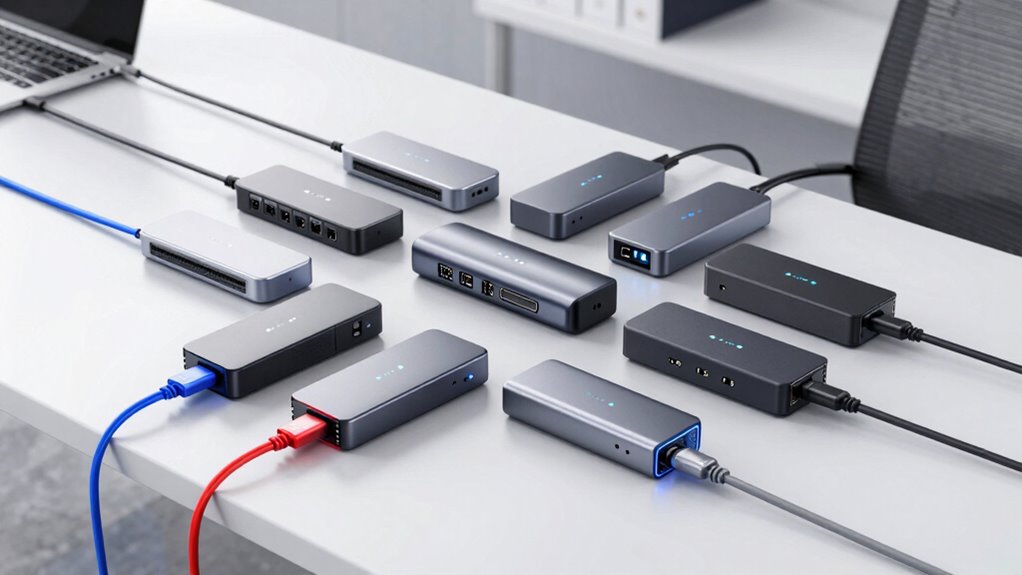

For most people choosing a Thunderbolt docking station, the Plugable Thunderbolt 4 Dock with 100W Charging is the best overall starting point because it balances laptop power and everyday connectivity. The Anker Prime 14-in-1 Thunderbolt 5 Dock is the premium pick for newer setups, while the UGREEN 8-in-1 suits buyers who want a more compact selection of ports. The main tradeoffs are how much power your laptop needs, which displays you plan to connect, and whether extra ports justify a larger dock. Dell’s WD19 and WD22 models also make sense for compatible Dell laptops, though their power and feature details vary by version. Read on for the full breakdown and a guide to matching a dock to your setup.

Get the latest gadgets delivered free with Prime
- Fast, free delivery on millions of items
- Prime Video, Amazon Music and more included
- Member-only deals all year
Complete the kit



Key Takeaways
- Plugable’s Thunderbolt 4 Dock with 100W Charging takes the overall lead for buyers who want a balanced dock without moving to Thunderbolt 5.
- Anker’s Thunderbolt 5 model is the premium choice, but its newer connection standard is most useful when the laptop and displays can take advantage of it.
- UGREEN’s 8-in-1 dock gives up some port breadth for a simpler, more compact setup.
- Dell’s WD19, WD22, and Pro SD25TB4 models are distinct options; check the exact model’s host power delivery and laptop compatibility rather than treating them as interchangeable.
- The two Plugable listings have similar names, so compare their listed monitor support and port details before choosing between them.
| Plugable Thunderbolt 4 Dock with 100W Charging |  | Best Overall | Interface: Thunderbolt 4 | Total ports: 13 | USB ports: 7 | VIEW ON AMAZON | See Our Full Breakdown |
| Dell Pro Thunderbolt 4 Smart Dock SD25TB4 |  | Best for Managed Business Desks | Model: SD25TB4 | Thunderbolt ports: 2 Thunderbolt 4 | Video connections: 2 DisplayPort 1.4, HDMI 2.1, USB-C | VIEW ON AMAZON | See Our Full Breakdown |
| Dell Thunderbolt 4 Dock WD22TB4, 130W |  | Best for Upgradeable Dell Setups | Thunderbolt ports: 2 Thunderbolt 4 | USB ports: 1 USB-C 3.2 Gen 2, 3 USB-A 3.2 Gen 1 | Display connections: 2 DisplayPort 1.4, 1 HDMI 2.0, 1 USB-C multifunction DisplayPort | VIEW ON AMAZON | See Our Full Breakdown |
| Dell WD19TBS Thunderbolt Dock with 180W Adapter |  | Best for Mixed Laptop Fleets | Connectivity: Thunderbolt | Display support: Up to three displays; one 5K or two 4K monitors | Included adapter: 180W | VIEW ON AMAZON | See Our Full Breakdown |
| Anker Prime 14-in-1 Thunderbolt 5 Docking Station |  | Best Premium Thunderbolt 5 Pick | Connectivity: Thunderbolt 5 upstream and 2 downstream ports | USB ports: 2 USB-C and 3 USB-A | Card readers: SD and TF | VIEW ON AMAZON | See Our Full Breakdown |
| UGREEN 8-in-1 Thunderbolt 4 Docking Station |  | Best for Thunderbolt Expansion | Thunderbolt ports: 3 Thunderbolt 4 | USB-A ports: 3 USB-A 3.2 | Thunderbolt data speed: Up to 40 Gbps | VIEW ON AMAZON | See Our Full Breakdown |
| Dell WD19TB Thunderbolt Docking Station with 180W AC Adapter |  | Best for Dell Workstations | Model: WD19TB | Thunderbolt connection: Thunderbolt 3 | Video ports: 2× DisplayPort 1.4, 1× HDMI 2.0b, 1× USB-C multifunction DisplayPort | VIEW ON AMAZON | See Our Full Breakdown |
| Plugable Thunderbolt 4 Dock with 100W Charging and Dual Monitor Support |  | Best for a Full Desk Setup | Total ports: 13 | Thunderbolt data speed: Up to 40 Gbps | Power delivery: Up to 100W; 96W certified | VIEW ON AMAZON | See Our Full Breakdown |
| thunderbolt docking station | USB ports | Display support |
|---|---|---|
| Plugable Thunderbolt 4 Dock wi | 7 | Up to two 4K displays at 60Hz on compatible systems |
| Dell Pro Thunderbolt 4 Smart D | — | Up to 4 4K monitors |
| Dell Thunderbolt 4 Dock WD22TB | 1 USB-C 3.2 Gen 2, 3 USB-A 3.2 Gen 1 | — |
| Dell WD19TBS Thunderbolt Dock | — | Up to three displays; one 5K or two 4K monitors |
| Anker Prime 14-in-1 Thunderbol | 2 USB-C and 3 USB-A | — |
| UGREEN 8-in-1 Thunderbolt 4 Do | — | Up to two 4K@60Hz or one 8K@30Hz; varies by computer |
| Dell WD19TB Thunderbolt Dockin | 2× USB-C, 3× USB-A | — |
| Plugable Thunderbolt 4 Dock wi | 4× USB at 10 Gbps and 5 Gbps; 1× USB-C at 10 Gbps | Dual 4K@60Hz HDMI or one 8K display on compatible systems |
More Details on Our Top Picks
Plugable Thunderbolt 4 Dock with 100W Charging
The Plugable Thunderbolt 4 Dock is my most balanced pick for a desk that needs displays, charging, and everyday peripherals through one connection. Its 13 ports include two HDMI outputs, card readers, Ethernet, and audio, so it handles more kinds of equipment than the simpler UGREEN 8-in-1 Thunderbolt 4 Docking Station. Up to 100W host charging can power many laptops while keeping the desk cable count down. Compatible systems can drive two 4K displays at 60Hz, though Mac display support depends on the specific model. That limitation matters: buyers with a base M-series Mac should check their display configuration before choosing it. It also requires a Thunderbolt 4 or USB4 host, making it a poor fit for older USB-only laptops.
Pros:- Broad 13-port selection includes HDMI, Ethernet, audio, and SD and microSD readers
- Supports up to two 4K 60Hz displays on compatible systems
- 100W host charging can power many laptops over the dock connection
- Plug-and-play operation and lifetime support
Cons:- Dual-display support is limited on some base M-series Mac models
- Requires a Thunderbolt 4 or USB4 host connection
- At 1.3 kg, it is better suited to a permanent desk than frequent travel
Best for: Thunderbolt 4 or USB4 laptop owners who want one dock for two compatible 4K displays, card transfers, wired networking, and laptop charging.
Not ideal for: Owners of base M-series Macs who need two external displays without checking model-specific limits, or users with laptops lacking Thunderbolt 4 or USB4.
- Interface:Thunderbolt 4
- Total ports:13
- USB ports:7
- Video outputs:2 HDMI
- Display support:Up to two 4K displays at 60Hz on compatible systems
- Host charging:100W
- Other connections:Downstream Thunderbolt, USB-C, 4 USB-A, SD and microSD UHS-II, Ethernet, 3.5mm audio
- Dimensions and weight:3.3 × 8.9 × 0.9 in; 1.3 kg
Our verdict“Choose the Plugable for a well-rounded Thunderbolt 4 desk setup, provided your laptop supports the display arrangement you need.”
Dell Pro Thunderbolt 4 Smart Dock SD25TB4
The Dell Pro Thunderbolt 4 Smart Dock SD25TB4 is aimed at organizations managing shared or distributed Windows workstations. Its standout advantage over the Plugable Thunderbolt 4 Dock is remote Wi-Fi management paired with business security features, including WPA3 encryption, PXE boot, and DMA protection. It can connect up to four 4K monitors and daisy-chain up to six devices, which gives IT teams more room to standardize complex desks. Charging reaches 130W on Dell devices, but falls to 96W for other systems; the Plugable provides 100W without that Dell-specific distinction. The Dell’s management tools will matter less to a single laptop owner, and buyers outside the Dell ecosystem should account for the lower charging ceiling.
Pros:- Supports up to four 4K monitors
- Remote Wi-Fi management through Dell Console and Intel AMT
- Business security features include WPA3, PXE boot, MAC filtering, and DMA protection
- Up to 130W charging for Dell devices and 2.5GbE networking
Cons:- Charging is limited to 96W for non-Dell devices
- Its management and security features add little value for a standalone home desk
Best for: IT teams standardizing Dell-heavy offices that need remote dock management, business security controls, and multi-monitor workstations.
Not ideal for: Individual users who do not need remote fleet management, or non-Dell laptop owners who require more than 96W charging from the dock.
- Model:SD25TB4
- Thunderbolt ports:2 Thunderbolt 4
- Video connections:2 DisplayPort 1.4, HDMI 2.1, USB-C
- Display support:Up to 4 4K monitors
- Charging:Up to 130W for Dell devices; 96W for other devices
- Daisy chaining:Up to 6 devices
- Ethernet:2.5GbE
- Management and security:Remote Wi-Fi management; WPA3 encryption, PXE boot, MAC filtering, DMA protection, secure enclosure
- Materials:65% recycled plastic; 100% recycled packaging
Our verdict“Pick the SD25TB4 for a managed Dell workplace where remote controls and four-display support outweigh its lower charging output on other brands.”
Dell Thunderbolt 4 Dock WD22TB4, 130W
The Dell WD22TB4 suits Windows users who want broad display and peripheral connections with a dock designed for later module upgrades. Its swappable module gives it a practical distinction from the Dell WD19TBS: the WD22TB4 is built around an upgradeable module, while the WD19TBS emphasizes multi-display placement and compatibility across select Dell, HP, and Lenovo notebooks. The WD22TB4 also offers two Thunderbolt 4 ports, DisplayPort, HDMI, USB-A, and a multifunction USB-C video connection, reducing the need for adapters at a workstation. It provides up to 130W charging and data transfer up to 40Gb/s. The main limit is its stated compatibility with Windows 10 and 11, so Mac users and buyers seeking confirmed cross-platform support should look elsewhere.
Pros:- Swappable module supports future upgrades
- Up to 40Gb/s data transfer through Thunderbolt 4
- DisplayPort, HDMI, USB-C, and USB-A cover common workstation connections
- Provides up to 130W charging
Cons:- Listed operating system compatibility is limited to Windows 10 and Windows 11
- The included 180W adapter adds a separate power brick to the desk
Best for: Windows 10 or 11 laptop owners, especially Dell users, who want multiple display connections and a dock with a swappable module.
Not ideal for: Mac users or buyers who need broad, clearly stated cross-platform compatibility.
- Thunderbolt ports:2 Thunderbolt 4
- USB ports:1 USB-C 3.2 Gen 2, 3 USB-A 3.2 Gen 1
- Display connections:2 DisplayPort 1.4, 1 HDMI 2.0, 1 USB-C multifunction DisplayPort
- Ethernet:Gigabit Ethernet RJ45
- Data transfer:Up to 40Gb/s
- Charging:130W
- Power adapter:180W
- Compatibility:Windows 10 and Windows 11
- Upgrade feature:Swappable module
Our verdict“Choose the WD22TB4 if you use a compatible Windows laptop and value its upgradeable module alongside a wide range of display outputs.”
Dell WD19TBS Thunderbolt Dock with 180W Adapter
The Dell WD19TBS makes sense for buyers connecting a mix of compatible commercial notebooks, since its stated compatibility includes select HP and Lenovo Thunderbolt laptops alongside Dell systems. That makes it a broader fit than the Windows-focused Dell WD22TB4 listing, though compatibility still depends on each laptop’s Thunderbolt support. It can drive up to three displays, including one 5K or two 4K monitors, and its 0.8 m cable suits a fixed workstation. Compared with the Plugable Thunderbolt 4 Dock, the WD19TBS has less detailed port information in the supplied specs and no stated host charging wattage, so buyers should verify their exact laptop and power needs. The optional VESA mount can tidy a desk, but it is an extra part rather than an included feature.
Pros:- Supports up to three displays, including one 5K or two 4K monitors
- Compatible with select Dell, HP, and Lenovo Thunderbolt notebooks
- Firmware can be updated without rebooting
- Optional VESA mounting supports under-desk or behind-monitor placement
Cons:- VESA mount is optional and not included
- Compatibility depends on each laptop supporting Thunderbolt standards
- Supplied specifications do not state host charging wattage or a detailed port count
Best for: IT teams or office users connecting compatible Dell, HP, and Lenovo commercial Thunderbolt laptops to a multi-display desk.
Not ideal for: Buyers who need a clearly specified charging output, detailed port inventory, or included VESA mounting hardware.
- Connectivity:Thunderbolt
- Display support:Up to three displays; one 5K or two 4K monitors
- Included adapter:180W
- Cable length:0.8 m
- Compatibility:Dell commercial laptops and compatible HP and Lenovo Thunderbolt notebooks
- Mounting:Optional VESA mount
- Firmware:Can be updated without rebooting
Our verdict“The WD19TBS is a sensible shared-office dock for compatible mixed-brand fleets that need high-resolution displays and flexible placement.”
Anker Prime 14-in-1 Thunderbolt 5 Docking Station
The Anker Prime 14-in-1 is the forward-looking choice for buyers whose laptop can use Thunderbolt 5 and who want generous charging and high-resolution display options. Its 140W upstream charging exceeds the Plugable’s 100W, while HDMI 2.1 or DisplayPort 2.1 and support for up to 8K at 60Hz give it more headroom for demanding displays. Three Thunderbolt ports, card readers, 2.5Gbps Ethernet, and active cooling round out a desk-ready setup. That extra capability is less compelling for a Thunderbolt 4 laptop, where the host sets the practical limits. There are also specific tradeoffs: dual 8K at 60Hz is specified for Thunderbolt 5 Windows laptops, and the front USB-C ports share 45W total rather than supplying that amount to each device.
Pros:- Thunderbolt 5 upstream and two downstream ports
- Up to 140W upstream charging with PD 3.1
- HDMI 2.1 or DisplayPort 2.1 supports up to 8K at 60Hz
- Includes 2.5Gbps Ethernet, card readers, and active cooling
Cons:- Dual 8K at 60Hz support is specified for Thunderbolt 5 Windows laptops
- Front USB-C ports share 45W total
- Its Thunderbolt 5 capabilities may go unused with a Thunderbolt 4 host
Best for: Thunderbolt 5 laptop owners who need high-resolution display support, up to 140W host charging, and fast wired networking.
Not ideal for: Thunderbolt 4 users who will not benefit from the newer connection, or buyers who need each front USB-C port to deliver 45W independently.
- Connectivity:Thunderbolt 5 upstream and 2 downstream ports
- USB ports:2 USB-C and 3 USB-A
- Card readers:SD and TF
- Ethernet:2.5Gbps
- Video output:HDMI 2.1 or DisplayPort 2.1; up to 8K at 60Hz
- Maximum upstream charging:140W, PD 3.1
- Front USB-C charging:45W shared
- Cooling:Active cooling system
- Warranty:24 months
Our verdict“Choose the Anker Prime if you have a Thunderbolt 5 laptop and want more display headroom and host charging than the Thunderbolt 4 docks provide.”
UGREEN 8-in-1 Thunderbolt 4 Docking Station
The UGREEN 8-in-1 is a strong fit when you want several fast Thunderbolt connections alongside familiar USB-A ports. Its three Thunderbolt 4 ports make it easier to attach high-speed storage or other docks than the Dell WD19TB, which centers on a wider mix of direct display connections and older Thunderbolt 3. The included 140W GaN adapter supplies up to 85W to a laptop, so the dock can power a typical work setup without a separate laptop charger. It also supports up to two 4K displays or one 8K display, though the computer determines what actually works. That caveat matters for basic M-chip MacBooks, which support only one 4K display here. The dock also needs its included power adapter to operate, and its 1.4 kg body is less convenient to move than its port count might suggest.
Pros:- Three Thunderbolt 4 ports support fast peripherals and daisy chaining
- Three USB-A 3.2 ports accommodate older accessories
- Included 140W GaN adapter supports up to 85W laptop charging
- Can drive up to two 4K@60Hz displays or one 8K display on compatible computers
Cons:- Display capability varies by computer; basic M-chip MacBooks support one 4K display
- Requires the included power adapter to operate
- At 1.4 kg, it is relatively heavy for a desk dock
Best for: Thunderbolt 4 laptop owners who connect fast peripherals, USB-A devices, and one or two compatible high-resolution displays at a fixed desk
Not ideal for: Basic M-chip MacBook owners who need two external displays, or mobile users who want a light dock they can carry often
- Thunderbolt ports:3 Thunderbolt 4
- USB-A ports:3 USB-A 3.2
- Thunderbolt data speed:Up to 40 Gbps
- Display support:Up to two 4K@60Hz or one 8K@30Hz; varies by computer
- Laptop charging:Up to 85W
- Included power adapter:140W GaN
- Other connection:Gigabit Ethernet
- Dimensions and weight:9.5 × 9.5 × 2.5 in; 1.4 kg
Our verdict“Choose the UGREEN if you want multiple Thunderbolt 4 ports and USB-A at a stationary workstation and have confirmed your computer’s display limits.”
Dell WD19TB Thunderbolt Docking Station with 180W AC Adapter
The Dell WD19TB makes the most sense for buyers matching a dock to a supported Dell laptop, especially when direct monitor connections are a priority. Its two DisplayPort 1.4 ports, HDMI 2.0b, and multifunction USB-C video port offer more ways to connect displays without relying on the HDMI-focused setup of the Plugable Thunderbolt 4 Dock. It also provides up to 130W power delivery, a useful fit for compatible Dell systems that need more charging headroom than the UGREEN’s 85W limit. The tradeoff is an older Thunderbolt 3 connection and laptop-specific compatibility: the port list alone does not guarantee every display or charging feature will work with every computer. Some Precision workstations also need their own power adapter for full operation, which can complicate an otherwise tidy desk setup.
Pros:- Two DisplayPort 1.4 outputs and HDMI 2.0b provide flexible monitor connections
- Up to 130W power delivery suits compatible Dell laptops with higher charging needs
- Includes three USB-A and two USB-C ports
- 180W AC adapter is included
Cons:- Uses Thunderbolt 3 rather than Thunderbolt 4
- Compatibility and supported features vary by laptop model
- Some Precision workstations require their own power adapter
Best for: Owners of compatible Dell Latitude, Precision, Rugged, or XPS laptops who need several direct video outputs and higher power delivery
Not ideal for: Buyers with non-Dell or unverified laptops, or users who specifically want Thunderbolt 4 connectivity and its newer compatibility standards
- Model:WD19TB
- Thunderbolt connection:Thunderbolt 3
- Video ports:2× DisplayPort 1.4, 1× HDMI 2.0b, 1× USB-C multifunction DisplayPort
- USB ports:2× USB-C, 3× USB-A
- Other connections:Combo audio/headset, audio out, Gigabit Ethernet RJ45
- Power delivery:Up to 130W
- Power adapter:180W AC
- Dimensions and weight:8.1 × 3.5 × 1.1 in; 20.63 oz
Our verdict“Pick the WD19TB for a supported Dell workstation setup that benefits from varied display outputs and up to 130W charging.”
Plugable Thunderbolt 4 Dock with 100W Charging and Dual Monitor Support
With 13 ports, this Plugable dock suits a desk where monitors, storage, memory cards, network, and audio all need to meet at one hub. Its HDMI outputs and dual 4K@60Hz support on compatible systems give it a more direct monitor setup than the UGREEN 8-in-1, while its SD and microSD readers add a practical connection UGREEN does not list. Up to 100W power delivery is also more headroom than the UGREEN’s 85W, though less than the Dell WD19TB’s 130W for compatible Dell systems. The main limitation is host dependence: dual displays require a supported computer and operating system, while selected Thunderbolt 3 and USB-C systems are limited to one external display. Its breadth is useful when every connection has a purpose, but unnecessary if you only need a few ports.
Pros:- 13-port selection includes USB, HDMI, card readers, audio, and Gigabit Ethernet
- Supports dual 4K@60Hz displays on compatible systems
- Provides up to 100W power delivery, with 96W certified
- Driverless Thunderbolt 4 operation
Cons:- Dual-display support depends on the computer model and operating system
- Selected Thunderbolt 3 and USB-C systems support only one external display
- Its broad port selection may be unnecessary for simpler setups
Best for: Thunderbolt 4 or USB4 laptop users building a fixed workstation around two compatible 4K monitors, card readers, wired networking, and multiple USB devices
Not ideal for: Thunderbolt 3 or standard USB-C users who require dual external displays, or buyers who only need a compact set of basic ports
- Total ports:13
- Thunderbolt data speed:Up to 40 Gbps
- Power delivery:Up to 100W; 96W certified
- Downstream Thunderbolt charging:15W
- Display support:Dual 4K@60Hz HDMI or one 8K display on compatible systems
- USB ports:4× USB at 10 Gbps and 5 Gbps; 1× USB-C at 10 Gbps
- Other connections:SD and microSD, combo audio jack, Gigabit Ethernet, K-lock slot
- Compatibility:Thunderbolt 4, Thunderbolt 5, and USB4; selected Thunderbolt 3 and USB-C systems support one external display
Our verdict“Choose the Plugable if your compatible computer needs a broad set of desk connections and dual 4K display support in one dock.”

How We Picked
I ranked these docks by how well their stated capabilities address common desk setups: charging a connected laptop, adding useful ports, supporting the displays a buyer plans to run, and fitting the host computer. I gave more weight to a practical mix of connectivity and clear everyday utility than to a newer standard alone. Model-specific power delivery and display support matter because a dock’s headline connection type does not guarantee the same result with every laptop.
That logic puts the balanced Plugable Thunderbolt 4 model first for broad use, with Anker’s Thunderbolt 5 dock above the simpler options for buyers building around newer hardware. UGREEN earns a distinct place for buyers who prefer a smaller port set. Dell’s docks rank around their fit for Dell-centered setups and the differences between their model generations and configurations. The two Plugable products are judged separately because the listings call out different support details; buyers should verify the exact specifications before ordering.
| thunderbolt docking station | Display support |
|---|---|
| Plugable Thunderbolt 4 Dock wi | Up to two 4K displays at 60Hz on compatible systems |
| Dell Pro Thunderbolt 4 Smart D | Up to 4 4K monitors |
| Dell Thunderbolt 4 Dock WD22TB | — |
| Dell WD19TBS Thunderbolt Dock | Up to three displays; one 5K or two 4K monitors |
| Anker Prime 14-in-1 Thunderbol | — |
| UGREEN 8-in-1 Thunderbolt 4 Do | Up to two 4K@60Hz or one 8K@30Hz; varies by computer |
| Dell WD19TB Thunderbolt Dockin | — |
| Plugable Thunderbolt 4 Dock wi | Dual 4K@60Hz HDMI or one 8K display on compatible systems |
Factors to Consider When Choosing Thunderbolt Docking Station
Choosing a dock starts with the laptop and displays you already own, then moves to the connections you want within reach. These checks can prevent common mismatches that are easy to miss when shopping by port count alone.
Match the Dock to Your Laptop’s Charging Needs
Check your laptop’s required charging wattage and compare it with the dock’s power delivery to the host. A dock that supplies less power than your laptop expects may charge slowly or struggle to keep up during demanding work. Some Dell models list different adapter wattages, but the adapter’s rating and the power sent to the laptop are not always the same figure. Look for the host charging specification in the dock’s documentation, not just the power brick label. If you use a power-hungry workstation, compare its needs with the dock’s actual output before replacing its original charger. For a lighter laptop, paying for excess charging capacity may bring little practical benefit.
Check Display Support Across the Whole Setup
Write down each monitor’s resolution and refresh rate, then check that the dock and laptop can drive the combination together. A dock’s maximum display count does not tell the whole story: available bandwidth, host graphics, and the way displays connect can affect the result. Operating systems can also handle multiple external displays differently, especially across laptop generations. Confirm whether your monitors use HDMI, DisplayPort, or USB-C, and whether you will need adapters. Avoid choosing from a phrase like “dual monitor support” alone; verify the supported resolutions and refresh rates for your exact computer. This step is especially useful when comparing docks with similar names but different monitor claims.
Count the Ports You Will Use at the Same Time
Make a list of devices that stay connected at your desk, such as storage, a webcam, a keyboard, wired networking, and monitors. Separate ports you need every day from ones you might use occasionally. A dock with more ports can reduce adapter swapping, but it may also take more desk space and leave connections you never use. A smaller model can suit a laptop-first setup if it still covers your monitor and storage needs. Check whether the dock has front-facing ports for quick access and rear ports for permanent cables. Think through simultaneous use, since a port count does not explain how convenient the layout will be.
Decide Whether Thunderbolt 5 Is Useful for You
A Thunderbolt 5 dock is most compelling when the laptop and connected devices support the standard and your work benefits from its expanded capabilities. It will not make an older host deliver features it does not support. For a basic desk with one or two displays and everyday peripherals, a well-matched Thunderbolt 4 dock may already cover the need. Consider how long you plan to keep the dock and whether a likely laptop upgrade will use the newer connection. Buying a newer standard just for its name can leave much of its capability unused. Compare the connections you need today with the hardware you realistically expect to add.
Verify Compatibility Before Buying a Dell Dock
Dell’s WD19TB, WD19TBS, WD22TB4, and Pro SD25TB4 are separate models, not interchangeable labels for one dock. Check the exact laptop model’s compatibility guidance and note any differences in charging, ports, firmware, or included adapter. A dock can connect physically while still lacking a feature your computer needs or expects. This matters especially in mixed-brand offices, where support information may be written around Dell systems. If you share a dock between computers, confirm compatibility and display behavior for each host. Keep the full model number handy when comparing documentation or seeking support.
Plan for Desk Space, Cable Routing, and Future Changes
A dock becomes part of the desk layout, so its size, port placement, and cable direction affect daily use. Measure the available space and consider where the laptop’s host cable will reach without crossing a work area. A compact dock can be easier to move between home and office, while a larger dock may keep more devices connected at once. Think about whether you need wired networking or removable storage connections now, rather than filling every port speculatively. Leave room for the laptop and monitor cables you expect to add later. This practical check can matter more than a small difference in the number of advertised connections.
Frequently Asked Questions
Will a Thunderbolt 4 dock work with a USB-C laptop?
It may connect, but the dock’s full Thunderbolt features require a compatible Thunderbolt host. A USB-C port can support different capabilities, so check the laptop specifications for Thunderbolt support, display output, and charging. Without the right host connection, some ports or display functions may be limited or unavailable. Confirm the dock maker’s compatibility notes for your specific laptop model. If you need a fallback for a non-Thunderbolt computer, verify that the dock explicitly supports that mode.
Can one dock run two monitors from any laptop?
No. The number and type of displays depend on the dock, laptop graphics, operating system, and the resolution and refresh rate you want. A dock listing dual monitor support does not promise the same display arrangement on every computer. Check the dock’s display matrix and your laptop maker’s external display limits together. Also confirm which video ports or adapters your monitors require. If two high-resolution displays are essential, verify that exact configuration before choosing the dock.
Should I choose a Thunderbolt 5 dock if my laptop has Thunderbolt 4?
A Thunderbolt 5 dock can still be worth considering for a setup that may gain a newer laptop or needs the dock’s other specific features. With a Thunderbolt 4 host, however, you should not expect the host to deliver Thunderbolt 5 capabilities. For many current desk setups, Thunderbolt 4 already provides the connections and display support needed. Compare the features you can use now with your upgrade plans instead of relying on the standard name alone. An older dock may be the more sensible fit if it meets your monitor and port requirements.
Is a higher-wattage Dell adapter enough to charge my laptop faster?
Not by itself. The adapter’s wattage rating does not necessarily equal the power the dock sends to the connected laptop. The dock, cable, laptop charging limit, and system workload all affect charging behavior. Check the dock’s host power delivery specification and compare it with your laptop’s requirement. If the laptop needs more power than the dock supplies, its original charger may remain useful. Verify the details for the exact WD or SD model you are considering.
How do I choose between the two Plugable Thunderbolt 4 listings?
Compare the complete model identifiers and the specifications for monitor support, ports, and host charging rather than relying on the shared product name. One listing specifically calls out dual monitor support, while both describe 100W charging. Check whether their port layouts or supported display configurations differ for your computer. Read the compatibility information for your laptop and operating system before deciding. If the listings do not make a relevant difference clear, use the manufacturer’s product documentation to confirm the exact model.
Conclusion
Best overall: I’d start with the Plugable Thunderbolt 4 Dock with 100W Charging for a balanced desk setup. Best value: the UGREEN 8-in-1 is the simpler choice when its smaller port selection covers your needs. Best premium: Anker’s Thunderbolt 5 dock suits buyers with compatible newer hardware who want to build around the newer standard. Best for beginners: the Plugable option with clearly stated dual monitor support gives a straightforward place to begin, provided its display details match your laptop. For Dell-specific setups, compare the WD19TB, WD19TBS, WD22TB4, and SD25TB4 against your computer’s exact compatibility and power requirements. Your best choice is the one that supports your actual displays, charges your laptop as needed, and gives you ports you will use.
Evergreen bestsellers Picks
bestsellers
As an affiliate, we earn on qualifying purchases.