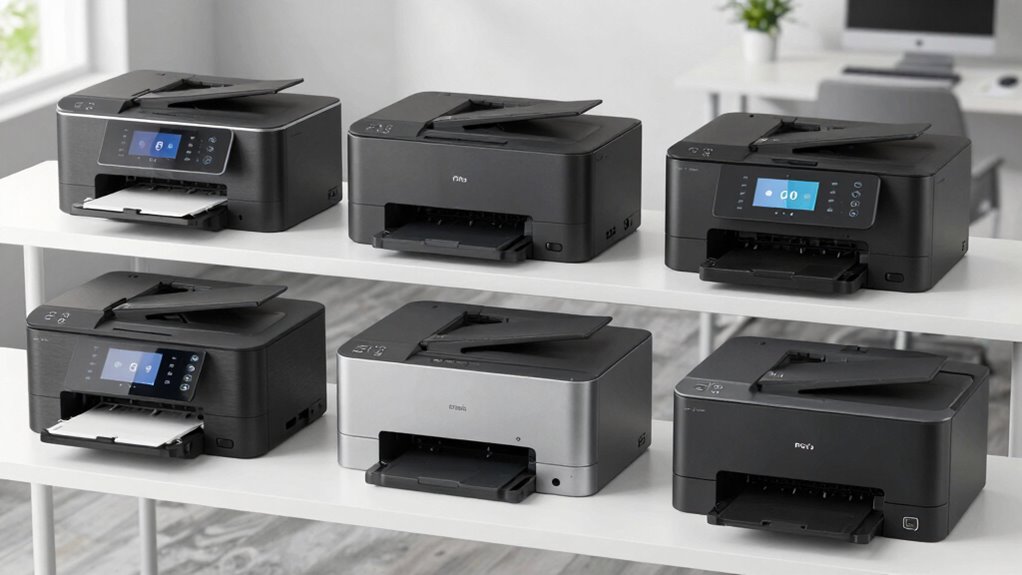
For most small offices, I’d start with the HP OfficeJet Pro 9135, which pairs color inkjet printing with a business-focused set of all-in-one functions. The Brother MFC-L8930CDW is a stronger fit for teams that need a color laser workflow, while the Brother MFC-L2820DW keeps things compact for offices that print mostly in black and white. The main choice is whether your work calls for color versatility, laser printing, or a smaller monochrome setup. Features such as automatic document handling and paper capacity also matter when several people share a printer. Read on for how all six options compare and which one fits your workday.

Get the latest gadgets delivered free with Prime
- Fast, free delivery on millions of items
- Prime Video, Amazon Music and more included
- Member-only deals all year
Complete the kit



Key Takeaways
- The HP OfficeJet Pro 9135 is the most balanced color pick here for a small office that wants inkjet flexibility and a broad all-in-one workflow.
- The Brother MFC-L8930CDW is the business-focused color laser choice, aimed at shared workloads where laser printing and office capacity matter.
- The HP OfficeJet Pro 9125 and 9135 fill similar roles; compare their included workflow features and choose based on what your office will use.
- The Brother MFC-L3720CDW offers color laser functions in a more modest office package than the MFC-L8930CDW.
- The MFC-L2820DW makes the clearest case for monochrome work: skip color capability if black-and-white documents are all the business needs.



More Details on Our Top Picks
HP OfficeJet Pro 9125 Wireless All-in-One Color Inkjet Printer
The HP OfficeJet Pro 9125 is a practical fit for a small business that needs color, faxing, and routine document handling in one wireless machine. Its automatic two-sided printing and scanning, ADF, and 250-sheet tray help cut down on hands-on work when processing forms or multi-page reports. It is less suited to heavier shared workloads than the HP OfficeJet Pro 9135, which adds a second tray, faster listed speeds, and a single-pass duplex feeder. Against the laser models here, the 9125 offers inkjet printing but lacks supplied data on laser-style output speeds. Its main tradeoff is the HP cartridge restriction; the Instant Ink trial also becomes a paid plan unless cancelled. I’d choose it for a modest workload, not a team that regularly handles large batches.
Pros:- Prints, scans, copies, and faxes in one machine
- Automatic duplex printing and scanning reduce manual page handling
- 250-sheet tray and ADF support everyday office documents
- Dual-band Wi-Fi and HP app support enable wireless workflows
Cons:- Cartridges must use original HP chips or circuitry
- Instant Ink becomes a paid subscription after the trial unless cancelled
- One 250-sheet input tray offers less capacity than the HP OfficeJet Pro 9135
Best for: Small offices that need faxing, color documents, and automatic two-sided scanning without the higher paper capacity of the 9135
Not ideal for: Teams that print large batches or want freedom to use cartridges without original HP chips or circuitry
Our verdict“Choose the 9125 for a small office that wants color, fax, and duplex document handling in a capable everyday inkjet.”
HP OfficeJet Pro 9135 Wireless All-in-One Color Inkjet Printer (C2WM0A)
For a small team that shares its printer, the HP OfficeJet Pro 9135 earns its place with two 250-sheet trays and a single-pass duplex ADF that scans both sides of a page in one pass. That combination reduces tray refills and speeds up handling of double-sided paperwork. It also lists faster print speeds than the HP OfficeJet Pro 9125 and has a larger 4.3-inch touchscreen, making frequent control-panel tasks easier. The Brother MFC-L8930CDW is a stronger fit for teams prioritizing laser output and fast duplex scanning, while the 9135 includes faxing and an inkjet setup. Its drawbacks are tied to HP’s ecosystem: it accepts only cartridges with original HP chips or circuitry, and the Instant Ink trial requires a paid subscription to continue. Some formatting tools also depend on the app and AI features.
Pros:- 500-sheet capacity across two input trays reduces frequent refills
- Single-pass duplex ADF scans both sides of a document in one pass
- Prints, scans, copies, and faxes, with listed speeds up to 25 ppm black and 20 ppm color
- 4.3-inch touchscreen, dual-band Wi-Fi, and HP app support
Cons:- Accepts only cartridges with original HP chips or circuitry
- Instant Ink requires a paid subscription after the three-month trial unless cancelled
- Some formatting features depend on the HP app and AI tools
Best for: Small offices with several users, frequent double-sided scanning, and enough print volume to benefit from two paper trays
Not ideal for: Businesses that prefer laser printing, avoid subscription ink programs, or need to use third-party cartridges
Our verdict“Pick the 9135 if your office needs higher paper capacity and frequent duplex scanning in a wireless color all-in-one.”
Brother MFC-L8930CDW Business Color Laser All-in-One Printer
The Brother MFC-L8930CDW suits a busy small office where fast output and document capture matter more than faxing or a simple setup. Its listed 33 ppm print and copy speed, 80-page ADF, and duplex scanning up to 104 ipm make it the most workflow-focused option in this group. The legal-size glass also accommodates larger originals, while a 7-inch touchscreen, Ethernet, Wi-Fi, and NFC authentication support shared office use. Compared with the HP Color LaserJet Pro MFP 3301sdw, it offers a larger ADF and more advanced scanning detail; the HP is a simpler print, scan, and copy choice. The Brother does not list faxing among its functions, unlike the HP OfficeJet models and the Brother MFC-L3720CDW. Included color toner yields are lower than black, and the best listed replacement yields require high-yield cartridges.
Pros:- Listed print and copy speeds reach 33 ppm
- 80-page ADF and duplex scanning up to 104 ipm support large document batches
- Legal-size scanner glass handles larger originals
- Dual-band Wi-Fi, Gigabit Ethernet, a 7-inch touchscreen, and NFC authentication
Cons:- Faxing is not listed among its functions
- Included color toner yield is lower than the black toner yield
- Lowest listed replacement toner yields require high-yield cartridges
Best for: Small teams that scan large or double-sided document batches and need fast color laser printing with wired or wireless networking
Not ideal for: Businesses that require faxing, want a simple printer setup, or have only occasional basic print needs
Our verdict“Choose the MFC-L8930CDW for fast, scan-heavy office workflows when faxing is not part of the job.”
HP Color LaserJet Pro MFP 3301sdw Wireless All-in-One Color Laser Printer
The HP Color LaserJet Pro MFP 3301sdw is a straightforward match for a small team that wants color laser printing, scanning, and copying without a long list of workflow extras. Its 26 ppm listed speed in black or color, automatic duplex printing, ADF, and 250-sheet tray cover common office jobs with less manual page turning. Compared with the Brother MFC-L8930CDW, it gives up the larger 80-page feeder, high-speed duplex scanning, and faxing, so it is a less capable choice for document-heavy offices. The Brother MFC-L3720CDW includes faxing and a 50-sheet ADF, making it a better fit if those functions are needed. The HP’s limited function set can keep routine use simple, but the cartridge policy is a material constraint: it requires original HP 218A or 218X cartridges and blocks supplies without HP chips or circuitry.
Pros:- Listed speed reaches 26 ppm in both black and color
- Automatic duplex printing reduces manual page turning
- ADF and 250-sheet input tray support everyday office document work
- Wireless color laser printing, scanning, and copying
Cons:- Does not list faxing as a function
- ADF capacity and scanning speed are not specified in the supplied product data
- Requires original HP 218A or 218X cartridges with HP chips or circuitry
Best for: Small teams that mainly print color business documents and need occasional scanning and copying
Not ideal for: Offices that need faxing, large-batch scanning, or freedom to use cartridges without HP chips or circuitry
Our verdict“Pick the 3301sdw if your team wants a simple color laser printer with scanning and copying but does not need fax or advanced batch scanning.”
Brother MFC-L3720CDW Wireless Color Laser All-in-One Printer with Scanner, Copier, Fax, Auto Duplex, and 250-Sheet Capacity
The Brother MFC-L3720CDW makes sense for a small business that wants color laser printing and faxing alongside practical scanning tools. It includes a 50-sheet ADF, automatic duplex printing, and a 250-sheet tray, while its 3.5-inch touchscreen offers 48 customizable shortcuts for repeat tasks. The dual-band wireless connection, Wi-Fi Direct, USB, and listed cloud services give a small team several ways to send or retrieve documents. Compared with the HP Color LaserJet Pro MFP 3301sdw, this Brother adds faxing and provides a stated ADF capacity; the HP lists a faster 26 ppm top speed, while the Brother lists up to 19 ppm. It is less built for heavy batch work than the MFC-L8930CDW, whose speed and duplex scanning are much higher. Toner costs can add up without a subscription, and the listed top speed may depend on settings.
Pros:- Prints, scans, copies, and faxes
- 50-sheet ADF and automatic duplex printing support routine paperwork
- 3.5-inch touchscreen includes 48 customizable shortcuts
- Dual-band Wi-Fi, Wi-Fi Direct, USB 2.0, and listed cloud service integration
Cons:- Listed print speed of up to 19 ppm is lower than the HP Color LaserJet Pro MFP 3301sdw
- Color laser toner can have high running costs without a subscription
- Some features may require changing default settings to reach listed speeds
Best for: Small offices that need faxing, color laser output, and customizable shortcuts for recurring print and scan tasks
Not ideal for: Teams that regularly print large volumes or scan big two-sided batches and need the fastest listed throughput
Our verdict“Choose the MFC-L3720CDW if your small office needs faxing and flexible everyday workflows more than maximum print speed.”
Brother MFC-L2820DW Wireless Compact Monochrome All-in-One Laser Printer with Copy, Scan, Fax, and Duplex Printing
The Brother MFC-L2820DW suits a small office that handles forms, invoices, and other black-and-white documents. Its 36 ppm print speed, 250-sheet tray, and 50-page automatic document feeder help keep routine batches moving, while print, copy, scan, and fax cover common office tasks in one compact machine. Compared with the color-capable Brother MFC-L3720CDW, this model gives up color output in exchange for a focused monochrome setup; it also has fewer color-laser capabilities than the HP Color LaserJet Pro MFP 3301sdw. Automatic duplexing can reduce paper use, and Ethernet gives an office a wired network option alongside dual-band Wi-Fi and USB. The tradeoffs are meaningful: it cannot produce color documents, and toner remains an ongoing supply cost. Its small-office fit is strongest when dependable black-and-white work matters more than color flexibility.
Pros:- Prints up to 36 pages per minute for brisk black-and-white document work.
- 50-page automatic document feeder handles multi-page scan and copy jobs.
- 250-sheet paper tray and automatic duplex printing support routine office batches.
- Dual-band Wi-Fi, Ethernet, and USB provide flexible connection choices.
Cons:- Monochrome printing cannot handle color reports, graphics, or client materials.
- Toner is an ongoing supply expense.
- The 1-year limited warranty is relatively short for a business printer.
Best for: Small offices, consultants, and service businesses that regularly print black-and-white paperwork and need faxing, scanning, and copying in a compact footprint.
Not ideal for: Businesses that send color proposals, marketing materials, or charts to clients, or teams seeking a color laser all-in-one such as the Brother MFC-L3720CDW.
- Print technology:Monochrome laser
- Functions:Print, copy, scan, fax
- Print speed:Up to 36 ppm
- Paper capacity:250-sheet tray
- Automatic document feeder:50 pages
- Duplex printing:Automatic
- Connectivity:Dual-band Wi-Fi, Ethernet, USB 2.0
- Touchscreen:2.7 inches
- Warranty:1-year limited
Our verdict“Choose the MFC-L2820DW if your small business prioritizes compact, fast black-and-white printing with fax and scanning over color output.”

How We Picked
I ranked these printers by how well their print technology, all-in-one functions, paper handling, and office workflow suit a small business. Color capability matters for client materials and charts, while monochrome laser printing can be a better fit for text-heavy offices that rarely need color. I also weighed the practical difference between a compact personal-office machine and a model intended to serve a busier shared workspace.
The ranking favors adaptable office use, then separates models by their strongest fit. The HP OfficeJet Pro 9135 leads as a balanced color option; the Brother MFC-L8930CDW follows for businesses prioritizing a color laser workflow. The more focused picks rank lower for broad use, but may be the better choice when a buyer values simpler needs, a smaller footprint, or a different balance of color and laser capability.
Factors to Consider When Choosing All In One Printer For Small Business
Before choosing a model, I’d map the printer to the work your office actually sends through it. The right fit depends on document mix, who shares the machine, and how much hands-on paper management your staff can tolerate.
Match the print technology to your documents
Start by looking at what you print in a typical week: mostly contracts and invoices, or also color charts, menus, and client handouts? A color-capable printer gives you flexibility, but a business that rarely prints color may get more from a monochrome laser model and avoid paying for a capability it seldom uses. Inkjet and laser also differ in how they suit your workflow, so consider whether the printer will sit idle between jobs or handle frequent batches. A common mistake is choosing based on one occasional print task instead of the work that repeats every day. If color is essential, check that the output quality meets your needs before focusing on speed or capacity. If it is not, put those needs first.
Count the people and jobs sharing the printer
A printer for one home office has a different job from one used by a team of six. Shared use means more queued jobs, more paper replenishment, and greater value from features that reduce interruptions. Think about whether employees need to print from phones and laptops, scan documents to common destinations, or send faxes from the same device. A feature that sounds useful on a spec sheet can go unused if it does not match the way your staff handles documents. Ask the people who will use the printer which steps currently slow them down. Then prioritize functions that remove those specific steps.
Check document handling before buying
Scanning and copying can take more staff time than printing, especially when paperwork arrives in batches. If your business regularly digitizes multi-page forms, look for an automatic document feeder and check how it handles the pages and sides your workflow requires. Automatic duplex printing saves paper on longer documents, but duplex scanning is a separate capability and should not be assumed. Offices that scan only the occasional receipt may have little reason to pay extra for advanced document handling. Consider the whole route from paper intake to a saved or shared file, not just whether the printer has a scanner. That helps avoid buying an all-in-one that still leaves manual steps in your busiest process.
Size paper capacity for real workdays
Paper capacity affects how often someone has to stop and refill the machine. Estimate how many pages your team prints between routine check-ins, then allow room for busy periods rather than sizing for an unusually quiet week. A larger tray can be valuable in a shared office, but it takes space and does not remove the need to keep supplies available. Also check whether the printer supports the paper sizes and types your business uses, such as envelopes or heavier stock. One common misstep is counting the main tray while overlooking how specialty media must be loaded. Match capacity to the documents you produce and the space you can spare.
Plan for supplies and upkeep
The purchase decision should include the effort of keeping the printer ready, not just the device’s feature list. Compare the supply types each model uses, their availability, and whether your office can store replacements without hassle. If a printer handles a high volume, a supply interruption can cost more staff time than expected. Think about who will troubleshoot connection issues, replace consumables, and keep the device updated. A simpler model may suit a very small team that wants fewer features to manage, while a shared office may benefit from more capable document tools. Choose a maintenance routine your business can realistically follow.
Decide when a larger office model is worth it
Paying for a more office-oriented printer can make sense when multiple people depend on it or when document handling is a regular bottleneck. The benefit is not simply having more features; it is reducing interruptions and manual work across repeated jobs. For occasional printing, those capabilities may sit idle while taking up space and adding complexity. Consider the cost of staff time spent reloading paper, feeding pages one at a time, or moving documents between devices. If those tasks happen often, stronger capacity and workflow tools can earn their place. If they do not, a more focused machine may be easier to live with.
Frequently Asked Questions
Should a small business choose inkjet or laser for color printing?
Choose based on your regular jobs and how the printer will be used, rather than color capability alone. The HP OfficeJet Pro models represent the color inkjet side of this lineup, while the Brother MFC-L8930CDW, HP Color LaserJet Pro MFP 3301sdw, and Brother MFC-L3720CDW offer color laser options. A team producing frequent office documents may prefer to compare laser models, while an office that values inkjet flexibility should weigh the OfficeJet options. Check the specific paper handling and workflow features you need on each model. The best match is the one suited to your routine output and staffing, not an assumption that one technology always wins.
Is a monochrome all-in-one enough if my office occasionally needs color?
It can be, if those color jobs are rare and your business has another way to produce them. The Brother MFC-L2820DW is the lineup’s dedicated monochrome option, so it is a focused choice for text-heavy work rather than an all-purpose color solution. Consider how quickly an occasional need could become a regular one, such as adding color charts to client reports. If color materials are part of your normal service, choosing a color model avoids routing those jobs elsewhere. If they are exceptional, a monochrome device may keep the everyday setup simpler.
Do I need an automatic document feeder for a small office?
An automatic document feeder is useful when staff regularly scan or copy multi-page paperwork. It can remove repeated page-by-page handling, which adds up with forms, applications, and signed documents. For a business that only scans a few single pages, the feeder may not change much. Also check whether the feeder supports the scanning workflow you need; an automatic feeder does not necessarily scan both sides automatically. Base the decision on how many multi-page jobs your office processes and who will handle them.
How should I choose between the HP OfficeJet Pro 9125 and 9135?
These two models serve a similar small-office color inkjet role, so compare their exact included features and connectivity against your routine. Identify which all-in-one tasks matter most, such as scanning batches, copying, or sending documents from multiple devices. If one model includes a capability your staff will use regularly, that difference can justify choosing it. If the workflows are effectively the same for your team, avoid treating the model number alone as proof of a meaningful upgrade. Verify the specifications for the versions sold in your region before deciding.
When is a larger color laser all-in-one a better fit than a compact model?
A larger office-oriented model makes more sense when several people share printing and scanning, or when the device handles recurring batches. More capable paper handling and office workflow features can reduce the time spent managing routine jobs. A compact model is often a better fit for a single user or a small workspace where print volume stays modest. Before choosing the larger device, check its footprint and whether its additional functions solve a real problem for your team. If the extra capacity and workflow tools would rarely be used, a smaller or more focused printer may be easier to accommodate.
Conclusion
For a small business that needs a flexible color all-in-one, I’d choose the HP OfficeJet Pro 9135 as best overall. The Brother MFC-L3720CDW is my value-minded color laser pick for offices that want laser capability without centering the choice on the larger MFC-L8930CDW. For a best premium, shared-office fit, look to the Brother MFC-L8930CDW; choose the HP OfficeJet Pro 9125 for a straightforward color inkjet setup after checking the feature differences from the 9135. The HP Color LaserJet Pro MFP 3301sdw suits buyers specifically seeking an HP color laser, while the Brother MFC-L2820DW is best for compact, text-heavy work that does not need color. If your office is new to shared printing, begin with the simplest model that covers its recurring jobs, then move up only when a specific workflow calls for it.
Fall Picks
fall essentials
As an affiliate, we earn on qualifying purchases.