For creators who want smooth motion without giving up image quality, the ASUS TUF Gaming VG27UQ1A is my best overall pick: its 4K resolution and 160Hz refresh rate balance detailed editing with responsive playback. The LG 27GX790B-B is a standout for OLED contrast, while the ASUS ROG XG27ACS adds USB-C convenience to a sharp QHD, 180Hz setup. The main tradeoffs are resolution versus refresh rate, OLED contrast versus burn-in care, and screen size versus desk space. Gaming-focused speed alone does not guarantee accurate color or a good creator workflow. Read on for how all 13 options compare and which fits your work.

Get the latest gadgets delivered free with Prime
- Fast, free delivery on millions of items
- Prime Video, Amazon Music and more included
- Member-only deals all year
Complete the kit



Key Takeaways
- 4K and high refresh can coexist: The ASUS TUF VG27UQ1A pairs 4K detail with 160Hz, making it the most balanced choice here for creators who also value smooth motion.
- OLED serves contrast-sensitive work: The LG 27GX790B-B and ASUS ROG XG27AQDMGR offer OLED panels, but static interface-heavy workflows should account for burn-in care.
- QHD is the lineup’s practical middle ground: Options such as the ASUS TUF VG27AQ3A and ROG XG27ACS combine more workspace than Full HD with refresh rates suited to fluid previews.
- Ultrawide is a workflow choice, not just a size upgrade: The ASUS VG34WQML5A reaches 250Hz, while the VG34VQL1B offers 165Hz; both trade desk width for a broader timeline and side-by-side panels.
- Refresh rate does not replace color or resolution: The Sceptre U325W-UPT provides 4K and 100% sRGB coverage but only 70Hz, so it favors image detail over motion smoothness compared with the other picks.
| ASUS TUF Gaming VG259QM5A 24.5″ Full HD 240Hz G-SYNC Gaming Monitor |  | Best Compact Pick | Screen size: 24.5 inches | Resolution: 1920 × 1080 (Full HD) | Panel: Fast IPS | VIEW ON AMAZON | See Our Full Breakdown |
| ASUS TUF Gaming VG34VQL1B 34-Inch WQHD 165Hz Curved Gaming Monitor |  | Best Ultrawide for Multitasking | Screen size: 34 inches | Resolution: 3440 × 1440 (WQHD) | Curvature: 1500R | VIEW ON AMAZON | See Our Full Breakdown |
| ASUS TUF Gaming VG27UQ1A 27″ 4K 160Hz G-SYNC Gaming Monitor |  | Best for 4K Detail at High Refresh | Screen size: 27 inches | Resolution: 3840 × 2160 (4K UHD) | Panel: Fast IPS | VIEW ON AMAZON | See Our Full Breakdown |
| ASUS TUF Gaming VG279QM5A 27″ 1080p 240Hz Fast IPS G-SYNC Gaming Monitor |  | Best 27-Inch Speed Pick | Screen size: 27 inches | Resolution: 1920 × 1080 (Full HD) | Panel: Fast IPS | VIEW ON AMAZON | See Our Full Breakdown |
| LG 27GX790B-B 27″ UltraGear QHD OLED Gaming Monitor |  | Best Premium OLED Pick | Screen size: 27 inches | Resolution: 3440 × 1440 (QHD, as provided) | Panel: 4th Gen OLED, Primary RGB Tandem | VIEW ON AMAZON | See Our Full Breakdown |
| Samsung 34-Inch Odyssey G5 Ultra-Wide Curved Gaming Monitor |  | Best for Ultrawide Editing and Play | Screen size: 34 inches | Resolution: Ultra-WQHD | Curvature: 1000R | VIEW ON AMAZON | See Our Full Breakdown |
| ASUS TUF Gaming VG259QMRL5A 24.5-Inch Full HD 310Hz Fast IPS Gaming Monitor |  | Best for Competitive Gaming on a Creator Desk | Screen size: 24.5 inches | Resolution: 1920 × 1080 (Full HD) | Panel type: Fast IPS | VIEW ON AMAZON | See Our Full Breakdown |
| ASUS TUF Gaming VG27AQM5A 27-inch QHD 300Hz G-SYNC Gaming Monitor |  | Best High-Refresh QHD Balance | Screen size: 27 inches | Resolution: 2560 × 1440 (QHD) | Panel technology: Fast IPS | VIEW ON AMAZON | See Our Full Breakdown |
| ASUS TUF Gaming VG27AQ3A 27-inch QHD 180Hz G-SYNC Gaming Monitor |  | Best for Everyday Creative Work and Gaming | Screen size: 27 inches | Resolution: 2560 × 1440 (QHD) | Refresh rate: 180Hz | VIEW ON AMAZON | See Our Full Breakdown |
| ASUS ROG XG27AQDMGR 27-inch 1440p 240Hz Glossy OLED HDR Gaming Monitor |  | Best Premium OLED for Creator-Gamers | Screen size: 26.5 inches (27-inch class) | Resolution: 2560 × 1440 (QHD) | Panel type: Glossy WOLED (TrueBlack) | VIEW ON AMAZON | See Our Full Breakdown |
| ASUS TUF Gaming VG34WQML5A 34″ Ultrawide Curved Gaming Monitor (WQHD, 250Hz) |  | Best Ultrawide for Fast-Paced Creative Work | Screen size: 34 inches | Resolution: 3440 x 1440 (WQHD) | Aspect ratio: 21:9 | VIEW ON AMAZON | See Our Full Breakdown |
| Sceptre 32-inch 4K UHD Monitor (U325W-UPT Series), 70Hz, DisplayPort x2, HDMI x2, 100% sRGB, Built-in Speakers, Machine Black |  | Best for 4K Detail and Everyday Creation | Screen size: 32 inches | Resolution: 3840 x 2160 (4K UHD) | Panel type: IPS | VIEW ON AMAZON | See Our Full Breakdown |
| ASUS ROG XG27ACS 27″ 1440p 180Hz USB-C G-SYNC HDR Gaming Monitor | 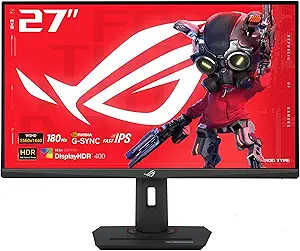 | Best Compact USB-C Pick | Screen size: 27 inches | Resolution: 2560 x 1440 (1440p) | Refresh rate: 180Hz | VIEW ON AMAZON | See Our Full Breakdown |
| high refresh monitor for creator | Screen size | Resolution | Refresh rate | Response time |
|---|---|---|---|---|
| ASUS TUF Gaming VG259QM5A 24.5 | 24.5 inches | 1920 × 1080 (Full HD) | 240Hz | 0.3ms GTG minimum |
| ASUS TUF Gaming VG34VQL1B 34-I | 34 inches | 3440 × 1440 (WQHD) | Up to 165Hz; supports 144Hz | 1ms MPRT |
| ASUS TUF Gaming VG27UQ1A 27" 4 | 27 inches | 3840 × 2160 (4K UHD) | 160Hz | 1ms |
| ASUS TUF Gaming VG279QM5A 27" | 27 inches | 1920 × 1080 (Full HD) | 240Hz | 0.3ms minimum |
| LG 27GX790B-B 27" UltraGear QH | 27 inches | 3440 × 1440 (QHD, as provided) | QHD at 540Hz; HD at 720Hz | 0.02ms GTG |
| Samsung 34-Inch Odyssey G5 Ult | 34 inches | Ultra-WQHD | 165Hz | 1ms (MPRT) |
| ASUS TUF Gaming VG259QMRL5A 24 | 24.5 inches | 1920 × 1080 (Full HD) | Up to 310Hz | 0.3ms GTG (minimum) |
| ASUS TUF Gaming VG27AQM5A 27-i | 27 inches | 2560 × 1440 (QHD) | 300Hz | 0.3ms GTG (minimum) |
| ASUS TUF Gaming VG27AQ3A 27-in | 27 inches | 2560 × 1440 (QHD) | 180Hz | 1ms |
| ASUS ROG XG27AQDMGR 27-inch 14 | 26.5 inches (27-inch class) | 2560 × 1440 (QHD) | 240Hz | 0.03ms GtG |
| ASUS TUF Gaming VG34WQML5A 34" | 34 inches | 3440 x 1440 (WQHD) | 250Hz (overclocked) | — |
| Sceptre 32-inch 4K UHD Monitor | 32 inches | 3840 x 2160 (4K UHD) | Up to 70Hz (overclocked) | — |
| ASUS ROG XG27ACS 27" 1440p 180 | 27 inches | 2560 x 1440 (1440p) | 180Hz | 1ms GTG |
More Details on Our Top Picks
ASUS TUF Gaming VG259QM5A 24.5″ Full HD 240Hz G-SYNC Gaming Monitor
The 24.5-inch Full HD panel keeps the ASUS TUF Gaming VG259QM5A manageable on a crowded desk, while 240Hz refresh and a stated 0.3ms minimum response time put fast motion ahead of fine detail. Its 99% sRGB coverage gives creators a useful color baseline for web graphics and general content work, though it is not a wide-gamut match for the 4K ASUS TUF Gaming VG27UQ1A or the OLED LG 27GX790B-B. FreeSync Premium, G-SYNC compatibility, and ELMB SYNC make this the more gaming-focused compact option. The tradeoff is clear: Full HD offers less workspace and image detail than the larger, higher-resolution picks, and no HDR support is listed. I would choose it for a small setup where speed and familiar sRGB work matter more than pixel density.
Pros:- 240Hz refresh rate supports fluid motion in fast games.
- 99% sRGB coverage suits many web and general content workflows.
- FreeSync Premium, G-SYNC compatibility, and ELMB SYNC support smoother motion.
- Compact 24.5-inch screen fits smaller desks.
Cons:- Full HD provides less editing workspace and detail than the 4K VG27UQ1A.
- No HDR support is specified.
- The listed color coverage is narrower than the LG 27GX790B-B’s DCI-P3 gamut.
Best for: Creators with limited desk space who also play competitive games and mainly produce sRGB web content.
Not ideal for: Photo and video creators who need 4K detail, broad color gamut, or HDR support.
- Screen size:24.5 inches
- Resolution:1920 × 1080 (Full HD)
- Panel:Fast IPS
- Refresh rate:240Hz
- Response time:0.3ms GTG minimum
- Color gamut:99% sRGB
- Adaptive sync:FreeSync Premium, G-SYNC compatible
- Warranty:3 years
Our verdict“Choose this compact ASUS if you want high refresh gaming and sRGB content work on a small desk, and can accept Full HD.”
ASUS TUF Gaming VG34VQL1B 34-Inch WQHD 165Hz Curved Gaming Monitor
The ASUS TUF Gaming VG34VQL1B takes a different route from the smaller, faster ASUS TUF Gaming VG259QM5A: its 34-inch 3440 × 1440 curved screen gives timelines, side-by-side panels, and wide creative canvases room to breathe, while 165Hz refresh keeps motion smoother than a typical productivity display. The 1500R curve wraps the workspace toward the viewer, and the height-adjustable stand helps with positioning. FreeSync Premium and DisplayHDR 400 add gaming and contrast features, but the HDR certification is modest compared with the LG 27GX790B-B’s DisplayHDR True Black 500 OLED presentation. Its 1ms MPRT claim is also a different response-time measure from GTG figures on some rivals. This is the list’s workspace-first ultrawide: choose it for multitasking and broad timelines, not for peak refresh or color-critical HDR finishing.
Pros:- 34-inch ultrawide resolution gives timelines and side-by-side windows more room.
- 165Hz refresh rate adds smoothness for gaming and scrolling.
- Height-adjustable stand supports a more comfortable setup.
- FreeSync Premium and DisplayHDR 400 are included.
Cons:- DisplayHDR 400 is a limited HDR tier compared with the LG 27GX790B-B.
- 165Hz is slower than the 240Hz and higher-refresh options in this batch.
- The 34-inch curved footprint may crowd smaller desks.
Best for: Video editors, streamers, and design users who want a wide workspace for timelines and multiple open panels.
Not ideal for: Creators who prioritize very high refresh rates, OLED contrast, or a compact desk footprint.
- Screen size:34 inches
- Resolution:3440 × 1440 (WQHD)
- Curvature:1500R
- Refresh rate:Up to 165Hz; supports 144Hz
- Response time:1ms MPRT
- HDR:DisplayHDR 400
- Adaptive sync:FreeSync Premium
- Connections:2 × DisplayPort 1.4, 2 × HDMI 2.0
- Stand:Height adjustable
Our verdict“Pick this ASUS when a spacious curved editing canvas matters more than the highest refresh rate or OLED contrast.”
ASUS TUF Gaming VG27UQ1A 27″ 4K 160Hz G-SYNC Gaming Monitor
For creators who want fine image detail without giving up a fast panel, the ASUS TUF Gaming VG27UQ1A pairs 27-inch 4K resolution with a 160Hz Fast IPS display. Compared with the 165Hz ASUS TUF Gaming VG34VQL1B, it gives up ultrawide width but packs substantially more pixels into a standard-size screen, which can help with detailed imagery and dense editing layouts. Its 95% DCI-P3 gamut, HDR support, and 1ms response time make it more creator-oriented than the Full HD VG279QM5A, while G-SYNC compatibility and FreeSync Premium cover variable refresh needs. HDMI 2.1 supports 4K at 120Hz for consoles; reaching 160Hz requires DisplayPort. It does not match the LG 27GX790B-B’s OLED contrast or extreme refresh ceiling, so this is the balanced resolution-and-speed choice rather than the specialist pick for either.
Pros:- 4K resolution provides detailed images on a 27-inch screen.
- 160Hz refresh rate balances creative work with responsive gaming.
- 95% DCI-P3 gamut and HDR support offer broader color capability than the Full HD ASUS picks.
- G-SYNC compatibility and FreeSync Premium support variable refresh.
Cons:- Console use over HDMI 2.1 is limited to 4K at 120Hz; 160Hz requires DisplayPort.
- The 27-inch screen has less timeline width than the 34-inch VG34VQL1B.
- IPS does not provide the OLED contrast of the LG 27GX790B-B.
Best for: Creators who edit detailed 4K imagery or video and want a high refresh rate for PC gaming on the same display.
Not ideal for: Buyers who need an ultrawide timeline, OLED-level contrast, or the highest possible competitive refresh.
- Screen size:27 inches
- Resolution:3840 × 2160 (4K UHD)
- Panel:Fast IPS
- Refresh rate:160Hz
- Response time:1ms
- Color gamut:95% DCI-P3
- HDR:Supported
- Adaptive sync:NVIDIA G-SYNC Compatible, AMD FreeSync Premium
- HDMI:HDMI 2.1; up to 4K at 120Hz
Our verdict“Choose the VG27UQ1A if 4K detail and a genuinely high PC refresh rate matter more than ultrawide space or OLED contrast.”
ASUS TUF Gaming VG279QM5A 27″ 1080p 240Hz Fast IPS G-SYNC Gaming Monitor
The ASUS TUF Gaming VG279QM5A brings 240Hz and 0.3ms minimum response time to a 27-inch Full HD screen, making it the larger sibling to the compact VG259QM5A. That extra screen area may suit creators who prefer a roomier viewing surface, but the same 1920 × 1080 resolution is spread across more space, so fine interface details and close-range image work are less crisp than on the 4K VG27UQ1A. 99% sRGB coverage gives it a practical role in web graphics and general content creation; it is not the wide-gamut choice beside the LG 27GX790B-B. FreeSync Premium, G-SYNC compatibility, and ELMB SYNC support smooth gameplay. The tradeoff is that this is a speed-led gaming screen with no HDR support listed, rather than a detailed or HDR-focused creator display.
Pros:- 240Hz refresh rate and 0.3ms minimum response time target fast motion.
- 27-inch Fast IPS panel provides a larger view than the VG259QM5A.
- 99% sRGB coverage suits common web content workflows.
- FreeSync Premium, G-SYNC compatibility, and ELMB SYNC support smooth motion.
Cons:- Full HD resolution is less sharp at 27 inches than the 4K VG27UQ1A.
- No HDR support is specified.
- Its sRGB coverage is narrower than the LG 27GX790B-B’s DCI-P3 gamut.
Best for: Competitive players who create web graphics or stream content and prefer a 27-inch screen over a compact 24.5-inch model.
Not ideal for: Creators who work close to the screen on detailed images or need HDR and higher pixel density.
- Screen size:27 inches
- Resolution:1920 × 1080 (Full HD)
- Panel:Fast IPS
- Refresh rate:240Hz
- Response time:0.3ms minimum
- Color gamut:99% sRGB
- Adaptive sync:FreeSync Premium, G-SYNC compatible
- Special features:ELMB SYNC, DisplayWidget Center, TUF Gaming A.I.
- Warranty:3 years
Our verdict“Choose this model for a larger 240Hz gaming display that can handle everyday sRGB creation, provided Full HD is enough for your work.”
LG 27GX790B-B 27″ UltraGear QHD OLED Gaming Monitor
The LG 27GX790B-B is the premium specialist in this group: its 4th Gen Primary RGB Tandem OLED pairs near-instant 0.02ms GTG response with a striking QHD 540Hz or HD 720Hz Dual Mode. For creators, the appeal extends beyond speed: up to 99.5% DCI-P3, Delta E ≤ 2, and a stated 1,500,000:1 contrast ratio make it the strongest listed option for rich color and deep blacks. Compared with the IPS ASUS VG27UQ1A, the LG offers OLED contrast and far higher refresh, while the ASUS provides 4K rather than QHD detail. The 720Hz mode drops resolution to HD, so creators will likely favor QHD. Typical brightness is 335 nits, and static interface use brings OLED burn-in risk. This suits ambitious gaming-and-creation setups, not buyers who need 4K or all-day static layouts.
Pros:- OLED contrast and up to 99.5% DCI-P3 coverage support vivid creative work.
- Dual Mode offers QHD at 540Hz or HD at 720Hz.
- 0.02ms GTG response time supports crisp motion.
- DisplayPort 2.1, USB-C, and dual HDMI 2.1 provide modern connectivity.
Cons:- 720Hz mode requires reducing resolution to HD.
- OLED panels carry burn-in risk with prolonged static content.
- QHD has less pixel detail than the 4K ASUS VG27UQ1A.
Best for: Creators who want OLED contrast, broad DCI-P3 coverage, and exceptionally high gaming refresh in one display.
Not ideal for: 4K editors, budget-conscious buyers, or people who keep static toolbars and interface elements on screen for long periods.
- Screen size:27 inches
- Resolution:3440 × 1440 (QHD, as provided)
- Panel:4th Gen OLED, Primary RGB Tandem
- Refresh rate:QHD at 540Hz; HD at 720Hz
- Response time:0.02ms GTG
- Brightness:335 nits typical
- HDR:VESA DisplayHDR True Black 500
- Color:Up to 99.5% DCI-P3 typical; Delta E ≤ 2
- Ports:DisplayPort 2.1, USB-C, 2 × HDMI 2.1
Our verdict“Pick the LG for OLED contrast, wide-gamut creation, and extreme refresh if QHD resolution and OLED care fit your workflow.”
Samsung 34-Inch Odyssey G5 Ultra-Wide Curved Gaming Monitor
The 34-inch Ultra-WQHD screen gives this Odyssey G5 a wider workspace than the 27-inch ASUS TUF VG27AQ3A, which can help creators keep a timeline, tools, and preview visible together. Its 1000R curve wraps that workspace around the viewer, while the 165Hz refresh rate keeps motion smooth during gaming and scrolling. The VA panel and HDR10 support add contrast-focused viewing, though the provided specs do not establish color accuracy for demanding color-critical work. Compared with the ASUS TUF VG34WQML5A, which is listed at 250Hz, this Samsung puts less emphasis on maximum refresh speed. Its 1ms MPRT response time and FreeSync Premium suit mixed gaming and creative use, but missing connectivity and stand-adjustment details make desk setup harder to judge.
Pros:- 34-inch Ultra-WQHD panel offers more horizontal workspace than the 27-inch QHD options here.
- 1000R curvature creates an immersive, wraparound view.
- 165Hz refresh rate and 1ms MPRT support smooth motion.
- FreeSync Premium helps reduce tearing and stutter with compatible systems.
Cons:- Color accuracy and gamut figures are not provided for color-critical creative work.
- Connectivity and stand-adjustment details are unspecified.
- Its 165Hz refresh rate is below the 250Hz ASUS TUF VG34WQML5A.
Best for: Creators who want a single wide screen for editing timelines, multitasking, and smooth gaming, and who prefer a pronounced curve.
Not ideal for: Color-critical editors who need documented color accuracy, or buyers who need confirmed ports and ergonomic stand adjustments.
- Screen size:34 inches
- Resolution:Ultra-WQHD
- Curvature:1000R
- Panel type:VA
- Refresh rate:165Hz
- Response time:1ms (MPRT)
- HDR:HDR10
- Adaptive sync:AMD FreeSync Premium
Our verdict“Choose the Odyssey G5 if you want a curved ultrawide workspace with high refresh for gaming, and look elsewhere if verified color performance is central to your work.”
ASUS TUF Gaming VG259QMRL5A 24.5-Inch Full HD 310Hz Fast IPS Gaming Monitor
The ASUS TUF VG259QMRL5A is the speed-first compact pick: its 310Hz refresh rate and minimum 0.3ms GTG response time favor very fluid motion in fast games. The Fast IPS panel and 99% sRGB coverage give it a more creator-friendly starting point than a basic gaming display, while its height-adjustable stand helps with a comfortable desk setup. Compared with the 27-inch ASUS TUF VG27AQM5A, this model trades QHD detail and screen area for a smaller Full HD image that is easier to drive at very high frame rates. That makes it a practical fit for esports alongside lighter creative work, but fine image detail and expansive timelines suffer against higher-resolution options. DisplayHDR 400 and ELMB Sync add flexibility; the resolution remains its defining compromise.
Pros:- 310Hz maximum refresh rate supports exceptionally fluid motion.
- Fast IPS panel offers a useful balance of speed and viewing flexibility.
- 99% sRGB coverage suits many web and general content tasks.
- Height-adjustable stand and FreeSync Premium with G-SYNC compatibility aid setup and smooth play.
Cons:- Full HD resolution provides less workspace and detail than the QHD ASUS TUF VG27AQM5A.
- The 24.5-inch screen can feel cramped for multi-panel editing.
- DisplayHDR 400 does not replace a dedicated high-dynamic-range reference display.
Best for: Competitive players who also make web graphics, social content, or other sRGB-focused work at a compact desk.
Not ideal for: Photo, video, and design creators who need QHD detail or more room for dense editing interfaces.
- Screen size:24.5 inches
- Resolution:1920 × 1080 (Full HD)
- Panel type:Fast IPS
- Refresh rate:Up to 310Hz
- Response time:0.3ms GTG (minimum)
- Adaptive sync:FreeSync Premium, G-SYNC compatible
- Color gamut:99% sRGB
- HDR:DisplayHDR 400
- Stand:Height adjustable
Our verdict“Pick this ASUS if competitive gaming speed matters most and your creative work fits a compact Full HD screen.”
ASUS TUF Gaming VG27AQM5A 27-inch QHD 300Hz G-SYNC Gaming Monitor
The VG27AQM5A lands between the compact, speed-focused VG259QMRL5A and the more measured 180Hz ASUS TUF VG27AQ3A. Its 27-inch QHD resolution gives creators more room and detail than Full HD, while 300Hz refresh keeps it unusually responsive for a screen that can also handle creative tasks. The stated 95% DCI-P3 coverage is useful for a broader range of color work than sRGB-only coverage, though a gamut figure alone does not establish calibration or color accuracy. Fast IPS, 0.3ms GTG, and ELMB Sync target clear motion; the high refresh rate also asks more of the graphics card at QHD. Built-in speakers are handy for basic audio, but they are no substitute for production monitoring. This is the most balanced high-speed option here if gaming and creation share equal priority.
Pros:- QHD resolution balances workspace and detail at 27 inches.
- 300Hz refresh rate and 0.3ms minimum response time emphasize smooth motion.
- 95% DCI-P3 coverage offers a wider stated gamut than the VG27AQ3A’s 130% sRGB specification.
- ELMB Sync, built-in speakers, and a three-year warranty add practical features.
Cons:- Driving QHD at very high frame rates demands a powerful GPU.
- Gamut coverage alone does not confirm factory calibration or color accuracy.
- The 27-inch panel provides less workspace than the 34-inch ultrawide Samsung Odyssey G5.
Best for: Creators who game competitively and want QHD workspace plus a broad stated DCI-P3 gamut on one 27-inch display.
Not ideal for: Users with modest graphics hardware, or color professionals who need verified calibration and a larger editing canvas.
- Screen size:27 inches
- Resolution:2560 × 1440 (QHD)
- Panel technology:Fast IPS
- Refresh rate:300Hz
- Response time:0.3ms GTG (minimum)
- Color gamut:95% DCI-P3
- Adaptive sync:G-SYNC / ELMB Sync
- Speakers:Built-in
- Warranty:3 years
Our verdict“Choose the VG27AQM5A if you want QHD creative space without giving up an exceptionally high refresh rate.”
ASUS TUF Gaming VG27AQ3A 27-inch QHD 180Hz G-SYNC Gaming Monitor
The ASUS TUF VG27AQ3A offers a more restrained refresh rate than the 300Hz VG27AQM5A, but 180Hz is still smooth for gaming and fast-moving desktop work. Its 27-inch QHD Fast IPS panel provides a sensible balance of sharpness and workspace, while the listed 130% sRGB gamut and HDR-10 support make it a versatile general-purpose screen. Broad sync support—G-SYNC compatibility, FreeSync Premium, AdaptiveSync, and ELMB Sync—helps it accommodate different gaming setups. Compared with the OLED ASUS ROG XG27AQDMGR, this TUF model avoids OLED’s stated burn-in concerns, but its 1000:1 contrast ratio cannot deliver the same deep blacks or TrueBlack HDR presentation. Built-in speakers and an included DisplayPort cable simplify a basic setup. Color gamut is not the same as measured accuracy, so serious grading still calls for calibration.
Pros:- QHD resolution and 27-inch size suit everyday editing and multitasking.
- 180Hz refresh rate is fast for gaming and smooth desktop motion.
- Multiple sync technologies cover a wide range of graphics setups.
- Built-in speakers and included DisplayPort cable make setup more convenient.
Cons:- 1000:1 contrast is limited for dark-scene and HDR-focused work.
- 130% sRGB gamut does not establish color accuracy or calibration.
- Its 180Hz refresh rate is lower than the VG27AQM5A’s 300Hz.
Best for: Generalist creators who want a QHD screen for design, editing, and gaming without moving to OLED.
Not ideal for: HDR-focused video editors or users who need OLED contrast, exceptionally fast refresh, or verified color calibration.
- Screen size:27 inches
- Resolution:2560 × 1440 (QHD)
- Refresh rate:180Hz
- Panel type:Fast IPS
- Response time:1ms
- Color gamut:130% sRGB
- Contrast ratio:1000:1
- HDR support:HDR-10
- Sync technologies:G-SYNC Compatible, FreeSync Premium, AdaptiveSync, ELMB Sync
Our verdict“Choose the VG27AQ3A for a versatile QHD IPS screen when broad compatibility and everyday creative work matter more than OLED contrast or peak refresh.”
ASUS ROG XG27AQDMGR 27-inch 1440p 240Hz Glossy OLED HDR Gaming Monitor
The ROG XG27AQDMGR is the premium image-quality pick: its glossy WOLED panel, 99% DCI-P3 coverage, 10-bit color, and Delta E below 2 point toward richer, more controlled creative imagery than the IPS ASUS TUF VG27AQ3A. At 240Hz with a 0.03ms response time, it also handles fast gaming with minimal stated response delay. VESA DisplayHDR 400 True Black and QHD resolution pair strong contrast with a useful desktop workspace. That combination makes it especially appealing for creators who game and care about visual impact. The tradeoff is OLED upkeep: ASUS includes OLED Care Pro and a three-year warranty with burn-in coverage, but the panel still carries inherent burn-in risk. Its glossy finish can also reflect bright windows and lights, unlike a more forgiving matte workspace.
Pros:- Glossy WOLED and TrueBlack HDR support deep contrast and vivid imagery.
- 99% DCI-P3 coverage, 10-bit color, and Delta E below 2 support color-focused work.
- 240Hz refresh and 0.03ms response time suit fast gaming.
- OLED Care Pro and a three-year warranty with burn-in coverage provide added protection.
Cons:- Glossy coating can reflect windows and room lighting.
- OLED retains some burn-in risk despite care features and warranty coverage.
- At 26.5 inches, it offers less workspace than the 34-inch Samsung Odyssey G5.
Best for: Creators who want OLED contrast, wide-gamut QHD imagery, and high refresh for both visual work and gaming.
Not ideal for: Users who work for long periods with static interface elements, have a bright reflective room, or need an ultrawide canvas.
- Screen size:26.5 inches (27-inch class)
- Resolution:2560 × 1440 (QHD)
- Panel type:Glossy WOLED (TrueBlack)
- Refresh rate:240Hz
- Response time:0.03ms GtG
- HDR certification:VESA DisplayHDR 400 True Black
- Color gamut:99% DCI-P3
- Color depth:10-bit
- Color accuracy:Delta E < 2
Our verdict“Pick the ROG OLED if image contrast and stated color performance matter more than reflections, burn-in concerns, or ultrawide workspace.”
ASUS TUF Gaming VG34WQML5A 34″ Ultrawide Curved Gaming Monitor (WQHD, 250Hz)
The ASUS TUF VG34WQML5A pairs a 34-inch, 21:9 workspace with an overclocked 250Hz refresh rate, making it the most gaming-focused ultrawide in this batch. Extra horizontal room can keep editing panels beside a timeline, while 95% DCI-P3 coverage gives creators a wider color range than the Sceptre U325W-UPT’s 100% sRGB focus. Its 1500R curve suits a centered desk setup, though it can make straight lines feel less natural for precision layout work. The Sceptre trades speed and width for 4K detail and a flatter 16:9 canvas. This ASUS also has DisplayHDR 400 rather than high-end HDR performance, and reaching 250Hz requires overclocking. I’d choose it for creators who split their time between ultrawide editing and high-refresh gaming.
Pros:- 34-inch 21:9 screen leaves room for editing panels and timelines
- 95% DCI-P3 coverage supports a wider color range than an sRGB-only display
- Up to 250Hz refresh rate and FreeSync Premium Pro support fluid gaming
- 1500R curve and matte finish suit an immersive, low-glare desk setup
Cons:- 250Hz requires overclocking
- DisplayHDR 400 offers limited HDR capability
- The curved ultrawide shape may be less suitable for straight-line design work
Best for: Creators who want a wide editing workspace, broad DCI-P3 coverage, and very high refresh for competitive gaming.
Not ideal for: Color-critical professionals who need dependable high-end HDR or a flat 4K canvas for precise layout work.
- Screen size:34 inches
- Resolution:3440 x 1440 (WQHD)
- Aspect ratio:21:9
- Curvature:1500R
- Refresh rate:250Hz (overclocked)
- Color gamut:95% DCI-P3
- HDR:DisplayHDR 400, HDR-10
- Adaptive sync:AMD FreeSync Premium Pro
Our verdict“Choose this ASUS if you want a wide creator workspace with gaming-first speed and can accept modest HDR performance.”
Sceptre 32-inch 4K UHD Monitor (U325W-UPT Series), 70Hz, DisplayPort x2, HDMI x2, 100% sRGB, Built-in Speakers, Machine Black
The Sceptre U325W-UPT is the resolution-first choice here: its 32-inch 4K IPS panel gives photo editors and designers more fine detail than the 1440p ASUS ROG XG27ACS. Its 100% sRGB coverage fits web graphics and general design, while two DisplayPort and two HDMI inputs make it easier to keep several devices connected. Built-in speakers and VESA mounting can also simplify a work setup. The tradeoff is speed: its refresh rate reaches just 70Hz through overclocking, far below the XG27ACS’s 180Hz and the VG34WQML5A’s 250Hz. That makes it a weaker fit for fast gameplay or motion-focused work. Its listed 1,000,000:1 contrast ratio does not by itself establish HDR performance, and no HDR support is specified. I’d pick it for detailed, mostly static creative work over high-refresh gaming.
Pros:- 32-inch 4K resolution provides fine detail and generous workspace
- IPS panel and 100% sRGB coverage suit everyday design and web content
- Two DisplayPort and two HDMI inputs accommodate several connected devices
- Built-in speakers and 100mm x 100mm VESA mounting add setup flexibility
Cons:- Up to 70Hz refresh is modest and requires overclocking
- No HDR support is specified in the product data
- At 16.9 pounds, it may be cumbersome for frequent monitor repositioning
Best for: Photo editors, designers, and home-office creators who prioritize a large 4K workspace, sRGB coverage, and multiple connected devices.
Not ideal for: Competitive gamers, motion-focused creators, or colorists seeking wide-gamut coverage and specified HDR support.
- Screen size:32 inches
- Resolution:3840 x 2160 (4K UHD)
- Panel type:IPS
- Refresh rate:Up to 70Hz (overclocked)
- Color gamut:100% sRGB
- Brightness:350 nits
- Inputs:2 x DisplayPort, 2 x HDMI
- VESA mount:100mm x 100mm
Our verdict“Choose the Sceptre for large-screen 4K and sRGB creative work when refresh rate matters less than detail.”
ASUS ROG XG27ACS 27″ 1440p 180Hz USB-C G-SYNC HDR Gaming Monitor
The ASUS ROG XG27ACS offers a practical middle ground for creators who want a high-refresh screen without a large ultrawide footprint. Its 27-inch 1440p Fast IPS panel runs at 180Hz, giving motion more headroom than the 70Hz Sceptre U325W-UPT while retaining a standard aspect ratio for familiar editing and layout work. The USB-C video connection and hub can reduce cable clutter for a compatible laptop, a useful advantage over the VG34WQML5A, whose product data lists no USB-C. The compromise is resolution: the Sceptre’s 4K panel shows finer detail, and this ASUS’s HDR support has no performance tier specified. Its 1440p canvas also offers less room than the 34-inch ultrawide. I’d choose it for a compact creator desk that needs responsive gaming and convenient laptop connectivity.
Pros:- 180Hz refresh rate supports smooth motion for gaming and scrolling
- Fast IPS panel with 1ms GTG response time
- USB-C video and hub connectivity can simplify a compatible laptop setup
- G-SYNC compatibility and ELMB SYNC support smoother gameplay
Cons:- 1440p provides less fine detail than the Sceptre’s 4K screen
- 27-inch 16:9 workspace is smaller than the VG34WQML5A ultrawide
- HDR is listed without a performance certification or tier
Best for: Laptop-based creators who want a compact 27-inch display, USB-C hub connectivity, and smooth gaming between editing sessions.
Not ideal for: Creators who need a 4K canvas, ultrawide timeline space, or clearly specified high-performance HDR.
- Screen size:27 inches
- Resolution:2560 x 1440 (1440p)
- Refresh rate:180Hz
- Panel technology:Fast IPS
- Response time:1ms GTG
- Adaptive sync:G-SYNC compatible
- USB-C:DisplayPort video transmission and USB hub
- HDR:Supported
Our verdict“Choose the XG27ACS if a compact 1440p creator display with USB-C and 180Hz speed fits your workflow.”

How We Picked
I ranked these monitors by how well their stated features support a creator’s daily work: resolution and screen area for editing, refresh rate for fluid motion, panel type for contrast, and practical extras such as USB-C. A high refresh rate matters for responsive interaction and smooth previews, but it does not establish color accuracy. I gave more weight to balanced combinations than to the largest refresh number alone, and considered whether the display’s format suits common desk and timeline workflows.
That logic puts the ASUS TUF VG27UQ1A first for its 4K resolution and 160Hz balance. OLED models earn strong positions for contrast-sensitive work, with burn-in management as a real tradeoff. QHD models make sense for buyers who want a middle ground, while Full HD high-refresh screens rank lower for detailed creative tasks. The Sceptre’s 4K resolution and stated sRGB coverage make it a distinct option, but its 70Hz refresh rate puts it behind for buyers specifically seeking high-refresh performance.
| high refresh monitor for creator | HDR |
|---|---|
| ASUS TUF Gaming VG259QM5A 24.5 | — |
| ASUS TUF Gaming VG34VQL1B 34-I | DisplayHDR 400 |
| ASUS TUF Gaming VG27UQ1A 27" 4 | Supported |
| ASUS TUF Gaming VG279QM5A 27" | — |
| LG 27GX790B-B 27" UltraGear QH | VESA DisplayHDR True Black 500 |
| Samsung 34-Inch Odyssey G5 Ult | HDR10 |
| ASUS TUF Gaming VG259QMRL5A 24 | DisplayHDR 400 |
| ASUS TUF Gaming VG27AQM5A 27-i | — |
| ASUS TUF Gaming VG27AQ3A 27-in | — |
| ASUS ROG XG27AQDMGR 27-inch 14 | — |
| ASUS TUF Gaming VG34WQML5A 34" | DisplayHDR 400, HDR-10 |
| Sceptre 32-inch 4K UHD Monitor | — |
| ASUS ROG XG27ACS 27" 1440p 180 | Supported |
Factors to Consider When Choosing High Refresh Monitor For Creators
I’d start with the work you do most often, then check whether the monitor’s resolution, panel, and connections fit that workflow. These broader tradeoffs can matter more over time than a single headline refresh-rate figure.
Match resolution to your editing tasks
Resolution affects how much detail you can inspect and how much interface space you have at a comfortable scaling level. A 4K screen can make fine image details easier to review, though small interface elements may call for operating-system scaling. QHD is a useful middle ground when you want more workspace than Full HD without making 4K the defining requirement. A common mistake is assuming that higher resolution automatically means better color or a more accurate image. Check color coverage and calibration information separately, especially if your work must match a delivery standard. Also account for your computer’s ability to drive the chosen resolution at the refresh rate you plan to use.
Choose a refresh rate for the motion you actually review
High refresh rates make pointer movement, scrolling, and motion previews feel smoother, which can help when reviewing animation or fast footage. They do not improve the underlying sharpness of a still image or guarantee a more faithful export. For still photography and layout work, resolution and color handling may deserve more of your attention. Before paying for an especially high refresh ceiling, check whether your computer and connection can output it at your target resolution. Some workflows also involve reviewing footage at a fixed playback frame rate, so the monitor’s maximum figure may matter less than smooth, consistent playback. Choose the rate that supports your daily interaction rather than treating the highest number as a quality score.
Weigh OLED contrast against static interface use
OLED can produce deep blacks and strong contrast, useful for viewing dark scenes and judging tonal separation. Its tradeoff deserves extra thought if your work keeps the same menus, panels, or timeline visible for long sessions. Follow the manufacturer’s care guidance and check warranty terms for coverage related to image retention or burn-in. LCD options avoid the same OLED-specific concern, though their black levels and contrast may differ. A creator who edits varied footage and uses screen-saving features may see the OLED tradeoff differently from someone who leaves a fixed interface on screen all day. Decide based on your actual screen habits, not panel labels alone.
Treat ultrawide as a desk and workflow decision
An ultrawide can keep a timeline, preview, and tool panels visible together, reducing the need to rearrange windows. That layout only helps if your desk can accommodate the width and you sit at a distance where the full panel remains comfortable to scan. Check the display’s curve, stand footprint, and available adjustment before committing to the format. A very wide canvas can also be less convenient when sharing a screen or working with layouts designed around standard aspect ratios. Compare usable workspace with the option of two separate displays, including how you want windows and color profiles managed. Pick ultrawide for the continuous workspace it gives you, not simply for a larger diagonal measurement.
Check connections, ergonomics, and computer support
USB-C can simplify a desk when it carries the signals and power your laptop needs, but the port label alone does not confirm those capabilities. Verify supported video modes, charging wattage, and whether a hub is built in before relying on a single-cable setup. Check stand adjustment or VESA compatibility if you need a particular viewing height; long creative sessions make fit a practical concern. Then confirm your graphics hardware and cables support the resolution and refresh combination you plan to use. A monitor may offer a high maximum refresh rate that your current computer cannot reach at full resolution. These checks can prevent paying for specifications your setup cannot use.
Frequently Asked Questions
Should I choose 4K at 160Hz or QHD at 300Hz for creative work?
I’d choose 4K at 160Hz when fine detail, image review, and a larger pixel workspace lead your day. QHD at 300Hz makes more sense when responsive motion is a priority and your computer can sustain the higher refresh rate. The comparison here shows that a bigger refresh figure does not automatically make a monitor better for editing. Also check your software scaling preferences and graphics hardware before deciding. If you split time between design and fast motion work, weigh which limitation you notice most in your current setup.
Is an OLED monitor a good choice for editing with static tool panels?
It can be, particularly if contrast and dark-scene viewing matter to your work, but persistent interface elements deserve attention. Review the manufacturer’s burn-in guidance and warranty terms, and use available screen-care features. Varying content and hiding panels when they are not needed may help manage static display time. If your monitor shows the same layout for long stretches, an LCD option may be a simpler fit. Panel type should follow your usage pattern as much as your image-quality preferences.
Does a high refresh rate improve color accuracy?
No: refresh rate describes how often the display can update, not how faithfully it reproduces color. For color-critical work, look for relevant gamut coverage, calibration options, and dependable color management. The Sceptre listing, for example, states 100% sRGB coverage, while its 70Hz refresh rate serves a different need from the faster gaming-oriented models. Treat these as separate checks rather than assuming one specification implies the other. If deliverables must match a particular color space, verify that the display supports your target and calibrate it as your workflow requires.
Will my laptop run a 4K monitor at its maximum refresh rate?
That depends on the laptop’s graphics hardware, port, cable, and the monitor’s supported input modes. A connection that carries a 4K signal may not support the refresh rate you want at that resolution. Check the computer and monitor specifications together, including any limits imposed by adapters or docks. If your laptop cannot drive the maximum mode, the display may still work at a lower refresh rate. Confirm this before buying if smooth high-resolution playback is central to your workflow.
Is an ultrawide better than two monitors for editing?
An ultrawide gives you one continuous canvas for a timeline, preview, and tools, which some editing layouts suit well. Two displays can offer more flexibility for separating a full-screen preview from controls, but add another panel, connection, and setup to manage. Desk width, viewing distance, and the aspect ratios used by your projects all affect the choice. Curved ultrawide models in this lineup span 165Hz to 250Hz, but the right fit still depends on workspace and software layout. Try mapping your usual windows to each format before deciding.
Conclusion
For the best overall balance, I’d choose the ASUS TUF VG27UQ1A for 4K detail and 160Hz motion. The best value in features is the ASUS TUF VG27AQ3A, a QHD 180Hz option for creators who do not need 4K or OLED. For a premium contrast-focused setup, consider the LG 27GX790B-B, while keeping OLED care in mind. Beginners who want a capable, straightforward QHD starting point can look to the ASUS ROG XG27ACS, especially if USB-C suits their desk. For a broad timeline, the ASUS VG34WQML5A is the specific-workflow pick; for detailed sRGB work where refresh matters less, the Sceptre’s 4K panel is the alternative. Choose by the constraint you want to solve first: detail, motion, contrast, connectivity, or workspace.