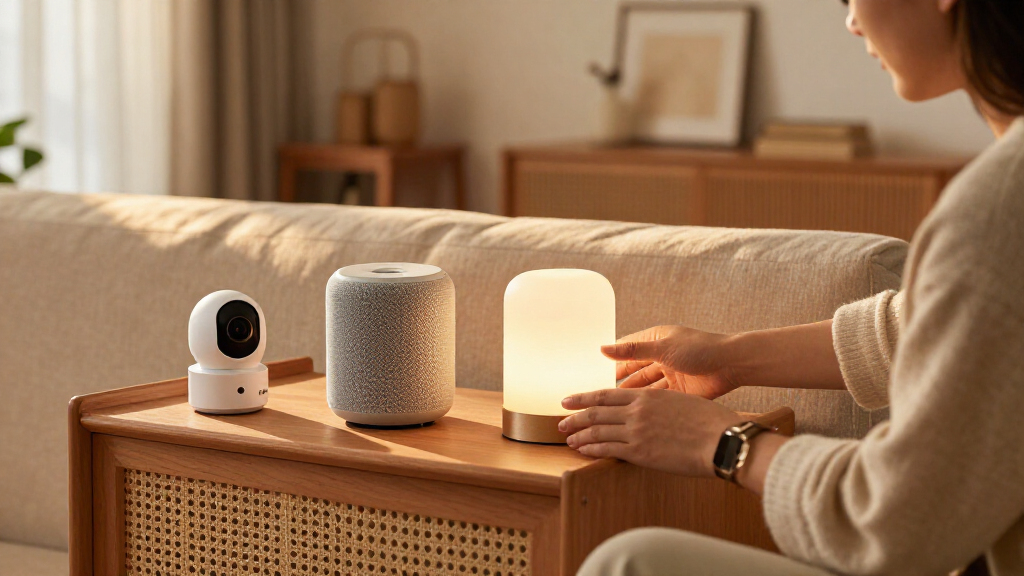

Choosing a smart home bundle is a decision about how much you want to commit upfront. A basic starter bundle typically combines a hub or compatible speaker with a small number of lights, plugs, or sensors. A premium ecosystem bundle usually adds more devices, a more capable controller, and tighter links among products from the same platform. Exact contents vary by brand and retailer, so compare the included models and required subscriptions before buying.

Get the latest gadgets delivered free with Prime
- Fast, free delivery on millions of items
- Prime Video, Amazon Music and more included
- Member-only deals all year

Amazon Echo Hub Smart Home Starter Kit with Smart Plug and Four Smart Bulbs
- ✔ Included devices: Echo Hub, Amazon Smart Plug, four Amazon Basics smart bulbs
- ✔ Display: 8-inch touchscreen, 1280 × 800
- ✔ Connectivity: Dual-band Wi-Fi, Ethernet, Bluetooth

Ring Alarm 14-Piece Home Security Kit
- ✔ Kit contents: Base station, 2 keypads, 8 contact sensors, 2 motion detectors, range extender
- ✔ Connectivity: Ethernet, Wi-Fi, Z-Wave, Bluetooth for setup
- ✔ Cellular backup: Requires a subscription
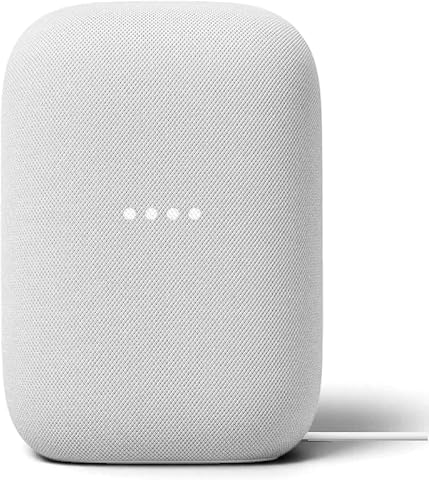
Google Nest Audio Smart Speakers, 3-Pack
- ✔ Quantity: 3 speakers
- ✔ Connectivity: Wi-Fi, Bluetooth 5.0
- ✔ Voice assistant: Google Assistant
The central tradeoff is lower initial cost and flexibility versus broader coverage and a more unified setup. The basic bundle suits someone who wants to automate one room, try a platform, or avoid paying for devices they may never use. The premium bundle makes more sense for someone ready to automate several rooms and who values coordinated controls and compatible accessories. More devices alone do not make a bundle better: the useful question is whether the included equipment covers needs you already have.
At a Glance
| Criteria | Basic smart home starter bundle | Premium smart home ecosystem bundle | Winner |
|---|---|---|---|
| Upfront cost | Usually lower; fewer devices keep the initial commitment modest. | Usually higher; buyers pay for more hardware and ecosystem features. | A |
| Included coverage | A small selection suited to one room or a first experiment. | More devices can cover multiple rooms or use cases from the start. | B |
| Compatibility and expansion | Can be flexible, but depends on the hub, standards, and supported products. | Often strongest within its own ecosystem; cross-platform support still varies. | Depends |
| Setup and daily control | Fewer devices mean a simpler first setup, though products may need separate apps. | More coordinated controls may simplify daily use, but setup involves more devices. | Depends |
| Automation depth | Covers basic schedules and device actions when supported by the platform. | May support richer routines and linked actions, depending on the platform. | B |
| Privacy and security | Depends on the specific devices, account protections, and update policy. | More connected equipment increases the need to review updates and account settings. | Depends |
| Long-term value | Good if the included devices solve a real need and avoid unused extras. | Worth the premium when the added devices and integration will be used. | Depends |
Amazon Echo Hub Smart Home Starter Kit with Smart Plug and Four Smart Bulbs
The Echo Hub kit is the most varied bundle in this group: it combines an 8-inch touchscreen, an Amazon Smart Plug, and four smart bulbs. That gives us a visible place to control compatible devices plus a few lights and one plug to connect right away. Compared with the Ring Alarm kit, it is designed for broader household control rather than securing doors and windows; compared with the Nest Audio three-pack, it brings lighting and a screen instead of making sound the center of the setup.Its support for Zigbee, Thread, Matter, Bluetooth, and Wi-Fi gives the Hub flexibility when we add compatible devices, although a list of standards does not guarantee that every product or feature will work together. Matter support is described as controller-only, so we should check the specific devices we plan to connect. The kit also needs an internet connection for setup. It is intended to stay in one place, and while wall hardware is included, a tabletop stand is sold separately.For buyers who want to start with a central interface and basic lighting, this package has the clearest range of functions per bundle. Ring provides more dedicated equipment for alarms, and Nest provides more speakers for room-to-room audio. The Echo Hub is the stronger all-purpose starting point only if its screen-based approach fits our home and we are ready to confirm compatibility before expanding.
Pros:
- Includes an Echo Hub, smart plug, and four smart bulbs
- 8-inch touchscreen provides a dedicated control surface
- Works with compatible Zigbee, Thread, Matter, Bluetooth, and Wi-Fi devices
- Wall mount and power adapter are included
Cons:
- Internet access is required for setup
- A separate stand is needed for tabletop placement
- Matter support is controller-only, and compatibility varies by device
Best for: Households starting a compatible smart home who want a touchscreen controller, a smart plug, and several bulbs in one kit.
Not ideal for: Buyers seeking a portable hub, a security-focused sensor system, or a bundle that works without an internet connection during setup.
Bottom line: We recommend this as the most versatile starting bundle when touchscreen control and compatible lighting matter more than dedicated alarm coverage or multi-room audio.
“We recommend this as the most versatile starting bundle when touchscreen control and compatible lighting matter more than dedicated alarm coverage or multi-room audio.”
Ring Alarm 14-Piece Home Security Kit
Ring is the most purpose-built bundle here. Its base station, eight contact sensors, two motion detectors, and two keypads give us components for monitoring multiple doors, windows, and areas from the start. That makes it a much better fit for an alarm setup than the Echo Hub kit, whose included devices center on lighting and control. Nest Audio offers voice assistance, but it does not provide the contact or motion sensors that define Ring’s role.The base station can send mobile alerts when the system is triggered, and its rechargeable battery backup is specified for up to 24 hours. App control is included in the described capabilities, while voice control, cellular backup, professional monitoring, and some remote features require a compatible subscription. We should factor that into the system we intend to operate; the hardware bundle alone does not establish that every monitoring path is available without an ongoing plan.Ring ranks behind Echo Hub in this broad category because its strength is concentrated in security. That focus is a benefit when we need sensor coverage, but extra sensors and accessories are sold separately if our layout needs more. It also cannot serve as the audio-centered bundle that Nest is, or as the general touchscreen-and-lighting starter that Echo Hub is. For homes prioritizing an alarm and multiple entry points, however, it is the most directly equipped option of the three.
Pros:
- Eight contact sensors and two motion detectors cover multiple areas
- Two keypads provide physical controls at separate locations
- Base station offers rechargeable battery backup for up to 24 hours
- Mobile alerts are sent when the system is triggered
Cons:
- Cellular backup, professional monitoring, and some remote features require a compatible subscription
- Additional sensors and accessories are sold separately
- Focused on alarm protection rather than lighting or whole-home audio
Best for: Households that want a dedicated alarm system with multiple contact sensors, motion detectors, and two keypads in the initial kit.
Not ideal for: Buyers looking for a general smart home touchscreen, multi-room speakers, or cellular backup and professional monitoring without a compatible subscription.
Bottom line: We would choose Ring when sensor coverage and alarm controls are our main goals and the subscription-dependent features fit our plan.
“We would choose Ring when sensor coverage and alarm controls are our main goals and the subscription-dependent features fit our plan.”
Google Nest Audio Smart Speakers, 3-Pack
This three-speaker set is the clearest choice when our definition of a smart home bundle starts with sound in more than one room. Nest Audio supports multi-room playback or stereo pairing, so we can group speakers around a shared listening setup or pair them for stereo output. Each unit combines a 75 mm woofer with a 19 mm tweeter, while Google Assistant adds voice control and smart home commands. Unlike the Echo Hub kit, this is not a bundle of lighting and device-control hardware; it gives us three speakers built around Google Assistant.Wi-Fi and Bluetooth 5.0 offer two ways to connect, and touch controls provide another option when voice is inconvenient. The tradeoff is the set’s narrower scope compared with Ring’s alarm equipment and Echo Hub’s mix of a display, plug, and bulbs. We should select it for connected audio first, and treat smart home commands as an added benefit rather than assume that the pack includes other devices or sensors.Each speaker needs corded electric power, and none is water resistant, so placement is limited to suitable indoor locations with outlets. That makes the bundle less flexible for bathrooms, patios, or rooms where power access is awkward. Among these three, Nest Audio is the focused pick: it offers the most speakers, while Ring brings security coverage and Echo Hub provides the broadest starting mix of device types.
Pros:
- Three speakers support multi-room playback or stereo pairing
- Google Assistant enables voice control and smart home commands
- Wi-Fi and Bluetooth 5.0 connectivity
- Each speaker includes a 75 mm woofer and 19 mm tweeter
Cons:
- Requires corded electric power at each speaker
- Not water resistant
- Does not include lighting or security devices like the other bundles
Best for: People who want three Google Assistant speakers for multi-room playback or stereo pairing across suitable indoor rooms.
Not ideal for: Buyers who need included smart lighting, security sensors, battery-powered portability, or speakers for damp and outdoor spaces.
Bottom line: We would choose the Nest Audio 3-Pack when connected audio across rooms matters more than getting a mix of smart home devices in one box.
“We would choose the Nest Audio 3-Pack when connected audio across rooms matters more than getting a mix of smart home devices in one box.”
As an Amazon Associate we earn from qualifying purchases.
Key Differences
The clearest difference is how much of the home each bundle can cover on day one. A basic kit is easier to justify when you have a specific first job, such as controlling a lamp or monitoring a door. A premium kit can be more convenient if it includes devices for several rooms and supports routines across them. If its extra hardware will sit in a drawer, the larger package has bought unused capacity rather than value.
Compatibility also changes the decision. A smaller kit can leave you more freedom to add products gradually, but only if its controller supports the devices and standards you plan to use. A premium kit may coordinate well inside one brand family, while making you more dependent on that platform. Check whether key products work locally, which voice assistants and standards they support, and whether any features require a paid plan.
Neither bundle wins every category by default. The basic option limits initial expense and makes a lower-risk trial; the premium option can save effort when its broader coverage replaces several separate purchases and setup decisions. For most first-time buyers with one clear need, start with the basic kit. Choose premium when you can name the extra devices you will install and the routines they will support.
Detailed Comparison
Upfront cost (Basic smart home starter bundle wins — major)
The basic bundle wins clearly on initial outlay because it includes fewer devices and often a simpler controller. This is a moderate-to-major difference for a buyer who is testing smart home products or working to a firm budget. The premium bundle asks for more money before you know whether every feature matters to you. Its price is easier to defend when the package replaces several purchases you were already planning, rather than adding attractive but unneeded equipment.
The premium bundle generally wins on breadth because it may include enough devices to cover more than one room. The gap is moderate: a buyer with a large home or several immediate automation goals can benefit from having the right equipment together. For a single room, however, extra coverage brings little practical advantage. Check device counts and types against your floor plan; bundle labels such as “whole home” do not guarantee that every room is covered.
Compatibility and expansion (moderate difference)
This is a platform-specific decision, so neither bundle wins across all brands. A basic kit can be a better starting point if its hub supports the standards and products you intend to add, letting you buy gradually. A premium kit can be simpler when its devices are designed to work together, but that convenience may come with stronger ties to one ecosystem. The difference is moderate: inspect supported standards, assistant compatibility, and device limitations before treating either package as expandable.
Setup and daily control (moderate difference)
The basic bundle has fewer devices to configure, which makes its first installation smaller in scope. The premium bundle may provide more unified controls if its devices share an app and platform. The winner depends on what “easy” means to you, and the gap is usually moderate. A larger kit can reduce the number of separate product decisions while increasing the number of devices to install, name, place, and maintain. Confirm whether each item uses the same app and whether a hub is required.
The premium option often has the advantage when it includes more sensors and devices that can trigger linked routines. A motion sensor, for example, is more useful when it can prompt a light or other supported device to respond. The difference can be moderate, but the bundle alone does not determine what routines are possible; app features and device support matter. The basic kit may already cover schedules and straightforward controls, which is enough for many homes. Look for named features rather than assuming “premium” means more capable automation.
Privacy and security (moderate difference)
There is no reliable category winner based only on bundle size or price. Security depends on the specific manufacturer, update support, account protections, data practices, and which devices connect to the internet. A basic kit has fewer connected products to manage; a premium kit may offer clearer centralized controls, but also adds more devices and possible data flows. The difference is moderate because poor update support can outweigh convenience. Before purchase, check how long the products receive updates, whether two-factor authentication is available, and what data the service collects.
Long-term value (moderate difference)
The winner depends on use, with a moderate difference for buyers comparing the package price with separate purchases. A premium bundle may offer better value if you need most included devices and its integration replaces buying a controller and accessories separately. A basic kit is better value if it accomplishes the main task without unused extras. Compare the included model numbers and current individual prices, then account for required subscriptions and replacement costs. A discount does not turn an unnecessary device into a saving.
Basic smart home starter bundle: Pros and Cons
Pros:
- Lower initial cost and a smaller commitment to a platform.
- A practical way to automate one room or test whether smart controls suit your household.
- Fewer devices to install, configure, and keep updated.
- Can support gradual expansion if the controller has the compatibility you need.
Cons:
- Limited coverage may leave you buying additional devices soon after setup.
- A small kit may lack sensors or other hardware needed for richer routines.
- Separate brands or apps can complicate control if compatibility is limited.
- The low bundle price may not include a hub, subscription, or every required accessory.
Pros:
- More equipment can cover several rooms or use cases from the start.
- A shared platform may make controls and coordinated routines easier to manage.
- Can be a strong package value when you will use most of its included devices.
- May offer more flexibility for routines when its controller and devices support them.
Cons:
- Higher upfront cost, even if some included devices are unnecessary.
- A larger setup takes more time to place, configure, and maintain.
- Strong dependence on one ecosystem can limit later product choices.
- More connected devices mean more update and account settings to review.
Who Should Choose What
Choose Basic smart home starter bundle if:
- You have one clear first task, such as controlling a lamp or adding a single sensor.
- You want to try a platform before investing in several rooms of equipment.
- You prefer to add devices gradually and have checked that the hub supports your planned products.
Choose Premium smart home ecosystem bundle if:
- You already plan to automate several rooms and will use most included devices.
- You value coordinated control and your chosen platform supports the routines you want.
- The bundle costs less than buying the compatible controller and devices you need separately.
Skip both if: Skip both if neither bundle supports your chosen voice assistant, standards, or privacy requirements; select compatible devices individually after checking update policies and any recurring fees.
Value for Money
Paying more is worthwhile when the premium bundle includes equipment you would otherwise buy and its platform makes the setup easier to manage. Compare the bundle with the same devices purchased individually, including the controller, required accessories, and any recurring service fee. Count only products you expect to install and use. If the premium package costs more mainly because it includes extra lights or sensors with no clear job, its headline discount does not make it better value.
The basic bundle is usually the safer value for a first purchase because it limits unused hardware and lets you learn how the platform fits your home. That advantage disappears if the kit lacks a controller you need or cannot connect to products you plan to add. A slightly higher initial price for a compatible hub can be cheaper than replacing an isolated starter device later. The best value is the least costly setup that meets your actual needs while leaving a reasonable path to expand.
Final Verdict
For most first-time buyers with a single room or task in mind, choose the basic smart home starter bundle. Its lower cost limits the risk of paying for devices you do not use, and it is enough to show whether the platform fits your habits. Before buying, verify that the controller supports the products and standards you might add later.
Choose the premium smart home ecosystem bundle if you have several concrete uses for its included hardware and want those devices coordinated in one platform. The deciding factor is whether the added equipment and integration will be used regularly. Pay more for coverage and routines you can name; skip the premium tier when its main appeal is a longer device list.
Frequently Asked Questions
Is a premium smart home bundle worth the extra cost?
It can be if you will install most of its devices and its ecosystem supports the routines you want. Compare the package price with the same controller and products bought separately. If extra devices have no clear use, the basic kit is the better value.
Can I add devices from other brands to a starter bundle?
Sometimes. Check the hub’s supported standards, specific device compatibility, and any feature limits before buying. A standard listed on the box does not automatically mean every feature works across brands.
Do smart home bundles require a subscription?
Some core controls may work without a subscription, while certain storage, monitoring, or advanced features may require a paid plan. Check the terms for each included device and decide whether the bundle still meets your needs without optional services.
Should I buy a bundle or choose devices individually?
Choose a bundle when its controller and included devices match a plan you already have. Buy individually when you have specific needs that the package does not cover or when you want to compare brands and compatibility one device at a time.