
A smart plug energy monitor can show how much electricity an individual appliance uses while adding remote control and scheduling. I rank the Tapo P115 4-Pack as the best overall for outfitting several outlets with energy tracking and 15A capacity. The Tapo P110M is a stronger fit if Matter support matters, while the Emporia 4-Pack suits buyers who want an energy-monitoring-focused option. The main tradeoffs are smart home compatibility, how many outlets you need to monitor, and whether you prefer Wi-Fi, Bluetooth, or Matter setup. Read on for how the seven options compare and which one best matches your home.

Get the latest gadgets delivered free with Prime
- Fast, free delivery on millions of items
- Prime Video, Amazon Music and more included
- Member-only deals all year
Complete the kit



Key Takeaways
- Tapo P115 4-Pack leads this lineup for broad multi-outlet coverage, while the 2-Pack serves buyers who want the same product type for fewer locations.
- Tapo P110M adds Matter support, making it the clearest choice here for buyers prioritizing cross-platform smart home integration.
- Emporia’s 4-Pack gives energy monitoring the leading role, which may appeal to buyers already interested in tracking household consumption.
- Govee’s Wi-Fi and Bluetooth combination offers a different connectivity mix from the Wi-Fi-focused picks, but buyers should check that its app and ecosystem suit their routines.
- Kasa KP115 and KP125MP4 split the Kasa choices between a compact mini format and a Matter-enabled option with stated 15A/1800W capacity.


| smart plug energy monitor | Connectivity | Energy monitoring | Model | Pack size |
|---|---|---|---|---|
| Tapo P115 Wi-Fi Smart Plug wit | Wi-Fi | Yes; statistics and charts | P115 | 4 plugs |
| Tapo P115 Wi-Fi Smart Plug wit | Wi-Fi | Yes; statistics and charts | P115 | 2 plugs |
| TP-Link Tapo P110M Matter Smar | — | Yes; usage statistics | P110M | 4 plugs |
| Emporia Energy Monitoring Smar | 2.4 GHz Wi-Fi | — | — | 4 plugs |
| Govee Smart Plug with Energy M | Wi-Fi and Bluetooth | Power, current, and voltage | — | 4 plugs |
| Kasa Smart Plug Mini with Ener | 2.4 GHz Wi-Fi | Yes | KP115 | — |
| Kasa Matter Smart Plug with En | Matter over Wi-Fi | Yes | KP125MP4 | — |
More Details on Our Top Picks
Tapo P115 Wi-Fi Smart Plug with Energy Monitoring, 4-Pack, 15A
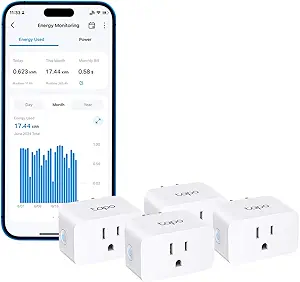
The Tapo P115 four-pack suits households that want energy charts for several appliances without switching to a new smart home standard. Its usage statistics, schedules, and remote control put day-to-day monitoring and automation in one app, with Alexa and Google Assistant support for voice control. Compared with the Tapo P115 two-pack, this set covers more outlets at once; the tradeoff is that it makes less sense if you only need to track one or two devices. The P110M four-pack adds Matter compatibility for Apple HomeKit and other platforms, which makes it a stronger fit for mixed smart home setups. Tapo’s energy data can show usage patterns, but cost visualization depends on billing-system integration, so buyers seeking a direct bill estimate should check that compatibility first.
Pros:- Displays energy-use statistics and charts
- Schedules and remote control are available through the Tapo app
- Supports Amazon Alexa and Google Assistant
- Includes automatic charging and overload shutoff features
Cons:- Energy cost visualization depends on integration with billing systems
- Does not list Matter or Apple HomeKit compatibility
Best for: Households that want to track and schedule several appliances through Alexa or Google Assistant using the Tapo app
Not ideal for: Buyers who need Matter or Apple HomeKit support, or who only need a couple of monitored outlets
- Model:P115
- Pack size:4 plugs
- Current:15A
- Connectivity:Wi-Fi
- Energy monitoring:Yes; statistics and charts
- Voice assistants:Amazon Alexa, Google Assistant
- Remote control:Tapo app
Our verdict“Choose this four-pack to monitor several devices in the Tapo ecosystem, provided you do not need Matter or Apple HomeKit.”
Tapo P115 Wi-Fi Smart Plug with Energy Monitoring, 2-Pack, 15A
The Tapo P115 two-pack is a practical starting point when you want to monitor a few appliances and use schedules without adding extra plugs you may not need. Like the four-pack, it provides energy statistics, app control, and Alexa and Google Assistant support; its smaller set is the main reason to pick it. The Tapo P115 four-pack makes more sense when several outlets need tracking, while the Tapo P110M four-pack is a better match for homes that need Matter and Apple HomeKit compatibility. This standard Wi-Fi model keeps the feature set straightforward, including configurable smart charging and automatic shutoff. One limitation applies to both Tapo P115 sets: energy cost estimates rely on billing-system integration, so usage charts may be more useful for comparing appliances than for reading an exact bill impact.
Pros:- Shows energy-use statistics and charts
- Supports scheduling and remote control in the Tapo app
- Works with Amazon Alexa and Google Assistant
- Offers configurable smart charging and automatic shutoff
Cons:- Energy cost visualization depends on billing-system integration
- Two plugs may not cover households monitoring several appliances
Best for: Apartment residents or small households tracking one or two appliances with app, schedule, and voice control
Not ideal for: Buyers monitoring many devices or building around Matter and Apple HomeKit
- Model:P115
- Pack size:2 plugs
- Current:15A
- Connectivity:Wi-Fi
- Energy monitoring:Yes; statistics and charts
- Voice assistants:Amazon Alexa, Google Assistant
- Remote control:Tapo app
- Scheduling:Yes
- Automatic shutoff:Yes
Our verdict“Pick this two-pack for a compact Tapo monitoring setup, and choose the four-pack if you need to cover more appliances.”
TP-Link Tapo P110M Matter Smart Plug with Energy Monitoring, 15A, 4-Pack
The Tapo P110M four-pack is the lineup’s clearest choice for buyers who want energy monitoring within a Matter-compatible home. It supports Apple HomeKit, Google Home, and Samsung SmartThings, giving it wider platform reach than the Wi-Fi-only Tapo P115 sets. Usage tracking, schedules, remote app control, and power thresholds add useful ways to spot consumption and manage connected devices. That threshold feature needs active setup: power management depends on user-set limits, so it is less hands-off than a buyer might expect from an automatic safeguard. Compared with the Emporia Energy Monitoring Smart Plug, the P110M lists a higher 15A current rating and broader smart home compatibility, while Emporia offers physical touch and push-button control. Tapo also ties bill estimates to billing-system integration, which can limit how directly its energy data translates into household costs.
Pros:- Matter-certified compatibility includes Apple HomeKit, Google Home, and Samsung SmartThings
- Tracks energy use and provides usage statistics
- Supports schedules and remote app control
- Offers configurable power thresholds and voice control
Cons:- Energy bill estimates depend on billing-system integration
- Power management relies on user-set thresholds
Best for: People with Apple HomeKit, Google Home, or SmartThings who want energy monitoring across multiple outlets
Not ideal for: Buyers who want energy thresholds to manage power without configuring them, or who need cost estimates without billing integration
- Model:P110M
- Pack size:4 plugs
- Current:15A
- Connectivity standard:Matter
- Energy monitoring:Yes; usage statistics
- Smart home compatibility:Apple HomeKit, Google Home, Samsung SmartThings
- Voice assistants:Amazon Alexa, Google Assistant
- Power thresholds:Configurable
Our verdict“Choose the P110M four-pack when broad Matter platform support matters as much as monitoring several devices.”
Emporia Energy Monitoring Smart Plug, 4-Pack
The Emporia four-pack stands out for giving buyers several ways to operate a monitored outlet: app, remote, touch, voice, and push button. That range makes it a more flexible fit for homes where someone may want to control a plug without opening an app. It tracks connected-device energy use and supports schedules, while Alexa and Google Assistant handle voice commands. Compared with the Govee Smart Plug four-pack, Emporia lists physical touch and push-button controls, whereas Govee provides power, current, and voltage tracking with up to a year of data history. Emporia’s main constraint is electrical and network fit: it is rated for 10A continuous load and requires 2.4 GHz Wi-Fi, with no 5 GHz support. Buyers should match those limits to the appliance and router before choosing it.
Pros:- Monitors energy use of connected devices
- Supports scheduling and remote control through the app
- Offers app, remote, touch, voice, and push-button controls
- Works with Amazon Alexa and Google Assistant
Cons:- Limited to a 10A continuous load
- Requires 2.4 GHz Wi-Fi and does not support 5 GHz
Best for: Households that want energy monitoring with app, voice, and physical plug controls for compatible appliances
Not ideal for: People monitoring loads above 10A continuous or whose Wi-Fi network only provides 5 GHz
- Pack size:4 plugs
- Operating voltage:120 V
- Maximum wattage:1200 W
- Continuous load:10A
- Connectivity:2.4 GHz Wi-Fi
- Control methods:App, remote, touch, voice, push button
- Compatible assistants:Amazon Alexa, Google Assistant
- Operating temperature:14–140 °F
Our verdict“Choose Emporia if you value physical controls alongside monitoring and your appliance stays within its 10A continuous limit.”
Govee Smart Plug with Energy Monitoring, Wi-Fi and Bluetooth, 4-Pack
The Govee four-pack is the standout for buyers who want to examine energy use over time: its app tracks power, current, and voltage and keeps historical data for up to one year. That record can help compare an appliance’s changing draw across seasons or usage patterns, while schedules and group controls simplify routine management of several plugs. Compared with the Emporia Energy Monitoring Smart Plug, Govee specifies the electrical measurements and data history more clearly; Emporia adds physical touch and push-button control. Govee also combines Wi-Fi and Bluetooth, but the plugs still do not support 5 GHz Wi-Fi, and setup and control require the Govee Home app. Buyers who want Matter or a choice of monitoring apps should look at the Tapo P110M instead. The listed FCC and ETL certifications and fire-resistant materials add concrete build details.
Pros:- Tracks power, current, and voltage
- Retains historical data for up to one year
- Supports remote, voice, scheduled, and group control
- FCC and ETL certified and made with fire-resistant materials
Cons:- Does not support 5 GHz Wi-Fi
- Requires the Govee Home app for setup and controls
Best for: Households that want detailed power, current, and voltage records for appliances over an extended period
Not ideal for: Buyers who need 5 GHz Wi-Fi, Matter compatibility, or setup outside the Govee Home app
- Pack size:4 plugs
- Current:15A
- Voltage:120V
- Connectivity:Wi-Fi and Bluetooth
- Energy monitoring:Power, current, and voltage
- Data history:Up to 1 year
- Voice assistants:Amazon Alexa, Google Assistant
- Certifications:FCC, ETL
Our verdict“Choose Govee if long-term electrical usage records are your priority and you are comfortable using its app and 2.4 GHz Wi-Fi.”
Kasa Smart Plug Mini with Energy Monitoring (KP115)
The Kasa KP115 pairs energy monitoring with app and voice control, making it a practical fit for someone who wants to track an appliance without changing how they control it. Its overheating protection, fire-resistant shell, sliding safety cover, and UL certification give it a more safety-focused profile than the Kasa Matter KP125MP4, whose standout advantage is broader platform compatibility and local control. The KP115 works with Alexa and Google Assistant and can be managed remotely through the Kasa app, but it requires 2.4 GHz Wi-Fi and does not list Matter support. That makes it a straightforward choice for households already using Kasa, while the TP-Link Tapo P110M is a better match for buyers building around Matter. Its two-year warranty adds reassurance, though the older Wi-Fi-only setup is less flexible across smart home platforms.
Pros:- Tracks energy use while supporting app and voice control
- Works with Amazon Alexa and Google Assistant
- Includes overheating protection, a fire-resistant shell, and a sliding safety cover
- UL certified and backed by a two-year warranty
Cons:- Requires a 2.4 GHz Wi-Fi connection
- Does not list Matter support or the broader platform range of the KP125MP4
- Remote and voice control depend on the Kasa app or supported assistant
Best for: Alexa or Google Assistant users who want appliance energy monitoring alongside clearly specified physical safety features
Not ideal for: Buyers building a Matter-based smart home or using a network without 2.4 GHz Wi-Fi
- Model:KP115
- Connectivity:2.4 GHz Wi-Fi
- Energy monitoring:Yes
- Voice control:Amazon Alexa and Google Assistant
- Remote control:Kasa app
- Safety features:Overheating protection, fire-resistant shell, sliding safety cover
- Certification:UL certified
- Warranty:2 years
Our verdict“Choose the KP115 if safety features and familiar Alexa or Google control matter more to you than Matter compatibility.”
Kasa Matter Smart Plug with Energy Monitoring, KP125MP4, 15A/1800W
The Kasa KP125MP4 makes the most sense for buyers who want energy tracking in a smart home shared across platforms. Its Matter over Wi-Fi support spans Apple Home, Alexa, Google Home, and SmartThings, while local network control can keep commands working when internet access is down. That gives it a flexibility edge over the Kasa KP115, which supports Alexa and Google Assistant but lists no Matter support. The compact design can also help preserve access to a neighboring outlet, a useful everyday advantage over plugs that crowd a receptacle. The tradeoff is that Matter control still depends on compatible devices and supported platforms, so setup may take more planning than the simpler KP115. Its energy monitoring and 15A/1800W capacity suit typical plug-in appliances, but this listing does not specify the same set of detailed safety features as the KP115.
Pros:- Matter support spans Apple Home, Amazon Alexa, Google Home, and Samsung SmartThings
- Local network control can work when internet access is unavailable
- Tracks energy use over time
- Compact design helps avoid blocking adjacent outlets
Cons:- Smart home control requires compatible devices and supported platforms
- Matter setup may require more configuration than the Kasa KP115
- The listed data does not specify the KP115’s overheating protection or sliding safety cover
Best for: Households using Apple Home, Alexa, Google Home, or SmartThings that want energy monitoring with local control
Not ideal for: Buyers seeking a simple single-platform setup or those without compatible Matter devices and hubs
- Model:KP125MP4
- Connectivity:Matter over Wi-Fi
- Energy monitoring:Yes
- Maximum current:15A
- Maximum power:1800W
- Supported platforms:Apple Home, Amazon Alexa, Google Home, Samsung SmartThings
- Safety certification:UL certified flame-retardant design
- Warranty:2-year limited warranty
Our verdict“Pick the KP125MP4 if cross-platform Matter support and local control matter more than the KP115’s specified safety features.”
How We Picked
I compared these plugs around the decisions that affect daily use: energy monitoring, outlet coverage, stated electrical capacity, connectivity, smart home compatibility, and the likely effort of managing several plugs. I gave more weight to a useful balance of monitoring and control than to any single feature in isolation. Pack size also matters: a four-pack can cover several appliances at once, while a two-pack or single plug may be a better fit when only a couple of devices need tracking.
The ranking reflects those differences. The Tapo P115 4-Pack takes the lead as a balanced multi-outlet pick; the P110M follows for buyers who place Matter support first. Emporia, Govee, and Kasa each serve a narrower preference, such as energy-focused monitoring, Wi-Fi plus Bluetooth, or a compact Kasa plug. I treated the Tapo P115 2-Pack as a useful lower-coverage alternative rather than a different feature tier. Product details provided for this comparison do not establish measurement accuracy or long-term reliability, so I have not ranked those claims.
| smart plug energy monitor | Model | Energy monitoring |
|---|---|---|
| Tapo P115 Wi-Fi Smart Plug wit | P115 | Yes; statistics and charts |
| Tapo P115 Wi-Fi Smart Plug wit | P115 | Yes; statistics and charts |
| TP-Link Tapo P110M Matter Smar | P110M | Yes; usage statistics |
| Emporia Energy Monitoring Smar | — | — |
| Govee Smart Plug with Energy M | — | Power, current, and voltage |
| Kasa Smart Plug Mini with Ener | KP115 | Yes |
| Kasa Matter Smart Plug with En | KP125MP4 | Yes |
Factors to Consider When Choosing Smart Plug Energy Monitor
Choosing an energy-monitoring plug is partly a smart home decision and partly an electricity-tracking decision. Before choosing a pack, decide what you want the readings to help you do and how you plan to control the plug.
Decide What You Want the Readings to Tell You
Some buyers want a quick view of whether a device draws power while idle; others want to compare usage across days or appliances. Those are different jobs, so check how the companion app presents history and whether it supports the time range you care about. A plug that reports current or accumulated consumption may not answer every question about a device’s cost or operating pattern. Common mistake: buying a monitor before deciding which appliance you want to measure. Start with one device whose consumption could change a household decision, then expand if the readings prove useful.
Match Capacity to the Appliance
Check the plug’s rated current and wattage against the appliance label, especially for devices with heating elements, motors, or variable loads. The 15A and 1800W figures listed for some picks describe a ceiling, not a recommendation to run every appliance near that limit. A smart plug does not make an unsuitable load safe, and multi-outlet adapters can complicate heat and load management. Avoid choosing on the basis of the word “smart” alone; confirm the rating and any manufacturer restrictions for the exact device. If the load is close to the stated limit or has a high startup draw, consult the appliance and plug specifications before connecting it.
Choose the Smart Home Route You Already Use
Matter can simplify control across supported smart home platforms, but the experience still depends on compatible controllers and the features each platform exposes. A Wi-Fi plug may be easier if you already manage devices in its brand app, while Bluetooth can affect how setup and nearby control work. Before buying multiple plugs, confirm that your preferred voice assistant, automations, and phone app support the functions you expect. Buyers often assume that compatibility with one platform means every energy statistic will appear in every other platform. If energy history matters, verify where those readings are available, not just whether basic on/off control works.
Buy the Number of Plugs You Can Put to Work
Pack size changes the practical value of a setup: a four-pack is useful when you have several appliances to compare, while a two-pack avoids leaving spare units unused. Count accessible outlets and consider whether neighboring sockets will remain usable once a plug is installed. You may also want to leave room for devices that should not be automated. A common mistake is to buy a large pack because the per-plug proposition seems attractive, then monitor only one appliance. List the locations first and prioritize devices where tracking could inform a concrete choice.
Separate Monitoring From Automation
Energy data and scheduling solve related but distinct problems. Monitoring helps you understand consumption; schedules, timers, and remote control change when an appliance runs. Decide whether you need both, and check that a plug supports the automation behavior you intend to use. A schedule that cuts power can disrupt clocks, settings, or safe operating cycles on some appliances. For anything that needs a deliberate shutdown sequence, use the appliance’s own controls and instructions as your guide. Pay for added smart home features only when they fit a routine you will actually use.
Think About Setup and Ongoing Use
Each plug adds another device to configure, name, and maintain in an app or smart home system. If several people will control them, clear names and shared access can matter more than extra connectivity features. Check whether your home Wi-Fi setup meets the product’s requirements and whether the manufacturer supports the app on your phones. For Matter devices, confirm you have a compatible controller before purchase. A smaller setup that everyone can operate may give more lasting value than a larger system with readings no one checks.
Frequently Asked Questions
Can a smart plug energy monitor tell me exactly how much an appliance costs to run?
It can help estimate electricity use, but a cost figure depends on the rate applied to that usage and how accurately the plug captures the appliance’s consumption. Electricity tariffs can vary by time, plan, and location, so a simple estimate may not match a bill. Check whether the app lets you enter your rate or export readings for your own calculation. Treat the result as a comparison aid between appliances unless the measurement method and tariff inputs match your billing details. For a billing-grade measurement, verify the product’s documentation and local requirements.
Should I choose a Matter plug if I already use a smart home hub?
Choose Matter when cross-platform control or flexibility across supported systems is a priority. A hub alone does not guarantee that every plug feature, especially energy history, will be available through it. Confirm that the hub and app support the plug’s Matter functions and check where monitoring data appears. If you mainly use one manufacturer’s app and do not plan to change platforms, a non-Matter plug may meet your needs with fewer setup considerations. The P110M and KP125MP4 are the Matter options in this group.
Is a four-pack a better choice than buying just two energy-monitoring plugs?
A four-pack makes sense when you already have several appliances to monitor or want readings from multiple rooms at the same time. Two plugs can be a more useful starting point if you are still deciding whether energy data will change your choices. More monitored outlets also mean more devices to set up and more readings to interpret. Count the appliances and accessible sockets before selecting a pack, and check whether the plugs could block adjacent outlets. The Tapo P115 appears here in both two-pack and four-pack versions, which makes that coverage decision straightforward.
Can I use these plugs with heaters, refrigerators, or other high-draw appliances?
Do not assume a plug is suitable just because its stated rating appears high enough. Compare the appliance’s current and wattage requirements with the exact plug specifications, and account for motor startup loads and manufacturer restrictions. Some appliances may also behave poorly if power is cut remotely or on a schedule. Review both product manuals before connecting a high-draw or continuously operating device. If the load is close to the plug’s limit, choose a control method designed for that appliance instead.
Will the energy readings show up in my preferred smart home app?
Basic on/off control and energy reporting can have different compatibility rules. Matter support may help with cross-platform control, but the platform may expose fewer monitoring details than the plug’s own app. Check the product’s compatibility notes for the specific phone app, assistant, or hub you use. If historical readings are the reason you are buying, confirm that those are available in the interface you plan to open regularly. Otherwise, you may find that control works while the data you wanted remains in a separate app.
Conclusion
For most buyers fitting several outlets, I recommend the Tapo P115 4-Pack as the best overall balance in this lineup. The Tapo P115 2-Pack is the value-minded pick when two monitored outlets are enough, while the Tapo P110M is my premium-style choice for buyers who prioritize Matter support. Beginners who already use Tapo’s app may prefer the familiar P115 route and a smaller pack to start. Choose Emporia when energy monitoring is your main focus, Govee if its Wi-Fi and Bluetooth mix fits your setup, or Kasa KP115 for a compact mini plug; the KP125MP4 suits buyers seeking Matter within the Kasa lineup. Match the plug’s rating and supported app features to your appliance before buying.
Halloween Picks

Pumpkin Halloween Fog Machine with 12-Color LED Lights, Bluetooth Speaker, and Remote

12.5-Foot Lighted Halloween Inflatable Archway

Gemmy 6-Foot Leatherface Animatronic Halloween Decoration
As an affiliate, we earn on qualifying purchases.