
For a home office, I’d choose a thermostat that keeps work hours comfortable without heating or cooling an empty house all day. The Google Nest Smart Thermostat is my best overall pick for its scheduling and smart-home features, while the Sensi Lite ST25 is a straightforward option for buyers who want simple app control. The Honeywell Home T5 stands out for flexible scheduling, and the Amazon Smart Thermostat makes sense for Alexa households. The main tradeoffs are system compatibility, how much automation you want, and whether you value a clear display or app-led control. Read on for the full breakdown and advice on matching a thermostat to your workspace and HVAC system.

Get the latest gadgets delivered free — and shop member deals
- Fast, free delivery on millions of items
- Access to Prime Big Deal Days deals on October 6–7
- Prime Video, Amazon Music and more included
Complete the kit



Key Takeaways
- The amazon.com/dp/B08HRPDYTP?tag=geeksalad-20&ascsubtag=dc-475162″ target=”_blank” rel=”nofollow sponsored noopener”>Google Nest Smart Thermostat is the strongest all-around fit for a home office if you want scheduling and connected-home features in one unit.
- Sensi Lite ST25 favors straightforward control, making it a practical pick for buyers who want to adjust the temperature by app without a more elaborate smart-home setup.
- Honeywell Home T5 puts scheduling first, which can suit a predictable workweek where comfort needs change between office hours and evenings.
- The single-stage thermostat listing calls for extra compatibility checking; its stated system scope is narrower than the named-brand options.
- The Nest Snow and Charcoal models share the same product family, so color and room aesthetics matter more than expecting different office-focused capabilities.
| Google Nest Smart Thermostat, Snow |  | Best Overall for a Google Home Office | Connectivity: Wi-Fi | Color: Snow | Energy certification: ENERGY STAR | VIEW ON AMAZON | See Our Full Breakdown |
| Sensi Lite Smart Wi-Fi Thermostat (ST25) | 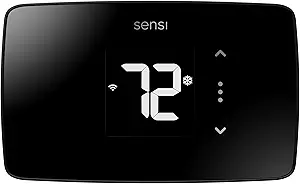 | Best for DIY Installation | Model: ST25 | Connectivity: 2.4 GHz Wi-Fi | Control methods: App, touch, and voice | VIEW ON AMAZON | See Our Full Breakdown |
| Wi-Fi Smart Thermostat for Single-Stage 1 Heat/1 Cool Systems |  | Best for Simple Single-Stage Setups | System compatibility: Conventional single-stage 1 heat/1 cool | Wi-Fi: 2.4 GHz only | Power: 24V AC; C wire required; no batteries | VIEW ON AMAZON | See Our Full Breakdown |
| Honeywell Home T5 Smart Wi-Fi Thermostat |  | Best for Geofenced Workday Routines | Connectivity: Wi-Fi | Scheduling: 7-day flexible scheduling | Temperature control: Geofencing and home/away modes | VIEW ON AMAZON | See Our Full Breakdown |
| Vine Wi-Fi Smart Thermostat with Alexa and Google Assistant, 7-Day Programmable |  | Best for Detailed Schedules and Alerts | System compatibility: 24V AC conventional, heat pump, heat-only, and cool-only systems | Wiring requirement: C wire required | Connectivity: Wi-Fi | VIEW ON AMAZON | See Our Full Breakdown |
| Google Nest Smart Thermostat, Charcoal |  | Best for Automatic Away Adjustments | Color: Charcoal | Connectivity: Wi-Fi 802.11b/g/n (2.4 GHz), 802.11a/n (5 GHz), and Bluetooth Low Energy | Energy certification: ENERGY STAR | VIEW ON AMAZON | See Our Full Breakdown |
| Honeywell Home RTH9585WF Wi-Fi Smart Color Thermostat |  | Best for a Customizable Display | Model: RTH9585WF | Display: Customizable color touchscreen | Programming: Flexible scheduling | VIEW ON AMAZON | See Our Full Breakdown |
| Sensi Smart Wi-Fi Thermostat, ST55 |  | Best for DIY Installation | Model: ST55 | Connectivity: Wi-Fi | Voice assistant: Amazon Alexa | VIEW ON AMAZON | See Our Full Breakdown |
| Amazon Smart Thermostat with Alexa and Ring Compatibility |  | Best for Alexa and Ring Homes | Compatibility: Alexa and select Ring devices | Wiring requirement: C wire required | Control options: Alexa app, schedules, and compatible Alexa devices | VIEW ON AMAZON | See Our Full Breakdown |
| smart thermostat for home office | Connectivity |
|---|---|
| Google Nest Smart Thermostat | Wi-Fi |
| Sensi Lite Smart Wi-Fi Thermos | 2.4 GHz Wi-Fi |
| Wi-Fi Smart Thermostat for Sin | — |
| Honeywell Home T5 Smart Wi-Fi | Wi-Fi |
| Vine Wi-Fi Smart Thermostat wi | Wi-Fi |
| Google Nest Smart Thermostat | Wi-Fi 802.11b/g/n (2.4 GHz), 802.11a/n (5 GHz), and Bluetooth Low Energy |
| Honeywell Home RTH9585WF Wi-Fi | Wi-Fi |
| Sensi Smart Wi-Fi Thermostat | Wi-Fi |
| Amazon Smart Thermostat with A | — |
More Details on Our Top Picks
Google Nest Smart Thermostat, Snow
The Google Nest Smart Thermostat is a strong fit for a home office where schedules shift and remote adjustments are useful: I can set a workday routine in the Google Home app and change the temperature without leaving my desk. Its ENERGY STAR certification and energy-saving features suit buyers who want scheduling alongside tools for managing energy use. Compared with the Sensi Lite Smart Wi-Fi Thermostat (ST25), Nest offers Matter-certified voice assistant compatibility, while Sensi Lite adds geofencing and energy usage reports. Nest also works without a C wire in most homes, which can simplify installation, but some HVAC and zone-controlled systems still need a C wire or power accessory. I would choose it for a Google-centered setup; buyers who want geofencing or more explicit usage reports may prefer Sensi Lite.
Pros:- Programmable schedules and app control make it easy to adapt settings to changing office hours.
- Works without a C wire in most homes.
- Supports Google Assistant, Alexa, and Matter-certified voice assistants.
- Includes HVAC monitoring alerts and maintenance reminders.
Cons:- Some HVAC, heat pump, or zone-controlled systems require a C wire or compatible power accessory.
- Voice control requires a compatible smart device.
Best for: Home office workers using Google Home who want app scheduling, remote adjustments, and broad voice assistant compatibility.
Not ideal for: Owners of HVAC systems that need a C wire or power accessory, and buyers who want geofencing or energy usage reports included in the feature set.
- Connectivity:Wi-Fi
- Color:Snow
- Energy certification:ENERGY STAR
- C wire:Not required in most homes; some HVAC systems need one
- Smart home compatibility:Google Assistant, Alexa, and Matter-certified voice assistants
- Control:Google Home app and compatible voice assistants
Our verdict“Choose Nest for a Google Home office that needs flexible app control and broad assistant support, provided the HVAC wiring is compatible.”
Sensi Lite Smart Wi-Fi Thermostat (ST25)
The Sensi Lite ST25 suits a home office owner who wants practical scheduling and straightforward installation. Its built-in level and step-by-step instructions support a DIY setup, while geofencing and remote access can help adjust heating or cooling when work plans change. Compared with the Google Nest Smart Thermostat, Sensi Lite adds energy usage reports and geofencing, but its Wi-Fi is limited to 2.4 GHz and its C-wire exceptions are more specific: heat pump and heat/cool-only systems require one. The LCD and touch controls also give me a local way to adjust settings if I do not want to open an app. This is a more hands-on, report-oriented pick than Nest, though buyers with incompatible wiring or only 5 GHz Wi-Fi should check their setup first.
Pros:- Built-in level and step-by-step instructions support DIY installation.
- Geofencing, flexible schedules, and remote access accommodate changing work routines.
- Energy usage reports help track thermostat activity.
- Offers app, touch, and voice controls.
Cons:- Requires a C wire for heat pump and heat/cool-only systems.
- Wi-Fi connection is limited to 2.4 GHz.
Best for: DIY-minded home office workers who want geofencing, energy reports, and app or touch control on a compatible 2.4 GHz network.
Not ideal for: People with heat pump or heat/cool-only systems lacking a C wire, or homes whose available Wi-Fi is 5 GHz only.
- Model:ST25
- Connectivity:2.4 GHz Wi-Fi
- Control methods:App, touch, and voice
- Power source:Battery or C-wire
- Voltage:24 volts
- Display:LCD
- Energy certification:ENERGY STAR
- Compatible HVAC equipment:Air conditioner, boiler, furnace, and heat pump
- C-wire requirement:Not required on most systems; required for heat pump and heat/cool-only systems
Our verdict“Pick Sensi Lite if you want DIY-friendly installation and geofencing with energy reports, and your system and Wi-Fi meet its requirements.”
Wi-Fi Smart Thermostat for Single-Stage 1 Heat/1 Cool Systems
This thermostat makes the most sense for a home office with a conventional single-stage 1 heat/1 cool system and an existing C wire. Its 7-day schedule lets me set separate routines for workdays and weekends, and the backlit LCD remains readable in a dim room. Compared with the Honeywell Home T5 Smart Wi-Fi Thermostat, it is much narrower in system compatibility: this model cannot control heat pumps or multi-stage systems, while the T5 is described as working with most heat/cool oil furnace systems. The tradeoff is a defined, simple fit rather than flexibility across HVAC types. It also requires 24V power through a C wire and only supports 2.4 GHz Wi-Fi, so I would verify both wiring and system type before choosing it.
Pros:- Customizable 7-day schedules can match regular office and weekend routines.
- Backlit LCD is easier to read in dim rooms.
- Offers app, remote, and button controls.
- Temperature control is specified within 2°F.
Cons:- Requires a 24V C wire and has no battery option.
- Not compatible with heat pumps or multi-stage systems.
- Works only with 2.4 GHz Wi-Fi.
Best for: Home office owners with a conventional single-stage heating and cooling system, a 24V C wire, and a 2.4 GHz Wi-Fi network.
Not ideal for: People with heat pumps, multi-stage HVAC, no C wire, or a 5 GHz-only Wi-Fi network.
- System compatibility:Conventional single-stage 1 heat/1 cool
- Wi-Fi:2.4 GHz only
- Power:24V AC; C wire required; no batteries
- Control:App, remote, or buttons
- Scheduling:7-day programmable
- Temperature accuracy:Within 2°F
- Display:Backlit LCD
- Dimensions:0.98 × 4.72 × 3.86 inches
Our verdict“Choose this model for scheduled control in a compatible single-stage office, but skip it if your HVAC system is a heat pump or multi-stage.”
Honeywell Home T5 Smart Wi-Fi Thermostat
The Honeywell Home T5 is aimed at office routines that vary with when I arrive home or step out: geofencing and home/away modes can adjust the temperature around those changes, while 7-day scheduling handles predictable days. Monthly energy reports and personalized tips add a way to review thermostat habits beyond setting a schedule. Compared with the Sensi Lite ST25, the T5 highlights home/away modes and energy guidance, while Sensi Lite lists touch control and a DIY installation level. The T5’s power requirements need attention: a C-wire adapter may be required, and heating-only oil furnace systems need a C wire. That makes it less forgiving for some installations than the Google Nest, which works without a C wire in most homes. I would shortlist it for geofenced routines after checking HVAC compatibility.
Pros:- Geofencing and home/away modes can adapt temperature settings to changing routines.
- Supports flexible 7-day scheduling.
- Monthly energy reports and personalized tips provide feedback on usage.
- ENERGY STAR certified.
Cons:- A C-wire power adapter may be required.
- Heating-only oil furnace systems require a C wire.
Best for: Home office workers with variable arrival times who want geofencing, home/away modes, and monthly energy guidance.
Not ideal for: Owners of heating-only oil furnaces without a C wire, or buyers seeking a thermostat with less demanding power requirements.
- Connectivity:Wi-Fi
- Scheduling:7-day flexible scheduling
- Temperature control:Geofencing and home/away modes
- Energy certification:ENERGY STAR
- Power requirement:C-wire power adapter may be required
- System compatibility:Works with most heat/cool oil furnace systems
- Heating-only oil furnace:Requires a C wire
- Energy guidance:Monthly energy reports and personalized energy-saving tips
Our verdict“Choose the T5 for a home office schedule that changes with your comings and goings, after confirming its wiring and HVAC compatibility.”
Vine Wi-Fi Smart Thermostat with Alexa and Google Assistant, 7-Day Programmable
The Vine Wi-Fi Smart Thermostat packs several useful controls for a home office into one schedule: seven days and eight periods allow more specific temperature changes through the workday, while alerts and filter reminders provide prompts beyond basic remote control. Auto-away, geofencing, and vacation mode add options for days when I leave the office or take time off. Compared with the single-stage Wi-Fi thermostat in this roundup, Vine supports 24V conventional and heat pump systems, as well as heat-only and cool-only setups, but that wider stated range still calls for a compatibility check. Its firm drawback is power: a C wire is required. Alexa and Google Assistant support is useful for hands-free adjustments, yet buyers wanting a less wiring-dependent option may favor the Google Nest.
Pros:- Seven-day schedules with eight periods allow detailed workday temperature changes.
- Supports Alexa and Google Assistant voice control.
- Auto-away, geofencing, and vacation modes accommodate time away from the office.
- Temperature alerts, filter reminders, and child lock add household controls.
Cons:- Requires a C wire.
- Compatibility should be checked against the specific HVAC system before purchase.
Best for: Home office workers with a compatible 24V system and C wire who want detailed schedules, away modes, and temperature or filter alerts.
Not ideal for: People without a C wire or anyone who cannot confirm compatibility with their specific HVAC equipment.
- System compatibility:24V AC conventional, heat pump, heat-only, and cool-only systems
- Wiring requirement:C wire required
- Connectivity:Wi-Fi
- Programmable schedule:7 days, 8 periods
- Voice assistants:Amazon Alexa and Google Assistant
- Control methods:App, voice, and touch
- Display:LCD
- Additional features:Auto-away, geofencing, vacation mode, temperature alerts, filter reminders, and child lock
Our verdict“Choose Vine if you want detailed scheduling and alerts and have verified both C-wire power and HVAC compatibility.”
Google Nest Smart Thermostat, Charcoal
For a home office that sits empty during breaks or commute days, this Nest can adjust the temperature when compatible devices indicate that you have left. Schedules and remote control in the Google Home app also make it easy to warm or cool the room before you return. Compared with the Amazon Smart Thermostat, it works with Matter-certified voice assistants as well as Google Assistant, giving it a broader stated voice-assistant fit. HVAC monitoring and maintenance alerts add useful visibility without requiring constant schedule changes. The tradeoff is wiring: most homes do not need a C wire, but some systems do, so check compatibility before buying. Voice control also depends on a compatible smart device. This is my pick for flexible, app-led control, not for a guaranteed wire-free installation.
Pros:- Automatic adjustments when you leave can reduce heating or cooling in an empty home
- Google Home app supports remote control and schedules
- Works with Google Assistant and Matter-certified voice assistants
- HVAC monitoring can provide maintenance alerts
Cons:- Some heating, cooling, heat pump, and zone-controlled systems need a C wire or compatible power accessory
- Voice control requires a compatible smart device
Best for: Home-office workers who use Google Home, want remote scheduling, and have days when the house is unoccupied
Not ideal for: People whose HVAC system requires a C wire or power accessory, or who expect voice control without a compatible smart device
- Color:Charcoal
- Connectivity:Wi-Fi 802.11b/g/n (2.4 GHz), 802.11a/n (5 GHz), and Bluetooth Low Energy
- Energy certification:ENERGY STAR
- App control:Google Home app for Android and iPhone
- Voice compatibility:Google Assistant and Matter-certified voice assistants
- C wire:Not required in most homes; some systems need a C wire or compatible power accessory
- HVAC features:System monitoring and maintenance alerts
Our verdict“Choose this Nest if you want app scheduling and automatic away adjustments with Google or Matter voice control, after checking your wiring.”
Honeywell Home RTH9585WF Wi-Fi Smart Color Thermostat
The color touchscreen makes this Honeywell a strong fit for a home office where you want to check settings at the wall, without reaching for an app. Its flexible schedules, energy reports, weather forecasts, and equipment alerts offer more visible information than the simpler app-led setup of the Sensi Smart Wi-Fi Thermostat, ST55. Remote control and Alexa or Google Home compatibility add convenience when you are working in another room. That display-led approach comes with firm installation limits: a C wire is required, and electric baseboard systems are not supported. Compatibility also depends on the heating setup, though supported systems include forced-air, hot water, steam, and certain heat pumps. I’d rank it for people who value a customizable wall interface and can confirm wiring before purchase.
Pros:- Customizable color touchscreen keeps settings visible at the thermostat
- Remote control works through a mobile app, Alexa, and Google Home
- Flexible scheduling and energy reports help track HVAC use
- Weather forecasts and equipment alerts provide additional system information
Cons:- Requires a C wire for installation
- Not compatible with electric baseboard heat at 120–240 V
- Compatibility depends on the home’s heating system
Best for: Home-office users with a compatible forced-air, hot-water, steam, or supported heat-pump system who want an at-a-glance color display
Not ideal for: Renters or homeowners without a C wire, and anyone with 120–240 V electric baseboard heat
- Model:RTH9585WF
- Display:Customizable color touchscreen
- Programming:Flexible scheduling
- Connectivity:Wi-Fi
- Smart home compatibility:Amazon Alexa and Google Home
- Compatible systems:Forced-air gas, oil, or electric; hot water and steam; heat pumps with electric backup
- Power requirement:C wire required
- Not compatible with:Electric baseboard heat (120–240 V)
Our verdict“Pick the Honeywell if a customizable touchscreen and detailed on-device information matter more to you than flexible wiring requirements.”
Sensi Smart Wi-Fi Thermostat, ST55
Clear app instructions and a built-in level make the Sensi ST55 the most installation-focused choice in this group. That can suit a home-office worker who wants remote access and scheduling without hiring help, while its common wire is not required for most applications. The Honeywell Home RTH9585WF offers a more prominent color touchscreen and broader listed voice compatibility, but it requires a C wire; the Sensi’s appeal is simpler setup for many homes. ENERGY STAR certification, usage reports, system alerts, and filter reminders cover the basics for managing HVAC use. The limitation is that compatibility varies by equipment, and the listed voice assistant is Alexa. I’d choose it for a straightforward, guided DIY setup rather than for a feature-rich wall display or broad voice-assistant options.
Pros:- Built-in level and step-by-step app instructions support DIY installation
- Common wire is not required for most applications
- Remote access, flexible schedules, and usage reports help manage heating and cooling
- System alerts and filter reminders support routine HVAC upkeep
Cons:- Compatibility may vary across HVAC equipment
- Listed voice-assistant compatibility is limited to Amazon Alexa
Best for: DIY-minded home-office workers with common residential HVAC equipment who want app guidance and remote scheduling
Not ideal for: People who need confirmed support for a less common HVAC system or want voice control beyond Amazon Alexa
- Model:ST55
- Connectivity:Wi-Fi
- Voice assistant:Amazon Alexa
- Certification:ENERGY STAR
- Installation:DIY with built-in level and app instructions
- Common wire:Not required for most applications
- Scheduling and access:Flexible scheduling and remote access
- Monitoring:Usage reports, system alerts, and maintenance reminders
Our verdict“Choose the Sensi ST55 if you want guided DIY installation and core remote scheduling features, provided your HVAC system is compatible.”
Amazon Smart Thermostat with Alexa and Ring Compatibility
Alexa-centered automatic control gives this thermostat a clear role for a home office already using compatible Alexa devices or select Ring devices. You can set schedules and manage temperatures in the Alexa app, while supported devices can adjust settings based on readings or presence. Compared with the Google Nest Smart Thermostat, Charcoal, its stated smart-home fit is narrower: Alexa and select Ring, rather than Google Assistant and Matter-certified voice assistants. Guided DIY installation is helpful, but the C wire is required, and automatic adjustments depend on compatible Alexa devices. For someone already working within Amazon’s ecosystem, the app and schedules offer a direct way to manage comfort around work hours. If your smart home is mixed or you lack compatible devices, the automatic-control benefit is reduced.
Pros:- Alexa app supports remote control and schedules
- Compatible Alexa devices can adjust temperature based on readings or presence
- Alexa app provides guided DIY installation
- ENERGY STAR certification
Cons:- Requires a C wire
- Automatic adjustments depend on compatible Alexa devices
- Smart-home compatibility is limited to Alexa and select Ring devices
Best for: Home-office workers who already use Alexa and compatible Ring devices and want app-based schedules or presence-linked adjustments
Not ideal for: People without a C wire, compatible Alexa devices, or an Alexa-centered smart home
- Compatibility:Alexa and select Ring devices
- Wiring requirement:C wire required
- Control options:Alexa app, schedules, and compatible Alexa devices
- Installation:DIY with guidance from the Alexa app
- Technology:Honeywell Home Thermostat Technology
- Certification:ENERGY STAR
- Automatic adjustments:Can use readings or presence from compatible Alexa devices
Our verdict“Pick this thermostat if Alexa and Ring already anchor your smart home and your wiring includes a C wire.”

How We Picked
I ranked these thermostats around the needs of a room used for focused work: dependable scheduling, practical remote control, usable smart-home connections, and a reasonable path to setup. A thermostat can help keep a workspace comfortable during occupied hours and reduce heating or cooling when it is empty, but only if it works with the home’s HVAC equipment. I gave more weight to products with clearly described scheduling or ecosystem features, while treating narrow system compatibility as a meaningful limitation.
The order reflects how broadly each option can serve a home office, not a claim that one control style suits every buyer. The Nest models lead for their balance of everyday scheduling and connected features; the Sensi and Honeywell options offer alternatives for buyers who value simpler control or explicit programming. The Vine, color-display Honeywell, and Alexa-compatible Amazon models address more specific preferences. I placed the single-stage listing lower because its title signals a tighter equipment fit, and the two Nest color variants are judged as one family with different finishes.
Factors to Consider When Choosing Smart Thermostat For Home Office
Before choosing a thermostat, I’d start with the heating and cooling equipment, then decide how much office-specific automation will actually help. These broader checks can prevent a feature-rich model from becoming a poor fit for your home.
Match the thermostat to your HVAC system
Compatibility comes before app features: check the exact heating and cooling equipment, wiring, and any special controls in your home. A listing limited to single-stage 1 heat/1 cool systems may not suit a multi-stage setup, heat pump, or other configuration. Compare the thermostat’s compatibility information with your equipment manual, and take a clear photo of the existing wiring before removing anything. A wire’s color alone does not reliably identify its function. If the system uses uncommon wiring or controls, ask the manufacturer or a qualified installer to confirm the match. A little checking here can prevent buying a thermostat that cannot operate the equipment you have.
Plan around the hours you use the office
A home office often has a different schedule from the rest of the household, but a central thermostat usually controls the whole home. Think through when the room is occupied, when the house is empty, and whether weekends follow the same pattern. A schedule can help avoid conditioning the entire home for a workday that starts late or ends early. If your work hours change frequently, a rigid weekly program may take more adjustment than it saves. Remote controls can help when meetings run long or plans change, though they still affect the HVAC zone controlled by that thermostat. Decide whether you need automation or just a convenient way to make occasional changes.
Check whether the thermostat controls your office zone
In a home with one thermostat, changing the setpoint for a chilly office may also make bedrooms or living spaces less comfortable. Before paying for advanced scheduling, find out which rooms and vents the thermostat actually influences. Zoning, room sensors, and smart vents are separate capabilities, and a thermostat listing should not be assumed to include them. If the office is consistently warmer or colder than the thermostat’s location, first look at airflow, drafts, and sensor placement. A thermostat can only respond to the temperature information available to it. This check helps distinguish a control problem from an insulation or distribution problem.
Choose an app and voice setup you will keep using
Smart features help most when they fit the devices and routines already in your home. If you use Alexa, Google Assistant, or a compatible doorbell and home system, verify the exact integrations supported by the thermostat before choosing it. Voice commands can make a quick adjustment convenient, but app control may be clearer for setting weekday schedules. Also consider who else needs access and whether everyone is comfortable managing settings from a phone. Avoid choosing based only on a familiar assistant name; integration support can differ by product and feature. A simpler control setup may be easier to live with than one that depends on several connected services.
Decide how much on-device control matters
Some buyers want to adjust the temperature at the wall, while others are happy to use an app for nearly every change. A prominent color display can make status and adjustments easier to see in a shared living area, but it may matter less if the thermostat is out of view during work. App-led designs can reduce clutter while asking more of your phone and home network. Think about guests, family members, and anyone who may need to change the temperature without signing in. Review the listing for the controls and display it actually provides rather than assuming all smart thermostats work alike. The right balance is the one that makes ordinary adjustments easy for everyone in the home.
Frequently Asked Questions
Can one smart thermostat keep only my home office comfortable?
Usually, a thermostat controls the HVAC system or zone it is connected to, so a change may affect several rooms rather than just the office. Check whether your home has separate zones and which thermostat controls the workspace. If the office is uncomfortable while the rest of the home is fine, airflow, drafts, and room temperature differences may be part of the problem. A thermostat cannot independently condition a room that is not a separate zone. Confirm the control arrangement before expecting office-only temperature changes.
How can I tell whether these thermostats will work with my heating and cooling system?
Identify the equipment type and existing thermostat wiring, then compare those details with the manufacturer’s compatibility information for the specific model. Pay close attention to heat pumps, multi-stage systems, and any auxiliary or emergency heat controls. The single-stage thermostat in this roundup has a more limited system description, so its listing needs particularly close matching. Do not rely on wire colors alone to identify terminals. When the wiring or system type is unclear, get confirmation from the manufacturer or an HVAC professional before installation.
Is a programmable schedule useful if my work hours change every week?
A schedule can still help with recurring parts of your routine, such as nights or regular days off, even if office hours vary. For workdays that shift often, remote app control may be more useful than repeatedly editing a detailed weekly program. Consider how often you would realistically update the schedule and whether other household members need to make adjustments too. A simpler setup can be more convenient than automation that needs constant maintenance. Choose around your actual routine rather than assuming a fixed schedule will fit.
Should I choose Alexa or Google compatibility for my office thermostat?
Start with the assistant and connected devices your household already uses, then confirm that the specific thermostat supports the functions you want. The Amazon model is listed with Alexa and Ring compatibility, while the Nest models are the natural comparison for a Google-centered setup. Those ecosystem links matter most when you plan to use voice commands or connected routines. If you mainly set a temperature in an app, assistant compatibility may not change your day much. Check whether all household members can access the preferred controls before deciding.
Is the Nest Snow model different from the Nest Charcoal model for a home office?
The listed difference is the finish: Snow is light, while Charcoal is dark. Both are the Google Nest Smart Thermostat, so the names do not indicate separate office scheduling capabilities. Pick the finish that fits the wall and room around the thermostat, particularly if it is visible during video calls or in a shared space. Compare the full listing if you need to confirm a hardware or package detail. For the choice between these two, color is the clearest distinction provided.
Conclusion
For most buyers, I’d start with the Google Nest Smart Thermostat as the best overall balance of scheduling and connected control. The Sensi Lite ST25 is my best value-style pick for simpler app control, while the Honeywell Home T5 suits buyers who want to build their routine around programmed schedules. For a more prominent on-wall display, consider the Honeywell Home RTH9585WF; for an Alexa and Ring household, the Amazon Smart Thermostat is the specific ecosystem pick. Beginners who prefer a straightforward starting point can look at Sensi Lite, and buyers considering the single-stage model should first verify their HVAC system matches its stated limits. Choose the thermostat that fits both your equipment and the way your household actually manages temperature.
Fall Picks
fall essentials
As an affiliate, we earn on qualifying purchases.