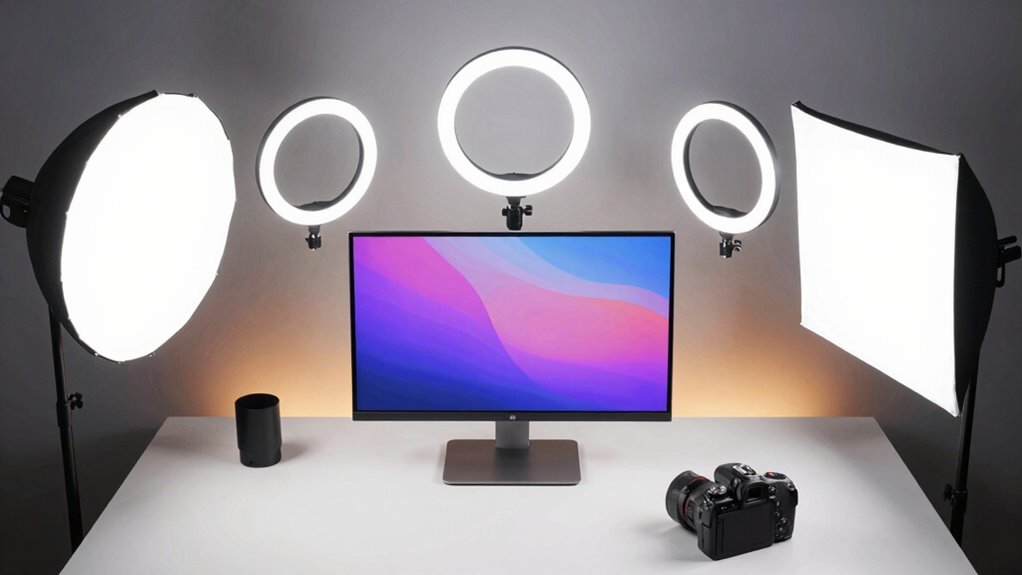

For most desk creators, I’d start with the Logitech Litra Glow, which is purpose-built for streaming and video calls, while the NEEWER NL-116AI offers a compact panel format and the Torjim 12 Inch 2-Pack gives creators a two-light setup. The main choice is between a small light that fits neatly at a monitor and larger kits that offer more coverage or flexible placement. Ring lights can give a direct, even look, while panels make it easier to shape light from different angles. A desk clamp or tripod can matter as much as brightness when space is tight. Read on for the full breakdown of all 12 options and which one fits your setup.

Get the latest gadgets delivered free with Prime
- Fast, free delivery on millions of items
- Prime Video, Amazon Music and more included
- Member-only deals all year
Complete the kit



Key Takeaways
- The Logitech Litra Glow is the most desk-focused pick in this group, while the two-light kits suit creators who need more control over shadows and background balance.
- Small panels and clip-on lights save workspace, but they provide less placement flexibility than kits with separate tripod stands.
- Ring lights favor a centered, direct look; panel kits make it easier to place light off-axis for a more shaped image.
- Two-light bundles vary in how desk-friendly they are: desktop stands keep lights close, while 73-inch stands take more room but allow greater height and distance.
- Phone holders and overhead mounts solve specific framing problems, but buyers should check whether those accessories suit their camera and available desk space.
| NEEWER BR60 5-Inch Clip-On Ring Light with Desk Tripod |  | Best Compact Pick | Light diameter: 5 inches | LEDs: 60 | Illumination: 450 lx at 0.5 m | VIEW ON AMAZON | See Our Full Breakdown |
| Anautin 1-Pack LED Video Lighting Kit with Tripod Stand, 15W/1700Lux Dimmable Photography Light |  | Best for Flexible Height | Power: 15 W | Brightness: 1700 lumens | LED beads: 352 | VIEW ON AMAZON | See Our Full Breakdown |
| Weilisi 10.2″ Desk Ring Light with Stand, 360° Rotating Desk Lamp with C-Clamp for Home Office, Podcast, Gaming, Recording, and Video Calls |  | Best for Soft Desk Coverage | Light size: 10.2 inches | Stand extension: 11.42 inches | Maximum clamp width: 2.34 inches | VIEW ON AMAZON | See Our Full Breakdown |
| LitONES Adjustable Desk Ring Light for Video Calls |  | Best Freestanding Desk Pick | Light type: 7-inch edge-lit LED | Color temperature: 3 settings, 3000K–6500K | Brightness levels: 10 | VIEW ON AMAZON | See Our Full Breakdown |
| Logitech Litra Glow Premium LED Streaming Light | 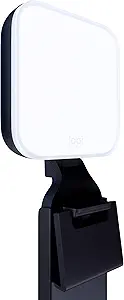 | Best for Monitor-Based Streaming | Light source: Full-spectrum LED | Power: USB-powered | Mount: Three-way adjustable monitor mount | VIEW ON AMAZON | See Our Full Breakdown |
| UBeesize 10″ Ring Light with Overhead Phone Mount |  | Best for Overhead Desk Shots | Ring light size: 10 inches | Color modes: Cool white, warm, and daylight | Brightness: 10 levels per color mode | VIEW ON AMAZON | See Our Full Breakdown |
| Torjim 12 Inch Video Light Kit (2-Pack), 30W High Brightness LED Studio Lights with Tripod Stands, Phone Holders, Remote and Carrying Bag |  | Best for Two-Sided Lighting | Light diameter: 12 inches | Quantity: 2 LED lights and 2 tripod stands | Power: 30W per light | VIEW ON AMAZON | See Our Full Breakdown |
| NEEWER NL-116AI 9-Inch LED Video Light Panel with Desk Tripod |  | Best Compact Rechargeable Pick | LEDs: 58 warm and 58 cool | Maximum output: 10W | Illuminance: 600 lux at 0.5 m | VIEW ON AMAZON | See Our Full Breakdown |
| NiceVeedi 2-Pack LED Video Lighting Kit with Adjustable Tripods |  | Best for USB-Powered Flexibility | Quantity: 2 LED panels and 2 tripod stands | Panel dimensions: 7 × 5.5 inches | Color temperatures: 2800K, 4800K, and 6500K | VIEW ON AMAZON | See Our Full Breakdown |
| NiceVeedi 2-Pack 25W LED Video Light Kit with 73″ Tripod Stands |  | Best for Flexible Studio Expansion | Quantity: 2 LED panels and 2 tripod stands | Power: 25W | Color temperature: 2900K, 4800K, and 7000K | VIEW ON AMAZON | See Our Full Breakdown |
| NEEWER Basics BP66 2-Pack LED Video Panel Light with Desktop Tripod Stands |  | Best Compact Desk Pair | Quantity: 2 LED video lights | Panel dimensions: 5.9 × 4.1 × 0.7 in | Brightness: 750 lx at 0.5 m | VIEW ON AMAZON | See Our Full Breakdown |
| NiceVeedi 2-Pack LED Video Light Kit with Tripod Stand & Phone Holder |  | Best for Flexible Desk-to-Room Setups | Quantity: 2 LED panels | Panel dimensions: 10 × 7.8 in | LED beads: 356 per panel | VIEW ON AMAZON | See Our Full Breakdown |
| video lighting kit for desk creator | Power | Color temperature | Color rendering |
|---|---|---|---|
| NEEWER BR60 5-Inch Clip-On Rin | 10 W, 5 V/2 A USB | 3000K–6000K | CRI >97 |
| Anautin 1-Pack LED Video Light | 15 W | — | — |
| Weilisi 10.2" Desk Ring Light | — | — | — |
| LitONES Adjustable Desk Ring L | 10 W USB, 5V/2A | 3 settings, 3000K–6500K | — |
| Logitech Litra Glow Premium LE | USB-powered | — | — |
| UBeesize 10" Ring Light with O | — | — | — |
| Torjim 12 Inch Video Light Kit | 30W per light | 3000K–6500K | — |
| NEEWER NL-116AI 9-Inch LED Vid | — | 3200K–5600K | CRI 95+ |
| NiceVeedi 2-Pack LED Video Lig | USB, 5V/2A | — | CRI 85+ |
| NiceVeedi 2-Pack 25W LED Video | 25W | 2900K, 4800K, and 7000K | CRI 97+ |
| NEEWER Basics BP66 2-Pack LED | 5V/2A USB; built-in 6.6 ft cable | 3200K–5600K | CRI 95 |
| NiceVeedi 2-Pack LED Video Lig | USB, 5V/2A; charger not included | 2800K–6500K; 3 presets | CRI 97+ |
More Details on Our Top Picks
NEEWER BR60 5-Inch Clip-On Ring Light with Desk Tripod
The NEEWER BR60 suits a desk creator who wants a small, close-range fill light without giving up the option to move it off the monitor. Its monitor clip and included mini tripod offer two setups, while the 5-inch ring, 10 brightness levels, and five lighting modes make quick adjustments possible for calls or streaming. Compared with the larger Weilisi 10.2-inch Desk Ring Light, the BR60 takes up less space but gives you a smaller light source, so it is less suited to broad, soft illumination across the face. Its 3000K–6000K range and CRI above 97 support color adjustment and natural-looking tones. The tradeoff is scale: this is a near-field light, not a way to brighten a whole desk scene. It also needs USB power, and its clip is not intended for smartphones.
Pros:- Monitor clip and mini tripod provide two placement options
- Five modes and 10 brightness levels allow fine adjustments
- High CRI above 97 supports natural-looking color
- Lightweight body and 6-foot USB cable suit a compact desk setup
Cons:- Small 5-inch ring offers less coverage than the Weilisi 10.2-inch light
- USB power source is required
- Clip is not recommended for smartphones
Best for: Desk creators who need a compact monitor-mounted light that can also sit on a mini tripod.
Not ideal for: Creators who want broad, soft coverage or a tall stand for lighting from farther away.
- Light diameter:5 inches
- LEDs:60
- Illumination:450 lx at 0.5 m
- Color temperature:3000K–6000K
- Color rendering:CRI >97
- Power:10 W, 5 V/2 A USB
- Clip compatibility:Monitors up to 1 inch (2.5 cm) thick
- Weight:131 g
Our verdict“Choose the BR60 if you want a lightweight, flexible light for close-up desk video and can work within its small coverage area.”
Anautin 1-Pack LED Video Lighting Kit with Tripod Stand, 15W/1700Lux Dimmable Photography Light
The Anautin K15-US stands apart from the desk-clamped and monitor-mounted lights here by including a tripod that extends from 16 to 62 inches. That reach helps when a desk creator wants to change from face-level calls to a wider recording angle or overhead lighting. Its 6.85-by-10-inch panel is more suited to general scene fill than the compact NEEWER BR60, while three color settings and dimming from 10% to 100% make it adaptable to different room light. The long USB cable also gives more freedom to place the stand. The compromise is a larger footprint and a USB power requirement; maximum brightness depends on the adapter, and the 15W output may not cover a large studio. This is a practical single-light kit, not a two-light setup for balancing shadows.
Pros:- Tripod height adjusts from 16 to 62 inches
- Large panel offers broader coverage than the NEEWER BR60
- Three color settings and 10%–100% dimming suit changing room conditions
- 2.5-meter USB cable allows flexible placement
Cons:- Tall tripod occupies more floor or desk area than clamp-mounted options
- Maximum brightness depends on USB adapter output
- 15W output may be insufficient for larger studio setups
Best for: Creators who record at a desk but need one light that can rise for overhead or wider shots.
Not ideal for: Small-desk users who need a compact permanent light or creators lighting a large room or set.
- Power:15 W
- Brightness:1700 lumens
- LED beads:352
- Color temperature settings:2500K, 4500K, 8500K
- Brightness range:10%–100%
- Panel size:6.85 × 10 inches (17.4 × 25.4 cm)
- Tripod height:16–62 inches (41–157 cm)
- USB cable length:2.5 m (8.2 ft)
Our verdict“Pick the Anautin if height flexibility matters more than a compact footprint and you need a single panel for varied desk shots.”
Weilisi 10.2″ Desk Ring Light with Stand, 360° Rotating Desk Lamp with C-Clamp for Home Office, Podcast, Gaming, Recording, and Video Calls
The Weilisi M2 is the better fit when a desk creator wants a larger, more uniform source close to the screen. Its 10.2-inch ring spreads light more broadly than the 5-inch NEEWER BR60, which favors portability and quick repositioning. A C-clamp holds the Weilisi at the desk edge, leaving the work surface clearer than a standalone base, and the rotating head plus telescoping stand help aim it around a monitor. Three color temperatures and 10 brightness levels give useful control for calls, streaming, and desk work. The reach is still limited: the stand extends only 11.42 inches, so it cannot match the height range of the Anautin K15-US. The clamp also fits desks up to 2.34 inches thick, and the light needs a 5V/3A adapter.
Pros:- 10.2-inch ring provides broader, softer coverage than the NEEWER BR60
- C-clamp saves desk surface space
- 360° rotation and 180° head adjustment support flexible aiming
- Three-year warranty
Cons:- Clamp fits desk edges only up to 2.34 inches thick
- 11.42-inch stand extension offers less height reach than the Anautin tripod
- Requires a 5V/3A power adapter
Best for: Home-office streamers and frequent video callers who want soft, close lighting while keeping the desk surface clear.
Not ideal for: Creators with thick desk edges, limited clamp access, or a need to position a light high above the desk.
- Light size:10.2 inches
- Stand extension:11.42 inches
- Maximum clamp width:2.34 inches
- Color temperatures:3
- Brightness levels:10
- Power adapter:5V/3A
- Rotation:360° light rotation; 180° adjustable head
- Warranty:3 years
Our verdict“Choose the Weilisi if you want a larger, desk-clamped ring light for face-level calls and can fit its clamp to your desk.”
LitONES Adjustable Desk Ring Light for Video Calls
The LitONES makes sense for creators who want a freestanding light with more reach than a compact clamp lamp. Its 22–32.5-inch adjustable height can place the 7-inch edge-lit head above a monitor, while the metal base avoids the desk-edge fit limits of the Weilisi M2. Edge lighting and a CRI of 97.8 are aimed at soft, even illumination, which can be more comfortable for long video calls than a sharply focused source. The rotating phone holder adds a convenient framing option for phone-based recording. Compared with the USB-powered Logitech Litra Glow, LitONES offers a taller freestanding arrangement but takes up desk space with its base. It also needs a 5V/2A USB supply, and its 7-inch head provides less coverage than larger panel kits.
Pros:- Adjustable 22–32.5-inch height suits different monitor and seating positions
- Edge-lit design provides soft, even illumination
- Rotating light head and phone holder support flexible framing
- Metal base has a non-slip pad
Cons:- Freestanding base uses more desk space than the Weilisi clamp
- 7-inch light head covers less area than larger panel kits
- Requires a 5V/2A USB power supply
Best for: Desk creators who want a freestanding light with adjustable height and a phone holder for direct-to-phone recording.
Not ideal for: Users with very limited desk space or creators who need a large panel to light a wider scene.
- Light type:7-inch edge-lit LED
- Color temperature:3 settings, 3000K–6500K
- Brightness levels:10
- Color rendering index:97.8
- Adjustable height:22–32.5 inches
- Light head rotation:360°
- Power:10 W USB, 5V/2A
- Base:Metal with non-slip pad
Our verdict“Pick LitONES if you prefer a freestanding, height-adjustable desk light with a phone holder and have room for its base.”
Logitech Litra Glow Premium LED Streaming Light
The Logitech Litra Glow is a focused choice for creators who want a tidy light mounted directly above or beside their monitor. Its three-way adjustable mount lets the light move in height, tilt, and rotation, while the diffuser and TrueSoft technology are designed to soften shadows for face-level streaming and calls. G HUB adds saved presets, a useful convenience for switching between a daytime call and a more controlled recording setup. Compared with the clip-on NEEWER BR60, the Litra Glow offers app support and an adjustable monitor mount, but it lacks the BR60’s included mini tripod for off-monitor placement. Its monitor-based design also limits where the light can go, and USB power means the setup depends on a suitable port or supply. It is a polished single-light option, not a broad multi-light kit.
Pros:- Diffuser and TrueSoft technology are designed for soft, balanced face lighting
- Three-way adjustable monitor mount supports height, tilt, and rotation changes
- G HUB software supports saved lighting presets
- USB-powered plug-and-play setup
Cons:- Monitor mount limits placement options compared with the Anautin tripod
- Requires a USB power source
- Single monitor light does not provide the coverage of a multi-light kit
Best for: Streamers and video-call creators who keep their camera on a monitor and want adjustable, preset-based lighting.
Not ideal for: Creators who need to move the light away from the monitor or want a stand-alone panel for wider scene coverage.
- Light source:Full-spectrum LED
- Power:USB-powered
- Mount:Three-way adjustable monitor mount
- Adjustments:Height, tilt, rotation, brightness, and color temperature
- Software:Logitech G HUB
- Color:Graphite
Our verdict“Choose the Litra Glow if your monitor is the center of your streaming setup and you value adjustable mounting with software presets.”
UBeesize 10″ Ring Light with Overhead Phone Mount
The cantilever C-clamp mount is the main reason I’d choose this UBeesize for a desk setup: it keeps a stand off the work surface and lets the light and phone reach over a cooking, craft, or makeup area. Its 360° gooseneck and three color modes give more positioning flexibility than the tabletop NEEWER NL-116AI, whose included tripod is only 8.6 inches tall. The tradeoff is the mounting point: this kit needs a desk edge that can hold the clamp, and the spring arm may sag under heavier devices over time. Its 10-inch ring is suited to a close subject, but it won’t illuminate a broad scene like the two-light Torjim kit. I’d pick it for overhead phone framing and skip it if my desk cannot take a clamp.
Pros:- C-clamp mount frees desk surface for tools and materials
- Gooseneck arm and ball head allow flexible overhead positioning
- Three color modes and ten brightness levels per mode
- Phone, webcam, camera, and GoPro compatibility through 1/4-inch mounts
Cons:- Requires a compatible desk edge for the clamp
- Cantilever arm may sag over time with heavier devices
- Single 10-inch light covers a smaller area than a two-light kit
Best for: Desk creators who film hands-on cooking, crafts, or makeup videos from an overhead phone angle
Not ideal for: Creators with thick, rounded, or fragile desk edges, or those who need broad two-person lighting
- Ring light size:10 inches
- Color modes:Cool white, warm, and daylight
- Brightness:10 levels per color mode
- Mounting:C-clamp desk mount with metal cantilever bracket
- Adjustment:360° gooseneck
- Device compatibility:Phone, webcam, digital camera, and GoPro
- Included control:Remote
- Warranty:1 year manufacturer warranty
Our verdict“Choose this UBeesize if you need a space-saving overhead light and phone mount for close-up desk videos.”
Torjim 12 Inch Video Light Kit (2-Pack), 30W High Brightness LED Studio Lights with Tripod Stands, Phone Holders, Remote and Carrying Bag
With two 30W lights and two tripods, this Torjim kit makes it easier to soften shadows across a face or light both a creator and a product. That gives it a broader desk-studio role than the single UBeesize ring light, which is better for close framing and overhead work. The 3000K–6500K color range lets me match the room or shift the scene’s feel, while the included phone holders and bag make the set usable beyond one fixed desk. The compromise is footprint: two tripod stands need clear floor or desk-side space, and the kit requires outlet access because no battery option is listed. Its 12-inch lights may also feel limited when lighting a larger room or wide scene. I’d choose it when balanced coverage matters more than a minimal setup.
Pros:- Two lights can provide more balanced coverage than a single-light setup
- Adjustable 3000K–6500K color temperature
- Includes tripod stands, phone holders, remote, and carrying bag
- 30W per light is suited to dimmer rooms
Cons:- Requires outlet access; battery operation is not listed
- Two tripod stands take more space around a desk
- 12-inch light size may not suit broad studio scenes
Best for: Desk streamers and video callers who want a pair of lights to reduce facial shadows and illuminate a background or product
Not ideal for: Creators with a very small desk area or who need battery-powered lighting away from outlets
- Light diameter:12 inches
- Quantity:2 LED lights and 2 tripod stands
- Power:30W per light
- Color temperature:3000K–6500K
- Brightness levels:9
- Control:In-line controller for power, mode, and brightness
- Included accessories:2 phone holders, remote, and storage bag
Our verdict“Pick the Torjim kit if your desk videos need two-sided lighting and you have room for a pair of stands.”
NEEWER NL-116AI 9-Inch LED Video Light Panel with Desk Tripod
The NEEWER NL-116AI is the most self-contained compact option here: its built-in 4000mAh battery lets me move it around a desk or use it where a cable would be awkward. Its 9-inch panel, mini tripod, and 180° tilt suit close-up calls and tabletop filming, while 1% brightness steps allow finer adjustment than the NiceVeedi 2-pack’s three fixed color temperatures. The tradeoff is output and runtime: 10W and up to 1.5 hours of battery life are better suited to a single nearby subject than a long session or wide scene. Unlike the two-light Torjim set, it cannot fill both sides of a desk at once. I’d choose this for a compact, moveable key light, and keep a charger nearby for extended recording.
Pros:- Built-in rechargeable battery supports cable-free placement
- Brightness adjusts from 0% to 100% in 1% steps
- Warm and cool LEDs provide adjustable color temperature
- Includes a tilting mini tripod and cold shoe adapter
Cons:- Battery life is up to 1.5 hours
- 10W maximum output is intended for close setups rather than broad coverage
- No carry bag is included
Best for: Remote workers and solo creators who want a small rechargeable light for close desk framing and occasional repositioning
Not ideal for: Creators filming long sessions without charging breaks or needing two-sided illumination across a wider scene
- LEDs:58 warm and 58 cool
- Maximum output:10W
- Illuminance:600 lux at 0.5 m
- Color temperature:3200K–5600K
- Brightness adjustment:0%–100% in 1% steps
- Color rendering:CRI 95+
- Battery:3.7V, 4000mAh; up to 1.5 hours
- Tripod and tilt:Up to 8.6 inches tall; 180° tilt
Our verdict“Choose the NL-116AI for a compact rechargeable desk light when portability matters more than long runtime or broad coverage.”
NiceVeedi 2-Pack LED Video Lighting Kit with Adjustable Tripods
This NiceVeedi pair suits creators who want two lights without committing to a wall outlet: each panel runs from a 5V/2A USB source, including compatible power banks, phones, or laptops. That flexibility is useful when I need to shift a desk setup or work away from a socket. The panels’ three color temperatures cover warm, neutral, and cool looks, and the tripods adjust from 15.7 to 23.6 inches. Compared with the Torjim 2-pack, this set trades its listed 30W-per-light output for USB convenience and 12W maximum per panel. It also has a lower CRI rating than the NEEWER NL-116AI. I’d use it for modest desk coverage, but plan the USB power source and keep the lights relatively close to the subject.
Pros:- Two panels can light a creator and desk subject from separate angles
- USB power can come from compatible power banks, phones, or laptops
- Three color temperatures and adjustable brightness
- Rotating panels and adjustable tripods support varied placement
Cons:- Requires an external 5V/2A USB power source
- 12W maximum output per panel may limit use in dim rooms or at greater distances
- CRI 85+ is lower than the NEEWER NL-116AI’s CRI 95+
Best for: Creators who need a portable two-light setup and already have compatible USB power banks or computer ports
Not ideal for: Users seeking high output for a dim room or more color-accurate product and artwork capture
- Quantity:2 LED panels and 2 tripod stands
- Panel dimensions:7 × 5.5 inches
- Color temperatures:2800K, 4800K, and 6500K
- Brightness range:10%–100%
- Maximum power:12W per panel
- Color rendering:CRI 85+
- Power:USB, 5V/2A
- Tripod height:15.7–23.6 inches
- Panel rotation:Up to 280°
Our verdict“Pick this NiceVeedi pair if USB-powered portability and two-light coverage matter more than high output or color accuracy.”
NiceVeedi 2-Pack 25W LED Video Light Kit with 73″ Tripod Stands
This NiceVeedi set is the strongest fit when desk filming sometimes expands into standing shots or a wider home-studio scene. Its tripods reach 61 inches, giving me more height options than the desk-scale UBeesize clamp arm or the compact NL-116AI mini tripod. The pair of panels, remote, and CRI 97+ also suit product demonstrations where color fidelity matters. That reach comes with a footprint: two full-height stands can crowd a compact desk, so this makes more sense in a room with clear floor space. Its 25W panels use listed 5V/2A adapters, which may limit maximum brightness compared with higher-powered studio gear. I’d pick it for a flexible home setup, while creators who only need close webcam lighting can choose a smaller desk light.
Pros:- Two panels and tall tripods adapt to desk-height and standing shots
- CRI 97+ supports more accurate color rendering
- Remote control and 10%–100% brightness adjustment simplify changes during recording
- Foldable tripods and included storage bag aid storage and transport
Cons:- Two stands need more floor space than compact desk lights
- Lightweight aluminum tripods may be less stable in busy environments
- 5V/2A power supply may limit maximum brightness compared with higher-powered studio lights
Best for: Creators who alternate between seated desk videos and taller product demonstrations in a room with space for two stands
Not ideal for: Small-desk users who need an unobtrusive permanent light or creators seeking stronger output than the listed 5V/2A setup supports
- Quantity:2 LED panels and 2 tripod stands
- Power:25W
- Color temperature:2900K, 4800K, and 7000K
- Brightness range:10%–100%
- Color rendering:CRI 97+
- LED beads:352 per panel
- Tripod height:Up to 61 inches
- Panel rotation:180°
- Package contents:2 AC adapters, storage bag, and user manual
Our verdict“Choose this kit if you want high color fidelity and tall stand options for a home studio that extends beyond desk-level framing.”
NEEWER Basics BP66 2-Pack LED Video Panel Light with Desktop Tripod Stands
The NEEWER Basics BP66 is the more desk-friendly choice for creators who want two adjustable light sources without tall floor stands. Its mini tripods reach 21 inches and swivel, so you can place one panel on either side of a monitor and angle the light toward your face. Bi-color output and magnetic filters help match warmer room lighting or cooler daylight, while CRI 95 supports natural-looking colors. Compared with the larger NiceVeedi 2-Pack LED Video Light Kit with Tripod Stand & Phone Holder, the BP66 takes up less space but offers less reach and a smaller lighting surface. Its 750 lx rating is specified at just 0.5 m, so these are best used close to the desk. The tradeoff is USB-only power and a built-in cable that may be difficult to replace.
Pros:- Two compact panels fit easily on a crowded desk
- Adjustable mini stands reach 21 inches and swivel 360°
- 3200K–5600K color range supports matching common room lighting
- CRI 95 helps keep skin and other colors looking natural
Cons:- USB power means each light needs a nearby compatible power source
- Built-in cables are difficult to replace if damaged
- Short stands and small panels are less suited to lighting a wide area from a distance
Best for: Desk streamers and video-call hosts who want a compact two-light setup that can sit beside a monitor
Not ideal for: Creators who need lights positioned above eye level or away from the desk, or who need battery-powered operation
- Quantity:2 LED video lights
- Panel dimensions:5.9 × 4.1 × 0.7 in
- Brightness:750 lx at 0.5 m
- Color temperature:3200K–5600K
- Color rendering:CRI 95
- Dimming:10 levels plus continuous dimming
- Stand height:8.3–21 in
- Power:5V/2A USB; built-in 6.6 ft cable
Our verdict“Choose the BP66 pair if you want compact, close-range desk lighting with flexible positioning and can work around USB power.”
NiceVeedi 2-Pack LED Video Light Kit with Tripod Stand & Phone Holder
For a creator who wants the same lights to work at a desk and in a larger room, the NiceVeedi 2-Pack offers more placement height than compact desktop kits. Its tripods extend to 60 inches, and the panels rotate 180°, which can help position light around a monitor, phone, or small recording setup. The 2800K–6500K range gives more room to match warm indoor bulbs or cooler daylight than the NEEWER Basics BP66, while CRI 97+ favors accurate color. Those taller stands do take more floor space and need room to open, so this is less tidy as a permanent desk fixture. Power comes through USB, but the package does not include a wall charger; the stated 5V/2A requirement means buyers need to provide a suitable source. It suits flexible setups better than a minimal desktop arrangement.
Pros:- Tripods extend to 60 inches for flexible light placement
- Three color temperature presets span 2800K–6500K
- CRI 97+ supports accurate color rendering
- USB power can be supplied by a compatible power bank, phone, or computer
Cons:- Wall charger is not included
- Tripods take more space than the NEEWER Basics BP66 desktop stands
- The 60-inch maximum height may not suit setups needing higher light placement
Best for: Home creators who alternate between desk videos, phone recording, and wider room setups and have space for tripod stands
Not ideal for: People seeking a compact permanent desk light or a ready-to-plug-in kit with a wall charger included
- Quantity:2 LED panels
- Panel dimensions:10 × 7.8 in
- LED beads:356 per panel
- Power output:15W
- Color temperature:2800K–6500K; 3 presets
- Brightness adjustment:10–100%
- Color rendering:CRI 97+
- Maximum tripod height:60 in
- Power:USB, 5V/2A; charger not included
Our verdict“Pick this kit if you want adjustable-height lights for desk and room recording and are prepared to supply the USB power adapters.”

How We Picked
I ranked these kits for the constraints of a desk creator: limited surface area, a nearby camera, and the need to look clear on calls or in recordings. I weighed light format, adjustment options, mounting style, included stands and phone holders, and whether a kit appears suited to one-person close-up lighting or broader coverage. A light that can sit near a monitor without crowding the keyboard has an advantage for a compact workstation.
The ordering reflects those tradeoffs. The Logitech Litra Glow leads for its streaming-oriented, desk-centered role; the NEEWER NL-116AI and compact ring lights follow for creators who want a small footprint or simple face lighting. Two-light kits rank higher for creators who need more flexible coverage, though their extra stands and accessories can take more room to position and store. Without directly comparable published output and color data across every listing, I focus on the stated kit design and practical fit rather than treating brightness figures as directly interchangeable.
| video lighting kit for desk creator | Color rendering |
|---|---|
| NEEWER BR60 5-Inch Clip-On Rin | CRI >97 |
| Anautin 1-Pack LED Video Light | — |
| Weilisi 10.2" Desk Ring Light | — |
| LitONES Adjustable Desk Ring L | — |
| Logitech Litra Glow Premium LE | — |
| UBeesize 10" Ring Light with O | — |
| Torjim 12 Inch Video Light Kit | — |
| NEEWER NL-116AI 9-Inch LED Vid | CRI 95+ |
| NiceVeedi 2-Pack LED Video Lig | CRI 85+ |
| NiceVeedi 2-Pack 25W LED Video | CRI 97+ |
| NEEWER Basics BP66 2-Pack LED | CRI 95 |
| NiceVeedi 2-Pack LED Video Lig | CRI 97+ |
Factors to Consider When Choosing Video Lighting Kit For Desk Creators
I’d choose a desk lighting kit by planning where the light, camera, and monitor will sit together. The best fit depends on your framing and workspace as much as the light itself.
Match the Light Shape to Your Look
A ring light places illumination around or near the camera, which can make a face look evenly lit in a straight-on call. Panels give you more freedom to move the source to one side, helping add shape and reduce a flat appearance. Before choosing, decide whether your usual shot is a centered head-and-shoulders frame or a wider view that includes your desk and background. A common mistake is buying a ring light for a more dimensional studio look without room to move it away from the camera axis. If you record different kinds of content, a kit with separate lights can adapt to more setups. For simple calls, a single compact source is often easier to keep positioned.
Measure Your Desk and Mounting Options
Measure the usable edge of your desk and check whether a clamp can attach securely before buying a clamp-mounted light. A desktop tripod uses surface area but can be moved without relying on the desk edge. Full-height stands offer more range for lighting above or beside the screen, though their legs may compete with chairs, shelves, or walkways. Leave room for the light to sit slightly off camera if you want softer-looking shadows. Creators with shared or shallow desks may prefer a clip-on or compact desktop setup they can remove quickly. Consider storage too: a kit that folds or packs away can make a larger setup workable in a multipurpose room.
Plan for One Light or Two
One light is simpler to set up and control, and it can be enough when your camera frames only your face against a plain background. Two lights can let you illuminate the subject and background separately or soften shadows by placing a second source at a lower level. They also require extra outlets or cable management and more space to place the stands. A frequent buying mistake is assuming a two-light bundle automatically improves every shot; badly placed lights can create competing shadows or wash out the scene. Think through the angle and purpose of each light before paying for a pair. If you are new to lighting, begin with one reliable source and add another only when you can name the problem it should solve.
Check Adjustability and Control
Brightness adjustment helps when daylight changes or when you move closer to the camera, while color adjustment can help a light blend with the room. Check the product listing for the actual control range and method, since a remote, inline control, or app can change how convenient daily adjustments feel. A light that is difficult to dim may force you to reposition it or change your camera exposure whenever your room changes. Do not assume that a high wattage or lux figure alone predicts how flattering the light will look at your desk; distance, diffusion, and beam spread also affect the result. Prioritize controls you will use during your normal recording routine. If you record in one fixed setup, a simpler control scheme may be enough.
Treat Phone Mounts as a Compatibility Choice
Bundled phone holders can save a separate purchase when a phone is your main camera, but they add weight and influence how the light is balanced. Check whether the holder can accommodate your phone with its case and whether its position leaves the screen or controls accessible. Overhead mounts are useful for hands-on desk demonstrations, where a direct view of a keyboard, notebook, or product matters more than a face-centered shot. That arrangement may not be ideal for ordinary video calls, so make sure the mount supports the angles you use most. If you use a webcam or mirrorless camera, a phone holder may add little value. Choose the lighting around your camera setup instead of treating every included accessory as a benefit.
Decide When More Coverage Is Worth It
A compact desk light makes sense for close framing, but a wider shot may need a larger source or a pair of lights placed farther away. More coverage can produce a smoother look across the face and upper body, though distance often calls for more output. A larger kit also takes longer to arrange and may be harder to leave set up in a shared room. Think about your most common recording distance, not the biggest shot you might make once. If the kit will serve both calls and video production, adjustable stands and separate sources may justify the additional space. For a fixed webcam frame, portability and easy placement can be more useful than studio-style reach.
Frequently Asked Questions
Should I choose a ring light or a panel for video calls at my desk?
I’d choose a ring light if your camera stays centered and you want direct, even face lighting with minimal setup. A panel is a better fit if you want to place the source beside the monitor or change its angle to create more shape. Neither format is automatically more flattering; distance and brightness matter too. Check that the chosen light can be positioned without blocking your screen or camera. For a desk that changes between calls and recording, a panel can offer more placement options.
Is a two-light kit worth the extra stands on a small desk?
It can be, if you regularly need to balance light on your face with light on a background or want to soften shadows with a second source. On a small desk, two desktop stands may crowd the keyboard and camera area, so think about where both lights will sit before choosing a bundle. A kit with tall stands may free the desktop but needs floor space and room for the legs. For a tight fixed webcam shot, one well-placed light is often easier to manage. Choose two lights when you have a clear role for each one.
Can a desk lighting kit work with both a webcam and a phone?
Many kits can provide light for either camera, but an included phone holder does not automatically mean the light works equally well with every device setup. Check the holder dimensions, mounting position, and whether it can be removed when using a webcam. A phone mounted in front of a light can change the balance and may obstruct a monitor or webcam. If you switch devices often, prioritize an adjustable mount or a light that stands separately from the camera. Confirm how the kit attaches to your desk before ordering.
Will a brighter kit fix a dim or uneven-looking video?
More output can help when a light needs to sit farther away, but brightness alone does not fix uneven placement or harsh shadows. Start by putting the source near the camera and slightly above eye level, then adjust its distance and brightness. If one side of your face is much darker, a second source or a reflector may help more than a brighter single light. Also check for mixed light from windows and room bulbs, which can change the look across a recording. Compare stated brightness only when the measurement conditions are clear and similar.
What should I prioritize if I record both face-to-camera videos and overhead desk demonstrations?
Prioritize a mount that can switch between a face-centered angle and a stable overhead view without forcing the light into the camera frame. A bundled overhead phone holder can help with demonstrations, while a separate adjustable light gives you more freedom to illuminate the subject. Check that the mount reaches your work surface and can hold your phone securely in the intended orientation. You may need a second light position for hands and objects, since a face-lighting angle can cast shadows onto the desk. If you change formats often, quick adjustment and a clear space to store the mount matter as much as the light source.
Conclusion
I’d choose the Logitech Litra Glow as the best overall for a desk creator who wants a streaming-oriented light near a monitor. The NEEWER NL-116AI is my compact panel pick, while the Torjim 12 Inch 2-Pack fits creators who want two lights and can make room for separate stands. For a straightforward face-lit setup, the NEEWER BR60 clip-on ring light or the Weilisi desk ring light are better starting points than a full studio-style bundle. Beginners should favor a single light with simple placement; creators with wider shots or changing camera angles should look at two-light kits such as the NiceVeedi or NEEWER Basics pairs. Match the mount and number of lights to your actual desk and framing, then choose the kit that makes that setup easy to repeat.
Halloween Picks

Max Fun 10-Foot Halloween Dragon and Pumpkin Inflatable Archway with LED Lights

MGparty 14.5 ft Halloween Inflatable Walk-In Pumpkin House with LED Lights

Panefright Halloween Window Projector – Scary Projector for Spooky Decor
As an affiliate, we earn on qualifying purchases.